
Obsidian OSCP Enumeration Template
Most OSCP notes don’t fail because you “forgot a command.” They fail because, the next day, you can’t recreate what you proved—and your confidence turns into rework.
This template is built for that exact moment: you’re tired, timeboxed, and one missing breadcrumb quietly costs you an hour. Keep guessing, and you lose momentum twice—once when you miss the finding, and again when you can’t trust your own trail.
The Recon Snapshot: A single hub note that holds shared context—ports/services as a living index, constraints, creds tried, access level, and one “Next Best Question.” Every service card links back to it, so you stop repeating the same truths.
Capture decision-grade evidence (not tool output).
De-duplicate with transcluded snippets you update once.
Link services so clues can “talk” across the network.
Read this like a checklist, not a novel. You’ll feel the system click. Then the pivots get… oddly inevitable.
- Keep “facts” separate from “ideas.”
- Write outcomes, not tool diaries.
- De-duplicate with transcluded snippets.
Apply in 60 seconds: Create one “Recon Snapshot” note and commit to updating it first—before any service card.
Table of Contents
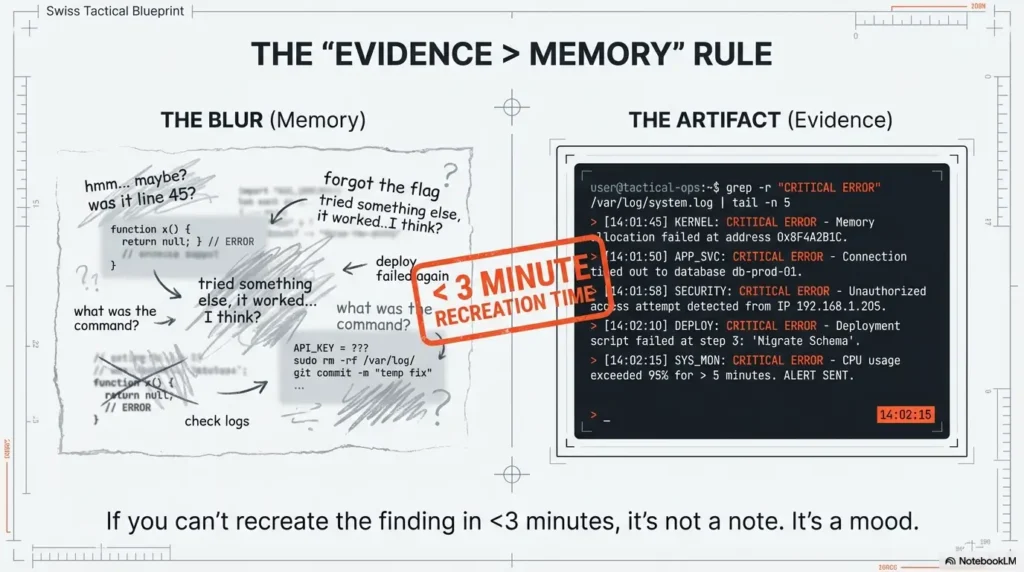
1) First 10 minutes: the “Evidence > Memory” rule (so your notes still work tomorrow)
Here’s the uncomfortable truth: most OSCP-style notes fail when your brain gets confident. You remember the “shape” of what you saw—then you can’t reproduce it. In my early lab days, I’d finish a session feeling brilliant… and the next morning I’d stare at my own notes like they belonged to someone else. The fix isn’t more detail. The fix is decision-grade evidence: facts that survive fatigue.
1.1 The OSCP note failure nobody admits: “I saw it… then lost it”
When you can’t recreate a finding, you don’t just lose time—you lose trust in your process. This is where a note system either becomes your co-pilot or your saboteur. Your goal: capture enough proof to re-walk the path in under 3 minutes, without rereading a novel.
1.2 Your universal capture order: What you touched → What changed → What it means
No matter the service (SMB, HTTP, FTP), you’re always answering the same three questions:
- What you touched: the exact thing you interacted with (page, endpoint, share, file, banner).
- What changed: what was revealed or confirmed (access level, exposed path, response behavior, metadata).
- What it means: your next best question (hypothesis) and the smallest check to validate it.
1.3 Open loop: Why one missing screenshot can cost you an hour later
The time drain isn’t the missing image. It’s the chain reaction: you hesitate, you second-guess, you re-check everything, you lose momentum. The obsession with “perfect notes” is a trap; the win is repeatable proof. Later we’ll close this loop with a single field that predicts your next breakthrough—yes, really. If you want a single, repeatable standard for what “proof” should look like, borrow the structure from OSCP proof screenshots that actually survive the next day.
- Proof beats prose under time pressure.
- Capture the smallest reproducible artifact.
- End every section with one testable question.
Apply in 60 seconds: Add a “Recreate in <3 min?” checkbox to every card. If you can’t check it, your card isn’t done.

2) Vault anatomy that scales under pressure (folders, tags, and a single truth)
A good vault feels boring—in the best way. You shouldn’t “wonder where things go.” You should drop evidence in the same place every time, like muscle memory. This matters for OSCP-style labs, but it also matters for professional, authorized engagements where evidence handling and clarity are non-negotiable. Think of your vault like a clean kitchen: you can cook faster because you’re not hunting for the knife.
2.1 A clean OSCP vault map: Targets, Services, Evidence, Snippets, Debriefs
Keep the structure minimal and opinionated. A practical starting set:
- Targets/ (one folder per target or per network segment)
- Services/ (SMB, HTTP, FTP cards—organized by target links)
- Evidence/ (screenshots, exported text, hashes, “what was observed” artifacts)
- Snippets/ (reusable text blocks; your “recipes”)
- Debriefs/ (what worked, what didn’t, what you’ll do next time)
2.2 Frontmatter that makes search feel like cheating (without being messy)
Keep metadata consistent. In Obsidian, frontmatter helps you filter quickly without turning your vault into tag soup. Use a small set of fields that are universally meaningful:
- target (name or identifier)
- ip (if applicable)
- service (SMB / HTTP / FTP)
- status (new / active / blocked / resolved)
- confidence (low / medium / high)
2.3 Naming conventions that survive resets: “Target–IP–Service–Finding”
When you’re 2 hours into a session, the “cute” names stop being cute. A clear naming pattern keeps search fast and keeps your cards scannable. It also helps when you migrate notes between machines, labs, or authorized projects.
2.4 Let’s be honest… your vault isn’t “too big,” your labels are too vague
The problem isn’t volume. The problem is when everything is called “notes” and nothing is called “proof.” If you can’t answer “Where is the evidence?” in one breath, your structure needs tightening. If you want a bigger picture framework before you touch folders and tags, start with note-taking systems for pentesting that don’t collapse under pressure.
- Yes/No: Do you have exactly one place where credentials live?
- Yes/No: Do you have exactly one place where evidence files live?
- Yes/No: Can you locate any “critical finding” in under 30 seconds?
Apply in 60 seconds: If any answer is “no,” create one canonical note (Credential Ledger / Evidence Index) and link to it from every target.
3) The “Recon Snapshot” card (one page that feeds every service card)
The Recon Snapshot is the quiet hero of this whole system. It prevents repetition because it centralizes the shared context: what you know, what you suspect, and what you’ve already tried. When you get this right, your service cards stop repeating themselves because they stop carrying shared baggage.
3.1 The minimum viable snapshot: identity, scope notes, constraints, timeboxes
Keep it short, but serious. In authorized settings, scope and constraints are not optional. Even in labs, timeboxing is your sanity. A simple snapshot includes:
- Identity: target name, segment, notes on environment
- Authorization: lab range / written scope reference (where relevant)
- Constraints: time limits, restricted actions, data rules
- Timebox: today’s focus and “stop conditions” (when you pivot)
3.2 Port/service list as a living index (not a static dump)
Your service list shouldn’t be a graveyard of raw text. Treat it like an index that points to cards:
- Each service entry links to its service card (SMB/HTTP/FTP).
- Each service entry has a status flag (new/active/blocked/resolved).
- Each service entry has one line: “most important known fact.”
3.3 A “Pivot Notes” strip: creds tried, tokens seen, access level achieved
This is where you stop losing time. Your Pivot Notes strip is a running micro-log:
- Creds tried: what, where, outcome (success/fail/unknown)
- Tokens/sessions: what existed, where stored, what they unlock
- Access level: anonymous / user / admin (with confidence)
3.4 Open loop: The one field that predicts your next breakthrough
It’s not “ports.” It’s not “tools.” It’s your best unanswered question. Add a single line called Next Best Question (NBQ). When you return after sleep—or chaos—NBQ tells you what matters without rereading everything. We’ll close this loop again near the end with a “15-minute next step” you can run like a ritual. And when NBQ starts pulling you into “maybe I should try everything,” anchor it to a boundary like the OSCP rabbit hole rule that saves your timebox.
Show me the nerdy details
“Living index” is an information retrieval trick: you’re reducing cognitive load by turning a flat list into a navigable graph. In Obsidian terms, this is the difference between a note you read and a note you operate. Your Snapshot becomes a hub; cards become spokes; evidence becomes anchored artifacts. The model is simple: hub-and-spoke beats sprawl.
4) The Snippet Library: de-duplicate once, reuse everywhere
You’re not trying to stop using tools—you’re trying to stop retyping the same scaffolding every time. The Snippet Library is where “repeatable text” lives. The service cards are where “what happened on this target” lives. This separation is what stops your SMB/HTTP/FTP cards from becoming clones.
4.1 What belongs in snippets vs. what belongs in service cards
A clean rule:
- Snippet: reusable wording, reusable check prompts, reusable evidence format (“Observed / Inferred / Next check”).
- Service card: the specific facts you observed, and the decisions you made for this target.
If you paste the same paragraph into multiple targets, it probably belongs in snippets. If it would confuse you in a different target, it belongs in the card.
4.2 Transclusion rules: “snippets are recipes, cards are case notes”
Transclusion is the magic trick: store one snippet once, pull it into multiple notes. You update once, your whole system improves. This is where Obsidian shines compared to a plain folder of text files or a messy Google Doc.
4.3 Versioning your snippets: “works in my lab” is not a guarantee
A tiny, humble habit: add a “Last tweaked” line and a “Works in” line. Even if you don’t change tools, you’ll change your preferences. Versioning prevents you from trusting an old snippet that no longer matches your current workflow. (This is the same mindset that keeps your environment stable—like Kali Linux lab logging that makes debugging repeatable when something “mysteriously” changes.)
4.4 Here’s what no one tells you… the best snippet is the one you trust
Snippets aren’t about being fancy. They’re about removing friction. The best snippet is short, accurate, and calm—like a friend who doesn’t panic. If a snippet makes you feel overwhelmed, it’s too long.
- When A: you want consistency across targets → use transcluded snippets.
- When B: you need target-specific nuance → write it in the service card.
- Time trade-off: 5 minutes setting snippets saves repeated rework later.
Apply in 60 seconds: Create one snippet called “Observed / Inferred / Next Check / Proof” and transclude it into SMB/HTTP/FTP today.
5) SMB card: evidence-first mapping without drowning in output
SMB is where people drown in output. The temptation is to capture everything “just in case.” But most of it never changes a decision. Your SMB card should be short enough to scan, but strong enough to recreate what you learned—without replaying your whole session in your head.
5.1 SMB card layout: Access state → Shares/users → Policies → Leads
Your SMB card works when it has a predictable rhythm. Think of it like a lab notebook: the same sections, every time, with different facts inside. That predictability is what keeps you from repeating yourself.
5.2 “Access state” ladder (anonymous, low-priv, known user) as the top divider
Start your SMB note with the current access state and confidence (low/medium/high). This prevents “phantom progress,” where you think you had access but it was actually a different machine, different user, different day. (Ask me how I learned that.)
5.3 What to record (and what to ignore): the 3 SMB findings that actually move you
Keep it outcome-based, not tool-based. The three categories that tend to matter most for later pivots:
- Access boundaries: what is accessible and what is denied (with proof).
- Human clues: names, project folders, policy hints, “this belongs to…” details.
- Paths that connect: anything that links SMB to HTTP/FTP (shared files, config hints, uploaded artifacts).
5.4 Proof pattern: “Share → Path → File → Why it matters”
This is your reproducibility chain. It forces you to capture the exact breadcrumb trail, not just the ending. The “why it matters” line is what transforms evidence into a plan. If you’re using tools like enum4linux, it helps to keep your output interpretation tight—see a practical enum4linux workflow for Kali that stays evidence-first.
5.5 Open loop: The tiny permission detail that changes everything later
The small details (read vs write, list vs access, inherited permissions) are often the hinge. Don’t panic. Just record what you can prove. We’ll return to this in cross-service linking—where “one weird permission” often explains why HTTP behaves differently than you expect. If you ever hit the classic “tool says SMB exists but I can’t confirm version,” keep a calm fallback path like when smbclient can’t show the Samba version (and what to record instead).
6) HTTP card: the content map that turns browsing into a plan
HTTP work can feel like wandering through hallways: pages, redirects, logins, dashboards, breadcrumbs. Your HTTP card turns wandering into a map. The goal is not “visit everything.” The goal is to identify the few places where identity, data, and input intersect—and to document them like an operator, not a tourist.
6.1 HTTP card layout: Surface map → Tech signals → Auth → Input points → Evidence
Keep this in the same order, every time. You’re building a mental model of a system: what exists, what it runs on, who can access what, where inputs live, and what you observed.
6.2 The “Three maps” approach: routes, roles, and data flows
Three small maps beat one giant brain dump:
- Routes map: key paths and what they appear to do.
- Roles map: what changes when identity changes (anonymous vs user vs admin).
- Data flow map: where data enters, transforms, and is stored/displayed.
If you’ve ever said, “I know there was an upload somewhere…,” this is the cure.
6.3 Tech fingerprinting notes without turning your card into a tool log
Record signals that help you reason later (framework hints, auth patterns, cookie behavior, error style). Don’t paste raw output for its own sake. If it doesn’t change your next decision, it goes in evidence attachments—or it doesn’t go anywhere.
6.4 Input inventory: parameters, uploads, headers, sessions (record like an auditor)
The auditor mindset is simple: “If someone asked me what changed, could I show it?” Capture:
- Input locations (forms, uploads, query parameters) in plain English.
- Session behavior (what persists, what expires, what changes UI states).
- Any sensitive exposure concerns—then pause and follow scope rules.
6.5 Pattern library: “Observed → Inferred → Testable next question”
This turns messy browsing into clean thinking. Each important observation gets:
- Observed: what you can prove.
- Inferred: what you suspect (clearly labeled as a guess).
- Next question: the smallest check that confirms/denies.
Why link a privacy framework here? Because even in labs, practicing good evidence hygiene prepares you for real, authorized work. NIST’s guidance is a reminder that documentation and data handling are part of professional security—not an afterthought.
- Track only decision-driving signals.
- Separate facts from hypotheses.
- Always write the next smallest check.
Apply in 60 seconds: Mini “Time Leak” calculator: If you re-find the same page twice (input: minutes), multiply by 2. That’s your tax. Write one “Routes map” line to remove it.
7) FTP card: the shortest card… until it isn’t
FTP is the service everyone underestimates—until it quietly becomes the bridge between systems. Treat it with respectful simplicity. Your FTP card should be short, focused, and evidence-based. If it stays short, great. If it grows, it means it’s important.
7.1 FTP card layout: Banner → Auth states → Writable paths → File intel → Next checks
Keep these sections even if you think “FTP won’t matter.” Your future self will thank you when you discover that a “boring” service was the missing connector.
7.2 The “writable path” checkpoint (and why it’s not automatically “the way in”)
A writable path is not a victory by itself; it’s a decision point. Record what you can prove, then consider scope. In real authorized work, a writable location can also become a data-handling risk. Document, don’t improvise.
7.3 Evidence capture: file lists, timestamps, ownership, and why you care
In labs, timestamps and naming patterns can reveal operational habits. In professional contexts, they can reveal data sensitivity. Either way: capture the minimal proof, then add a one-line interpretation.
7.4 Hand-off notes: when FTP is just a delivery mechanism for other services
FTP often matters because it connects to HTTP (uploads served publicly) or to SMB (shared storage). Your job is to record the “handoff”—the relationship—not just the existence of the service.
8) Cross-service linking: when SMB, HTTP, and FTP start talking to each other
This is where the system starts paying rent. Cross-service linking is how you stop writing the same truth three times. It’s also how you spot the “clue that doesn’t belong”: a config name in SMB that explains an HTTP route; a file in FTP that matches a web feature; a role label that shows up in two places.
8.1 The “Finding → Lead → Service” link type (so you stop duplicating notes)
Use a simple linking pattern:
- Finding: a proven fact in one service card.
- Lead: the hypothesis it creates (written as a question).
- Service: the next service card where that lead will be checked.
This keeps your cards short and your pivots purposeful.
8.2 Credential ledger: one canonical place, referenced everywhere
Credentials (even in labs) are where duplication becomes chaos. Keep a single ledger note and link to it from every target and service card. In authorized professional contexts, this practice also supports safer handling and easier rotation/removal when required.
8.3 Artifact trail: hashes, filenames, and where they were observed
Keep an “artifact trail” section that lists:
- Artifact: filename or identifier
- Where observed: SMB/HTTP/FTP card link
- Why it matters: one line (again—decision-grade)
8.4 Open loop: How to spot the “one clue” that doesn’t belong to its service
The clue that doesn’t belong usually looks like a mismatch: a web-ish folder name in a file share, a “public” label tied to private data, a role name that appears where it shouldn’t. The trick is not brilliance—it’s writing it down as a mismatch and asking, “What would explain this?” We’ll close this loop in the conclusion with a 15-minute ritual that forces mismatches to surface.
9) Common mistakes that burn OSCP time (and the fixes that stick)
This section is the loss-prevention part—the part that saves you from yourself. I’ve made every mistake below, often on a day I felt “productive.” If you recognize yourself, good. That means you’re about to get faster.
9.1 Mistake: turning cards into command diaries (fix: outcome-only summaries)
If your card is a transcript, it’s not a tool—it’s a time capsule. Replace “I ran X” with “I confirmed Y.” Store raw logs as attachments if you must, but keep the card readable.
9.2 Mistake: mixing raw output with hypotheses (fix: separate “Facts” from “Ideas”)
Your brain treats formatting as truth. When facts and guesses look the same, you’ll later “remember” a guess as a fact. Make “Facts” and “Ideas” visually distinct. Your future self deserves the courtesy.
9.3 Mistake: copying the same steps into every card (fix: transclude snippets)
Duplication creates drift. One card gets updated, another doesn’t, and suddenly you’ve got two “systems.” Snippets prevent drift by centralizing the reusable text and letting your cards stay target-specific.
9.4 Mistake: losing your “why” (fix: every section ends with a next-check question)
The question at the end is your compass. Without it, you’ll default to “do more stuff,” which feels productive but often isn’t. Write the question. Then do the smallest check. When your “smallest check” becomes “scan everything again,” revisit your baseline fast enumeration routine for any VM so your next action stays tight.
- Write outcomes, not diaries.
- Visually separate facts from ideas.
- Transclude what repeats; write what’s unique.
Apply in 60 seconds: Add two headers to every service card: “Facts (Proven)” and “Ideas (Unproven).” Move one line into the correct bucket.
10) Who this is for / not for
A template is a tool. Like any tool, it’s great in the right hands—and dangerous in the wrong context. This workflow is designed for authorized learning and authorized work, including people who want clean documentation, faster pivots, and less mental clutter.
10.1 For: OSCP-style learners who want faster pivots, cleaner evidence, fewer resets
If you’re time-poor and trying to learn efficiently, this system keeps you from redoing work. I used to lose 15–25 minutes per session to “where did I write that?” After the Snapshot + ledger pattern, that time leak shrank dramatically—mostly because I stopped trusting my memory.
10.2 For: consultants building audit-friendly engagement notes (authorized scope)
In professional settings, clarity is a security feature. A clean evidence trail supports responsible reporting, internal review, and safer handling. It also helps align with standards-oriented thinking—whether you follow NIST guidance, OWASP’s documentation culture, or client-specific policy requirements. If you want your personal notes to translate cleanly into deliverables later, it helps to keep a ready structure like a Kali pentest report template you can fill from your evidence trail.
10.3 Not for: anyone testing systems without explicit permission
If you don’t have authorization, stop. This is not a gray area. Unauthorized testing can harm real people and can trigger legal consequences. Build these habits in labs and authorized ranges instead.
10.4 Not for: people seeking “one-click” playbooks instead of thinking frameworks
This template won’t “solve” targets for you. What it will do is protect your attention and make your thinking visible—so you can improve faster, with fewer dead ends.
11) When to pause and seek help (scope, legality, and data-handling)
This is the part most blogs skip. In real security work, knowing when to pause is a skill. Even in labs, practicing the pause builds professional reflexes. And in authorized engagements, it protects clients, protects you, and keeps your work defensible.
11.1 If authorization is unclear: get written scope before proceeding
If you can’t clearly answer “Am I allowed to test this system?”—don’t test it. Ask. Get it in writing. This is where reputable organizations (including those aligned with NIST-style governance thinking) expect you to be disciplined.
11.2 If you encounter sensitive data: stop, preserve evidence, follow reporting rules
If you stumble into personal data, credentials, or confidential materials in an authorized environment, don’t spiral. Record the minimum proof required, avoid unnecessary copying, and follow the reporting path defined in your scope or your organization’s policy. This is not about being dramatic—it’s about being professional.
11.3 If you’re in a workplace setting: involve security/legal per policy
Many organizations have escalation paths for security findings. Follow them. OWASP culture emphasizes responsible handling and clear documentation; corporate policies often mirror this. Your notes should support that workflow, not create risk.
Short Story: I once had a lab evening where everything “worked,” but my notes were garbage. I’d hopped between SMB and HTTP, found a clue that felt important, and kept going because I didn’t want to lose the feeling of momentum. The next day, momentum was gone. I had a vague memory of a folder name and a page that “looked admin-ish,” but no proof.
I rechecked the same paths, took the same turns, and burned almost an hour recreating a trail I’d already walked. That was the day I started writing “Why it matters” on every artifact. Not a paragraph—one sentence. The funny part is that the fix wasn’t extra effort. It was less effort, aimed correctly. Evidence first. Memory second. And suddenly I was faster, not because I learned more tricks, but because I stopped losing what I already earned.
If you’re preparing for OSCP-style environments, Offensive Security’s exam guidance helps anchor expectations and professional boundaries. It’s not a “notes” resource, but it keeps your preparation aligned with legitimate practice.

FAQ
What should an OSCP enumeration note include if I want it to be “report-ready” later?
Focus on reproducible proof and decision rationale: what you observed, why it mattered, and what you checked next. Keep raw logs as attachments if needed, but keep the card readable. In authorized work, report-readiness often comes from clean evidence trails, not from long transcripts. If you want a ready-made structure for turning evidence into a deliverable, compare your note fields against a professional OSCP report template.
How do I structure Obsidian notes so I don’t repeat the same steps per service?
Separate Snippets (reusable text frameworks) from Service Cards (target-specific facts). Then transclude your snippet frameworks into each card so you update the structure once. This prevents drift and keeps your notes consistent.
What’s the best way to separate raw output from conclusions in Obsidian?
Use two clearly labeled sections: Facts (Proven) and Ideas (Unproven). Facts get evidence links (screenshots/artifacts). Ideas get a single “Next check” line. This reduces the chance you’ll mistake a hypothesis for a confirmed finding later.
How do I build a snippet library that stays useful across different labs?
Keep snippets short and tool-agnostic. Use them for consistent phrasing (Observed/Inferred/Next Check/Proof), evidence formatting, and common decision prompts. Add a “Last tweaked” line so you don’t trust stale snippets by accident.
How do I track credentials and access levels without scattering them everywhere?
Create one canonical Credential Ledger note and link to it from every target and service card. Record what was tried (and outcome), not just what exists. In authorized environments, this also supports safer handling and easier review.
What tags work best for OSCP notes: service tags, technique tags, or outcome tags?
Start with service tags (SMB/HTTP/FTP) and outcome tags (new/active/blocked/resolved). Add technique tags only if they help you retrieve meaningfully. If tags stop helping search, you have too many.
How do I keep my notes consistent when I’m tired or timeboxed?
Use a fixed card skeleton and end every major section with one line: Next Best Question. When you return later, NBQ tells you where to restart without rereading everything. Consistency isn’t willpower—it’s a template you trust.
Can I use this workflow for authorized client work without leaking sensitive data?
Yes—if you treat evidence as sensitive by default. Store only what you need, minimize copying, and follow scope rules for data handling and reporting. Many teams align with standards-oriented thinking (like NIST-style governance) to keep documentation safe and defensible.
12) Next step (one concrete action)
In the next 15 minutes, do this: create one “Recon Snapshot” note and three service notes (SMB/HTTP/FTP) for a single authorized lab target. Then create one Snippet Library note with a single transcludable block titled Observed → Inferred → Next Check → Proof. Transclude that block into all three service cards.
- One target
- Three service cards
- One snippet block
Apply in 60 seconds: Write one NBQ line in your Snapshot right now: “What is the smallest check that could change my plan?” Then stop and do only that.
Remember the open loops? Here’s the closure: the “missing screenshot that costs an hour” disappears when you standardize Proof and NBQ. Proof preserves the trail. NBQ preserves the direction. And the “clue that doesn’t belong” becomes obvious when your notes force you to label mismatches instead of hand-waving them.
OWASP’s work is widely used to communicate web risk clearly—especially when you need to explain “why it matters” in human language. Even if you’re just practicing, it’s a good anchor for framing observations responsibly.
Last reviewed: 2026-01-13