Sources, review date and section shortcuts
Key claims reviewed: October 19, 2026. The ten releases are editorial practice selections from VulnHub, not a verified live Proving Grounds catalogue or exam-equivalence ranking. Confirm import settings from each release and check PG access in your account.
Original Kioptrix releases · PG access and publication rules · DC-1 release notes
Go straight to: Overview · Practical checks
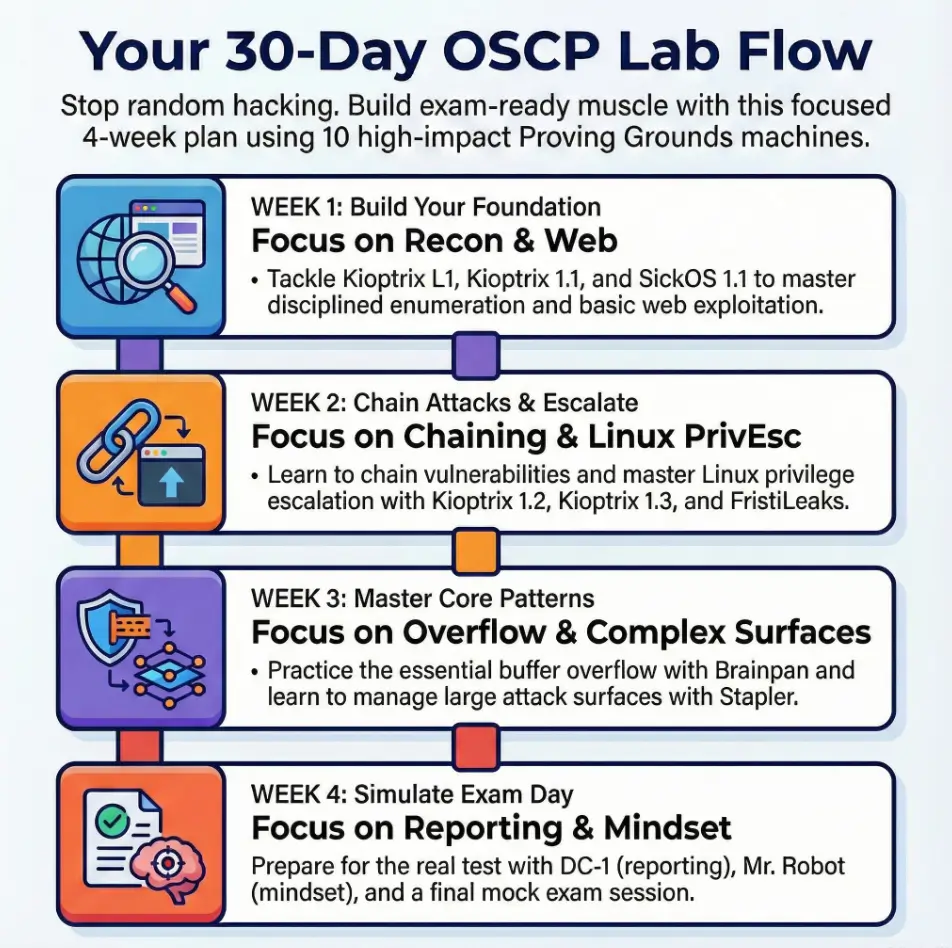
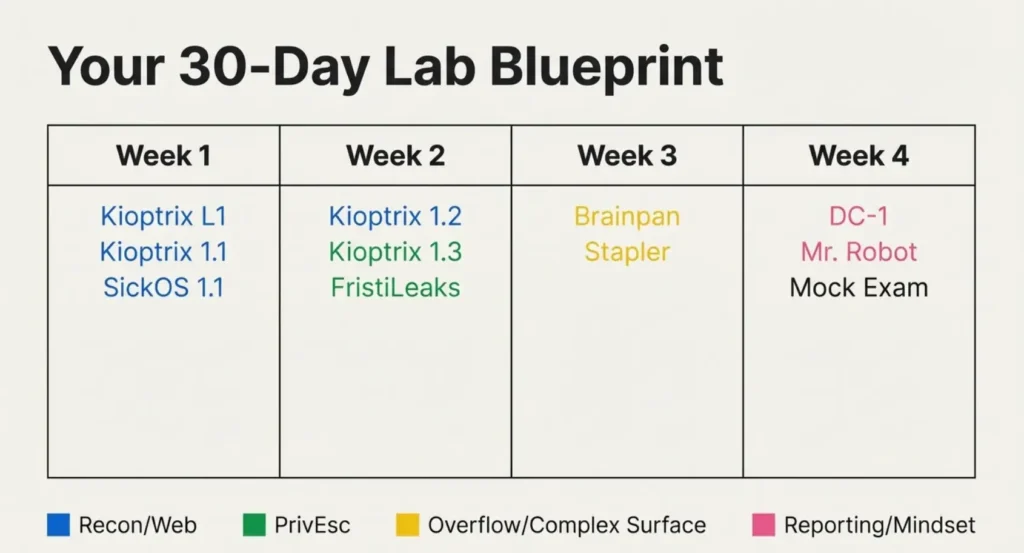
These are ten classic VulnHub releases, not a verified current Proving Grounds catalogue or an official OffSec ranking. Use them as practice options after checking host compatibility and a controlled lab network. Confirm current PG availability in your account before buying access for a named machine.
This is a documentation-based selection guide. No personal OSCP attempt, machine completion, speed improvement or pass rate is claimed. The practice prompts below are editorial suggestions, not findings from newly performed VM tests.
Classic VulnHub labs and Proving Grounds are different
VulnHub distributes downloadable community VM releases. PG is OffSec’s hosted lab service. A release appearing on VulnHub does not establish that an identically named machine is currently available in PG or that the environments are identical.
The official PG rules describe PG Play as free registered access with three hours over a 24-hour window, and PG Practice as paid access with one active machine at a time. Check the current product rules and catalogue before paying; this article supplies no current subscription quote.
For local VMs, inspect the release information, file format and checksums, then review every network adapter before starting. Do not place a deliberately vulnerable target on a shared household or work network to make discovery easier. The Kioptrix beginner lab guide explains the setup boundary and compatibility checks. Use only targets you own or have explicit permission to test.
How to choose from this list
The numbers below are navigation labels, not a measured difficulty or quality ranking. Choose a release that fits your hardware and one task you want to practise. A name, age or author-provided difficulty label does not predict your completion time.
Before beginning, record the release, source, lab boundary, a question and an evidence file location. After a session, record what changed and what remains uncertain. A repeated solution can test whether notes are reproducible, but it does not measure readiness for an unseen exam.
1. Kioptrix Level 1: build a baseline
Use the VulnHub Kioptrix series listing to identify the exact Level 1 release. A useful first exercise is to record target identity, service observations and the reason for each next check. Evidence to keep: one observation, its output and an explanation of what it does not prove.
2. Kioptrix Level 1.1: practise a new investigation
Confirm that you selected Level 1.1 rather than another similarly numbered release. Treat it as a fresh investigation instead of copying the previous machine’s commands. Practice prompt: which observation supports the next hypothesis, and which test would distinguish it from an alternative? This is a learning task, not a promised exploit route.
3. Kioptrix Level 1.2: document a chain
Keep the release name and a sequence of observed transitions in your notes. Practice prompt: can another learner understand the prerequisites for each step without guessing? If you use a walkthrough, mark what it supplied so copied knowledge is not mistaken for an independently discovered result.
4. Kioptrix Level 1.3: keep release and setup notes
The series page lists this as Level 1.3 (#4). Review release-specific import and networking notes before attributing a problem to your testing method. Practice prompt: distinguish a setup failure, an unsupported assumption and a tested dead end. Do not inherit a historical bridged-network suggestion without checking your lab boundary.
5. SickOs 1.1: separate clues from assumptions
The SickOs 1.1 release page provides the archive and setup information. Practice prompt: keep an observation log and explain why a response is relevant before escalating a test. The author’s historical comparison with OSCP labs is not evidence of current exam difficulty or coverage.
6. FristiLeaks 1.3: follow evidence
The FristiLeaks 1.3 listing describes an enumeration-led challenge and includes a VMware-specific MAC-address note. Check that release note if setup fails rather than changing unrelated settings. Practice prompt: distinguish a clue, an assumption and a confirmed prerequisite. The release’s time expectation is not a deadline for you.
7. Brainpan 1: optional legacy debugging practice
The Brainpan 1 listing identifies an older lab with release-specific instructions. Choose it when legacy debugging is a learning goal, rather than as proof of current exam readiness. Practice prompt: explain an observed program failure and your debugging evidence. Consult the current exam guide for actual requirements; this article supplies no exam target or solution.
8. Stapler 1: compare more than one route
The Stapler 1 release description notes multiple possible routes. Practice prompt: compare the evidence behind two hypotheses and record why you abandoned one. Do not interpret a long port list or a completion time as a score. Keep lab credentials in a separate, clearly labelled record; never reuse personal credentials.
9. DC-1: write a reproducible finding
The DC-1 release page describes a deliberately vulnerable practice VM and notes that success depends on the learner’s background. Practice prompt: write a finding with the observation, evidence, impact in this lab and a reasoned remediation suggestion. The author notes a bridged default: review and change the network attachment before running it on a shared network.
10. Mr-Robot 1: manage challenge objectives
The Mr-Robot 1 release page describes a themed challenge with three keys. Practice prompt: keep the stated challenge objectives separate from interesting but untested files or stories. Record why a line of investigation is relevant. Finishing this challenge does not establish an exam score or professional testing competence.
Fit labs to a specific learning gap
A predominantly legacy lab list is not a complete OSCP preparation programme. Compare your actual gaps with the current OffSec OSCP+ exam guide, including its Active Directory component and reporting requirements. Follow the current rules for permitted tools and assistance; a tool being useful in a home lab does not make it permitted in an exam.
Choose one objective per session: diagnose setup, investigate a service response, explain a prerequisite, or write evidence clearly. Pause when you can state the blocker and next question. There is no universal three-to-five-hour completion range, mandatory weekly quota or score made from checklist answers.
Plan time and paid access without a readiness score
Use the time estimator for calendar planning only. Supply your own average hours per machine, including setup and notes. It does not predict how quickly you learn, whether a machine will run on your host or whether you should book an exam.
Enter your own assumptions.
Formula: total hours = machines × assumed hours per machine; planning weeks = total hours ÷ weekly hours. Setup problems, interruptions, revision and new learning can extend the schedule. No values or history are saved.
Hypothetical example: 10 machines × 6 assumed hours = 60 hours. At 8 hours per week, that is 7.5 planning weeks, rounded up to 8 whole weeks. The six-hour input is an assumption, not a measured average.
Before paying, identify a concrete constraint: host compatibility, a missing subject, hosted access or support. Confirm current availability, access limits, total price and cancellation terms directly with the provider. A larger subscription or more lab hours does not guarantee a pass.
A repeatable practice loop
Choose a gap → confirm release and setup → work within the authorized lab → preserve evidence → review what was learned → choose the next gap. Repeat according to your needs, not a fixed 30-day promise. If a hint supplied the key step, mark it and revisit the explanation without treating speed as proof of new skill.
Common questions
Are these currently in Proving Grounds? This review does not verify the current hosted catalogue. Check your account before subscribing for a named machine. VulnHub release availability and PG availability are different facts.
Must I complete all ten? No. This is not an official prerequisite or complete curriculum. Choose by a current learning gap and the platform rules.
Does a faster second run prove readiness? No. Familiarity and memorization can shorten a repeat run. Check whether you can explain the evidence and apply the reasoning to an unfamiliar authorized lab. No measured speed improvement is claimed here.
Can I publish my notes? Check the owner’s rules first. OffSec’s PG rules restrict sharing target information for PG Practice machines. Private study notes, public walkthroughs and actual exam material have different restrictions.
Choose one next task and record the evidence
Select one compatible release, write the task you want to practise and establish the lab boundary before starting. Finish with a short record of an observation, an uncertainty and the next check. That is a concrete next step without pretending that a ten-machine list measures professional or exam competence.
Documentation review: October 16, 2026 (Asia/Seoul). Release identity and the cited setup notes were checked against the linked VulnHub pages; PG and exam statements use the linked official OffSec guidance. No new VM installation or completion test was performed, and current PG catalogue placement is unverified. The retained images are illustrations, not evidence of an author’s examination history.