A backup restore test answers a practical question: if you lose access to a system today, can your team recover the right data and use it in time? Start with one business workflow, restore to a separate environment, and measure when a user can complete that workflow again. Keep the backup timestamp and the test start and finish times so you can judge the result later.
On this page

Start here. Pick one workflow that someone needs tomorrow, such as opening a customer invoice and generating a PDF. Ask the owner what data must be present, how much data loss they can tolerate, and how long they can work without it. Write those conditions down before you open the backup console.
Open the backup restore test record
1. Define what the backup restore test must prove
Choose the smallest test that will tell you something meaningful. Restoring one non-sensitive file checks file recovery. Restoring an application database plus the files it references can test a business workflow. Write the system name, the person authorized to run the test, and the exact success checks. For billing, those checks could include opening a known invoice, confirming its attachment is present, and comparing a subtotal and invoice status with the expected values.
Set two objectives with the owner before testing. The recovery time objective (RTO) is the target for getting the scoped workflow back. The recovery point objective (RPO) is the maximum acceptable age of the recovered point relative to the disruption. Decide what event starts the clock and what user action stops it. Keep the targets separate from the measurements you collect.
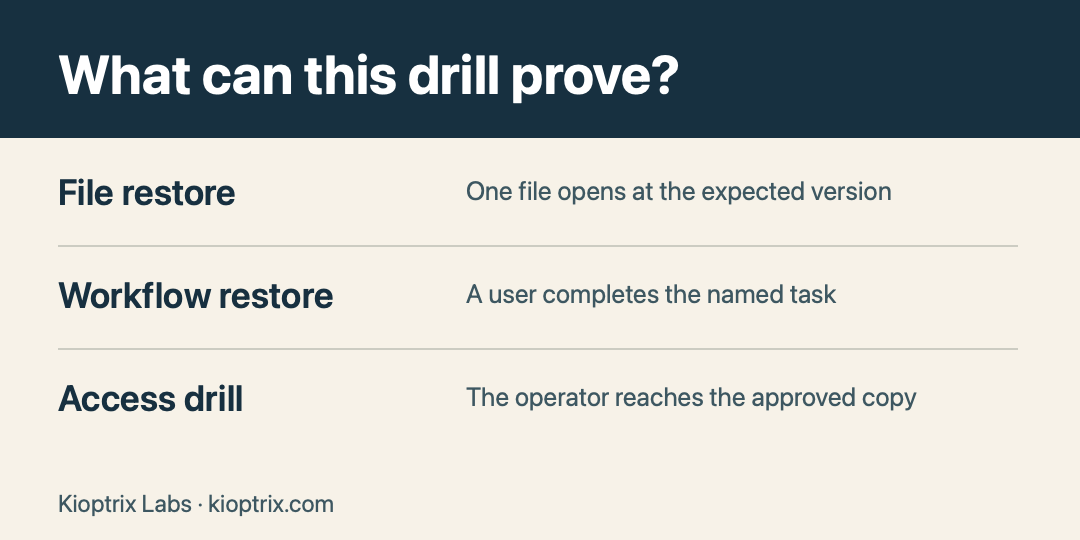
A backup restore test can start with one of three questions. If nobody has used the backup before, start by asking whether the designated operator can retrieve it under the scenario. If the copy is reachable but its contents have never been checked, restore a file with a known version. If people need an application after an outage, run the full task and test the data it depends on. Record how much each exercise covered so its success can be interpreted correctly.
2. Prepare a separate restore destination
Restore into a clean staging environment, separate storage location, or isolated test tenant supported by your backup provider. Have the system owner confirm the destination before you start. Prevent the test instance from sending email, triggering billing, running scheduled jobs, or making calls to production integrations. Prefer synthetic data for routine tests where it exercises the same recovery path. If real data is necessary, restrict access and agree on cleanup before restoring.
If the product only offers a restore that overwrites production, pause the drill. Ask the provider for a supported alternate destination or a test tenant. A tabletop can test the decision process while the team arranges somewhere to run a functional restore.
Before copying data, write down who can open the restored environment and how the team will remove the test copy. For a cloud application, check that the restore destination cannot bill customers or reach real inboxes. For a local file restore, use a new directory and record where the restored copy will go. If the operator cannot verify the destination or stop side effects, classify the run as blocked and keep the evidence of that decision.
3. Confirm the recovery account can reach the copy
Confirm that the assigned operator can find the intended backup and access approved recovery credentials and decryption keys under the failure you are simulating. For example, if the exercise assumes the usual identity provider is down, check whether the documented recovery path still works with the approved recovery account. Record the approval and whether access succeeded. Keep passwords, recovery codes, and key material out of the test record.
CISA’s StopRansomware Guide recommends offline, encrypted backups of critical data and regular checks of their availability and integrity. Confirm the drill covers a copy you could still reach in the scenario you chose. If you only tested the most convenient copy, record which other copies still need a drill.
4. Restore the data and its dependencies
Record the backup identifier, recovery timestamp and scope, then run the approved restore for the chosen destination. For an app, account for the database, the files it references, the application version, and any settings or dependencies the workflow needs. Include the time spent requesting access, obtaining the copy, restoring it, and resolving dependencies when those steps fall inside the recovery clock you defined.
A restore operation may finish while the app is still unusable. Have the operator record the restore-tool finish time, then have the workflow owner record the time the final business check passes. These two times reveal where recovery time actually went.
5. Verify the restored workflow
Use a small set of predetermined checks. Open a representative older record and a record that should exist shortly before the backup point. Compare known values and test whether the linked file opens. If the app relies on search, permissions, or reports for the selected workflow, test those through the account that would do the work. A passing file comparison supports that file’s integrity. It leaves questions about application behavior for the workflow check.
| What you checked | Evidence to keep | Claim it supports |
|---|---|---|
| One restored file | File identifier, expected version, and result of opening it | That file was readable at the tested version |
| Application workflow | Sample records, expected and actual outputs, and owner sign-off | The named workflow worked for the stated cases |
| Recovery access | Approval reference, access path, and outcome | The operator reached the designated copy in the tested scenario |
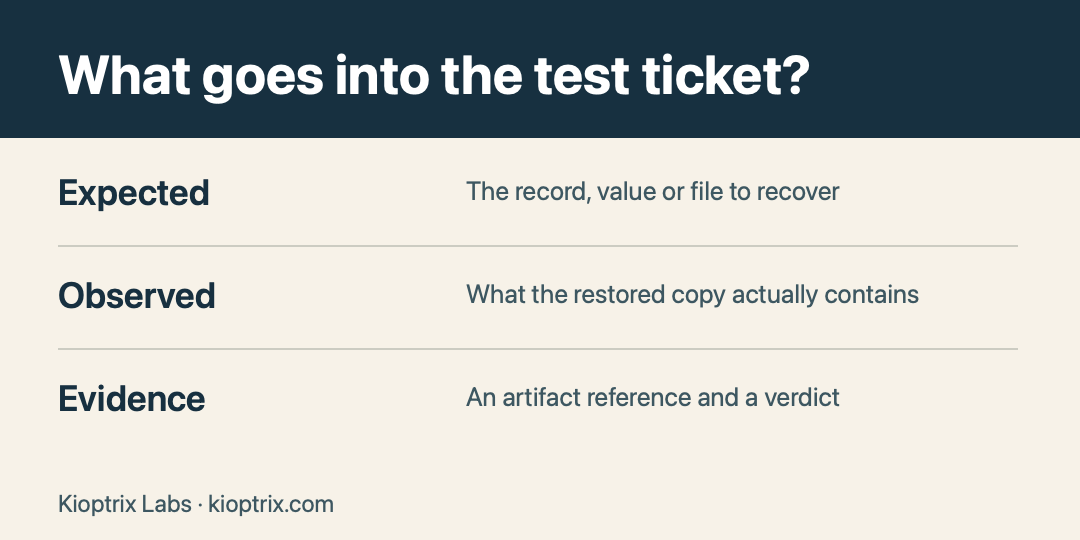
Mark the expected results before you run the backup restore test. For each sampled item, record an identifier, the expected value, what the restored copy showed, and the evidence you can retain. If a record opens but its attachment is missing, log the mismatch and keep the record and attachment checks separate. A screenshot can establish what a reviewer saw. A file hash can establish a byte comparison when you compare it with a known reference.
Completed backup restore test with synthetic data
Executed local exercise, November 22, 2026. A synthetic billing fixture used a SQLite database and a text attachment. The database was backed up to a snapshot, bundled with the attachment in a ZIP archive, and restored into a separate temporary directory. A second invoice was inserted into the source database after the backup. Checks then ran against the recovered database and file.
| Check | Expected | Observed | Verdict and evidence |
|---|---|---|---|
| Invoice INV-1042 | 129.50 USD, status paid | 129.50 USD, status paid | Pass. Restored SQLite row. |
| Invoice attachment | Recovered file has the source SHA-256 | Exact hash match | Pass. Source and restored file were hashed separately. |
| Post-backup invoice INV-1043 | Absent from the recovered point | Absent | Pass. Restored database query; the fixture added this invoice after backup. |
The first check shows the recovered invoice had the expected values. The hash comparison checks the recovered attachment against the original. The last check shows the planned restore boundary: the invoice created after the copy was outside that snapshot. Together they support a narrowly scoped billing data recovery, with the application interface, access approvals, remote storage and integrations outside this local exercise.
To reproduce the comparison with your own tool, create one synthetic record and attach a small file. Preserve the known values and a reference hash, capture the backup, and then add a second record. Restore into a clean destination and check both records and the attachment. If the provider uses continuous point-in-time recovery, define the chosen cutoff first and compare the restored data against that cutoff. These checks let you explain whether missing data was expected or a recovery defect.
6. Measure recovery time and data loss
Measure elapsed recovery time from the defined start event to the workflow owner’s successful check. Measure the recovery-point gap from the simulated disruption time back to the latest point you can substantiate from the restored data. Use one time zone, and note any stage that was prepared in advance. If you verified two selected records, describe exactly what that sample can support. For systems with independently backed-up databases and files, use a consistent recovered point for the workflow and record any uncertainty.
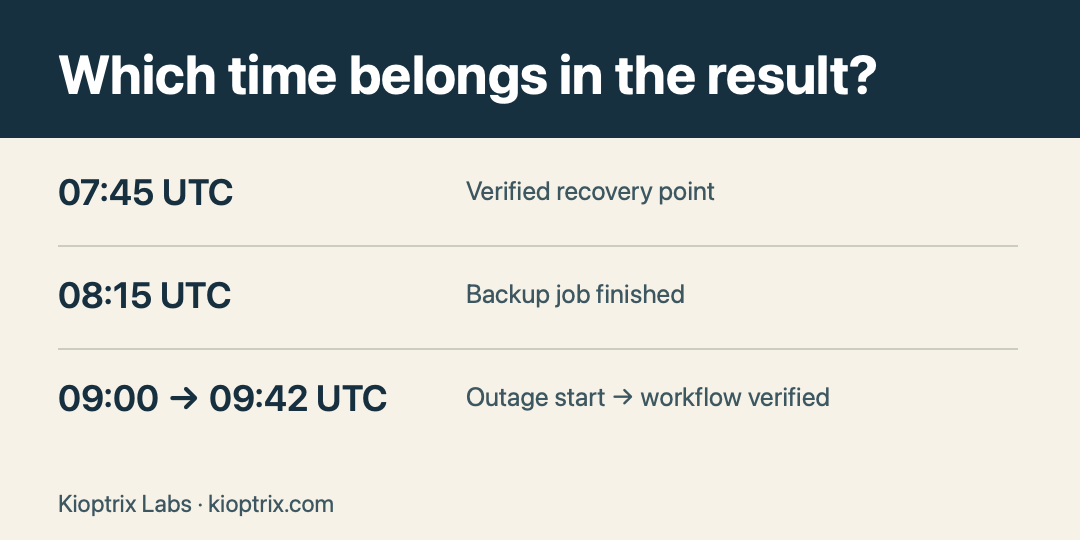
For the recovery point, keep three facts separate: when the backup job finished, which point the restore selected, and what evidence verifies that point for the workflow. A job receipt establishes completion. Use a documented snapshot or transaction position, plus restored record checks, to substantiate the recovered point. The timestamp on the newest invoice alone is weak evidence if no new invoice was created for a while. If the relevant data sources disagree and you cannot establish a consistent point, mark the RPO result inconclusive and record what to verify next.
7. Record the result and book the retest
Mark the workflow pass, fail, or inconclusive and include the reason. If the files open but the data is older than the RPO, keep the successful checks and record an overall failure against the agreed criteria. Assign a person to each gap, note the next action, and give the retest a date. Retest after material changes to the backup provider, storage location, encryption, identity service, or application dependencies. The NIST contingency planning guide provides further background on planning, exercises and maintenance.
Review the test ticket with the business owner before closing it. If the test exercised only one department or data source, name the dependencies that remain unverified. Decide whether the next round should repeat the same exercise to confirm a fix or broaden the scope to cover a different failure. When a retest happens, retain both runs and link the changed evidence so the next reviewer can see which result improved and under what conditions.
Worked example: restored in time, with older data
Illustrative drill. The billing team sets an RTO of 60 minutes and an RPO of 60 minutes. Its simulated outage starts at 09:00 UTC. The team validates the workflow at 09:42, so elapsed recovery takes 42 minutes and meets the RTO. The backup job finished at 08:15 UTC, but the latest substantiated recovery point is 07:45 UTC. The recovery-point gap is 75 minutes, 15 minutes beyond the RPO.
The owner records an RPO failure and preserves the evidence that the workflow recovered in 42 minutes. The follow-up is to identify whether the gap came from backup scheduling, a failed run, or the available restore points, then repeat the same workflow check using the corrected recovery path.
Complete the ticket. Record the timing result as “RTO pass (42/60 min), RPO fail (75/60 min).” Link to the restore-point evidence and target-environment sign-off. State the next test in concrete terms: after the backup operator confirms the available recovery points, rerun the same invoice and attachment checks using a point within the approved 60-minute window.
Copyable backup restore test record
Download the backup restore test record (.txt)
Copy these fields into your test ticket.
Workflow and owner:
Drill scenario and scope:
Operator and approval reference:
Backup ID and job completion (UTC):
Latest verified recovery point (UTC) and evidence:
Restore destination and integration safeguards:
Disruption/start, restore finished, and workflow accepted (UTC):
RTO target / elapsed recovery time:
RPO target / measured recovery-point gap:
Validation sample | expected | observed | verdict | evidence:
Verdict and supporting evidence location:
Gap, action owner, due date and retest date:
Test data cleanup or retention decision:
Frequently asked questions
Is restoring a single file enough?
It can establish recovery of that file. To judge whether an application can return to service, include its dependencies and have a user complete a representative workflow.
How can a test show both a pass and a failure?
Time and data freshness have separate targets. Record each outcome. If the drill requires both and either fails, the scoped workflow has missed its recovery criteria.
What if the team has no safe restore destination?
Run a tabletop to practice approvals, escalation and handoffs. Mark functional recovery and measured timing as unverified until you can exercise the restore in a supported destination.
This guide draws on published recovery guidance. The worked timing scenario is illustrative. The separately labeled SQLite drill was executed locally with synthetic data. See the Kioptrix Labs editorial and evidence policy for how the site describes supporting material.