OSCP Exam Commands are easier to study when every saved result answers a specific question. This guide gives you 20 evidence checks, a worked example from a fictional lab record, and a worksheet you can reuse during authorized practice. Start with the example if you already have a capture to review.
On this page

The 60-second check: Open one saved lab result. Write the machine label, capture time, one fact you can point to, and one question the file leaves open. If you cannot point the reader to the exact line or frame, make the claim narrower or mark it unresolved.
Check scope and current OffSec rules
Use these OSCP Exam Commands notes with systems you own or have permission to use, or with saved sample outputs. Before reading a record, identify the exercise, machine, and authorized scope. A lab inventory entry with a stable label is especially useful when a virtual machine has been reset or when the same address appears across multiple exercises.
Official rules checked November 24, 2026. OffSec publishes the current exam tool restrictions and the evidence, screenshot, and reporting requirements in its OSCP+ Exam Guide. The OSCP+ Exam FAQ explains which resources candidates may consult. OffSec prohibits AI chatbots and LLMs with direct prompt access during an active exam. Use the current guide for actual exam evidence and submission requirements.
Decide where authorized lab evidence will live before you start. Give the session a short identifier that you can put on the report, exports, and case notes. Keep fictional practice records in a separate folder from real lab captures so a screenshot cannot be mistaken for an observed result.
OSCP Exam Commands in practice: read a saved result
Suppose a training packet contains a saved browser transcript for a fictional machine named LAB-WEB-01. The record shows an initial response with status 302 and a redirect location of /login. The follow-up response shows the sign-in form. The question is whether this captured request reached the sign-in screen.
| What to check | What to record | What the evidence can support |
|---|---|---|
| Source | Instructor-style sample, LAB-WEB-01, session DEMO-01. | The example belongs to a fictional practice session. |
| Observed | The lab evidence shows a redirect to /login followed by a sign-in form. | The captured navigation reached a sign-in screen. |
| Unresolved | The packet contains no authorization test or authenticated response. | Access enforcement and post-login behavior remain unresolved. |
| Evidence reference | DEMO-01-web-redirect.txt, lines 3–12. | A reviewer has a specific place to look in the fictional exercise packet. |
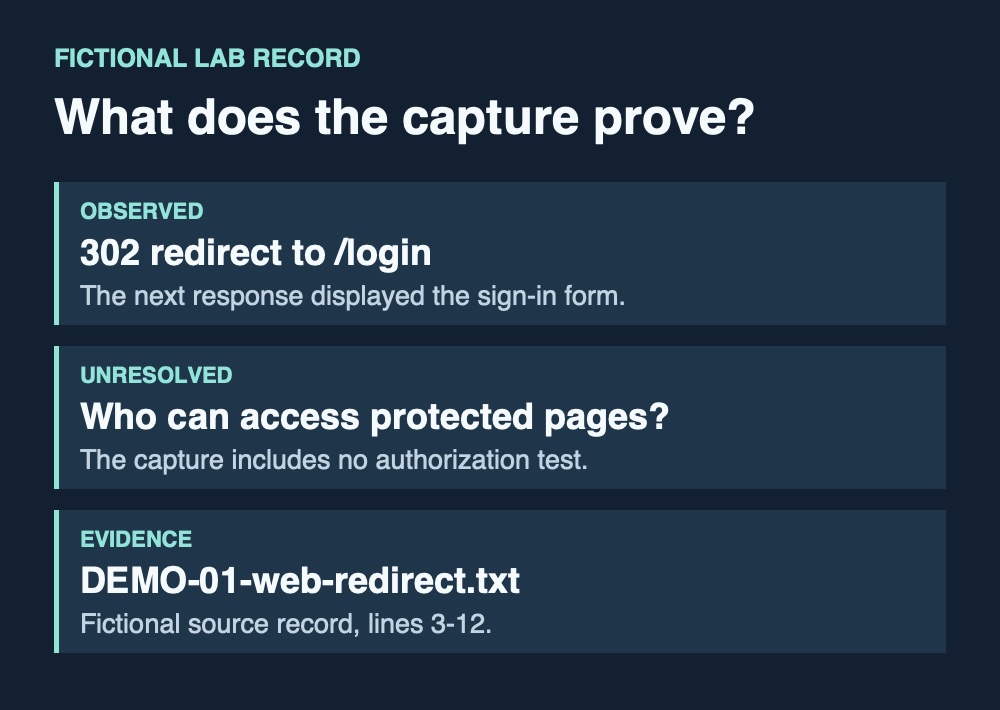
Report-ready sentence: “The saved response for LAB-WEB-01 redirected to a sign-in form. The sample did not include an authorization test or authenticated response, so I left access enforcement unresolved.” That wording lets a reader verify the first sentence and understand why the report stops there.
A screenshot of a login form alone would support the visible state, while the saved transcript supplies the redirect. Choose the lab evidence that matches the sentence you want to write. If the screenshot and transcript have different timestamps, list both timestamps and check the session identifiers before treating them as part of the same event.
20 checks for interpreting lab evidence
Use the OSCP Exam Commands reference below during a practice review. The first group establishes where the evidence came from. The next two help you read and document it. The final group checks whether another reader can verify what you wrote.
Before you interpret lab evidence
| What to check | What to record | What the evidence can support |
|---|---|---|
| 1. Practice scope | Record the lab owner, written scope, and assigned machine label. | A scope record establishes what the exercise covers. A hostname alone cannot establish authorization. |
| 2. Evidence origin | Label the file as your authorized lab capture, instructor sample, or synthetic exercise. | A later reviewer can tell where the observation came from and which claims it can support. |
| 3. Machine identity | Tie the observation to the lab inventory entry and session date. | A reused IP address or VM name may refer to a different instance after a reset. |
| 4. Local time and time zone | Record the capture time with its UTC offset when known. | Events from different records can be ordered without guessing which clock was used. |
| 5. Tool name and version | Record the version used to produce the saved output and relevant display settings. | The reviewer can interpret output fields against the version that produced them. A later version may format them differently. |
While you read the result
| What to check | What to record | What the evidence can support |
|---|---|---|
| 6. Exact question | Write one question in plain language before reading the result, such as whether a saved response shows a sign-in screen. | A specific question keeps the conclusion proportional to the evidence. |
| 7. Original output | Keep an unedited copy of the authorized lab capture and use a second copy for annotations. | A reviewer can distinguish the original result from your notes and highlights. |
| 8. Redirect chain | Keep the original status, destination, and final response together. | A redirect and destination screen support a narrow navigation observation. They leave access enforcement unresolved. |
| 9. Warnings and errors | Copy relevant warnings alongside the result and identify the part of the result they affect. | A warning may limit coverage or explain a missing result. It is part of the evidence. |
| 10. Empty or partial output | State whether the output ended normally, was truncated, or came from a partial export. | An empty view can support a statement about that capture. Broader negative conclusions require fuller coverage. |
When you record lab evidence
| What to check | What to record | What the evidence can support |
|---|---|---|
| 11. One claim per reference | Give each finding a short identifier and point to the file and relevant line or frame. | A reader can verify a claim without hunting through several screenshots. |
| 12. Screenshot context | Keep the relevant label visible and transcribe key facts into the report text. | A screenshot is easier to interpret when the machine and observation accompany the image. |
| 13. Duplicate captures | Mark repeated captures as duplicates unless their time or context changes the observation. | Several copies of the same result still represent one observation. |
| 14. Shared-copy redaction | Remove private details from copies shared outside your lab and keep authorized originals in approved storage. | The shared copy can illustrate the observation while protecting identities and secrets. |
| 15. File naming | Use an exercise identifier, sequence number, and short subject in the filename. | Files sort in reading order and stay traceable after export. |
Before you close the exercise
| What to check | What to record | What the evidence can support |
|---|---|---|
| 16. Confidence level | Label each summary as observed, inferred, or unresolved. | Readers can tell which statements follow directly from the capture. |
| 17. Conflicting records | Record both observations, then compare their times, scopes, and machine labels. | A discrepancy can reflect a different session or changed conditions. Keep it open until you can explain it. |
| 18. Next verification | Write the single record needed to settle the open question, such as an approved permissions matrix. | The handoff states what evidence would change the conclusion. |
| 19. Export check | Open the exported practice PDF, zoom to the evidence, and compare it with the draft. | A readable export preserves what the reviewer needs even when links or images render differently. |
| 20. Second-reader check | Ask a permitted practice reviewer to match one claim to one evidence file and explain the limit. | Their answer shows whether the report is clear without the author in the room. |
Six local commands for reviewing saved lab files
These OSCP Exam Commands examples work on files already saved in an authorized practice folder. The filenames are fictional. Run the examples from the folder holding your own practice copies. The commands read local records and help you cite evidence precisely.
| What to check | What to record | What the evidence can support |
|---|---|---|
pwd | Check the working directory before naming files in your practice report. | The printed path identifies the local folder you are reviewing. |
ls -l ./DEMO-01-web-redirect.txt | Check that the expected file is present and inspect its local size and modification time. | Local metadata can locate a file. Its modification time alone leaves the original event time unknown. |
wc -l ./DEMO-01-web-redirect.txt | Count newline characters when comparing a full text capture with an excerpt. | The count helps identify a possible mismatch. Equal counts leave content identity unresolved. |
nl -ba ./DEMO-01-web-redirect.txt | Show numbered lines, including blank lines, before adding a citation to your notes. | A reviewer using the same version of the file can follow the line reference. |
diff -u ./DEMO-01-original.txt ./DEMO-01-working.txt | Compare your saved original and working copy line by line. | The differences show changes between the two files you supplied. |
sha256sum ./DEMO-01-web-redirect.txt | Record a SHA-256 fingerprint on Linux. On macOS, use shasum -a 256 ./DEMO-01-web-redirect.txt. | A matching fingerprint helps confirm that a later copy has the same bytes. |
Try the OSCP Exam Commands file checks with one text export you already own. If you include lines 3–12 in a worksheet, count from the original saved record and name that file in the citation. A line number in a pasted excerpt can change when you add an introduction or remove blank lines.
Keep any fingerprint beside the evidence filename and date in your worksheet. If a later copy has a different fingerprint, record the difference and compare the files locally. A redacted copy is expected to differ from the original. Give it a distinct filename and keep its own reference so a reviewer knows which version you supplied.
Long lines can wrap in a terminal or browser window. Before transferring a citation into your OSCP Exam Commands notes, compare the line number with the numbered file view. Use the file’s numbered output for the reference and a short quote or image only when it adds context.
Resolve common problems with a saved record
- You cannot locate the original. Mark the remaining file as a copy and describe its origin as far as you know. Withhold claims that require the missing source.
- The capture appears incomplete. Record the last visible timestamp or numbered line and check whether the authorized export produced a separate continuation file. A clear cutoff helps someone else reconcile the sequence.
- Two timestamps differ. Identify which value came from the application and which came from the local file. Convert known offsets to a common time zone and flag any time zone you cannot establish.
- The file contains private details. Reference the approved version by filename in your worksheet and use an appropriately redacted snippet in a practice handoff. Check the exported PDF for text hidden underneath black annotation boxes before sharing it.
For a ten-minute OSCP Exam Commands review, pick one paragraph from your draft report. Underline every factual claim. Give each claim a reference or break it into a smaller statement. A sentence such as “the response displayed a sign-in page at 14:32 UTC” needs evidence both for what appeared and for the time. Keep the timestamp field unknown when it cannot be recovered.
Copy the lab evidence worksheet
Copy one OSCP Exam Commands worksheet per question. A short entry is enough if someone else can find the lab evidence and understand the limit. Write “unknown” where the packet lacks a detail. Use a sanitized filename in examples you share and follow the lab owner’s rules for storing originals.
Exercise and machine label:
Authorized scope or sample source:
Date, time, and time zone:
Question this record should answer:
Source and version, if known:
Exact observation:
Evidence file and relevant line or frame:
Conclusion the evidence supports:
What remains unresolved:
Record needed to resolve the question:
In the fictional OSCP Exam Commands worksheet, the last field could read “An instructor-provided access-control test record for DEMO-01.” If the practice packet never supplies that record, leave the question unresolved. That makes the limit easy to see when you read the report again.
To practice with a partner, trade one sanitized worksheet each. Give the other reader two minutes to find the supporting line and underline any phrase that goes beyond it. If they can find the evidence but cannot tell what remains open, revise the limit first.
Review your evidence and report
Review the OSCP Exam Commands notes in three passes. First confirm the source and the lab label. Next match each sentence to a file, line, or frame. Finally open the exported practice report on a narrower screen and make sure a reader can identify the lab evidence without relying on color or a tiny annotation.
- Traceability: The machine name, session label, and capture time agree across the worksheet and evidence.
- Readability: The useful part of each image remains legible after export and the same fact appears in the text.
- Completeness: Each unresolved claim states what evidence is missing.
- Submission: For the actual exam, check the screenshot and report instructions in the current OffSec guide.
If a claim has only an image reference as lab evidence, say what the image shows in one sentence. If the filename has changed, open it from your report before you consider the draft finished. Catching a broken reference at this stage is easier than reconstructing it after you have cleaned up an exercise folder.
For your next OSCP Exam Commands review, use the Kioptrix study plan to schedule a short reporting review. Pair that with the proof screenshot guide and the exam-day checklist as you prepare.
Frequently asked questions
What should I write down first?
Write the question, the machine or exercise label, and where the evidence came from. Then record the exact observation and link it to a line or frame. Starting with the intended claim makes it easier to spot an output that answers only part of the question.
Is a screenshot enough for a practice report?
A screenshot can document a visible state. A short caption, a capture time, and a source label make it easier to verify. If your claim depends on a sequence, keep the parts of that sequence that establish it. Follow OffSec’s official evidence rules during the exam.
Can I use the OSCP Exam Commands worksheet for a different lab?
Yes. Replace the scope, machine label, and evidence paths with those for your authorized exercise. If you are using a sample packet, identify it as sample evidence. The same fields work for a local training VM, a supplied browser transcript, or a defensive audit exercise.
What belongs in a note when a result is ambiguous?
Include the exact observation, the missing context, and the evidence that would settle the question. For example, an image of a login page supports its visible appearance. A saved sequence of responses can explain how the browser arrived there.
Editorial review: The worked example uses fictional records. The policy summary was checked against the official OffSec guide and FAQ on November 24, 2026.