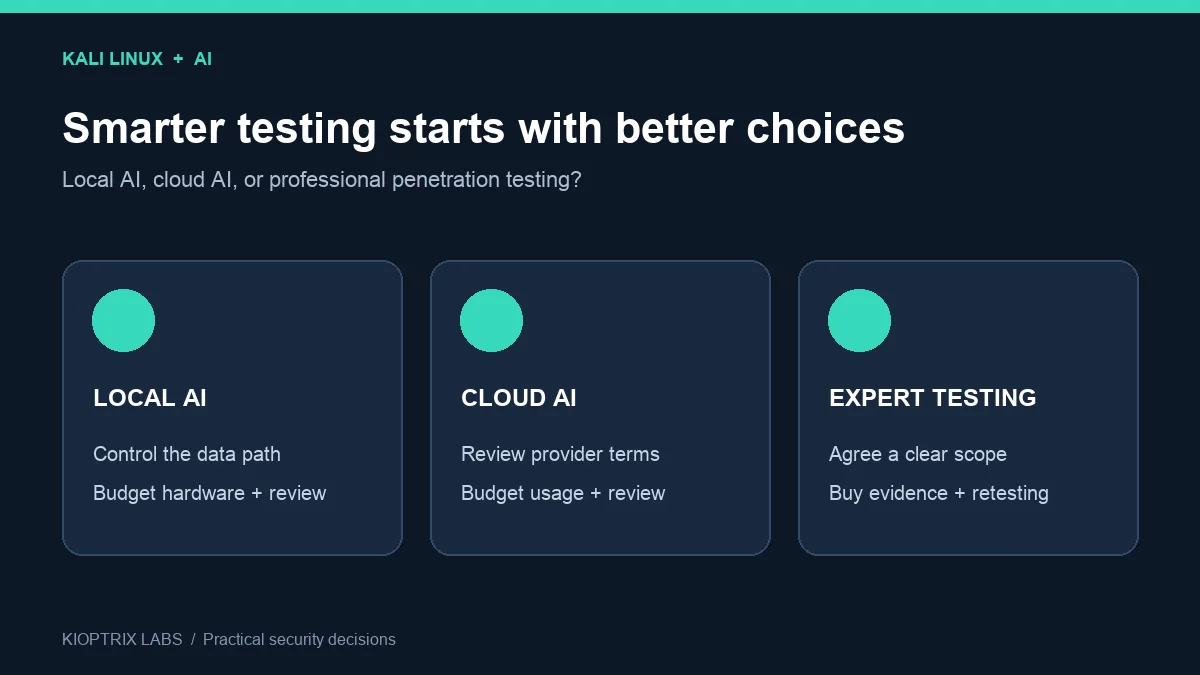
Kali Linux AI pentesting is becoming a practical buying decision: should you run a local model, connect a cloud assistant to your lab, or pay for penetration testing services? A free operating system can still leave you with hardware costs, review work, and a report that does not answer your customer’s questions.
The useful question is what you need to prove. This guide helps small IT teams and independent testers choose an AI-assisted workflow, estimate its real cost, and recognize when a professional assessment is the better purchase. Start with the comparison, then work through seven checks before committing money or client data.
Research checked October 11, 2026. This is a documentation-based decision guide, not a hands-on benchmark or a vendor quotation. All budget figures below are illustrative assumptions in USD.
Table of Contents
Why Kali Linux AI pentesting deserves attention
Kali published a cloud-assisted workflow using Claude Desktop in February 2026 and a local Ollama and 5ire workflow in March. These are concrete examples of connecting natural-language requests to security tools. They establish that the integration exists; they do not establish that an assistant can independently deliver a complete assessment. See the official cloud workflow and local workflow.
An LLM generates or interprets text. Model Context Protocol (MCP) lets a compatible client expose tools to it. Kali’s mcp-kali-server package bridges an MCP client to a terminal API. Once a workflow can execute commands, its permissions and target scope matter as much as the quality of its answers.
For a reader, the immediate opportunity is faster explanation and organization of authorized lab evidence. The harder commercial question is whether that convenience reduces total review time. Treat claims about autonomous testing or guaranteed vulnerability discovery as claims requiring evidence.
Compare local AI, cloud AI, and penetration testing services
| Option | Fit, costs, and decision check |
|---|---|
| Local AI with Kali | Fit: owned labs and control over inference. Count: hardware, power, setup, updates, and review. Check: every component’s network behavior. |
| Cloud AI with Kali | Fit: approved use of sanitized evidence. Count: usage fees, integration, and review. Check: provider terms and client permission. |
| Professional penetration testing services | Fit: a business assessment with accountable deliverables. Count: scope, reporting, support, and retesting. Check: the contract and sample report. |
Quick decision: choose a lab workflow to learn or organize evidence. Compare service quotes when a customer needs an independent assessment, your team lacks testing experience, or nobody has time to validate findings. A tool subscription buys a capability; a scoped service buys people and deliverables.
1. Define the evidence you need before choosing tools
Write the decision your result must support: “Can we release this application?”, “Which exposed services need remediation?”, or “What does the customer need in the assessment report?” Then specify the environment, authorized targets, test window, exclusions, and person responsible for accepting the work.
An AI summary of scan output and a penetration test answer different questions. A vulnerability scan can identify potential issues; a penetration test may validate exploitability and impact through agreed testing. Neither a polished paragraph nor a list of severity labels proves that the underlying checks happened.
- For learning: a repeatable lab, saved commands, observations, and explanations may be enough.
- For internal triage: require raw output, asset ownership, validation status, and remediation owners.
- For a purchased assessment: agree a sample report, methodology, evidence requirements, exclusions, and retest terms.
Before paying, ask the recipient of the report what they will accept. Do not assume an AI-generated report satisfies an audit, procurement review, or insurance requirement.
2. Map where prompts, outputs, and credentials go
A local model can keep inference on your own machine. That does not make the entire workflow offline: model downloads, extensions, telemetry, cloud fallbacks, and MCP tools can still contact external services. Inventory those connections and test the intended configuration before using client material.
For cloud AI, inspect the applicable product and account terms for retention, training use, access controls, and deletion. A familiar brand name does not tell you which terms apply to a consumer account, business subscription, or API integration. Use sanitized lab data until your organization approves the actual arrangement.
Remove tokens, cookies, customer records, private keys, and unnecessary identifiers from material sent to a model. Keep secrets outside the prompt and provide only the evidence needed for the task. Local storage also needs access control and a defined retention period.
3. Put human approval at the execution boundary
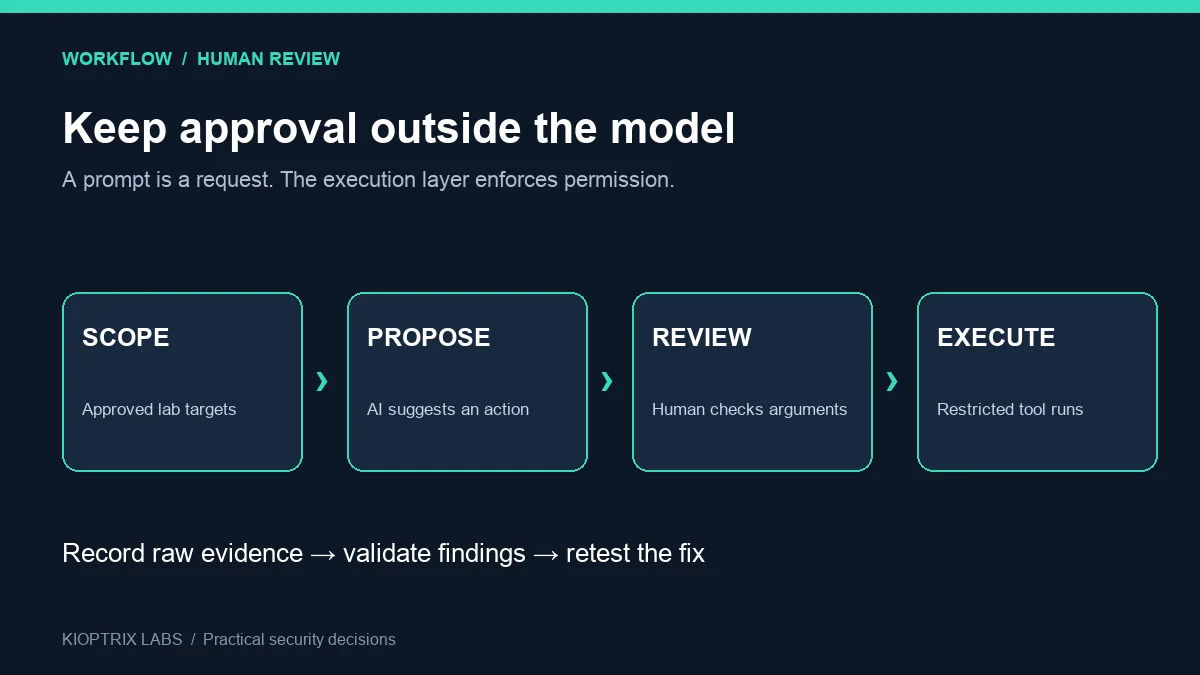
Start with an assistant that explains already collected lab results. Add command execution only after you can constrain targets and inspect proposed tool arguments. A sentence in a prompt asking for permission is not an enforced approval gate.
Kali documents a localhost default for its MCP terminal API. Keep the bridge limited to the intended environment. Use a restricted execution identity, a target allowlist, and an action review mechanism outside the model. Review the exact target, operation, and parameters before a consequential tool action.
Web pages, logs, and tool output can contain instructions that try to redirect an agent. OWASP describes this as indirect prompt injection. Treat that material as evidence to analyze and enforce permissions separately. These controls reduce exposure; they are not proof that every injection will be blocked.
A useful first task: ask the assistant to explain a sanitized scan you already collected in an owned lab, identify uncertainty, and suggest questions for manual review. Measure its usefulness before giving it live tools.
4. Calculate the total cost, including reviewer time
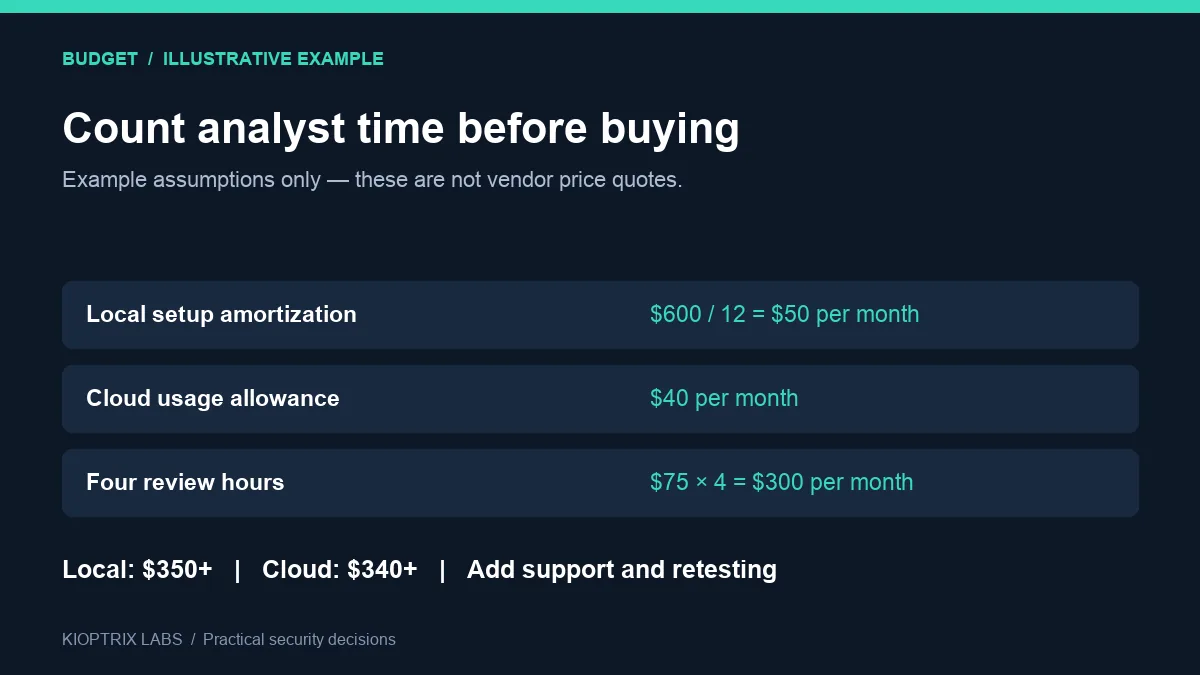
Use this planning formula: monthly total = hardware amortization + power + software or usage fees + setup and maintenance time + analyst review + reporting and retesting. For a service engagement, compare the quoted project cost against the same deliverable and scope.
Suppose you allocate $600 of hardware over 12 months: that is $50 per month. If review takes four hours at an assumed internal rate of $75 per hour, review adds $300. The local option is already $350 before power and maintenance. A hypothetical cloud usage allowance of $40 plus the same review time is $340 before integration and other costs.
These are arithmetic examples, not market rates. They show why a small difference in subscription price can disappear when review takes another hour. Replace every assumption with your own costs and measured time. Existing hardware may have little incremental acquisition cost, but it still has capacity and operating costs.
Questions to ask about penetration testing cost
- How many applications, roles, hosts, APIs, and environments are included?
- Is authenticated testing included, and who prepares test accounts?
- Which findings will be manually validated?
- Is remediation discussion included, and how many retests are covered?
- What happens when scope changes or access fails?
A low quote with missing retesting can be more expensive than a higher quote that includes validation and support. Compare like-for-like work rather than a generic “price per scan.”
5. Buy vulnerability assessment tools for a specific gap
Avoid paying for features you have not connected to a real bottleneck. If your problem is organizing evidence, a faster scanner might not solve it. If your problem is limited web application coverage, a chat interface alone may not solve it either.
For example, PortSwigger describes Burp Suite Community as a manual toolkit and lists additional Professional capabilities such as saved project files and a web vulnerability scanner. Check the current edition comparison against your needs. A paid scanning feature still needs a tester to interpret the result.
For any vulnerability assessment tools under consideration, request a trial or sample workflow using an owned test environment. Define success in advance: time to a validated finding, false positives requiring review, usable exports, and the effort required to retest. Do not grade tools by the number of alerts alone.
Keep learning and client configurations separate. A disposable lab is a better place to evaluate a new connector than a workstation holding customer credentials.
6. Test report quality against raw evidence
Require each finding to include the affected asset, observation, supporting evidence, validation status, business impact, proposed fix, and retest result where available. An assistant can help structure those fields; a reviewer must verify their accuracy.
Try a small evaluation with sanitized lab artifacts. Include a confirmed issue, a false positive, and an inconclusive result. Check whether the assistant separates them and preserves uncertainty. Record the model and tool versions so you can repeat the evaluation after updates.
Reject unsupported severity changes, invented commands, fabricated timestamps, and claims that a fix was verified when no retest occurred. Compare the final report with original output. Keep “not tested,” “not observed,” and “confirmed absent” distinct.
For a practical evidence workflow, see our vulnerability retesting checklist. The goal is an auditable chain from observation to remediation, not a more confident writing style.
7. Decide when to hire an accountable specialist
Consider professional help when your team cannot validate findings, the target has sensitive workflows, or a customer requests independent testing. A specialist should be able to explain their scope and limits before starting, then connect technical findings to the business systems you operate.
Ask penetration testing services providers for a redacted sample report and a clear statement of who performs the work. If AI assists their process, ask how outputs are checked, how client data is handled, and which deliverables remain the provider’s responsibility.
Require written authorization, rules of engagement, escalation contacts, evidence handling, and retest terms. These are purchasing criteria for a scoped engagement. They are also a way to distinguish a service that solves your problem from one that merely produces a scan export.
A 30-minute buying checklist you can reuse
- Write the business question and the exact report recipient.
- List authorized targets, exclusions, and the test window.
- Choose whether the first workflow is explanation-only or can execute tools.
- Map the data path and approve the applicable provider terms.
- Set a spending cap and include analyst time in the budget.
- Evaluate with sanitized artifacts from an owned lab.
- Define acceptance: validated evidence, uncertainty, remediation owners, and retesting.
Next step: run one small, supervised evaluation before purchasing hardware or a long subscription. If the report recipient requires independent assurance, use the checklist to request comparable service quotes. For baseline evidence discipline, our Kali lab logging guide explains how to preserve a more useful record of practice.
Frequently asked questions
Is Kali Linux AI pentesting free?
Kali is available without an operating-system purchase price. An AI-assisted workflow can still incur hardware, electricity, usage fees, maintenance, and review time. Estimate the entire workflow before calling it free.
Is local AI always better for confidential work?
Local inference gives you more direct control of where inference runs. The surrounding application, extensions, downloads, logs, and tools still need review. The right choice depends on the complete data path and your approved requirements.
Can AI replace a penetration tester?
It can assist with explanation, organization, and proposed actions. This guide does not establish that it can replace an accountable tester. Validate findings and choose a professional engagement when the business needs independent testing or skills your team does not have.
What is the difference between a vulnerability assessment and a penetration test?
A vulnerability assessment identifies and prioritizes potential weaknesses. A penetration test typically includes scoped attempts to validate weaknesses and their impact. The provider’s agreed methodology determines the actual work; request that detail before buying.
What should I ask an AI penetration testing vendor?
Ask what targets and roles are covered, which actions require approval, where client data goes, and how findings are validated. Request a sample report, clear limitations, and retest terms. Evaluate AI penetration testing against the same evidence requirements you would apply to a human-led engagement.
Sources and methodology
This article draws on official Kali documentation, PortSwigger product information, and OWASP guidance checked October 11, 2026. Editorial checklists, cost assumptions, and purchasing examples are our analysis. We did not perform a hands-on performance comparison.
- Kali: cloud-assisted LLM workflow — February 25, 2026.
- Kali: local Ollama and 5ire workflow — March 10, 2026.
- Kali: MCP package and interface documentation.
- PortSwigger: Community and Professional capabilities.
- OWASP: prompt injection prevention guidance.