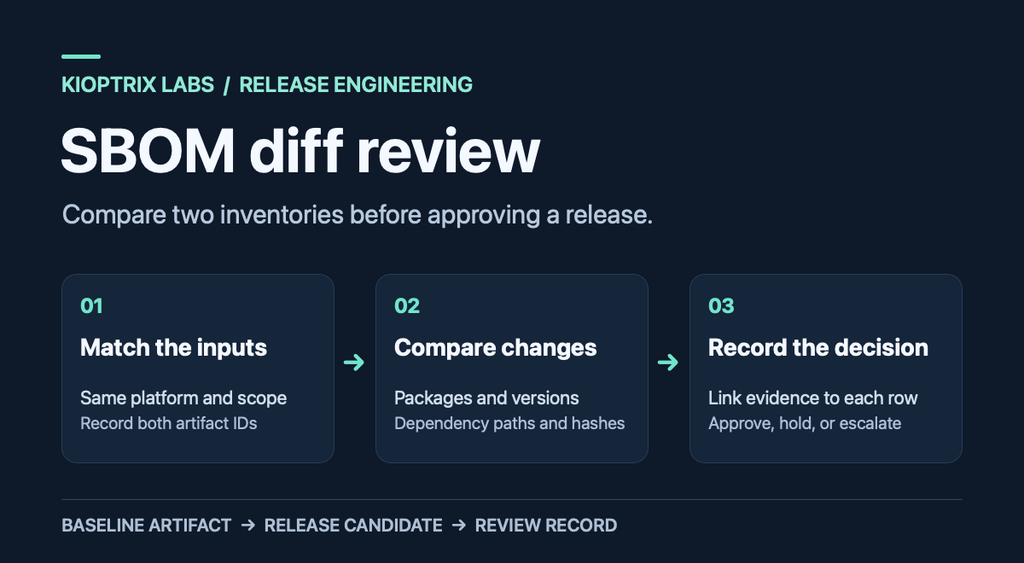
An SBOM diff review compares what two releases contain, then checks whether each meaningful change has an explanation. Start with the software bill of materials (SBOM) for the previous release and the release candidate. Match each file to its artifact, compare the component inventory, and investigate any change that the build record cannot explain.
Table of Contents
This walkthrough uses a container image and CycloneDX JSON. You can use the same review decisions for an application archive if the baseline and candidate describe equivalent artifacts. See the public Jackson release comparison, then run the synthetic exercise to see how a scope mismatch changes the result.
1. Match each SBOM to the artifact being reviewed
Record the previous release and candidate image digests, their platform, the two SBOM filenames, and the corresponding build references. Use immutable identifiers from your build or registry records. A tag such as latest can point to a different image by the time a second reviewer opens the ticket.
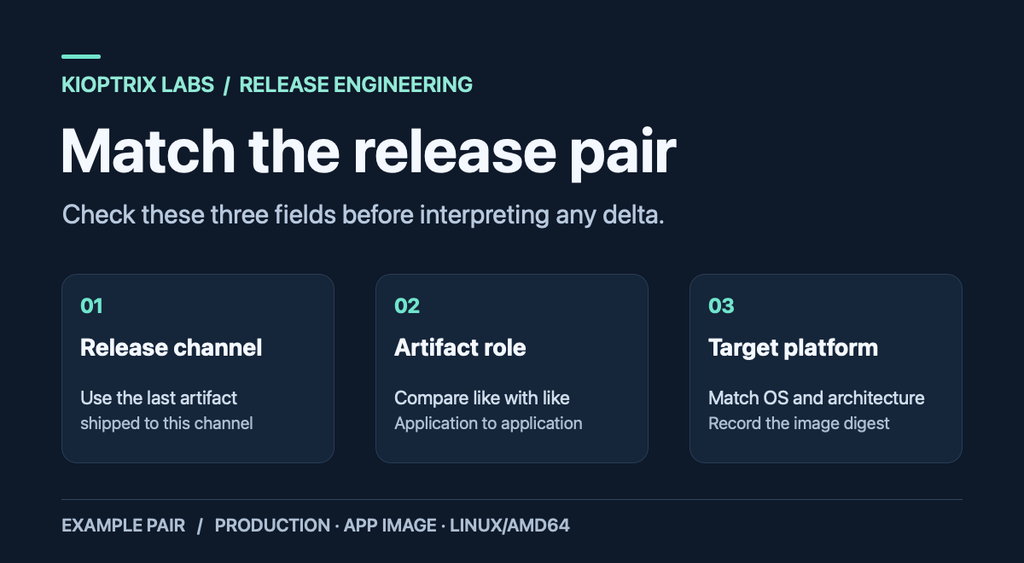
For a multi-platform container, compare the same platform on both sides, such as linux/amd64 against linux/amd64. Check whether the recorded identifier refers to a platform image or the multi-platform index. If you cannot connect either SBOM to its artifact, request the missing build evidence before approving the candidate.
2. Check whether both inventories cover the same scope
Compare the generator, its version, the input it analyzed, and the package ecosystems and dependency scopes it reports. A source-tree scan can include development dependencies while a scan of a built image can include operating-system packages and exclude packages left behind in an earlier build stage. Comparing those files directly can make scanner coverage changes look like release changes.
If the generator or its settings changed, rerun both artifacts with the same current configuration where feasible. Keep the originals alongside that comparison and record why you generated a second pair. When a rerun is impossible, mark the affected rows as uncertain and consult the matching lockfile, image build record, or package manifest.
3. Build a short list of component changes
For two local CycloneDX JSON files, the CycloneDX CLI diff command can report added, removed, and modified component versions. Check the options supported by your installed version with cyclonedx diff --help. Run the comparison with the baseline first.
cyclonedx diff baseline.cdx.json candidate.cdx.json --component-versionsStart the SBOM diff review with additions, removals, version changes, and ambiguous matches. Keep multiple installed versions visible. A component that appears at two versions in one release and three in the next needs a different explanation from a clean one-for-one upgrade.
When examining matches by hand, use the package ecosystem, namespace, name, and relevant qualifiers. Compare the version separately. If a public package and an internal fork have the same display name, use their package coordinates and build evidence to tell them apart. Leave unresolved matches in the review ticket with a named owner.
4. Compare dependency paths where the graph is available
An inventory can show the same component in both releases while its parent dependency changes. CycloneDX uses bom-ref to connect a component to references within its own document. Resolve those references within each SBOM before comparing relationships across releases. A generated reference may change even when the underlying package stays the same.
For each surprising addition, follow the recorded relationship back to the application or top-level package where the graph supports it. If the graph is missing or incomplete, record the gap and check the relevant package manager or build evidence. The CycloneDX dependency guide explains the relationship fields.
5. Investigate same-version changes when the evidence supports a match
When both inventories report a checksum for the same object using the same algorithm, a mismatch deserves a closer look. One generator may hash a downloaded package archive while another hashes an extracted binary. Establish what was hashed before treating the mismatch as a difference in the shipped component.
Once the checksum scope matches, use the build record to look for an approved rebuild, a packaging change, or a patched distribution revision. A plausible explanation still needs a link to evidence. Record a missing checksum as an evidence gap if your release policy requires it.
6. Turn surprising rows into release decisions
For each material change, record the previous and candidate values, the evidence link, and the owner. Accept a row once the evidence matches the actual build. Hold it open when the build owner cannot explain a material change. Escalate an exception to the approver named by your release policy and record its expiry.
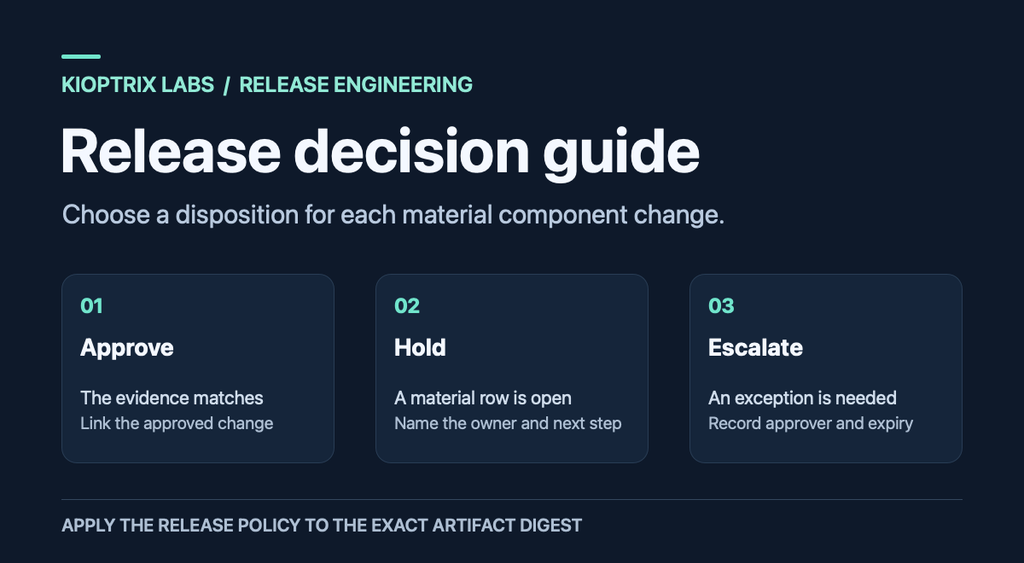
See the public Jackson release comparison for an expected version update and the synthetic exercise for a case that stays on hold.
7. Keep the evidence with the release record
Attach or link the baseline and candidate identifiers, original SBOMs, comparison output, and the build evidence for each material change. Add the generator versions and comparison command so a second reviewer can reproduce the result. Keep private package names and internal paths inside the approved project workspace.
Use this copyable note in the release ticket:
Baseline artifact and platform:
Candidate artifact and platform:
SBOMs and generator versions:
Comparison output:
Material changes and evidence links:
Unresolved rows, owners, and deadlines:
Decision and reviewer:
Public release case: Jackson Databind 2.22.1 to 2.22.2
This comparison uses two historical Maven Central releases of com.fasterxml.jackson.core:jackson-databind. Both inputs describe the main JAR for the same Java library. Both documents declare CycloneDX 1.6 and cyclonedx-maven-plugin 2.9.1 as the generator.
Download the 2.22.1 SBOM and Gradle metadata for the baseline, and 2.22.2 SBOM and Gradle metadata for the candidate. Keep the original filenames. Maven Central’s SHA-256 sidecars for the baseline JAR and candidate JAR identify the published artifacts. The checksums below are the values Maven Central reports for the JARs.
2.22.1 JAR SHA-256: 7dcd7e53bec1f56c7ad278bd1ca0840bebcc595d61ce44d6a8439abb75b965b2
2.22.2 JAR SHA-256: d0da14c12b16b5d54719aa172d83b542ff4abeb8b0fb7db476fde8ceece760ca
Reproduce the component comparison. Run this with Node.js from the directory containing the two downloaded JSON files. The comparison below was run in JavaScript on the published JSON. For this pair, it matches each listed component on Maven group and artifact name and checks its reported version.
node - jackson-databind-2.22.1-sbom-cyclonedx.json jackson-databind-2.22.2-sbom-cyclonedx.json <<'JS'
const { readFileSync } = require('node:fs');
function inventory(bom) {
  const rows = new Map();
  for (const item of bom.components) {
    const key = item.group + ':' + item.name;
    if (rows.has(key)) throw new Error('Duplicate coordinate: ' + key);
    rows.set(key, item.version);
  }
  return rows;
}
function compare(beforeBom, afterBom) {
  const before = inventory(beforeBom);
  const after = inventory(afterBom);
  const keys = [...new Set([...before.keys(), ...after.keys()])].sort();
  return keys.map(key => {
    const a = before.get(key) ?? 'missing';
    const b = after.get(key) ?? 'missing';
    return key + '  ' + a + ' -> ' + b + '  ' + (a === b ? 'UNCHANGED' : 'CHANGED');
  });
}
const inputs = process.argv.slice(2).map(file => JSON.parse(readFileSync(file, 'utf8')));
console.log(compare(...inputs).join('\n'));
JS
com.fasterxml.jackson.core:jackson-annotations 2.22 -> 2.22 UNCHANGED
com.fasterxml.jackson.core:jackson-core 2.22.1 -> 2.22.2 CHANGEDDecision on the changed row. Treat the jackson-core update as expected for this comparison. The runtimeElements entries of the published Gradle metadata declare the same version change, and the FasterXML release notes list changes to Jackson Core for 2.22.2. jackson-annotations stays at 2.22 in both sources. This evidence closes the version-change question. The release decision still requires whatever checks your team applies.
The Gradle metadata also lists the Jackson dependency-management BOM as a platform. The comparison here counts entries from the CycloneDX components array. This keeps platform constraints, the root JAR version, and library inventory changes distinct.
To compare the same downloads using the CycloneDX CLI, use the command below. The recorded output on this page comes from the JavaScript comparison.
cyclonedx diff jackson-databind-2.22.1-sbom-cyclonedx.json jackson-databind-2.22.2-sbom-cyclonedx.json --component-versionsWorked example: an SBOM diff review that catches a scope mismatch
Run this SBOM diff review with two synthetic CycloneDX 1.6 JSON files. They represent fictional releases 2.7.1 and 2.7.2 and use invented npm component names. The ZIP includes both inputs, a Python verifier, the recorded output, and the test environment. The exercise requires Python 3 and runs without installing the example packages.
Tested with Python 3.9.6 on macOS 14.5 (Apple silicon). Extract the ZIP and run this command from the extracted directory.
python3 compare_demo.py baseline.cdx.json candidate.cdx.jsonThe verifier first models a scope mistake by adding 37 fictional development entries to the candidate in memory. It then compares the original fixtures at matched scope. Here is the recorded output.
Mixed-scope run: 40 total changes
Matched-scope run: 3 changes
ADDED   @sbom-review-demo/diagnostic-tool  + 0.3.0
REMOVED @sbom-review-demo/legacy-helper  - 0.9.0
UPDATED @sbom-review-demo/parser  1.4.2 -> 1.4.3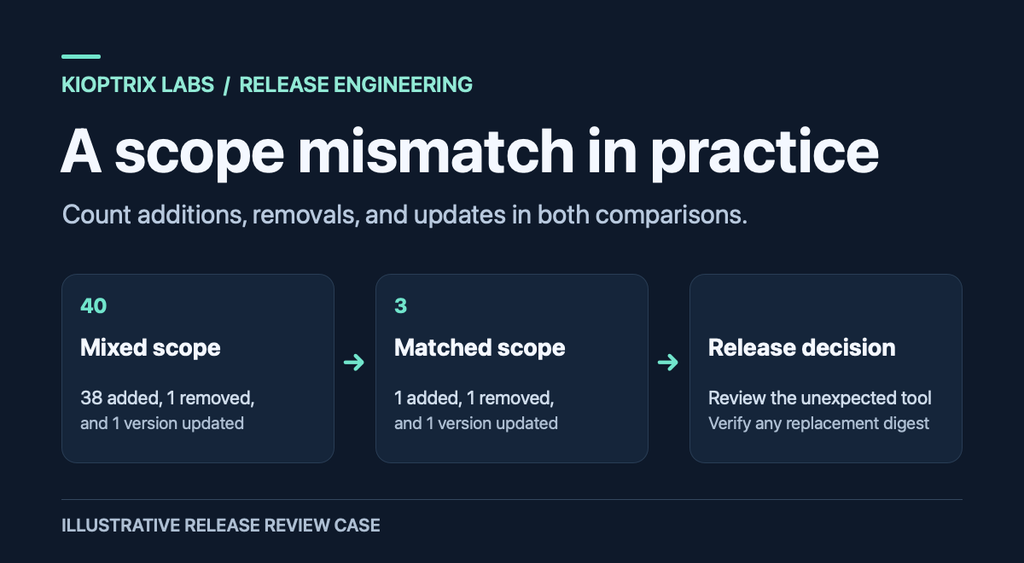
Both lines count added, removed, and updated component rows. The mixed-scope run contains 38 additions, one removal, and one version update. The matched-scope run contains one of each. The unchanged runtime-core entry drops out of the report.
| Observed change | Decision in this exercise | Evidence needed for a real release |
|---|---|---|
| Diagnostic tool added at 0.3.0 | Hold. The stated change did not include a diagnostic tool. | Trace the addition to a dependency or build step. If removed, rerun the comparison against the replacement image digest. |
| Legacy helper 0.9.0 removed | Accept after verification. The removal is plausible and still needs an owner’s explanation. | Check the package manifest or final image and link the approved removal. |
| Parser updated from 1.4.2 to 1.4.3 | Accept if it matches the approved update. | Match the old and new versions against the build’s lockfile and change request. |
The three dispositions are release-review decisions made from the scenario. The verifier compares component group, name, and version for these fixtures. Use the dependency graph and build records separately when you need to establish a changed parent, checksum, or artifact identity.
To try the original matched-scope pair with CycloneDX CLI, run the following command in the same directory. The recorded run above used the bundled Python verifier. CycloneDX CLI reports in its own format.
cyclonedx diff baseline.cdx.json candidate.cdx.json --component-versionsWhat to record when the candidate changes during review
Close the initial SBOM diff review as superseded and keep its findings with the release ticket. Open the final review against the replacement digest. Carry forward explanations only when the matching component and evidence are still valid for the new build. If a package disappears in the replacement, record the evidence for its removal.
As a final check, ask a second reviewer to trace one material row from the diff back to the candidate. They should be able to find the component, its version, and the decision without reading the whole build log. A useful SBOM diff review ends with a record another reviewer can reproduce.
SBOM diff review playbook for recurring releases
Use this playbook when several people share responsibility for the build, the component records, and the approval. Assign a build owner who can explain how the artifact was created and a reviewer who can verify the evidence. Keep those names in the release ticket. If the reviewer cannot reach an owner before the release deadline, the ticket should say which decision is waiting and who can make it.
Choose a comparison baseline for each release channel
For a routine production update, start the SBOM diff review from the last artifact actually shipped to that channel. A patch release can branch from an older line while the main branch continues to change. Comparing against the newest build overall may produce a long list of differences from a release that never reached the affected users.
For a phased rollout, write down the artifact already installed in each cohort. If two cohorts will move from different baselines to the same candidate, run two comparisons or explicitly limit the review to the first cohort. Keep the candidate identifier in both records so a second reviewer can see when the same build was evaluated from different starting points.
When a release has an application image and a separate worker image, compare each artifact against its own predecessor. Link the results in the same ticket with their roles and platforms. Keep separate rows for a shared package when each image uses a different version or obtains it through a different build step.
Keep change categories consistent across reviewers
In an SBOM diff review, “changed” is a starting label. Use more specific categories when two reviewers might otherwise interpret a row differently. Record the previous value, candidate value, source of evidence, and disposition for the rows that influence approval.
- Added. The package is visible only in the candidate inventory. Confirm that both generators covered the relevant ecosystem and final artifact. Find the dependency or packaging change that introduced it.
- Removed. The package is visible only in the baseline. Check whether it left the shipped artifact, changed identity, or fell outside the candidate scanner’s coverage. Leave the row unresolved if the evidence is incomplete.
- Version changed. Match stable package coordinates before comparing versions. For an apparent downgrade, use the package manager’s version rules and confirm the reason in the change record.
- Relationship changed. Check which parent now brings in the component. The same version may serve a different module or workload, and the new parent may own the future update path.
- Identity unclear. Keep the two entries visible while the build owner resolves the collision. A shared display name or an empty version string gives the reviewer too little information to infer a match.
Prepare the evidence before opening the release review
The build owner can attach a short release manifest with each artifact’s digest, target platform, build run, and matching SBOM. Include the lockfile or package manifest that the build used. If a generated lockfile differs from the checked-in file, link the source of the generated version so the reviewer compares against the actual build input.
For a repeatable SBOM diff review, capture the generator and comparison tool versions alongside the commands or configuration. Keep the original SBOMs and any filtered views. If a filtering step drops fields such as generation timestamps, record those choices so another reviewer can reproduce the view and return to the full records as needed.
Store the comparison where the release approver can open it without requesting access to a personal account. Link to the exact build run or stored artifact instead of a dashboard that always opens the latest run. A clean handoff lets another reviewer resume the work when the build owner is unavailable.
Decide what the automation should report
Start the automation with checks it can substantiate from the evidence. It can flag a missing baseline, different platform labels, an unfamiliar generator version, or unmatched rows. It can attach links to the relevant build runs. The SBOM diff review owner can then confirm whether those flags are due to a real release change or a collection issue.
Define which cases require human review. An approved version update may be straightforward when its package coordinates and build record match an existing change request. A new runtime package with no owner, a coordinate collision, or a checksum mismatch with unclear scope should produce a visible review item.
Track the number of unresolved rows after scope checks. A count of raw differences can jump when the generator changes. A count of unresolved material rows tells the release team what still needs an explanation. Keep the original count in the output if the team uses it to spot changes in the generator or its configuration.
Review the review record before approval
Read the final SBOM diff review record from top to bottom as a release approver would. Confirm that the linked artifact is the one scheduled for deployment and that the listed evidence applies to its exact build. Open a representative evidence link and check that it shows the package and version claimed in the disposition.
Record when the final candidate was selected, who reviewed it, and which exceptions are active. For an exception, identify the affected component, the owner responsible for follow-up, and the date the exception expires. If the candidate is rebuilt later, check the new artifact identifier and reassess any disposition that depended on the old build.
A release can be ready from an inventory perspective while other sign-offs are still pending. Write the result in terms of the scope covered by the SBOM diff review. For example, mark the component changes reviewed and link the decision, then use the release ticket to track the remaining approvals.
Capture follow-up from the first few reviews
After several releases, look at the rows that cost the most time to resolve. If the team repeatedly investigates source packages that do not ship, move the primary inventory collection to the packaged artifact or label the source inventory clearly. If reviewers cannot reproduce the diff because tools change between builds, store the versions with the comparison record.
Use those observations to update the release template. One field for the platform-specific artifact identifier may prevent more confusion than adding another general checklist. The goal of a recurring SBOM diff review is to make each meaningful change traceable, so the next reviewer starts with better evidence.
SBOM diff review FAQ
Does an empty diff mean the build is safe to ship?
An empty result means the comparison found no changes within the fields and coverage it inspected. Your usual release checks still apply. Review artifact provenance, build results, and any vulnerability or license checks required by your team.
What if we have no previous SBOM?
If you can retrieve the previously shipped artifact, generate its SBOM with the same scope and settings as the candidate and label it as a retrospective baseline. Otherwise, review the candidate inventory on its own and retain it as the baseline for the next release.
Which changes should I look at first?
Start with unexpected additions to the shipped artifact, apparent downgrades, unexplained checksum changes, and any difference that could come from a tool or scope change. Resolve the scope question early because it can change the interpretation of many rows at once.