The renewal notice is due Friday. Your SaaS provider has sent a new assurance report, a list of hosting providers, and a recovery summary. The report covers the service you already use. The renewal also adds an analytics module, and none of the attachments clearly says whether that module is covered. What can you take to the renewal meeting?
On this page

A vendor security evidence register connects each material question to the evidence reviewed, its scope and dates, and a person responsible for the next action. Use one row per question or requirement. At renewal, the rows should show which parts of the service the evidence supports and which decisions still need an owner.
60-second renewal triage
| What the reviewer finds | Practical next action |
|---|---|
| Evidence covers the service and requirement | Record the file, the relevant section, and the date or period reviewed. |
| Evidence exists but scope or dates are unclear | Mark what is unclear and ask for the missing scope or period in one precise request. |
| A material requirement is open | Name an owner, identify the affected service, and route the decision before renewal or expansion. |
Begin with the contract notice date and the internal decision date. They can differ by several days. A risk decision due Friday is of little help if procurement needs instructions on Wednesday to act on the contract. Record the earlier operational deadline and agree who can decide by then.
Seven checks for a vendor security evidence register
1. Define the service your team will actually use
Capture the vendor legal entity, contracted service, editions or modules, processing regions, and the customer activity that matters to the review. Keep the current deployment and planned additions in separate rows if they have different evidence. A report that covers the core service can support that row while the additional module remains open.
Start with what changed since the last review. A new connector, a different hosting region, or a new data flow gives you a concrete reason to reopen the scope question. Ask the service owner to confirm which changes will be enabled and when.
2. Turn each requirement into an answerable question
Use a question that a document can answer. “Show us your security” gives a reviewer too much discretion. “Does the scope description cover the analytics module and the region in our order form?” leads to a specific page, a clear answer, or a gap. If the answer needs several sources, keep links to each one in the same row.
Match the request to the risk and the service. A dependency question may call for a scoped software bill of materials or a vendor explanation. A payment-service assessment has its own scope and responsibility questions. For that case, use the separate PCI DSS attestation review checklist and record the resulting decision in the register.
3. Record the evidence period separately from the date received
Give each record separate fields for the period or effective date, when your team received the file, and when it was reviewed. A document delivered this week may address an earlier period. If a change occurred afterward, ask what evidence covers the change rather than treating the delivery date as an answer.
For an ongoing activity, identify the most useful date. A recovery-test summary needs a test date and scope. A subprocessor list needs an effective date and a service match. Where policy requires a review interval, calculate the next review from the field the policy actually uses.
4. Cite the section that supports the conclusion
Add a page, heading, section name, or dated record beside the link. “Reviewed PDF” gives the next reviewer little to work with. A better entry reads “scope section names the core platform and the contracted U.S. region. The order form adds a separate module whose coverage is pending.” Keep the written conclusion narrow enough to match the evidence.
Store source files in the approved, access-controlled repository, then link to them from the register. Check that the second reviewer can open those links before you finish. If a portal link expires, record the document title, period, and a durable retrieval location permitted by your organization or your agreement.
5. Record exceptions separately from gaps in evidence
An exception is an observed departure from a requirement or a documented control outcome. A gap in evidence means the reviewer cannot yet substantiate an answer. Both can require follow-up, but the questions are different. For an observed exception, document its relevance, affected scope, and any remediation evidence. For a gap, identify the missing artifact or clarification.
When a vendor provides a VEX statement, review that statement with the VEX review checklist, then summarize the review outcome and remaining owner in the register. Keep the detailed technical analysis linked to its own record.
6. Assign the decision and the next action to named roles
A request needs an owner who can obtain the evidence. The renewal decision needs someone with authority under your organization’s policy. They may be different people. Write both roles, the due date, and what should happen if the evidence remains unavailable. A status such as “awaiting vendor” should always have a next action and a date.
A conditional approval should state what can proceed, the temporary restriction, a deadline or expiry, who approved it, and what happens at expiry. In the analytics example, the restriction could be keeping the module disabled while the existing service continues, assuming the contract and product setup make that restriction practical.
7. Preserve the decision and schedule the next review
Record the final decision date, the approver, the open conditions, and the next review trigger. A calendar check is one trigger. A change to hosting, an added module, or a newly disclosed incident can also prompt a review of the affected rows under your internal policy. Keep prior evidence and decisions according to your organization’s retention and access rules.
For governance context, NIST SP 1305 explains how organizations can use the CSF 2.0 supply-chain category and define or communicate supplier requirements. The register below is a practical example for recording a review. Adapt its fields and approvals to your own requirements.
Worked example: renew the core service and review the new module separately
Illustrative case. An operations team wants to renew an existing service and add an analytics module. The contract owner confirms the notice date. Procurement needs written instructions two days earlier. Security reviews the evidence against the current deployment and the proposed expansion.
| Review question | Evidence and assessment | Owner and next action |
|---|---|---|
| Does the scope cover the currently deployed core service? | Assurance report scope section names the core service and contracted region. Period ended June 30. Match recorded for the core service row. | Security reviewer records the section and the organization’s next review date. |
| Does the same scope cover the analytics module? | Order form names analytics. The reviewed report does not identify it. Coverage remains unverified. | Vendor manager asks for a scoped written answer and supporting evidence before enabling analytics. |
| What does the latest recovery exercise support? | The summary lists a test for the core service. The module is not listed in the test scope. | Service owner confirms which recovery requirement applies to the proposed module. |
| What may proceed by the internal deadline? | Current scope can be considered for renewal. The module is a separate open decision. | Approver records the core-only decision if permitted, restriction, deadline, and outcome if evidence remains open. |
Before procurement acts, check whether the order form, billing setup, and product permissions actually allow the module to remain disabled. If they do not, escalate the combined decision. A restriction in a spreadsheet needs a person and a mechanism to enforce it.
A completed approval record you can take to the renewal meeting
Fictional decision record. All dates and roles in this example are illustrative. The contract notice deadline is Friday, December 4, 2026, at 17:00 UTC. Procurement needs instructions by Wednesday, December 2, at 17:00 UTC. The risk approver accepts a core-only renewal on December 2 after the contract owner confirms the order can exclude analytics. The analytics module remains unapproved. The temporary arrangement allows the disputed scope to stay open until December 18 at 17:00 UTC while the team gathers evidence.
| Decision record item | Recorded condition | Owner and timing |
|---|---|---|
| Decision and scope | Renew the existing core service. Exclude the analytics module and any related data connector from the order or activation until a separate decision is recorded. | Risk approver approves on December 2. Procurement records the order-form version and confirms the core-only scope. |
| Restriction and verification | Keep analytics disabled. Check that no connector is configured to send data and that the vendor order excludes the module. | The service administrator records a dated verification on December 2 and checks again on December 16. |
| Vendor evidence deadline | Provide a scope statement or other appropriate evidence that names analytics, the processing region, and the applicable period. | Vendor manager requests it by December 11 at 17:00 UTC and retains the written response. |
| Expiry and action | The temporary review window ends December 18 at 17:00 UTC. If evidence is still insufficient, close the expansion request as deferred, leave analytics disabled, and notify procurement and the service owner. | The risk approver owns the disposition. The service administrator confirms the restriction remains in effect. |
An email request and an actual restriction have different jobs. The vendor manager can ask the vendor to hold the module. The service administrator checks the customer configuration, and procurement checks what was purchased. Attach or link to a dated status record for each check. That gives the next reviewer a way to distinguish a plan from a verified state.
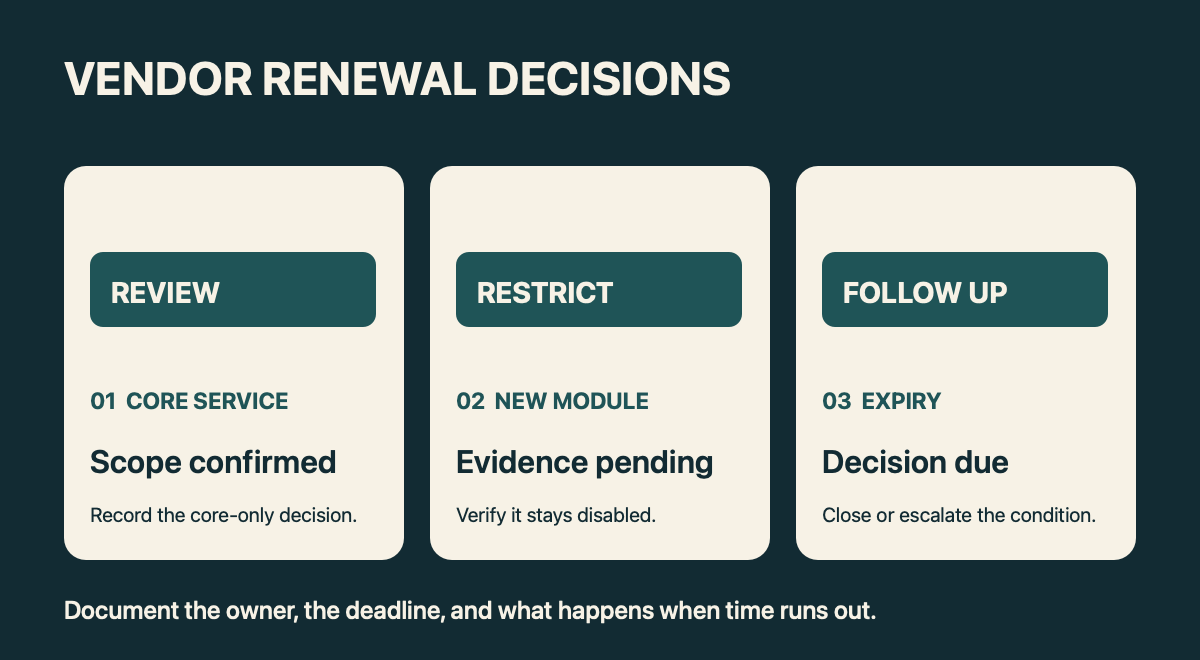
What to do at the next checkpoint
Evidence arrives on time. Suppose the supplier sends an updated scope letter on December 10. The reviewer records who issued it, its effective date, and the service and region named in it. The reviewer then checks whether the letter satisfies the specific procurement requirement or whether an independent report or another document is still required under policy. The risk approver records a new decision before the service administrator enables the module.
A reply arrives without resolving the scope. A vendor might provide an overview that confirms the analytics module exists, while leaving the region and assessment period open. Update the evidence register with the parts the reply establishes, keep the unanswered questions explicit, and send one follow-up asking for the missing detail. If the December 18 deadline is still in force, retain it so the service owner can plan for a deferral.
The deadline passes while the question is open. On December 18, the decision owner records “expansion deferred,” assigns the service administrator to verify that the module remains disabled, and notifies procurement that the core-only order remains the working basis. The register records who was notified and when. If someone wants a later review, create a new due date and decision record under the applicable approval process.
The restriction cannot be verified. Some services bundle a module into the same tenant and give customers limited visibility over whether it processes data. Record exactly what your service administrator can see and ask the vendor for a dated written confirmation and configuration evidence that your policy accepts. If the contract or product cannot separate the feature, route the combined service to procurement and the risk approver. The core-only decision in the example depended on that separation being available.
How to hand this off without asking a reviewer to start from scratch
Provide the next reviewer with a single decision record that identifies the signed order form, the deployed configuration, and the highest-priority open question. For each evidence link, include the section or page and the reason it matters. The reviewer should see why a scope statement for the core service supports a core-only outcome and what evidence could change the expansion decision.
Keep the short handoff note anchored to the next action. An example is “Core service renewed on December 2. Analytics remains disabled, verified December 16 in the service settings. As of December 18, vendor scope still omits the contracted region. Procurement notified and the expansion request deferred.” A handoff with dates and named roles lets a colleague pick up the vendor thread without reopening every closed item.
Avoid collecting multiple copies of the same evidence in email threads and shared drives. Link to the approved copy, log a version or date, and make files available only to authorized reviewers. Record whether the vendor provided a written statement, the review team inspected a restricted portal, or the service administrator confirmed a setting. Each form of evidence supports a different claim.
A five-minute quality check before the renewal meeting
Ask a second reviewer to read one open row and one closed row. In the open row, they should be able to tell who is acting, by when, and what happens if the vendor stays silent. In the closed row, they should be able to open the right evidence, inspect the relevant section, and explain the decision in a sentence. If they cannot do that, add the missing reference or action to the evidence register before the meeting.
Next, read the renewal decision against the purchase request. Check whether its product names and enabled services match the proposed scope. Confirm the decision owner has the authority your process requires and that the service owner knows which changes must remain on hold. A calendar reminder can flag the deadline, while a named role makes it clear who is responsible for acting on it.
Copy the evidence-register template
Open the template, replace the sample row, and paste it into a spreadsheet. Keep one row per decision or requirement if different teams or deadlines apply. Store only the amount of vendor information your reviewers need in the register.
Tab-separated register template
Vendor follow-up email
Subject: Renewal evidence request for [service / module]
We reviewed [document and period]. Its scope section identifies [covered service]. Please confirm whether [module and region] are covered, and share the relevant section or separate evidence showing the scope and applicable dates. Our internal decision is due [date and time]. If the evidence will be available later, please provide the expected date and a contact for follow-up.
Common questions
Should every vendor get the same evidence request?
Use a common register structure and tailor the requests to the service, access, reliance, and your review policy. A public-content tool and a platform handling sensitive records can use the same column headings while needing different questions and approvers.
Does a new report close a prior exception?
Check whether the new evidence addresses the same control, service, period, and corrective action. Record closure and the reviewer only after identifying what establishes remediation. If the vendor reports a planned fix, retain an owner and a follow-up date.
What if the vendor can only show evidence in a portal or a call?
Record the date, reviewer, scope, and conclusion allowed by your policy and the vendor’s terms. Have an authorized second reviewer confirm a material conclusion when required. Track any restriction that would prevent future reviewers from verifying the same evidence.
Start with one renewal. Pick the requirement most likely to change the decision, create its register row, and set the internal deadline. A reviewer who opens that row later should be able to reconstruct the scope, the evidence behind the conclusion, and the next decision from the record itself.