Sources, review date and section shortcuts
Key claims reviewed: October 19, 2026. These twenty patterns are a review map, not a prevalence ranking or complete assessment.

Primary documentation · NoSQL Injection Patterns: 7 Checks for Query Types, Tenant Scope and Evidence
Go straight to: Decision check · Main workflow · Further detail
Do not use CORS as an authorization verdict
CORS governs browser access to cross-origin responses; application authorization still needs its own checks. In a permitted exercise, identify the caller, object, intended action and observed server decision. A CORS error can hide a response from browser script without establishing that the server rejected the request. Equally, an HTTP 200 response does not establish access to the intended protected object. Keep the observed operation separate from the browser presentation. Source and scope.
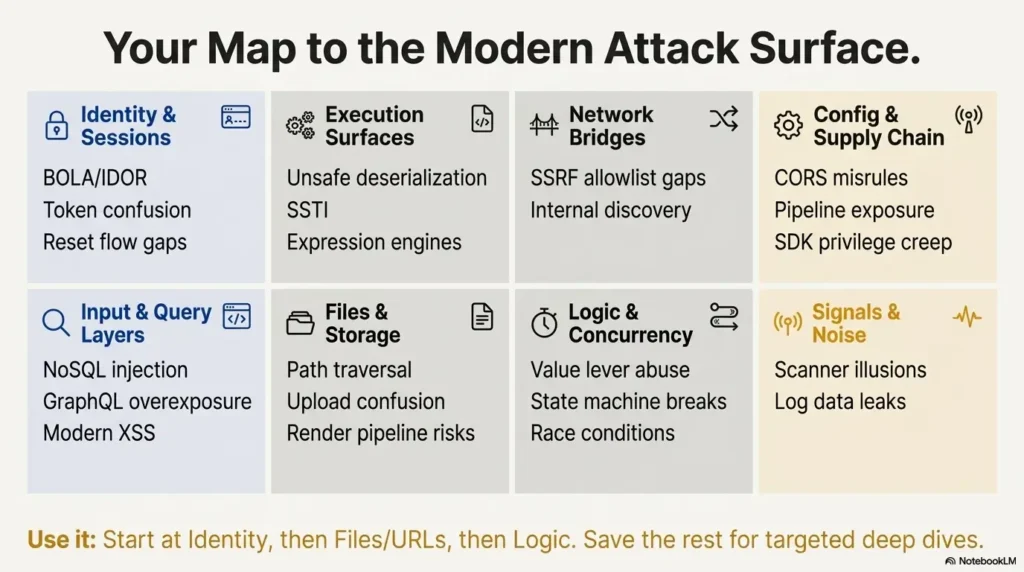
Use these 20 web-security patterns to choose questions for an authorized review, then verify the conditions and impact in the actual application. A pattern name, scanner severity or unusual response is not a confirmed finding. This guide is a review map, not a ranked prevalence study or a complete assessment methodology.
The list covers identity, inputs, execution surfaces, files, server-side requests, business rules and configuration. It contains no personal client stories, promised completion times or measured productivity gains. Proposed checks must fit the agreed environment and data-handling rules.
Define the Scope and Evidence Standard
Before active testing, record the authorized endpoints, accounts, actions, time window, approved observation endpoints and stop conditions. Start with disposable labs and synthetic data for practice. Ownership of one component does not authorize testing an adjacent service or a third party.
For each question, state the expected behavior, one controlled comparison and the evidence that would distinguish an issue from normal behavior. Stop when activity leaves scope or changes could affect real users. Automation choices depend on permitted actions and application behavior, not an arbitrary number of endpoints.
Identity and Session Boundaries
1) Broken object-level authorization
Identify which user, role or tenant may act on each object. With approved synthetic accounts, compare permitted and forbidden operations on known lab records. A hard-to-guess identifier does not replace authorization. Use server-side permission checks on every request, including alternate API routes; describe only the access actually observed.
2) Token confusion and session shadowing
Trace which kind of token each endpoint accepts, and how issuer, audience, expiration and intended use are validated. A valid signature alone does not establish permission for every endpoint. For JWT deployments, RFC 8725 addresses audience validation and separation of different JWT uses. Check the real token design rather than assuming every system uses JWTs.
3) Password reset and magic link edge cases
Use lab accounts to review issuance, expiry, reuse and account association of recovery links. Record what is invalidated after successful use. The OWASP recovery guidance covers single-use, expiring tokens and consistent responses. A visible response difference requires investigation; it does not by itself prove account takeover.
Queries, GraphQL and Browser Rendering
4) NoSQL injection through flexible filters
Find where parsed input becomes a database filter. Verify allowed fields and scalar types before construction, while keeping authorized tenant scope application-controlled. An object-shaped input is a question to investigate, not an exploit result. The NoSQL query review provides a narrow filter example and explicit verification limits.
5) GraphQL overexposure
Inspect authorization on the objects and fields a resolver returns, as well as mutation permissions. A discoverable schema does not itself establish unauthorized access. OWASP’s GraphQL guidance treats access control and query resource limits as separate concerns. Compare approved roles using small synthetic examples rather than extracting real datasets.
6) XSS with modern templating
Identify the final browser context: text, attribute, URL, HTML or script. Reflection alone is not execution. OWASP’s XSS guidance distinguishes context-specific encoding and HTML sanitization. Check custom renderers and rich-text paths; a framework’s default behavior does not establish the safety of every escape hatch.

Deserialization and Expression Execution
7) Unsafe deserialization
Record the exact format, parser and source of an imported state object. Do not equate all JSON handling with native object deserialization. OWASP’s deserialization guidance explains the risks of native formats that can instantiate behavior. Prefer constrained data formats and validation suited to the actual runtime; do not run unknown serialized objects to discover what they do.
8) Server-side template injection
Determine whether user content is supplied as template data or becomes executable template source. PortSwigger’s template-injection material explains that server-side evaluation is distinct from ordinary browser rendering. A preview feature or template-like delimiter is not proof of code execution. Keep the template source application-controlled and verify the chosen engine’s restrictions.
9) Expression language surprises in low-code features
For rule builders and low-code expressions, document the intended language capabilities and exposed objects. An expression feature may be deliberate; the question is whether it crosses its permitted boundary. Review the implementation in an authorized environment, restrict exposed capabilities and test the declared policy. Do not assume one universal escaping rule makes arbitrary server-side expressions safe.
Files, Paths and Conversion Services
10) Path traversal through “helpful” file APIs
Trace a download or import identifier to the resolved storage object. A filename parameter is only an entry point. PortSwigger’s path-traversal guidance describes access outside an intended directory. Prefer application-controlled identifiers mapped to permitted resources and verify the actual filesystem/storage boundary, including permission checks.
11) Insecure file upload and content-type confusion
Check the whole upload lifecycle: acceptance, naming, storage, conversion and delivery. The client-supplied Content-Type is not trustworthy evidence of file type. OWASP’s upload guidance recommends layered validation, appropriate storage and size/access controls. An allowed extension or a clean scanner result alone does not establish safe execution or rendering.
12) PDF/office renderers and conversion pipelines
Treat conversion as a separate processing boundary with its own inputs, privileges, network access and resource limits. The presence of a PDF or office renderer does not prove SSRF or a sandbox escape. Review the specific converter’s documentation and deployment. For this overview, those product-specific behaviors remain unverified; use synthetic files and approved observation points for a follow-up exercise.
Server-Side Requests and Destinations
13) URL fetchers with weak allowlists
For URL previews, imports and webhooks, record how the destination is parsed, resolved and requested. OWASP’s SSRF guidance covers application and network controls, including redirect behavior. Verify allowed destinations at the relevant boundaries. A successful callback to an approved test endpoint demonstrates a request, not arbitrary internal access.
14) Cloud metadata and internal service discovery
Keep external request behavior, internal reachability and credential access as separate claims. A URL-fetch feature does not automatically expose a cloud metadata service. Determine provider-specific protections and egress policy from the actual deployment. Do not probe metadata or retrieve credentials outside explicit scope; a prepared lab marker can answer a narrower reachability question without collecting secrets.

Business Rules and Concurrent Actions
15) Price, quota, and coupon manipulation
Write down the authoritative rule for price, quota or discount use. PortSwigger’s business-logic guidance emphasizes application-specific assumptions. Use synthetic transactions to compare the final server state with the rule. Client-side controls are not the authoritative calculation; do not infer a financial loss from a changed screen value.
16) State machine breaks
Map the permitted states and who may advance them. For an approval workflow, record prerequisites, authorization and the final stored state. A skipped UI step is not a confirmed bypass if the server rejects the action. Validate transitions on the server and include negative regression cases for the declared workflow.
17) Race conditions in multi-request flows
Identify a rule that must remain true when operations overlap, such as one-time redemption. PortSwigger’s race-condition guidance describes limit overruns caused by concurrent processing. Do not equate sequential duplicate requests with a demonstrated race. Reproduce only in an approved environment and choose atomicity/transaction controls appropriate to the actual data store.
Configuration and Third-Party Trust
18) Overly permissive CORS and debug features
A permissive header is an observation to interpret in browser context. MDN’s CORS reference explains that browsers block credentialed response access with a wildcard allowed origin. Investigate whether an unintended origin can actually read sensitive content under the relevant credential policy. CORS is not server-side authorization. Assess debug disclosures separately.
19) CI/CD secrets and artifact exposure
Inspect who may read build logs, downloadable artifacts and registry contents. OWASP’s CI/CD guidance addresses pipeline credentials and permissions. An exposed artifact does not prove a working secret exists. Use controlled canaries where possible; redact discovered values and follow the agreed response process instead of trying credentials on other services.
20) Third-party SDK and plugin privilege creep
Record the data and privileges available to each browser script, SDK or plugin. OWASP’s third-party JavaScript guidance explains the trust introduced by scripts. Review necessity and deployment controls for the component involved. Dependency presence or age alone is not evidence of an exploitable path in this application.
Interpret Alerts and Protect Logs
Treat scanner alerts as hypotheses
Record what the tool observed and reproduce the smallest permitted comparison. Reflection does not establish XSS, a version banner does not establish exploitability, and an error does not establish query control. If conditions remain unknown, label the item unverified rather than assigning a dramatic outcome.
Protect the evidence collection
The OWASP logging guidance discusses excluding sensitive values and protecting access to logs. Preserve the evidence needed to explain the issue, with timestamps and context. A trace identifier alone is not proof of sensitive disclosure; examine what an unauthorized reader can actually obtain.
Build a Target-Specific Review Record
Plan, compare and retest
- Plan: name the object, identity, boundary and expected rule.
- Compare: collect a baseline and one bounded variation, preserving synthetic evidence.
- Retest: verify the proposed repair and permitted behavior; record what remains untested.
Use fields for component/version, source reference, authorized identity, expected result, observed result, evidence location, root-cause hypothesis, repair owner and regression outcome. Estimate work from the actual scope and uncertainties. This guide does not provide a validated hours-per-endpoint calculator or claim that these patterns cover a fixed percentage of vulnerabilities.
This checklist is a local planning aid. It has no submission action and does not run tests or certify coverage.
Choose Your Next Bounded Check
Choose one sensitive lab object and one approved identity. Write the rule that should protect it, then identify the smallest observation that could confirm or challenge that rule. If no issue is observed, record the conditions checked rather than concluding that the whole application is secure.
Common Review Questions
Which patterns should a beginner start with?
Choose a prepared exercise that teaches one boundary you can explain. Object authorization, rendering context and file access are possible starting topics; they are not a universal ranking.
How should an unconfirmed scanner alert be reported?
Describe the observed response and missing conditions. Keep a suspected issue separate from an impact that has been demonstrated.
When should SSRF receive attention?
Prioritize from actual server-side request features, reachable data and permissions. Cloud deployment alone does not prove metadata exposure.
How do I review a business rule?
Write the intended invariant and compare authorized synthetic operations with the final server state. Do not experiment with real purchases, balances or destructive actions.
What makes a report actionable?
Explain the identity, object, controlled reproduction, demonstrated access change, limits and proposed regression check. Do not promise a particular repair time.
Do these checks apply to mobile APIs?
They can apply to shared or alternate backends. Verify the actual routes and permissions; do not assume the mobile and web clients use identical controls.

Review Limits and Source Date
Reviewed October 16, 2026. Selected meanings and defensive principles were checked against the linked original documentation. The 20-item grouping is an editorial learning map, not a measured frequency ranking. No application was independently scanned or exploited for this revision. Illustrations and hypothetical review steps are not evidence of personal engagements or successful exploitation.