Beginner-Friendly Reporting Guide
Professional Pentest Report Template
That Clients Can Actually Use
Finding a vulnerability feels like the dramatic part of penetration testing. The terminal scrolls, the exploit lands, and for a moment the room seems to hum. Then the assessment ends, the command history goes quiet, and the work that determines whether anyone fixes the problem begins: writing the report.
A professional penetration testing report does not merely prove that you found something. It explains what was tested, what happened, why the issue matters, how confidently it was verified, and what the client should do next. That requires technical accuracy, restraint, structure, and a little empathy for the tired reader opening page 37 before a Monday meeting.
This guide gives beginners a practical report architecture, a reusable finding template, severity guidance, evidence rules, quality checks, and clear boundaries for responsible reporting. You will finish with a format you can use for legal lab work, portfolio projects, freelance engagements, and junior security roles without turning scanner output into an expensive-looking scrapbook.
Structure
Know exactly what belongs in executive, technical, and appendix sections.
Evidence
Document proof clearly without leaking secrets or drowning readers in screenshots.
Action
Write remediation advice that engineers can prioritize and verify.
The report is not the receipt for your hacking. It is the bridge between evidence and action. 🔐
Snapshot
This guide is for cybersecurity students, entry-level analysts, freelancers, and aspiring penetration testers who need a client-ready reporting format. It solves the blank-page problem by showing how to organize scope, findings, evidence, risk, and remediation. By the end, you can build a reusable pentest report template and test it against a legal practice lab.
Table of Contents
Before You Write: Authorization, Scope, and Safe Handling
Before You Act
Use this article for authorized assessments, controlled labs, portfolio exercises, and lawful professional work. A report template does not replace a signed statement of work, rules of engagement, legal review, data-handling policy, or client-specific compliance requirements. Confirm scope, testing permission, confidentiality expectations, evidence retention, and delivery methods with the appropriate client representatives before testing or reporting.
Permission comes before evidence
A polished report cannot repair an assessment performed without clear authorization. Before collecting evidence, confirm which systems, domains, applications, accounts, network ranges, facilities, and testing techniques are included.
The engagement documents should also identify exclusions. Production denial-of-service testing, social engineering, physical access attempts, destructive database actions, and tests involving third-party infrastructure often require separate approval.
Treat the report as sensitive security material
A pentest report may contain internal addresses, usernames, software versions, architecture clues, exploit paths, screenshots, and remediation gaps. In careless hands, it becomes a tidy menu of the organization’s weak points.
- Agree on approved recipients before delivery.
- Use an authorized encrypted transfer method.
- Remove passwords, tokens, cookies, private keys, and unnecessary personal data.
- Define how long working notes and screenshots will be retained.
- Keep an access-controlled final copy and record when it was delivered.
- Confirm whether the client requires secure deletion after acceptance.
Key takeaway
The safest report contains enough evidence to support the finding, but not enough unrelated sensitive data to create a second incident.
Why Great Pentest Reports Matter More Than Great Hacks
Clients remember your report longer than your terminal session
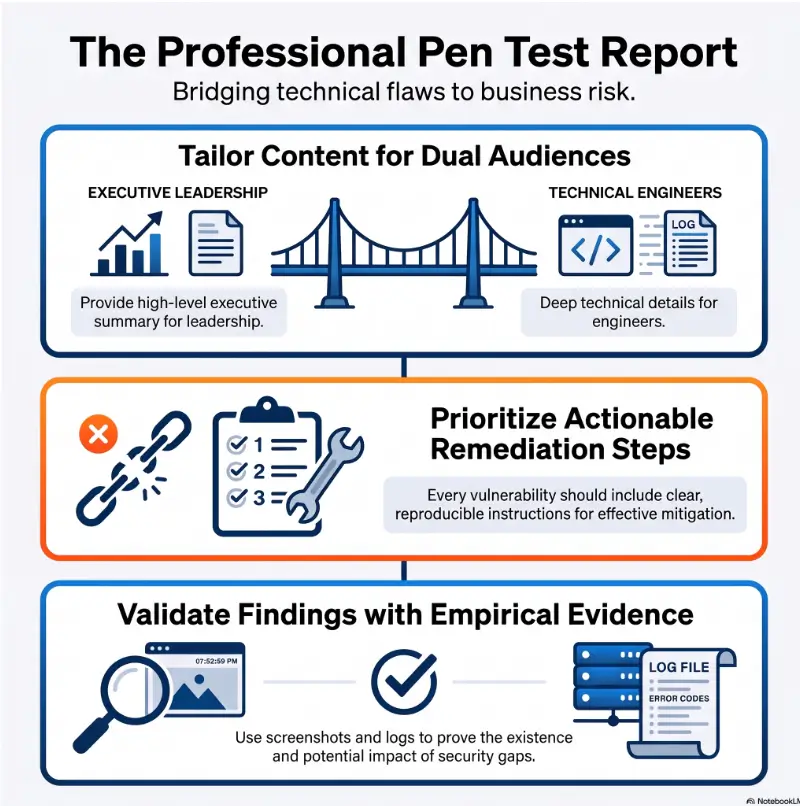
Most clients will never watch your enumeration process or see the chain of small decisions that led to a compromise. They will see the report. It may be forwarded to executives, engineers, auditors, insurers, investors, customers, and legal counsel.
That makes the report the durable product of the engagement. Your technical work establishes the truth; your writing determines whether that truth survives contact with budgets, deadlines, and competing priorities.
Communication is a security skill, not a decorative extra
A vague finding can remain open for months because nobody knows which asset is affected or what “fix this” means. A clear finding reduces the distance between discovery and remediation.
Strong reporting requires you to distinguish observation from assumption, technical possibility from demonstrated impact, and immediate remediation from longer-term improvement. Those are analytical skills wearing a writing coat.
Professional restraint builds trust
Beginners sometimes try to make every issue sound catastrophic. The instinct is understandable: dramatic findings appear impressive. In practice, inflated language weakens credibility and makes prioritization harder.
A calm sentence such as “An authenticated user could access invoices belonging to another customer by changing a numeric identifier” is more useful than “The entire platform is completely broken.” Precision has a quiet authority. It does not need smoke machines.
Real-world example: the five-line finding nobody could assign
A junior tester discovers an exposed administration page and writes a brief finding: “Admin panel found. High risk. Restrict access immediately.” A screenshot shows the login screen, but the report omits the affected host, discovery path, authentication behavior, business impact, and verification steps.
The infrastructure team assumes the application team owns it. The application team thinks it belongs to a vendor. The vendor asks for the exact URL and source address used during testing. A week passes while everyone circles the same five lines.
A stronger finding identifies the asset, notes that the panel is internet-accessible, explains whether default or weak credentials were tested, describes the observed risk, names the likely owner, and recommends both immediate exposure reduction and credential review.
The lesson is simple: a finding is not finished when it is technically true. It is finished when the right person can understand, assign, fix, and retest it.
What Belongs in Every Professional Pentest Report
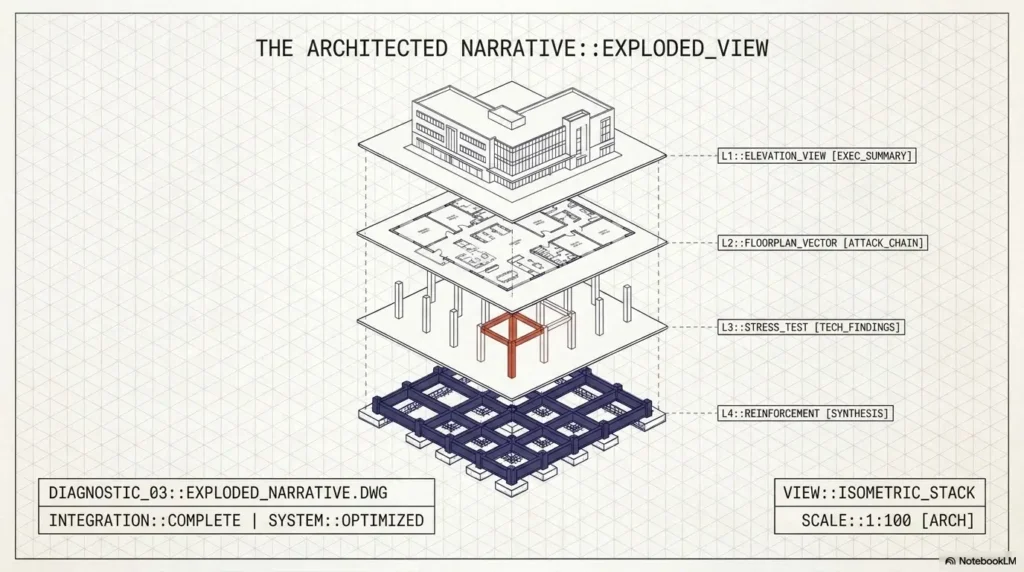
The exact structure changes with the engagement, but most professional pentest reports share a recognizable spine. Keeping that spine consistent makes your work easier to review and gives clients fewer places to get lost.
Front matter and document control
The opening pages establish what the document is, who may receive it, and which version is current. This sounds administrative until two different drafts begin wandering through an organization like confused twins.
- Report title and assessment type
- Client or organization name
- Testing provider or assessor
- Assessment dates and report date
- Document classification
- Version number and change history
- Approved recipients or distribution statement
- Primary client and tester contacts
The core report sections
| Section | Primary reader | Main question answered |
|---|---|---|
| Executive summary | Leadership and business owners | What is the overall risk, and what should happen first? |
| Scope and objectives | All stakeholders | What was tested, why, and within which boundaries? |
| Methodology | Security and technical teams | How was the assessment performed? |
| Findings summary | Leadership and remediation owners | What was found, and how is it prioritized? |
| Detailed findings | Engineers and security teams | What happened, how was it verified, and how can it be fixed? |
| Limitations | Risk owners and auditors | What did the assessment not establish? |
| Appendices | Technical reviewers | Where can supporting detail be found? |
Scope, objectives, and methodology need separate jobs
Scope defines the assets and boundaries. Objectives explain what the assessment was intended to evaluate. Methodology summarizes how testing was conducted.
Combining all three into a foggy paragraph creates avoidable disputes. A reader should be able to determine whether an asset was tested, whether a technique was allowed, and whether a stated objective was met without decoding your prose.
Limitations are not excuses
Every pentest is constrained by time, scope, access, environmental stability, and the information available during the engagement. Documenting those limits protects the meaning of the results.
- An application environment was unavailable during part of the test window.
- A third-party payment flow was excluded from active testing.
- Testing used one standard user role rather than every possible role.
- Rate limits restricted the depth of automated checks.
- Source code, cloud configuration, or endpoint telemetry was not provided.
- Results represent a point-in-time assessment rather than continuous assurance.
The Reporting Chain
From raw evidence to a verified fix
1. Context
Record scope, asset, role, time, and test conditions.
2. Observation
State exactly what the tester verified.
3. Risk
Connect likelihood and impact to the client.
4. Remedy
Recommend a practical, testable correction.
5. Retest
Verify the original path no longer succeeds.
How to Write an Executive Summary People Will Read
Executives buy clarity, not packet captures
The executive summary should explain the assessment in business language without becoming vague. Its purpose is not to reproduce every finding. It should help decision-makers understand the overall exposure, recurring themes, meaningful strengths, urgent priorities, and next actions.
A useful summary often fits within one to three pages, depending on the engagement. Length matters less than signal. A small application test may need several focused paragraphs; a broad enterprise assessment may require a compact risk table and thematic analysis.
Use a five-part executive summary formula
- Purpose: State what was assessed and why.
- Overall result: Describe the security posture in measured terms.
- Primary risk themes: Group findings into two or three patterns.
- Business relevance: Explain what those patterns could affect.
- Priority actions: Identify what should happen first and what should follow.
Beginner-friendly executive summary template
Reusable summary structure
Assessment context: An authorized penetration test was performed against the specified systems during the agreed test period to evaluate exposure to realistic attack paths within the approved scope.
Overall observation: Testing identified a small number of weaknesses that could increase the likelihood of unauthorized access or sensitive-data exposure under the conditions described in this report.
Primary themes: The most significant risks were associated with access-control enforcement, externally exposed administrative functionality, and inconsistent security configuration.
Business relevance: If exploited, these issues could affect confidentiality, account integrity, service reliability, or customer trust. The precise impact depends on the privileges and data available to an attacker.
Recommended response: Address the highest-priority findings first, confirm ownership for each remediation item, and schedule a focused retest after corrective work is complete.
Highlight risk without manufacturing fear
Avoid claims such as “attackers will certainly compromise the company” unless the evidence truly supports that certainty. Penetration testing demonstrates observed weaknesses and feasible paths under specific conditions. It rarely predicts the future with courtroom lighting and a thunderclap.
Prefer language such as “could allow,” “may increase the likelihood,” “was demonstrated using,” and “would require.” These phrases are not timid when they are accurate. They show that you understand the boundary between evidence and speculation.
Key takeaway
A strong executive summary translates findings into priorities. It should leave a decision-maker knowing what matters, why it matters, and who needs to move next.
The Anatomy of a Finding That Gets Fixed
A professional finding is a small case file. It should stand on its own, support review by someone who did not perform the test, and provide enough context for a remediation owner to act.
The essential finding fields
| Field | What to include | Common beginner error |
|---|---|---|
| Finding ID | A stable reference such as WEB-01 | Changing IDs between drafts |
| Title | Condition plus affected function or asset | Using a generic scanner name |
| Severity | Rating with stated rationale | Assigning Critical by instinct |
| Affected assets | Host, endpoint, component, role, or environment | Writing “the server” |
| Description | What the weakness is and where it occurs | Copying a textbook definition |
| Evidence | Observed proof with context | Adding screenshots without explanation |
| Impact | Realistic consequences for this client | Listing every theoretical outcome |
| Reproduction | Controlled steps sufficient for validation | Omitting prerequisites and user role |
| Remediation | Specific corrective actions and verification ideas | Saying only “patch immediately” |
| References | Relevant standards or vendor guidance | Adding unrelated links for decoration |
Write a title that carries useful information
“Broken Access Control” identifies a category. “Authenticated users can access other customers’ invoices through the invoice export endpoint” identifies a finding.
Useful titles often combine the condition, affected function, and consequence. Keep them concise enough for a summary table, but specific enough that two similar findings do not blur together.
Business impact should follow the evidence
Impact is not a catalogue of frightening possibilities. It is the realistic consequence of the verified condition in the client’s environment.
- What data, function, or trust boundary is affected?
- What level of access is required?
- Can the issue affect one record, many records, or the entire environment?
- Was the impact demonstrated or inferred?
- Are compensating controls present?
- Would exploitation be noisy, repeatable, or difficult to detect?
Remediation needs a destination, not just a direction
“Use secure coding practices” is directionally correct and operationally empty. Better guidance describes what control should change, where it should be enforced, and how the team can confirm the correction.
For an authorization issue, that might mean enforcing object-level permission checks on the server for every request, avoiding trust in user-supplied identifiers, adding automated negative tests, reviewing adjacent endpoints, and retesting with accounts from different tenants.
Finding Quality Test
Could a different tester reproduce the observation, could a manager assign it, could an engineer fix it, and could a reviewer verify the fix? Four yes answers usually indicate a mature finding.
Copyable penetration test finding template
Finding [ID]: [Specific vulnerability title]
Severity: [Critical / High / Medium / Low / Informational]
Affected asset: [Host, application, endpoint, component, environment]
Affected role: [Unauthenticated, standard user, administrator, other]
Description: [Explain the observed weakness and where it occurs.]
Evidence: [Describe the request, response, behavior, screenshot, log, or other proof.]
Impact: [State the realistic confidentiality, integrity, availability, operational, or business consequence.]
Reproduction: [List controlled steps, prerequisites, test account role, and expected result.]
Remediation: [Describe specific corrective controls, broader review points, and verification steps.]
References: [Add only relevant standards, vendor documentation, or secure implementation guidance.]
Severity Ratings Without the Drama
Severity is decision support, not a scoreboard
A severity rating helps the client compare remediation priorities. It is not a measure of how clever the exploit felt, how long you spent finding it, or how exciting the screenshot looks.
A consistent process normally considers technical exploitability, privileges required, user interaction, exposure, demonstrated impact, affected data, business criticality, existing controls, and the scale of possible harm.
Use a standard framework, then add client context
The Common Vulnerability Scoring System can provide a repeatable technical score, but a number alone does not understand the client’s environment. The same vulnerability may have different practical significance in an isolated test system and an internet-facing production service holding sensitive records.
State the scoring framework and version used, preserve the vector when appropriate, and explain any contextual adjustment. Do not quietly change a standard score because the label “feels wrong.” Document the reasoning.
A practical beginner severity matrix
| Rating | Typical interpretation | Reporting discipline |
|---|---|---|
| Critical | Severe impact with a feasible attack path that may affect core systems, sensitive data, or broad control of the environment | Reserve for exceptional cases and explain the full chain |
| High | Substantial impact or access that requires prompt remediation | Identify affected assets, prerequisites, and realistic consequence |
| Medium | Meaningful weakness with limited impact, added prerequisites, or partial mitigation | Explain why the issue is not High and why it still matters |
| Low | Limited direct impact or a defense-in-depth weakness | Connect it to a practical improvement rather than inflating it |
| Informational | Observation, hygiene issue, or improvement opportunity without a demonstrated vulnerability | Do not disguise preferences as security defects |
Show me the nerdy details
How to separate technical severity from remediation priority
Technical severity estimates the intrinsic seriousness of the vulnerability under defined conditions. Remediation priority considers the organization’s current situation, including asset value, exposure, exploit activity, compensating controls, regulatory commitments, maintenance windows, and dependencies.
A technically severe issue on a decommissioning test server may be scheduled differently from a medium-severity weakness affecting a public authentication flow used by every customer. The report should preserve the technical rating while allowing the client to document an operational priority.
A useful model is to include separate columns for severity, business priority, remediation owner, target date, and retest status. This prevents one label from carrying five different meanings.
Key takeaway
Overrating every issue makes the report louder and less useful. Consistent ratings help the client spend limited remediation time where it changes risk most.
Evidence, Screenshots, and Reproduction Steps
Evidence without context is just an interesting rectangle
A screenshot should demonstrate a meaningful state: the unauthorized response, elevated privilege, exposed record, successful command, insecure configuration, or other observed condition. It should not force the reader to guess what changed.
- Crop irrelevant desktop clutter while preserving necessary context.
- Add a caption explaining what the image proves.
- Record the affected asset, user role, date, and step number.
- Redact secrets and unrelated personal information.
- Use consistent filenames that map to finding IDs.
- Preserve original evidence securely when annotation changes the working copy.
Not every finding needs a gallery
One strong screenshot may be enough for a straightforward issue. A complex exploit chain may require several images, request-and-response excerpts, logs, or a short sequence showing the change in access.
Choose evidence based on what a reviewer needs to validate the claim. Repetition does not create certainty. Sometimes it merely creates page 94.
Write reproduction steps for validation, not performance
Reproduction steps should state prerequisites, test identity, starting location, relevant action, expected insecure result, and cleanup requirements. Keep them controlled and scoped to the client’s authorized environment.
- Authenticate using the approved standard-user test account.
- Navigate to the affected function and create or identify an authorized test record.
- Capture the relevant request using the approved testing workflow.
- Modify only the specified object identifier or parameter.
- Resend the request and observe whether another test user’s record is returned.
- Record the response, affected role, and server behavior.
- Remove test data or restore the agreed state where required.
Separate facts, interpretation, and untested possibility
| Statement type | Example | How to label it |
|---|---|---|
| Observed fact | The server returned another test account’s invoice after the identifier changed. | State directly and attach evidence. |
| Supported interpretation | Object-level authorization was not enforced for the tested endpoint. | Explain how the evidence supports the conclusion. |
| Untested possibility | Other invoice endpoints may use the same authorization pattern. | Mark as a review recommendation, not a verified finding. |
Key takeaway
Evidence should make the finding easier to verify, not merely prove that the tester had a terminal open.
Free Templates, Paid Tools, and Professional Reporting Services
You can produce a strong beginner pentest report with a document editor, spreadsheet, screenshot tool, and disciplined notes. Paid reporting platforms become more valuable when collaboration, reusable content, finding libraries, workflow control, metrics, and repeated client delivery begin consuming substantial time.
Good, better, and best reporting setups
| Setup | Best for | What you need | Main trade-off |
|---|---|---|---|
| Good: manual template | Students, labs, occasional freelance work | Document template, spreadsheet tracker, secure evidence folder, PDF export | More manual formatting and version control |
| Better: structured reporting workflow | Junior teams and repeat engagements | Central finding library, review checklist, consistent severity model, controlled collaboration | Requires process design and maintenance |
| Best: dedicated reporting platform | Consultancies and multi-tester teams | Role-based access, reusable findings, client separation, workflow states, export testing, audit history | Subscription cost, onboarding, and vendor review |
When a free DIY template is enough
- You report on legal practice labs or personal portfolio projects.
- You complete only a few assessments each year.
- One person writes and reviews the report.
- You can maintain consistent formatting manually.
- Your evidence and client files can be separated securely.
- You do not need complex workflow automation or client dashboards.
When paid reporting tools may be worth comparing
Paid tools may save money when report production, review cycles, duplicated findings, formatting errors, and collaboration overhead cost more than the subscription. The business case should be based on time and quality, not on the hope that a glossy interface will teach judgment.
- How are client workspaces separated?
- Does the platform encrypt stored and transferred data?
- Can permissions restrict who sees evidence and drafts?
- Can you export usable documents without vendor lock-in?
- Does it support your severity model and custom fields?
- Can reviewers track changes and approvals?
- How are backups, retention, deletion, and incident notification handled?
- Does the final output remain accessible and readable?
When professional review is the smarter purchase
A reporting platform solves workflow problems. It does not necessarily solve weak writing, unsupported claims, inconsistent severity, or contractual gaps. A freelance reviewer, senior tester, legal professional, or compliance specialist may provide more value when your main risk is quality rather than speed.
Professional review is especially worth considering for a first paid engagement, a regulated client, sensitive personal data, unusual liability terms, a report likely to be shared with customers, or an assessment tied to a contractual security commitment.
Build a Report Clients Can Navigate in Minutes
Design for two reading speeds
Executives scan for posture, themes, and priority. Engineers search for affected assets, evidence, reproduction, and remediation. Your report should serve both without making either group excavate the document.
Use a summary table near the front, detailed findings in a consistent order, clear page or section references, and technical appendices for supporting material that would interrupt the main narrative.
Use a findings summary table that supports ownership
| ID | Finding | Severity | Affected asset | Suggested owner | Status |
|---|---|---|---|---|---|
| WEB-01 | Missing object-level authorization in invoice export | High | Customer portal API | Application team | Open |
| NET-01 | Administrative service exposed beyond intended network | Medium | Management interface | Infrastructure team | Open |
| CFG-01 | Incomplete security header configuration | Low | Public web application | Platform team | Open |
Consistency makes the report feel expensive
Professional appearance usually comes from restraint: one heading hierarchy, one severity vocabulary, consistent spacing, readable tables, numbered findings, useful captions, and predictable placement of evidence.
Decorative complexity creates more opportunities for broken exports and accessibility problems. A clean report with excellent labels will outperform a neon document whose table of contents appears to have escaped from a nightclub.
Test accessibility and the exported file
- Use sufficient contrast and readable type sizes.
- Do not rely on color alone to communicate severity.
- Give tables clear headers.
- Add descriptive captions to evidence.
- Check bookmarks, links, page breaks, and table wrapping.
- Search the final PDF for accidental secrets and placeholder text.
- Open the exported file on a second device before delivery.
Key takeaway
Good navigation reduces remediation friction. A reader should be able to move from the summary table to the full finding and back without hunting.
Pentest Reporting Mistakes Beginners Keep Repeating
Mistake 1: treating scanner output as the report
Automated tools can identify useful leads, but output must be validated, deduplicated, scoped, and translated into client context. A scanner description cannot tell you whether the condition is exploitable in the tested environment or what the business should fix first.
Mistake 2: writing only for other testers
Commands, payload fragments, and protocol details may be necessary in the technical evidence. They should not replace plain-language explanation. State what happened before presenting the machinery that proved it.
Mistake 3: leaving out asset and role context
“The application allowed access” is incomplete. Which application? Which endpoint? Which environment? Which user role? What object was accessed? Was the behavior repeatable?
Mistake 4: recommending magic verbs
“Secure,” “sanitize,” “restrict,” “harden,” and “monitor” sound useful until an engineer asks what to change. Pair the verb with a control, location, owner, or verification step.
| Weak recommendation | More actionable alternative |
|---|---|
| Secure the endpoint. | Enforce server-side object authorization for every request and add negative tests using accounts from separate tenants. |
| Restrict access. | Limit the management interface to approved administration networks and require strong administrator authentication. |
| Patch the server. | Confirm the affected software version, test the vendor-supported update in staging, deploy it through change control, and verify the reported condition afterward. |
| Monitor suspicious activity. | Log failed and successful administrative actions, retain the required fields, define alert thresholds, and test that alerts reach the responsible team. |
A fast red-flag checklist
- Every finding is rated High or Critical.
- Scanner language appears unchanged.
- Evidence includes passwords, tokens, or customer data.
- Claims use “always,” “entire,” or “complete” without proof.
- Affected assets are missing or inconsistent.
- Reproduction steps do not identify the user role.
- Recommendations are identical across unrelated findings.
- The executive summary introduces issues absent from the findings.
- The findings summary and detailed sections use different severities.
- The report contains unresolved placeholders or internal comments.
The Final Quality-Assurance Checklist
Pass one: technical truth
- Each finding was validated within the authorized scope.
- The affected assets and user roles are accurate.
- Evidence supports the exact claim being made.
- Reproduction steps match the final observed behavior.
- Severity rationale is consistent with the chosen framework.
- Impact statements distinguish demonstrated and potential outcomes.
- Recommendations address the root condition where possible.
- Limitations and untested areas are recorded.
Pass two: editorial clarity
- The executive summary can be understood without the technical appendix.
- Acronyms are expanded when first used.
- Finding titles are specific and consistent.
- Paragraphs are short enough to scan.
- Tables use the same terms as the detailed findings.
- Captions explain what each image demonstrates.
- Facts, interpretations, and recommendations are clearly separated.
- The writing is calm, objective, and free of blame.
Pass three: delivery safety
- Credentials, secrets, session tokens, and private keys are removed or properly redacted.
- Unnecessary personal data is excluded.
- The final filename, version, date, and classification are correct.
- Only approved recipients are included.
- The transfer method matches the engagement agreement.
- The exported document opens correctly and remains searchable.
- Links, bookmarks, page numbers, and references work.
- A secure retained copy follows the agreed retention policy.
Plan the retest before the report disappears into email
A retest should verify whether the original condition remains exploitable under comparable conditions. It is not automatically a complete new assessment, and it should not imply that adjacent or newly introduced weaknesses were examined unless that work was included.
| Retest status | Meaning |
|---|---|
| Remediated | The reported condition could no longer be reproduced using the agreed verification method. |
| Partially remediated | The risk was reduced, but part of the original condition or impact remains. |
| Not remediated | The original condition remained reproducible. |
| Not retested | No verification was performed during the retest window. |
| Unable to verify | Environmental, access, or evidence limitations prevented a reliable result. |

FAQ
What should a beginner include in a pentest report?
Include document control, executive summary, scope, objectives, test dates, methodology, limitations, findings summary, detailed findings, remediation guidance, and relevant appendices. Each finding should identify the affected asset, severity, evidence, realistic impact, reproduction steps, and recommended correction.
How long should a professional pentest report be?
There is no correct universal length. A focused application test with three findings may need fewer than 20 pages, while a broad multi-system assessment may require much more. The report should be long enough to support decisions and remediation, but short enough that every section earns its place.
Should screenshots appear for every finding?
Use screenshots when they materially support verification. Some findings are better demonstrated through request-and-response excerpts, configuration evidence, logs, or concise tables. One clear image with a useful caption is often better than several nearly identical images.
Which vulnerability rating system is widely accepted?
CVSS is widely used for technical vulnerability scoring. Many organizations combine it with a documented business-context model. Whatever approach you choose, state the framework and version, apply it consistently, and explain contextual decisions.
Can AI help write penetration testing reports?
AI can help reorganize notes, improve readability, identify inconsistent terminology, and suggest clearer phrasing. It should not invent evidence, assign severity without review, process sensitive client data without authorization, or replace technical validation. Confirm the client’s data-handling rules before entering report content into any external system.
How technical should an executive summary be?
It should contain enough technical specificity to remain accurate, but not so much implementation detail that the main risk disappears. Focus on assessment context, broad themes, affected business functions, overall priority, and recommended next actions.
What is the difference between a vulnerability assessment and a pentest report?
A vulnerability assessment generally identifies and prioritizes suspected or confirmed weaknesses across a defined scope. A penetration test usually includes controlled attempts to validate exploitability and demonstrate realistic attack paths. The report should describe the work actually performed rather than relying only on the engagement label.
How can beginners make reports look more professional?
Use consistent headings, finding IDs, severity labels, spacing, tables, captions, and terminology. Add document version control, remove unnecessary decoration, test the PDF export, and ask another person to review one finding without verbal explanation. Confusion discovered during review is cheaper than confusion discovered by the client.
Create Your First Client-Ready Report in 15 Minutes
Do not begin by designing a 60-page masterpiece. Open a document and create the smallest reusable skeleton that can carry one real finding from a legal lab.
- Create sections for document control, executive summary, scope, methodology, limitations, findings summary, detailed findings, and appendices.
- Add the finding template from this guide beneath the detailed findings section.
- Choose one verified issue from an isolated practice machine you are authorized to test.
- Write the description, evidence, impact, reproduction steps, and remediation without copying scanner language.
- Read the finding once as an executive, once as an engineer, and once as a skeptical reviewer.
For a useful practice sequence, begin with a controlled environment using a safe hacking lab at home, build a repeatable pentesting note-taking system, and compare your work with this Kioptrix pentest report guide. When you want exam-oriented practice, review the professional OSCP report template while keeping exam requirements separate from client reporting expectations.
Your first report will not feel effortless. That is normal. Reporting turns scattered moments of discovery into a coherent record, and coherence takes revision. The goal is not to sound like the most dramatic person in the room. It is to make the next correct action unmistakably clear.
Your next move
Create one blank report skeleton today and document one lab finding completely. A finished, reviewable finding teaches more than twenty beautiful empty templates.
Last reviewed: 2026-08