Sources, review date and section shortcuts
Editorial review: October 20, 2026. Interpret a tree-connect error separately from transport, negotiation and authentication.
Reference documentation · Related practical guide
Go straight to: Decision check · Main workflow · Further detail
Open the practical working record to connect this guide to your scope, evidence and next decision.
Use the exact operation and status as evidence
Confirm the endpoint, share path and authenticated context, then preserve the complete returned status. A tree-connect failure can involve share existence or permissions and is not automatically a password failure. Do not globally weaken SMB settings to bypass the symptom; use an authorized, narrowly justified compatibility check only where appropriate. Reference and scope.
Linux and SMB Troubleshooting Guide
SMBClient Tree Connect Failed: Find the Exact Breakpoint
Interpret a tree-connect error separately from transport, negotiation and authentication.
The useful clue is hidden in the timing. A Tree Connect failure occurs after the client has reached the SMB service and requested a specific published share. That sharply narrows the search. Instead of changing passwords, firewalls, permissions, protocols, and server settings all at once, you can identify the rejected checkpoint and test one variable at a time.
This guide gives Linux administrators, NAS owners, help-desk engineers, and developers a repeatable diagnostic path. You will learn how to separate a bad share name from denied authorization, identity drift, filesystem access, SMB3 encryption requirements, and misleading client behavior without turning a small outage into a security problem.
Decode the status
Let the returned NT_STATUS choose the next test.
Protect the evidence
Avoid restarts, downgrades, and blanket permission changes.
Prove the repair
Retest the same command after one targeted correction.
The shortest route through this problem is not more commands. It is better sequencing. 🔐
Snapshot
This article is for readers whose SMB client reaches the server but cannot connect to one expected share. It helps you interpret the failure stage, choose the right diagnostic branch, preserve security controls, and complete a two-command test that identifies the next action.
Before You Change the Server
This guide supports diagnostic work, not a substitute for your organization’s change-control, access-review, or incident-response process. Confirm production changes with the responsible system owner. Do not enable SMB1, disable encryption, allow guest access, or apply world-writable permissions merely to make a test succeed. Record the original state before editing Samba, Windows Server, NAS, directory-service, or filesystem settings.
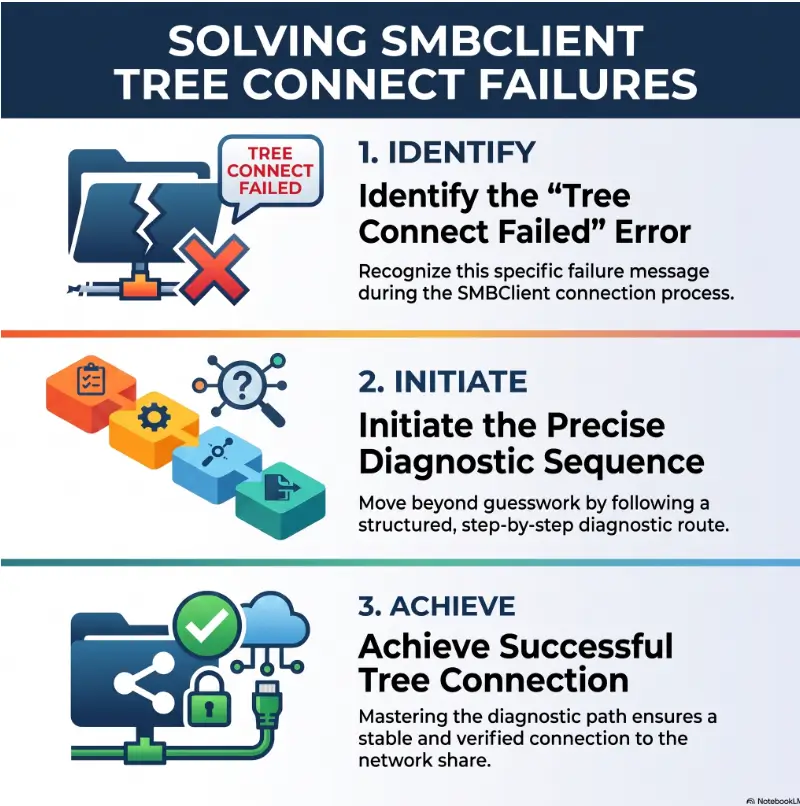
Why Tree Connect Is the Breakpoint That Matters
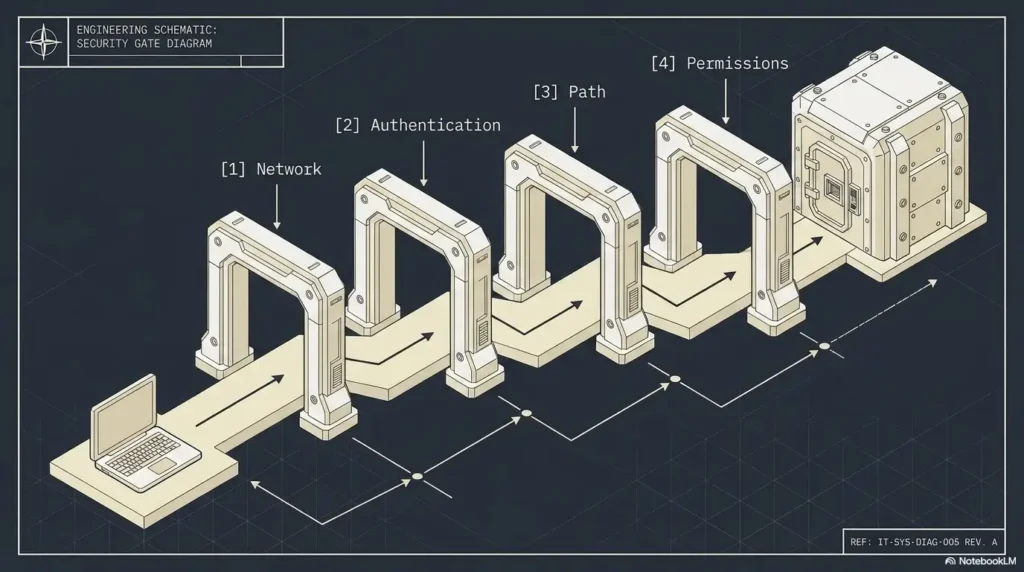
SMB access is not one indivisible login event. The client and server move through several checkpoints, and the point of failure tells you which assumptions are still alive.
A Tree Connect error means the request made it far enough to ask for a named resource such as //SERVER/finance. The server then refused or could not satisfy that request. That is different from failing to find the host, reach TCP port 445, negotiate an SMB dialect, or authenticate the session.
Read SMB as three separate checkpoints
| Checkpoint | What happens | Typical failure clues |
|---|---|---|
| Negotiate | Client and server agree on an SMB dialect, security capabilities, signing, and related features. | Protocol negotiation errors, unsupported dialects, abrupt disconnects. |
| Session Setup | The server processes authentication and creates or rejects the user session. | Logon failure, expired password, Kerberos or domain errors. |
| Tree Connect | The authenticated session requests a specific published share. | BAD_NETWORK_NAME, ACCESS_DENIED, encryption rejection, malformed share path. |
Distinguish the neighboring failures before troubleshooting
Do not call every SMB problem a Tree Connect problem. A timeout before negotiation belongs in a network or service-availability runbook. A session setup failed message belongs in an authentication runbook. A successful share connection followed by failure to open one file belongs in a file-level ACL, locking, or path investigation.
If Kali or another Linux client fails before the share request, compare the behavior with this guide to SMB negotiation failures on Kali Linux. Keeping those stages separate prevents a great deal of command-line confetti.
Capture the complete failure line
Before changing anything, record the full command and output. At minimum, preserve the server name or IP, exact share name, username format, returned NT_STATUS value, timestamp, SMB protocol if visible, and whether share enumeration worked.
Key takeaway
A successful connection to port 445 does not prove authentication. Successful authentication does not prove share authorization. Successful share access does not prove file access. Name the checkpoint before choosing the repair.
Let the NT_STATUS Code Choose the Investigation
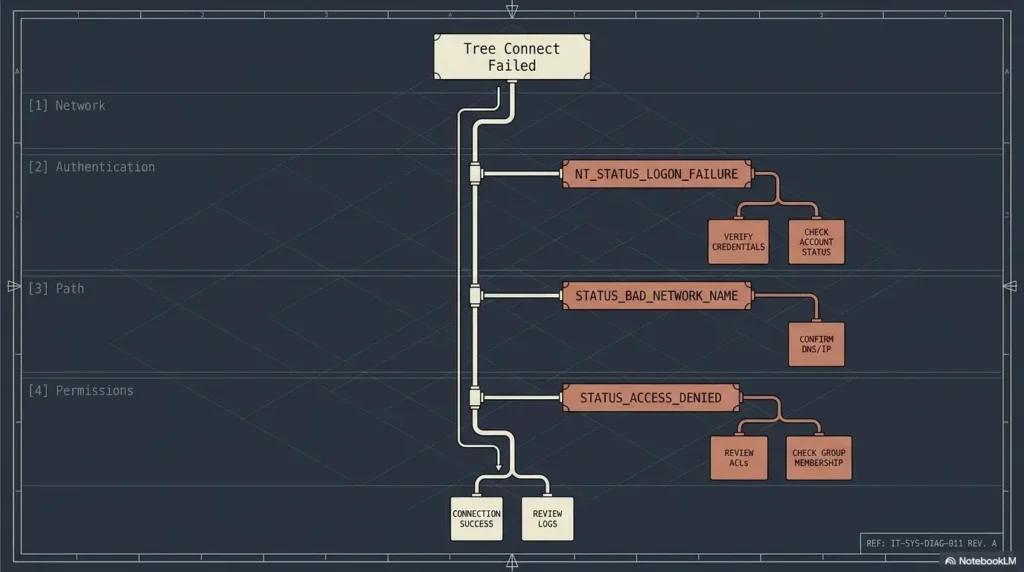
The words “tree connect failed” identify the stage. The NT_STATUS value identifies the most promising branch. Treat it as a routing label rather than decorative server grumbling.
NT_STATUS_BAD_NETWORK_NAME: verify the published service
This status commonly means the requested share name does not match a resource currently published by the target server. The hostname may be valid and the backing directory may exist, yet the SMB service name is absent, misspelled, disabled, renamed, or published by a different node.
Start by listing services with the same identity used in the failed connection:
smbclient -L SERVER -U 'DOMAIN/user'Compare the returned share names character by character. Do not substitute a filesystem directory, storage-pool name, dataset name, hostname alias, or familiar Windows folder label.
NT_STATUS_ACCESS_DENIED: identify the rejecting gate
Access denied is not a single-permission diagnosis. During Tree Connect, the rejection may come from share authorization, a Samba user restriction, an NTFS or Unix ACL, identity mapping, host-based access rules, or an SMB encryption requirement.
Ask four questions in order:
- Is this effective identity allowed to connect to the share?
- Can the mapped server-side account traverse the backing path?
- Does the current group or domain membership resolve correctly?
- Does the share require encryption or another capability the client did not provide?
When RPC enumeration fails with a similar status, the access boundary may be related but not identical. The guide to rpcclient NT_STATUS_ACCESS_DENIED explains that neighboring diagnostic path.
NT_STATUS_INVALID_PARAMETER: inspect the request
This branch points toward a malformed service path, encoding problem, unsupported client behavior, or implementation mismatch. Re-enter the UNC-style service path manually, avoid copied whitespace, test a plain ASCII share when possible, and compare client versions.
smbclient //SERVER/SHARE -U 'DOMAIN/user'Less-common statuses need their own branch
Statuses such as STATUS_REQUEST_NOT_ACCEPTED, STATUS_SMB_BAD_CLUSTER_DIALECT, deleted-session errors, and DFS redirection failures should not be flattened into “permissions.” They may indicate resource pressure, cluster compatibility, expired session state, or referral behavior.
The four-branch Tree Connect map
BAD_NETWORK_NAME
Check the published share name, target server, and share availability.
ACCESS_DENIED
Check authorization, effective identity, filesystem access, and encryption.
INVALID_PARAMETER
Check path formatting, encoding, client behavior, and compatibility.
OTHER STATUS
Read the named status before editing permissions or protocols.
Read Microsoft’s SMB failure-stage guidance
The Share-Name Trap: Valid Path, Wrong Service
An SMB client connects to a published service name. It does not connect directly to the server’s local directory. That distinction looks tiny on paper and causes an impressive number of very real outages.
Enumerate what the server actually publishes
Use -L before testing a guessed share. Run it with the same account format, domain context, and target server used in the failed command.
smbclient -L SERVER -U 'DOMAIN/user'Share enumeration proves that the server can return a service list to that session. It does not prove that the same identity can connect to every listed share. For that distinction, see the related guide on why smbclient can list shares without granting access.
Separate the share name from the backing directory
Consider this Samba configuration:
[finance]
    path = /srv/company/accounting
    read only = no
The client connects to //SERVER/finance. It does not connect to //SERVER/accounting or //SERVER/srv/company/accounting. The bracketed section name is the published service.
Inspect the differences your eyes skip
- A renamed share with an old desktop shortcut or mount configuration.
- An administrative share ending in
$. - Non-ASCII characters that are represented differently by the client.
- A NAS display label that differs from its SMB service name.
- A container share alias that changed after redeployment.
- Trailing whitespace copied from documentation or configuration output.
- A connection sent to the wrong cluster node, alias, or virtual server.
Compare hostname and IP without changing the share
Use -I to direct the client to a specific server IP while preserving the original server and share path:
smbclient //SERVER/SHARE -I 192.0.2.10 -U 'DOMAIN/user'This test can help separate name resolution and target selection from service naming. Keep the username, share, protocol, and other variables unchanged so the result remains interpretable.
Key takeaway
If the share is absent from enumeration, investigate publication and targeting, but also hidden-share settings and access-based enumeration; absence from the list alone does not prove that the share does not exist. If it is listed but direct access fails, move to authorization, identity, filesystem access, or encryption.
The Permission Double-Lock on Windows and Samba
“Check permissions” is technically correct and operationally vague. SMB access usually crosses at least two permission layers, and either one can close the door.
Windows shares require share and NTFS review
A Windows-hosted share can allow a user at the SMB share layer while NTFS denies the required folder access. The reverse can also happen. Review both permission sets and consider inherited denies, nested groups, and access-based enumeration.
Use the actual affected identity rather than an administrator account. A successful test as a privileged user proves little about the service account, application pool, container user, scheduled task, or employee experiencing the failure.
Samba combines share controls with Unix access
A Samba client may need to satisfy valid users, invalid users, host restrictions, group expressions, guest mapping, and other share settings. After that, the effective Unix account still needs ownership, group, mode-bit, or ACL access to the backing path.
Review the effective configuration rather than trusting the file you intended to load. Includes, registry-backed settings, NAS-generated configuration, container mounts, and stale services can make the running state differ from the edited text.
Test every parent directory for traversal
A user may have read and write permissions on the final directory yet lack execute permission on a parent directory. Without traversal access, the path remains unreachable.
namei -l /srv/company/accountingTools and output vary by operating system, but the principle is stable: inspect the full path, not only the final folder.
Why chmod 777 is not a diagnostic method
World-writable permissions may hide the ownership problem while leaving the real rejection untouched. They will not repair a wrong share name, denied valid users rule, failed identity mapping, required encryption setting, host restriction, or malformed request.
They can also expose unrelated files to every local account or mapped SMB user. The original outage may be inconvenient. A newly writable company archive is much less charming.
| Observed condition | Safer next check | Avoid |
|---|---|---|
| Share listed, user denied | Review share authorization and effective identity | Making the directory world-writable |
| Final folder looks accessible | Check traversal on every parent directory | Changing only the final folder mode |
| Admin account succeeds | Retest as the affected service user | Declaring the issue resolved |
| Group access should apply | Confirm current server-side group resolution | Assuming cached membership is current |
When Protocol and Encryption Reject a Valid User
A client can authenticate successfully yet lack a capability required by the target share. SMB encryption is a common example because it can be required globally or for one particular share.
Confirm the negotiated SMB generation
Modern smbclient versions normally negotiate the strongest mutually supported SMB3 dialect. For controlled comparison, the -m option can cap the highest protocol offered:
smbclient //SERVER/SHARE -U 'DOMAIN/user' -m SMB3The -m option sets a maximum dialect; it does not by itself require SMB3 or request encryption. Where supported, use –client-protection=encrypt to test a connection that requires encryption. A forced value is evidence, not a permanent repair. Record whether it changes the result, then remove the override and correct the underlying compatibility or configuration problem.
Check Windows Server encryption requirements
On a Windows SMB server, review both the server-wide configuration and share-specific encryption state:
Get-SmbServerConfiguration | Select-Object EncryptData, RejectUnencryptedAccess
Get-SmbShare | Select-Object Name, EncryptData
If the selected share requires encryption, compare that requirement with the client’s SMB dialect and encryption support. Do not disable the requirement merely to make an aging client connect without documenting the data exposure.
SMB1 is not a repair
Old tutorials often recommend NT1 because the lab, appliance, or forum post was written for a different era. Enabling SMB1 can conceal the actual incompatibility while weakening security, losing modern protections, and expanding exposure to legacy attack techniques.
For isolated training labs, protocol forcing may help document expected behavior. For production systems, the better answer is usually to update, replace, segment, or retire the incompatible device.
Do not confuse signing with encryption
SMB signing helps protect message integrity and authentication against tampering. SMB encryption protects SMB payload confidentiality as well as integrity. A signing check does not prove that the client meets an encryption requirement.
Use the SMB signing verification guide when the question is whether signing is enabled or required. Keep that result separate from the Tree Connect authorization decision.
Check the official smbclient options
Show me the nerdy details
During an SMB2 or SMB3 Tree Connect, the client sends a request containing the UNC path for the desired share. The server evaluates the session, requested share, access rules, cluster or DFS behavior, and required capabilities before returning a Tree ID.
A successful response creates the logical connection between the authenticated session and that share. Later file operations use the resulting Tree ID. A failure response therefore occurs before ordinary file open, read, or write requests begin.
This explains why a valid password can coexist with ACCESS_DENIED at Tree Connect, and why a missing service can return BAD_NETWORK_NAME even when the backing directory exists.
Identity Drift: The User You Typed Is Not Always the User Tested
SMB troubleshooting becomes slippery when the username shown at the client differs from the identity evaluated at the server. Domain prefixes, Kerberos tickets, cached credentials, guest mapping, UID and GID translation, and container boundaries can each alter the result.
Compare local, domain, and realm formats
Depending on the environment, you may encounter forms such as:
DOMAIN/user
DOMAIN\user
user@realm.example
localuser
Shell escaping matters, particularly with backslashes. Quote the username where appropriate and confirm whether the server expects a local Samba account, Active Directory identity, Kerberos principal, or another directory-backed user.
Detect guest fallback before editing ACLs
A client may appear to submit a username while the server maps failed or unknown identities to guest. The resulting session can enumerate public resources yet fail on the protected share.
Compare the presented identity, authenticated identity, effective Unix or Windows identity, mapped groups, and guest settings. A password prompt alone does not prove that the intended account was used.
Verify group resolution after directory changes
Group changes may not appear immediately across every service. Investigate caches and identity services after Active Directory membership updates, domain rejoining, winbind restarts, SSSD changes, UID or GID remapping, NAS directory synchronization, or container replacement.
Check the groups recognized by the SMB server, not merely those displayed on the client or directory-management console.
Remove credential ambiguity without exposing passwords
Avoid embedding passwords in shell history, scripts, tickets, screenshots, and process listings. Prefer a secure prompt, Kerberos credential cache, or protected authentication file supported by your environment.
Key takeaway
Before changing permissions, prove which identity the server actually evaluated. A perfectly configured ACL for the wrong mapped account is still a perfectly locked door.
Collect Logs That Reveal the Rejecting Gate
Good logs turn “it still fails” into a bounded question. The goal is not maximum verbosity. The goal is one reproducible attempt, one timestamp, one identity, and enough context to identify the rejecting component.
Start with debug level 2 or 3
Run the exact share test with modest client debugging:
smbclient //SERVER/SHARE -U 'DOMAIN/user' -d 2Higher levels can create large, technical output that buries the decisive line. Increase verbosity only when a specific question remains unanswered.
Align client and server timestamps
Collect the same attempt from the client debug output, Samba or Windows SMB logs, authentication service, domain controller, NAS audit log, and any relevant proxy or cluster layer. Verify clock synchronization first.
A one-minute clock difference can turn a clean investigation into log archaeology. Record the timezone as well as the local time.
Record the effective configuration, not merely the edited file
For Samba, confirm the active share section, resolved path, user restrictions, host allow and deny rules, encryption settings, interfaces, included configuration files, and whether the daemon reloaded the change.
Existing connections may retain state after a configuration reload. That does not automatically justify restarting every SMB component. First determine whether a new test session sees the intended setting.
Use packet capture last
A packet capture is useful when logs cannot establish whether the server returned the status, an intermediary reset the connection, a DFS referral changed the target, or a required capability was omitted. It is rarely the best first move.
Illustrative example: the permission fix that was not a permission fix
A developer could list shares on a test NAS but received NT_STATUS_ACCESS_DENIED when opening the deployment share. The folder owner and Unix mode looked correct, so the team nearly widened the permissions.
Client debugging showed that authentication completed. The NAS audit log, matched to the same timestamp, showed the account being mapped to guest after a directory-service restart. The protected share rejected guest access during Tree Connect.
The repair was to restore directory binding and confirm group resolution. No folder permissions changed. The final retest used the original command and succeeded under the intended identity.
The lesson is simple: when the evidence says the wrong user reached the right share, changing the folder is a distraction.
| Evidence to save | Why it matters |
|---|---|
| Exact command | Preserves username, target, share, protocol, and options. |
| Full NT_STATUS | Routes the investigation to the correct branch. |
| Timestamp and timezone | Connects client output to server-side records. |
| Effective identity | Shows which account and groups were evaluated. |
| Effective share configuration | Confirms what the running service actually loaded. |
| Failed and successful output | Makes the final repair reproducible and reviewable. |
Choose the Lightest Tool or Support Level That Works
Most Tree Connect failures do not require expensive software. They require a disciplined comparison between the client request and the server’s effective configuration. Paid tooling or professional support becomes useful when complexity, scale, evidence retention, or downtime costs make manual correlation unreliable.
Good, Better, Best diagnostic setup
| Level | Suitable for | What it includes | Trade-off |
|---|---|---|---|
| Good: built-in tools | One client, one server, reproducible failure | smbclient, server logs, configuration validation, permission checks | Manual timestamp and evidence correlation |
| Better: centralized logging | Multiple servers, NAS devices, or help-desk handoffs | Central log collection, identity events, saved queries, shared runbook | Setup and storage cost |
| Best: specialist support | Clusters, DFS, regulated shares, recurring outages, business-critical access | Vendor or consultant review, controlled change plan, packet analysis, escalation path | Higher cost and coordination effort |
When the free DIY path is enough
- The failure affects one known account or share.
- You can reproduce it without disrupting production users.
- You have access to client output and server logs.
- The environment has a documented owner and rollback path.
- The returned status clearly maps to a share-name, identity, or authorization issue.
When paid help may be worth considering
- The share is part of a Windows cluster, DFS namespace, domain controller, or managed NAS platform.
- The outage affects many users or revenue-producing systems.
- Logs contain conflicting identities, referral targets, or session behavior.
- The data is regulated or access changes require formal approval.
- The issue recurs after restarts, failovers, or directory-service events.
- You need an evidence package for a vendor, insurer, auditor, or incident responder.
Questions to ask before paying for tools or support
- Can the service correlate SMB, authentication, directory, and filesystem events?
- Does it support the exact Windows, Samba, NAS, or cluster version in use?
- Will sensitive share names, usernames, packet data, or file metadata leave your environment?
- How are logs retained, protected, and deleted?
- Is the engagement diagnostic only, or does it include approved remediation?
- Will you receive a reproducible root-cause summary and rollback record?
Key takeaway
Buy complexity management only when you have complexity to manage. For a single reproducible failure, disciplined use of built-in tools usually beats a dashboard full of attractive uncertainty.
Mistakes That Turn One SMB Failure Into Three
The fastest way to lose the root cause is to change several variables and celebrate when one combination works. A working connection is useful. A repair you cannot explain is a future outage wearing a temporary disguise.
Changing the share name and permissions together
If you rename the share, alter ACLs, restart Samba, and force a different SMB dialect before retesting, the successful result cannot identify which action mattered. Change one variable, repeat the same command, and save the output.
Assuming enumeration proves access
The ability to list services does not prove authorization to connect to every service. Enumeration and Tree Connect are separate operations with different policy decisions.
Restarting every SMB component immediately
A restart can clear sessions, caches, logs, and reproducible state. It can also disrupt users whose shares still work. Capture evidence first, then restart only when a specific stale component or unloaded configuration justifies it.
Testing with root or an administrator and declaring victory
Privileged accounts often follow different mappings, groups, policies, and filesystem rules. The final verification must use the affected account or a controlled test account with equivalent access.
Weakening security to match an old tutorial
- Do not enable SMB1 as a permanent compatibility shortcut.
- Do not permit guest access without a documented business requirement.
- Do not disable signing or encryption merely to silence an error.
- Do not remove all share ACL restrictions.
- Do not make a production path world-writable.
Review the official Samba configuration reference
FAQ: SMBClient Tree Connect Failures
What does “tree connect failed” mean in smbclient?
It means the SMB client reached the stage where it requested a specific published share, but the server did not create that share connection. The accompanying NT_STATUS code indicates the likely reason.
Why does smbclient -L work while the share connection fails?
Share enumeration and Tree Connect are separate operations. A server may allow an identity to view the service list while denying access to one protected share.
How do I fix NT_STATUS_BAD_NETWORK_NAME?
List the server’s published shares, compare the exact service name, confirm the intended server or cluster node, and verify that the share is enabled. Remember that the local directory name may differ from the SMB share name.
How do I fix NT_STATUS_ACCESS_DENIED?
Check share authorization, NTFS or Unix filesystem access, parent-directory traversal, effective identity, current group resolution, guest mapping, host restrictions, and SMB encryption requirements separately.
Can an SMB version mismatch cause Tree Connect failure?
Yes. A share may require an SMB3 capability such as encryption, while a legacy client may not support it. Protocol forcing should be used as a temporary diagnostic comparison, not an excuse to weaken the final configuration.
Does capitalization matter in an SMB share name?
Behavior can vary by client, server, and backing filesystem. During diagnosis, use the exact published spelling rather than assuming that capitalization or Unicode normalization will be handled consistently.
Why can Windows open the share when Linux smbclient cannot?
The clients may use different cached credentials, Kerberos tickets, domain identities, name-resolution paths, SMB capabilities, signing settings, or encryption support. Compare those variables rather than assuming the server treats both sessions identically.
Which logs should I collect before escalating?
Save the exact command, full NT_STATUS, debug output, timestamp and timezone, server-side SMB log, authentication event, effective share configuration, resolved identity and groups, and the output of any successful comparison test.
Run the 15-Minute Split Test
You do not need to map the entire SMB ecosystem before taking a useful next step. You need two commands, one unchanged identity, and the discipline to branch on the actual result.
Command 1: list the published shares
smbclient -L SERVER -U 'DOMAIN/user'Command 2: test one exact share with modest debugging
smbclient //SERVER/EXACT_SHARE_NAME -U 'DOMAIN/user' -d 2Branch on the result
| Result | Next action |
|---|---|
| Share absent from the list | Inspect share publication, service configuration, server target, cluster node, or NAS alias. |
BAD_NETWORK_NAME | Correct the exact SMB service name or confirm that the share is active on the intended server. |
ACCESS_DENIED | Check authorization, filesystem traversal, effective identity, groups, host rules, and encryption. |
| Session Setup failure | Move upstream to credentials, Kerberos, domain trust, SPN, clock, or account status. |
| Connection timeout | Move upstream to DNS, routing, firewall, port 445, service health, or network policy. |
| Share opens but files fail | Move downstream to file ACLs, locks, path behavior, and application access. |
Change one variable, then repeat the same command
Within the next 15 minutes, save the two command outputs in a dated troubleshooting note. Make one targeted correction based on the returned status, then run the identical direct-share command again.
Keep the failed and successful results together. That pair is more valuable than a vague memory that “permissions were changed.” It shows the breakpoint, the intervention, and the proof that the repair addressed the right gate.
Your next move
Run the share-list command, copy the exact service name, and test it with -d 2. Let the returned status choose one correction. The problem stops being a fog bank once every test has a single purpose.
Last reviewed: 2026-10-13
Technical guidance updated: 2026-10-13. Restored command and configuration line breaks, clarified dialect versus encryption options and hidden shares, and repaired section navigation.
SMB tree-connect diagnostic card
Use this when: you are an authorized operator locating the stage where a share connection fails. Copy these fields into your notes and replace each prompt with a dated response. Keep assumptions and unresolved questions visible.
| Field | What to record | Your evidence / owner / next check |
|---|---|---|
| Endpoint and share | Record the exact approved endpoint and share path. | To complete |
| Session context | Identify negotiated connection and authenticated identity evidence. | To complete |
| Failure evidence | Preserve the complete tree-connect status and matching log time. | To complete |
| Separated hypotheses | List share existence, permission and policy questions still unresolved. | To complete |
Next action: Confirm the failing stage before changing credentials or server policy. Mark the relevant row confirmed, provisional or unresolved. Keep the supporting record, responsible person and next check beside it so another reader can continue the work without treating an assumption as a result.
This is a blank practice record, not a report of a test performed by Kioptrix. Add the actual versions, approved conditions and observations from your own session.
Worksheet change record — October 20, 2026
Added this smb tree-connect diagnostic card with four article-specific fields and an evidence-based next action. Existing source notes retain their own review dates. This addition is not a fresh verification of every statement or a newly executed test.