Open the practical working record to connect this guide to your scope, evidence and next decision.
Verify the assertion before submitting it
Identify the population, control configuration, exception owner and review date for each answer. Distinguish enrolled MFA from enforced access and configured backups from tested restoration. Application answers may affect underwriting and claims, but this checklist cannot determine coverage or the legal effect of a particular representation. Reference and scope.
Cyber Insurance Application Readiness
Cyber Insurance Questionnaire Checklist:
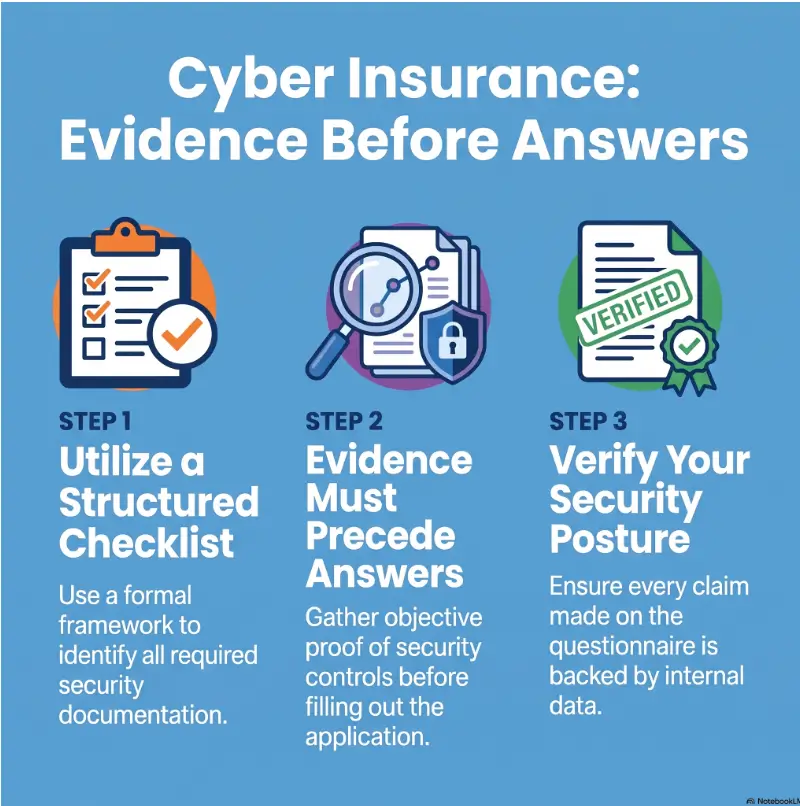
Evidence Before Answers
Support application answers with dated, scoped evidence and disclose relevant exceptions.
The safest way to complete the form is not to answer faster. It is to build a clear trail from every response to dated, reviewable evidence. That approach helps business owners, CFOs, IT leaders, brokers, and security teams find weak assumptions before an underwriter or future claim examiner does.
This guide turns the application into a practical verification exercise. You will map the applicant, measure control coverage, inspect recovery claims, search for overlooked incidents, and decide when internal review is enough or specialist help is worth the cost.
Verify the Scope
Find the systems, people, entities, and exceptions hidden behind each answer.
Preserve the Proof
Keep reports, policies, test results, explanations, approvals, and the final submission together.
Close the Signature Gap
Give the signer verified facts instead of polished guesses from a hurried email thread.
The governing rule is simple: no unsupported “yes,” no invisible exception, no evidence lost after submission. 🔐
Snapshot
This article is for U.S. small and midsize businesses preparing a new or renewal cyber insurance application. It helps cross-functional teams verify technical controls, business exposure, incident history, vendors, and recovery claims so they can produce a defensible submission and a clear list of unresolved questions.
Before You Sign: What This Checklist Can and Cannot Do
A cyber insurance application is part fact collection, part control assessment, and part formal representation. The exact meaning of a question depends on the carrier’s wording, definitions, supplements, requested lookback period, and the applicant’s operations.
This guide can help you organize a reasonable inquiry, identify weak evidence, and prepare questions for your broker, security adviser, or counsel. It cannot interpret your policy, decide what must legally be disclosed, confirm that a carrier will accept an answer, or guarantee that a future claim will be covered.
Before You Act
Use the insurer’s current form and answer only after reasonable inquiry. Ask a licensed insurance professional or qualified counsel about unclear definitions, disclosure duties, past events, acquisitions, policy conflicts, or material changes before inception. If an incident may be active, follow your incident response and notification procedures rather than treating the application as the reporting channel.
Pause If an Incident May Be Active
Do not send speculative breach details through broad internal email lists simply because the questionnaire asks about incidents. Preserve relevant records and use approved communication channels for incident response, legal review, insurance notification, and forensic work.
Completing an underwriting form is not necessarily the same as giving notice of a claim or circumstance. The organization should confirm the proper reporting route with its broker, insurer, or counsel.
The Signer Coordinates the Truth, Not the Technology
An authorized executive may sign the application, but that does not make the executive the best source for endpoint coverage, backup isolation, MFA exceptions, or patch compliance. The signer should receive verified answers from the people who own those systems and business processes.
Think of the application as an ensemble. IT supplies technical evidence, finance checks payment controls and fraud history, legal or risk teams review incidents and complaints, human resources confirms workforce practices, and leadership approves the final representation.
Build the Evidence Room Before Opening the Form
The fastest reliable application process begins before anyone starts clicking checkboxes. Create a secure working area where every proposed response can be matched to an owner, evidence source, and verification date.
This does not need to become a costly governance project. A protected spreadsheet and a well-organized folder may be enough for a smaller company. A larger or regulated organization may prefer a governance, risk, and compliance platform with approval history and access controls.
Create a Five-Field Answer Register
Use one row for each questionnaire item. Do not combine several carrier questions into a single vague control statement.
| Field | What to Record | Why It Matters |
|---|---|---|
| Question | Exact carrier wording and section | Prevents definitions from being softened during internal discussion |
| Proposed answer | Yes, no, partial, unknown, or explanatory response | Preserves the original decision state before conversion to the carrier format |
| Evidence | Report, policy, ticket, contract, test result, or written explanation | Connects the answer to something reviewable |
| Owner | Named person responsible for verification | Stops questions from floating between departments |
| Verified date | Date the evidence and scope were checked | Shows whether the answer reflects current operations |
Gather the Documents Most Likely to Be Tested
- Corporate entity, subsidiary, acquisition, and divestiture records
- Revenue, employee, asset, customer, and website information
- Data inventories, retention schedules, and system diagrams
- Identity provider, MFA, and privileged-access reports
- Endpoint protection and asset-management exports
- Patch policies, vulnerability reports, and exception registers
- Backup configurations and restoration-test records
- Incident response and business continuity plans
- Security awareness and phishing exercise results
- Vendor inventory, contracts, access records, and offboarding evidence
- Incident, complaint, demand, claim, and loss registers
Security teams that already maintain evidence for customer reviews can adapt the same discipline used in a vendor security questionnaire process. The questions differ, but the underlying habit is the same: state the scope, identify the owner, preserve the proof, and record exceptions.
Organize Evidence Around Six Risk Functions
A practical folder structure can follow the six functions in the NIST Cybersecurity Framework 2.0: Govern, Identify, Protect, Detect, Respond, and Recover. This keeps related evidence together and makes missing areas easier to spot.
1. Govern
Assign owners, approvals, and disclosure decisions.
2. Identify
Map entities, data, assets, vendors, and dependencies.
3. Protect
Verify MFA, patching, access, training, and encryption.
4. Detect
Confirm logging, monitoring, endpoint visibility, and alerts.
5. Respond
Review incidents, plans, exercises, contacts, and notice paths.
6. Recover
Prove restorations, recovery times, and continuity assumptions.
Key Takeaway
The evidence room is not a storage project. It is a decision system. Every answer should reveal who verified it, what was reviewed, when it was checked, and which exceptions remain.
Confirm the Applicant, Data, and Business Exposure
The first application pages often feel administrative, but mistakes here can affect the rest of the form. Entity names, subsidiaries, revenue, industries, websites, data counts, and foreign operations shape how the insurer understands the risk.
Identify the Exact Applicant and Covered Entities
- Match legal names to corporate records
- List subsidiaries seeking coverage
- Disclose recent acquisitions, divestitures, and new business lines where requested
- Confirm public-facing domains, websites, applications, and brands
- Use the reporting period requested for revenue and employee figures
- Identify foreign operations, customers, and data where relevant
A parent company may assume a newly acquired business is covered automatically. The acquired company may assume the parent completed every disclosure. That quiet gap can survive for months because both sides believe the other owns it.
Count People, Not Rows
Applications may ask how many unique individuals have information collected, stored, processed, or transmitted by the applicant or its providers. Five database records about one person may still represent one individual unless the form defines the calculation differently.
- Customers and former customers
- Employees and former employees
- Patients, clients, students, donors, or members
- Contractors and applicants
- Business partners and account contacts
- Individuals whose data is held by processors on the company’s behalf
Classify the Data That Changes the Conversation
Do not stop at “personal information.” Record the actual categories, locations, retention periods, encryption status, and third parties involved.
| Data Category | Questions to Confirm |
|---|---|
| Payment card data | Who processes it, whether the company stores it, and which systems can access it |
| Health or medical information | Where it resides, who handles it, and which legal or contractual obligations apply |
| Government identifiers | Whose identifiers are held, why they are retained, and whether access is restricted |
| Credentials | Whether passwords, tokens, keys, or authentication secrets are stored or processed |
| Financial information | Whether account, payroll, tax, lending, or transaction data is involved |
| Confidential business data | Which customer files, source code, plans, contracts, or trade information could create loss |
Check the Systems That Never Reached the Official Inventory
Small businesses often have cloud applications purchased directly by departments, temporary file-sharing accounts, abandoned trial software, and AI services connected without a formal review. These systems may hold company or customer data even when the central IT inventory does not list them.
Use an AI shadow IT risk review to identify unsanctioned tools, data flows, and access paths that could make questionnaire answers incomplete.
MFA: Turn One “Yes” Into a Coverage Map
“We have MFA” is not a complete underwriting answer. It may mean MFA is licensed, offered, enabled for some users, enforced for most users, or required across every relevant access path. Those are very different facts.
Verify MFA Separately for Each Environment
- Cloud and web-based email
- VPN, remote desktop, and remote network access
- Administrative and privileged accounts
- Directory and identity administration
- Backup platforms and recovery consoles
- Cloud administration portals
- Firewalls, routers, switches, and security appliances
- Servers, endpoints, and local administrator access
- Contractors, managed providers, and other third parties
- Customer-facing administrative portals
Record the numerator and denominator wherever possible. “428 of 431 active workforce accounts are covered” is more useful than “almost everyone uses MFA.” The remaining three accounts should have names, owners, reasons, compensating controls, and remediation dates.
Find the Exceptions Before the Underwriter Does
- Legacy applications that cannot support modern authentication
- Service, automation, and integration accounts
- Emergency or break-glass accounts
- Shared or generic accounts
- Local administrator accounts
- Acquired systems outside the primary identity provider
- Contractor accounts created outside standard onboarding
- Backup administrators using separate credentials
An exception is not automatically fatal to an application. An invisible exception is more dangerous because it can turn a seemingly simple answer into an unsupported representation.
Prove Enforcement, Not Purchase
- Identity provider policy exports
- Conditional-access rules
- Enrollment and enforcement reports
- Privileged-account inventories
- Authentication method reports
- Third-party access policies
- Exception and risk-acceptance records
- Dated screenshots where exports are unavailable
Key Takeaway
A software invoice proves that MFA was purchased. A policy export and coverage report help show where it was enforced. Underwriting questions are usually about the second fact.
Show me the nerdy details
A strong control answer has four parts: scope, state, evidence, and time. Scope identifies the systems and people included. State explains whether the control is enforced, optional, partial, or planned. Evidence shows how the state was verified. Time establishes when that verification occurred.
For quantitative controls, preserve the denominator. A report showing 980 protected devices says little if the company owns 1,240 devices. Coverage percentages become meaningful only when the total population is reliable and exceptions are reviewed.
How to document 428 covered accounts out of 431
Hypothetical population: 431 active workforce accounts, of which 428 are verified as subject to the required MFA control. Coverage is 428 ÷ 431 × 100 ≈ 99.3%. It is not 100%, and the percentage does not answer whether every privileged or remote-access path is protected.
Keep the population date, inclusion rule, identity source and policy evidence together. Record each of the three exceptions, its owner, affected access, reason, compensating control and remediation status. Reconcile service accounts, emergency accounts, contractors and acquired systems separately against the question’s scope; do not silently exclude them to improve the percentage.
If the insurer offers only yes or no, request its written instructions for partial coverage through the broker or authorized underwriting channel. Preserve the exact attachment submitted and any clarification. A broker’s receipt is not itself confirmation that the carrier accepted an exception or that a future claim is covered.
Endpoint, Patching, and Logging: Measure the Denominator
Security tools create reassuring dashboards, but a green dashboard may describe only the devices that successfully checked in. Cyber insurance preparation requires teams to ask what is missing, stale, unmanaged, or outside the tool’s reach.
Verify the Endpoint Coverage Denominator
Compare the asset inventory with the endpoint detection or antivirus console. Investigate differences rather than rounding them away.
- Employee laptops and desktops
- Servers and virtual machines
- Cloud workloads
- Mobile devices where relevant
- Newly purchased or recently imaged devices
- Systems inherited through acquisition
- Stale agents and devices that stopped reporting
- Machines managed by a separate provider
- Unsupported operating systems
Turn “We Patch Regularly” Into Measurable Evidence
A patching answer should describe more than frequency. It should show ownership, deadlines, exceptions, emergency handling, and actual compliance.
- Written patch policy and responsible team
- Automated and manual deployment methods
- Critical and high-risk remediation deadlines
- Emergency patch procedure
- Unsupported software and operating systems
- Approved exceptions and risk acceptance
- Most recent compliance report
- Escalation process for missed deadlines
A documented vulnerability remediation SLA can help convert loose promises into measurable deadlines, ownership, and escalation rules.
Check Logging and Monitoring From Source to Review
Applications may ask whether security logs are collected, retained, and monitored. Those are three separate controls. A system can generate logs without sending them to a central platform. A platform can store logs without anyone reviewing meaningful alerts.
- Identify the systems expected to generate security logs.
- Confirm that logs are enabled and reaching the intended destination.
- Review retention periods and access protections.
- Confirm which alerts are monitored and by whom.
- Check escalation, ticketing, and after-hours coverage.
- Test a small sample from source event to analyst review.
Cloud-heavy organizations can use an AWS CloudTrail logging checklist to verify that account activity is recorded, protected, retained, and connected to a review process.
Review the Controls That Quietly Fall Off the Form
| Control Area | Evidence to Look For | Common Weak Point |
|---|---|---|
| Firewalls | Configuration standards, rule reviews, change records | Old rules and undocumented internet exposure |
| Vulnerability scanning | Scope, frequency, results, remediation tickets | Internal or acquired systems omitted |
| Penetration testing | Statement of work, final report, remediation evidence | Unresolved findings described as closed |
| Access termination | HR workflow, identity logs, sampled tickets | Contractor and vendor accounts remain active |
| Security training | Completion reports, content, follow-up process | New hires or contractors excluded |
| Encryption | Configuration reports, key management, scope statement | Backups, exports, or legacy databases excluded |
When a penetration test supports an answer, confirm what the report actually says rather than relying on its executive summary. A practical guide to reading a penetration test report can help business and insurance teams separate tested scope, findings, limitations, and remediation status.
Backups and Recovery: Prove the Restore, Not the Storage
A successful backup job is not the same as a recoverable business. Stored files may be incomplete, encrypted with inaccessible keys, tied to compromised credentials, or unable to rebuild the applications and identities that make the data usable.
Answer the Question Behind the Backup Question
- Which systems, applications, configurations, identities, and data are backed up?
- How frequently do backups run?
- Where are copies stored?
- Are copies isolated, immutable, offline, or otherwise protected from production compromise?
- Who has administrative access?
- Does MFA protect backup administration?
- How are failures detected and escalated?
- When was restoration last tested?
- What was successfully restored?
- How long did recovery take?
Separate Backup Success From Recovery Readiness
| Measure | What It Tells You | What It Does Not Prove |
|---|---|---|
| Backup completion rate | Whether scheduled copy jobs completed | Whether the copies are usable |
| Storage isolation | Whether backups are separated from ordinary production access | Whether restoration procedures work |
| File restoration test | Whether selected files can be recovered | Whether a full business service can return |
| Application recovery test | Whether systems, configurations, dependencies, and data can be rebuilt | Whether every crisis scenario is covered |
| Recovery exercise | Whether people, procedures, communications, and technology work together | That future recovery will meet every estimate |
Make Recovery Claims Agree Across the Business
Compare the recovery time stated in the insurance application with the disaster recovery plan, business continuity plan, customer contracts, internal service objectives, and recent exercise results.
A polished four-hour estimate is not stronger because it appears in five documents. It becomes stronger when a representative recovery test supports it and unresolved dependencies are recorded.
Illustrative example: The backup that restored files but not the business
A professional services firm reported daily automated backups and answered “yes” to restoration testing. The evidence showed that an administrator had restored several documents six months earlier.
During the application review, the IT manager tried to rebuild the billing platform in a test environment. The database copy existed, but the application configuration, encryption key procedure, and identity permissions had not been documented. The files were present, yet the service could not run.
The company changed its proposed answer, described the limited test accurately, and created a scheduled application recovery exercise. The lesson was not that the backup system had failed. The lesson was that the word “restore” had been carrying more weight than the evidence could support.
Key Takeaway
A backup becomes persuasive evidence when the organization can show what was restored, when it was tested, who performed the test, how long it took, and which recovery gaps remained.
Incident History, Vendors, and Payment Risk: Search Beyond IT
A “no known claims” answer can miss the very events a carrier question is trying to uncover. Applications may ask about incidents, attempts, complaints, demands, investigations, outages, or circumstances that could lead to a future claim.
Separate Incidents, Claims, and Circumstances
- Suspected or confirmed data breaches
- Ransomware and extortion attempts
- Business email compromise
- Fraudulent or attempted funds transfers
- Malware infections
- Denial-of-service events
- Security-related system outages
- Privacy complaints and customer allegations
- Regulatory inquiries
- Lost devices or misdirected information
- Facts that may reasonably lead to a demand or claim
Use the exact lookback period and wording on the current form. Do not import a three-year period from an older application if the new carrier asks for five years, “ever,” or a different category of events.
Search Beyond the Insurance File
- IT service desk and security ticketing systems
- Finance and accounts payable
- Legal, privacy, and compliance records
- Customer support complaints
- Human resources investigations
- Managed service provider records
- Previous broker and insurer correspondence
- Executive inboxes used for escalation
Finance may remember a blocked payment diversion attempt that never became an insurance claim. Customer support may hold a privacy complaint that never reached security. An MSP may have investigated suspicious access without using the word “incident” in its ticket title.
Explain What Changed After Each Event
- Date and type of event
- Systems, operations, or information affected
- Investigation result and current status
- Financial impact, demands, or payments
- Insurance involvement
- Corrective actions completed
- Remaining remediation and owners
- Whether similar exposure remains elsewhere
A concise remediation narrative is usually more useful than a defensive paragraph. State what happened, what was confirmed, what changed, and what remains open.
Map Critical Vendors and Their Access
Identify providers whose failure, compromise, or loss of access could interrupt operations or expose information.
- Cloud hosting and software platforms
- Managed IT and security monitoring
- Backup and disaster recovery services
- Payment processors and payroll providers
- Software developers and support contractors
- Data processors and communication platforms
- Web hosting and domain administration
- Physical security and building systems
For each critical provider, record what it does, which data it handles, how it connects, who approves access, whether privileged access uses MFA, how incidents must be reported, and what happens during offboarding.
Verify Payment Controls With Finance, Not Assumptions
- Independent callback or secondary verification for changed payment instructions
- Dual approval for high-risk or unusual transfers
- Defined approval thresholds
- Restrictions on changing vendor banking information
- Training for accounts payable and executive assistants
- Escalation for urgent, confidential, or unusual requests
- Records of attempted social engineering fraud
A technical email filter may reduce risk, but it does not replace a well-designed payment verification process. Insurance supplements may examine both security controls and the human approval steps used before money leaves the organization.
Common Questionnaire Mistakes That Cost Time and Credibility
Mistake 1: Reporting a Partial Rollout as “Yes”
A control may cover headquarters but not acquired systems, contractors, remote workers, backup administrators, or legacy applications. Quantify the coverage and exceptions before deciding how the carrier’s response format should be completed.
Mistake 2: Copying Last Year’s Form
Previous answers are a starting point, not evidence of the present. Review changes in cloud services, remote access, security providers, acquisitions, data volume, revenue, headcount, payment processes, backup platforms, incidents, and planned controls.
Mistake 3: Letting One Department Answer Everything
IT may not know about privacy complaints. Finance may not know whether backup administrators use MFA. Legal may not know the current endpoint denominator. An application completed by one department can be tidy and still be wrong.
Mistake 4: Reporting Planned Controls as Current
- Implemented and verified: operating now with current evidence
- In progress: deployment has begun but scope is incomplete
- Planned: approved or discussed but not operating
- Unknown: ownership or evidence has not yet been established
A purchase order, project plan, or scheduled rollout does not make the control operational. Where the form permits explanation, provide a factual status and expected remediation date.
Mistake 5: Losing the Evidence After Submission
- Final signed application
- All supplements and attachments
- Dated reports and screenshots
- Internal approvals and owner confirmations
- Broker and insurer correspondence
- Explanations of partial or negative answers
- Remediation commitments and target dates
- Changes reported before inception
Mistake 6: Ignoring Changes Before Policy Inception
Controls, incidents, acquisitions, outages, and business facts can change between application, quotation, binding, and inception. Assign one person to review material changes during that period and report them through the appropriate written channel when required.
Key Takeaway
The most expensive questionnaire mistake is often not an obvious falsehood. It is an answer that sounded reasonable because nobody measured its scope, checked its exceptions, or preserved how the decision was made.
Choose the Right Level of Help Before You Pay
Not every company needs a large consulting engagement to complete a cyber insurance application. The right level of support depends on operational complexity, evidence quality, past incidents, regulatory exposure, and how much uncertainty remains after internal review.
Good, Better, Best: Application Review Options
| Approach | Best For | What It Includes | Cost and Trade-off |
|---|---|---|---|
| Good: Internal evidence review | Smaller businesses with stable systems, clear ownership, and no known complex incidents | Cross-functional worksheet, evidence folder, owner signoff, broker questions | Lowest direct cost, but requires disciplined internal time and honest escalation |
| Better: Broker-led readiness review | Businesses comparing carriers, handling supplements, or needing underwriting guidance | Form review, carrier clarification, application sequencing, explanation support | Cost may be part of the brokerage relationship or vary by service; technical verification still belongs to the applicant |
| Best: Broker, security specialist, and counsel | Complex groups, regulated data, acquisitions, weak evidence, major exceptions, or incident uncertainty | Technical validation, coverage coordination, disclosure analysis, remediation planning | Higher professional cost, but may reduce uncertainty where DIY review would be unreliable |
When a Free DIY Process May Be Enough
- The organization has a current asset and vendor inventory
- MFA and endpoint coverage can be measured
- Backup restoration has been tested recently
- Incident and complaint records are centralized
- Business entities and data counts are straightforward
- Control owners can verify answers in writing
- The broker can clarify carrier terminology
When Paid Help May Be Worth Considering
- MFA or endpoint coverage cannot be measured
- Backups have never been restored in a representative test
- Internet-facing assets are not fully known
- A major penetration-test finding remains unresolved
- Vendor access cannot be traced
- An acquisition has not been integrated into security governance
- A prior event may qualify as an incident, claim, or circumstance
- The application and policy wording appear inconsistent
- Attachments may contain privileged or highly sensitive information
Questions to Ask Before Hiring a Security or Insurance Adviser
- Will the review test evidence or merely reformat our answers?
- Which carrier forms and supplements are included?
- Who will review technical controls, incident history, and policy issues?
- How will sensitive evidence be protected?
- Will we receive a gap register with owners and priorities?
- Are remediation services separate from the review?
- What assumptions and limitations will appear in the final work?
- How will urgent incident concerns be escalated?
Before buying another platform, compare its purpose with the tools already in place. A security tool stack cost review can help distinguish a genuine evidence gap from a duplicated subscription.
Run the 60-Minute Answer-to-Evidence Review
This one-hour review is not a substitute for deeper technical or legal work. It is a fast way to expose unsupported high-impact answers before the form reaches an executive signer.
Minutes 0–15: Freeze the Scope
- Confirm the carrier, form edition, supplements, and proposed effective date.
- Identify the exact applicant entities.
- Assign executive, technical, financial, legal, and broker owners.
- Create the answer register and secure evidence folder.
Minutes 15–35: Test the High-Impact Controls
- MFA coverage and exceptions
- Endpoint protection denominator
- Critical patch compliance
- Backup isolation and administrator access
- Restoration-test evidence
- Incident response plan and current contacts
Minutes 35–50: Review Exposure and History
- Entity structure, revenue, headcount, and websites
- Data counts, types, locations, and third parties
- Critical vendors and cloud dependencies
- Payment verification procedures
- Incidents, attempts, complaints, demands, and potential claims
Minutes 50–60: Close the Signature Gap
For every “yes,” identify evidence. For every “no,” determine whether an explanation is permitted or advisable. For every partial answer, quantify the scope and exceptions. For every unknown, assign an owner and deadline instead of turning uncertainty into confidence-shaped prose.
| Status | Required Action Before Signing |
|---|---|
| Verified | Attach or reference dated evidence and owner approval |
| Partial | Quantify coverage, list exceptions, and request carrier guidance if needed |
| Not implemented | Answer accurately and describe remediation only where permitted |
| Unknown | Assign an owner and investigate; do not guess |
| Potential incident | Escalate through incident response, insurance, and legal channels |
| Material change pending | Track through binding and inception and report when required |
Key Takeaway
The review is complete only when each high-impact answer has evidence, an owner, a date, and a clear treatment for exceptions. A beautifully formatted unknown is still an unknown.
Cyber Insurance Questionnaire FAQ
Who should complete the cyber insurance questionnaire?
One coordinator should manage the process, but answers should come from the people who own the relevant facts. IT or security should verify technical controls, finance should review payment and fraud procedures, legal or risk teams should review incidents and complaints, and the authorized executive should approve the final representations.
Can an MSP complete the questionnaire for the business?
An MSP can provide technical evidence for systems within its scope. The applicant remains responsible for the accuracy and completeness of the submission. Internal owners should identify systems, vendors, cloud accounts, applications, and business processes the MSP does not manage.
What does “MFA enabled” usually need to cover?
The required scope depends on the form, but it may include email, remote network access, privileged accounts, directory administration, backup systems, cloud portals, network infrastructure, servers, endpoints, contractors, and third-party providers. Use the carrier’s definitions rather than an internal shorthand.
Should a partially implemented control be marked yes or no?
Do not force partial implementation into an unqualified answer without reviewing the form and obtaining guidance where needed. Quantify the covered population, identify exceptions, describe compensating controls, and ask the broker how the insurer wants the partial state reported.
Do unsuccessful phishing or funds-transfer attempts need disclosure?
Potentially. Some forms ask about attempted fraud, suspected breaches, complaints, extortion attempts, or facts that could lead to a claim, not only successful attacks. Review the exact wording, lookback period, and disclosure question with the appropriate insurance or legal adviser.
What evidence should be saved with the application?
Keep dated policy documents, configuration exports, coverage reports, vulnerability results, restoration-test records, incident records, written explanations, approvals, supplements, attachments, broker correspondence, and the final signed submission.
Can answers be updated after submission?
Carrier forms may require notice of material changes before policy inception. Report changes through the broker or insurer in writing when required, and preserve the update with the underwriting record.
Does completing the questionnaire guarantee claim coverage?
No. The application supports underwriting, but coverage for a future event depends on the issued policy, including its insuring agreements, definitions, exclusions, conditions, limits, retentions, endorsements, notice requirements, and the facts of the claim.
Your 15-Minute Next Step: Create the Answer Register
Open a protected spreadsheet and create five columns: question, proposed answer, evidence, owner, and verified date. Then copy in the six highest-impact questions from your current application: MFA, endpoint protection, critical patching, backups, restoration testing, and incident history.
Do not try to finish the entire form in those 15 minutes. Your goal is smaller and more useful: expose the first unsupported answer. Once that gap becomes visible, it can be measured, assigned, explained, or fixed.
A cyber insurance questionnaire should not be a memory test conducted under deadline pressure. Treated properly, it becomes a compact map of how the business protects information, responds to trouble, and recovers when systems go dark.
The final check
Before the signer approves the form, ask one last question: “Could we show a careful reviewer why each answer was reasonable on the date it was submitted?” If the answer is yes, preserve the record. If the answer is no, the checklist has found its next job.
Last reviewed: 2026-10-13
Technical guidance updated: 2026-10-13. Labeled the recovery scenario as illustrative and repaired section navigation.
Editorial review: October 16, 2026. Updated the decision guidance and removed misleading illustrations where identified. Worked examples are hypothetical; they do not describe testing performed by Kioptrix, actual quotes, claim decisions or guaranteed outcomes.
Cyber insurance answer-to-evidence ledger
Use this when: you are a business preparing reviewed responses for a specific insurance application. Copy these fields into your notes and replace each prompt with a dated response. Keep assumptions and unresolved questions visible.
| Field | What to record | Your evidence / owner / next check |
|---|---|---|
| Question scope | Keep the exact question, definitions and applicant entity. | To complete |
| Control coverage | Record the population covered and any exceptions. | To complete |
| Evidence and owner | Link the current supporting record and responsible operator. | To complete |
| Submission wording | Document approved qualifications, reviewer and outstanding broker questions. | To complete |
Next action: Resolve a qualified or uncertain answer before submitting the application. Mark the relevant row confirmed, provisional or unresolved. Keep the supporting record, responsible person and next check beside it so another reader can continue the work without treating an assumption as a result.
This is an editorial working aid. Complete it with your own scope, source records and accountable reviewers. Filling the table does not by itself establish coverage, compliance or acceptance.
Worksheet change record — October 20, 2026
Added this cyber insurance answer-to-evidence ledger with four article-specific fields and an evidence-based next action. Existing source notes retain their own review dates. This addition is not a fresh verification of every statement or a newly executed test.