Keep dialect and session evidence together
Record client/server context, dialect, port, negotiation evidence and authentication type. Requiring signing is different from advertising support; packet interpretation also depends on the SMB generation and relevant flags. A denied guest operation is not a controlled test of unsigned authenticated access. Preserve uncertainty when session evidence is insufficient, and do not weaken a client or server policy just to manufacture a comparison. Reference and scope.
Mastering SMB Signing: From Scan Output to Report-Ready Precision
Report signing support, requirement and observed session behavior as separate fields.
If you’ve ever logged “SMB signing enabled” at 1:40 AM, then realized the real question was “Will an unsigned session still work?”, this is your fix. In Kioptrix-style labs, the difference between enabled and required is the difference between a clean note and a cleanly wrong report.
SMB signing is a message-integrity feature that lets an SMB client and server cryptographically sign requests and responses to prevent tampering.
- Enabled: Signing is available and may be used.
- Required: The server enforces it and rejects unsigned sessions.
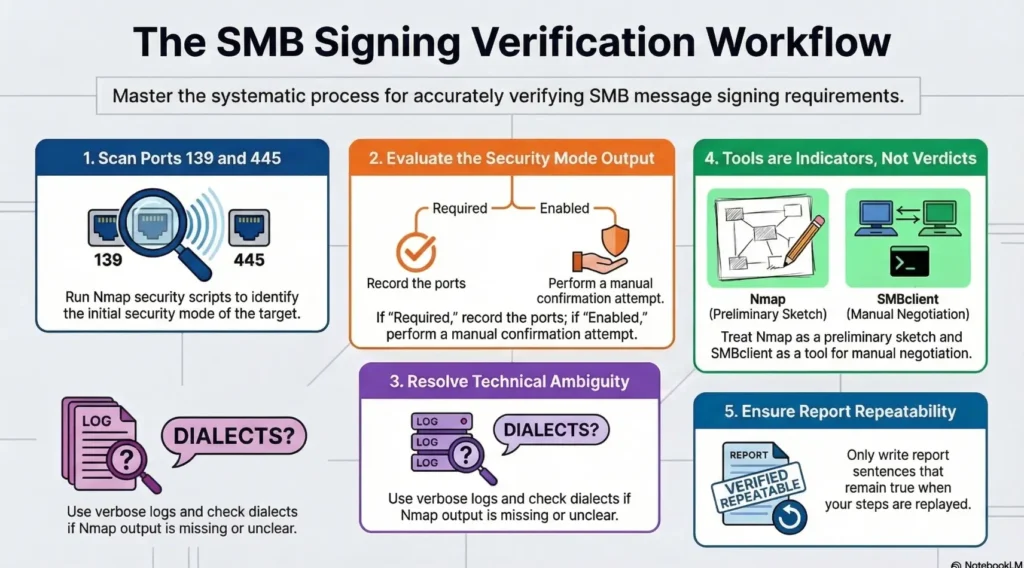
SMB1 and SMB2/3 negotiate this differently, so one script on one port can quietly miss the truth. Here you’ll do a low-noise Nmap NSE first pass, then a manual confirmation step (SMB1 via smbclient, SMB2/3 via an SMB2-capable client or packet visibility) that turns “supported” into a defensible yes/no.
Save artifacts. Name the ports. Sleep better.
Keep reading if you want the shortest path from scan output to a report-ready sentence.
Table of Contents
Who this is for / not for
For: authorized lab defenders, sanctioned pentesters, and learners on Kioptrix/VulnHub/HTB-like targets who need a fast, defensible “enabled vs required” statement without installing CME. If your environment is explicitly allowed and you’re writing notes like an adult, this workflow fits.
Not for: drive-by scanning, “curiosity” against systems you don’t own, or anything that smells like real-world targeting. SMB signing checks can be low-noise, but “low-noise” is still “a scan,” and permission is still the entry ticket. (If you need a clean policy anchor for that boundary, pin a vulnerability disclosure policy or internal rules-of-engagement note right next to your lab checklist.)
- Run the smallest scan that answers the question
- Separate “supported” from “required” every time
- Save artifacts so your future self can’t argue with you
Apply in 60 seconds: Create a notes folder named smb-signing and save raw outputs as you go.
Eligibility checklist (yes/no)
- Yes/No: Do you have written authorization for this target and timeframe?
- Yes/No: Is the target a lab VM (Kioptrix/VulnHub/HTB-style) or a sanctioned internal asset?
- Yes/No: Are you scanning only ports 139/445 with specific SMB scripts (not “kitchen sink”)?
- Yes/No: Will you store outputs securely (screenshots/logs) as assessment data?
Next step: If any answer is “No,” stop and fix scope before touching Nmap.
Scope lock: what “SMB signing” really means in practice
Signing enabled vs signing required (the only distinction that matters)
Enabled means the server can sign SMB messages and may use signing in some cases. Required means the server insists on signing; an unsigned session can’t proceed cleanly. In real pentest documentation, “required” is the line that changes feasibility for certain attack paths and relaying scenarios. “Enabled” is the line that people misread.
SMB1 vs SMB2/3 matters (your script choice changes the truth)
Kioptrix-style targets are time capsules. Some speak only SMB1, some speak SMB2+, and some do that annoying thing where port 139 behaves differently than 445. That means you can’t treat a single output line as gospel unless you know which dialect you actually negotiated. (If you want the quick mental model, see port 139 vs 445 SMB behavior in null-session-style tests and steal the “separate the ports” note-taking habit.)
Let’s be honest… “supported” ≠ “enforced”
Tools love the word “supported.” It sounds reassuring. It is also a trap. You’re hunting for “required” (enforced) versus “enabled” (optional). Everything else is garnish.
Show me the nerdy details
At a protocol level, “required” means the server’s negotiation and session setup logic expects signed messages (and will reject or fail sessions that don’t meet signing policy). SMB1 and SMB2+ represent signing in different parts of the negotiation flow, which is why script choice matters. When you see vague terms like “supported,” you’re usually looking at capability rather than enforcement.
Nmap first pass: scripts that usually answer in one scan
Minimal command you can copy-paste (low noise, high signal)
Start with exactly the scripts that answer the signing question, and exactly the ports that matter:
nmap -p 139,445 --script smb-security-mode,smb2-security-mode <IP>If host discovery is blocked in your lab setup (NAT/host-only weirdness), you can add -Pn to skip ping. Try not to add more than you need. (If you want a tight explanation for when -Pn is legitimate vs when it’s masking a routing problem, bookmark Nmap -Pn vs -sn so you stop “fixing” network reachability with bigger scans.)
- What this does: probes SMB1 security mode and SMB2+ security mode where possible
- What it avoids: broad enumeration, credential guessing, “oops I scanned the world” energy
Read the output like a prosecutor (what strings actually mean)
Different Nmap/NSE versions print slightly different phrasing, but the logic stays steady. You’re looking for language that clearly implies one of these states:
- Signing required: the server enforces signing, unsigned won’t work
- Signing enabled, not required: optional signing, unsigned may still work
- No SMB2 output: often SMB1-only or SMB2 negotiation failed
Important: if you see only SMB1 results, don’t “assume SMB2 is off.” Assume “SMB2 wasn’t negotiated.” Those are different facts.
Curiosity gap: when Nmap lies by omission
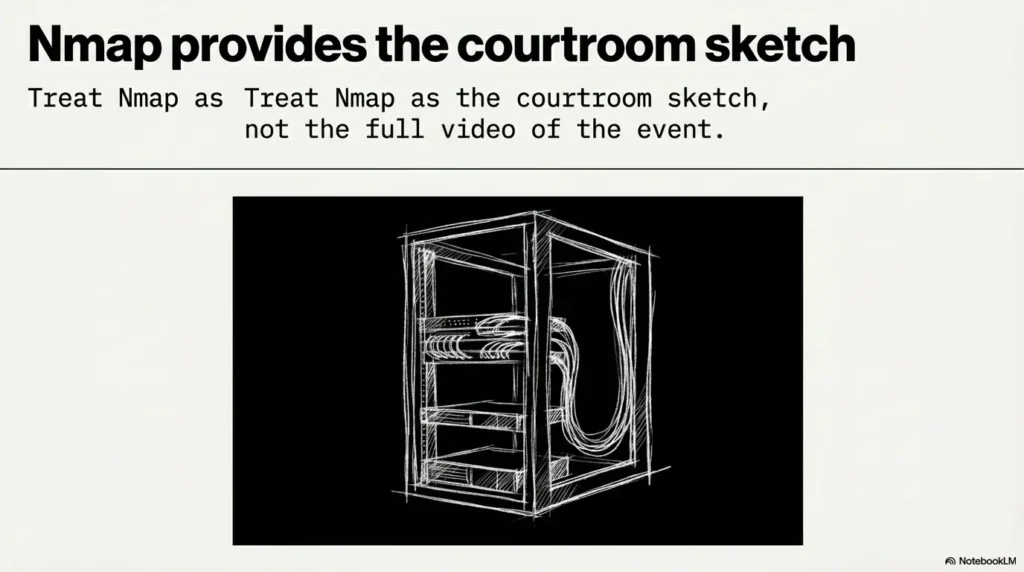
Nmap is honest, but it’s not psychic. If SMB2 scripts show nothing, it might be because SMB2 isn’t supported, or because the server refused negotiation, or because the script couldn’t complete its handshake for environmental reasons. That’s why you do the manual confirmation step: to turn “maybe” into “yes/no.”
- Run SMB1 + SMB2 scripts together
- Interpret missing output as “not negotiated,” not “doesn’t exist”
- Plan to manually confirm enforcement
Apply in 60 seconds: Re-run the same command with -oN smb-signing-nmap.txt to save it.
Precision scan: force “required or not?” without extra chatter
Narrow to the exact script and port that responds
If 445 responds cleanly, start there. If it’s ambiguous, fall back to 139. The goal is to reduce variables, not collect trophies.
nmap -p 445 --script smb2-security-mode <IP>
nmap -p 139 --script smb-security-mode <IP>
If one script produces output and the other doesn’t, that’s not a failure. It’s a clue about dialect support and how the service is exposed.
Add version context (only if needed)
If you need service context for reporting (again, in a lab), add service detection. Keep it disciplined:
nmap -p 139,445 -sV --script smb-security-mode,smb2-security-mode <IP>In my notes, I treat -sV like hot sauce: helpful in small amounts, regrettable when poured over everything. (If you’re tired of getting “confidently wrong” banners, see how -sV produces false positives and why saving raw output beats trusting your memory.)
Why Kioptrix-like images sometimes flip signing between boots
Some lab images have startup scripts, template resets, or package differences across snapshots that quietly change Samba defaults. If your result changes, record the VM snapshot, date/time, and any updates you applied. Your “evidence trail” matters even in a personal lab, because it trains you for real client work. (For a repeatable “don’t lose the receipts” workflow, copy the structure from Kali lab logging and standardize filenames per target.)
Show me the nerdy details
Nmap NSE scripts depend on completing specific negotiation steps. If a target only supports SMB1, SMB2 scripts may not run. If the target supports SMB2 but blocks certain negotiation features, the script may fail silently or return partial information. Precision scanning reduces “tool noise,” making it easier to spot which layer is failing: reachability, port exposure, dialect negotiation, or policy enforcement.
One more lived-experience note: if you’re scanning a VM behind a host-only adapter and your results look “filtered,” don’t panic and expand the scan. Fix the network path first. A clean, small scan on the right interface beats a big scan on the wrong one.
Manual confirmation path A: SMB1 check with smbclient (quick sanity)
One-shot negotiation test (what to observe)
A default smbclient connection is not an SMB1-specific test. Record the negotiated dialect. For a confirmed SMB1-only isolated lab, pair --option='client min protocol=NT1' with -m NT1 on that command; do not change global defaults. For blank credentials, specify -U '%' -N.
smbclient -L //<IP> -U '%' -NThe example submits an empty username/password. Server guest mapping and signing behavior still need to be recorded; share-list success is not evidence that an authenticated unsigned session was accepted.
smbclient -L //<IP> -U '%' -N -d 3- Good sign for your analysis: you can see negotiation progress and any signing-related hints in debug output
- Bad sign for your sleep: you get a generic failure that could mean five different things unless you log details
Increase visibility without increasing risk
Verbosity is your friend. Credential spraying is not. You’re looking for protocol-level behavior, not “try 50 passwords and hope.” If you’re documenting a lab exercise, capture the exact command and the first 30–60 lines of output that show the negotiation path. (If you hit that classic “it lists something but I still can’t access anything” moment, it pairs well with smbclient list works but access still fails.)
Here’s what no one tells you…
A successful anonymous list does not prove signing isn’t required. It only proves your session met the server’s rules. If your client used signing automatically (or if the server didn’t require it for that flow), you still haven’t answered the enforcement question. That’s why Path B exists: it focuses on enforcement signals.
- Use it to confirm SMB1 reachability and dialect behavior
- Turn on verbosity to avoid “mystery failures”
- Don’t confuse “worked” with “unsigned was allowed”
Apply in 60 seconds: Save verbose output to a file for later comparison.
Show me the nerdy details
SMB clients may opportunistically use signing depending on configuration and server capabilities. That means an SMBclient success can occur even when signing is required, because the client complied. Manual confirmation becomes meaningful when you can compare behavior under conditions that differ by signing (or at least observe explicit “signing required” negotiation errors in verbose logs).
Manual confirmation path B: SMB2/3 check without CME (verify enforcement)
Use an SMB2-capable tool to confirm “required”
Your manual confirmation goal is simple: determine whether the server enforces signing for SMB2/3 sessions. Many environments use tools like Wireshark for visibility and SMB2-capable clients for negotiation. If you have an SMB2-capable client in your toolkit, run a single, minimal connection attempt with verbose logging enabled.
What you’re validating:
- Record the SMB2 NEGOTIATE response SecurityMode: signing-enabled and signing-required are distinct flags, and each negotiated dialect needs its own result.
- If enforcement must be tested, use an authorized non-Guest authenticated session and demonstrate that post-authentication unsigned traffic is rejected for a signing-specific reason. A generic connection failure is insufficient.
In other words: you’re not trying to “do something” to the box. You’re trying to watch the box refuse to talk unless the rules are followed.
Validate by failure mode (the safest proof)
The safest proof is often a controlled failure. If your tooling lets you adjust signing behavior (or at minimum surfaces a clear negotiation error), you can document the difference between a generic auth failure and a signing enforcement failure.
Operator note: A generic access-denied status does not identify authentication versus signing by itself. Use the failure stage, negotiated flags and explicit error evidence.
The “required” tell that hides inside generic failures
Some tools compress negotiation errors into a bland “NT_STATUS_*” output. That doesn’t mean the signal isn’t there. It means you need to turn on verbose logs or use packet capture to see the negotiation flags. Microsoft’s SMB behavior and policy controls are well documented in Windows security settings and SMB signing guidance, and Samba’s configuration options are described in Samba documentation. In labs, Wireshark is often the simplest truth serum when tool output is coy.
Show me the nerdy details
Packet capture can show the SMB2 NEGOTIATE SecurityMode and Session Setup Guest/Null flags. Not every early handshake message is signed, so an unsigned initial negotiation or Session Setup packet alone does not show optional signing. Separate the server’s advertised requirement from actual signed traffic after authentication.
Decision card: Nmap-only vs Nmap + manual confirmation
Choose Nmap-only when:
- You only need a quick lab note
- The output clearly states “required” or “enabled, not required”
- Dialects are obvious and consistent
Trade-off: faster, but more vulnerable to omission/ambiguity.
Choose Nmap + manual confirmation when:
- You’re writing report-ready findings
- SMB2 output is missing/partial
- You suspect SMB1-only or port-specific behavior
Trade-off: slightly slower, dramatically more defensible.
Neutral action: Pick one approach, then save the artifacts immediately.
Quick lived-experience moment: on one lab box, 445 showed what looked like “enabled,” but 139 behaved differently. If I’d stopped at the first scan, I would’ve written a clean sentence that was cleanly wrong. Testing both ports felt boring. It also kept me honest.
Edge cases that fool people on Kioptrix
SMB on 139 only (NetBIOS) vs 445 direct-hosted
Some older images are weirdly polite on one port and stubborn on the other. If you get ambiguity, test both ports with the same discipline. Do not “average” results in your head. Record them separately.
Guest access and “false comfort”
Guest/Anonymous and ordinary authenticated sessions have different signing semantics. SMB2/3 Guest logons lack normal signing key support, and a required-signing policy can prevent Guest access. Record Guest/Null session flags separately from the server’s negotiated signing requirement; do not use an easy anonymous listing as proof about authenticated unsigned traffic.
SMB dialect mismatch (SMB1-only boxes)
If your SMB2 script returns nothing, don’t force it into meaning. Treat it as a signal: you may be talking to an SMB1-only service or the environment isn’t allowing SMB2 negotiation. Either way, document what you attempted.
- Test 139 and 445 when results conflict
- Don’t let guest access blur policy conclusions
- Write “not negotiated” instead of guessing
Apply in 60 seconds: Split your notes into two headers: “Port 445” and “Port 139.”
Show me the nerdy details
Different SMB transports and dialects can present different security mode capabilities. Older stacks may default to SMB1 behaviors on 139, while 445 might expose direct-hosted SMB with different negotiation results. Testing both is a practical way to avoid false certainty.
The box was effectively SMB1-first, and my tool output had been overly tidy. The lesson wasn’t “never trust tools.” The lesson was “trust tools the way you trust a flashlight: it shows what you point it at.” Once I treated the process like evidence collection instead of fortune-telling, the lab stopped feeling like a carnival game. …
Common mistakes (loss-prevention)
Mistake #1: Treating “enabled” as “required”
This is the classic report bruise. “Enabled” means signing is available. “Required” means unsigned doesn’t work. If you mix these up, you don’t just make a small error, you mislead downstream decisions.
Mistake #2: Running only one script and calling it done
Select checks appropriate to the observed or documented dialect and authorized scope. A failed script can reflect unsupported negotiation or another prerequisite; silence alone does not establish policy. Review exact script behavior rather than automatically running both SMB generations.
Mistake #3: Scanning the wrong interface/segment in lab NAT setups
Filtered ports in a VM lab often mean “you’re not actually reaching it,” not “the service is hardened.” This is where people expand scans, increase timing aggressiveness, and add more scripts. That’s how you waste an hour. Fix routing first.
Reporting-ready interpretation: write the finding in one clean sentence
This is where you make your future self proud. Use language that separates ports and avoids assumptions about dialects you didn’t negotiate.
If signing is required
“SMB signing is required on port(s) 445/139; unsigned sessions are not accepted.”
If signing is enabled but not required
“SMB signing is enabled but not required; the server permits unsigned sessions.”
If inconclusive
“SMB signing status could not be confirmed due to dialect/port limitations; SMB1/SMB2 checks returned ambiguous negotiation output.”
- Name the port(s)
- Say “required” only when you can support it
- Use “not confirmed” when negotiation was ambiguous
Apply in 60 seconds: Paste your one sentence into notes, then attach the raw outputs underneath it.
Show me the nerdy details
Report language should reflect the strongest supported claim. If your scan indicates “enabled,” don’t upgrade that to “required.” If your manual confirmation proves enforcement via negotiation failure (or explicit signing-required signals), then “required” is appropriate. When in doubt, “not confirmed” is more professional than accidental certainty.
Commercial entity signals, kept neutral and accurate: you’re using Nmap NSE scripts for the first pass, potentially Samba tooling for SMB client negotiation, and often Wireshark for packet-level visibility. If your target is Windows-based, Microsoft’s SMB signing policies and security settings shape what “required” means in practice. All of these are legitimate, defensible tools to mention in a report without turning into a product pitch. (If you want your “one clean sentence” to sit inside a consistent findings structure, see how to read a penetration test report and mirror the language patterns that stakeholders actually understand.)
FAQ
1) What Nmap script checks SMB signing status?
The two most directly relevant are smb-security-mode (SMB1-oriented) and smb2-security-mode (SMB2/3-oriented). Running both against ports 139 and 445 helps prevent dialect blind spots.
2) What’s the difference between SMB signing enabled vs required?
Enabled means signing is available and may be used. Required means the server enforces signing and won’t accept unsigned sessions. For reporting, “required” is the stronger claim and needs stronger evidence.
3) Can SMB signing differ between SMB1 and SMB2/SMB3?
Yes. SMB1 and SMB2/3 have different negotiation mechanisms and may be configured differently, especially on older images or mixed-stack targets. That’s why you test both script families when possible.
4) Should I check ports 139 and 445 or just 445?
Start with 445 if it’s available, but check 139 when results are missing, ambiguous, or suspiciously “too clean.” Some lab targets expose different behaviors per port, especially older NetBIOS-era images.
5) Why does Nmap show nothing for smb2-security-mode?
Common reasons include: SMB2/3 not supported (SMB1-only target), SMB2 negotiation failing, environmental reachability issues, or the script not completing its handshake. Treat “nothing” as “not negotiated,” not as “disabled,” until you confirm.
6) How do I confirm SMB signing manually without CME?
Use a minimal SMB client connection attempt with verbose logs (SMB1 via smbclient, SMB2/3 via an SMB2-capable client). The safest confirmation is often a controlled failure mode that clearly indicates signing enforcement, optionally supported by packet capture.
7) Does guest/anonymous access affect SMB signing results?
Guest/Anonymous sessions are not equivalent to an ordinary authenticated session when testing signing. SMB2/3 Guest logons lack the normal signing key support, and requiring SMB signing can prevent Guest access. Record session type and assess the advertised requirement separately.
8) What does “message signing supported” actually mean?
Usually it means the server can do signing, not that it enforces it. Your key decision is whether unsigned sessions are accepted. That’s the “required” distinction.
9) Can I rely on smbclient output alone for signing enforcement?
Not reliably. A successful smbclient session may already be signed, depending on client defaults and server negotiation. Use verbose logs, compare behaviors where possible, and document limitations when you can’t force a clear differentiation. (If you need a concrete example of “it connected, but the operation still fails,” compare your symptoms to SMBclient TREE_CONNECT failed and note how often errors blur protocol, auth, and share-level policy.)
10) What’s the safest way to document SMB signing in a pentest report?
Write one sentence per port with “required” only when supported by clear negotiation evidence. Attach the Nmap output and your manual confirmation logs (or a short packet capture summary). If it’s ambiguous, say so plainly.
Conclusion: next step in 15 minutes
Let’s close the curiosity loop from the hook: you now have a way to stop arguing with the word “supported” and start answering the real question, “Is signing required?” Nmap gives you the fast first pass. Manual confirmation turns it into a defensible finding. The win isn’t sophistication. The win is repeatability.
One infographic: the “Enabled vs Required” decision flow
smb-security-mode + smb2-security-mode
- Signing required
- Signing enabled but not required
- Status not confirmed (with reason)
Run a 2-step check and save outputs (the 15-minute version)
- Run Nmap with smb-security-mode + smb2-security-mode against -p 139,445 and save stdout.
- Perform one manual negotiation attempt with verbose logging and attach both artifacts to your notes.
Original review: 2026-03-02
Lab-only reminder: keep scans minimal, avoid credential guessing, and treat outputs as sensitive assessment data. If you want a quick upgrade next, add one packet capture on the manual step so your “required vs enabled” conclusion has both tool output and observable negotiation behavior in the same evidence bundle. (And when you’re ready to turn lab notes into a real deliverable, drop this finding into a consistent structure like a pentest report template so your evidence and your sentence stay welded together.)
Technical guidance updated: 2026-10-13. Corrected dialect-specific client testing, SMB2 signing flags and handshake evidence, and the relationship between Guest sessions and signing enforcement.