Sources, review date and section shortcuts
Editorial review: October 20, 2026. Treat RPC connection, authentication and permission to a particular operation as separate stages.
Reference documentation · Related practical guide
Go straight to: Decision check · Main workflow · Further detail
Open the practical working record to connect this guide to your scope, evidence and next decision.
Identify the first denied operation
A connection can succeed while a specific RPC operation is denied. Preserve the interface, requested operation, identity context and returned status before choosing a permitted follow-up. Access denied is not a unique diagnosis of invalid credentials and is not authorization to expand credential attempts. Reference and scope.
Authorized SMB and RPC troubleshooting guide
Rpcclient NT_STATUS_ACCESS_DENIED: Beginner Fixes That Actually Narrow It Down
Treat RPC connection, authentication and permission to a particular operation as separate stages.
The fastest route is not a larger pile of command variations. It is a controlled sequence that identifies where the denial first appears: name resolution, SMB authentication, tree connection, pipe opening, RPC binding, or command authorization.
This guide gives beginners, help-desk technicians, junior administrators, and lab learners a safe diagnostic path. You will test one variable at a time, protect credentials, interpret useful debug lines, and know when the correct result is simply, “this account is not allowed.”
Find the failure stage
Separate login trouble from pipe or command permissions.
Avoid unsafe shortcuts
Do not expose passwords, force SMB1, or grant broad admin rights.
Build a clean record
Capture the exact command, version, result, and first meaningful denial.
The useful question is not merely “Why was I denied?” It is “At which door did the denial happen?” 🔐
Snapshot
Who it is for: authorized beginners, support technicians, and junior administrators. What it solves: vague NT_STATUS_ACCESS_DENIED failures that may occur at several SMB or RPC checkpoints. What you can do next: run a three-test sequence, classify the failure, and prepare a useful escalation record without weakening server security.
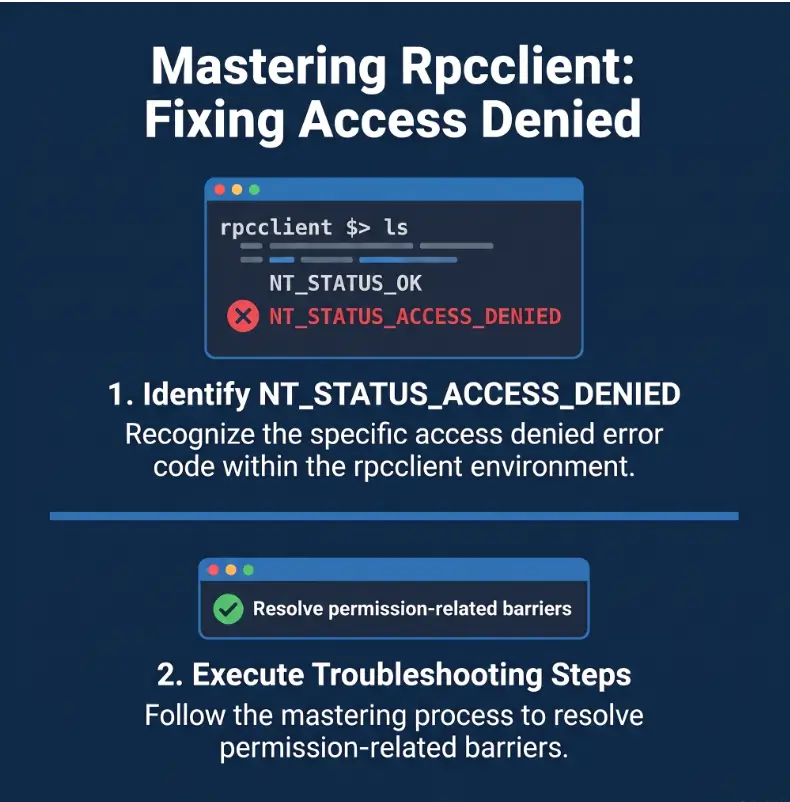
Before You Act: Keep the Fix Inside Your Permission Boundary
This article is for systems you own, administer, support under an approved role, or use in a training environment that explicitly permits SMB and RPC testing. A reachable server is not automatically an authorized server.
NT_STATUS_ACCESS_DENIED is an authorization result. It may indicate a configuration mistake, but it may also show that a security boundary is working exactly as intended.
Before You Act
This guide can help you classify an access-denied error and gather evidence. It cannot determine your organization’s approved permissions, replace an administrator’s judgment, or authorize changes to SMB, firewall, domain, or remote-management policies. Confirm scope before altering credentials, group membership, signing requirements, protocol settings, or server permissions.
Good fit: authorized troubleshooting
- Your own Windows, Samba, Active Directory, home-lab, or test system
- A client environment you are formally assigned to support
- A classroom, certification lab, or training platform that permits the test
- A documented internal task involving account, share, or RPC diagnostics
Stop when scope is unclear
Do not try to bypass a denial on a system you are not authorized to examine. Enumeration of users, policies, shares, services, printers, registry data, or account objects may be restricted even when the host responds normally on the network.
When ownership or permission is uncertain, pause and obtain written scope. That small administrative step is far cheaper than turning a troubleshooting exercise into an incident report.
Key takeaway
A denial is diagnostic evidence, not permission to search for a bypass. First confirm that the target, account, and requested operation are inside your approved scope.
First Clue: Locate the Exact Access-Denied Stage
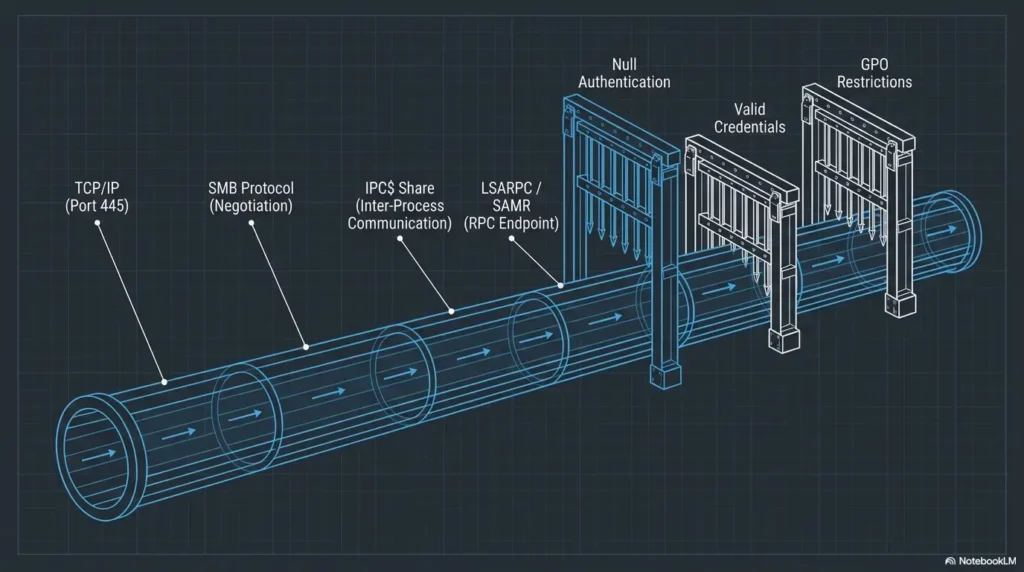
The phrase NT_STATUS_ACCESS_DENIED is less useful than the moment it appears. Treat the session as a row of checkpoints. The first failed checkpoint usually tells you which family of causes deserves attention.
Denied before the rpcclient prompt
When rpcclient never opens its interactive prompt, investigate the path that comes before individual RPC commands. That includes the target name, destination IP, SMB negotiation, account authentication, and connection to IPC$.
Do not begin by researching SAMR or LSA command permissions if the SMB session itself never becomes usable. You would be inspecting the upstairs light switch while the front door is still locked.
Connected, but one command failed
A successful prompt proves only that part of the path worked. It does not guarantee permission to query domain users, inspect policy objects, access remote registry functions, manage printers, or modify accounts.
If one low-impact query succeeds and an administrative operation fails, stop changing the password. The account may be authenticated correctly but lack the access mask required by that specific operation.
Every command fails after login
This pattern may point to a restricted session, unavailable interface, pipe-access rule, service configuration, or account type that is permitted to connect but not permitted to perform useful RPC calls.
| Where the denial appears | Most useful next check | Do not assume |
|---|---|---|
| Before any prompt | Target, DNS, SMB authentication, IPC$ | That the selected RPC command is the problem |
| During pipe opening or RPC bind | Named-pipe access, service availability, transport policy | That a valid password grants RPC access |
| Only after one command | Interface, object, and command-specific rights | That authentication failed |
| After every command | Session restrictions, account type, remote RPC policy | That broad administrator access is the only fix |
Illustrative example: the password was never the problem
A junior technician connected to a lab file server with rpcclient and could run a basic identity query. An account-management command returned NT_STATUS_ACCESS_DENIED, so the technician tried three username formats, reset the password, and added sudo.
Nothing changed. The session had already authenticated successfully.
The useful clue was that the first read-oriented query worked. The second command requested rights the lab account did not have. Once the technician recorded the exact failing operation, the administrator confirmed that the restriction was intentional.
The lesson is pleasantly unglamorous: classify the failure before changing anything. A correct classification can save an hour of password-shaped noise.
The five-door diagnostic flow
1. Target
Correct hostname, IP, route, and VPN path?
2. SMB login
Did session setup accept the identity?
3. IPC$ and pipe
Can the account reach the required named pipe?
4. RPC bind
Is the interface available and permitted?
5. Command
Does this operation require additional rights?
Run This 60-Second Rpcclient Sanity Check
Before opening logs or editing policies, confirm the basics. These checks catch wrong targets, stale lab addresses, unexpected account contexts, and command-line credential mistakes.
Confirm the target is the machine you intended
- Check the hostname you typed.
- Confirm the resolved IP address.
- Check whether a VPN or secondary interface changed the route.
- Make sure an old virtual machine did not reuse the same address.
- Match the target’s operating system or Samba identity to your ticket or lab notes.
If name resolution has been unreliable, the internal guide to diagnosing Kali Linux DNS problems can help you separate a naming error from an SMB permission error.
Use an explicit account context
Use a domain-qualified or server-qualified identity when the environment requires one. In this example, LAB is the account source and alex is an authorized test user:
rpcclient -U 'LAB/alex' fileserver.example.testEnter the password interactively. Avoid placing a reusable password after a percent sign because shell history, screenshots, copied tickets, and shared terminals have long memories.
Pin the destination IP when DNS is suspicious
The -I option lets you force the destination IP while retaining the server name in the command:
rpcclient -I 192.0.2.10 -U 'LAB/alex' fileserver.example.testUse this as a diagnostic comparison, not as a permanent excuse to leave broken DNS untouched. If the IP-pinned test behaves differently, document the result and inspect name resolution.
Record the client version
rpcclient --versionVersion information matters when two machines use different syntax, defaults, authentication behavior, or protocol support. “It works on my laptop” becomes useful only after the laptop identifies itself.
Key takeaway
A clean first test has four recorded facts: client version, target name, destination IP, and explicit account context. Without those facts, each retry adds fog rather than evidence.
Credential Shape: The Small Detail That Changes the Session
A username is not always a complete identity. The same visible name may exist locally on a server, inside an Active Directory domain, or in another trusted account source.
Local account versus domain account
Use the account namespace the target actually recognizes. Common forms include a domain-qualified user, a server-local user, or an unqualified username when the environment has an established default.
| Identity form | Typical meaning | What to confirm |
|---|---|---|
LAB/alex | Domain or workgroup account | The target trusts or belongs to that account source |
FILESERVER/alex | Local account on the server | The local account exists and remote use is permitted |
alex | Default account context | Which context the client and server will assume |
A correct password attached to the wrong account context can fail authentication or create a session with fewer rights than expected. Record the exact identity form used in every attempt.
Empty password is not anonymous permission
The -N option suppresses the password prompt. It does not grant anonymous RPC rights, convert a named account into a guest, or persuade the server to permit enumeration.
If null or guest access is intentionally disabled, rpcclient -N returning access denied is an expected result. The related guide to SMB null sessions on ports 139 and 445 explains why transport availability and anonymous authorization should not be treated as the same thing.
Use the expected authentication path
Modern Samba clients can use different authentication paths. In a domain environment, the correct choice depends on DNS, time synchronization, account configuration, ticket availability, server policy, and the identity used.
Do not switch authentication methods at random. Note the current method, change one factor, and compare the failure stage. Random variation produces a bag of outcomes with no clear cause.
Credential attempt log
- Exact username form
- Password entered interactively or loaded from a protected source
- Authentication method selected
- Target hostname and resolved IP
- Whether the prompt opened
- First command attempted and exact result
Login Success Is Not the Same as RPC Permission
The most important mental model is a stack of permissions. A session can pass one layer and fail at the next. This is why “the password is correct” and “the command is allowed” are separate statements.
Layer 1: SMB session rights
The server decides whether the supplied identity may authenticate and establish the underlying SMB session. Failure here usually affects both ordinary SMB tools and RPC-over-SMB activity.
Layer 2: IPC$ and named-pipe rights
RPC over SMB commonly uses named pipes reached through IPC$. An account may authenticate successfully yet be denied when it tries to reach the pipe required by a particular service.
If your logs point to a tree-connect problem, compare the symptoms with the guide to smbclient tree-connect failures. That helps distinguish a usable SMB login from access to the requested share or IPC path.
Layer 3: RPC interface and object rights
RPC interfaces such as LSA, SAMR, workstation, registry, printer, or service-related interfaces can enforce different authorization rules. The account may reach one interface while another is unavailable or restricted.
Layer 4: individual command rights
Two commands sent through the same session may request very different rights. A read-oriented query may work while a command that changes an account, policy, or service is denied.
When a basic query succeeds and a modification fails, the safest interpretation is not “the tool is broken.” It is “this operation requests more authority.” Confirm the required rights with the system owner before making any change.
Show me the nerdy details
An RPC client does more than submit a username and command. It establishes or reuses an SMB session, reaches an interprocess communication path, opens a named pipe, binds to an RPC interface, requests access to an object, and then asks the server to perform an operation.
Each step can apply its own authentication, availability, transport, and authorization checks. The final status displayed by the client may be the visible consequence of an earlier denial.
That is why the first meaningful failure in debug output matters more than the last repeated error line.
Read the official Samba rpcclient manual
Test SMB Authentication Before Blaming Rpcclient
A comparison with smbclient helps you decide whether the problem affects SMB generally or appears only along the RPC path. Use the same target and account context for both tools.
Run a controlled smbclient comparison
smbclient -L fileserver.example.test -U 'LAB/alex'Enter the same account password interactively. Do not change the username form, target name, VPN route, and authentication method all at once.
Interpret the two-tool result
| smbclient result | rpcclient result | Likely diagnostic direction |
|---|---|---|
| Fails | Fails before prompt | Credentials, account context, account state, target, SMB policy, or network path |
| Works | Fails before prompt | IPC$, named-pipe access, RPC service, transport, or RPC-specific policy |
| Works | Prompt opens, one command fails | Command-specific interface, object, or access rights |
| Limited listing | Limited RPC results | Restricted but valid session, guest mapping, or intentionally narrow permissions |
A successful share listing does not prove that every share is accessible. Similarly, a successful rpcclient prompt does not prove that every RPC command is authorized.
Start with one low-impact query
Choose a read-oriented command that is appropriate for your approved task and environment. Avoid beginning with account changes, policy changes, or service operations merely to see whether they work.
If user enumeration is the specific failing step, compare your evidence with the guide to rpcclient enumdomusers failures. It focuses the diagnosis on one command instead of treating every RPC denial as identical.
Key takeaway
Use smbclient as a comparison instrument, not as proof of universal permission. The useful result is whether the failure belongs to SMB login, IPC and pipe access, or one RPC operation.
Read Rpcclient Debug Output Without Drowning in It
Debug output can turn a small error into a waterfall of technical text. Begin with moderate verbosity and search for the earliest meaningful transition that fails.
Start around debug level 3
rpcclient -d 3 --debug-stdout -U 'LAB/alex' fileserver.example.testThis usually provides enough context to see name resolution, negotiation, session setup, tree connection, pipe activity, and RPC progress without producing the thickest possible log.
Find the first meaningful failure
- Name resolution: Did the client resolve the expected host?
- Protocol negotiation: Did client and server agree on a usable SMB protocol?
- Session setup: Was the supplied identity accepted?
- Tree connection: Could the session reach the requested IPC path?
- Named-pipe opening: Could the required pipe be opened?
- RPC bind: Was the interface available and accepted?
- Command execution: Did the requested operation lack rights?
The final access-denied line may simply repeat the consequence of an earlier failure. Read upward until you find the first transition from normal progress to denial.
Redact logs before sharing
Debug logs can contain more than a status code. Remove or mask passwords, hashes, ticket material, internal hostnames, public IP addresses, usernames, domain names, session identifiers, and sensitive account details.
Safe log-sharing checklist
- Keep timestamps and the first failure stage
- Replace internal names consistently, not randomly
- Remove secrets and reusable authentication material
- Retain the client version and command syntax
- State whether smbclient succeeded with the same account
- Share only the smallest useful section of the log
Change one variable at a time
| Variable | Useful controlled change | What the comparison tells you |
|---|---|---|
| Username context | Domain-qualified versus approved local account | Whether the account source was wrong |
| Target resolution | Hostname versus pinned destination IP | Whether DNS or routing affects the result |
| Authentication method | Use the method expected by policy | Whether the environment rejects another path |
| RPC command | Low-impact query versus approved administrative operation | Whether the denial is command-specific |
| Client machine | Compare versions and configurations | Whether client defaults differ |
For repeatable notes, the technical note-taking workflow for security labs offers a simple structure for commands, observations, dead ends, and next tests.
Server-Side Checks for Authorized Administrators
Client-side testing can classify the problem, but the server often owns the final answer. Administrators should correlate the attempt with server logs and the policy governing the requested RPC service.
Verify that the account is usable
- Is the account disabled or locked?
- Has the account or password expired?
- Must the user change the password at next logon?
- Does a logon-hours or workstation restriction apply?
- Is remote network logon permitted for this account type?
- Is the account local, domain-based, trusted, or service-specific?
Match client and server timestamps
Record the client timestamp before testing. Then check the corresponding Samba or Windows logs for the same attempt. Server-side records may show whether the denial happened during authentication, share access, named-pipe access, RPC binding, or command execution.
Make sure client and server clocks are reasonably aligned. A five-minute search becomes a small archaeological dig when timestamps disagree.
Review the specific remote RPC policy
Investigate the policy for the requested service rather than opening every remote-management interface. Relevant controls may include Group Policy, Samba configuration, firewall rules, endpoint protection, RPC filtering, local security policy, or service-specific access controls.
Do not disable signing, encryption, access controls, or firewall protections merely to make a test pass. A successful command obtained by dismantling the guardrails is not a successful diagnosis.
Confirm command and service support
rpcclient began as an RPC testing utility, and command behavior may vary by client version, target service, server implementation, and configuration. Confirm that the command exists in the installed client and is supported by the target service.
When the problem began after a client upgrade, server upgrade, domain hardening change, or policy rollout, include that change in the diagnostic record. Timing does not prove cause, but it gives administrators a productive place to look.
Key takeaway
Preserve least privilege. Identify the smallest missing right, confirm that the task genuinely requires it, document the approved change, and retest the same controlled command.
Check Microsoft’s NTSTATUS reference
Free Checks, Paid Tools, or Professional Support?
Most beginner access-denied cases do not require buying software. A careful manual comparison with existing Samba tools is usually enough to classify the failure.
Paid tooling or professional assistance becomes more valuable when the environment is large, regulated, business-critical, difficult to reproduce, or governed by multiple overlapping policies.
Good, Better, Best diagnostic setup
| Approach | What it includes | Best for | Watch for |
|---|---|---|---|
| Good: free manual checks | rpcclient, smbclient, version capture, moderate debug output, server logs | Home labs, single servers, junior admin practice, repeatable help-desk issues | Inconsistent notes and changing several variables at once |
| Better: structured admin tooling | Centralized logs, identity auditing, configuration tracking, approved diagnostic scripts | Small businesses, recurring tickets, several servers, shared support teams | Tools that collect sensitive credentials or hide the actual failure stage |
| Best: specialist support | Experienced Windows or Samba administrator, security consultant, vendor support, formal change control | Production outages, domain-wide policy issues, regulated systems, high-impact access changes | Unclear scope, weak evidence, and paying for hours that a clean diagnostic record could save |
What to check before paying for a tool or service
- Does it support your Windows or Samba versions?
- Can it distinguish authentication, share, pipe, interface, and command failures?
- How does it store passwords, tickets, hashes, and captured logs?
- Can sensitive fields be redacted before export?
- Does it require broad administrative access merely to diagnose?
- Can you reproduce its findings with standard logs or commands?
- Does the provider explain required changes and rollback steps?
A tool that produces a red dashboard but cannot tell you which access decision failed may add expense without adding clarity. Useful diagnostic products should shorten the route from symptom to evidence.
When to escalate instead of experimenting
- The denial is limited to a specific administrative command.
- Production policy changes would be required.
- Domain privileges, signing, encryption, or firewall controls may be affected.
- The server contains sensitive or regulated data.
- The error began after an organizational hardening change.
- The result differs across several client versions or network paths.
- You cannot safely reproduce the issue outside production.
Send an escalation packet, not a vague complaint
Useful escalation record
- Exact command and sanitized output
- rpcclient and smbclient versions
- Target operating system or Samba version
- Target hostname and expected IP address
- Authentication method and account type
- Whether smbclient succeeds with the same identity
- Whether the rpcclient prompt opens
- Exact command that first fails
- First meaningful debug failure with nearby context
- Recent server, domain, firewall, or policy changes
Compare options in the official smbclient manual
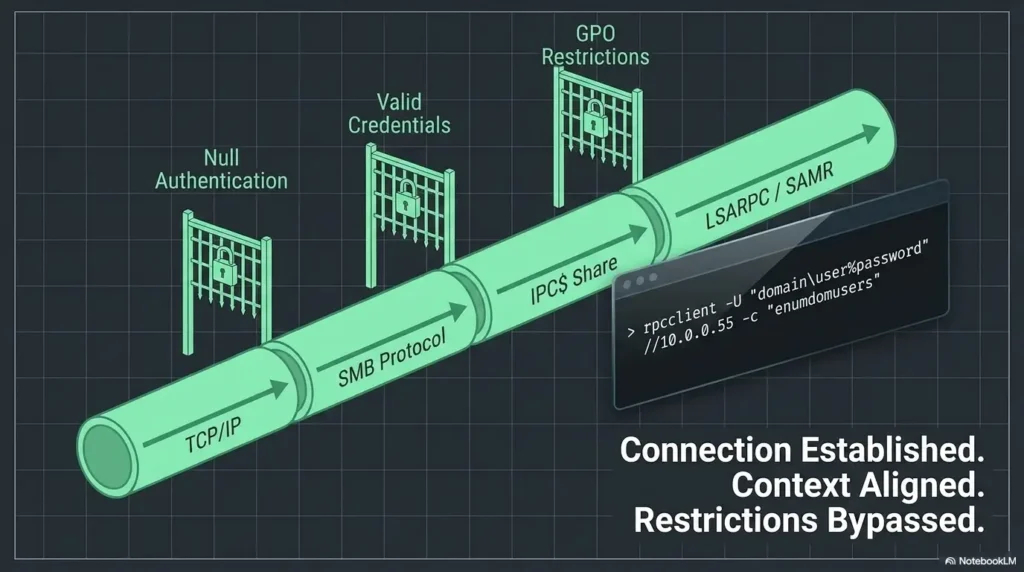
Rpcclient Access-Denied FAQ
Why does rpcclient return NT_STATUS_ACCESS_DENIED with a correct password?
The password may be valid while the account lacks permission for IPC$, the required named pipe, the RPC interface, the requested object, or the selected command. Authentication success does not guarantee operation-level authorization.
Why does rpcclient -N still return access denied?
-N prevents the password prompt. It does not grant anonymous access. If guest or null-session RPC access is disabled or restricted, access denied is expected.
Can sudo rpcclient fix remote access denied?
No. sudo changes the local process privileges on your client machine. It does not add rights to the remote Windows or Samba account.
Why does smbclient work while rpcclient fails?
General SMB access and RPC access are separate decision points. The account may authenticate and list shares while lacking permission for IPC$, a named pipe, an RPC interface, or a particular command.
Why can one rpcclient command work while another fails?
Different commands can request different access rights from different interfaces or objects. A basic query may be permitted while an account, service, registry, printer, or policy operation requires higher privileges.
Should I use the server IP address instead of its hostname?
Use -I as a diagnostic comparison when DNS is suspicious. Keep the intended server name in the command, record whether the result changes, and repair name resolution rather than permanently hiding the problem.
Should I force SMB1 for compatibility?
Not as a routine beginner fix. First identify the actual failure stage and confirm supported protocols. Enabling an obsolete protocol may weaken security without granting the missing account permission.
How much debug output should a beginner collect?
Begin around debug level 3. Keep the first meaningful failure and nearby context, record the command and version, and redact sensitive data before sharing.
Should I add the user to an administrator group first?
No. Confirm the exact missing permission and whether the task requires it. Broad administrator access can conceal the real cause, increase risk, and create a permanent privilege problem to fix later.
Your Next 15 Minutes: Capture One Clean Diagnostic Record
The access-denied wall becomes smaller once you can place the failure in one category: SMB authentication, IPC or pipe access, RPC binding, or command-level authorization.
Run the following sequence with one authorized account and one known target. Substitute your approved server name, IP address, and account context.
rpcclient --version
smbclient -L fileserver.example.test -U 'LAB/alex'
rpcclient -d 3 --debug-stdout -U 'LAB/alex' fileserver.example.test
Record whether smbclient authenticates, whether the rpcclient prompt opens, and which exact command first fails. Then save the earliest meaningful denial with a few lines of surrounding context.
The 15-minute finish line
You do not need to solve every server policy today. Your immediate job is to produce one reliable sentence:
“The account succeeds at ________, but access is first denied during ________ when running ________.”
That sentence gives an administrator something solid to investigate. It also prevents the usual spiral of exposed passwords, random flags, unnecessary privilege changes, and protocol downgrades.
The best beginner fix is not always a command that makes the denial disappear. Sometimes it is a clean diagnosis showing that the account reached exactly as far as its permissions allow.
Last reviewed: 2026-10-13
Technical guidance updated: 2026-10-13. Restored the three separate diagnostic commands, labeled the scenario as illustrative, and repaired section navigation.
rpcclient denial-stage record
Use this when: you are an authorized operator investigating a denied RPC operation. Copy these fields into your notes and replace each prompt with a dated response. Keep assumptions and unresolved questions visible.
| Field | What to record | Your evidence / owner / next check |
|---|---|---|
| Connection context | Record endpoint, tool version and approved identity context. | To complete |
| Requested operation | Name the interface or call attempted and its purpose. | To complete |
| Returned evidence | Preserve the complete status and relevant client or server log time. | To complete |
| Next permitted check | Separate transport, authentication and operation-specific permission hypotheses. | To complete |
Next action: Locate the first denied operation before proposing a configuration change. Mark the relevant row confirmed, provisional or unresolved. Keep the supporting record, responsible person and next check beside it so another reader can continue the work without treating an assumption as a result.
This is a blank practice record, not a report of a test performed by Kioptrix. Add the actual versions, approved conditions and observations from your own session.
Worksheet change record — October 20, 2026
Added this rpcclient denial-stage record with four article-specific fields and an evidence-based next action. Existing source notes retain their own review dates. This addition is not a fresh verification of every statement or a newly executed test.