
Decoding the SMB Handshake: Port 139 vs. 445
Port 139 gives you a friendly handshake. Port 445 stares at you like you brought the wrong badge to the wrong building.
When an SMB null session works on 139 but fails on 445, it isn’t “Kioptrix luck.” It’s a precision clue about transport and rules: NetBIOS Session Service vs. direct-hosted SMB, SMB dialect negotiation (SMB1 vs. SMB2/3), SMB signing, and anonymous/guest policy differences, plus the ever-boring, ever-decisive firewall/ACL filter.
A null session is an SMB session attempt made with blank credentials (no real username/password). What you can do with it depends entirely on server policy: sometimes you get shallow enumeration (like share names), and sometimes you get shut down at negotiation or session setup.
Keep guessing, and you lose the only scarce resource in labs: clean time and clean notes.
This post helps you classify the failure fast: filter vs. negotiate vs. auth, using error strings and cross-client confirmation. No tool roulette. Just a repeatable, write-up-ready diagnosis method.
If an explicitly anonymous SMB test works on TCP/139 but fails on TCP/445, compare the target address, client identity, negotiated dialect and failure stage. TCP/139 is NetBIOS session transport and TCP/445 is direct SMB; neither port alone determines SMB version or anonymous permissions. A timeout is inconclusive, a negotiation error points to compatibility, and session or operation denial requires separate identity and permission evidence.
Table of Contents
Who this is for / not for
Who this is for
- You’re testing authorized labs (Kioptrix, HTB-style, internal ranges) and your notes say: “null on 139 OK, 445 nope.”
- You want the why, not vibes: what this implies about SMB transport, dialects, and anonymous/guest policy.
- You’re time-poor and want a repeatable troubleshooting script for write-ups (pair it with a clean logging habit, like this Kali Linux lab logging workflow).
Who this is not for
- Anyone targeting real systems without explicit permission (if you need an ethics boundary to link in your footer/nav, use your vulnerability disclosure policy).
- Anyone looking for exploitation instructions. This is diagnosis-first, lab-safe, and intentionally non-weaponized.
- Same service family, different transport
- Different defaults, different fallbacks
- Your job is classification, not tool-roulette (if you feel yourself spiraling, borrow the OSCP rabbit hole rule and timebox it)
Apply in 60 seconds: Write “139 = NBSession, 445 = direct SMB” at the top of your notes before you run anything else.
Map the ports first: 139 vs 445 in plain English
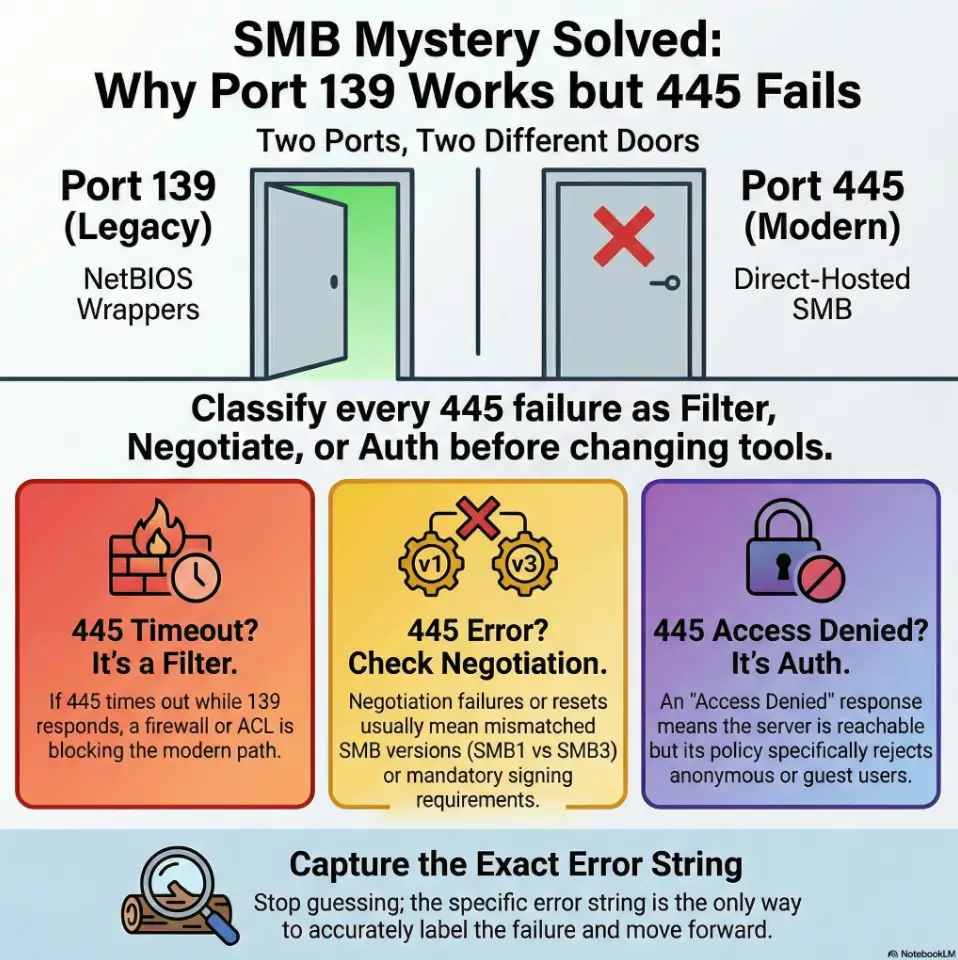
Before we diagnose, we name the beast. Microsoft’s own documentation draws a crisp line: TCP/139 is NetBIOS Session Service, and TCP/445 is direct-hosted SMB (NetBIOS-less). That distinction matters because your “null session success” might be riding a legacy path that 445 simply refuses to entertain.
139 = “SMB via NetBIOS” (legacy wrapper)
- Think: SMB traffic carried inside a NetBIOS session.
- Labs still show it because legacy stacks, compatibility knobs, and deliberate “training wheels” configs exist.
- It’s also where older discovery habits and naming quirks like to hang out.
445 = “Direct-hosted SMB” (modern default)
- SMB directly over TCP, no NetBIOS session wrapper.
- Filtering and hardening depend on the environment; the port alone does not establish either.
- Confirm dialect and signing from negotiation, rather than inferring stricter policy from port 445.
Let’s be honest… your tool isn’t “lying,” you’re seeing two different doors
Same building. Different entrance. One door still accepts an old jacket and a fake mustache. The other checks IDs under bright lighting.
Show me the nerdy details
Microsoft describes direct-hosted SMB on TCP/445 as “NetBIOS-less SMB traffic” and lists NetBIOS Session Service on TCP/139 as a traditional transport component. In practice, clients may take different negotiation paths, and servers may have different policy/hardening behavior per listener/stack. Translation: your packet story changes when the transport changes.
💡 Read the official SMB transport ports 139 vs 445 guidance
What it implies when null works on 139 but not 445
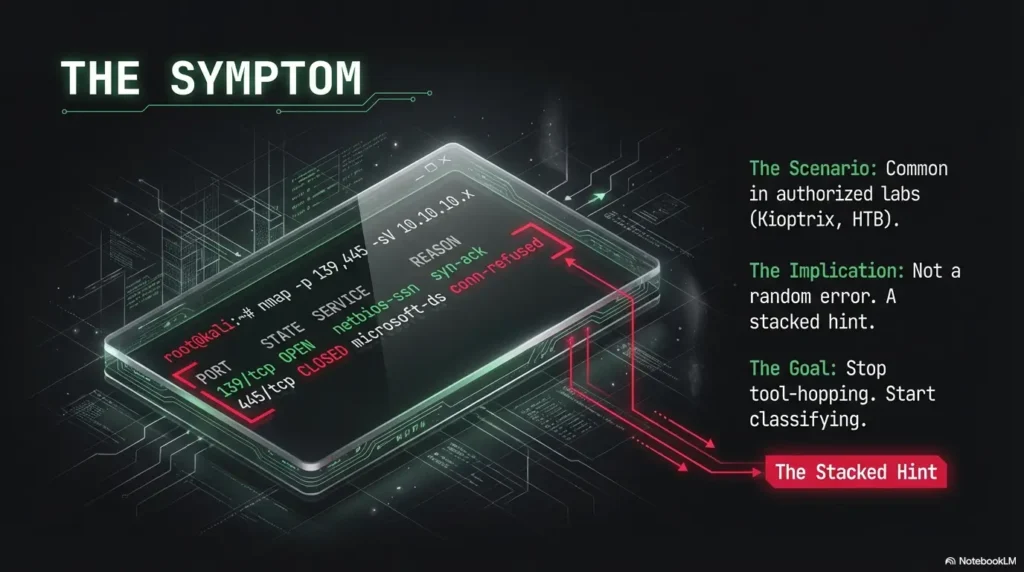
When you see “139 accepts anonymous” but “445 fails,” it’s rarely one thing. It’s a stacked hint: transport first, then dialect (SMB1 vs SMB2/3), then session rules (signing, guest, anonymous). The trick is to treat each as a switch you can label, not a mystery you can argue with at 2:00 AM.
Implication #1: Transport-level filtering is likely
If 445 times out while 139 responds, filtering is one hypothesis. A missing listener, wrong endpoint, packet loss or routing can produce similar symptoms. Record the timeout and confirm reachability/listener evidence before assigning a cause; an open 139 port does not reveal the lab designer’s intent.
Implication #2: SMB negotiation differs (SMB1 vs SMB2/3 expectations)
Different clients or listeners can negotiate different dialects, but direct-hosted SMB on 445 can carry SMB1 too. Record the dialect from actual negotiation and repeat with the same credentials/client options before attributing the difference to a version or policy.
Implication #3: Anonymous policy may be scoped by interface/path
“Anonymous allowed” is not always a single global truth. Guest access, anonymous restrictions, and signing requirements can behave differently depending on the service stack and settings. Microsoft’s SMB signing documentation notes that signing can be required inbound, outbound, both, or neither depending on OS and configuration. That matters because an anonymous-style session without proper signing or policy alignment can simply be rejected.
Why would a host “trust” 139 more than 445?
In the real world, it usually doesn’t “trust” it more. It’s legacy inertia or misconfiguration. In labs, it can be intentional pedagogy: leave one entrance ajar so you can learn what you’re looking at, then slam the modern door so you don’t skip the reading.
- Filter: timeouts/resets on 445
- Negotiate: dialect/signing mismatch
- Auth: anonymous/guest rejected
Apply in 60 seconds: Label your failure in one word (filter/negotiate/auth) before you do any deeper enumeration.
Quick triage checklist: prove what’s failing
This is the part where most people accidentally start free-climbing a cliff in flip-flops. Don’t. Your goal is not “get in.” Your goal is “name the failure type.” Once you can name it, everything else becomes smaller.
Step 1: Confirm it’s not just reachability
- Timeout usually smells like filtering or routing.
- Immediate refusal/reset often points to host/service rule behavior.
- Negotiation error suggests dialect/signing mismatch.
- Access denied / logon failure suggests policy (anonymous/guest blocked). If you’re seeing “logon failure” specifically, anchor your notes to a single canonical explanation like SMBMap NT_STATUS_LOGON_FAILURE.
Step 2: Capture the “failure type” your client reports
Write down the exact string. Seriously. SMB errors are not poetic, but they are specific. “Session setup failed” versus “negotiation failed” versus “connection timed out” are different countries with different weather.
Step 3: Cross-check with a second SMB client
Different clients can “helpfully” fall back into guest-like behavior and still call it a win. I’ve watched people celebrate a “null session” that was actually a restricted guest context with the permissions of a polite cardboard box. Validate with a second client so you don’t build a write-up on sand.
Show me the nerdy details
Cross-client confirmation reduces false positives caused by silent fallbacks: guest sessions, cached credentials, name resolution side-effects, or a client choosing a different dialect/order of offers. Your objective in triage is stable, reproducible behavior, not one tool’s optimistic interpretation.
- 445 times out → record an inconclusive network result; check filtering, routing, endpoint and listener state.
- 445 errors after negotiation → record whether session setup, tree connect or the requested operation failed; negotiation success does not make every later error a dialect issue.
- 445 returns access denied/logon failure → locate the failed stage and examine authentication or operation permissions.
Neutral next action: Record one exact error string + whether it was timeout/reset/deny.
Curiosity gap: when “null session works” isn’t what you think
Here’s the trap: “null session worked” is a sentence with hidden ambiguity. Did you truly get an unauthenticated session? Or did your client slide into guest behavior? Those two can feel identical at first glance and then diverge violently when you try to do anything meaningful.
Guest fallback vs true anonymous
- Anonymous (null): no username, no password, no identity beyond “I exist.”
- Guest: an identity exists, but it’s intentionally underpowered and restricted.
- Authenticated: a real user context with permissions tied to that account/group.
Share listing vs real access
Seeing share names is not the same as reading files. Think of share listing as the lobby directory. You can read the names on the wall. That doesn’t mean you have the elevator key. In labs, it’s common to permit shallow enumeration so you can learn the surface, while blocking actions that would shortcut the learning objective.
Here’s what no one tells you… SMB can hand you a brochure while locking every door
I’ve personally wasted an hour “enumerating” a host that was basically saying: “Welcome! Please enjoy the pamphlet. Also, absolutely not.” Once you accept that enumeration is not permission, you stop confusing movement with progress.
- Yes/No: Are you explicitly using anonymous/blank credentials (no cached creds)?
- Yes/No: Does the server identify you as “guest” (or equivalent) instead of anonymous?
- Yes/No: Can you do anything beyond listing (even a minimal metadata query)?
Neutral next action: If any answer is “No/Unsure,” re-run the same probe with a second client and compare outputs.
The most common root causes (ranked)
Let’s rank by what you’re most likely to see, then talk about what it looks like from the outside. No heroics. Just pattern recognition.
1) Firewall/ACL blocks 445 but leaves 139 open
This is the classic. 445 times out. 139 answers. The server may be fine; the path is not. Microsoft publishes port requirements that explicitly list SMB on 445 and NetBIOS Session Service on 139. In many environments, 445 is treated as higher-risk and filtered more aggressively. In labs, it can be intentionally shaped.
2) SMB signing or session requirements differ on 445
Signing can be required depending on OS and configuration, and Microsoft’s SMB signing guidance describes inbound and outbound signing as independent requirements. If the server requires signing and your session type can’t satisfy it (or your client’s negotiation path differs), you get a failure that looks “mysterious” until you remember: security controls rarely announce themselves with confetti.
3) SMB1 disabled or mismatched negotiation
Microsoft documents that SMBv1 is deprecated and provides guidance for enabling/disabling SMBv1/2/3. In modern setups, SMBv1 is often disabled. In lab setups, SMBv1 may exist in one place and not another, or your client may try dialects in an order that produces different results per transport. That’s why you treat dialects as data, not assumptions.
4) NetBIOS name resolution quirks
Some workflows “work” on 139 because the tool leans on NetBIOS naming behavior (or because the lab environment resolves names in ways direct SMB doesn’t). If you’re connecting by IP, this matters less; if you’re connecting by hostname, it can matter more than you want to admit.
Why would disabling SMB1 “break” only one port?
Because your client might not behave the same way on both paths, and the server’s listener stack might not accept the same dialect sequence. It’s not that “port 139 equals SMB1” and “port 445 equals SMB2.” It’s that the negotiation story can differ depending on how you approach the service.
Show me the nerdy details
SMB negotiation involves offering dialects and agreeing on one. Signing, encryption, and guest/anonymous policy then shape whether session setup succeeds. Transport differences can influence client behavior (timeouts, fallbacks, name services) and server behavior (policy scopes, listeners, hardening). Your safest move is to record observed dialect results instead of assuming them.
Inputs (3): (1) Did 445 timeout? (Yes/No) (2) Do you have an exact error string? (Yes/No) (3) Did a second client agree? (Yes/No)
Output: If you answered “No” to (2) or (3), assume you’re 30–90 minutes away from clarity. If you answered “Yes” to both, you’re often under 10 minutes from the right label (filter/negotiate/auth).
Neutral next action: Stop and capture the error string before changing anything else.
Common mistakes (the ones that waste an entire evening)
Mistake #1: Declaring “SMB is open” because 139 responds
I’ve done this. You see 139, you get excited, you tell your notes “SMB open,” and then you spend an hour wondering why the “real” port doesn’t work. Treat 139 and 445 as separate surfaces. “SMB open” is not specific enough to help Future You.
Mistake #2: Treating “share list visible” as proof of credentials
You can list shares and still be blocked from meaningful actions. This is not failure; it’s information. Don’t convert it into confidence you didn’t earn.
Mistake #3: Not recording the exact error string
SMB errors are like street signs: ugly, essential, and surprisingly honest. If you don’t write them down, you force yourself to re-drive the same road in the dark.
Mistake #4: Assuming Kioptrix behaves like a modern Windows server
Labs are Franken-systems by design. The point is to make you notice seams. If your brain expects “modern defaults,” Kioptrix will happily teach you humility for the price of one evening (a broader framing that also shows up when people misread scans, like Nmap -sV service detection false positives).
- Port + symptom + exact error string
- Which client produced it
- Whether behavior is reproducible
Apply in 60 seconds: Add a one-line “Observation” header to your notes and fill it before you run another command.
Don’t do this: two traps that create false confidence
Trap #1: Tool-hopping without changing hypotheses
Swapping tools without a theory is just moving the flashlight around your room while refusing to turn the lights on. If you can’t say “I think this is filter/negotiate/auth,” you’re not troubleshooting yet. You’re orbiting.
Trap #2: Over-tuning scans before confirming basics
Don’t decorate a house you haven’t confirmed exists. First confirm reachability, then negotiation, then session type. After that, enumeration becomes productive instead of performative (this mindset pairs well with a tight fast enumeration routine for any VM).
I once spent a full lab session convinced the target was “half-broken” because 139 gave me a warm handshake and 445 acted like I’d insulted its family. I tried three clients, changed flags I didn’t understand, and started narrating my troubleshooting out loud like it was a documentary.
The turning point was embarrassingly small: I wrote down the exact 445 failure and realized it wasn’t “SMB hates me,” it was “445 never truly responds.” That pushed me to label it as filter, not “auth weirdness.” Ten minutes later, everything else snapped into place, including the reason the lab designers left 139 open in the first place: they wanted me to learn that “SMB” is not a single door. It’s a hallway with different locks.
“So what should I change?” A decision table in words
You’re not here to collect trivia about NetBIOS. You’re here to decide what to do next without wasting your afternoon. Use this as a practical “if/then” map.
If 445 times out
- Think: network filter/ACL or segmentation.
- Do: verify from another authorized vantage point or network segment (if your lab supports it).
- Write: “445 = timeout; cause unconfirmed.”
If 445 refuses negotiation
- Think: dialect mismatch or session requirements (signing/hardening).
- Do: identify which SMB versions the service accepts and whether signing is required in your environment.
- Write: “445 = negotiate fail; classify as negotiate.”
If 445 returns access denied/logon failure
- Think: anonymous disallowed on 445, or guest rules differ.
- Do: compare anonymous policy and session identity (anonymous vs guest) between the two paths.
- Write: “445 = policy reject; classify as auth.”
If 139 “works” but only lists a couple items
- Think: restricted guest-like context.
- Do: confirm what “worked” actually returned and whether the session is anonymous or guest.
- Write: “139 = shallow enumeration; treat as lobby access.”
Show me the nerdy details
The same “SMB” label covers different layers: TCP reachability, SMB dialect agreement, and session setup with policy constraints (signing, guest/anonymous restrictions). Many failures happen before authentication is even meaningfully evaluated. That’s why your first label should be filter/negotiate/auth.
Lab notes for Kioptrix: what this usually means in practice
Kioptrix-style labs often behave like a time capsule with a teaching agenda. If you’re used to modern Windows defaults, the lab will feel like it’s speaking an older dialect on purpose. That’s not a defect. That’s the point.
Expect legacy SMB/NetBIOS surfaces
Seeing 139 open often signals that older components are reachable. The lab designers may want you to notice that NetBIOS-era pathways exist and that they can behave differently than direct SMB.
Expect inconsistent policy edges
Labs may intentionally allow shallow enumeration on one path but block the other. It forces you to write better notes and treat “success” as something you verify, not something you assume.
What to document in your write-up
- Ports open and how you confirmed it (don’t sleep on fundamentals like Nmap -Pn vs -sn when the lab network is doing “helpful” things)
- Exact error strings on each port
- Observed dialect behavior (what the client/server agreed on)
- What “worked” actually returned (share names only? any meaningful metadata?)
- Whether a second client reproduced the same behavior (and if you’re using smbclient for validation and it won’t reveal details, see smbclient can’t show Samba version)
Meaning: network/ACL/firewall/segmentation.
Next move: confirm path, vantage, routing.
Meaning: SMB version or signing expectations mismatch.
Next move: record dialect outcome, check signing.
Meaning: anonymous/guest policy rejects on 445.
Next move: confirm session identity (anon vs guest).
Next step (one concrete action)
Do the “two-port, one-question” check: perform the same minimal anonymous probe against 139 and 445, and record exact errors and dialect negotiation results. Then label 445’s failure as filter, negotiate, or auth before you do anything else. That single label prevents most rabbit holes and makes your write-up reproducible.
- Same probe on both ports
- Exact strings, not paraphrases
- One-word label: filter/negotiate/auth
Apply in 60 seconds: Create a three-line note template: “139 result: ___ / 445 result: ___ / Label: ___”.
FAQ
1) What is a null session in SMB, and what does it allow?
A null session is an SMB session attempt without a real username/password. What it allows depends entirely on server policy. In many environments, it allows little or nothing. In labs, it may allow limited enumeration so you can observe the service surface safely.
2) Why is port 139 still open on some systems if 445 exists?
Legacy compatibility, older stacks, and sometimes deliberate configuration choices. Microsoft documentation distinguishes NetBIOS Session Service (139) from direct-hosted SMB (445). In labs, 139 may be left open to expose older behaviors for learning.
3) Does “null session worked” mean I have real access to SMB shares?
Not necessarily. You might be seeing share names without meaningful permissions. Or your client may have fallen back into guest-like access. Treat “worked” as “I observed something,” then verify what identity and permissions you actually have.
4) What’s the difference between anonymous, guest, and authenticated SMB access?
Anonymous is no credentials. Guest is a restricted identity (often with minimal permissions). Authenticated is a real user context with group/ACL-based access. They can look similar during shallow enumeration and diverge sharply when you attempt real actions.
5) If 445 fails but 139 works, is that a firewall issue or an SMB version issue?
It can be either. Use symptoms: timeouts lean toward filtering; negotiation errors lean toward dialect/signing mismatch; access denied/logon failure leans toward policy. Label the failure first, then drill down.
6) How can SMB signing affect anonymous or legacy connections?
Signing requirements can prevent certain session types or negotiation paths from succeeding if the client and server can’t agree on signing behavior. Microsoft’s SMB signing guidance explains that signing can be required inbound, outbound, both, or neither, depending on configuration.
7) Can SMB1/SMB2 negotiation differences cause one port to fail and not the other?
Yes, especially when client behavior differs by transport and when server hardening or legacy support is uneven. Microsoft provides guidance on enabling/disabling SMB versions; modern environments commonly disable SMBv1, while labs may intentionally expose older behaviors.
8) In Kioptrix-style labs, what should I record to make my troubleshooting reproducible?
Record ports, exact error strings, observed dialect behavior, what “success” returned (share names only vs anything more), and whether a second client reproduced the same outcome. That’s enough for a reader to follow your logic without you narrating your pain.
Conclusion
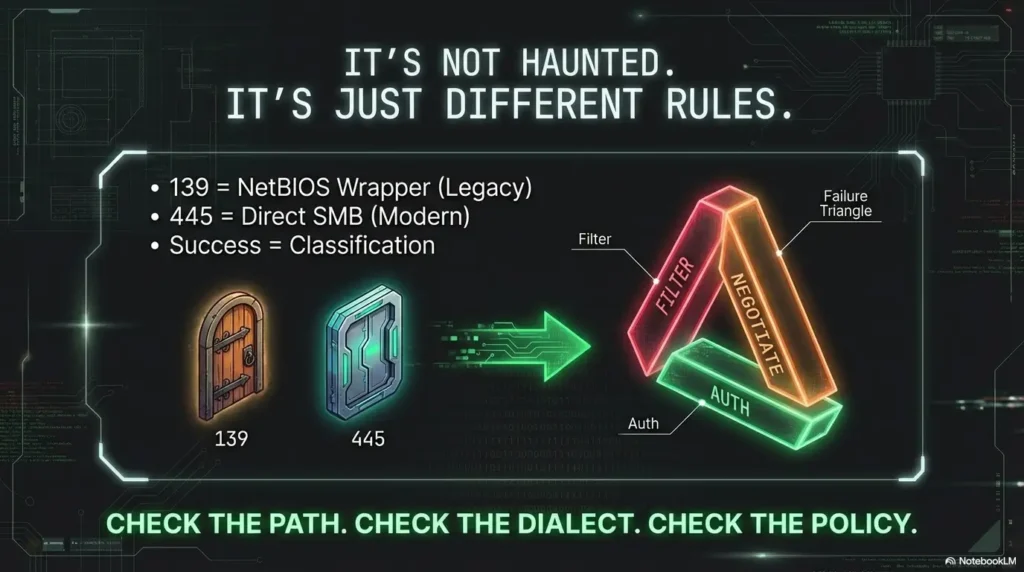
Remember the hook, that feeling of “why is 445 acting haunted?” Here’s the closure: it’s not haunted. It’s different rules at a different door. When a null-style probe works on 139 but fails on 445, you’re staring at a diagnostic postcard that says, “Check the path, then the dialect, then the policy.” If you do nothing else, do the two-port check, capture the error strings, and label the failure as filter, negotiate, or auth. That’s a real next step you can complete in 15 minutes, and it makes your Kioptrix notes read like a professional operator instead of a sleep-deprived diary.
If you want to go one level deeper (still safely), Microsoft’s documentation on SMB versions and SMB signing is worth skimming because it explains how version and signing requirements shape whether sessions succeed at all.
💡 Read the official SMB versions (SMBv1/SMBv2/SMBv3) guidance
💡 Read the official SMB signing guidance
Original review: 2026-02
Technical guidance updated: 2026-10-13. Separated SMB transport from dialect and policy, clarified timeout evidence, and distinguished authentication from operation denial. For a controlled blank-user/blank-password comparison use smbclient -L TARGET -U ‘%’ -N -p 139 and the same command with -p 445; server guest mapping can still occur.