

The SMB Ghost Win: From Enumeration to Actual Access
SMBMap shows shares, but Access Denied is the SMB equivalent of a bouncer nodding at you, then stopping you at every door. The share list looks like a win, but it can be nothing more than a well-mannered Guest or Anonymous session letting you read the building directory from the sidewalk.
The pain is modern and specific: you “successfully” enumerate shares on Kioptrix or a real network, then every ls/dir returns STATUS_ACCESS_DENIED. You start blaming tools, flags, or protocol versions, losing time and risking lockout policies while learning nothing.
This post provides a verification-first loop to distinguish credential rejection, guest mapping, and share or filesystem permissions. Compare client behavior, then correlate the accepted session identity with server audit logs or explicit session metadata; a client printing the username you supplied is not proof that the server accepted it.
- ✔ No spiraling (use the OSCP rabbit-hole rule mindset even outside the exam).
- ✔ No exploit detours.
- ✔ Just proof, then the right fix.
Start with the lobby test. Then try one harmless door handle.
Fast Answer (Snippet-ready, 40–80 words):
If smbmap lists shares but file operations return ACCESS_DENIED, record the failure stage and verify the accepted identity. Explicit username/domain options control what the client submits; they do not prevent a server from mapping the attempt to Guest. A harmless directory listing establishes access to that path, while server logs or explicit Guest/Anonymous session indicators establish identity. A valid user can also be denied by permissions.
Table of Contents
Who this is for / not for
For: you’re seeing “shares found” but file access is blocked
- Blue team validation, IR triage, internal audit (especially if you’re building repeatable playbooks like an incident response retainer workflow)
- Red team / pentest with written authorization (make sure scope language is crisp, e.g., a penetration test SOW template plus limitation of liability)
- Lab users (Kioptrix/HTB-style) learning SMB auth behavior
Not for: breaking into systems or bypassing controls
If you don’t own it or don’t have explicit permission, stop here. This guide stays in the “verification lane”: confirming session type, confirming identity, and understanding why permissions block access. No bypasses, no “try this exploit,” no lockout-speed credential guessing.
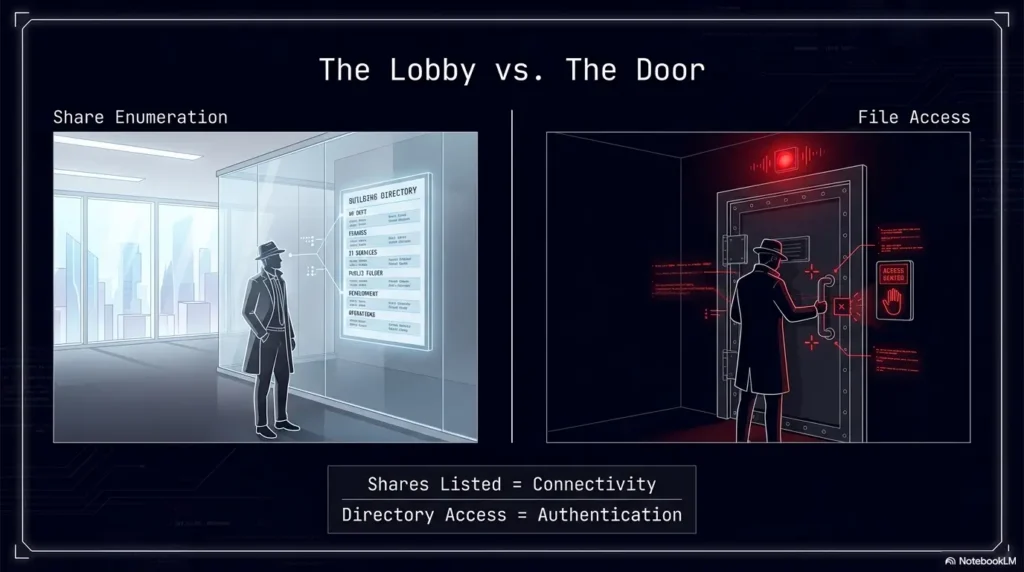
- Lobby: share names can be visible in low-priv sessions
- Door: read/list actions require real permissions
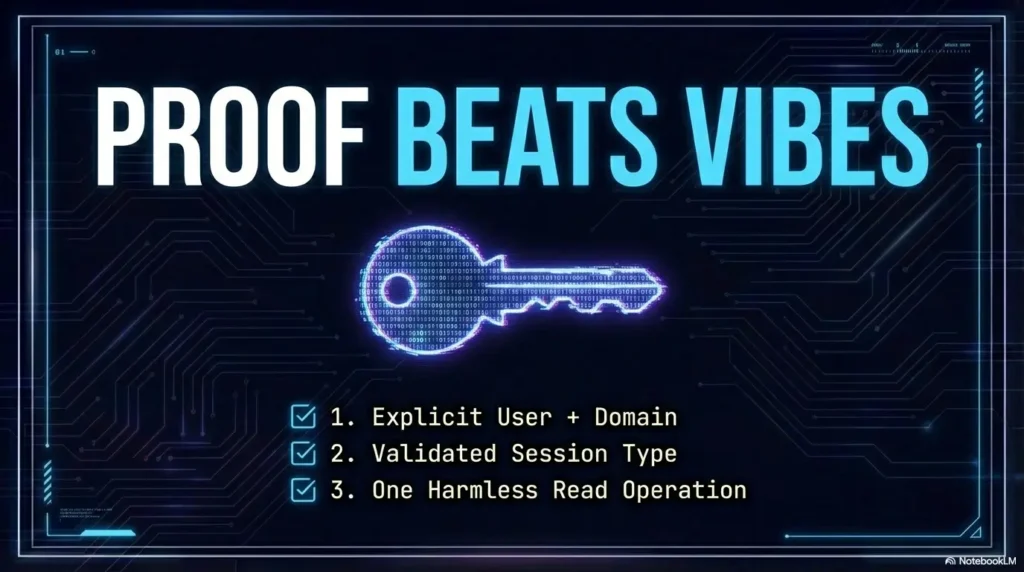
- Proof beats vibes: verify session identity explicitly
Apply in 60 seconds: Record enumeration and directory access separately, then verify the accepted identity before calling credentials valid.
A tiny personal confession: the first time I hit this, I spent 27 minutes blaming the tool. The tool was innocent. My “successful” output was just a well-dressed Guest session wearing my confidence like a borrowed coat.
Shares listed, access denied: what that actually means
Share enumeration ≠ share permission
It’s completely normal to “see” shares like IPC$, print$, or even administrative shares on some setups, yet be unable to read anything useful. Many servers allow some form of share browsing while still enforcing strict access on actual file operations. Think of it as reading the building directory from the sidewalk.
- Browseable: the server discloses share names and metadata
- Readable: you can list directories and read files within a share
- Traversable: you can move through folders (NTFS/ACL traversal matters)
SMB session types that confuse everyone
When people say “my creds worked,” they’re often describing “I got a response.” But SMB can respond with different session identities:
- Authenticated user session: your supplied identity actually took
- Guest session: the server maps you to Guest (sometimes after a “bad user” or “empty password” path)
- Anonymous/null session: no real identity, minimal access, still enough to learn some names
In Windows environments, the server-side security logs can show this clearly. Microsoft’s documentation for Security Event ID 4624 describes how successful logons are recorded on the destination machine, and that a network logon commonly appears as logon type 3. In authorized environments, this is one of the cleanest “proof points” for what identity actually landed.
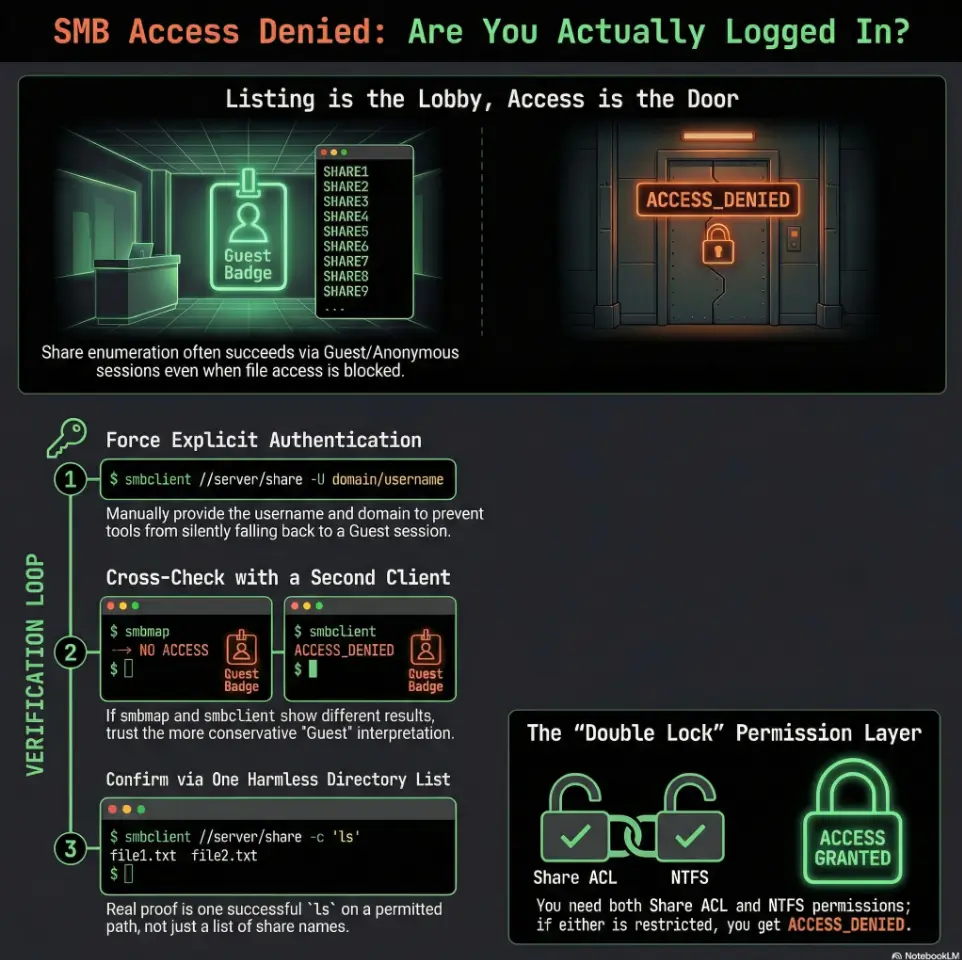
Quick mental model: “List is a lobby, access is the door”
Listing shares is standing in the lobby reading a directory.
Listing files is trying the door handle.
Reading a file is actually stepping inside.
Show me the nerdy details
Tools can retrieve share names via different RPC/SMB calls (e.g., server service enumeration, browse lists, IPC interactions) that do not imply you have file-level rights. That’s why you should treat “share list returned” as a connectivity and negotiation success, not an authorization success.
Eligibility checklist: are you testing “creds vs guest” safely?
- Yes/No: Do you have written authorization (lab scope or client approval)?
- Yes/No: Are you limiting attempts to a small number to avoid lockouts?
- Yes/No: Are you only performing harmless read-only checks (share list + single directory list)?
- Yes/No: Are you logging what you tried (user format, domain, protocol) so you don’t brute-force your own time? (A clean habit here: Kali lab logging that doesn’t slow you down.)
Next step: If any answer is “No,” fix that before running more tests.
Verify creds vs guest fallback: the 60-second litmus test
Force authentication (don’t let tools “help” you)
Here’s the trap: some client behaviors treat “missing info” as an invitation to try Guest/Anonymous. That can produce a share list that looks like success. So your first goal is to remove ambiguity:
- Use an explicit username and an explicit domain/workgroup where applicable.
- Avoid empty password paths, and avoid “just press enter” prompts.
- Keep your test minimal: 1 share listing, 1 directory listing attempt.
A small, honest anecdote: I once “fixed” this by retyping the username three different ways. The third way wasn’t magical. It was just the first time I stopped accidentally authenticating as nobody.
Confirm identity on the wire (proof, not vibes)
You want a concrete artifact that says, “This session is this user.” There are three practical proof paths:
- Client evidence: distinguish submitted usernames from the accepted session identity. An explicit Guest/Anonymous session indicator is useful; a command banner alone is insufficient.
- Second-client comparison: reproduce the behavior with the same target, port and credential context. Agreement corroborates behavior, not necessarily the accepted user.
- Server-side evidence (authorized): do the security logs show your user, logon type, and authentication package?
In Samba-based environments, “guest mapping” can be an intentional configuration. Red Hat’s Samba documentation, for example, describes how certain settings can map failed or missing authentication to Guest. The point isn’t the exact knob. The point is: Guest fallback is real, common, and annoyingly polite.
Pattern interrupt micro: “Wait… why did it ‘work’ then?”
Because “worked” meant “the server answered.” A Guest session can still:
- negotiate a dialect,
- establish a session,
- return some share names,
- and then deny every file operation that matters.
- Share list alone is not evidence
- A successful directory listing proves access to that path, not the supplied identity
- Server audit logs or explicit session identity are stronger identity evidence
Apply in 60 seconds: Pick one share that is intended to be readable (in your lab/scope) and attempt one directory list.
Show me the nerdy details
Many SMB denial messages collapse into a few status codes. A directory list can fail due to share ACLs, NTFS ACLs, token restrictions, or policy. That’s why you pair “one dir list” with “identity proof” instead of assuming denial implies wrong password.
Make smbmap tell the truth: flags and behaviors to control
Turn off ambiguity: pin protocol and auth
If your environment supports it, pinning negotiation (SMB2/SMB3) can reduce weirdness caused by legacy fallbacks. But don’t over-romanticize protocol pinning: in this specific problem, the bigger villain is usually identity ambiguity, not dialect choice.
- Be explicit about user format (domain vs local).
- Be explicit about target naming (IP vs hostname) to avoid “context drift.”
- Be explicit about what success means: you want identity proof, not a pretty list.
Reduce false positives from cached/previous sessions
Existing OS drive mappings and mounted SMB connections can retain credentials. Independent smbmap or smbclient processes normally establish new sessions. Close the relevant existing mapping only when it is actually part of the test; a fresh VM is not a required diagnostic step.
- Start a fresh client process and record its exact arguments. Check existing OS mounts or drive mappings separately when they are involved.
- Change one variable at a time (user string, domain, protocol, client).
- Keep a tiny log so you don’t loop back into the same mistake with different confidence.
I once watched an engineer “fix” ACCESS_DENIED by rebooting… and the real fix was that the reboot cleared a local session state. The server didn’t learn anything. We did.
Confirm what smbmap is actually attempting
Read the output like it’s a witness statement. Look for:
- the displayed user identity,
- explicit login success/failure markers,
- the status codes on file actions (not just enumeration),
- differences when you change only the user format.
Decision card: “Creds problem” vs “Guest fallback” vs “Permissions”
- All tools show login failure (not Guest)
- Server logs show failed logons for your user
- Changing user format doesn’t change behavior
- Explicit server or session evidence identifies Guest/Anonymous; a share list followed by denied file operations alone does not.
- Identity output looks generic (Guest/Anonymous)
- Second client confirms Guest-like session
- Login is confirmed as your user
- One share lists but deeper paths deny traversal
- Admins mention NTFS/share ACL or “deny from network” controls
Next step: Choose one branch and test only what that branch predicts.
Cross-check with a second client: isolate “tool quirk” vs “real auth”
Use smbclient as a sanity mirror
You’re not “tool-hopping.” You’re running a controlled experiment: if two clients agree, the behavior is probably real. If they disagree, you’ve learned something valuable: your first tool’s defaults might be misleading.
- Can you list shares consistently?
- Can you list directories inside a share that should be readable?
- Does the client show any hint that the session is Guest/Anonymous?
Use CrackMapExec (CME) or similar for auth confirmation
In many authorized workflows, CME is used as a quick “login classification” tool: success vs fail vs guest-ish behavior, plus notes about signing or domain context. Again, you’re not trying to be loud. You’re trying to be certain.
Compare outputs side-by-side
A practical rule: if one tool says “you’re you” and another tool says “you’re Guest,” believe the more conservative interpretation until you can prove otherwise.
Show me the nerdy details
Differences can come from how clients handle anonymous binds, how they retry authentication after a failure, and whether they reuse sessions. That’s why “fresh context + second client” is the fastest way to identify a default you didn’t mean to enable.
Short Story: the day Guest wore my hoodie …
I was in a lab late at night, the kind of night where your brain starts paying rent to the nearest conspiracy. smbmap listed three shares. I got that little spark: “Nice. Creds are good.” Then every file action returned ACCESS_DENIED, like a polite bouncer with infinite patience. I tried the same command again. And again.
Twenty minutes disappeared into the carpet. Finally I ran a second client, same target, same “password,” and it bluntly told me what I refused to hear: I wasn’t failing at permissions. I was succeeding as Guest. My first tool had quietly accepted an ambiguous auth path, and the server welcomed me into the lobby with a smile and no keys. The fix wasn’t fancy. I forced an explicit user format, re-ran once, and the output stopped pretending. The biggest exploit that night was my own optimism.
Permission layers that cause clean “ACCESS_DENIED” (even with valid creds)
Share permissions vs NTFS permissions (double lock)
Even if your identity is correct, Windows-style file sharing often behaves like a double lock: share-level permissions and file-system permissions both matter, and the effective access is typically the most restrictive combination. Microsoft’s guidance for SMB-based file permissions (including modern cloud-backed SMB shares) emphasizes that after share-level access is granted, you still configure NTFS-style ACLs on directories and files.
- Share ACL allows “read” but NTFS blocks traversal
- Share allows listing root, but denies deeper paths
- Your group membership doesn’t include the right ACL group
- Share-level permissions can’t grant what NTFS denies
- Traversal rights are separate from read rights
- Ask for the intended share/path when in doubt
Apply in 60 seconds: Request one known-permitted path from the system owner (or lab notes) and test only that.
Group membership and token restrictions
Sometimes you’re in the right group… on paper. But remotely, you may be affected by token filtering or admin restrictions. Local admin creds can behave surprisingly “non-admin” over the network depending on policy. When your gut says “but I’m admin,” treat that as a hypothesis, not a fact.
- Local admin group membership doesn’t equal remote admin behavior
- UAC-related remote restrictions can block actions you expect to work
- Lab targets may intentionally harden admin shares to teach this lesson
Policy and hardening gotchas
Three common hardeners that show up in real environments (and sometimes in labs designed to mimic them):
- SMB signing requirements: can cause negotiation or access failures depending on client support/config.
- Network logon rights: policies like “Deny access to this computer from the network” can make valid creds feel useless.
- Guest policies: guest access being allowed or blocked changes what “fallback” looks like.
Mini calculator: how noisy is your verification loop?
Inputs: (1) number of auth attempts you plan, (2) number of tools, (3) whether you will retry on failure (yes/no).
Output: total attempts = attempts × tools × (retry? 2 : 1).
Example: 2 attempts × 2 tools × retry(yes) = 8 events. That’s already enough to matter in a lockout-prone environment.
Next step: Cap your loop to the smallest number that still proves identity.
Don’t do this: two mistakes that waste an afternoon
Mistake #1: trusting “shares found” as proof of valid credentials
Treat “shares found” as enumeration evidence. A directory listing proves permission on that path; verify the accepted user separately through audit logs or explicit session identity metadata.
Mistake #2: retrying the same command 40 times
Repetition doesn’t produce new data. It only produces new emotions. Change one variable at a time:
- user format (local vs domain vs UPN),
- domain/workgroup specified or not,
- client tool (smbmap vs smbclient vs CME),
- target naming (hostname vs IP).
Pattern interrupt, delivered gently: it’s usually the user string. Not always. But often enough that you should check it first, with a straight face and a humble keyboard.
Common mistakes checklist (print this before you spiral)
Credential formatting errors
- Wrong domain, missing domain, or local vs domain confusion
- Special characters not quoted correctly in your shell
- Username case or machine name quirks (rare, but painful)
Session fallback traps
- Empty password behavior triggering guest-like sessions
- Anonymous allowed for enumeration but useless for file ops
- Tool defaults reusing sessions when you thought you “started fresh”
Environment mismatches
- DNS vs IP changing the context you think you’re authenticating into
- Time skew matters if you pivot into Kerberos-style domain checks (see KRB_AP_ERR_SKEW fixes if you’re in a domain lab)
- Network middleboxes that interfere with SMB negotiation
- Identity: exactly what user did the server accept?
- Path: exactly what share/folder are you testing?
- Proof: exactly what harmless operation succeeded or failed?
Apply in 60 seconds: Write one line: “I authenticated as ___ to \\server\share and attempted to list ___.”
“Access denied” diagnostics: what to capture (and what not to)
Minimal evidence that answers the real question
You don’t need a novel. You need a receipt. Capture:
- the auth result code (success/fail/guest-like),
- the identity displayed by the tool,
- the share list,
- one directory listing attempt on a known-permitted path.
Logs to look at (authorized environments only)
If you have access to server logs (lab admin, internal audit, or the system owner is cooperating), they’re a truth serum:
- Windows Security logs: look for a successful logon event and confirm the account name and logon type.
- Samba logs: check for guest mapping behavior and share-level denials.
Red flag: inconsistent identity across tools
If smbmap implies one identity and smbclient/CME implies another, assume the “less privileged” session until proven otherwise. That assumption keeps you safe, quiet, and sane.
Infographic: The 3-step “Cred vs Guest vs Permission” proof flow
Step 1: Force identity
Use explicit user + domain/workgroup. Avoid empty-password/anonymous behavior.
Output: “This is the user I intended.”
Step 2: Cross-check
Run a second client. Agreement = strong signal. Disagreement = investigate defaults.
Output: “Two tools agree on session type.”
Step 3: One harmless action
Attempt one directory listing on a known-permitted path. No recursion. No write.
Output: “Permissions confirmed or blocked.”
Accessibility note: this infographic summarizes a three-step verification flow to confirm SMB session identity and permissions without escalating actions.
Fix paths: choose the correct remediation based on your finding
If creds are wrong
- Verify the username format and domain context
- Confirm password accuracy and watch for lockout policy
- Stop repeated attempts and coordinate with the system owner if uncertain (align this with an overall security testing strategy so “verification” doesn’t become accidental noise)
If creds are right but permissions block access
- Identify whether the blocker is share ACL or NTFS ACL (or both)
- Request the correct group membership or an intended access path
- Document the exact denied path and status for the owner to remediate (bonus: this makes the finding easier to write up in a penetration test report without hand-waving)
If guest is being used unintentionally
- Adjust tooling to require explicit authentication and remove ambiguous defaults
- Server-side (org policy dependent): disable insecure guest mapping where appropriate
- Re-test once with forced identity and confirm the session type changes
FAQ
1) Why does smbmap show shares even when my password is wrong?
Because share enumeration can succeed under low-priv sessions (Guest/Anonymous/null) depending on server configuration. The server may still answer with a list of names while denying every file operation. Treat it as “connectivity confirmed,” not “credentials confirmed.”
2) How can I tell if I’m authenticated as Guest vs my user?
Specify the intended credential context, compare a second client if needed, and verify the accepted user using server audit logs or explicit session metadata. A directory listing verifies access only. If accepted identity is unavailable, record it as unconfirmed rather than assuming Guest.
3) What’s the fastest way to verify SMB credentials without being noisy?
Keep it to the smallest loop that still proves identity: one forced-auth attempt, one alternate client check, and one directory listing attempt. Avoid repeated retries and avoid any recursive listing or write operations.
4) Why can I access IPC$ but nothing else?
IPC$ is often accessible for certain RPC interactions and can be visible even with minimal privileges. That doesn’t imply you have read rights to file shares. It often means you can talk to the server, not that you can open its cabinets.
5) How do share permissions and NTFS permissions interact?
They behave like a double lock. Share-level permissions can’t grant access beyond what the underlying file system ACLs allow, and the most restrictive effective permission wins in practice. That’s why “read at share” can still fail at folder traversal.
6) Does SMB signing cause “access denied” or just connection failures?
Signing requirements more commonly show up as negotiation or session establishment issues, but mismatched client/server expectations can still manifest as confusing failures. If you suspect signing policy, validate with a second client and confirm what the server expects before assuming credentials are wrong.
7) Why do smbclient and smbmap disagree on the same target?
Defaults. Session reuse. How each tool handles anonymous or “helpful” fallback. That’s precisely why you cross-check: disagreement is a signal that one client is doing something you didn’t explicitly request.
8) Can local admin creds fail remotely because of UAC restrictions?
Yes. Many environments restrict how local admin tokens behave over the network. So you can be “admin” locally and still be treated as non-admin remotely for certain actions. Verify what identity and token the server actually applies.
9) What does STATUS_ACCESS_DENIED usually indicate in SMB tools?
It usually means your current session identity does not have permission for that specific operation on that specific object. That could be share ACL, NTFS ACL, token filtering, or policy. It does not, by itself, prove your password was wrong.
10) When should I stop and ask the system owner for intended access?
As soon as you can prove “identity is correct” but “permission is blocked.” At that point, further probing usually adds noise without adding truth. Ask for the intended share/path and the intended group membership, then test only that.
Conclusion
Remember the hook: why does it “work” and still deny you? Because SMB is perfectly capable of welcoming you into the lobby while refusing to hand you keys. The cure is not more commands. The cure is proof.
Your 15-minute next step is simple and disciplined:
- Run one forced-auth attempt with explicit identity.
- Run one alternate client check to confirm session type.
- Attempt one harmless directory listing on a known-permitted path (capture it like an OSCP proof screenshot, even if you’re not in the exam).
If clients disagree, record the accepted identity as unconfirmed and seek server or session evidence. If identity is verified and access remains denied, examine the relevant share and filesystem permissions with the system owner.
Original review: 2026-02-23
Technical guidance updated: 2026-10-13. Clarified accepted identity versus share access, server guest mapping, and client session reuse. Samba targets use share rules and underlying POSIX permissions/ACLs; NTFS examples apply to Windows-backed shares.