

Stop Chasing Nmap False Positives: Service Verification
Your scan prints “Apache 2.2.x,” and your next 45 minutes vanish into a quiet tragedy: exploits that don’t land, checks that don’t fit, and that creeping suspicion your lab is “broken.” This is where Nmap -sV service detection false positives quietly steal your best attention—especially on Kioptrix-style VMs built to look plausible before they tell the truth.
A service detection false positive occurs when Nmap’s version detection probes and fingerprints match a response that resembles a known service (banner fragments, generic errors, proxy headers), even though the underlying protocol behavior doesn’t actually align. If you keep trusting the label, you build the wrong mental model, and every next step gets more expensive.
This post gives you an evidence-first ladder you can run in minutes: confirm the protocol manually, capture the first bytes/headers (hello, TLS handshake surprises), and corroborate once—so you stop chasing “clean lies” and start writing notes you can defend later. If you want a companion workflow, pair this with a fast enumeration routine you can reuse on any VM.
Nmap -sV can mislabel services because it relies on probes and signature matches that can be fooled by banners, redirects, proxies, wrappers, or unusual configs (common in CTF labs like Kioptrix). Treat -sV as a hypothesis, not a verdict. Confirm with independent evidence: speak the protocol manually, capture the first bytes/headers, watch response behavior, and cross-check with one additional signal. Accuracy beats speed.
Table of Contents
Who this is for / not for
For: people who want fewer “wrong turns”
- You’re scanning CTFs/labs (Kioptrix walkthrough territory, VulnHub-style VMs, home lab boxes) and
-sVfeels “confidently wrong.” - You want notes you can defend later: evidence, not vibes.
- You’re time-poor and you’d rather save 30–90 minutes than “explore” the wrong service label for fun.
Not for: situations where you should slow down or get permission
- Any real system you don’t own or explicitly have authorization to test.
- Compliance-heavy environments where tooling, logging, and scope must follow a formal plan.
Before you chase a version string, answer these with a simple yes/no:
- Yes — The service label changes your next step (exploit path, auth method, protocol tooling).
- Yes — The port behaves oddly (redirects, TLS surprises, header mismatch).
- No — You only need “HTTP-ish” vs “SSH-ish” for now, not an exact version.
- No — You already have stronger evidence from behavior than from the scan label.
Neutral next step: If you got at least two “Yes” answers, do the verification ladder in the next section before you Google anything.
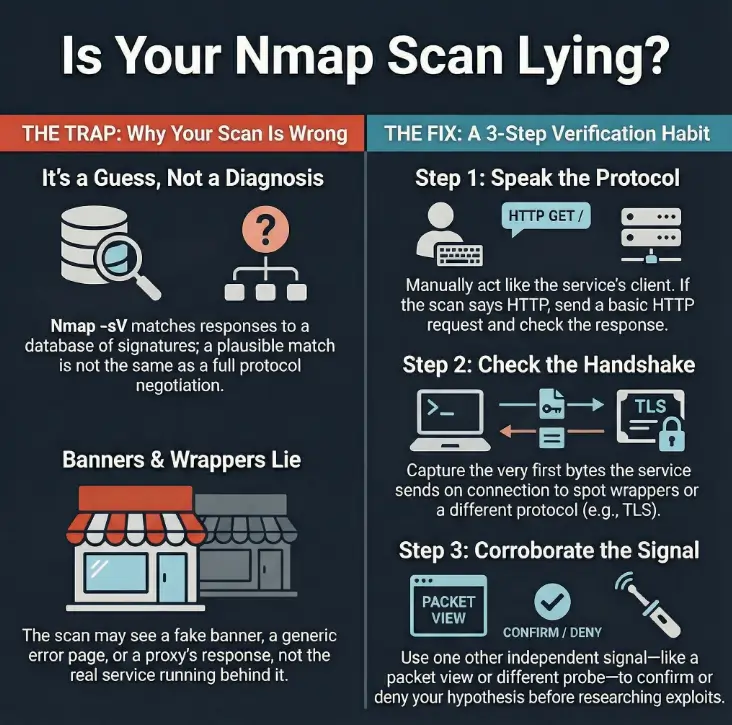
The real problem: “-sV sounds certain”
What -sV is actually doing (and what it isn’t)
-sV is fast because it’s mostly pattern recognition. Nmap sends a series of probes and compares the responses against its version detection database. That’s powerful—and also the reason it can be wrong. A match is not the same thing as a full, strict protocol negotiation. A match can be triggered by a banner fragment, a generic error page, or a response that “looks enough like” a known service. (If you want a quick “what did I miss?” checklist, keep these easy-to-miss Nmap flags nearby.)
Here’s the trap: scan output reads like a diagnosis. It prints a product name, sometimes a version, and you feel the relief of certainty. Then your next 45 minutes become a quiet tragedy where nothing works, and you start doubting your environment instead of your assumption.
Curiosity gap: the clue you missed in plain sight
False positives rarely scream. They whisper. A header that feels “HTTP-ish” on something labeled “unknown.” A TLS handshake on a port labeled “plain.” A response code that doesn’t belong to the story you’re telling yourself. The box is usually trying to tell you the truth; you just have to stop treating one line of output like a verdict.
Micro-vignette: You see “Apache httpd 2.2.x” and you immediately go shopping for Apache exploits. Ten minutes later, you’re staring at a page that always returns the same tiny body and the same server header—no matter what you send. That’s not “Apache behaving.” That’s a wrapper smiling politely. If your next move is vulnerability research, it helps to map reality to risk (for example, Apache/MySQL/PHP CVE mapping)—but only after you’ve verified what you’re actually talking to.
Kioptrix setup: why this lab produces “clean lies”
CTF reality: patched, wrapped, or intentionally weird
Older services and unusual configuration can complicate fingerprinting, but this article provides no captured Kioptrix scan proving that a wrapper or proxy caused a specific false positive. The examples below are general diagnostic scenarios, not a verified case study.
- Old daemons behind helper scripts or service wrappers (inetd/xinetd style setups).
- Nonstandard ports that answer “close enough” to confuse automated probes.
- Generic error pages that accidentally match a signature.
Evidence mindset: treat outputs as competing stories
When you read scan results, imagine three narrators arguing:
- Identity narrator: “This is Apache 2.2.3.”
- Behavior narrator: “When I speak HTTP, I get this. When I speak TLS, I get that.”
- Exposure narrator: “Here’s what I can actually interact with, authenticate to, or misuse.”
Your job is to crown the narrator with the best evidence—then make the next move. Not the fanciest move. The move with the least regret.
Open loop we’ll close later: by the end of this article, you’ll have a simple way to spot the “clean lie” in under 2 minutes—even when the label looks perfectly plausible.
Where false positives come from (the usual suspects)
Banner cosplay: when the greeting is theater
A banner is often the first thing version detection sees. And banners are easy to fake—intentionally or accidentally. A default template can look like a popular product. A proxy can add headers. A service can print a stale version string that no longer reflects what’s running behind it.
- Static banners: a service always prints the same greeting no matter what you do.
- Swapped headers: “Server: Apache” appears on a response that doesn’t behave like Apache.
- Generic errors: a short error body that matches a known signature snippet.
Loss prevention: if you treat banners as truth, you burn time. If you treat banners as hints, you gain options.
Port multiplexing: one port, many behaviors
Some ports behave like a choose-your-own-adventure book. The service you reach depends on what you say first. This is where Nmap can guess wrong:
- TLS-wrapped services: the same port may respond with a TLS handshake, but only if you initiate correctly.
- Redirect logic: HTTP redirects can make multiple services look alike from one angle.
- Protocol confusion: responses are “valid enough” to match the wrong probe.
Middleboxes inside labs
Even in home labs, you can encounter mini “middleboxes”: wrappers, proxies, or service-on-demand setups. inetd/xinetd can hand off connections. A proxy can normalize responses. A wrapper can enforce a pre-auth banner. The result: Nmap matches the wrapper’s behavior, not the underlying service.
- Banners are cheap to fake.
- Proxies and wrappers can “speak for” the real service.
- Behavior beats labels when they disagree.
Apply in 60 seconds: When -sV prints a specific product/version, pause and ask: “What single behavior test would prove it?”

The verification ladder: from fast checks to certainty
Step 1: Confirm the protocol, not the label
This is the fastest “sanity check” you can do: act like the client the service claims to be. If it says HTTP, speak HTTP. If it says SSH, listen for an SSH banner. If it says TLS, try a TLS handshake. You’re not trying to “hack” anything here—you’re confirming which language the port actually speaks. (If you need a quick baseline for scanning in this lab context, see how to use Nmap in Kali Linux for Kioptrix.)
Micro-vignette: You send a plain HTTP request and the server replies with raw binary-looking bytes. That’s not “weird HTTP.” That’s probably TLS or something wrapped. The label can’t save you from that reality; behavior can.
Step 2: Capture the first bytes (the “handshake truth”)
Before you send a complex request, capture what the service sends early—either immediately on connect or right after a minimal hello. That first response often reveals whether you’re talking to a wrapper, a proxy, or the real service. If you want a practical walk-through of this habit in the same ecosystem, traffic analysis for Kioptrix with Wireshark pairs perfectly with this step.
Step 3: Correlate with host-level hints (without overreaching)
Correlation is not proof, but it’s useful. If multiple ports suggest a particular OS family, or if the box exhibits consistent behavior across services, that can help you reject implausible interpretations. Stay humble here: you’re building a case, not a court verdict.
Step 4: Cross-check with one additional signal (but don’t tool-hop)
Pick one secondary confirmer—something that provides independent perspective. For example, a quick manual interaction plus a packet view, or a second lightweight probe approach. The point is not to collect more output; it’s to reduce uncertainty. If you catch yourself installing five new tools mid-stream, pause and return to fundamentals (a curated list of pentesting tools that actually matter can keep you honest).
Show me the nerdy details
Why Nmap can “match wrong” on version detection: it’s doing best-effort inference. Probes elicit responses; responses are compared to fingerprints. If an environment returns generic responses, swapped banners, or normalized errors, it can trip signatures that were never meant to describe that exact setup. This gets more common in CTF VMs where services are old, proxied, or deliberately odd. The cure is simple: validate the protocol and confirm with one independent observation (headers/handshake behavior/timing), then proceed.
This won’t “identify” a service. It will tell you whether you should trust -sV right now or verify before you commit.
Result: Risk score 4/8 → Verify before you commit.
Neutral next step: If your score is 4 or higher, do one manual protocol check and capture the first response bytes before you follow an exploit trail.
Common mistakes: how people waste hours here
Mistake #1: Trusting a single -sV hit like it’s a diagnosis
One probe match is not identity. It’s a suggestion. If you only remember one thing: version strings are cheap, verification is priceless. When the environment is noisy (CTF VMs often are), you should assume ambiguity by default.
Mistake #2: “It said X, so I Googled exploits for X”
This is the classic time-sink. Not because researching is bad, but because it’s expensive to do it on the wrong assumption. You can waste 60 minutes trying exploit after exploit, then later discover you were talking to a proxy that always responds the same way. (A real example of where premature certainty bites: going straight for a “login bypass” path—like Kioptrix Level 4 SQLi login bypass—before you’ve even proven the service stack you think you’re dealing with.)
Mistake #3: Ignoring response behavior (codes, methods, timing)
Behavior is the plot. Labels are the blurb on the back cover. If your requests always get identical content, identical headers, or strangely uniform timing, take that seriously. Uniformity is often a sign you’re not talking to the service you think you are.
- Probe match ≠ identity.
- Exploit research is expensive; spend it only after verification.
- Uniform responses often mean wrappers, not “stubborn services.”
Apply in 60 seconds: Before searching exploits, write one sentence: “I believe this is X because Y.” If you can’t, verify first.
You run nmap -sV and it prints a tidy label: “Apache httpd.” Great—your brain is already building the next steps. You try a few common checks. The responses feel… odd. Every request returns the same small body. The “Server” header never changes. You tweak user-agents, methods, paths—nothing. The box is unfazed. At minute 20, you decide the VM must be broken. At minute 30, you start blaming your network mode.
Then you do the one thing you should have done first: you capture the first bytes and the handshake behavior. Suddenly the story changes. You weren’t talking to “Apache” as a product. You were talking to a wrapper that politely imitated an Apache-ish surface. Your scan wasn’t useless; it was incomplete. The fix wasn’t more scanning. It was one clean verification step.
Don’t do this: the two traps Kioptrix loves
Trap #1: The copy-paste reconnaissance spiral
More flags can create the illusion of progress. But if you don’t know what question you’re answering, output becomes noise. In labs, it’s easy to keep “enumerating” while quietly walking away from the original mismatch you noticed.
- If output doesn’t change your next decision, it’s not helping.
- If you can’t explain what you’re validating, you’re collecting, not investigating.
Trap #2: The “port = service” assumption
Ports are conventions, not laws. Nonstandard ports are common in labs, and multiplexing happens in real stacks too. If you treat port numbers as identity, you’ll misread the entire environment.
- Protocol behavior matches the label.
- Headers/banners are specific and consistent.
- You only need a coarse direction (HTTP vs SSH vs SMTP).
Time bet: Save 5–10 minutes.
- Any mismatch (TLS surprise, odd errors, generic headers).
- The version drives your exploit research path.
- The box is a CTF VM known for weirdness.
Time bet: Spend 2–6 minutes now to save 30–90 later.
Neutral next step: If you’re in the “verify first” column, do one protocol speak-test and one first-bytes capture before you branch into research.
Let’s be honest: you want a rule you can remember
The one-sentence rule that prevents most false positives
“If I can’t speak the protocol manually, I don’t believe the label.”
This single sentence fixes the most common workflow mistake: committing too early. It forces you to keep your brain in “hypothesis mode” until you’ve earned certainty.
Here’s what no one tells you…
You don’t need perfect identification to make progress. You need the next best test—the one that reduces uncertainty the most. Operators don’t win by being certain. They win by being less wrong faster.
- Hold labels loosely until behavior confirms them.
- Choose tests that collapse uncertainty fast.
- Two minutes of verification can prevent an hour of chasing ghosts.
Apply in 60 seconds: Write down your next test before you run it. If you can’t explain why it helps, pick a simpler test.
Curiosity gap: the “one weird response” that changes everything
The mismatch checklist (pick one and pivot)
- HTTP-ish headers on a label that claims something else.
- TLS negotiation on a “plain” service claim.
- Authentication prompts that don’t match the expected daemon flow.
- Response timing that screams proxy/wrapper (too uniform, too “clean”).
When to pivot (and when to dig deeper)
Pivot when evidence conflicts. Conflicting evidence means your model of the service is wrong. Dig deeper when evidence is incomplete—when you simply don’t have enough signal yet. A great pivot is small: one new test, one new observation, one updated hypothesis.
Micro-vignette: The scan says “SSH,” but the first bytes look like an HTTP status line. That’s not “SSH being quirky.” That’s your invitation to pivot before you waste time on key exchange assumptions.
Write it like a pro: what to record so your future self trusts you
Evidence notes that survive review
If you ever plan to write a walkthrough, a report, or even a personal lab journal you can reuse, record why you believed what you believed. The goal is not a long diary. The goal is a short, defensible chain of evidence. If you want a clean, reusable structure for this, borrow ideas from note-taking systems for pentesting.
- Exact command + tool version; timestamp; network mode (NAT/host-only/bridged).
- Raw snippet: first bytes/headers or handshake behavior (just enough to show the mismatch).
- One paragraph: “I concluded the label was a false positive because…”
Passage-friendly mini template (copy into your notes)
- Hypothesis: What you think the service is.
- Test: The smallest interaction that should confirm it.
- Observation: The exact behavior you saw.
- Conclusion: Updated belief (confirmed / rejected / uncertain).
- Next test: One action that reduces uncertainty further.
If you were handing this to a teammate, what would you include so they don’t repeat your work?
- Port + observed protocol behavior (not just the label).
- One raw response snippet (first bytes/headers).
- Any redirects/TLS findings that change the interpretation.
- What you tried that failed (briefly) and what it implies.
- Your recommended next test (one line).
Neutral next step: Save this as a reusable “evidence packet” template in your lab notes—ideally alongside a simple Kali lab logging habit so you can reproduce findings later.
FAQ
1) Why does Nmap -sV sometimes misidentify services?
Because version detection is inference: probes trigger responses, and responses are matched to known fingerprints. If banners are generic, swapped, or normalized by proxies/wrappers, the match can be plausible but wrong. In CTF labs, that’s especially common.
2) Is Nmap service detection based on banners or something else?
It uses probes and fingerprints, which can include banner-like data. The key point: it’s not always a full protocol validation. A response that “looks like” a known service can trigger a match even when the underlying service is different.
3) What’s the difference between -sV and OS detection?
-sV targets application/service identification on ports. OS detection tries to infer the operating system from network-level behavior. They can support each other, but neither should be treated as absolute truth without corroboration.
4) How can I confirm a service without relying on Nmap’s guess?
Speak the protocol manually (minimal client interaction), capture first bytes/headers, and cross-check one independent signal (e.g., a packet view or a second lightweight confirmer). If behavior contradicts the label, trust behavior.
5) Why do CTF machines (like Kioptrix) produce more false positives?
CTF boxes often use old services, wrappers, odd configurations, and nonstandard ports to teach enumeration discipline. Those conditions increase ambiguity and make “clean lies” more likely.
6) Can a reverse proxy or wrapper cause service misdetection?
Yes. Proxies/wrappers can add headers, normalize responses, or present a consistent surface that matches a known fingerprint, even if the backend is different.
7) Should I use more aggressive version detection every time?
Not automatically. Aggressiveness can increase noise and time cost. Start with a simple verification step. If you still have ambiguity, then escalate intentionally—one step at a time.
8) What evidence is “enough” to call it a false positive?
Enough evidence means you can explain, in a short paragraph, why the behavior contradicts the label and what alternative is more consistent. Ideally: protocol speak-test + first-bytes/headers capture + one corroborating signal.
9) Why does the same port sometimes look like different services?
Because the service may change behavior depending on what the client sends first (TLS vs plaintext, HTTP method differences), or because middleboxes are shaping responses. Some ports are “multi-personality” by design.
10) What’s the safest workflow to avoid chasing the wrong exploit?
Use a short verification ladder: confirm protocol, capture first bytes/headers, then corroborate with one independent signal. Only after that should you spend time on version-specific research paths.

Next step
Build your “3-check verification” habit (do this in the next 15 minutes)
If you only implement one change, make it this: every time -sV prints a surprising label or a version that matters, do three checks before you commit to an exploit path:
- Speak the protocol like a minimal client.
- Capture first bytes/headers to spot wrappers and “clean lies.”
- Corroborate once with an independent signal (behavior, packet view, or a second confirmer).
This habit is small, boring, and wildly effective. It’s also how you stop wasting your best attention on the wrong story.
- Hold labels loosely until behavior confirms them.
- Use a 3-check ladder before version-specific research.
- Close the loop fast: hypothesis → test → observation → next test.
Apply in 60 seconds: Add a one-line note template to your lab journal: “I believe X because Y; next test: Z.”
Infographic: The “Stop Chasing Ghosts” Flow
Treat it as a hypothesis, not a verdict.
Does it behave like the claimed service?
Spot wrappers, proxies, and “clean lies.”
One independent signal reduces uncertainty fast.
- If evidence aligns: proceed confidently.
- If evidence conflicts: pivot your hypothesis before you research exploits.
Remember the open loop from earlier—the “clean lie” you can spot in under two minutes? It’s this: the moment you see a mismatch between the label and the first honest behavior, you stop trusting the pretty name and start trusting the evidence. That tiny pivot is the difference between a tight, satisfying enumeration path and an hour-long detour.
Conclusion
Nmap -sV is useful—and it’s also capable of telling a convincing story that’s just wrong enough to waste your night. The fix isn’t cynicism. The fix is a tiny verification habit: speak the protocol, capture first bytes/headers, corroborate once. That’s how you turn “maybe” into “known,” especially on Kioptrix-style labs where wrappers and odd configs are part of the lesson.
If you have 15 minutes, run your next scan and do the 3-check ladder on the one port that looks most “certain.” Write down your hypothesis, one observation, and your next test. You’ll feel the difference immediately: fewer dead ends, cleaner notes, and a calmer brain. If you ever turn these notes into something shareable, a Kali pentest report template can help you keep the evidence chain readable.
Original review: 2026-01
Protocol confirmation does not confirm product version. A valid HTTP or TLS response establishes the exposed protocol, not the exact backend product, patch level, or exploitability. Generic pages and uniform timing can be normal application behavior. Record the raw scan and an independent contradiction before calling a match false. Use --version-trace to inspect probe decisions when necessary; increasing --version-intensity sends more probes and does not guarantee accuracy. These distinctions follow the Nmap version detection reference.
Technical guidance updated: 2026-10-13. Distinguished protocol checks from product/version proof and identified illustrative scenarios rather than claiming an undocumented Kioptrix case study.