
Mastering the Methodology: Beyond the Root Shell
The fastest way to waste a beginner lab is to treat it like a speedrun. With a Kioptrix Level best practice path, the real win is not a root shell. It is learning how to observe, rank clues, test carefully, and explain what you did without sounding like you memorized someone else’s terminal.
That is where many career changers get stuck. They practice pentesting in a way that rewards rushing, random exploit hunting, and shaky confidence, then wonder why interviews feel harder than the lab ever did. The box falls. The story falls apart. Keep doing that, and you risk building habits that look exciting on screen but collapse under real scrutiny.
This post shows how to use Kioptrix as a training ground for junior pentester habits that actually transfer: disciplined enumeration, evidence-based testing, clear phase separation, privilege escalation logic, and notes you can revisit later without needing a decoder ring.
The method is practical, repeatable, and grounded in the same process-first mindset reflected in frameworks like NICE, OWASP, and PTES. Because that is the point. Not theatrics. Not trophies.
A workflow you can carry into harder labs, better interview answers, and the long bridge from self-study to real pentesting work.
Fast Answer: A strong Kioptrix Level practice path is not about rushing to “root the box.” It is about building the habits that pentesting actually rewards: careful enumeration, hypothesis-driven testing, note-taking, privilege escalation logic, and repeatable lab workflow. Used well, Kioptrix becomes less of a trophy and more of a training ground for thinking like a junior pentester without confusing old-school lab wins for real-world readiness.
Table of Contents
Kioptrix Level First, or Your Pentesting Transition Gets Messy
Why this lab still matters when the box itself is old
Kioptrix is old in the same way a well-worn scale exercise is old. Nobody confuses scales for a concert, but plenty of musicians quietly build their hands there first. That is the right mental model. You are not using Kioptrix because it mirrors every modern enterprise environment. You are using it because it strips the work down enough that you can see your thinking.
I have seen beginners bounce off newer labs not because they lacked talent, but because too many moving parts hid their actual weakness. One student could launch scanners all afternoon, yet could not explain why a service mattered. Another could repeat a walkthrough perfectly and then froze when a port banner changed by one version. Kioptrix, for all its wrinkles, makes that gap visible.
What Kioptrix teaches that beginner pentesters keep using later
The durable part is not the exploit chain. It is the workflow. Enumeration discipline in Kioptrix, service triage, evidence gathering, local privilege escalation logic, and disciplined note-taking stay useful long after this VM stops being exciting. OWASP’s latest testing guidance still frames security testing around information gathering, attack surface identification, and structured validation rather than random tool flailing. That is exactly why Kioptrix can still earn its desk space.
The real goal is not “finish fast,” but “think clearly under pressure”
A junior pentester is not valuable because they are dramatic. They are valuable because they stay legible when the room gets noisy. They can say, “Here is what I know, here is what I suspect, here is what I tested, here is why I pivoted.” That sounds almost boring. It is also the sound of employable judgment.
- Old labs can still sharpen current operator habits
- Enumeration matters more than nostalgia
- Clear thinking beats fast root shells
Apply in 60 seconds: Write one sentence before you begin: “Today I am practicing method, not speed.”
Eligibility checklist
- Yes/No: Can you read basic Linux command output without panic?
- Yes/No: Do you know what ports, services, and banners are?
- Yes/No: Can you keep notes while testing instead of “remembering later”?
- Yes/No: Are you willing to rerun the same box more than once?
Next step: If you answered “no” to two or more, spend one week on fundamentals before using Kioptrix as a career bridge.
Neutral action: Use the checklist to decide whether this lab is a starting point or a checkpoint.
Start With the Career Goal, Not the Box Itself
How to use Kioptrix as a bridge into entry-level pentesting skills
The career mistake here is subtle. People ask, “How do I beat Kioptrix?” when the more useful question is, “What junior-friendly work habits can I extract from Kioptrix?” Those are not the same question. One creates a scrapbook. The other builds a staircase.
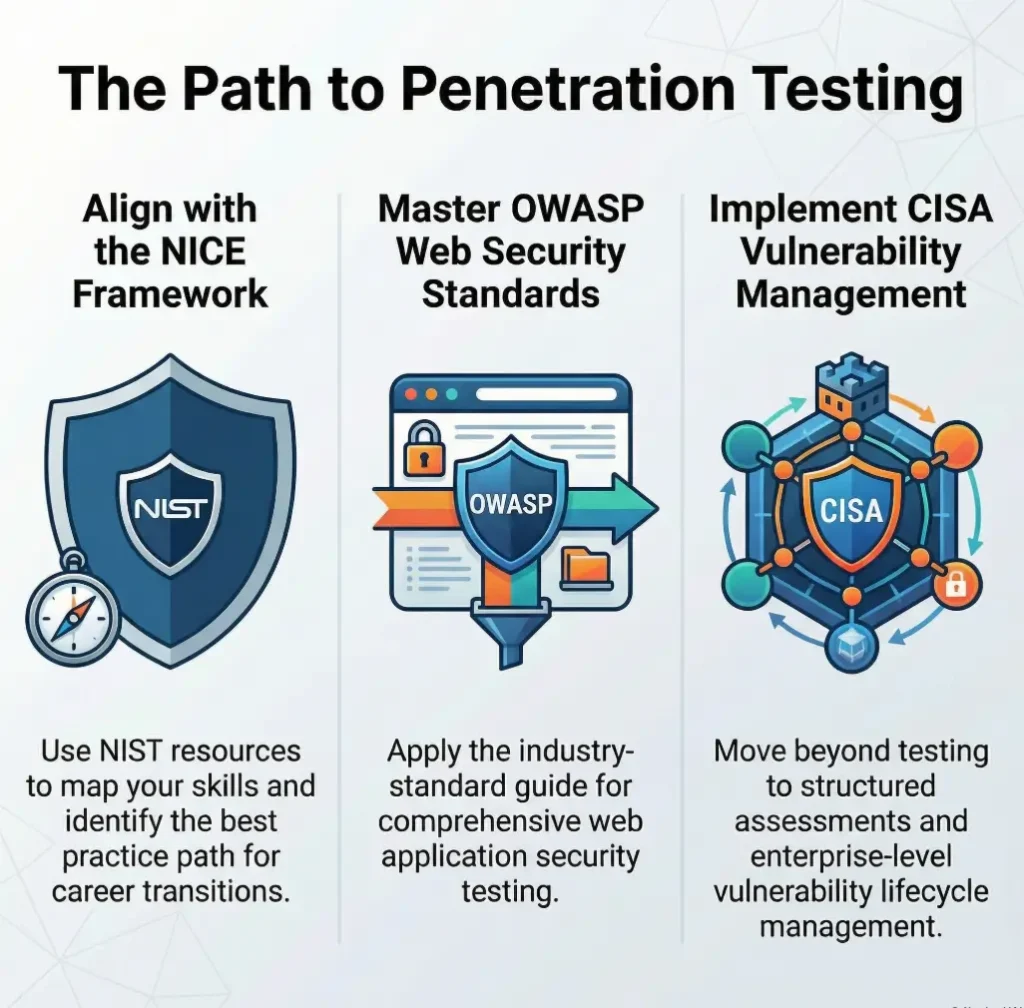
NIST’s NICE Framework Resource Center still describes cybersecurity work as a common language of tasks, skills, and roles used by employers, educators, and workforce programs. That is a helpful corrective. A career switch does not happen because you solved one lab. It happens because you can map what you practiced to recognizable job behaviors.
Which job-relevant habits this lab can build, and which it cannot
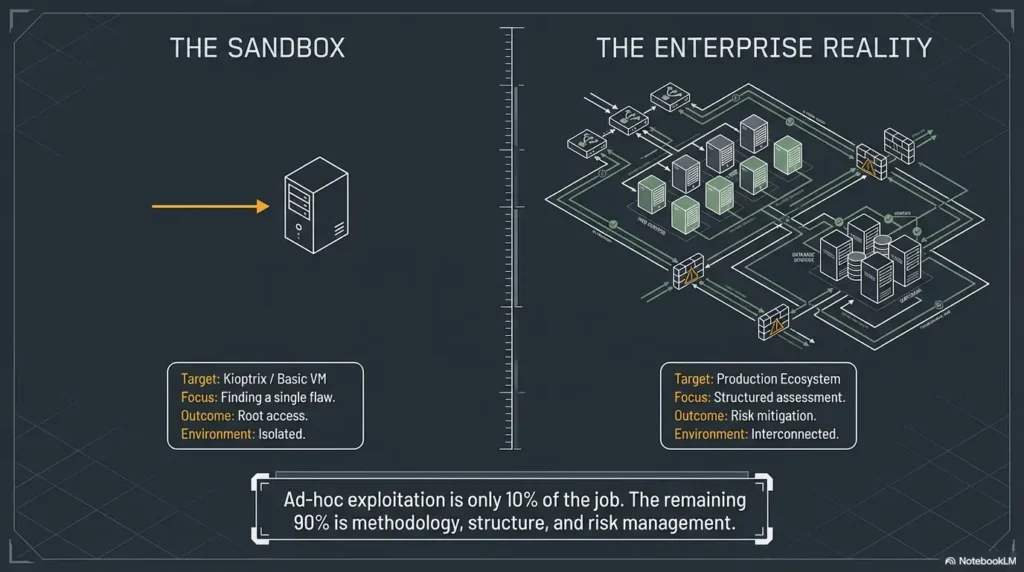
Kioptrix can help you build observation, test discipline, privilege escalation reasoning, and concise documentation. It cannot, by itself, make you comfortable with cloud attack paths, modern identity systems, client communication, scoping calls, report writing for executives, or the peculiar politics of real environments where “Do not break production” hangs in the air like sacred incense.
That limitation is healthy. It keeps the box in proportion. It lets you respect the lab without marrying it. A good bridge is useful because it gets you across, not because you pitch a tent on it.
Why “I solved a VM” is weaker than “I can explain my method”
Employers and interviewers tend to lean toward process questions for a reason. When a candidate says, “I enumerated first, identified likely attack surface, tested the lowest-risk leads, documented failed paths, then separated initial access from local privilege escalation,” that sounds like someone who can enter a team without becoming a small, glamorous fire hazard.
When a candidate says only, “I rooted three boxes,” the natural follow-up is brutal and fair: “How?” That is why turning a lab into better pentesting interview stories matters more than stacking trophies.
Show me the nerdy details
Structured pentesting methodologies such as OWASP’s testing framework and PTES separate reconnaissance, validation, exploitation, post-exploitation, and reporting. That separation is useful in labs because it turns one blurry “hack the box” goal into a sequence of evidence-based phases. The phase boundaries are where beginners usually mature fastest.
Who This Path Is For, and Who Should Not Use It Yet
Best for learners moving from IT, help desk, sysadmin, or self-study into security
If you come from help desk, support, systems administration, or general IT, Kioptrix often feels refreshingly concrete. Services are visible. Clues exist. Cause and effect still hold hands. You are not lost in some sprawling directory of acronyms before you have learned to trust your own process.
That matters for career-switchers because confidence should be built from repeatable wins, not mystery-box luck. One of the quiet advantages of a lab like this is emotional. You get to practice not melting down when you do not know the next move yet.
Good fit for beginners who need structure more than novelty
Some learners secretly need permission to do the same thing three times. They think repetition means they are behind. In practice, repetition is often the hinge. The first run shows what exists. The second run shows what you missed. The third run shows whether you can explain it without leaning on memory foam from a walkthrough.
Not ideal for learners who still struggle with Linux basics, networking, or terminal comfort
If the shell still feels like a room where the lights are off and the furniture keeps moving, slow down first. That is not failure. That is sequencing. I would much rather see a beginner spend 5 focused days learning permissions, processes, networking basics, and simple service enumeration than spend 5 chaotic days “doing pentesting” while mostly guessing.
Decision card: Start Kioptrix now, or wait a week?
Start now if you can read scan results, navigate Linux, and stay calm while taking notes.
Wait a week if terminal basics, networking vocabulary, or service identification still feel slippery.
Time trade-off: starting early feels exciting; starting prepared usually saves 2 to 4 cycles of frustration.
Neutral action: Choose the branch that lowers confusion, not the branch that feels more heroic.
Before You Touch the Box, Build the Four Foundations
Linux navigation, permissions, and services
You do not need monk-level Linux mastery. You do need enough comfort that the operating system stops stealing your attention. Can you move through directories, inspect files, read permissions, understand basic process and service output, and keep your footing when commands return something you did not expect? That is the threshold.
More than once, I have watched a learner misread a permissions issue as a vulnerability issue. It was not. The exploit was fine. Their understanding of the environment was not. That is a frustrating kind of confusion because it looks advanced while being painfully basic.
Basic networking, ports, and service identification
Ports are not trivia. Services are not wallpaper. If you cannot glance at a scan and turn it into ranked curiosity, the rest of the lab becomes a costume drama. You need enough networking literacy to see why a service matters, what kind of information it leaks, and which next question makes sense. You are not collecting port numbers like trading cards. You are building a model of exposure.
Web fundamentals, SMB basics, and common enumeration logic
Kioptrix often rewards learners who can think in layers. A web app is not just a page. SMB is not just “some Windows thing.” Enumeration is not one scan and a shrug. It is a sequence of checks where each result narrows the field. That habit scales beautifully into later web labs, internal network testing, and modern troubleshooting.
Note-taking discipline that saves you from starting over
Notes are where beginners either become operators or become archaeologists of their own confusion. A good note is small and specific: what you observed, what you tested, what happened, what it suggests. A bad note is “try exploit later,” which is really just a polite way of saying “future me can suffer.” If you need a structure, a Kioptrix recon log template or a stronger note-taking tool for Kioptrix can keep your observations from dissolving into fog.
- Linux comfort reduces false alarms
- Networking basics improve triage
- Notes prevent expensive memory gaps
Apply in 60 seconds: Create four note headings before you start: Host, Services, Hypotheses, Evidence.
Mini calculator: Is your practice loop realistic?
Input 1: How many sessions per week can you honestly do?
Input 2: How many focused minutes per session?
Input 3: How many minutes will you reserve for notes?
Planning suggestion: Choose a weekly schedule you can sustain and reserve a small part of each session for notes and review. Two to three hours and a 20% review allocation can be trial starting points, not minimum requirements or proven retention thresholds. Adjust them using how well you can resume and explain your own work.
Neutral action: Adjust the schedule until it feels repeatable for four straight weeks.
Your First Pass Should Feel Slow, Because That Is the Point
What a clean enumeration-first workflow looks like
A clean first pass is almost modest. You identify the host, scan carefully, verify what is actually exposed, gather banners, inspect web content, check obvious files and directories, review service behavior, and create a short list of plausible paths. You resist the urge to treat every early clue like destiny.
This stage should feel slower than your ego wants. Good. Slow is where pattern recognition is being built. Fast is often where beginners leap from one half-clue to another like a person trying to cross a river on frying pans.
How to separate evidence from guesses during a lab
I like two columns. In the left column: evidence. In the right: interpretation. A banner string is evidence. “This service version may be exploitable” is interpretation. An accessible page is evidence. “This app might reveal credentials elsewhere” is interpretation. Keeping those apart sounds almost too simple to matter. It matters enormously.
The learners who grow fastest usually do one quiet thing well: they do not confuse possibility with proof. That skill later becomes invaluable in real pentests, incident response, and even ordinary technical interviews.
Let’s be honest… most beginners do not fail from lack of exploits, but from skipping observation
This is the part nobody likes because it is unglamorous. Most early failure is not “I am bad at hacking.” It is “I rushed past the environment.” I have seen people spend 40 minutes hunting for the right exploit while ignoring 4 cleaner observations they already had. The box was not hard. Their pace was.
That is why old-school labs can still be useful. They force a kind of humility. The clues are often there. You just have to become the kind of person who sees them in time.
Stop Treating Exploitation as the Main Event
Why enumeration is the real muscle Kioptrix is training
Exploitation gets the applause, but enumeration does the cooking. The lab is really training you to notice exposed services, compare likely paths, test assumptions in order, and preserve evidence. When learners skip that and rush to public exploit databases, they often get a shell-shaped object without operator growth attached to it.
That is not just a learning problem. It is a career problem. In many real-world contexts, the valuable person is the one who can validate exposure carefully, communicate risk clearly, and avoid breaking things while investigating. CISA’s vulnerability management guidance and service offerings keep emphasizing identification, prioritization, and structured assessment rather than stunt work for a reason.
How to decide whether a lead is worth testing
Use a simple filter. Is the lead based on observed evidence? Is it plausible for this service and context? Can you test it safely and learn something even if it fails? If the answer is yes, it is worth trying. If the lead exists only because a forum post from 2009 made your pulse rise, maybe breathe once and keep walking.
When to pivot instead of forcing a dead-end path
There is a peculiar beginner superstition that every clue must be the clue. Not true. Dead ends are information. A path that fails cleanly can be more valuable than a messy half-success because it narrows the search space. Real maturity in labs often appears as a graceful pivot: “This hypothesis no longer earns more time.” That is excellent pentesting behavior.
Bold takeaway: Treat exploitation as a phase that follows reasoning, not a magic portal that replaces it.
Common Mistakes That Make Kioptrix Look Harder Than It Is
Moving too quickly from scan results to random exploit attempts
The scan is not the answer sheet. It is the start of the conversation. One of the most common beginner mistakes is seeing a service and instantly opening five tabs of exploit ideas before understanding the service in context. That feels energetic. It is usually just expensive confusion.
Copy-pasting commands without understanding what they prove
There is a special kind of lab sadness that comes from running a command successfully and learning nothing from it. You get output. You get momentum. You get absolutely no durable skill. Copy-paste can be useful for syntax, but only if you pause long enough to ask: What is this command verifying? What would success mean? What would failure mean? The problem is not merely habit. It is how copy-paste commands fail in Kioptrix practice when you mistake terminal rhythm for understanding.
Ignoring local privilege escalation as a second, separate phase
Many beginners treat initial access and privilege escalation as one continuous blur. That is like treating “getting in the building” and “opening the locked records room” as the same task. They are related, but they are not the same. If you separate them clearly in your notes, your reasoning gets much sharper.
Confusing “tool usage” with “pentesting judgment”
Tools matter. Judgment matters more. A learner who can explain why they chose one test path over another is usually ahead of a learner who knows 17 tool flags but cannot defend the sequence. Tools are instruments. Judgment is timing. One makes noise. The other makes music.
Proof-of-practice list for resumes, interviews, or mentor reviews
- Your lab notes with timestamps and phase separation
- One after-action summary of what worked and what failed
- A short explanation of initial access vs privilege escalation
- One example of a pivot you made and why
- A rewritten workflow you would use next time
What to gather before comparing yourself to job posts: proof of reasoning, proof of repeatability, and proof that you can explain trade-offs.
Neutral action: Save these artifacts in one folder so your learning has evidence, not just vibes.
Do Not Build Bad Habits on an Easy Win
Why old labs can accidentally teach false confidence
Old labs have a hidden tax. Because some paths are documented and some vulnerabilities are historically famous, the learner can mistake recognition for capability. The box feels conquered, but the skill may not be portable. That is not the lab’s fault. It is a measurement problem.
I once saw a learner celebrate a fast compromise and then stumble on a simple variant because the banner changed and the exact search terms no longer matched. The first win had been real, but the lesson extracted from it was too narrow. That happens a lot.
The danger of mistaking walkthrough memory for real skill
Walkthroughs are tools, not sins. The problem begins when memory puts on a fake mustache and introduces itself as understanding. If you use a guide, use it like a teacher, not a ventriloquist. Close it. Reproduce the logic from your own notes. Explain why each step mattered. Change one condition and see whether your reasoning survives.
How to practice without turning the lab into a cheat-sheet recital
Try staged runs. First run, no walkthrough. Second run, minimal hints only after your note trail is complete. Third run, rebuild the path from your own documentation. By the fourth run, you should be able to narrate the phases cleanly enough that another beginner could follow the logic even if their exact commands differ. A broader Kioptrix learning path helps keep repetition purposeful instead of circular.
- Walkthroughs should shorten confusion, not replace reasoning
- Repetition exposes whether learning is portable
- Self-explanation is a stronger test than memory
Apply in 60 seconds: Add one line to your notes after each step: “Why did this matter?”
Here Is What No One Tells You About “Being Ready”
Pentesting readiness is usually a workflow problem, not a brilliance problem
People imagine readiness as a lightning strike. In practice, it is more like a kitchen that finally makes sense. Knives live here. Pans live there. Heat happens in this sequence. Pentesting readiness often looks exactly that ordinary. You become ready when your process stops collapsing every time uncertainty appears.
That is good news for career-switchers because it means readiness is trainable. You do not need to feel dazzling. You need to feel organized.
Why junior candidates get filtered on reasoning, not swagger
Teams are usually not searching for a walking montage. They are trying to avoid costly ambiguity. A junior who can stay methodical, write clear notes, ask sensible questions, and distinguish evidence from assumption is less risky than a louder candidate who can list tools but cannot tell a coherent story about their own testing process.
PTES has long described penetration testing as a sequence of stages rather than a single explosion of talent. That framing still helps because it mirrors how professionals talk when they are being careful: scope, gather, analyze, validate, report. Even in a lab, that mindset changes your posture.
What employers hear when you explain your lab process clearly
They hear risk awareness. They hear patience. They hear that you understand how not to waste time. They hear someone who can be coached. Those signals matter more than many beginners realize. Your lab stories should sound less like a magic show and more like a calm engineering debrief.
Infographic: The Kioptrix Career Bridge
Scan, inspect, verify services, and gather evidence before acting.
Turn clues into ranked test paths instead of random guesses.
Test carefully, note failures, and pivot when a path no longer earns time.
Separate initial access, escalation, and findings into a clean story.
Career meaning: the box is temporary, but the sequence is portable.
Turn One Box Into a Repeatable Training System
How to rerun the lab with stricter rules each time
The smartest way to use Kioptrix is not once. It is in passes. Each pass should tighten the rules a little. No exploit searching until notes are complete. No walkthrough until you have logged failed paths. No local privilege escalation research until you have clearly separated initial access. Constraints create clarity.
First run: discovery and foothold
The first run is messy on purpose. You are learning the terrain, collecting clues, and building a rough model. Expect to feel clumsy. That is normal. In this run, the goal is not elegance. It is contact with reality.
Second run: cleaner notes, fewer wasted actions
The second run should feel quieter. You know more, so now the interesting question becomes whether your process improves. Are your notes clearer? Are your hypotheses more restrained? Are you opening fewer dead-end tabs that reproduce the cyber equivalent of pacing around the kitchen while forgetting why you came in?
Third run: explain every step as if teaching a teammate
This run is where many learners finally discover whether they understand the box or merely remember it. Teaching exposes fog. If you cannot explain why a step mattered, your knowledge is still wet clay. Keep shaping it.
Short Story: The third run was the real beginning
One career-switcher I worked with had already “finished” a beginner lab and felt oddly flat about it. On paper, the result looked fine. They had access, screenshots, and the little rush that comes from seeing success flash back at you. But when I asked what they would do first on a similar host, the room went quiet.
So we reran the box with one rule: every step had to be explained before it was taken. The pace slowed immediately. Notes got sharper. Guesses shrank. Two favorite shortcuts disappeared because they could not be defended. By the time we reached the final phase, the learner looked less triumphant and more grounded, which was much better. The box had not changed. The operator had. That was the day the lab stopped being a puzzle and started becoming practice.
Map the Kioptrix Skills to Real Pentesting Categories
Enumeration and attack surface identification
This is the most obvious transfer. You learn to identify exposed services, interpret basic signals, and decide what deserves deeper attention. OWASP’s Web Security Testing Guide still treats information gathering and attack surface identification as foundational categories, which is a useful reminder that recon is not a prelude you rush through. It is the work beginning to reveal itself.
Vulnerability validation and exploit selection
Even in a vintage lab, there is value in learning restraint. Good testing is not “try everything.” Good testing is “choose the next best thing and understand why.” That judgment transfers into vulnerability validation, tool choice, and client-safe prioritization later on.
Shell access, privilege escalation, and proof gathering
Once you have a foothold, the lab starts teaching a second rhythm. What can you access? What matters? What is noise? How do you move from “I got in” to “I can demonstrate impact responsibly”? That is a more mature question, and it is closer to real-world usefulness. For that phase, a Kioptrix Level 1 privilege escalation checklist or a broader guide to Kioptrix privilege escalation can sharpen the separation between access and escalation.
Documentation, communication, and defensible methodology
This is where the career bridge becomes visible. Clear notes, sane phase boundaries, and a concise after-action report make your learning legible to other people. Mentors can review it. Interviewers can ask about it. You can revisit it months later without feeling like you are deciphering a diary written by a sleep-deprived raccoon. That is also why a clean Kioptrix lab report or more general technical write-up practice does more than decorate your folder structure.
Show me the nerdy details
One practical mapping is simple: enumeration becomes attack surface identification, service-specific testing becomes vulnerability validation, shell activity becomes post-exploitation reasoning, and your notes become an embryonic reporting practice. That does not make a lab equal to a client engagement, but it does make the learning auditable.
Do Not Get Stuck in the Retro-Lab Comfort Zone
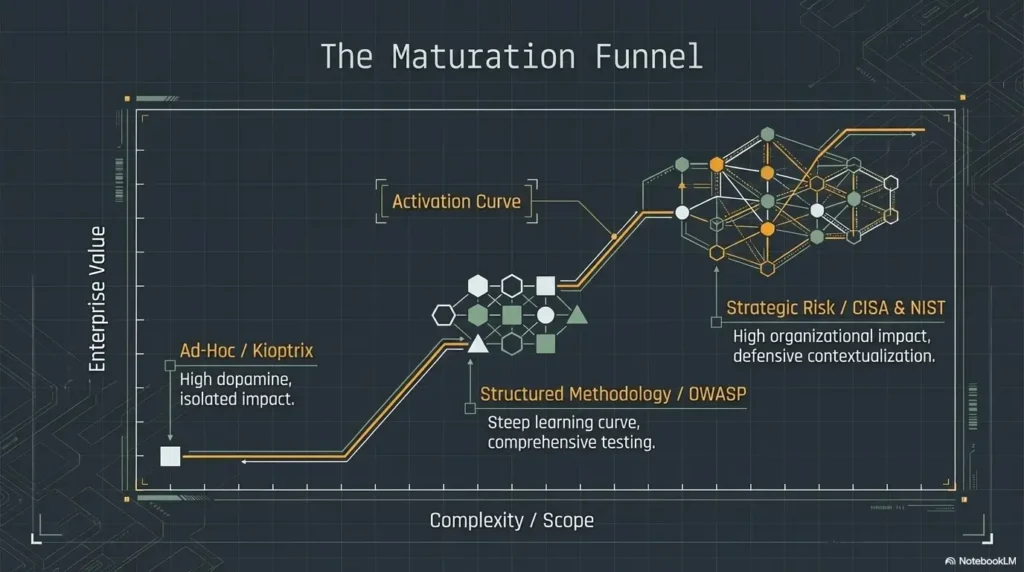
Why Kioptrix should be a phase, not a permanent home
Kioptrix is a phase because career transitions need expansion. Once the workflow starts making sense, the next danger is comfort. Retro labs can become cozy in a way that modern security work is not. Banners are clearer. systems are smaller. the attack surface often feels narratively polite. Real environments rarely are.
So use the comfort, then leave it. Do not build a shrine to the first lab that made you feel competent. Thank it and move on.
What to study after Kioptrix so your skills stop feeling boxed in
Move into modern web testing basics, more realistic Linux privilege escalation, Windows and Active Directory fundamentals, reporting practice, and simple methodology frameworks. This is also the moment to compare learning platforms more honestly. TryHackMe can be useful for guided ramps. Hack The Box can be useful for pressure and ambiguity. OWASP materials help ground web testing in categories rather than vibes. None of these are magic; together they keep you from getting trapped in one flavor of learning. If you want a cleaner bridge, moving from Kioptrix to Hack The Box is a more realistic next-step question than endlessly polishing a retro win.
When to move into web labs, AD labs, and modern privilege escalation practice
Move when you can do three things without wobbling: enumerate in a sane order, separate evidence from guesses, and explain your path without leaning on a walkthrough. That is your cue. Not perfection. Not mastery. Just enough internal structure that a new environment becomes a challenge instead of a fog machine.
Your Next Step Is Smaller Than You Think
Pick one Kioptrix VM and define a written workflow before you start
The next step is not a giant curriculum overhaul. It is smaller and more powerful than that. Pick one Kioptrix VM. Open a blank note. Write your phases in advance: host discovery, service triage, evidence log, hypotheses, initial access, local privilege escalation, findings, after-action review. That tiny act changes the quality of the whole session.
Set a rule: no exploit searching until enumeration notes are complete
This one rule prevents a shocking amount of chaos. It creates friction in exactly the place beginners most need it. You are not banning research. You are delaying it until your own observations have first had a chance to speak. For some learners, comparing Metasploit versus manual Kioptrix practice helps make that distinction painfully clear in a useful way.
Save one final artifact: a short after-action report you can review later
End each run with a short report. What did you find? What path worked? What failed? What would you do differently next time? This takes maybe 10 to 15 minutes, and it closes the loop that many learners leave swinging open behind them. By the time you have three of these, you are no longer just “doing labs.” You are building evidence of growth.
- Prewritten phases reduce flailing
- Delayed exploit searching improves observation
- After-action reports turn practice into proof
Apply in 60 seconds: Create a one-page template for your next Kioptrix session and reuse it every time.
FAQ
Is Kioptrix Level still worth doing if it is old?
Yes, if you use it to train workflow rather than treat it as a modern realism simulator. The age of the box matters less than the quality of your practice loop.
Can Kioptrix actually help me get into pentesting?
It can help as part of a portfolio of practice. On its own, no single VM proves job readiness. What helps more is being able to explain your method, your notes, your reasoning, and what you studied next.
How much Linux should I know before starting?
Enough to navigate files, inspect permissions, understand basic services, and avoid getting derailed by the shell itself. You do not need deep administration skill, but you do need basic fluency.
Should I use walkthroughs on my first attempt?
Try not to, at least at first. Give yourself a fair pass with your own notes. If you use a walkthrough later, use it as a teaching aid and then reconstruct the logic from memory and evidence.
What should I practice after I finish Kioptrix?
Modern web testing basics, Linux and Windows privilege escalation, Active Directory fundamentals, reporting, and methodology. The bridge works only if you actually cross it.
How do I know whether I am learning, not just repeating?
You know when you can explain the path clearly, rerun it with cleaner notes, adapt to small changes, and identify what each step proved rather than merely what command was used.
Is rooting the box enough to put it on a resume?
Usually not by itself. It is better to frame it as part of a structured home-lab practice process with documented methodology, repeated runs, and clear lessons learned.
What notes should I keep during the lab?
Keep the host details, observed services, exact evidence, hypotheses, tests attempted, results, pivots, privilege escalation phase notes, and a short after-action summary. Keep evidence and interpretation separate whenever possible.
The hook at the top of this article was simple: the danger is not that Kioptrix is too small, but that you might learn the wrong lesson from it. By now the loop should be closed. The right lesson is not “I got root.” The right lesson is “I built a method I can carry forward.” That is the part employers, mentors, and your future self can actually use.
So take the next 15 minutes and do one concrete thing. Choose a single Kioptrix VM, create a one-page workflow template, and block one session where your only goal is disciplined enumeration and clean notes. No theatrics. No trophy hunting. Just one careful run. Small steps like that look humble on the surface, but they are often where a career pivot quietly begins.
Optional Safety Note: Use Kioptrix Level only in a legal lab environment that you own or are explicitly authorized to use. Practice should stay confined to isolated, intentionally vulnerable systems. The goal is disciplined learning, not unsanctioned testing.
Original review: 2026-03.
Technical guidance updated: 2026-10-13. Reframed weekly hours and review percentages as adjustable planning suggestions, not learning thresholds.