


The Kerberos Clock Skew Nightmare: KRB_AP_ERR_SKEW
Kerberos doesn’t care that you’re “only” off by a few minutes—cross the ~300-second cliff and your whole Kerberoasting run faceplants with KRB_AP_ERR_SKEW (“clock skew too great”). In AD labs (HTB, VPN ranges, snapshot-happy VMs), the worst part isn’t the first failure. It’s the comeback: you sync once, celebrate, reboot… and the clock gets silently overruled again by VM tools or dueling time services. If your overall lab environment feels like it “changes its mind” between sessions, you’ll get long-term wins by tightening your Kali Linux lab infrastructure (time, networking, snapshots, and repeatability all move together).
Definition: KRB_AP_ERR_SKEW is a Kerberos authentication error meaning the timestamp in your request doesn’t match the server’s time within the allowed skew window (often ~5 minutes). In practice: your Kali client and the domain controller disagree about “now,” so tickets are rejected to prevent replay.
Keep guessing and you lose the only thing labs never refund: momentum—broken sessions, noisy logs, and another hour spent “debugging Kerberoasting” instead of doing it. This guide gets you synced fast and keeps it synced by managing chrony vs systemd-timesyncd, DC-as-authority logic, and the VM clock traps (VirtualBox Guest Additions / VMware Tools) that cause the snap-back.
The Strategy: Measure, Fix, Survive
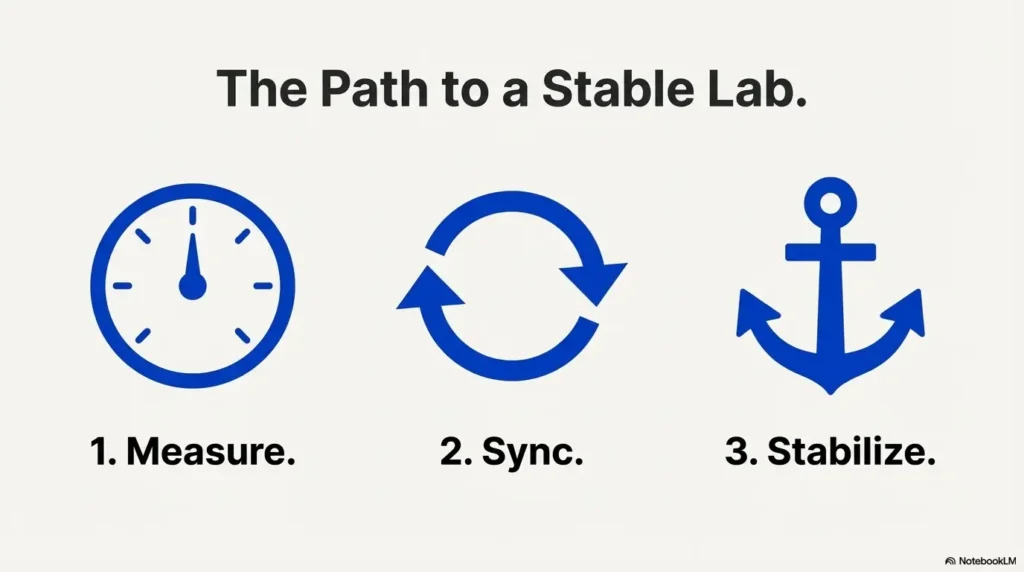
- ✓ Pinpoint the real offset: Determine the exact difference in seconds, not just vibes. Prove which clock is lying.
- ✓ Sync Kali to the Authority: Align your client directly with the DC/PDC emulator without time-hopping chaos.
- ✓ Eliminate NTP Conflicts: Remove conflicts so the fix survives reboots, resumes, and snapshots.
Safety / authorization note: Use this only on systems you own or you’re explicitly allowed to test (HTB, a sanctioned AD lab, a training range). The guidance below is standard time-sync hygiene—don’t use it to access anything you shouldn’t. If you’re building a legit environment from scratch, start with a safe hacking lab at home setup so your “time problem” doesn’t turn into a “permission problem.”
Table of Contents
KRB_AP_ERR_SKEW decoded: what the error is actually saying
The 5-minute cliff: why “almost right” still fails
Kerberos is weirdly dramatic about time. Being “close” doesn’t count. If your Kali VM is off by a few minutes, the ticket exchange can fail even though your creds are correct and your network path is clean.
Here’s the human translation: Kerberos is trying to stop replay attacks, so it uses timestamps. If the timestamp in the request looks too old or too futuristic relative to the server’s clock, Kerberos says, “Nope.”
One honest number you can rely on: in many common Kerberos deployments (including Windows domains), the tolerated skew is often set around 5 minutes. Sometimes it’s tighter. Sometimes it’s customized. But the “about five” rule is why this error shows up so consistently in labs.
Symptom vs root cause: the error can be “true” for the wrong reason
I’ve watched people spend 45 minutes “fixing Kerberoasting” when the real culprit was: a paused VM, a laptop sleep cycle, or two time services arguing like divorced parents.
The clue is the timing: if it fails right after reboot, snapshot restore, VPN reconnect, or suspend/resume, it’s rarely “Kerberoast logic.” It’s usually time authority or time drift.
Open loop: why it works once… then breaks again later
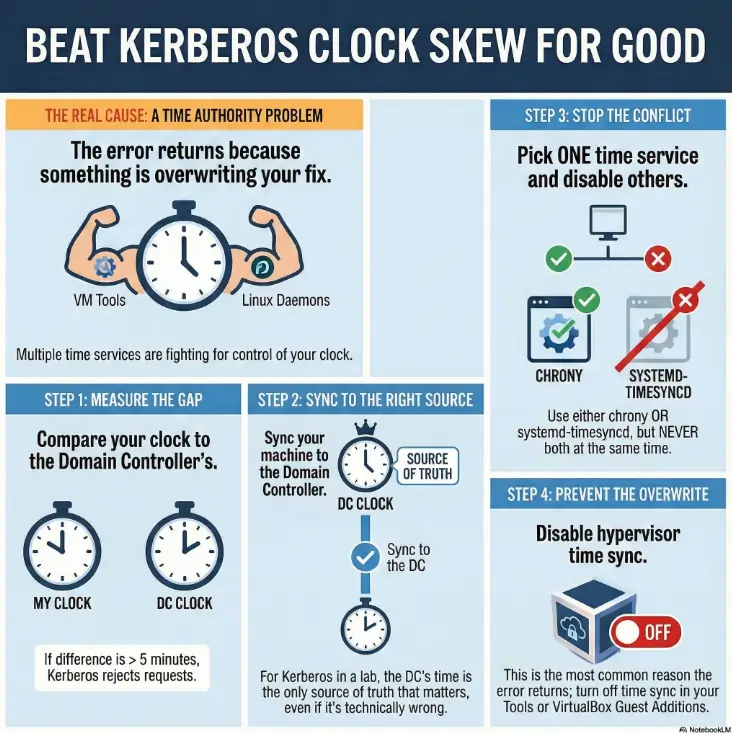
If you’ve ever done a quick manual sync and felt triumphant—only to see KRB_AP_ERR_SKEW return the next day—congrats. You didn’t fix “time.” You temporarily won a small war. The real battle is stopping time from being overridden later.
Show me the nerdy details
KRB_AP_ERR_SKEW is a Kerberos “application request” error: the authenticator timestamp and the service’s notion of time don’t align within the policy window. You can “fix” it by shifting either clock, but stability requires choosing a single authoritative source and preventing competing sync mechanisms (hypervisor tools, guest additions, multiple daemons) from reasserting themselves.
- Kerberos rejects requests outside the allowed time window.
- Labs amplify drift (sleep, snapshots, VPNs).
- Stability comes from one clock source and zero conflicts.
Apply in 60 seconds: Stop guessing—measure the offset against the DC before changing anything.
Kerberos time rules: why AD cares more than you do
Replay protection in plain English (no crypto lecture)
Kerberos expects, “If you’re asking for a ticket now, the request should look like it happened now.” That’s the whole vibe. Time is a security boundary.
This is also why the error feels unfair: you can have correct usernames, correct hashes, correct SPNs, and still get blocked because your VM thinks it’s living 7 minutes in the past.
Where time truth comes from in a Windows domain (DC → hierarchy)
In many Active Directory setups, time flows from the domain’s hierarchy, often with a designated “authoritative-ish” DC (commonly the PDC emulator) coordinating the domain’s notion of “now.” If your Kali VM syncs to something else—like your laptop’s time after a sleep cycle—you can drift away from what the domain considers real. If you’re doing AD work regularly, pairing this guide with an AD profiling workflow that doesn’t rely on BloodHound can save you from chasing the wrong “root cause” when auth fails.
I learned this the annoying way during a hotel Wi-Fi lab: my Mac’s clock was perfect, my VM looked perfect, and the DC was off because the lab image had a weird time source. Everyone was “correct” in their own universe. Kerberos only respects one universe.
Curiosity gap: the one place “local time” is not the real time
That place is your VM. “Local time” inside a guest can be a polite suggestion—until the host or hypervisor tools decide otherwise. If you remember only one thing from this section: your VM clock is negotiable.
Triage in 90 seconds: prove where the skew lives
Check three clocks: Kali, host OS, and the domain controller
The fastest path is boring and that’s why it works: compare three clocks. Kali’s clock, your host machine’s clock, and the domain controller’s clock. If you only check one, you can “fix” the wrong layer and watch the problem return.
- Kali: does the guest clock match reality?
- Host: did your laptop sleep, roam networks, or change time source?
- DC: is the lab DC aligned with an upstream source—or drifting?
My personal ritual: I do this check before any Kerberos-heavy work. It’s saved me more time than any single tool tweak. (Also saved me from rage-quitting a box at 2:11 AM. Not my finest hour.)
Measure drift, don’t guess: offset vs “current time”
“What time is it?” is a trap question. What you want is: how far apart are the clocks? A 4-minute offset is a quiet disaster. A 1-minute offset can become 6 minutes after suspend/resume.
Money Block — Mini Calculator: “Am I outside the Kerberos skew window?”
Enter an observed offset (seconds). Leave window at 300 seconds (5 minutes) unless your lab changed it.
Enter values and click “Check skew risk.”
Neutral next step: If it shows “Likely FAIL,” do the quick sync steps in the next section—before you touch Kerberos tooling.
Micro-check: confirm timezone vs UTC (the sneaky false-positive)
Timezone mistakes are the prankster cousin of time drift. Your clock can be “accurate” but labeled wrong. If your VM flips between local time and UTC unexpectedly, Kerberos can read that like a time jump.
Quick reality check: if your displayed time is correct but your offset calculation is weirdly large, it’s often timezone configuration or VM tools rewriting the clock post-boot.
Money Block — Eligibility checklist: “Is this really a time-skew problem?”
- Yes/No: Does the offset vs DC exceed ~300 seconds?
- Yes/No: Did this start after reboot, snapshot, or suspend/resume?
- Yes/No: Are you running more than one time service (or hypervisor sync tools)?
- Yes/No: Is timezone consistent (no surprise UTC/local flips)?
Neutral next step: If you answered “Yes” to any two, treat it as a time authority issue and continue.
Fix it now: get synced immediately without making things worse
Pick the authority first (DC time is usually the target)
In a typical HTB/AD lab, the domain controller’s time is the reference that matters for Kerberos success. If your Kali box matches your watch but not the DC, Kerberos still fails. Harsh, but consistent.
I used to “fix” the time by matching my host clock because it felt comforting. Then I’d wonder why the DC still rejected me. Kerberos doesn’t negotiate. It judges.
Sync once, verify twice: confirm the offset actually changed
A lot of “sync” commands report success even when they didn’t change the clock, or changed it temporarily until the next service tick. Your job is to verify: did the offset shrink to near-zero relative to the DC?
- After syncing, re-check the offset immediately.
- Then re-check again after 60–120 seconds.
- If it snaps back, something else is overwriting your time.
Don’t do this: “manual time hopping” that breaks sessions and logs
Manually setting the clock forward/back in big jumps is tempting. It can also trash time-sensitive logs, confuse tools, and create weird “future file timestamp” messes that you’ll trip over later.
If you need a fast fix, do a controlled sync to the right authority—then stabilize the environment in the next section.
Make it stick: one time service, one job, zero conflicts
Choose your keeper: chrony vs systemd-timesyncd (lab-friendly rules)
You can succeed with either. The key is consistency and observability.
My preference in pentest VMs is usually chrony because it tends to behave well under unstable networks and gives useful status output. But if your Kali build is already set up cleanly with systemd-timesyncd, you can keep it—just don’t run both. And if your environment got weird after an upgrade (packages held back, half-updated services, mismatched defaults), it’s worth sanity-checking your update state with Kali “packages have been kept back” fixes before you blame Kerberos.
Money Block — Decision card: chrony vs systemd-timesyncd
Choose chrony when…
- You use VPNs / flaky Wi-Fi often.
- You want clear “am I synced?” status.
- You restore snapshots frequently.
Trade-off: one more package to manage.
Choose systemd-timesyncd when…
- You want minimal moving parts.
- Your VM stays on stable networks.
- You already use systemd tooling everywhere.
Trade-off: less “nerd visibility” in some setups.
Neutral next step: Pick one time service and disable the other sources that fight it.
Disable the time tug-of-war: when multiple services “help” at once
This is the part most guides skip—because it’s less sexy than “run this command.” But it’s the difference between a fix and a recurring nightmare.
Common conflict sources in labs:
- Two Linux time services at the same time (chrony + systemd-timesyncd, or ntpd + anything).
- Hypervisor/guest tools forcing guest time (VirtualBox Guest Additions, VMware Tools).
- Host OS correcting time after sleep, then pushing it into the guest.
Let’s be honest… your box isn’t “drifting”—it’s being overruled
Most lab skew isn’t slow drift. It’s a shove. A sudden correction after reboot or resume. That’s why it feels random: it’s triggered by events, not time passing.
Show me the nerdy details
The stable pattern is: choose one authoritative time sync mechanism and ensure every other mechanism is disabled or set to “don’t touch guest time.” Hypervisor tools can reapply host time at boot/resume. Linux time daemons can race each other. If your offset “snaps back,” it’s almost always an overwrite, not drift.
VM clock traps: why lab VMs time-travel after reboot
Guest additions & tools (VirtualBox/VMware) and their hidden time sync
VirtualBox Guest Additions and VMware Tools are helpful… until they aren’t. They can synchronize guest time to host time automatically. If your host clock changes sharply (sleep/wake, NTP correction), your VM clock can jump with it—right into Kerberos failure territory. If you’re running VirtualBox and the VM “feels” off in multiple ways (not just time), you may also be dealing with heavier baseline overhead—especially if your disk is encrypted—so keep Kali encrypted VM slowness on VirtualBox on your checklist when troubleshooting the whole experience.
This is the “I swear I fixed it yesterday” problem. You did. Then the hypervisor quietly changed it again.
My messy confession: I once blamed an entire lab network for an hour because I forgot my VM was set to sync time on resume. The network was innocent. I was the villain.
Suspend/resume & snapshots: drift accelerators you didn’t notice
Suspend/resume doesn’t just pause the CPU. It can freeze a guest’s sense of time. When you wake the VM, the guest tries to catch up, the host tries to “help,” and your time service tries to correct—sometimes in the wrong order.
Snapshots can do something similar: you restore a moment in the past, then the system “snaps” back to a different time source. Kerberos reads that as chaos.
Here’s what no one tells you… the host clock often wins silently
You can configure the guest perfectly and still lose if the host is unstable. If your host is a laptop that sleeps, roams Wi-Fi, and gets time corrections mid-session, your VM inherits that chaos unless you block it. (VMware users: your “Tools” behavior varies by edition, so it helps to know your baseline—see VMware Player vs Workstation vs Fusion if you bounce between them.)
Show me the nerdy details
Many hypervisors implement periodic guest time sync or “catch-up” behavior. After a suspend, the guest may see a discontinuity. A time daemon may step the clock, then the hypervisor steps it again. Kerberos failures appear “random” because the stepping is event-driven (boot/resume), not gradual drift.
AD lab specifics: when the DC is the one that’s wrong
DC time source sanity check (where the DC gets time)
In a tidy enterprise, the domain’s time is anchored to a reliable upstream source. In a lab, the DC might be a template VM that hasn’t seen the internet in weeks, or it might be syncing to something weird.
If everyone in the lab is getting skew errors, or if you see the DC time wildly off compared to real-world time, the DC itself may be drifting. In that case, syncing Kali to the DC still gets you Kerberos success, but it’s worth understanding that your lab clock is “lab truth,” not necessarily “real truth.”
I’ve had labs where the DC was several minutes off and everything still worked—because the whole lab was consistently wrong together. Kerberos cares about consistency, not morality.
Multi-DC labs: replication delays that look like skew
If your lab has multiple DCs, it’s possible to hit two different notions of time depending on which DC you’re talking to. That can look like intermittent skew: one attempt works, the next fails, then works again.
Curiosity gap: the “correct” fix that fails because you synced to the wrong box
This is sneakier than it sounds. You sync your Kali VM to “a DC,” but the service you’re requesting tickets from is using another DC’s time (or your tooling reaches a different DC due to DNS). Suddenly your “fix” feels broken.
- Syncing to the DC can resolve KRB_AP_ERR_SKEW even if the DC is “wrong” in real-world terms.
- Multiple DCs can create inconsistent results if their times differ.
- DNS can route you to a different DC than you think.
Apply in 60 seconds: Identify which DC you’re actually talking to when the error happens, then measure offset against that DC.
Network & DNS gotchas: time sync fails even when NTP is “up”
NTP reachability in segmented lab networks (NAT/host-only/VPN)
NTP is “just UDP,” which makes it easy to block accidentally. In lab setups, you might have: NAT that doesn’t pass NTP the way you think, host-only networks with no upstream time, or VPN routing that prioritizes the tunnel. If your lab networking is a patchwork of modes, bookmark VirtualBox NAT vs host-only vs bridged so you can reason about where UDP is actually going.
That’s why you can browse the web but still fail time sync: browsing uses TCP and proxies well; NTP is picky and often filtered.
Anecdote: I once “fixed” a skew issue by reconnecting to a different coffee shop Wi-Fi. Same VPN. Same VM. Different network rules. It felt like magic. It was just UDP behaving like UDP.
DNS misroutes: syncing to the wrong NTP endpoint
DNS can betray you politely. You think you’re syncing to one thing; you’re syncing to another. If your resolvers change across networks, your NTP hostnames can resolve differently, and the offsets can wobble. And if your workflow involves proxying, remember that “name resolution” and “traffic routing” can split in surprising ways—see ProxyChains DNS leak fixes if your DNS path doesn’t match your tunnel path.
Firewall rules that block time but allow everything else
The classic: “ICMP works, HTTP works, but NTP doesn’t.” If you’re in a corporate network, a hotel network, or a VPN policy zone, NTP might be blocked outright. In that case, syncing to the DC inside the lab is often the simplest approach. If your VPN itself is unstable and “time snaps back” every reconnect, address the tunnel first—TryHackMe OpenVPN disconnect fixes are surprisingly transferable to other lab VPN quirks.
Common mistakes: the top ways people re-break time
Mistake #1: running two time daemons “for redundancy”
Redundancy is great for databases. For a lab VM clock, it’s usually a fight. When two daemons disagree, you get “it was fine… then it wasn’t.”
Mistake #2: fixing timezone instead of fixing offset
Timezone changes how time is displayed. Offset is how time differs. Kerberos cares about offset. If you “fix” display but not offset, the error stays and your confidence dies.
Mistake #3: trusting the VM clock without checking the host
If your host clock is unstable (sleep/wake cycles, aggressive NTP corrections), your VM can inherit instability. Fixing the guest without stabilizing the host is like mopping the floor while the sink is overflowing. (And yes, “post-update weirdness” is a real multiplier—if your VirtualBox guest starts misbehaving after upgrades, even unrelated symptoms like audio can be a hint that integration layers changed; see Kali VirtualBox no sound after update as a quick example of how “small” integration issues pop up.)
Quick reality check: If KRB_AP_ERR_SKEW returns after reboot, it’s almost always an overwrite (VM tools / competing daemons), not “mysterious drift.”
Who this is for / not for
For you if: HTB/AD lab work, Kerberos tooling, repeatable environment setup
This is for the time-poor operator who wants repeatability: you want your environment to behave the same way every time you open the lid, connect the VPN, or restore a snapshot. If you’re building that “boring reliability,” it pairs nicely with a clean daily workflow like Zsh setup for pentesters—not because it fixes time, but because repeatability is a habit, not a single tweak.
If you’re new, you’ll get a calm path. If you’re experienced, you’ll appreciate the focus on why it returns.
Not for you if: you’re targeting systems without explicit authorization
I’m not here to help with unauthorized access. If you don’t have permission, stop. Build a lab. Use HTB. Learn properly. You’ll sleep better and your future self will thank you.
If you’re defending: what this error can reveal about environment hygiene
From a defender view, widespread skew errors can hint at broken time infrastructure, bad NTP reachability, or inconsistent VM templates. Time is a security dependency; treating it casually can cause real auth failures—even without an attacker.
Short Story: I once had an AD lab session where every Kerberos action failed, and I started doing the classic spiral: rechecking hashes, blaming DNS, questioning my toolchain, then questioning my life choices. I finally noticed something tiny: the VM’s clock was “correct” but it was five minutes behind the DC. Five minutes. That’s it. I synced the guest, got instant success, and felt embarrassed—until it failed again after I closed the laptop lid. That’s when it clicked: the fix wasn’t “sync once.” The fix was “stop the silent overwrite.” I disabled the competing time source, picked one service, and suddenly the lab became boring in the best way. Kerberoasting didn’t get easier. My environment did.
FAQ
What does KRB_AP_ERR_SKEW mean in Kerberos?
It’s Kerberos saying the request timestamp doesn’t match the server’s time within the allowed window. In practice: your client and the service disagree about “now.”
How many minutes of clock skew does Kerberos allow?
Often around 5 minutes in common setups, including many Windows domain environments. It can be configured, but “about five” is the frequent default that explains the recurring lab pain.
Why does “clock skew too great” happen more in VMs?
VMs are more likely to experience time jumps after suspend/resume, snapshot restore, or when hypervisor tools sync guest time to an unstable host clock.
Should I use chrony or systemd-timesyncd on Kali?
Either can work. The bigger win is choosing one and eliminating conflicts. Many lab operators prefer chrony for clearer status and behavior on flaky networks.
Can timezone mismatch trigger the same error?
Timezone issues usually change display, not the underlying notion of time, but misconfiguration and VM tooling can create real offset problems. If the offset is large, treat it as an offset problem first.
Why does it work once and fail after reboot or suspend?
Because something else is overwriting your time after boot/resume—commonly hypervisor guest tools or a second time service. The fix is to stop the overwrite, not to keep re-syncing manually.
Does VPN or HTB network setup affect NTP?
Yes. NTP uses UDP and can be filtered or routed differently over VPN/NAT/host-only networks. If upstream NTP is blocked, syncing to the DC inside the lab is often the practical workaround.
If the DC time is wrong, what’s the safe way to fix it in a lab?
In a lab, you can usually treat the DC as the source of truth for Kerberos success and sync your Kali VM to it. If you control the lab DC, you can also fix its upstream time source—but keep changes contained to your training environment.
Next step: one concrete action
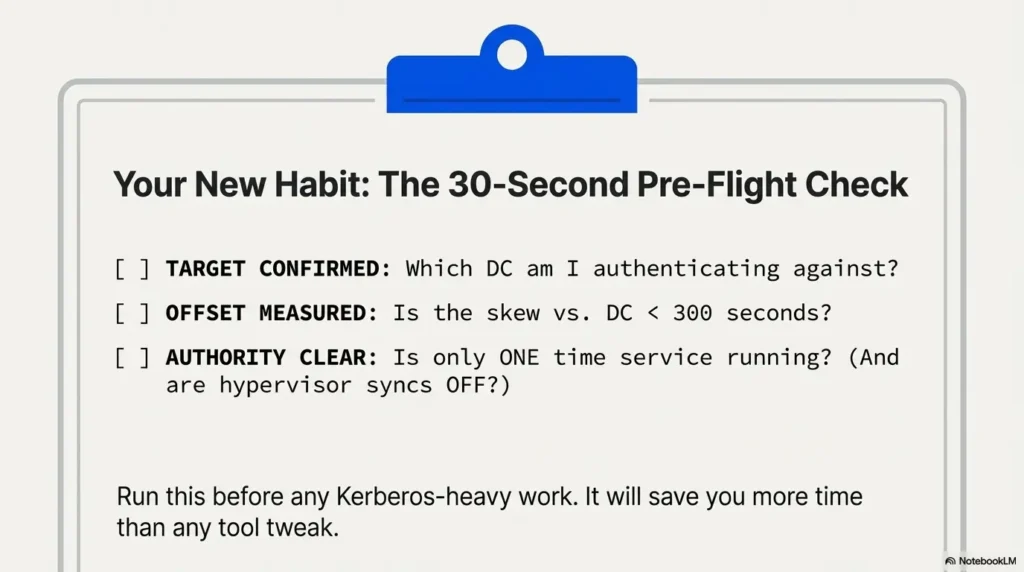
Create a “Time Health” check: a 30-second pre-flight you run before Kerberos tasks
Here’s the next step that pays rent: a tiny pre-flight you run every time before Kerberos-heavy work. It’s not glamorous. It’s effective.
- Confirm who you’re authenticating against (which DC/service).
- Measure offset (seconds, not vibes).
- Verify you have one time authority (one daemon, no hypervisor overwrites).
Money Block — Quote-prep list: what to gather for fast troubleshooting
- DC hostname/IP you’re actually contacting (from DNS + tool output).
- Hypervisor type (VirtualBox / VMware) and whether guest tools are installed.
- Whether the VM was resumed from sleep/suspend or restored from snapshot.
- Your chosen time service (chrony or systemd-timesyncd) and whether anything else is running.
Neutral next step: Keep these four items in your notes; they cut “why is it back?” time in half. If you’re documenting lab runs or client-safe practice reports, keeping this as a standard appendix inside your Kali pentest report template makes recurring issues dramatically easier to spot.
Infographic: The “Clock Skew” Fix Path (stickiness-first)
Compare Kali ↔ DC (seconds). If > ~300s, Kerberos may fail.
In labs, DC time is the practical reference.
One time daemon. Disable guest tool overwrites.
If offset snaps back: overwrite is still active.
Wrap-up: keep Kerberos happy tomorrow, too
Remember the open loop from the beginning—why it works once and breaks again? Here’s the honest answer: you didn’t have a time problem; you had a time authority problem.
When you pick the right authority (usually the DC in a lab), sync cleanly, and then remove the silent overwrites (hypervisor tools, competing daemons), KRB_AP_ERR_SKEW stops being a recurring plot twist. It becomes a solved problem.
If you only do one thing in the next 15 minutes: run your pre-flight once, then reboot your VM and run it again. If it survives a reboot, it’ll usually survive the rest of your lab session too.
Show me the nerdy details
The “stickiness” metric is post-event stability: reboot, resume, VPN reconnect, and snapshot restore. If time stays aligned after those events, you’ve eliminated overwrites. If it snaps back, keep hunting the second time authority—hypervisor sync is a frequent culprit.
Last reviewed: 2025-12-29