


Small Business AI Security Guide
AI Shadow IT Risk in Small Businesses:
Find the Hidden Tools Before They Find You
AI tools rarely enter a small business through the front door with a purchase order, a security review, and a neat little ribbon. More often, they slip in through a free browser extension, a meeting notetaker, a helpful spreadsheet add-on, or a personal chatbot account used to “just clean up this proposal.” That is how AI Shadow IT begins: not with rebellion, but with speed.
For owners and lean teams, the hard part is that employees are usually solving real problems. They are writing faster, summarizing calls, translating emails, drafting sales replies, and untangling admin knots. The danger is not AI itself. The danger is sensitive business data drifting into tools nobody has reviewed, configured, or even noticed.
This guide gives you a practical way to find hidden AI tools, sort real risk from noise, build a usable approved AI stack, and train people without making them afraid to tell the truth. No giant governance cathedral required. Just enough structure to keep the lights warm and the doors locked.
Find hidden tools
Spot browser extensions, meeting bots, AI plug-ins, and personal accounts before they become business-wide exposure.
Set safer rules
Create simple data categories, approved use cases, and “never paste this” guidance employees can remember.
Reduce risk calmly
Use lightweight checks, vendor questions, and monthly reviews without turning your workplace into a surveillance aquarium.
The goal is not to ban the new hammer. It is to stop people from storing customer records in the toolbox. 🔐
Snapshot
This article is for small-business owners, operators, department leads, and lean IT or security teams that want to reduce AI Shadow IT risk without killing useful productivity. You will learn where hidden AI tools usually appear, what data is most at risk, how to build an AI tool inventory, what to ask vendors, and how to run a 15-minute exposure check today.
Before You Act: What This Guide Can and Cannot Do
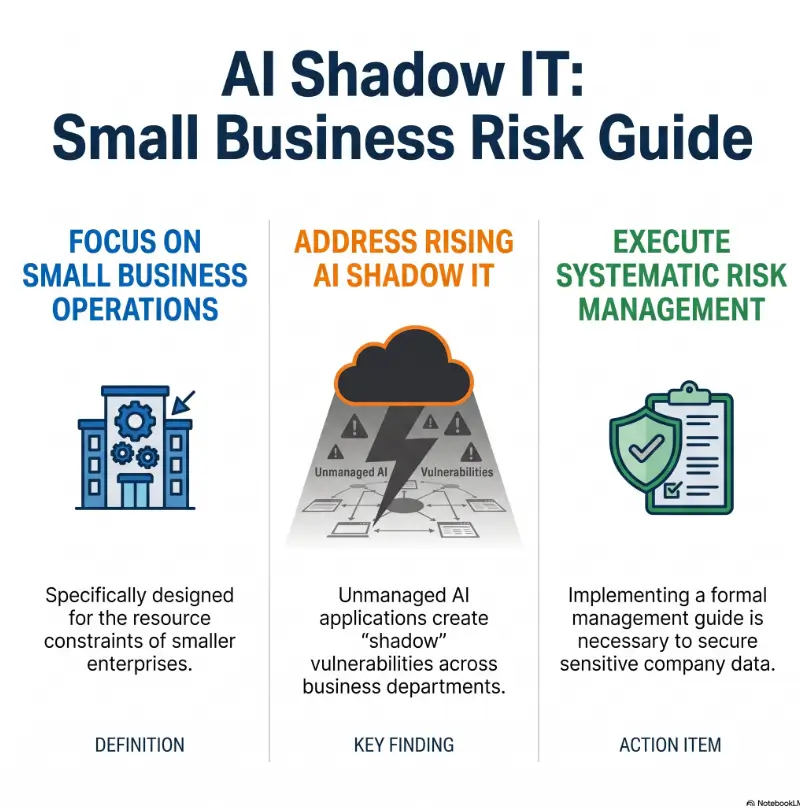
AI Shadow IT is a cybersecurity, privacy, compliance, vendor-risk, and management issue wearing one very convincing productivity costume. This guide can help you spot common risk patterns and create a practical first layer of control.
It cannot tell you whether your business is compliant with a specific contract, law, insurance requirement, industry rule, or customer security obligation. If your company handles regulated health data, financial records, legal documents, children’s data, government contracts, payment card information, or sensitive employee records, confirm your decisions with qualified security, legal, privacy, or compliance support.
Key takeaway
Do not start with a ban. Start with visibility. You cannot approve, restrict, replace, or train around tools you have not found yet.
Risk is not evenly distributed
A bakery using an AI tool to brainstorm cupcake captions faces a different risk profile than a medical billing company pasting patient notes into a chatbot. A five-person design studio using AI for mood-board copy faces different exposure than a law office summarizing client communications with an unreviewed meeting bot.
The practical question is not “Is AI safe?” That question is too large to fit through the office door. The better question is: what data is being used, by whom, inside which tool, under what account, with what permissions, and under what terms?
Use this as a first pass, not a final audit
For a small business, a first pass may be enough to stop the most obvious leaks: personal AI accounts, risky extensions, undocumented meeting bots, and customer data pasted into free tools. For higher-risk teams, this becomes the beginning of a formal AI governance, vendor review, and data protection program.
Think of this article as a flashlight, not a fortress. A flashlight is still useful when the room is dark.
AI Shadow IT Control Flow
1. Discover
List AI tools, extensions, bots, plug-ins, and personal accounts.
2. Classify
Sort data into public, internal, confidential, and regulated.
3. Approve
Create a safe lane with reviewed tools and clear use cases.
4. Train
Teach examples, not foggy warnings nobody remembers.
5. Review
Check new tools, invoices, connected apps, and policy gaps monthly.
The Hidden AI Tools Already Inside Your Business
AI Shadow IT happens when employees use AI tools without formal approval, visibility, or security review. In a small business, that can mean a free chatbot account, a browser extension that summarizes web pages, a note-taking bot invited to client calls, or a workflow app connected to email and files.
The word “shadow” sounds sinister, but the behavior is often ordinary. A salesperson wants better follow-up emails. A bookkeeper wants help categorizing messy notes. A founder wants a quick contract summary. A support rep wants to turn a tense customer message into something calmer.
The risk appears when useful work moves through tools the business has not checked. The little convenience candle becomes a room full of unattended flames.
Why AI Shadow IT spreads faster than old software sprawl
Traditional software sprawl usually required a purchase, installation, contract, or admin setup. AI tools often require only an email address and a curious employee with a deadline breathing down their neck.
That means AI adoption can skip normal checkpoints. No budget request. No vendor review. No policy conversation. No admin console. Just a tab, a prompt, and a quiet transfer of business information into a system nobody has evaluated.
The “free trial” trap: when convenience becomes exposure
Free trials feel harmless because no money changes hands at first. But free does not mean low-risk. An AI tool may still collect prompts, process uploaded files, request access to email or cloud storage, retain data for a period of time, or make it difficult to manage deletion later.
A free trial can also become sticky. One employee adds it, then another asks for the workflow, then a contractor uses it for a client deliverable. By the time the owner notices the monthly card charge, the tool may already contain customer names, internal documents, and project history.
What employees are really trying to solve with AI
Most employees are not trying to create risk. They are trying to remove friction. AI Shadow IT usually points to a real workflow problem: too much email, unclear templates, repetitive reporting, slow approvals, weak documentation, or support queues that never seem to sleep.
That is useful information. If three employees are using an unapproved AI writing assistant, you may not have a “bad employee” problem. You may have a documentation, communication, or workload problem wearing a neon hat.
Key takeaway
When you find unauthorized AI tools, ask what job they are doing. The answer often reveals which approved tool, template, or process improvement your team actually needs.
Where AI Shadow IT Usually Hides
Small businesses rarely have a single neat dashboard showing every AI tool in use. The clues live in browser profiles, connected app pages, meeting invites, expense records, SaaS integrations, and employee habits.
Start with the places where AI tools can touch data without looking like “software” in the old sense.
Browser extensions that read more than anyone realizes
AI browser extensions may summarize pages, rewrite text, generate email replies, extract data, or assist with search. Some request broad permissions, including the ability to read or change data on websites the employee visits.
That matters if employees access webmail, CRM records, admin dashboards, payroll tools, customer portals, legal files, or cloud documents in the same browser. A helpful extension can become a very nosy office plant.
Meeting bots quietly recording sensitive conversations
AI meeting notetakers can be genuinely useful. They create summaries, action items, transcripts, and searchable memory. They can also capture client strategy, pricing discussions, HR conversations, legal advice, medical details, merger chatter, performance reviews, or private employee concerns.
Before approving meeting AI, decide which meetings it may join, whether participants need notice, where transcripts are stored, who can access them, how long they remain available, and how deletion works.
AI writing tools inside email, CRM, support, and project apps
Many business apps now include AI drafting, summarizing, tagging, routing, or forecasting features. The risk is not only standalone AI tools. It is also AI built into tools your business already uses.
That creates a subtle governance problem. An app that was approved for project management last year may now offer AI features that process more sensitive content than originally expected. Review major SaaS tools periodically, especially after product updates.
Personal accounts used for business work
Personal AI accounts are one of the most common small-business blind spots. They may not support company admin controls, centralized billing, access removal, shared policy settings, or audit records.
When an employee leaves, their personal account may still contain business prompts, uploaded files, generated summaries, client names, or internal strategy notes. That is not a great farewell gift.
| Hidden AI location | What to check | Why it matters |
|---|---|---|
| Browser extensions | Permissions, publisher, install count, data access, business need | Extensions may see content from sensitive business systems |
| Meeting bots | Consent, storage, transcript access, retention, deletion | Conversations can contain client, HR, legal, or pricing information |
| SaaS integrations | Connected apps, OAuth scopes, admin logs, inactive apps | One integration may access files, email, calendar, or CRM data |
| Personal AI accounts | Use cases, data pasted, file uploads, account ownership | The business may lose control over records and offboarding |
| Expense records | Recurring charges, odd vendor names, small monthly subscriptions | Finance can reveal tools that IT never sees |
Data Leakage: The Risk Most Owners Notice Too Late
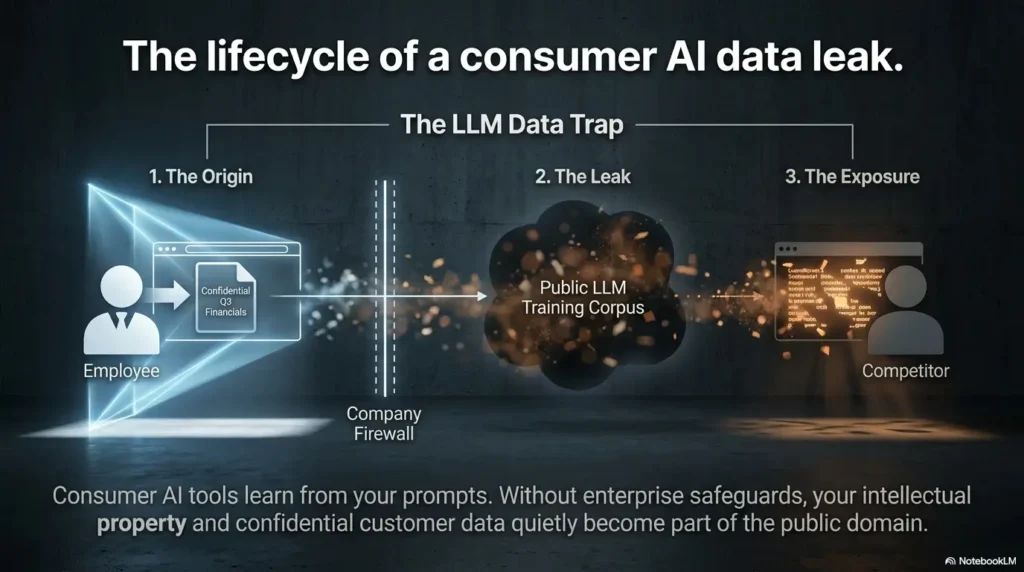
AI Shadow IT becomes serious when sensitive information enters a tool that is not approved for that data. The employee may paste only a paragraph. The risk may still be larger than the paste.
Why? Because the pasted text may include customer names, contract terms, confidential pricing, employee details, source code, credentials, roadmap plans, or regulated records. It may also reveal patterns about how your business works.
Customer data copied into public AI tools
A customer support employee might paste an angry customer email into an AI tool and ask for a softer reply. Sensible goal. Risky execution if the email includes the customer’s full name, account number, address, order history, payment details, health information, or private complaint.
The safer version is to remove identifying details first or use an approved business AI tool configured for the right data sensitivity. Training should show both versions side by side so the difference is visible.
Contracts, proposals, and pricing pasted for “quick cleanup”
Sales, operations, and leadership teams often use AI to polish proposals, summarize contracts, or simplify technical language. That can be useful. It can also expose negotiation terms, discounting strategy, renewal pricing, customer obligations, or confidential vendor clauses.
For small businesses, proposals are often the bloodstream of revenue. Treat them with care. If an employee needs AI help improving language, give them a sanitized template or an approved environment rather than hoping they guess correctly under pressure.
Employee records and payroll details in the wrong window
HR and payroll data should sit in the “handle carefully” drawer. AI tools can help draft job descriptions, interview guides, training plans, and neutral policy language. But employee records, salary details, disciplinary notes, medical leave information, identity documents, and performance reviews need stronger restrictions.
A useful rule: if the information would feel painful, private, or legally sensitive if read aloud in a crowded coffee shop, it probably does not belong in an unapproved AI prompt.
Tiny paste, giant footprint
Small data leaks rarely announce themselves with a siren. They look like a quick prompt on a busy Wednesday. That is why employees need practical examples, not abstract warnings about “data exposure.”
Key takeaway
Your AI policy should name the data that never belongs in unapproved tools: customer identifiers, employee records, payment details, credentials, confidential contracts, source code, trade secrets, and regulated records.
The Permission Problem: AI Tools With Too Much Access
AI risk is not only about what employees paste. It is also about what tools can access after someone clicks “Allow.” This is where OAuth permissions, connected apps, browser add-ons, and SaaS integrations become important.
For a small business, one over-permissioned tool can become a side door into email, files, contacts, calendars, CRM notes, or support tickets. Nobody has to paste anything if the tool has already been invited inside.
OAuth approvals that bypass normal buying decisions
OAuth is the permission system behind many “Connect your account” flows. It can be safe and useful when reviewed. It can also allow employees to grant third-party apps access to business data without a procurement, security, or owner review.
When reviewing AI Shadow IT, look for apps connected to Google Workspace, Microsoft 365, Slack, CRM systems, support platforms, cloud drives, project tools, and accounting apps. Pay special attention to broad permissions such as reading email, managing files, viewing contacts, or accessing calendars.
“Sign in with Google” and the quiet handover
Employees often see “Sign in with Google” or “Sign in with Microsoft” as a convenience, not a security decision. That is understandable. The screen is designed to feel simple.
Your job is to make the business rule simple too: signing in is fine only when the tool is approved for the type of work and data involved. Otherwise, employees should ask before connecting business accounts.
Why one over-permissioned tool can become a business-wide risk
A tool that can read one employee’s email may see client messages, password reset emails, invoices, calendar invites, internal documents, vendor notifications, and shared drive links. If that employee is an owner, manager, finance lead, or admin, the blast radius grows.
The safer approach is least privilege: give tools only the access they need, for only the users who need them, under business-controlled accounts where possible.
Permission review checklist
- Which employee approved the app?
- Which business account, workspace, or SaaS system is connected?
- Can the app read, write, delete, export, or share data?
- Does the vendor explain data retention and deletion clearly?
- Can an admin revoke access centrally?
- Is the app still being used, or is it a forgotten trial?
Common Mistakes That Make AI Shadow IT Worse
AI Shadow IT is not solved by dramatic speeches, long PDFs, or a sudden ban that arrives like a thundercloud over the sales team. The cure can become part of the illness if it ignores how people actually work.
Mistake 1: banning AI without giving employees a safer alternative
A blanket ban may feel clean on paper. In practice, it can push AI use further underground. Employees still have deadlines. If AI saves them an hour, some will quietly keep using it unless you provide a workable substitute.
The better move is to approve safe use cases, restrict sensitive data, and give employees at least one clear option for everyday tasks such as drafting, summarizing, brainstorming, and rewriting non-sensitive content.
Mistake 2: assuming small businesses are too small to be targeted
Small businesses may not look glamorous to attackers, but they often hold valuable data, use shared admin accounts, have lean security controls, and rely on busy people making quick decisions. That combination is attractive.
Even when there is no targeted attack, AI Shadow IT can create accidental exposure, contract problems, customer trust issues, and messy incident response work. You do not need to be famous to have a very bad Tuesday.
Mistake 3: treating AI risk as only an IT issue
AI tools are used by sales, HR, finance, operations, legal support, marketing, customer service, engineering, and leadership. If governance lives only in IT, it will miss the places where AI actually touches business judgment.
Owners should include department leads in the conversation. Ask where AI saves time, where it feels risky, and which tasks employees want help doing safely.
Mistake 4: ignoring contractors, freelancers, and agencies
External collaborators can create hidden AI exposure too. A freelancer may use AI to summarize your brand strategy. An agency may feed campaign data into a tool. A contractor may upload screenshots, logs, customer notes, or documents into their own account.
Add AI usage language to contractor onboarding, scopes of work, and vendor conversations. Keep it simple: what data they may use, what tools they may use, what they must not upload, and how they should disclose AI-assisted work when needed.
| Common mistake | Why it backfires | Safer alternative |
|---|---|---|
| Ban all AI | Employees may hide usage | Approve low-risk use cases and provide safe tools |
| Write a long policy nobody reads | Rules become decorative furniture | Create a one-page rule sheet with examples |
| Ignore contractors | Business data leaves through external workflows | Add AI terms to onboarding and statements of work |
| Focus only on chatbots | Miss extensions, integrations, bots, and SaaS AI features | Inventory all AI-assisted tools and connected apps |
| Review once and stop | New AI features appear constantly | Run a monthly lightweight review |
- Vendor Security Questionnaire: What Small Businesses Should Ask Before Trusting a Tool
- MVP Threat Modeling for Startups: A Practical Security Map Before You Scale
- 1-Hour-a-Month Security Training: A Lean Routine for Busy Small Teams
Build a Simple AI Tool Inventory in One Afternoon
An AI tool inventory is a living list of AI tools, AI-enabled features, extensions, integrations, and accounts used for business work. It does not need to be fancy. A spreadsheet is enough for many small businesses.
The inventory gives you a map. Without it, AI governance becomes office weather: everyone talks about it, nobody controls it.
Ask the right question: “What helps you work faster?”
If you ask, “Are you using unauthorized AI tools?” people may freeze. The phrase sounds like trouble. Ask instead: “Which AI tools, extensions, bots, or features help you work faster?”
This frames the inventory as a productivity and safety exercise, not a trap. Make it clear that the first goal is discovery, not punishment.
Review browser extensions and connected apps
Ask employees to export or screenshot installed browser extensions used for work. Review connected apps in your major business platforms, especially email, cloud storage, CRM, calendar, project management, support, finance, and identity tools.
Look for tools with AI-related words in the name or description, but do not rely on that alone. Some automation and productivity tools include AI features without making AI the main brand identity.
Separate approved, tolerated, restricted, and banned tools
Not every discovered tool needs the same response. Some should be approved. Some can be tolerated for low-risk tasks while you review alternatives. Some should be restricted to certain data or teams. Some should be prohibited because the access, terms, or use case is too risky.
This four-bucket model helps avoid overreaction. It also gives employees a practical answer when they ask, “Can I use this?”
| Inventory field | What to record | Example |
|---|---|---|
| Tool name | Name of app, extension, bot, or feature | AI meeting summarizer |
| Owner | Employee, department, or vendor using it | Sales team |
| Use case | What problem it solves | Creates call summaries and next steps |
| Data involved | Public, internal, confidential, or regulated | Client conversations and pricing notes |
| Account type | Personal, team, business, or vendor-owned | Personal account |
| Access level | Files, email, calendar, CRM, browser data, uploads | Calendar and transcripts |
| Status | Approved, tolerated, restricted, banned, under review | Restricted pending review |
| Next action | Keep, replace, remove, negotiate, train, monitor | Move to business account or disable |
Key takeaway
A useful AI inventory is not a museum document. Review it monthly, update it when tools change, and keep it short enough that someone will actually maintain it.
The Approved AI Stack: Give People a Safe Lane
The fastest way to reduce AI Shadow IT is to make the safe option easier than the risky option. Employees should not have to become amateur privacy lawyers just to draft a follow-up email.
An approved AI stack is a small set of reviewed tools and allowed use cases. It answers three questions: what can employees use, what can they put into it, and what should they never do?
Choose tools by data sensitivity, not popularity
The best AI tool for public marketing ideas may not be acceptable for contract review, customer support, HR records, or engineering work. Do not choose only by popularity, price, or social media buzz.
Start by sorting work into data categories. Public content can usually use broader tools. Internal content needs more care. Confidential or regulated content needs stronger controls, business terms, access management, and sometimes professional review.
Match AI tools to job functions
A marketing coordinator, finance manager, software developer, HR lead, and customer support agent should not necessarily have the same AI rules. Their data, tools, and mistakes are different.
Write rules by workflow. For example, “Marketing may use approved AI tools to brainstorm public campaign ideas, but may not upload unreleased customer lists, private performance reports, or partner contracts.” That is clearer than “Use AI responsibly,” which is basically a fortune cookie with a login screen.
Set rules for public, internal, confidential, and regulated data
Small businesses need a data classification system employees can remember. Four categories are usually enough: public, internal, confidential, and regulated or highly sensitive.
| Data category | Examples | AI use rule |
|---|---|---|
| Public | Published blog posts, public product pages, public job posts | Generally okay in approved tools |
| Internal | Draft process notes, non-sensitive meeting agendas, internal templates | Use approved business tools and avoid unnecessary identifiers |
| Confidential | Client files, contracts, pricing, strategy, source code, private financials | Use only approved tools with appropriate controls, or do not use AI |
| Regulated or highly sensitive | Health records, payment card data, legal matters, identity documents, employee medical or payroll details | Confirm with qualified professional guidance before AI use |
Good, Better, Best: small-business AI setup comparison
You do not need the most expensive system on day one. You do need a setup that matches your risk. The right budget depends on your data sensitivity, customer promises, contract obligations, team size, and tolerance for manual review.
| Setup tier | Best for | What it includes | Tradeoff |
|---|---|---|---|
| Good | Very small teams using AI for public or low-risk tasks | One-page policy, basic inventory, approved tool list, monthly connected-app review | More manual tracking and fewer admin controls |
| Better | Growing teams handling customer files or confidential business data | Business AI accounts, role-based rules, vendor checklist, training examples, browser extension review | Requires more setup and ongoing ownership |
| Best | Regulated, contract-heavy, or security-sensitive businesses | Formal AI governance, access controls, audit logs, legal review, vendor security review, incident process | Higher cost and more process, but better evidence for customers and auditors |
Need a neutral starting point for cybersecurity controls and risk conversations? The NIST Cybersecurity Framework is a useful official reference for organizing security work without buying a tool first.
Review the NIST Cybersecurity FrameworkVendor Risk Checks Without Enterprise Theater
Vendor risk review does not have to mean a 90-question spreadsheet, three committee meetings, and a ceremonial gong. For many small businesses, a short checklist is enough to decide whether a tool is acceptable, needs restrictions, or should be rejected.
The goal is to understand how the vendor handles your data, how much control you have, and what happens if something goes wrong.
What to review before approving an AI tool
Start with the vendor’s terms, privacy policy, security page, admin features, and support documentation. Look for plain answers about data use, retention, training, access controls, deletion, subprocessors, encryption, and incident notifications.
If the vendor cannot explain these basics, that does not automatically mean the tool is bad. It does mean you should be careful about what data enters it.
Data retention, training use, and deletion terms
Ask whether the vendor uses customer prompts, uploads, transcripts, or outputs to train models. Ask how long data is retained. Ask whether admins can delete data and whether deletion covers backups or only active systems.
For confidential or regulated data, vague answers should slow you down. “We value privacy” is not a control. It is a scented candle.
Admin controls, audit logs, and access management
Business accounts are usually better than personal accounts because they may offer admin settings, centralized billing, access removal, policy controls, user management, and audit records. Those features matter when an employee changes roles or leaves the company.
For small teams, do not overbuy. But do compare the cost of better controls against the cost of confusion during an incident, customer questionnaire, or employee offboarding.
The “good enough to start” vendor checklist
| Vendor question | Why to ask | Green flag | Red flag |
|---|---|---|---|
| Do you use our data to train AI models? | Protects prompts, files, and customer content | Clear opt-out or business data not used for training | Vague or buried answer |
| How long do you retain prompts, uploads, and outputs? | Controls long-term exposure | Specific retention periods and admin deletion options | No clear retention statement |
| Can admins manage users and revoke access? | Supports offboarding and least privilege | Central admin console | Only personal accounts |
| Do you provide audit logs? | Helps investigate misuse or incidents | Logs available on business plans | No visibility into activity |
| What security documentation is available? | Supports customer and compliance requests | Security page, SOC 2 report under NDA, DPA, subprocessor list, or similar documentation | No security contact or documentation |
| Can we restrict file uploads or sensitive data? | Limits accidental leakage | Policy controls or admin settings | No controls beyond employee behavior |
Show me the nerdy details
For higher-risk AI tools, ask about four control layers: data handling, identity and access, logging, and contractual commitments.
- Data handling: retention, deletion, model training, encryption, location, subprocessors, and backup behavior.
- Identity and access: single sign-on, multi-factor authentication, role-based permissions, admin-managed users, and offboarding.
- Logging: prompt history, file upload records, user activity, integration events, and exportable audit logs.
- Contractual commitments: data processing addendum, confidentiality language, incident notification, security documentation, and customer support paths.
Training Employees Without Scaring Them Silent
Good AI training does not sound like a courtroom warning. It sounds like a practical field guide. Employees should leave knowing what they can do, what they cannot do, and where to ask when the answer is fuzzy.
If training makes people afraid to admit AI use, it fails. Silence is not governance. It is a fog machine.
Teach examples, not abstract warnings
Instead of saying “Do not enter sensitive data,” show examples from your actual workflows. Use customer emails, meeting notes, HR tasks, sales proposals, coding questions, and support replies.
Employees need to see the line between safe and unsafe. The line should be painted on the floor, not hidden in a policy appendix.
| Unsafe prompt | Safer prompt | Why it is safer |
|---|---|---|
| Rewrite this customer complaint from Jane Smith, account #44391, about her billing dispute. | Rewrite this anonymized customer complaint about a billing delay. Remove blame and keep a calm tone. | Removes personal and account details |
| Summarize this employee performance review with salary and medical leave notes. | Help me draft a neutral performance review template for a customer service role. | Avoids private employee data |
| Clean up this proposal with our confidential discount strategy and client pricing. | Improve this generic proposal introduction without client names, pricing, or negotiation terms. | Protects commercial strategy |
| Debug this production code with API keys included. | Explain this error pattern using a simplified code sample with secrets removed. | Removes credentials and sensitive code context |
Make reporting feel normal, not punishable
Employees should know how to report an AI tool they are using, a tool they want, or a prompt they are unsure about. Keep the intake process short. A form with five questions is better than a committee that meets during the next lunar event.
Ask for the tool name, use case, data involved, account type, and business benefit. That gives you enough to decide whether to approve, restrict, replace, or review further.
Explain what never belongs in an AI prompt
Every employee should know the “never paste” list. Keep it visible, plain, and tied to real work.
- Passwords, API keys, tokens, private certificates, or secret recovery codes
- Customer names combined with account details, payment information, order history, or private complaints
- Employee records, payroll data, identity documents, medical leave information, or disciplinary notes
- Contracts, pricing, negotiation strategy, legal advice, or confidential client documents
- Source code, security reports, vulnerability details, infrastructure diagrams, or incident records unless approved
- Health, legal, financial, education, children’s, or regulated records unless specifically reviewed and approved
Real-world example: the sales summary that went sideways
A small consulting firm had a strong sales month and a very tired account manager. After a long client call, she used a personal AI notetaker to summarize the transcript. The summary was excellent. Too excellent, actually. It included the client’s budget ceiling, procurement concerns, competitor names, and a private comment about a pending leadership change.
Nobody meant to create a problem. The employee wanted clean notes before dinner. But the tool was tied to her personal account, not the company. The transcript retention setting was unclear. The client later asked how AI was used in account management, and the firm had no clean answer.
The fix was not a dramatic purge. The owner approved a business meeting tool, restricted it from sensitive calls, added client-notice language where appropriate, and trained the team to mark meetings as “AI allowed,” “AI restricted,” or “no AI.” The lesson was simple: speed needs a lane.
For practical small-business cybersecurity guidance, the FTC has plain-English resources that can help owners frame employee training and data protection basics.
Visit FTC Small Business CybersecurityMonitoring AI Shadow IT Without Becoming Big Brother
Monitoring should be proportional, transparent, and tied to business risk. The point is not to make employees feel watched through the office wallpaper. The point is to spot risky tools, broad permissions, and accidental exposure before they grow teeth.
Small businesses can usually start with finance records, admin panels, connected app reviews, browser extension checks, and employee disclosure. You may not need expensive software at first.
Use SaaS logs, browser controls, and finance records carefully
Review invoices and company card charges for unfamiliar AI tools, transcription services, productivity apps, browser tools, automation platforms, and subscription renewals. Check admin panels for connected apps and integrations.
If your business manages employee devices or browsers, consider limiting risky extension permissions or requiring approval for extensions that can read business data. Be transparent about what you monitor and why.
Review connected apps monthly
A monthly connected-app review is one of the simplest high-value habits. Look at apps connected to core systems such as email, cloud storage, CRM, support tools, project management, accounting, and identity systems.
Remove unused apps. Revoke access for tools with unclear ownership. Move approved tools into business-controlled accounts. Document decisions in your inventory.
Keep monitoring proportional to business risk
A small landscaping company using AI for public marketing copy does not need the same controls as a healthcare billing firm, law practice, or fintech vendor. Match the monitoring to the type of data, customer promises, and contractual obligations involved.
When in doubt, start with a light review and increase controls around sensitive workflows. Heavy controls everywhere can make employees work around the system. Target the places where a mistake would matter most.
Monthly AI Shadow IT review
- Check new company card charges and subscriptions.
- Review connected apps in email, cloud storage, CRM, and calendar tools.
- Scan approved browser extensions and remove unused or risky ones.
- Ask team leads whether new AI tools or features appeared in workflows.
- Update the AI inventory status: approved, tolerated, restricted, banned, or under review.
- Pick one training reminder for the month, such as “remove customer identifiers before prompting.”
When to Seek Help
Many small businesses can make meaningful progress with a one-page policy, inventory, approved tool list, and monthly review. But some situations deserve professional help because the stakes are higher or the evidence matters.
When your business handles regulated data
If your business handles health, legal, financial, payment, education, government, children’s, or other regulated records, do not rely on generic AI advice. Confirm obligations with qualified legal, privacy, compliance, or security professionals.
Ask specifically how AI tools may process, store, retain, transmit, or train on regulated information. Also ask what your contracts, privacy notices, cyber insurance policy, and customer security requirements say.
When customer data may already have been exposed
If you believe customer data, employee records, credentials, source code, or confidential documents were entered into an unapproved AI tool, pause and document facts. Which tool? Which account? What data? When? Who had access? Can it be deleted? Are logs available?
Do not guess your way through notification, contract, or legal obligations. A calm incident review is much cheaper than confident improvisation with a flamethrower.
When a client asks for proof of AI governance
Larger clients increasingly ask vendors how they use AI. A small business that can show an AI inventory, policy, training record, vendor checklist, and review cadence will look more trustworthy than one that says, “We think people are being careful.”
You do not need to pretend to be a giant enterprise. You do need to show that someone owns the process and that sensitive data is not being tossed into random tools like confetti.
| Situation | DIY may be enough when… | Professional help may be worth it when… |
|---|---|---|
| Basic AI policy | You use AI only for public or low-risk work | You handle confidential, regulated, or contract-sensitive data |
| Tool inventory | Your team is small and uses a few known tools | You have many contractors, SaaS integrations, or shared accounts |
| Vendor review | The tool touches only public content | The tool accesses customer records, files, email, or sensitive workflows |
| Incident response | No sensitive data was involved and access can be removed | Customer, employee, regulated, credential, or confidential data may be exposed |
| Client questionnaire | The client asks basic questions only | The client requires formal evidence, contracts, audits, or security documents |
If your AI risk work overlaps privacy obligations, official privacy and data security resources from regulators can help you shape safer questions before speaking with counsel.
Review FTC Privacy and Security Guidance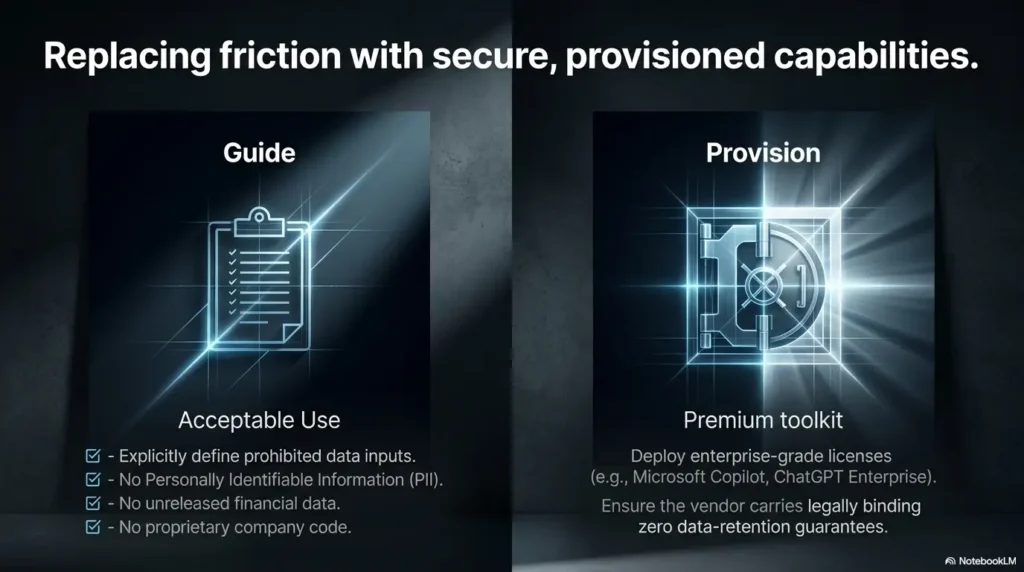
FAQ
What is AI Shadow IT in a small business?
AI Shadow IT is the use of AI tools, AI features, browser extensions, meeting bots, plug-ins, or automation apps without business approval or visibility. In small businesses, it often appears through free trials, personal accounts, connected apps, and employee-created workflows.
Is it safe for employees to use free AI tools at work?
It depends on the tool, the account type, the data entered, and the vendor’s terms. Free AI tools may be acceptable for public, non-sensitive tasks, but they should not receive customer data, employee records, confidential contracts, credentials, source code, or regulated information unless your business has reviewed and approved that use.
Can AI tools expose customer data?
Yes. Customer data may be exposed if employees paste it into unapproved tools, upload files, connect apps with broad permissions, or allow meeting bots to capture sensitive conversations. The safest approach is to define data categories and restrict customer identifiers and private records from unapproved AI use.
Should a small business ban ChatGPT and similar tools?
A blanket ban is not always the best answer. It can push usage underground. Many small businesses are better served by approving safe use cases, restricting sensitive data, using business accounts where appropriate, and training employees with practical examples.
How do I find which AI tools employees are using?
Start with a friendly team survey, then review browser extensions, connected apps, SaaS admin panels, company card charges, meeting invites, and contractor workflows. Ask which tools help people work faster rather than framing the question as an investigation.
What should an AI usage policy include?
A practical AI usage policy should include approved tools, allowed use cases, data that may be used, data that must never be entered, rules for meeting bots and file uploads, contractor expectations, reporting steps, and the person or team that owns approvals.
Are AI browser extensions risky?
They can be. Some browser extensions request broad permissions and may interact with sensitive business systems opened in the browser. Review extension permissions, publisher reputation, business need, and whether the tool is still used.
Who should own AI governance in a small business?
Ownership should usually sit with a business leader who can coordinate IT, operations, HR, finance, legal support, and department leads. In very small teams, the owner or operations lead may own the inventory and policy, with outside help for higher-risk issues.
Run a 15-Minute AI Exposure Check
You do not have to fix AI Shadow IT in one heroic afternoon. Start with a 15-minute exposure check. The goal is to find your first handful of hidden tools and create enough clarity to act.
Open a blank document or spreadsheet. Then answer the questions below. Do not polish. Do not build a grand policy temple. Just get the truth onto the page.
15-minute AI exposure check
- Name three AI tools, AI features, bots, or extensions your team likely uses today.
- Write the top three types of sensitive data your business handles.
- Check one admin panel for connected apps or integrations.
- Check recent card charges for unfamiliar AI or productivity subscriptions.
- Pick one use case to approve, one to restrict, and one to investigate.
- Send one simple rule to the team: “Do not paste customer, employee, credential, contract, or regulated data into unapproved AI tools.”
That tiny check will not solve everything. It will, however, move you from guessing to seeing. And in AI Shadow IT, seeing is the first real control.
Once you know what is in use, choose one next action: remove a risky extension, move a useful tool to a business account, create a one-page AI rule sheet, or schedule a monthly connected-app review. The hidden tools are easier to manage once they have names.
For a broader official view of AI risk management, NIST’s AI Risk Management Framework can help teams think through governance, measurement, and monitoring.
Explore the NIST AI Risk Management FrameworkLast reviewed: 2026-07