OSCP upload practice needs evidence for each stage from request to application processing and storage. A successful-looking response should not replace the separate observation needed for the claim you are making.

Sources, review date and section shortcuts
Key claims reviewed: October 19, 2026. A 200 response, upload ID, storage event and retrievable file are different observations.
Primary documentation · Related practical guide
Go straight to: Decision check · Main workflow · Further detail
Open the Upload lifecycle evidence record for this guide’s task-specific fields and next action.
Validate the upload lifecycle without assuming execution
Preserve a known-good request and change one permitted variable at a time. Keep session state, multipart field names, boundary and follow-up processing distinct. Header field names are case-insensitive; a casing difference alone does not establish a compliant parser requirement. Private storage or quarantine can intentionally prevent a direct GET. Use authorized UI/API status or owner-assisted evidence to determine acceptance and storage; retrieval does not prove executable behavior. Source and scope.
The Silent-Failure Zone: OSCP File Upload Bypass
First determine which stage of the upload lifecycle is supported by the available evidence. Stop guessing and start proving.
This workflow is for the moments when the UI flashes green and Burp shows a 200, but your payload disappears like it hit drywall. Before you tweak extensions, verify the request shape, session state, and multipart parsing.
The Methodology
- One variable at a time.
- Proof before payload. (If you need a guardrail for this mindset, keep the OSCP rabbit-hole rule nearby.)
- Fetch it back before impact.
The “Gold Request”
- 1. Build baseline in Repeater
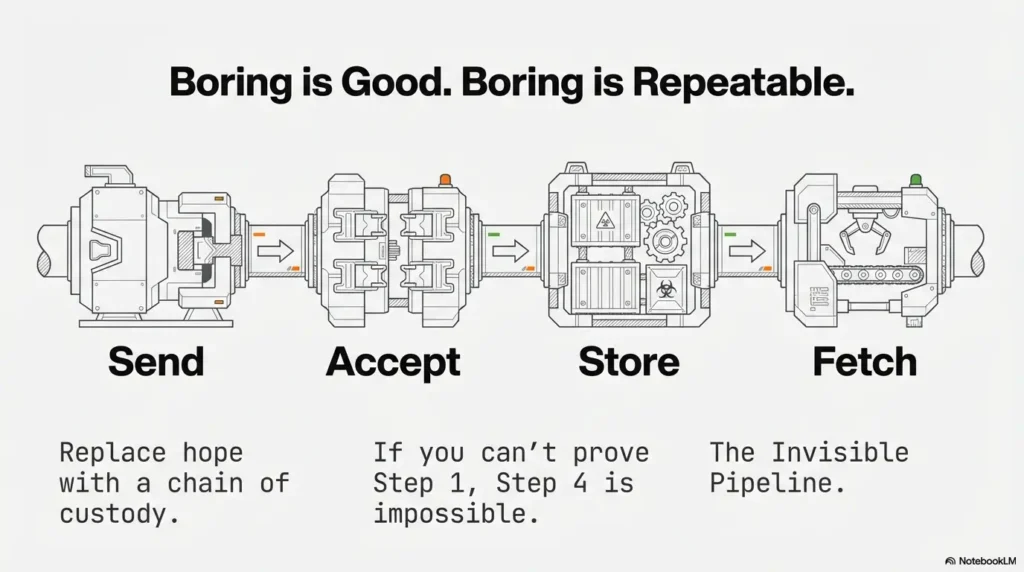
- 2. Spot the gate: Send/Accept/Store/Fetch
- 3. Pivot when execution isn’t the path
1) Who this is for / not for (Scope first, points later)
For: Burp users stuck at “It should work… but nothing lands”
If you can’t tell whether the backend even received your file, you’re in the right place. This checklist is built for the “silent failure” zone: the response looks normal, the UI claims success, and your payload feels like it vanished into the drywall.
For: OSCP-style labs where you have explicit authorization
This is for authorized lab/CTF environments and training targets you’re allowed to test. It’s designed to be exam-note-friendly: clean steps, proof points, minimal drama. (If you’re building your setup from scratch, start with safe hacking lab basics at home so your practice stays clean and intentional.)
Not for: real-world targets you don’t own or lack permission to test
Keep it legal. If you don’t have explicit permission, don’t touch it. Besides: the best workflow is the one you can use proudly in your report without sweating.
- Start from a known-good UI upload, not a fantasy request.
- Prove each gate before chasing bypass tricks.
- Document evidence like you’ll forget everything tomorrow (because you will). If you want a consistent standard for “what counts,” use an OSCP proof screenshot checklist mindset.
Apply in 60 seconds: Write the four verbs on paper: Send / Accept / Store / Fetch. Don’t move on until each one is true.
- Yes — This is an authorized lab/CTF target you’re allowed to test.
- Yes — You can capture one known-good upload from the UI.
- Yes — You can re-send the request in Burp Repeater.
- No — You’re trying to “guess” endpoints without a baseline.
Next step: If any “No” appears, pause and get a baseline upload first.
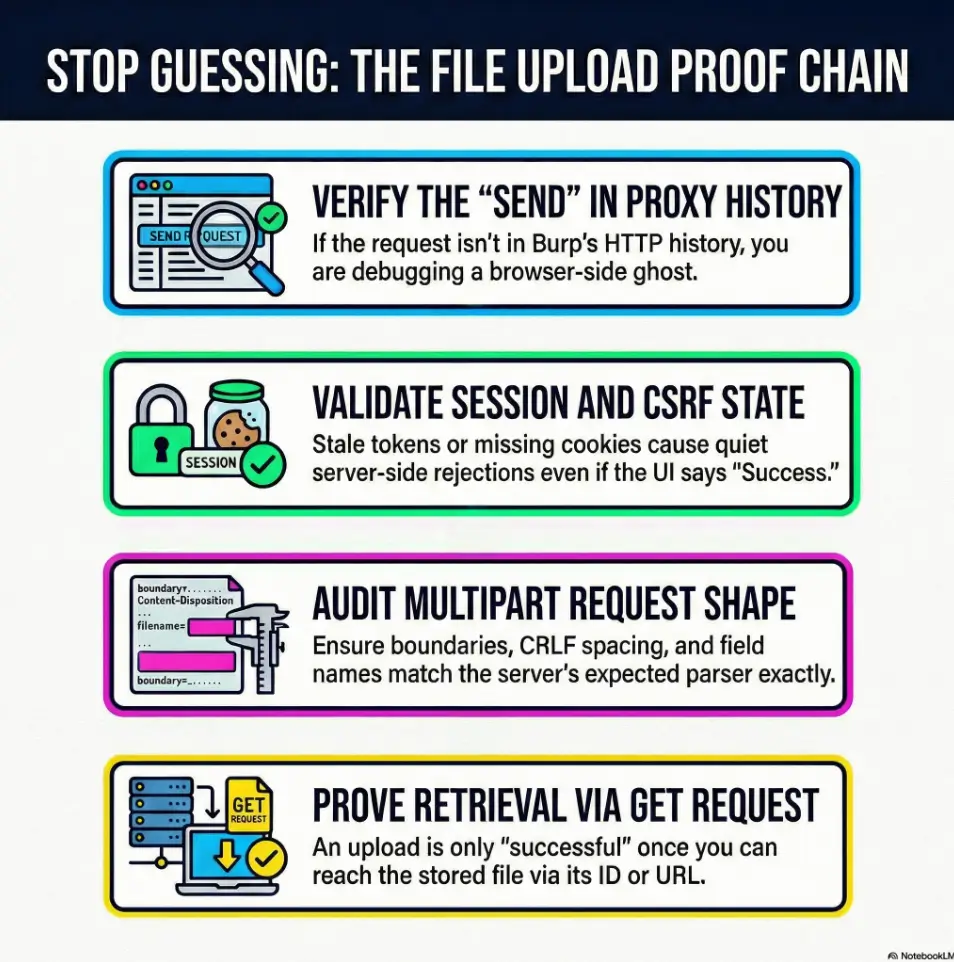
2) Payload never reaches the server: the 10-second Burp triage
Hook: “Did it even leave your browser?”
Before you debate MIME types or magic bytes, answer the most basic question: did the request actually get sent in the shape the server expects?
- Browser → Proxy → Repeater: same endpoint, same method, same body?
- Proxy HTTP history: do you see the request at all?
- Repeater: can you reproduce the response exactly?
Check 1: Request shows up in Proxy HTTP history
An absent history entry does not prove the browser sent nothing. First inspect history display filters, then confirm the browser uses the correct listener. A request sent directly by Repeater is not expected to appear as browser traffic in Proxy history.
Check 2: Does Repeater reproduce the exact server response?
Send the UI-generated request to Repeater and re-send it unchanged. If the response differs, don’t “improve” it yet. Find out why it differs. Session, CSRF, header normalization, or timing issues usually explain it.
Check 3: Response contains server-side hints (IDs, storage paths, hashes)
UI success can be a front-end illusion. Backend acceptance usually leaves fingerprints: an upload ID, a file key, a resized image URL, a JSON field that includes a stored filename, or at least a predictable redirect.
My rule: if I can’t point to a server-side artifact in the response, I treat the “upload” as unproven. It’s not pessimism. It’s time management.
3) The “request-shape” audit (multipart that actually parses)
Key term: multipart/form-data anatomy
Most upload lab failures are not “filters.” They’re parser mismatch. Your file is fine; your request is wrong. The backend doesn’t see a file at all.
- Content-Type: multipart/form-data; boundary=…
- Body format: each part has correct headers and CRLF spacing
- Content-Disposition: includes name (field name) and filename
Confirm boundary, Content-Disposition, filename, and field name
In Burp Repeater, it’s easy to accidentally damage multipart formatting when you edit quickly. Tiny mistakes matter:
- Boundary string doesn’t match the body separators
- Missing CRLF between headers and file content
- Wrong field name (the backend expects “avatar,” you sent “file”)
Validate the “file field” isn’t a decoy
Some apps send multiple parts: a metadata JSON part plus a file token, or a hidden field that must match. Others use two file fields (thumbnail + original). If you only edit one, the backend accepts the request but keeps the original file.
Let’s be honest… your field name is probably wrong
Don’t guess the field name. Extract it from a known-good upload. Capture a valid request from the UI, then copy the exact name=”…” value used in Content-Disposition.
Show me the nerdy details
Compare multipart boundaries, field names, Content-Disposition parameters and the application’s expected request sequence against a known-good request. HTTP header field names are case-insensitive. Any observed dependence on part order or unusual casing is an application-specific observation to verify, not a general multipart rule.
4) Session & CSRF: the invisible gate that kills uploads quietly
Mistake #1: Repeater request without the right cookies
Sending a captured request to Repeater includes its captured cookies. They can become stale; configured session handling rules may update cookies or tokens for tools within their scope. Verify the request actually sent rather than assuming automatic browser synchronization. If authentication is required, confirm:
- Cookie scope: correct domain and path
- Session freshness: not expired, not rotated
- SameSite realities: browser behaviors differ from raw requests
Mistake #2: CSRF token is one-time or tied to a form step
Many apps tie the CSRF token to a form view, a timestamp, or a session nonce. If your UI upload works once and Repeater fails, it might be token-binding, not filtering.
In Burp, you can re-fetch the form and re-send, or use a Macro-driven workflow so Repeater requests pull fresh tokens. Keep it simple: you’re not building a product, you’re building a repeatable lab method.
Why does the server return 200 but store nothing?
Because “200 OK” can mean “we received your request,” not “we accepted your file.” Some apps always respond with a generic success page, then handle validation asynchronously. Others soft-fail and show a success message to avoid revealing validation logic.
- First reproduce the UI request unchanged in Repeater.
- If it fails, assume session/CSRF before you assume filters.
- Look for backend proof, not UI applause.
Apply in 60 seconds: Re-send the baseline upload twice. If the second fails, suspect token rotation.
5) Client-side blocks that trick you (and how Burp exposes them)
Bypass the browser, not the server
If JavaScript blocks an extension or MIME type, Burp can still send it. But that doesn’t mean the server will accept it. Your job is to separate client-side theater from server-side truth.
Verify you’re not editing the wrong layer
This is the classic lab trap:
- You change something in DevTools and assume it changed the request.
- Or you intercept a request, but the UI sends a second request you didn’t modify.
- Or you edit Repeater, but the browser is still using the original.
Here’s what no one tells you… UI success is not upload success
Trust only evidence you can fetch. If the upload “succeeds,” you should be able to retrieve the stored file, or at least retrieve a server-generated ID that references it.
- Use Repeater when you’re proving the baseline and changing one variable at a time.
- Use Intruder when the request is stable and you’re testing a small set of controlled variations (field name, filename patterns, extensions).
- Avoid “spray and pray” when CSRF/session is unstable—your results will lie to you.
Next step: Pick one tool for the next 10 minutes and commit—no tab-hopping.
6) File-type validation: extension, MIME, magic bytes, and “double checks”
Server checks you’ll see in Burp responses
When validation is real, it often leaks clues in plain language—especially in labs:
- “Invalid file type”
- “Signature mismatch”
- “Corrupt image”
- “Unsupported media”
Your Burp checklist for validation layers
Think in layers. Many apps do two or more:
- Extension check: filename ends with .jpg/.png/.pdf
- Content-Type check: header says image/jpeg
- Magic bytes check: file content starts like a real image
- Server-side re-encode: image is resized or re-saved, stripping payloads
Why does changing Content-Type never help?
Because many servers ignore the declared MIME type and sniff the content. A fake header is easy to spot when the first bytes scream “this is not a JPEG.”
Also: if the backend re-encodes images, clever polyglots often die quietly. The app takes your upload, decodes it, then saves a new clean image. Your payload never survives the wash cycle.
Neutral, practical reminder: stacks vary. You may see Nginx in front of the app, Cloudflare at the edge, and object storage like AWS S3 behind it. Each layer can add rules. Your job is to locate the layer that says “no.”
- Stop trusting only the UI message.
- Look for “signature,” “decode,” “resize,” “unsupported.”
- Assume re-encode for images until proven otherwise.
Apply in 60 seconds: Upload a harmless, real JPEG once, then compare response headers and JSON fields against your test file attempt.
7) WAF / reverse proxy / CDN: when the edge eats your request
Signs you’re blocked before the app
Sometimes your request never reaches the application logic. Edge layers can block or normalize uploads. Look for:
- Generic error pages that don’t match the app’s style
- Sudden 403 / 406 responses or weird “Access Denied” pages
- Header changes (server banners, cache headers, bot-score hints)
- Timing shifts: requests fail instantly or start taking longer
Burp moves that reveal edge behavior
Do controlled comparisons:
- Send the same request via browser and via Repeater; compare headers.
- Normalize common headers (User-Agent, Accept, Accept-Language) when needed.
- Keep payload size constant while testing one variable.
Why does it work once, then never again?
Rate limits, token binding, or bot rules. Sometimes the first request warms a session and the second looks automated. Sometimes the first request uses a fresh token and the second reuses it. Treat “works once” as a clue: state or rate is involved.
8) Storage path reality check: where uploads go to disappear
Confirm the app stores the file where you can reach it
Check storage and retrieval separately. Private storage, quarantine or asynchronous processing may intentionally prevent a direct GET. Use the authorized UI/API status or other permitted evidence to establish storage; a returned ID alone and a failed GET alone do not settle whether the file was stored.
“Upload succeeded” but file is renamed or moved
Common patterns:
- Randomized names (hashes) instead of your filename
- Date buckets (/2026/01/17/…)
- Object storage keys unrelated to your original name
Proof step: fetch the uploaded file via GET
If the response includes a URL, test it immediately. If it includes an ID, look for the “view,” “download,” or “image” endpoint the UI uses. If you can’t retrieve it, don’t jump to bypass tricks yet—your problem might be reachability, not acceptance.
- Baseline UI upload request + response (saved in Burp)
- Your modified request + response (only one variable changed)
- Any returned file ID, key, or URL
- The GET request that proves retrieval (or proves you cannot retrieve)
- A short note: “Where it failed” (Send / Accept / Store / Fetch)
Next step: Save these as a single “UPLOAD_PROOF_PACK” note before you continue. If you want your proof habits to compound over time, build it alongside Kali lab logging so your evidence stays clean when you’re tired.
Personal habit: I name the first successful retrieval request “FETCH_BASELINE.” It sounds nerdy because it is. It also keeps me from reinventing the wheel when I’m tired.
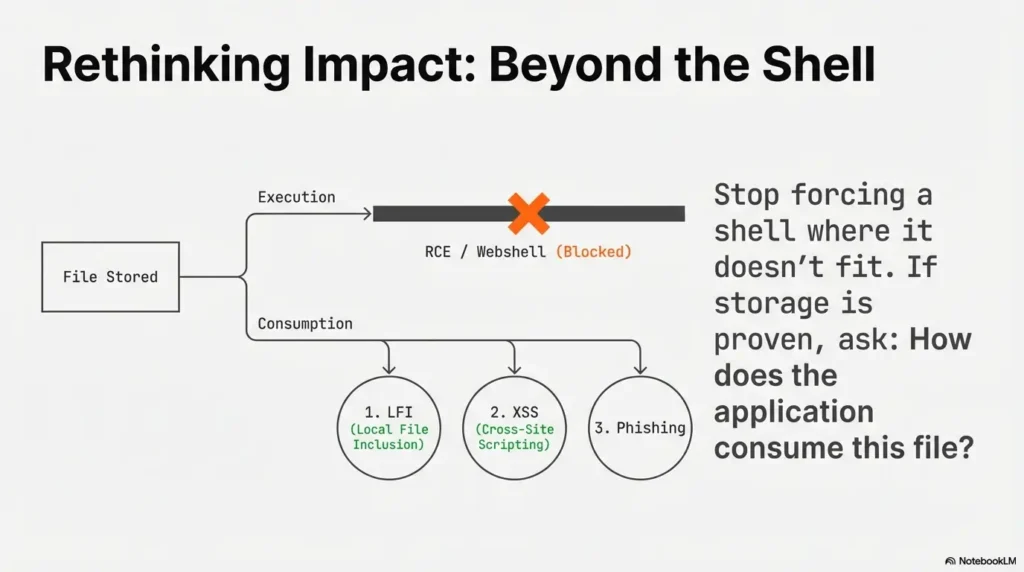
9) Execution myths (OSCP reality): most uploads aren’t executable
Separate goals: upload vs reach vs execute
In many labs, direct execution is not the point. The most common win path looks like this:
- Upload a file the backend accepts
- Reach it through a path you can influence
- Trigger impact via inclusion, parsing, or client-side execution
Common lab patterns where upload becomes impact
- Image upload → file include path: upload lands in a predictable directory, later included via LFI.
- PDF upload → parser behavior: backend extracts metadata or thumbnails; odd parsers create odd bugs.
- Avatar upload → stored XSS: filename or metadata is reflected unsafely in a profile page.
Don’t overfit “webshell” as the only win condition
When I finally stopped worshipping the webshell, my lab progress sped up. It felt like betrayal. It was actually maturity.
10) Common mistakes (the ones that waste 60 minutes each)
Mistake #1: Editing the filename but not the multipart structure
Changing filename= but breaking the boundary or field name is like putting a racing stripe on a car with no engine. It looks busy. It goes nowhere.
Mistake #2: Forgetting the original form fields (IDs, submit, hidden flags)
Many uploads require extra fields: userId, folder, “submit=1,” a hidden checksum, or a JSON metadata part. If you omit them, the backend may accept the request but silently ignore the file.
Mistake #3: Assuming HTTP 200 means backend acceptance
Always look for backend evidence. If the app returns “OK” without an artifact, verify by retrieving the file or checking a follow-up endpoint.
Mistake #4: Not re-running with fresh cookies/tokens after changes
When you tweak one variable, you still need a valid session state. Token-expired tests produce false negatives—and those hurt worse than regular negatives.
Mistake #5: Not saving a “known-good” baseline request
This is the biggest time thief. Baselines turn chaos into a science experiment. Without one, every “result” is questionable. If you want a reliable “what to do first” backbone for web targets, keep an OSCP initial access checklist nearby so you don’t drift into superstition.
Input 1: How many upload attempts have you made? (A)
Input 2: Average minutes per attempt including switching tabs? (M)
Output: Total time spent = A × M minutes. If that’s over 30, you owe yourself a baseline reset.
Next step: If you’re past 30 minutes, stop and recreate the UI baseline request in Repeater.
FAQ
Q1: Why does my upload return 200 OK but the file isn’t on the server?
Because 200 often means “request handled,” not “file accepted and stored.” Apps may soft-fail validation, quarantine files, re-encode content, or store to a private location. Your proof is an artifact: an upload ID, a retrievable URL, or a follow-up GET that returns your stored file.
Q2: In Burp, should I test uploads in Repeater or Intruder first?
Start with Repeater. Prove the baseline from the UI, then change one variable at a time. Intruder makes sense only when the request is stable and you’re testing a small, controlled set of variations.
Q3: What’s the fastest way to confirm the correct multipart field name?
Capture a known-good UI upload and read the Content-Disposition header in the multipart part. The name=”…” value is the field name the backend expects. Copy it exactly.
Q4: Why do my cookies work in the browser but fail in Repeater?
A captured request carries its cookies, but they may be stale. Check the sent request and any session handling rules that apply to Repeater. Browser SameSite enforcement differs from raw requests; rotated cookies and one-time CSRF tokens still require fresh state.
Q5: How do I handle CSRF tokens that change every request?
Keep a simple loop: request the form (or token endpoint), extract the new token, then send the upload. In Burp, a Macro-based approach can automate the token refresh, but even manual refresh is fine if you keep a clean baseline.
Q6: Why doesn’t changing Content-Type bypass file upload filters?
Because many backends sniff the content or validate magic bytes. Content-Type is a hint, not a guarantee. If the first bytes don’t match a real image/PDF, a strict validator will reject it regardless of the header.
Q7: How can I tell if a WAF blocked my file upload request before it reached the app?
Look for generic error pages, unusual headers, sudden 403/406 responses, and differences between browser vs Repeater behavior. If the response “brand” doesn’t match the application, suspect the edge layer.
Q8: If the server renames my file, how do I find the stored path?
Use the UI’s follow-up behavior as your map: profile image fetch endpoints, “view attachment” links, or JSON responses that include file IDs or keys. Your filename often won’t matter; the server’s generated key will.
Q9: In OSCP labs, when should I stop chasing RCE from uploads?
When you can prove the file is stored but served from a non-executable context (static object storage, strict content-type serving, heavy re-encoding). At that point, pivot to “what consumes the file” (include, parse, render) instead of forcing execution.
Q10: What evidence should I screenshot/log for exam-style notes?
Baseline request/response, your modified request/response, any upload ID or stored URL, and a GET request that proves retrieval (or proves denial). Add one sentence labeling where it failed: Send / Accept / Store / Fetch. If you need a tight standard for that evidence, use OSCP proof screenshots as your “minimum viable proof.”
12) Next step (one concrete action)
Build a “Gold Request” template in Burp
- Capture one known-good upload request from the UI.
- Send it to Repeater and save it as a tab named UPLOAD_BASELINE.
- For every attempt: change one variable, re-send, and log what changed in the response.
This one habit fixes more upload “mysteries” than any extension trick. It turns your work into a controlled experiment, not a late-night séance.
- Baseline first, then one-variable tests.
- Responses are data—read them like logs.
- If you can’t fetch the stored file, don’t chase execution yet.
Apply in 60 seconds: Rename your best Repeater tab to UPLOAD_BASELINE right now. Make it sacred. If you want this to live as a reusable note instead of a temporary tab, adapt it into an Obsidian OSCP enumeration template or keep it as a host-specific block inside your Obsidian OSCP host template.
Conclusion
Remember the hook—“Did it even leave your browser?” Here’s the calm answer: you don’t have to wonder anymore. When you run this checklist in order, your upload stops being a vibe and becomes a proven chain: sent → accepted → stored → reachable. And once you can name exactly where it breaks, your next move becomes obvious—refresh tokens, fix multipart structure, normalize headers, or pivot away from RCE fantasies toward a real consumption path.
One last personal note: the learners who move fastest aren’t the ones with the wildest payloads. They’re the ones who keep their process boring, logged, and repeatable. That’s not a personality trait. It’s a choice you can make in the next 15 minutes—and the same choice is what makes your final write-up painless when you drop evidence into a Kali pentest report template (or any exam-style report format).
The second send failed. That was the clue. The CSRF token was one-time, and my Repeater request was replaying a dead token while the UI refreshed it silently. Once I re-fetched the form and used a fresh token, the upload became stable. No magic bypass. Just proof. The shell dreams came later—after I could fetch the stored file back like an adult.
Original review: 2026-01-17
Technical guidance updated: 2026-10-13. Corrected history/session assumptions and distinguished stored files from directly retrievable files.
Upload lifecycle evidence record
Use these fields for your own task. Keep the actual conditions, evidence and unresolved questions beside the next decision.
On a small screen, scroll the table sideways to read all columns.
| Field | What to record | Your evidence / next check |
|---|---|---|
| Baseline request | Preserve session context, multipart fields and the known-good request. | To complete |
| Acceptance state | Distinguish HTTP response, application status and processing outcome. | To complete |
| Storage evidence | Record the authorized UI, API or owner-assisted observation. | To complete |
| Claim boundary | Keep retrieval and execution as separately unverified claims. | To complete |
Next action: Identify the first unknown upload stage before changing another request variable.
Related task: Use Burp WebSocket Testing: Capture, Replay and Evidence for that separate part of the workflow.
Worksheet change record — October 20, 2026
Added four task-specific fields, a next action and a related guide. This is a blank editorial working aid, not a completed test or validated assessment. Existing source-review dates retain their own scope; this addition is not a new verification of every statement.