
Practical case: Write a bounded command-execution finding · Editable working note
Write a bounded command-execution finding
Practice guidance / illustrative examples. No new VM execution or measured outcome is claimed for this section.
An unexpected response to a form is a lead; an attributed server-side effect is a stronger, separate claim. Define the smallest harmless observation allowed by the lab exercise before changing input. Keep a baseline request and one controlled variation under the same session conditions.
Illustrative reporting structure: ‘Under these lab conditions, this input change was followed by this reproducible response; these alternative causes remain.’ If you have reliable application-side evidence of command execution, cite it. Do not convert that into an interactive-shell, root-access or host-escape claim without additional evidence.
For remediation study, distinguish avoiding direct OS command invocation from validating arguments when a process call is necessary. A blacklist or escaping step alone is not a complete design review. Keep the proposed fix separate from any fix actually applied and retested. Stop when the permitted question is answered; collecting more access is not required to make the finding educational.
Open the practical working record for this guide’s task-specific fields and next action.
Prefer a bounded observation to an unnecessary shell
For an authorized lab, define a harmless observable effect and stop when it answers the agreed question. Attribute the effect to the tested input and record the execution context without inferring root or host control. OWASP recommends avoiding direct OS command invocation where possible; argument handling still needs validation when a process must be called. Neither a blacklist nor shell escaping alone proves the workflow safe. Source and scope.
Mastering Kioptrix Level 2:
Validation Over Guesswork
Stop chasing shells and start proving impact. Most testers fail Kioptrix Level 2 because they prioritize the “pop” over the process. This guide shifts the focus to evidence-driven validation—the way a senior tester operates.
Learn to demonstrate unsafe OS command execution without Metasploit, wrecking the lab, or losing your credibility. By focusing on non-destructive indicators and repeatable evidence, you’ll deliver findings that connect technical impact to real-world fixes.
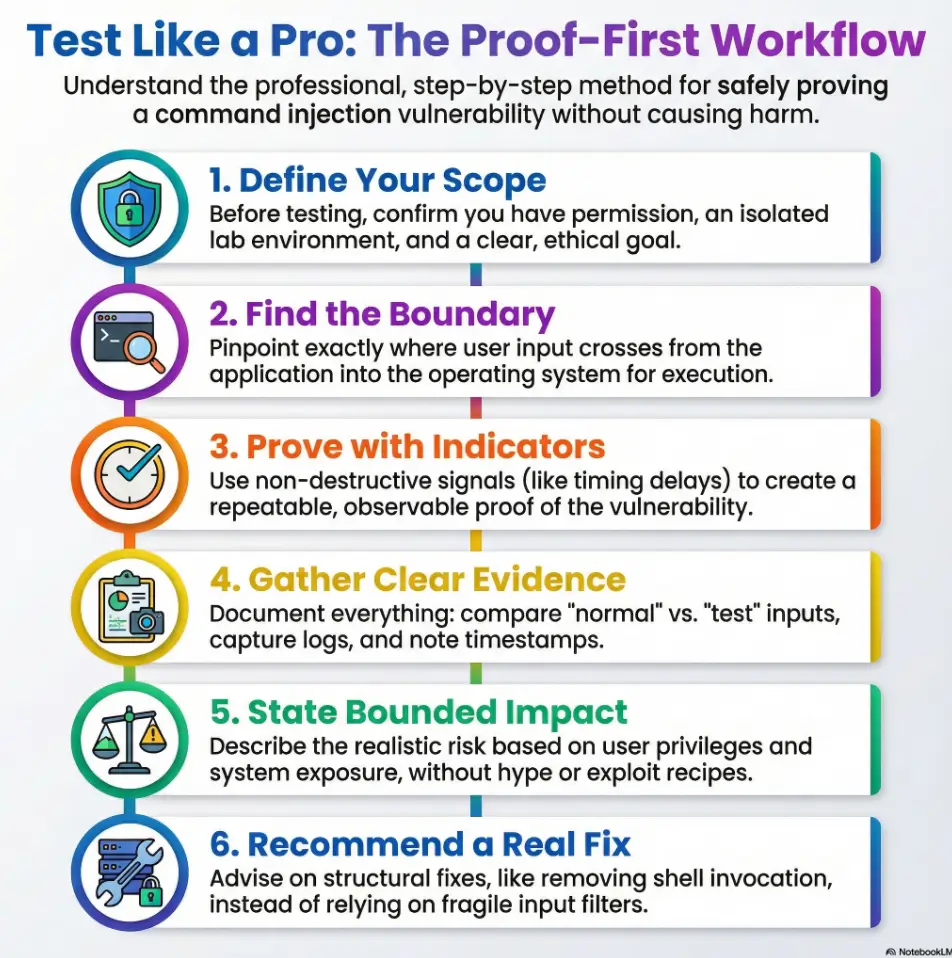
Slow Down. Lock the Boundary. Prove the Behavior.
Table of Contents
Who this is for / not for
For: “I want the real workflow, not a lucky pop”
This is for you if you’re working in an authorized, lab-only environment (Kioptrix Level 2 is perfect), and you want your process to look like something a senior tester would actually sign off on. If you need a clean setup baseline, start with a safe, isolated hacking lab at home.
- You’re learning how to produce repeatable findings: claim → proof → impact → fix
- You want evidence that survives the “show me again” test
- You’re trying to build habits that translate to real engagements
Not for: “Give me the payload / give me the shell”
Use this guide to distinguish a supported command-execution observation from an unverified response clue, interactive channel or privilege claim. It describes authorized lab reasoning and remediation, not results from a test performed for this article.
- No authorization? Stop.
- No isolated VM network? Stop.
- “Just curious” on a system you don’t own? Hard stop.
- Lab-only keeps learning ethical and repeatable
- Proof-first makes your work defensible
- Clear writeups build trust faster than cleverness
Apply in 60 seconds: Write one sentence defining your scope (system + permission + goal) before you touch the app.
Ping parameter threat model (why this form is “quietly dangerous”)
What makes ping forms unusually risky
A “ping” feature looks harmless because it feels like a utility: input an IP or hostname, press a button, get a result. But under the hood, this feature often calls an operating system command. If user input is passed unsafely into that command, the “ping” box becomes a doorway into the host.
OWASP describes command injection as an attack where the goal is execution of arbitrary commands on the host OS via a vulnerable application—usually because unsafe user input gets passed to a system shell. That’s the core risk: shell interpretation plus untrusted input.
The attacker’s goal isn’t “ping”—it’s command context
In practice, the attacker doesn’t care about ICMP. They care about whether the application is building an OS command as a string, and whether anything in the chain interprets special characters or tokens. If the application runs a shell, you get “command context.” If it runs a safe process call with strict arguments, the risk drops dramatically.
Curiosity gap: the one detail that decides whether injection is possible
The deciding detail is how the server constructs the command:
- String concatenation into a shell command (high risk)
- Direct process execution with argument arrays (lower risk)
- Allowlisted, validated input (best case)
Scope eligibility checklist (lab-safe)
Can you test this? Answer “yes” or “no.”
- Written permission or lab-owned environment? (Yes/No)
- Isolated VM network (no accidental internet exposure)? (Yes/No) — if you’re unsure, review NAT vs Host-Only vs Bridged networking first.
- Goal is proof + remediation, not exploitation? (Yes/No)
- You can stop immediately if you hit sensitive data? (Yes/No)
Neutral next action: If any answer is “No,” pause and fix scope before you test.
Proof-first flow (validate injection without escalating)
Step 1: Confirm the feature’s execution boundary
Before you “test,” figure out what you’re actually testing:
- Is the ping functionality server-side or client-side?
- Does it call a system utility, or a library function?
- Is output displayed to the user, logged, or suppressed?
If you can’t explain where user input crosses into OS execution, you’re not doing testing—you’re doing vibes. (If you need a broader mental model for how vulnerable apps tend to be wired, see vulnerable web app structure patterns.)
Step 2: Choose non-destructive indicators of injection
Proof-first means you validate the vulnerability using signals that don’t require you to “go further.” In authorized labs, testers often use behavioral indicators that show unintended command interpretation without writing files, exfiltrating data, or opening outbound sessions.
- Timing anomalies: a consistent, explainable delay tied to input handling
- Error behavior: predictable error changes that imply parsing/execution differences
- Output structure shifts: response format changes that correlate with server-side execution
Important: keep this conceptual. The point is to prove unsafe execution, not to publish a recipe.
Step 3: Lock in repeatability (the “auditor test”)
Repeatability is your superpower. You want a test that produces the same observable result across:
- Two separate sessions
- Two different times
- At least one “control” input (normal value) vs “test” input (behavioral indicator)
Let’s be honest… most “proof” falls apart under one question
That question is: “Can you demonstrate it again, on demand, and explain why it behaves that way?” If your proof depends on luck, it’s not proof. It’s a coin flip.
Show me the nerdy details
In real reviews, “proof” is evaluated like a mini experiment: control vs test, reproducibility, and a clear causal explanation. If you can’t articulate the boundary (input → parsing → execution → output/log), reviewers will assume the claim is overstated—even if you’re right.
- Define a control input
- Pick one non-destructive indicator
- Repeat until it’s boring
Apply in 60 seconds: Write your claim as: “Input affects OS execution because we observe X consistently under Y conditions.”
Decision card (Proof-first vs “shell-first”)
When to choose which approach
- Choose Proof-first when you need a report-ready finding, you’re learning, or the environment is sensitive.
- Choose Deeper validation only after proof is solid, scope is explicit, and you have a safe plan for containment and documentation.
Neutral next action: If you can’t explain your proof in 3 sentences, don’t escalate.

Evidence that convinces (what to capture for a report)
Minimum evidence set (what reviewers actually need)
Evidence doesn’t have to be dramatic. It has to be clear. Capture:
Request and response (sanitized; no secrets) —
if you’re capturing clean HTTP pairs, having Burp set up with an external browser in Kali makes life easier.
- Control vs test comparison (what changed, exactly?)
- Timestamp + environment note (Kioptrix Level 2 lab; isolated network)
- Impact framing (bounded; what could happen if abused)
Curiosity gap: the single log line most beginners never check
Beginners often focus only on the browser output. But command injection is frequently “blind” from the UI. The question that matters is: where would execution leave a trace? If you want a lab-friendly way to structure this, see Kali lab logging basics.
- Web server access/error logs (request patterns, error codes)
- Application logs (input handling, exceptions)
- System logs (process execution traces, security logs)
Make it readable for humans (not just hackers)
A strong writeup reads like this:
Finding: The ping parameter is passed to OS execution unsafely, enabling command injection under certain inputs.
Proof: A non-destructive indicator produces a consistent behavioral change compared to control input.
Impact: If exploited, could lead to OS-level command execution with the privileges of the web application user.
Fix: Remove shell invocation; enforce allowlist input; run with least privilege; log safely.
Show me the nerdy details
Good evidence separates “symptom” from “cause.” A screenshot of a weird response is a symptom. A controlled comparison plus a server-side trace is closer to cause. If you can show consistency and a plausible execution path, your finding becomes hard to dismiss.
- Capture the request/response pair
- Document the control input
- Write impact without hype
Apply in 60 seconds: Add one sentence to your notes: “This is repeatable because…” (If you want a plug-and-play structure for reporting, use a pentest report template that forces claim → proof → impact → fix.)
Reverse shell risk (without the reverse-shell playbook)
Why command injection often becomes “remote code execution”
In risk terms, command injection is often treated as remote command execution because it can enable arbitrary command execution on the host. The exact impact depends on:
- Privilege: what user the web app runs as (and what that user can touch)
- Environment: file permissions, secrets, internal network access
- Exposure: internet-facing vs internal-only
- Observability: whether the behavior is visible or “blind”
If you’re studying how “command execution” maps to real-world outcomes without turning it into a recipe, the safest lens is comparative: RCE vs shell vs privilege context (conceptual differences, not step-by-step escalation).
Impact mapping without escalation
You can map realistic risk without “going there.” Focus on what you can justify:
- What data is accessible to the application user?
- What internal services can the host reach?
- What controls exist (egress filtering, AppArmor/SELinux, container boundaries)?
Here’s what no one tells you… “no outbound traffic” doesn’t mean “no impact”
If outbound connections are blocked, people assume the vulnerability is “less serious.” Sometimes it is. Sometimes it isn’t. Local access can still enable:
- Configuration disclosure (paths, credentials, keys)
- Abuse of internal trust relationships
- Persistence risk (if the app can write or schedule tasks)
Mini calculator (severity thinking, not CVSS theater)
- Privilege + exposure drive severity
- Blind behavior can increase operational risk
- Local data access can be a major impact
Apply in 60 seconds: Write one bounded impact sentence: “If abused, this could allow X under the privileges of Y.”
Common mistakes (the ones that ruin credibility)
Mistake #1: Chasing escalation before proof
When you chase “full compromise” immediately, you often skip the boring steps that make your work trustworthy. That’s how findings get dismissed: not because they’re false, but because the evidence is thin.
Mistake #2: Testing outside an isolated lab
This is the fastest way to turn learning into harm. If you can’t guarantee isolation, you can’t guarantee safety. And if you can’t guarantee safety, you shouldn’t be testing.
Mistake #3: Overclaiming severity without context
“Critical” is not a vibe. Severity depends on exposure, privilege, and compensating controls. If you don’t know the app user, you don’t know the blast radius.
Mistake #4: Ignoring normalization edge cases
Input “validation” can fail quietly when normalization, encoding, or parsing steps change what the server actually sees. The fix isn’t more clever testing—it’s better defensive design.
Let’s be honest… you can lose trust with one sentence
That sentence is: “I didn’t record it, but it happened.” If your proof isn’t repeatable and captured, it didn’t happen in the only way that matters professionally: the way you can demonstrate.
Remediation that actually sticks (not “just sanitize it”)
Prefer “remove the shell” over “escape harder”
The cleanest fix is structural: avoid constructing shell commands from user input. If the app needs “ping,” you can often implement reachability checks using safer libraries or controlled system calls that don’t invoke a shell interpreter.
If OS execution is unavoidable: lock it down
When you truly must run OS commands, defense becomes layered and explicit:
- Allowlist-only input: accept only validated IP/hostname formats, reject everything else
- Safe process execution: pass arguments without shell interpretation
- Least privilege: run the service as a restricted user with minimal file and network permissions
- Constrained environment: use OS policies (sandboxing/mandatory access controls) where possible
Verification checklist after the fix
- Re-test the original proof-first indicator (control vs test)
- Confirm errors are handled safely (no revealing debug output)
- Confirm logs capture meaningful signals without leaking sensitive data
Show me the nerdy details
Framework thinking helps here. NIST’s SSDF emphasizes building secure practices into the lifecycle—removing risky patterns, validating inputs, and verifying controls. Even in a tiny “ping” feature, the same principle applies: reduce the chance of vulnerable design recurring by changing the pattern, not just patching the symptom.
- Remove shell invocation when possible
- Allowlist input, don’t “blacklist” creativity
- Run with least privilege and verify logs
Apply in 60 seconds: Ask, “Can we implement this without invoking a shell at all?”
Short Story: The day “sanitize it” failed in the most predictable way
It was a normal user pasting a hostname that included unexpected formatting from a ticketing system. The filter mangled the input into something the OS command didn’t expect, and the app started failing in ways that looked like infrastructure problems. The fix wasn’t “more filtering.” The fix was removing the shell call entirely and switching to a safer method with strict argument handling. The lesson stuck: fragile filters don’t just fail under attack. They fail under normal life.
When to seek help (and who to loop in)
If this is a real org system (not Kioptrix)
If you encounter command injection signals on a real environment, the responsible move is to stop and escalate. Not because you’re scared. Because you’re professional.
- Notify the system owner/security lead
- Preserve your evidence (requests, timestamps, observed behavior)
- Do not “keep testing” outside explicit scope
If you discover sensitive data exposure
Even in a lab mindset, treat sensitive data as a boundary. The moment you suspect exposure of credentials, personal data, or production secrets, switch into incident discipline: minimize access, document what happened, and loop in the right people.
Curiosity gap: the fastest way a learning exercise turns into an incident
It’s almost always one of these:
- Testing on the wrong target (typo or copied IP)
- Lab network bridged to a real network
- “Just one more test” after you’ve proven enough
Next step (a 15-minute drill you can repeat)
The 15-minute proof-first drill
Do this once. Then do it again next week. Your future self will feel oddly grateful.
- Write the claim in plain English (one sentence).
- Define a control input that is unquestionably normal.
- Select one non-destructive indicator you can observe consistently.
- Run the control and test twice each, and capture notes.
- Draft a 5-sentence mini report: claim → proof → scope → bounded impact → recommended fix.
A tiny template you can copy into your notes app
Mini report template (5 sentences)
- Claim: The ping parameter appears to be executed unsafely on the server.
- Proof: A non-destructive indicator produces a consistent behavior change vs control.
- Scope: Tested in isolated Kioptrix Level 2 lab environment.
- Impact: If abused, could enable OS-level execution with the app’s privileges.
- Fix: Remove shell invocation; allowlist input; least privilege; verify with re-test.
Neutral next action: Paste this into your notes and fill the blanks with your own observations.
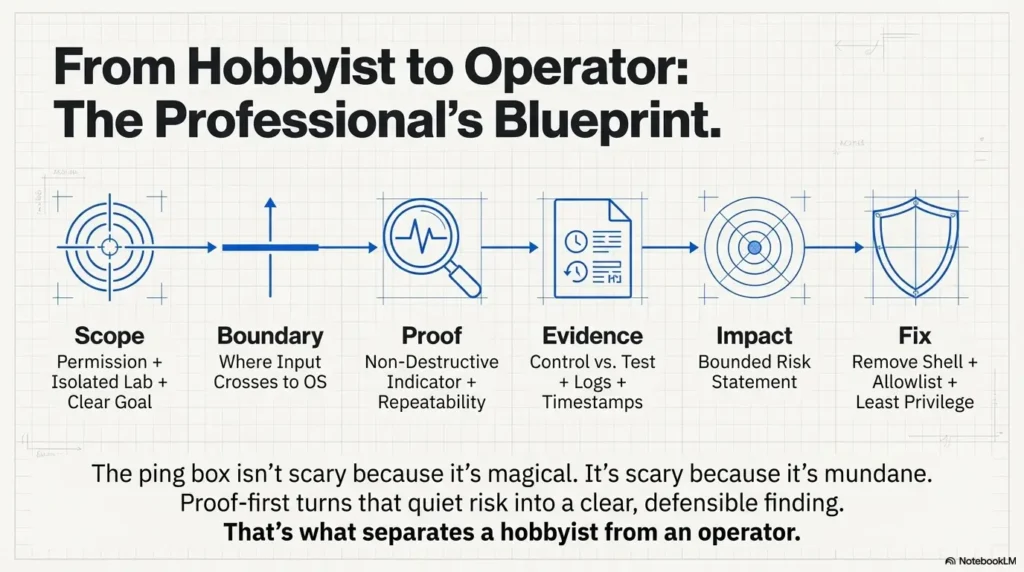
Infographic: Proof-first command injection workflow
1) Scope
Permission + isolated lab + clear goal.
2) Boundary
Where input crosses into OS execution.
3) Proof
Non-destructive indicator + repeatability.
4) Evidence
Control vs test, notes, timestamps, logs.
5) Impact
Bounded risk statement (no recipes).
6) Fix
Remove shell, allowlist input, least privilege.
Closing the loop from the beginning: that “Ping” box isn’t scary because it’s magical. It’s scary because it’s mundane. The most expensive vulnerabilities often start as someone saying, “It’s just a utility feature.” Proof-first turns that quiet risk into a clear, defensible finding—and that’s what separates a hobbyist from an operator.
Original review: 2026-01.
FAQ
1) What is “ping command injection” in plain English?
It’s when a web app takes what you type into a “ping” field and passes it into an OS-level command unsafely. If the input is interpreted by a shell, an attacker may be able to influence OS execution beyond what the feature intended.
2) How do I prove command injection without using destructive payloads?
Use proof-first indicators that demonstrate unsafe execution behavior (control vs test) without writing files, pulling sensitive data, or creating outbound connections. Your goal is a repeatable, explainable behavioral difference.
3) Why do some ping forms look vulnerable but aren’t exploitable?
Because the backend might be using safe process execution (passing arguments without invoking a shell), strict allowlist validation, or a library call that doesn’t interpret shell syntax. Surface appearance can be misleading.
4) What evidence should I include in a pentest report for command injection?
At minimum: the request/response pair (sanitized), a control vs test comparison showing a consistent behavioral indicator, timestamps/environment notes, and a bounded impact statement tied to privilege and exposure. If you want a Kioptrix-flavored example structure, see a Kioptrix pentest report writeup format.
5) Is command injection the same as RCE?
Not always, but it’s often close in impact. “RCE” typically means executing code or commands on a server. Command injection can enable OS command execution, which may effectively be RCE depending on what’s possible under the app’s privileges.
6) Why do defenders prefer “remove the shell” over input filtering?
Because filters are fragile. Structural fixes (avoiding shell invocation, using safe APIs, strict argument handling) reduce the chance of bypasses and reduce the chance the same bug reappears in a future feature.
7) How do I rate severity for command injection (CVSS-style thinking)?
Start with exposure (internet vs internal), privilege (least-privileged vs broad access), and compensating controls (sandboxing, egress blocks, logging/monitoring). Then write a severity justification tied to those facts—no hype required.
8) What logs help confirm whether a ping feature is executing OS commands?
Check web server logs for request patterns and errors, application logs for input handling exceptions, and system logs for process execution traces or security events. The UI may not show anything even when execution occurs.
9) How can network egress blocks change the impact of command injection?
Egress blocks can reduce certain types of follow-on abuse, but they don’t erase local impact. If the app user can read configs, keys, or internal service credentials, the vulnerability can still be serious.
10) What’s the safest way to retest after remediation?
Retest the original proof-first indicator using the same control vs test structure. Confirm that the behavior no longer changes under the test condition, and verify that logging and error handling remain safe and useful.
Keep the claim bounded. A delay, parsing error, or changed response is a candidate signal; normal ping timeouts and validation can produce the same symptoms. Correlate repeatable control/test behavior with an execution trace or a demonstrated unintended command before calling command injection confirmed. Arbitrary OS commands executed through a remote web request are remote command execution with the application user’s privileges; this does not imply a root shell.
Removing the shell does not remove argument injection. Use a fixed executable, separate arguments, strict validation, and reject option-like user values. Where the utility supports it, terminate options before user data with --; apply a timeout and a bounded ping count. Passing an argument array alone is insufficient if user input can still become a utility option. See the OWASP command injection defense guide.
Technical guidance updated: 2026-10-13. Removed a leftover assistant prompt and clarified confirmation evidence, RCE privilege scope, and argument injection defenses.
Working note: Write a bounded command-execution finding
Replace the prompts with your own authorized lab evidence. Select the completed text and copy it to a local note before leaving. This field is not submitted or saved; reload clears edits. Do not enter passwords, tokens or personal data.
Related task: Continue with the related practical guide.