

Beyond the Scan: Mastering the One-Page OSCP Workflow
Raw scan data is honest, but it’s not readable when you’re tired. When you can’t retrieve that SMB host from two days ago, you don’t just lose minutes—you lose momentum. Stop re-enumerating on autopilot. The Calm Upgrade compresses the essentials: identity, compact port tables, service cues, and testable hypotheses into a single host snapshot.
Table of Contents
Who this is for / not for
For you if you…
- Build OSCP/OSCP+ notes in Obsidian and keep losing time re-reading raw scan output
- Want a repeatable host page you can review in under 60 seconds
- Need better retest discipline (what changed, what didn’t, what you already tried)
Not for you if you…
- Need a full “how to run Nmap” guide (this assumes you already scan)
- Want an exploit cookbook (this is note structure + workflow, not exploitation steps)
- Are doing unauthorized testing (keep it lab/authorized environments only)
I built this system after one of those demoralizing lab moments: I had “done the work,” but the next morning I couldn’t remember what I’d already validated. My notes weren’t notes—they were a landfill. The goal here is boring, repeatable clarity: one host, one page, one queue.
- If it can’t be skimmed fast, it won’t be used under pressure.
- If it can’t be retested cleanly, you’ll re-enumerate on autopilot.
- If evidence is mixed into the summary, the summary dies.
Apply in 60 seconds: Pick one host and rewrite the top 10 lines as “identity + ports + next commands.”
- ✅ I’m scanning only authorized lab/VPN targets.
- ✅ I can export Nmap results as XML (even if I never read XML directly).
- ✅ I’m willing to keep one host per note (relationships via links).
- ✅ I can tolerate “minimum viable” notes (no perfection spirals).
- ✅ I want faster retests and fewer missed clues.
Next step: If you checked 4+, build the template once and run it on 3 hosts today.
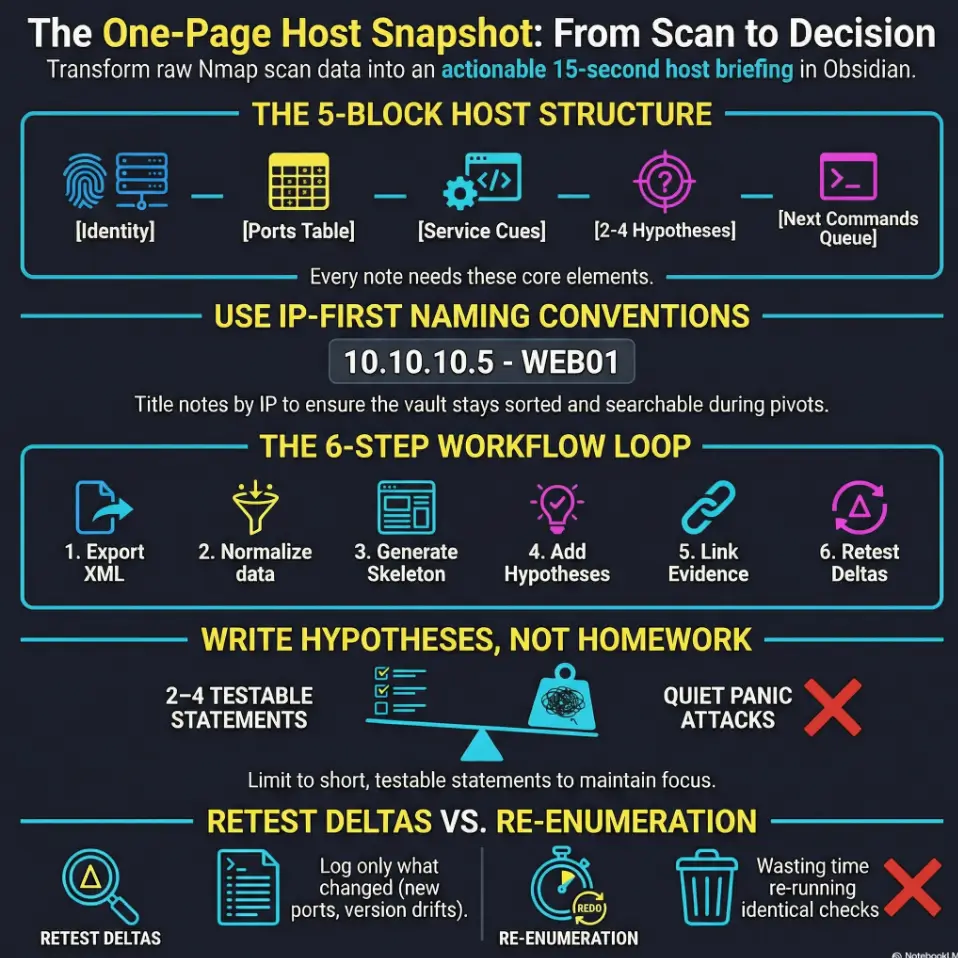
One-page host snapshot: the “minimum viable page”
A good host note feels like a cockpit: everything you need for the next safe decision, nothing that makes you rummage. The “minimum viable page” is intentionally small—because the moment it becomes a novel, you stop reading it.
The 5 blocks that make a host note actually usable
- Identity: IP, hostname, OS guess, environment tag, first/last seen
- Ports at a glance: compact TCP/UDP table (with versions)
- Service cues: auth hints, default paths, banner notes, protocol quirks
- Attack paths: 2–4 hypotheses (short and testable)
- Next commands: a tiny queue you actually plan to run
Pattern interrupt: “If it isn’t skimmable, it isn’t a note.”
Your future self should understand the host in 15 seconds without “scroll archaeology.” The trick is to write for the tired version of you—the one who’s three hours deep and accidentally re-running the same checks.
One small anecdote: I used to copy-paste everything “just in case.” Then I’d search my vault, find five results, and still not know which one mattered. That’s when I realized: the real enemy isn’t missing a port. It’s losing trust in your own notes.
Show me the nerdy details
If you already have a pipeline that parses Nmap XML into JSON/CSV/Markdown, the host snapshot becomes a stable “view layer.” Your automation should pre-fill identity + ports, but you should still write the hypotheses and next commands by hand—because those are decisions, not data.
Naming and linking: stop losing hosts in your vault
Obsidian is only magical when retrieval is boring. If you can’t reliably find “that SMB host from two days ago,” you’ll waste time and morale.
A naming convention that survives pivoting and retests
- IP first for sorting:
10.10.10.5 - DC01or192.168.56.101 - WEB01 - When hostname changes, keep the IP-first title and add an alias line in the note
If you pivot into a new subnet, you’re still “in order” and your vault doesn’t become a scavenger hunt—especially when you’re deep into
pivoting decisions and tool choice.
Tags that act like a dashboard
Keep tags at “dashboard-level.” Too many tags feels organized, but it’s actually just a prettier way to get lost.
#oscp/host(every host note)#svc/http,#svc/smb,#svc/rdp,#svc/winrm#prio/high,#prio/med,#prio/low#status/queued,#status/active,#status/closed#retest(if you expect drift)
Curiosity gap: “What if the ‘real’ target is the host you skipped?”
Add a single line: Skipped / Why. It turns “ignored” into “tracked.” Skipped hosts are often where points hide—because nobody wants to look there twice.
Quick real-world feeling: when you rename notes inconsistently, you don’t just lose time—you lose confidence. And confidence is the thing that keeps you moving when a lab host refuses to be dramatic.

The Obsidian host template (copy/paste structure)
This is the part you build once, then stop thinking about. Your template should be plain enough that it never breaks—and structured enough that your brain stops negotiating.
Front matter: metadata that pays rent later
Obsidian supports YAML front matter. Even if you never touch advanced querying, these fields help you stay consistent.
---
type: host
ip: 10.10.10.5
hostname: unknown
os_guess: unknown
lab: oscp
first_seen: 2026-01-16
last_retest: 2026-01-16
source_scan: scans/2026-01-16/run-01/10.10.10.5.xml
status: queued
priority: med
tags:
  - oscp/host
---
Note: Don’t obsess over perfect metadata. The point is to make your note queryable later, even if “later” is just you searching by IP.
Ports table: make it boring on purpose
Your ports table should be compact enough to scan, and structured enough to compare across retests. Keep a “confidence” column so you don’t treat shaky fingerprints like gospel—especially if you’ve ever been burned by Nmap service detection false positives.
| Port | Proto | Service | Version | Confidence | Notes |
|---|---|---|---|---|---|
80 |
tcp | http | nginx (guess) | 🟨 | Check headers, redirects, vhosts (and keep a short list of easy-to-miss Nmap flags you actually use). |
445 |
tcp | smb | Samba/Windows | 🟩 | List shares, auth modes, signing (if you get stuck, the troubleshooting path for smbclient not showing the Samba version can save you from chasing ghosts). |
Evidence pack: link-only, no screenshots dump
Keep the host note clean. Create a separate “evidence note” per host or per scan run and link to it. This prevents the host page from becoming a scroll marathon, and it pairs cleanly with a disciplined OSCP proof screenshot workflow.
- Link to raw scan excerpt (or the stored XML)
- Link to web screenshots and endpoint notes
- Link to share listings, directory enumeration, and credential notes (lab-only)
Pattern interrupt: “Let’s be honest… you won’t reread raw XML.”
Raw output is valuable, but not readable under time pressure. Your host snapshot must capture the meaning—the decisions and next checks—not just the data.
One more lived moment: I once convinced myself “I’ll remember why this host looked interesting.” The next day, it looked like every other host: IP, ports, silence. That’s why we write attack paths in plain English.
Workflow: XML → host snapshot in 6 repeatable steps
Here’s the core promise: you export once, then you stop improvising. The workflow below is intentionally simple so it survives exhaustion and “I have 20 minutes left in my brain” days.
Step 1: Export/collect scan artifacts (once per scan run)
Store scans by date/run so you can trace what changed. Your structure might look like:
scans/
  2026-01-16/
    run-01/
      10.10.10.5.xml
      10.10.10.7.xml
      notes.md   (optional: run summary)
Keep it boring. Boring is fast. Boring is searchable—and if you want your scanning to stay reproducible across days, Kali Linux lab logging is the quiet foundation that keeps your workflow honest.
Step 2: Parse + normalize into a consistent intermediate format
You don’t have to “read XML.” You just need a stable intermediate view (Markdown snippet, CSV table, or a simple parsed summary) so your host page doesn’t change shape every scan run.
If you already have a script, great. If you don’t, don’t let that block you. You can still manually summarize ports into the table—because the win is the structure, not the automation.
Step 3: Generate the host page skeletons automatically (then edit by hand)
Automation should do the boring parts: note creation, identity fields, and port rows. Humans do the valuable parts: hypotheses, priorities, next commands, and retest deltas.
When I tried to automate everything, I ended up with “perfect” notes I never read. The sweet spot is: auto-fill facts, handwrite intent.
Step 4: Add hypotheses, not homework
Your “attack paths” section isn’t a to-do list for your entire career. It’s 2–4 short, testable statements. You’re building a mental map you can confirm or deny quickly—using the same kind of disciplined cadence you’d apply in a fast enumeration routine for any VM.
Step 5: Link evidence + create an action queue
Every host gets a tiny queue. If the queue becomes 12 items, it’s no longer a queue—it’s a quiet panic attack.
Step 6: Retest loop (the difference between noise and progress)
Retest isn’t glamorous, but it’s how you stop repeating yourself. Update Last retest, log deltas, close loops.
Estimate how much time you spend re-reading scan output vs using a one-page snapshot.
Neutral action: Use the estimate to decide whether to automate parsing now or later.
One more practical note: Nmap can produce XML output that other tools can transform and compare, and it even includes a built-in comparison utility approach in the ecosystem. That matters because “retest mode” is where you win time back—not just “scan mode.”
Curiosity-gap checkpoints: where time disappears (and how to stop it)
These are the “quiet leaks” that drain a day: not big failures, just repeated small confusion. Plug them once, and your whole week gets calmer.
“Why did I scan this… and still not know what to do?”
Add a single line right after the ports table:
- Decision: “Priority = MED because web + SMB; check auth modes and vhosts before deeper enumeration.”
I started doing this after I realized I could spend 45 minutes “working” without making a single decision. A decision line forces movement—especially on days where you’re trying to stay calm and still push toward reproducible initial access.
“Which open port is lying to me?”
A confidence column feels small, but it’s a psychological hack. It gives you permission to say: “This might be wrong,” which prevents you from building a whole plan on a shaky banner.
“What changed since last time?”
Create a retest block with explicit delta fields. When you revisit a host, you shouldn’t have to mentally diff two scrolls of output.
- Added ports: —
- Removed ports: —
- Version changes: —
- New web paths: —
- New shares/users: —
- New creds (lab): —
- Dead ends closed: —
Personal confession: I used to “retest” by re-running everything. That’s not retesting—that’s self-soothing. A delta log turns retesting into progress, and it also helps you notice when you’re drifting into rabbit-hole behavior.
Common mistakes that quietly sabotage your notes
Mistake 1: Dumping output instead of summarizing choices
Fix: cap raw text. Move it to an evidence note and link it. The host snapshot should read like a briefing, not a transcript.
Mistake 2: Mixing multiple hosts into one page “because they’re related”
Fix: one host = one page. Relationships happen via links (e.g., “WEB01 talks to DC01,” “same creds,” “same subnet”).
Mistake 3: No retest discipline (you keep re-enumerating the same thing)
Fix: add a Retest checklist with dates and what changed. Your goal is to avoid repeating work, not to prove you can repeat work.
Mistake 4: Titles without IPs (search becomes a scavenger hunt)
Fix: IP-first naming; keep an alias line when hostname appears later.
Another small story: I once had two notes named “WEB” and “WEB2” and felt extremely confident—right up until pivoting made both meaningless. IP-first is the difference between “organized” and “actually retrievable.”
Don’t do this: the two note traps OSCP candidates fall into
Trap A: Perfect templates that slow you down
Templates are supposed to reduce decisions. If the template becomes a checklist you can’t finish, you’ll avoid writing notes entirely. Keep it minimum viable; expand only when needed.
Trap B: Infinite tags, zero retrieval
Tags should be for dashboards, not for describing every micro-feature of a host. Use service + priority + status. That’s enough to drive action.
- Fast linking from host notes
- Everything travels together
- Works well if your vault is already “lab-only”
Best when: you want frictionless retest references.
- Smaller vault, faster sync
- Cleaner separation of “notes” vs “artifacts”
- Easier to archive scan runs long-term
Best when: you scan frequently and care about vault performance.
Neutral action: Choose one, then stick to it for 30 days—consistency beats theory (especially if your lab setup is vulnerable to VirtualBox host-only “no IP” surprises).
From ports to “attack paths”: writing hypotheses that stay ethical and useful
Attack paths are where your note becomes a weapon against chaos (in the gentle sense). This is also where you stay ethical: you’re not writing “how to break in,” you’re writing testable checks for a training lab environment.
A safe, exam-friendly hypothesis format
- Format: “If service X is exposed, check Y for misconfig / weak auth / version clues (authorized lab).”
- Example shape: “If SMB is open, confirm signing/auth mode and enumerate shares/users; log what’s confirmed.”
- Example shape: “If HTTP is open, check redirects, vhosts, robots, and headers; capture 2–3 meaningful findings.”
How many hypotheses per host?
2–4 is the sweet spot. More becomes fiction. Less becomes “I’ll remember later,” which is a lie we tell ourselves when we’re tired.
Curiosity gap: “What if the shortest path is not the loudest port?”
Always add one “quiet” hypothesis: the management interface, the odd banner, the strange DNS name, the “why is this here?” port. Quiet paths are often the ones people skip because they’re not flashy.
Another lived moment: I once chased the loud web port for hours. The real progress came from a “boring” service that didn’t look exciting—until it did. Quiet hypotheses protect you from tunnel vision.
I had a host that felt “done.” Ports were noted. Screenshots were taken. I even had a triumphant folder named evidence. The next day, I opened the vault and felt that cold little drop in my stomach: I couldn’t tell what I had already validated versus what I had merely seen. The ports table was there, sure—but there was no decision line, no hypotheses, no queue. So I did what tired brains do: I re-ran the same checks, hoping the universe would reward persistence with novelty.
It didn’t. The fix was embarrassingly small: I rewrote the note as a one-page snapshot, added three hypotheses, and a three-item next-commands queue. Suddenly the host had a story arc again—beginning, middle, and a next scene.
Retest mode: turning today’s scan into tomorrow’s advantage
Retests are where your notes either save you… or betray you. A good snapshot makes retests almost mechanical: check deltas, close loops, move on.
The delta log that prevents déjà vu
- Δ Ports: open/closed changes
- Δ Versions: service fingerprint drift
- Δ Web paths: new routes, auth changes, redirects
- Δ Shares: new/removed shares, permissions drift
- Δ Creds: lab-only, if you discover usable creds
- Δ Access: “What level of access changed?”
A “close the loop” checklist
Every hypothesis ends as one of these:
- ✅ confirmed
- ❌ ruled out
- 🟨 pending (with a next action)
Here’s a practical, truthful tool-note: the Nmap ecosystem includes Ndiff, which compares two Nmap XML scans and reports differences. Even if you never use it directly, it’s a reminder that XML exists to be compared, not admired.
scans/YYYY-MM-DD/run-01/*.xml| Year | Task | Range | Notes |
|---|---|---|---|
| 2026 | Create skeleton note | ~30–90 sec | Fast once template exists |
| 2026 | Fill ports table | ~2–6 min | Depends on services/verbosity |
| 2026 | Write 2–4 hypotheses | ~1–3 min | Short, testable statements |
| 2026 | Retest delta update | ~1–4 min | Only log what changed |
Neutral action: Track your own ranges for one week—then optimize the slowest step (and don’t be afraid to borrow structure from a clean pentest report template when you want evidence to stay readable).
Next step
Do this in 10 minutes
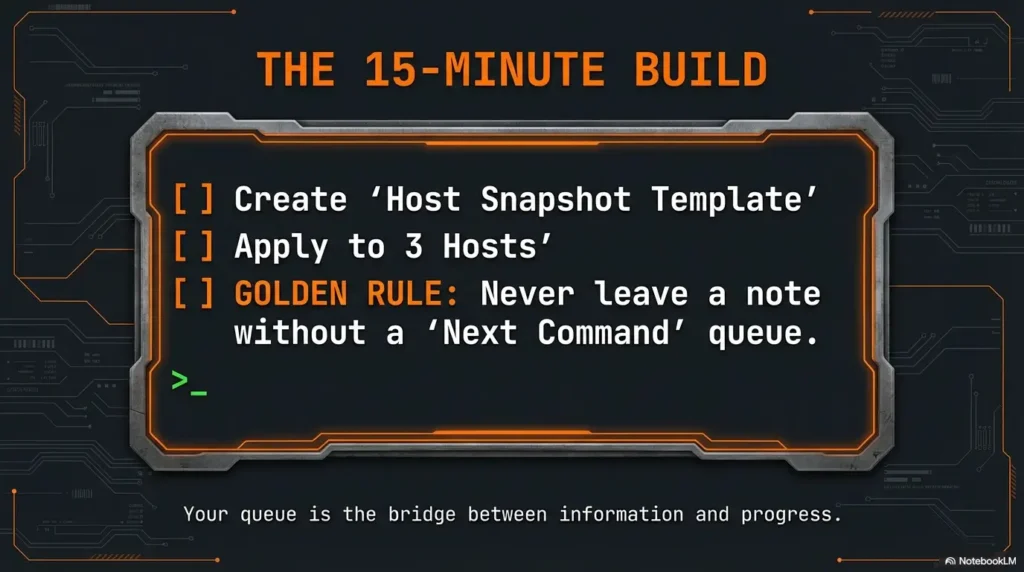
- Create one Obsidian template note named Host Snapshot Template.
- Apply it to 3 hosts from your latest scan.
- For each host, add: (1) ports table, (2) two hypotheses, (3) a three-item next-commands queue.
- Tomorrow, retest one host and fill the Δ log in under 4 minutes.
If you want a tiny rule that changes everything: never leave a host note without a queue. Even one item. Your queue is the bridge between “information” and “progress.”
- IP-first naming keeps retrieval friction low.
- Hypotheses keep your focus ethical and testable.
- Delta logs turn retest time into real progress.
Apply in 60 seconds: Add a “Decision:” line to your next host note before you do anything else.
FAQ
1) What’s the best way to import Nmap XML into Obsidian?
The cleanest approach is: store the XML (inside or outside the vault), then link to it from your host snapshot. Your snapshot should contain the summarized port table and your decisions. If you automate parsing, use it to pre-fill ports and identity fields—then write hypotheses and next commands by hand.
2) Should I store the raw Nmap XML in my vault or outside it?
Either works. Inside the vault is frictionless for linking and retests; outside can keep your vault lighter and cleaner. The important part is consistency: pick one approach and stick to it so your “source_scan” paths don’t become guesswork.
3) How do I structure one host note so it’s skimmable during an exam?
Use five blocks: identity, ports, service cues, 2–4 hypotheses, and a tiny next-commands queue. Keep raw output out of the main note—link evidence instead. Add a one-sentence “Decision” line after the ports table to force clarity.
4) What tags should I use for OSCP notes in Obsidian?
Keep tags dashboard-level: #oscp/host, one or two service tags (like #svc/http), plus #prio/high|med|low and #status/queued|active|closed.
Too many tags feels organized but harms retrieval.
5) How do I avoid duplicating hosts when IPs change across subnets?
Use lab/domain context plus verified host identity, and record IP addresses with observation dates. An IP can change or be reused. Keep uncertain identities separate; when evidence confirms the same machine, link or reconcile notes while preserving each address and scan history.
6) Should I keep a separate note per scan run or per host?
Per host for the snapshot (so it stays stable), and optionally a separate scan-run note for overview and “what changed across the whole network.” Your host notes are the unit of action; your scan-run note is the unit of orientation.
7) How often should I retest a host during OSCP labs?
Retest when something meaningful changes: new access, new subnet visibility, new creds, or you suspect a prior fingerprint was shaky. You don’t need constant retests—you need intentional retests with a delta log.
8) What should go into “attack paths” vs “next commands”?
Attack paths are hypotheses (short statements of what you think might be true and why). Next commands are the immediate checks you will run to confirm or deny those hypotheses. Paths are “why,” commands are “do.”
9) How do I link evidence (screenshots/output) without cluttering the host page?
Create an evidence note (or folder) per host and link to it. In the host snapshot, keep evidence as a short list of links with labels (“Web screenshot: login page,” “SMB shares listing,” “Raw scan excerpt”). The host note stays readable; the evidence stays available.
10) Is there a lightweight way to compare scan deltas over time?
Yes: keep a Δ log in the host snapshot and update it during retests. If you want a tool-assisted approach, the Nmap ecosystem supports XML-based comparisons (the key idea is “diff the scans,” not “re-read everything”). Your goal is fast change detection.
Conclusion
Remember the curiosity loop from the top—the feeling of “I know this matters… why can’t I see the next move?” The answer is almost never “more tools.” It’s almost always more shape: a host page that turns scan facts into decisions you can act on while tired.
Your one-page snapshot is a promise to your future self: no more tab sprawl, no more re-reading, no more pretending you’ll remember later. Export once. Summarize once. Retest with deltas. Close loops. Move.
15-minute CTA: Open Obsidian, create the Host Snapshot Template, and apply it to three hosts right now. Don’t perfect it. Just make it usable. Then retest one host tomorrow and write exactly what changed.
Original review: 2026-01.
Import and retest checks: Obsidian’s core Templates plugin inserts a prepared note; it does not parse Nmap XML. Copy YAML properties at the start of the note and replace example dates and paths. In an XML parser, select addresses by addrtype, retain protocol, port state and reason, and label service/OS guesses as estimates. A missing port is not automatically closed: compare scan scope, options, vantage point and reachability first. Identify hosts within their lab/domain context; reused IPs can merge different machines. source_scan is metadata text, so add an actual evidence link; core Obsidian does not display every XML file as a note.
Technical guidance updated: 2026-10-13. Clarified the six-step workflow, XML import limits, evidence links and comparable retest conditions.