Sources, review date and section shortcuts
Editorial review: October 20, 2026. Map current Microsoft guidance to the actual tenant, services and shared responsibilities.
Reference documentation · Related practical guide
Go straight to: Decision check · Main workflow · Further detail
Open the practical working record to connect this guide to your scope, evidence and next decision.
Distinguish guidance from verified implementation
The Microsoft cloud security benchmark describes recommended controls; its version and preview status matter. Check service-specific guidance and actual resource configuration, then record evidence and exceptions. A checklist, policy assignment or benchmark mapping is not a compliance certificate or proof that every control operates across the tenant. Reference and scope.
A practical 30-day hardening roadmap
Azure Security Baseline for SaaS Startups: Secure the company before the next security questionnaire
Map current Microsoft guidance to the actual tenant, services and shared responsibilities.
A useful Azure security baseline is not a shopping list of cloud products. It is a small, defensible set of controls your team can own, test, explain, and improve. The goal is to protect privileged identities, customer data, production systems, deployment paths, and recovery options without turning a six-person startup into a miniature bank.
This 30-day plan converts Microsoft guidance into startup-sized decisions. You will identify what matters, reduce preventable exposure, assign owners, collect useful evidence, and finish with a baseline that can survive both a production incident and a skeptical procurement team.
Prioritize correctly
Protect identities, data, and production before polishing dashboards.
Control cloud drift
Turn good intentions into policies, alerts, reviews, and expiring exceptions.
Build usable evidence
Answer customer questions with records instead of frantic archaeology.
The baseline is finished only when someone owns it, someone tests it, and the evidence can be found. 🔐
Snapshot
Who it is for: U.S.-based B2B SaaS founders, CTOs, and small Azure engineering teams preparing for enterprise sales, security reviews, or a more disciplined production environment. What it solves: scattered permissions, public exposure, weak workload credentials, incomplete logging, and undocumented recovery procedures. What you can do next: follow a 30-day sequence and leave with a prioritized control register, tested runbooks, and evidence your team can maintain.
Before You Configure Anything: Know What This Baseline Can Prove
Security and compliance disclaimer
This guide offers general cloud-security education. It cannot guarantee protection from compromise, satisfy every customer contract, or establish compliance with SOC 2, HIPAA, PCI DSS, state privacy rules, or another framework.
Your required controls depend on the product architecture, customer data, tenant design, contractual promises, threat model, team structure, and applicable law. Confirm high-risk decisions with an Azure security specialist, qualified auditor, privacy counsel, or other appropriate professional when the consequences are significant.
What a startup baseline should accomplish
A practical baseline should reduce common cloud failure modes while creating a repeatable operating system for security. That means the controls must remain understandable after the consultant leaves, the founding engineer changes roles, or a new enterprise customer asks for evidence six months later.
- Identify the most important assets, accounts, data stores, and deployment paths.
- Reduce standing privilege and unnecessary public exposure.
- Detect meaningful changes, suspicious activity, and disabled protections.
- Document owners, exceptions, response procedures, and review dates.
- Create evidence that reflects real control operation rather than a one-time screenshot festival.
What it does not prove
A green policy dashboard does not prove that your application correctly separates tenants. Encryption at rest does not prove that support staff cannot download unrestricted customer exports. A backup job marked “successful” does not prove that the team can restore a production database within an acceptable recovery window.
Key takeaway: Treat the Microsoft Cloud Security Benchmark as a reference library. Your startup baseline is the smaller set of controls you can continuously own, test, and explain.
The 30-Day Azure Security Plan at a Glance
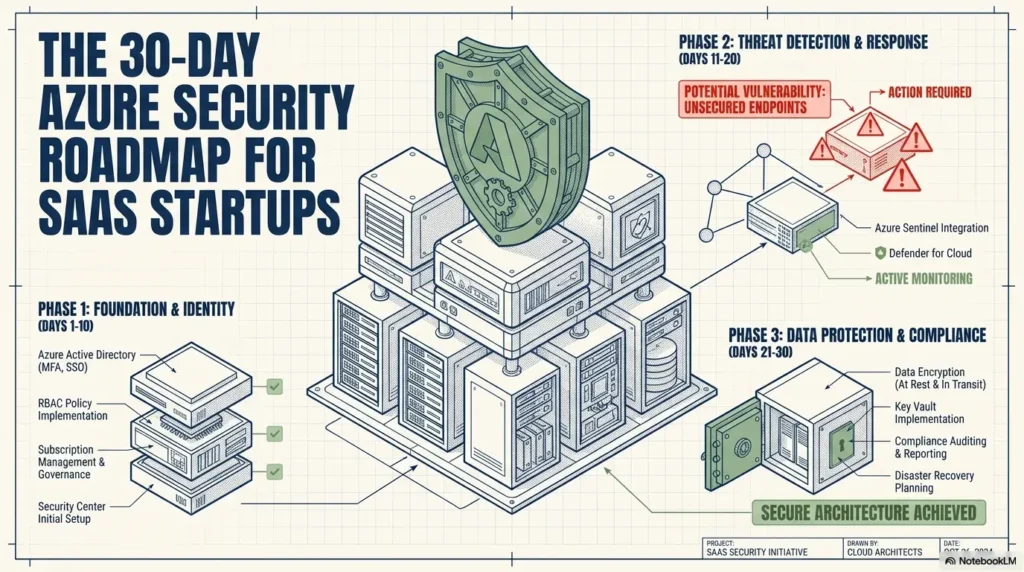
The safest order is not “install every security product.” Begin by understanding scope, then protect identities, govern configuration, restrict exposure, improve telemetry, and test recovery. Each phase gives the next phase firmer ground.
| Days | Primary objective | Minimum deliverable | Why it comes now |
|---|---|---|---|
| 1–5 | Inventory and classify | Asset map, data flows, owners, Tier 0 and Tier 1 list | You cannot govern resources you cannot name. |
| 6–10 | Protect identity | Privileged access review, strong authentication, workload identity register | Identity compromise can bypass otherwise sound infrastructure. |
| 11–15 | Establish guardrails | Subscription model, policy initiative, exception process | Repeatable controls reduce drift and forgotten exposure. |
| 16–20 | Protect networks and data | Public endpoint register, classification rules, backup restoration test | Customer data needs protection across storage, access, export, and recovery. |
| 21–25 | Improve detection and delivery | Central logs, critical alerts, protected deployment path | Teams need to see and explain important production changes. |
| 26–30 | Test response and evidence | Five runbooks, tabletop exercise, control register, review calendar | A control becomes credible when it can be demonstrated under pressure. |
The startup security sequence
Assets, data, owners, trust boundaries
Humans, roles, workloads, emergency access
Subscriptions, policies, exceptions
Logs, alerts, deployment records
Tests, runbooks, tickets, review dates
The official Microsoft Cloud Security Benchmark introduction provides a broader reference for security controls. Your job during these 30 days is to select the controls that matter most to your architecture and assign real ownership.
Days 1–5: Find the Assets That Could Sink the Company
Draw the system map before buying another tool
Begin with a plain diagram or repository document showing tenants, management groups, subscriptions, regions, production services, development environments, external integrations, and data flows. The map does not need the polish of an architecture conference poster. It needs to be accurate enough that an engineer can point to where customer data enters, moves, rests, and leaves.
- Microsoft Entra tenants and verified domains
- Management groups and Azure subscriptions
- Production, staging, development, security, and sandbox environments
- Internet-facing applications, APIs, storage, databases, queues, and administrative interfaces
- CI/CD systems, deployment identities, repositories, and artifact registries
- Third-party services receiving customer, billing, support, or analytics data
- Backups, exports, logs, and temporary processing locations
For a founder-led startup, this exercise often reveals that production is less tidy than everyone remembers. A test storage account became permanent. A contractor-created service principal still exists. A “temporary” public endpoint celebrated its second birthday.
Rank assets by blast radius, not by price
An inexpensive credential can be more dangerous than an expensive database. Classify assets by the damage that compromise, deletion, or misuse could cause.
| Tier | Typical assets | Primary concern | Expected control strength |
|---|---|---|---|
| Tier 0 | Entra tenant, privileged identities, domains, deployment credentials | Company-wide control or persistent access | Strongest authentication, minimal privilege, immediate alerting |
| Tier 1 | Production data, customer files, keys, backups | Data exposure, destruction, or business interruption | Restricted access, monitoring, tested recovery, documented owners |
| Tier 2 | Application services, APIs, queues, operational tooling | Service compromise or lateral movement | Controlled exposure, secure deployment, configuration policies |
| Tier 3 | Disposable development and test resources | Credential leakage, cost waste, accidental connectivity | Time limits, spending controls, isolation, no production data |
Give every important system a human owner
Ownership should describe accountability, not merely the person who created the resource. The owner must know what the resource does, who may access it, what logs exist, how it is restored, and when its security posture was last reviewed.
Ownerless resources should be investigated, reassigned, isolated, or removed. A resource without an owner is usually also missing a review date, an exception record, and a believable retirement plan.
Key takeaway: Scope is a security control. A narrow, documented production footprint is easier to protect than a cloud attic filled with forgotten experiments.
Days 6–10: Make Identity the Hardest Door to Open
Review every privileged human account
Export current role assignments and identify who can control the tenant, subscriptions, production resources, security settings, billing, and deployment systems. Ask whether each assignment is still needed, whether a narrower role would work, and whether the person uses a separate administrative account.
Require strong multifactor authentication and appropriate Conditional Access for privileged access. Where licensing and operating maturity permit, replace permanent assignments with time-limited activation through Privileged Identity Management.
- Separate daily productivity accounts from administrative accounts.
- Remove former employees, contractors, and obsolete guest accounts promptly.
- Reduce permanent Owner and Global Administrator assignments.
- Require justification or approval for highly sensitive role activation.
- Alert on new role assignments and changes to authentication policies.
- Review privileged access on a fixed schedule and after staffing changes.
Maintain emergency access without creating a hidden backdoor
Emergency accounts exist to prevent tenant-wide lockout when normal identity controls fail. Maintain at least two cloud-only accounts on the tenant’s .onmicrosoft.com domain, protect them with phishing-resistant authentication independent of normal administrator sign-in dependencies, and monitor every use. Review Conditional Access exclusions against Microsoft’s current emergency-access guidance so blocking policies cannot defeat recovery; an exclusion is not a reason to leave the account protected only by a password.
Store the procedure securely, assign named custodians, and test the process without casually using the account. An emergency credential that no one has tested is a hopeful note in a locked drawer.
Replace long-lived workload secrets where practical
Applications, pipelines, integrations, and background workers need identities too. Inventory service principals, certificates, client secrets, managed identities, and federated workload credentials.
Prefer managed identities or workload identity federation when supported. When a stored secret remains necessary, record its purpose, owner, storage location, permissions, rotation date, expiration date, and emergency revocation procedure. The site’s guide to startup secrets management can help turn this inventory into a maintainable operating routine.
Key takeaway: Treat service principals as employees with extraordinary patience. They never resign, never complain about excessive access, and may retain credentials long after everyone forgets why they exist.
Check the identity license and enforcement state before buying more tools
Microsoft distinguishes security defaults, a baseline available without an additional license, from customizable Conditional Access. Conditional Access licensing generally requires Entra ID P1; risk-based policies require the relevant P2 capability. Check the current licenses and exact features before budgeting.
Record which protection is actually operating. A Conditional Access policy in report-only mode does not enforce its grant or block controls. Likewise, a legacy per-user MFA screen showing disabled does not by itself establish that security-defaults or Conditional Access protection is absent; inspect the effective policy and sign-in evidence.
Plan any migration as a controlled change with verified replacement coverage, test users, emergency access, monitoring and rollback. Do not leave a gap while moving from defaults to custom policies. This article is a planning guide, not a claim that these controls have been tested in your tenant. The 30-day sequence is editorial pacing, not a Microsoft completion guarantee.
Days 11–15: Put Guardrails Around Subscriptions and Resources
Separate environments according to risk
Production, non-production, shared security services, and experimental workloads should not rely solely on naming conventions for separation. Use management groups, subscriptions, access boundaries, policies, deployment identities, and logging destinations that reflect their different consequences.
A lean startup structure might include a production subscription, a non-production subscription, a shared security or monitoring subscription, and a sandbox area with tight spending and expiration rules. More subscriptions are not automatically safer, but meaningful boundaries reduce accidental access and make policy scope easier to understand.
Start Azure Policy in Audit mode
Begin by measuring current behavior. Audit policies can identify public network access, missing diagnostic settings, unapproved locations, weak transport settings, missing ownership tags, shared-key access, unencrypted resources, and other configuration gaps.
Review violations with the engineers who operate the workloads. Some findings will be true defects. Others will reveal architectural dependencies, migration work, or services that need a documented exception.
Move selected controls from observation to enforcement
After reviewing impact, promote high-confidence controls to Deny, Modify, or DeployIfNotExists. Do not enforce a broad policy initiative on Friday afternoon and call it governance. Test in non-production, confirm remediation steps, verify deployment behavior, and document rollback.
| Policy effect | Best startup use | Main risk | Before enabling |
|---|---|---|---|
| Audit | Discover current violations | Findings may accumulate without action | Assign owners and remediation dates |
| Deny | Block clearly unsafe new configurations | May break legitimate deployments | Test pipelines and define exceptions |
| Modify | Correct supported properties automatically | Unexpected configuration changes | Review service behavior and permissions |
| DeployIfNotExists | Add required settings such as diagnostics | Remediation identity may be overprivileged | Limit permissions and verify deployment results |
Make every exception expire
Record the business reason, affected resources, owner, compensating control, approver, approval date, expiration date, and removal plan. Review upcoming expirations during an engineering or security operations meeting.
An exception with no end date has stopped being exceptional. It is now an undocumented policy written in invisible ink.
Days 16–20: Reduce Public Exposure and Protect Customer Data
Justify every public endpoint
Create a register of internet-facing resources. For each one, record why it must be public, permitted protocols and ports, authentication method, rate-limiting approach, edge protection, log owner, and review date.
- Customer-facing web applications and APIs
- Storage endpoints and file-upload paths
- Databases with public network access
- Virtual machines and remote management services
- Kubernetes management interfaces
- Administrative portals, support tools, and debugging endpoints
- Webhook receivers and integration callbacks
Administrative paths should not be reachable from the open internet merely because authentication exists. Consider private connectivity, controlled jump paths, restricted source networks, or identity-aware administrative methods appropriate to the service.
For a deeper review of exposure patterns, use the cloud misconfiguration checklist to identify settings that frequently survive from prototype infrastructure into production.
Classify data before selecting controls
Encryption is important, but it cannot decide whether a support agent should access a customer export or whether production data belongs in a test environment. Create a simple classification model the team can apply consistently.
| Classification | Example | Minimum handling rule |
|---|---|---|
| Public | Published documentation and marketing content | Integrity and availability controls |
| Internal | Routine operating documents | Workforce access and reasonable retention |
| Confidential | Customer account data and commercial records | Role-based access, encryption, logging, controlled export |
| Restricted | Authentication data, secrets, highly sensitive customer information | Strict need-to-know access, enhanced monitoring, limited storage locations |
Protect the full data lifecycle
Review data in transit, at rest, in backups, in logs, in support downloads, in analytics systems, and in temporary processing files. Confirm who can export data, how exports are recorded, where they are stored, and when they are deleted.
Pay particular attention to logs that contain access tokens, email addresses, query parameters, uploaded file names, or request bodies. Logging everything can create a second, less-protected copy of the data you worked so hard to secure.
Test restoration, not merely backup creation
Select one important production data store and perform a controlled restoration test. Record the recovery point, elapsed recovery time, steps followed, people involved, integrity checks, and problems encountered.
Confirm that restored data preserves tenant boundaries and access rules. A backup that restores into a shared test environment with broad engineering access may solve availability while creating a fresh confidentiality problem.
Days 21–25: Build Logs and Pipelines That Tell the Truth
Centralize high-value telemetry first
Collect the logs needed to reconstruct material events. Start with Microsoft Entra sign-ins and administrative actions, Azure Activity Log, privileged operations, production authentication, Key Vault access, database and storage activity, edge services, deployment systems, and Defender for Cloud findings.
Azure Activity Log is retained for 90 days by default; export it through diagnostic settings when your investigation or contractual retention requirement is longer, and verify the destination’s retention and costs. Other logs have separate retention and licensing settings. You do not need every log source on day one. You do need a clear answer to basic incident questions: Who signed in? What changed? Which identity made the change? What data or resource was affected? Did the change come through the approved pipeline?
Create startup-sized alerts for realistic attack paths
- A privileged role is assigned or activated unexpectedly.
- An emergency account is used.
- A new credential is added to a service principal.
- Public access is enabled on protected storage or a database.
- A security policy or diagnostic setting is disabled.
- A production deployment occurs outside the approved pipeline.
- Unusual bulk download or export activity appears.
- Critical logging stops or falls below an expected volume.
Every critical alert needs an owner, expected response time, escalation path, investigation steps, and test method. Sending alerts into a channel that everyone muted last quarter is not monitoring. It is decorative telemetry.
Key takeaway: A useful alert changes human behavior. If nobody knows who must act, how quickly, or what to check, the alert is only a noisy storage receipt.
Protect the path to production
Restrict who may change pipeline definitions, deployment identities, infrastructure templates, and production environment settings. Require branch protection, reviewed pull requests, traceable approvals for high-risk changes, and documented rollback procedures.
- Scan repositories and build output for exposed secrets.
- Review dependency and container findings according to defined severity targets.
- Test infrastructure-as-code changes before production deployment.
- Use separate identities for build, test, and production deployment.
- Limit pipeline permissions to the resources required for deployment.
- Record who approved and executed material production changes.
Application authorization deserves separate attention. Network controls cannot correct a missing tenant filter in an API or a support feature that permits unrestricted impersonation. The guide to API authentication and authorization for SaaS provides a useful companion review.
Illustrative example: the credential that outlived its project
A small SaaS team created a service principal during an early migration. Its secret was stored in the pipeline, granted broad access, and never given an expiration date because the project was expected to last only a few weeks.
Eighteen months later, the migration repository was mostly forgotten, but the credential still worked. The engineer who created it had changed teams, and no alert existed for credential use or permission changes.
The corrective work was not glamorous: inventory the identity, reduce its permissions, move the pipeline to a short-lived authentication method, revoke the old secret, and add an owner plus review date.
The lesson is practical. Cloud risk often accumulates quietly through unfinished cleanup rather than dramatic technical failure. Expiration dates, ownership, and alerting turn temporary access back into something temporary.
Show me the nerdy details
For each sensitive action, identify the control plane, data plane, identity type, log source, retention period, alert logic, and investigation query. This prevents a common gap where Azure records a resource change but the application cannot show which customer, support agent, or tenant-level action produced it.
A strong event chain links user identity, workload identity, request or correlation ID, deployment version, affected resource, tenant context, and outcome. You may not capture every field immediately, but documenting the missing links gives the team a credible improvement queue.
Days 26–30: Test Incidents, Recovery, and Security Evidence
Write five minimum viable runbooks
- Compromised administrator account
- Exposed application or pipeline secret
- Publicly accessible customer data
- Suspicious or unauthorized production deployment
- Possible cross-tenant data exposure
Each runbook should state how the incident is detected, who leads, who may disable access, how credentials are revoked, how workloads are isolated, what evidence must be preserved, and who decides whether customers, insurers, counsel, regulators, or outside responders should be contacted.
Run one uncomfortable tabletop exercise
Choose a scenario with business consequences, such as an administrator account showing suspicious sign-ins followed by a new production credential. Walk through the first 30 minutes, first four hours, and first business day.
- Who notices the event first?
- Who can revoke sessions and credentials?
- Can the team identify affected subscriptions and workloads?
- Where are the relevant logs, and who can access them?
- Could the attacker have created another persistence method?
- Who may pause production or block deployments?
- What customer or contractual notification questions arise?
Document every delay and uncertainty. The exercise is successful when it exposes confusion before a real incident does. For higher-risk operations, compare the limits of internal response with the benefits and cost factors described in the incident response retainer guide.
Build a control register that can answer customer questions
Create a spreadsheet or repository file that records the control outcome, scope, Azure enforcement method, owner, evidence, implementation status, and next review date.
| Field | What to record |
|---|---|
| Control | The security outcome required |
| Scope | Tenant, subscription, workload, pipeline, or data set |
| Enforcement | Policy, RBAC, Conditional Access, configuration, or procedure |
| Owner | One accountable person |
| Evidence | Log, query, ticket, test record, configuration export, or approved screenshot |
| Status | Missing, planned, implemented, or verified |
| Review date | When the control must be tested again |
Map common customer questions to this register. The vendor security questionnaire guide can help you prepare evidence without allowing each sales request to create a separate miniature security program.
Key takeaway: Evidence should show that a control operates over time. A dated access review, restoration record, alert test, or remediation ticket usually tells a stronger story than an isolated portal screenshot.
Free, Paid, or Professional Help: What Is Worth the Cost?
A Good, Better, Best security setup
The cheapest option is not always the most economical. An inexpensive tool that produces alerts nobody can investigate may add less protection than a weekly access review and a tested recovery procedure. Compare options by risk reduction, operational burden, evidence value, and the skills your team already has.
| Setup | Typical approach | Best fit | Main limitation |
|---|---|---|---|
| Good | Native logs, manual reviews, core policies in Audit, documented runbooks | Very small team with limited sensitive data | More manual work and slower investigation |
| Better | Centralized telemetry, selected policy enforcement, automated secret scanning, stronger posture management | Growing B2B SaaS preparing for enterprise procurement | Licensing, configuration, and alert-tuning effort |
| Best for higher risk | Advanced detection, formal testing, independent review, incident support, mature evidence workflow | Regulated, high-impact, or contractually demanding workloads | Higher cost and greater operating complexity |
When a DIY baseline may be enough
A capable engineering team may complete much of this plan internally when the architecture is small, data sensitivity is moderate, and the team can assign an experienced owner. Native Azure capabilities, repository controls, documentation, and regular review can remove a large amount of preventable risk.
- The production footprint is limited and well understood.
- The team can review identity, networking, storage, and deployment controls competently.
- Customer requirements are manageable and do not demand independent assurance.
- Someone has protected time to investigate findings and maintain evidence.
When paid tools or expanded Azure services may help
Paid capabilities may be worthwhile when they reduce manual review, improve cross-source investigation, detect vulnerabilities or configuration drift, preserve evidence, or meet a specific contractual need. Before paying, confirm what data is collected, how alerts are tuned, which integrations are supported, how long records are retained, and who will operate the system.
Use the security tool stack cost calculator to compare subscription fees with implementation time, alert review, training, storage, and renewal costs. The invoice is only one slice of the budget pie.
When professional help is worth considering
- Customer data may already have been accessed or exposed.
- A privileged identity appears compromised.
- The team cannot determine the blast radius.
- Logs are missing, inconsistent, or difficult to interpret.
- The product handles healthcare, payment, government, financial, identity, or other high-impact data.
- A customer requires independent penetration testing or control validation.
- Contractual or legal notification duties may apply.
- The architecture contains complex multi-tenant authorization boundaries.
Azure Security Mistakes That Look Harmless Until They Are Not
Giving engineers permanent Owner access
Broad standing privilege increases the effect of credential theft, malicious browser extensions, mistaken commands, and rushed troubleshooting. Replace it with narrower roles and time-limited elevation where practical.
Using one subscription for every environment
Production data, experiments, personal test resources, and shared tooling inherit overlapping permissions and policies. This makes governance harder and gives mistakes a larger blast radius.
Leaving default public access untouched
A resource protected by a password, token, or access key does not automatically need to accept connections from the entire internet. Public access should be a documented requirement, not the quiet result of a deployment template.
Enforcing policy before testing remediation
Moving directly to Deny can stop production deployments, block urgent recovery work, or create unofficial workarounds. Audit first, investigate dependencies, test changes, and create a controlled exception path.
Calling a compliance dashboard proof of security
Automated findings are useful inputs. They do not independently prove secure authorization, reliable incident response, complete data handling, or sustained control operation.
Mistake and safer-alternative checklist
| Common mistake | Safer alternative |
|---|---|
| Long-lived pipeline secret | Managed identity, federation, or short expiration with rotation ownership |
| Shared administrator account | Named accounts with strong authentication and traceable role activation |
| Public database with password protection | Private or tightly restricted connectivity plus identity-based access |
| Backup job never restored | Scheduled restoration test with recovery evidence |
| Alert sent to an unowned channel | Named responder, response target, escalation path, and test schedule |
| Permanent policy exemption | Documented compensating control and expiration date |
FAQ: Applying the Baseline Without Building a Security Department
What is the minimum Azure security baseline for a SaaS startup?
Start with privileged identity protection, workload identity hygiene, production separation, restricted network exposure, data classification, policy auditing, centralized logs, protected deployments, tested backups, and incident runbooks. Assign an owner and review date to each control.
Should a startup use the Azure Security Benchmark or Microsoft Cloud Security Benchmark?
Use the current Microsoft Cloud Security Benchmark as the primary reference while recognizing that some Azure documentation and service mappings may still mention earlier Azure Security Benchmark versions.
Does a startup need Microsoft Sentinel immediately?
Not always. The immediate need is centralized, searchable telemetry with assigned alert ownership and sufficient retention for investigation. A broader SIEM deployment becomes more valuable as risk, customer requirements, data volume, investigation complexity, and operating capacity increase.
Is Defender for Cloud enough to secure an Azure SaaS product?
No. It can surface posture, vulnerability, policy, and compliance findings, but it does not replace application authorization testing, threat modeling, secure development, incident readiness, or human review.
How should production and development resources be separated?
Use subscriptions, resource hierarchy, roles, deployment identities, policies, networking, and logging boundaries that match their different risk levels. Avoid relying only on resource-group names or informal team habits.
When should Azure Policy move from Audit to Deny?
Move after reviewing existing violations, testing remediation, identifying legitimate exceptions, validating pipeline behavior, and documenting an emergency rollback process. Enforce the clearest high-risk controls first.
Does encryption satisfy customer security requirements?
Encryption is one control among many. Customers may also examine identity, authorization, key ownership, logging, backups, retention, deletion, incident response, vulnerability management, employee access, and evidence of ongoing operation.
How often should the Azure baseline be reviewed?
Review it on a fixed schedule and after major architecture changes, new data categories, significant customer requirements, serious incidents, acquisitions, identity changes, or benchmark updates. Every review should have a named owner and recorded outcome.
Your 15-Minute Next Step: Create the First Control Record
Open a spreadsheet or repository file and create seven columns: Control, Scope, Enforcement, Owner, Evidence, Status, and Review Date.
For the first row, write: Privileged Azure access is limited, strongly authenticated, and regularly reviewed. Add the tenant and production subscriptions to Scope. Name the person responsible. Mark the status honestly.
Then schedule a 90-minute workshop with the founder, technical lead, and whoever operates production. Leave with five decisions: which assets are Tier 0 and Tier 1, who has privileged access, which production resources are publicly reachable, which critical logs are missing, and which single control will be enforced first.
That first row may look modest. Yet it changes security from a cloud of worthy intentions into a record someone can inspect, test, and improve. Thirty days later, that record becomes the spine of your Azure security baseline and a calmer answer to the next customer who asks, “How do you protect our data?”
Last reviewed: 2026-10-13
Technical guidance updated: 2026-10-13. Clarified emergency-access protection and Activity Log retention, labeled the scenario as illustrative, and repaired section navigation.
Editorial review: October 16, 2026. Updated the decision guidance and removed misleading illustrations where identified. Worked examples are hypothetical; they do not describe testing performed by Kioptrix, actual quotes, claim decisions or guaranteed outcomes.
Azure baseline verification register
Use this when: you are a SaaS team checking guidance against its actual Azure estate. Copy these fields into your notes and replace each prompt with a dated response. Keep assumptions and unresolved questions visible.
| Field | What to record | Your evidence / owner / next check |
|---|---|---|
| Estate boundary | Record tenants, subscriptions, workloads and customer responsibilities. | To complete |
| Control intent | Describe the security outcome and resources it should cover. | To complete |
| Operating evidence | Link configuration, events or an authorized validation result. | To complete |
| Exception and owner | Record excluded resources, unresolved gaps and the next review. | To complete |
Next action: Validate one important control across its actual resource population. Mark the relevant row confirmed, provisional or unresolved. Keep the supporting record, responsible person and next check beside it so another reader can continue the work without treating an assumption as a result.
This is an editorial working aid. Complete it with your own scope, source records and accountable reviewers. Filling the table does not by itself establish coverage, compliance or acceptance.
Worksheet change record — October 20, 2026
Added this azure baseline verification register with four article-specific fields and an evidence-based next action. Existing source notes retain their own review dates. This addition is not a fresh verification of every statement or a newly executed test.