
Cloud Misconfigurations: The Real Anatomy of a Breach
Most cloud breaches don’t start with zero-days. They start with a storage bucket someone thought was “internal,” an IAM wildcard added during a release crunch, or a service account key that never expired.
If you’re running AWS or GCP at speed, cloud misconfiguration isn’t a theoretical risk—it’s operational drift. Shared ownership, inherited roles, partial CloudTrail or Cloud Audit Logs coverage, forgotten snapshots, over-broad KMS policies. None of it looks dramatic in isolation. But together? That’s your incident chain.
Keep guessing, and you’ll eventually pay for one small checkbox with a very large post-mortem.
This guide cuts through the noise and focuses on the 10 cloud misconfigurations that actually trigger real incidents—public storage exposure, IAM overreach, service account key sprawl, exposed admin planes, and logging gaps.
- ✅ No compliance theater.
- ✅ No 200-control frameworks.
- ✅ Just the paths that repeatedly lead to breach headlines.
What you’ll walk away with:
- Prioritize by Blast Radius: A faster way to rank risks by impact, not just ticket age.
- Safe Permissions Testing: A practical method to test and roll back risky permissions safely.
- Sustainable Guardrails: Protections that survive release pressure, not just audits.
If your team ships weekly, this is where risk reduction becomes measurable—not aspirational.
Table of Contents
Start Here — Who This Is For / Not For
This is for: AWS/GCP teams shipping weekly (or daily) with shared ownership
If your reality is “platform owns some, app teams own some, security owns the alarms,” you are exactly the audience. This is for DevOps leads, cloud security engineers, SREs, and engineering managers who don’t have spare quarters for perfect programs. You need decisions that work by Friday, not frameworks that look pretty in a QBR.
This is not for: compliance-only checklists with no runtime controls
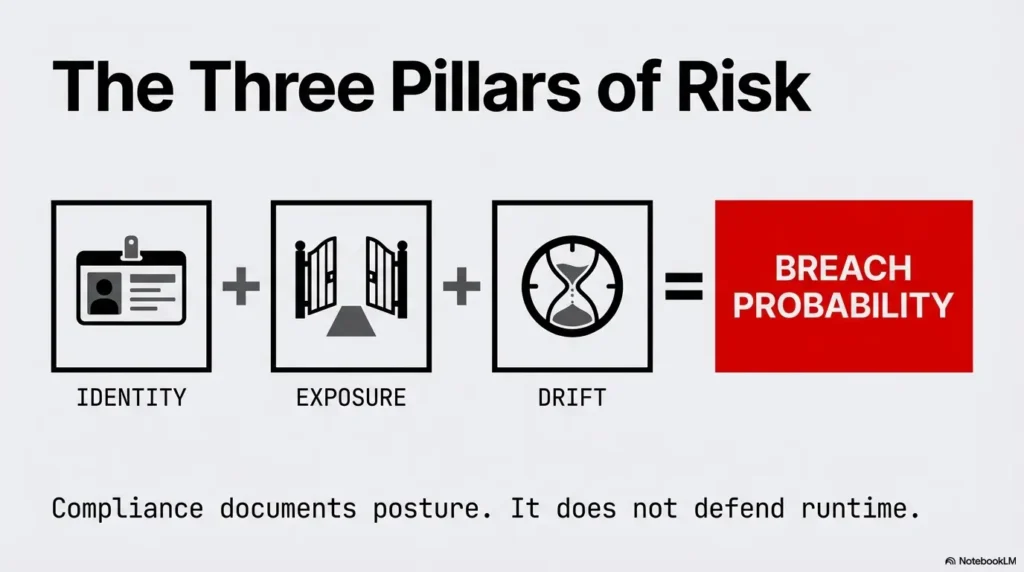
If your strategy is one annual review plus a slide that says “compliant,” this won’t feel comfortable. Compliance can document your posture. It cannot defend your runtime by itself. Real incidents happen on Tuesdays, between deploys, in the gap between policy and what actually exists in cloud control planes.
If your stack is “mostly managed,” why you still have misconfiguration risk
Managed services reduce infrastructure burden. They do not remove identity mistakes, storage exposure, key sprawl, weak trust boundaries, or logging blind spots. AWS and Google Cloud both provide strong controls for blocking public access and hardening identity patterns, but those controls must be enabled, enforced, and continuously checked in your own environment. If you need a founder-friendly way to align this with board-level security priorities, map this section to a lean security metrics framework for founders so execution and reporting stay connected.
- Cloud risk is mostly identity + exposure + drift.
- Policy files are not runtime proof.
- Shared ownership requires explicit owner maps.
Apply in 60 seconds: Write down who owns IAM, storage policies, and logging completeness this week.
Incident Reality Check — Why “Small Settings” Become Big Headlines
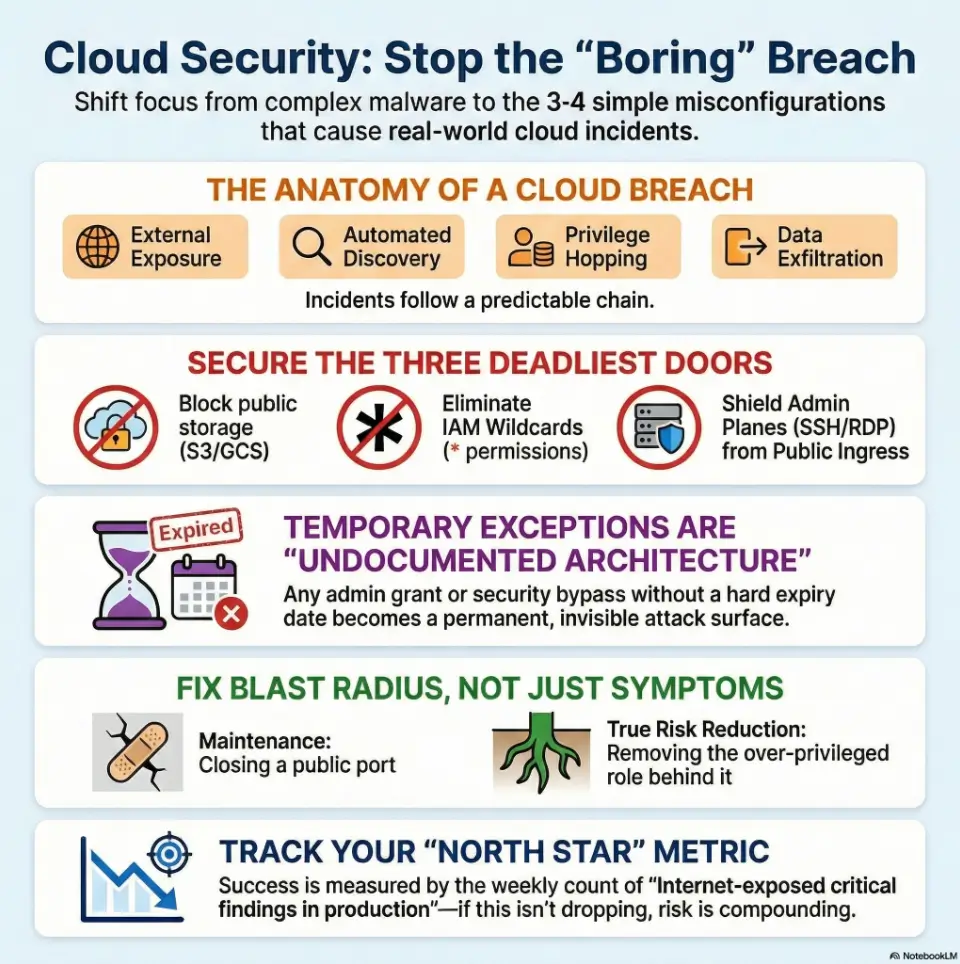
The repeat pattern: exposure → discovery → privilege hop → exfiltration
Most damaging cloud events follow a boring sequence. First, something becomes externally discoverable. Then an attacker confirms access. Next comes identity pivoting, where one permission leads to another. Finally, data moves out. The headline looks sudden; the setup usually took weeks.
“Secure by default” is not “secure in context”
Cloud platforms ship with safer defaults than a decade ago. That’s progress. But context changes quickly: exceptions get approved, new projects bypass templates, inherited roles accumulate, and old keys remain active. Your environment is a living system, not a static “default.”
Let’s be honest… speed won, and guardrails came later
I once joined a post-incident review where everyone did smart work under deadline pressure. No villain. Just a product launch, one emergency admin grant, and no expiry date. Ninety days later, that same privilege chain helped an attacker move laterally. The lesson was brutal and useful: fast teams need expiration built into power. If your engineers are still deciding scope “in the moment,” a lightweight MVP threat modeling workflow for startup teams can prevent rushed permission choices from becoming architecture.
“A temporary exception without an expiry is not temporary. It’s undocumented architecture.”
US teams often align controls to familiar standards language (least privilege, configuration baselines, change control), but incident prevention gets real only when those ideas become deployment gates and weekly evidence, not annual prose.
Top 10 Cloud Misconfigurations (AWS/GCP) That Actually Lead to Incidents
1) Public object storage by accident (S3 / GCS)
This is still the classic. One policy change, inherited ACL, or legacy exception exposes data. AWS recommends account-level blocking of public S3 access as a central control, and GCP teams should enforce public access policies plus continuous bucket exposure checks. “It’s only test data” is often wrong after six months of organic growth.
2) IAM wildcards and over-broad roles (* permissions)
Wildcards are velocity candy. They unblock now and charge interest later. In incidents, wildcards amplify blast radius because compromise of one identity means access across actions and resources you never meant to expose. Least privilege is less about perfection and more about making abuse expensive.
3) Service account key sprawl and long-lived credentials
Google Cloud guidance consistently pushes teams away from user-managed long-lived service account keys. That’s for good reason: key files drift into CI logs, local laptops, and forgotten scripts. Prefer keyless patterns, short-lived credentials, and explicit key lifecycle ownership where unavoidable. For practical implementation patterns, pair this with a startup-ready secrets management playbook so key rotation, vaulting, and ownership are operational—not aspirational.
4) Internet-exposed admin planes (SSH/RDP/K8s/API endpoints)
Anything administrative with public ingress should be treated as high-risk debt. Even with MFA and strong passwords, exposed control surfaces invite constant probing. Use private connectivity paths, identity-aware access proxies, and strict source restrictions by default.
5) Trust policy mistakes (cross-account / federation abuse paths)
Cross-account trust is powerful and fragile. A single permissive trust statement can open unintended assume-role paths. These issues are sneaky because each local policy can look reasonable while the global graph is dangerous.
6) Disabled or incomplete audit logging (CloudTrail / Cloud Audit Logs gaps)
Separate control-plane changes from data access. AWS CloudTrail trails do not record data events by default; GCP Data Access logs are disabled by default for most services except BigQuery. Enable the relevant read/write coverage, retention, and alerts deliberately and validate with an authorized test event. Missing access logs cannot establish that exposed data was never read.
7) Missing encryption/KMS policy alignment and key misuse
Encryption at rest helps, but key policy mistakes can nullify intent. Over-permissive KMS access, inconsistent key use by workload, or no separation between environments can all weaken control. Treat key policies as identity policies with cryptographic consequences.
8) Unrestricted egress paths that bypass data controls
Many teams lock ingress and forget egress. In exfiltration scenarios, unconstrained outbound routes are the open highway. Add explicit egress controls, DNS policy checks, and monitored approved destinations for sensitive workloads.
9) Orphaned snapshots, images, and backups with sensitive data
Archive systems become soft targets. Old snapshots often contain full datasets, stale secrets, and weaker controls. If you can restore it, you must secure it like production data. “Cold” does not mean “safe.”
10) Broken policy-as-code exceptions nobody revisits
Policy-as-code is strong only if exceptions expire and re-approval is painful enough to be intentional. I’ve seen teams with excellent gate checks and a quietly growing exceptions file that effectively disabled their own standard.
- Start with internet-exposed assets.
- Then trace privilege paths.
- Then validate logging and egress.
Apply in 60 seconds: Flag any finding that combines exposure and admin privilege as “today” priority.
Show me the nerdy details
When ranking misconfigurations, weight by exploitability (how easy to discover + use), privilege amplification (how fast one identity expands), and data access depth (what sensitive stores become reachable). A useful scoring shortcut is 0–3 points for each dimension; anything 7+ becomes sprint-blocking risk.
Open Loop #1 — The One Permission You Forgot to Remove
How “temporary admin” becomes permanent attack surface
“Can we grant admin for 24 hours?” sounds harmless in a release crunch. The real issue is not granting—it’s forgetting to revoke. Temporary elevation without automatic expiry is just permanent privilege wearing a fake mustache.
Fast hunt: where privilege creep hides in AWS/GCP
- Break-glass roles without TTL enforcement
- Project-wide/editor-equivalent grants for convenience
- Service accounts used by multiple apps with mixed criticality
- Human users with machine-like permissions
- Group memberships never reviewed after org changes
A 15-minute rollback plan that won’t break production
For a planned permission reduction, map owners and consumers, snapshot bindings, test a narrower policy in staging, and schedule a controlled production change with approval and rollback. Fifteen quiet minutes is not proof that infrequent jobs or recovery paths still work; observe at least a representative workload cycle and check denied-call logs. Handle suspected compromise through incident response instead.
Eligibility Checklist: Can you safely reduce one admin grant today?
- Yes/No: You can identify the owner of the role.
- Yes/No: You have logs/metrics to detect functional regressions quickly.
- Yes/No: You can perform rollback within 15 minutes.
- Yes/No: The grant is not tied to a live incident response.
Proceed only when all required safety checks pass: known owner and consumers, adequate telemetry, tested rollback, and no conflict with active incident response. Three out of four does not justify changing an unidentified or non-recoverable production permission.
Neutral action: run one permission rollback experiment before your next standup.
Detection First — How to Find These Before Attackers Do
Signal over noise: prioritize internet exposure + privilege paths
Most teams drown in findings because they triage by raw severity labels. That’s not how attackers work. They care about reachable paths. Pair two questions: “Is it externally reachable?” and “Can it escalate?” A medium-severity finding with both answers “yes” can outrank a high-severity isolated issue.
Misconfiguration triage by blast radius, not by ticket age
Ticket age tells you process delay, not exploit impact. Blast radius tells you business risk. I’ve seen a 4-day-old public asset matter more than a 120-day-old internal hardening gap. Prioritize what can leak customer or regulated data first.
Build an “incident-likelihood” queue for this sprint
Create a focused queue with five fields: exposure, privilege potential, data sensitivity, detectability gap, owner readiness. Keep it short (10–20 items), visible, and reviewed weekly with security + platform + product in one room. If you are bringing in outside testing support, align scoping and expected evidence in advance using a concise penetration test SOW template to avoid “good findings, unusable output” syndrome.
Decision Card: Fix A now or Fix B now?
Fix A: Publicly reachable + low privilege today
Fix B: Internal only + high privilege path potential
- If customer data is directly reachable, do A first.
- If B enables quick lateral movement to prod, do B first.
- If uncertain, simulate attacker path for 20 minutes and decide by shortest time-to-impact.
Time/Cost trade-off: A often reduces immediate exposure; B often reduces future breach depth.
Neutral action: adopt this card in your next vulnerability triage meeting and record one decision rationale.
Don’t Do This — Common Mistakes That Keep Repeating
Mistake #1: Treating CSPM alerts as backlog clutter
When everything is noisy, people mute. But muting without risk segmentation is how recurring incidents happen. Build suppression rules tied to explicit compensating controls, not to fatigue.
Mistake #2: Relying on annual audits for daily drift
Cloud drift is a daily phenomenon. Annual audits are rear-view mirrors. Useful, but late. Daily drift requires daily guardrails: policy checks in CI/CD, scheduled control validation, and escalation when critical drift persists beyond SLA.
Mistake #3: Shipping exceptions without expiry dates
Every exception should include owner, reason, review date, and auto-expiry. No expiry means no urgency. No urgency means silent risk growth.
Mistake #4: Fixing the symptom, leaving identity paths intact
Closing one public port feels productive. If an over-privileged role remains, incident odds barely move. Always pair exposure fixes with identity-path validation.
If your fix does not reduce attacker options, it’s maintenance—not risk reduction.
Open Loop #2 — Why Your “Private” Data Store Is Still Discoverable
Metadata leaks, mis-tagging, and inherited ACL surprises
A datastore can be “private” by policy and still discoverable by side channels: naming conventions, leaked paths in logs, inherited access at project level, or snapshots copied into weaker environments. Privacy is a chain, not a label.
Shadow assets: old projects/accounts no one owns
Every mature cloud estate has ghost zones: sandbox projects, retired accounts, old CI identities, forgotten buckets. During one internal review, we found an abandoned project with backups no one had touched in 14 months. It was compliant on paper and practically ownerless. That combination is dangerous.
Here’s what no one tells you… archived data is often the softest target
Production usually gets attention. Archives get assumptions. Attackers know this. If retention copies include PII, credentials, or tokens, archives are not cold storage—they are delayed breach fuel.
Short Story: The Backup Nobody Claimed
We were 40 minutes into a routine cloud risk workshop when a junior engineer asked a simple question: “Who owns the snapshot project with the weird naming prefix?” Silence. Not dramatic, just quiet. We traced it: legacy migration artifacts, three years old, two copied datasets, one included user export files that had never been redacted.
Access wasn’t world-open, but it was broad enough that several internal roles could pull it. No alerts were tied to those reads. The team felt embarrassed, then focused. We didn’t panic. We assigned ownership, tightened ACLs, moved critical archives behind stricter boundaries, and set deletion policies with legal sign-off. No breach had happened. But everyone in that room felt how close “no incident” can sit next to “headline incident.” The lesson stuck: unowned data is exposed data, even when the console says “private.”
- Inventory archives and snapshots explicitly.
- Assign owners and review cycles.
- Tie alerts to sensitive data reads.
Apply in 60 seconds: List your top 5 backup locations and put a named owner beside each.
Guardrails That Stick — Preventive Controls for AWS/GCP
Identity guardrails: least privilege, JIT access, keyless where possible
Use short-lived credentials and just-in-time access for elevated tasks. Prefer federated identity and workload identity flows over long-lived secrets. In GCP, reducing user-managed service account keys dramatically cuts key-theft risk patterns.
Network guardrails: default deny inbound, explicit egress policy
Default deny inbound should be boring and universal. Egress should be intentional: approved destinations, DNS-aware policy, and alerts for unusual transfer volume. This is where many exfiltration chains can be slowed or broken.
Data guardrails: block public access, encryption policy enforcement
Enforce organization-wide public access blocks for storage where possible, then validate drift continuously. Standardize encryption expectations and key ownership boundaries by environment (dev/stage/prod). Don’t let convenience cross those boundaries silently.
Change guardrails: policy-as-code gates in CI/CD, not after deploy
Pre-deploy gates prevent “oops in production” cycles. If policies trigger too many false positives, tune them. Don’t bypass them by default. The right friction point is before blast radius appears. When evaluating build-vs-buy for these controls, compare operational fit using a structured vendor security questionnaire so integration depth and evidence quality are tested early.
Show me the nerdy details
A practical guardrail stack: organization policy constraints, IaC static checks, CI policy gates, runtime posture scans, and weekly drift reports tied to remediation SLAs. The key is sequencing: prevent > detect > prove. Most teams overinvest in detect and underinvest in prevent.
Mini Calculator: Can your team outpace misconfiguration drift?
Input 1: New critical findings per week (N)
Input 2: Critical fixes completed per week (F)
Input 3: Reopened/recurring critical findings (R)
Output: Net risk delta = N – F + R
If delta is positive for 3 consecutive weeks, risk is compounding even if dashboards look “busy.”
Neutral action: calculate your last 3 weeks and set one measurable reduction target for next sprint. If budget is the hidden blocker, quantify tradeoffs with a practical SOC 2 budget calculator before the next planning cycle.
Open Loop #3 — Could You Prove You’re Safe in 30 Minutes?
The “evidence pack” every cloud team should keep ready
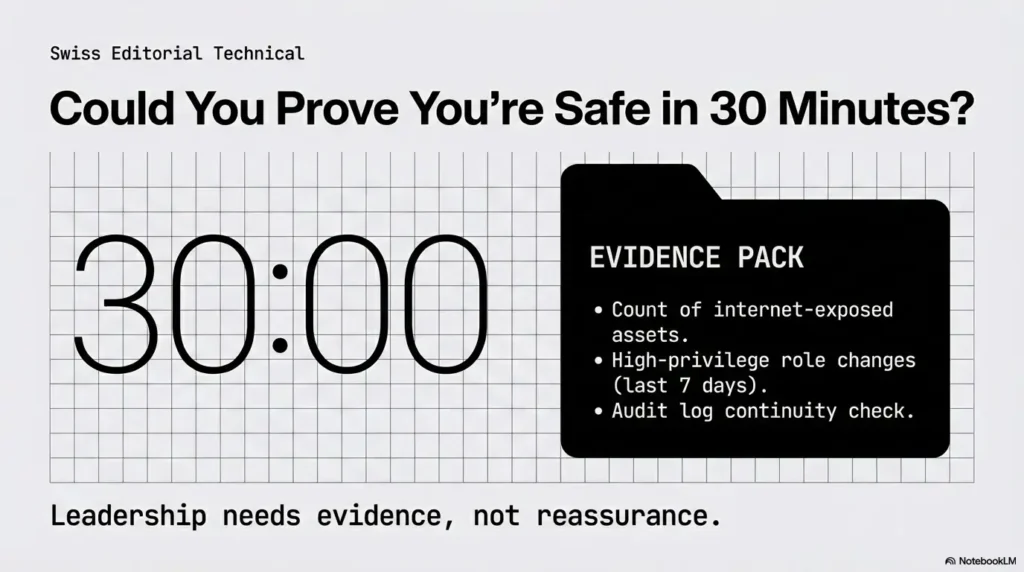
When leadership asks, “Are we exposed right now?” they need evidence, not reassurance. Keep a 30-minute pack with snapshots of your current risk posture. This turns stressful meetings into operational decisions.
Three screenshots/log views that convince leadership fast
- Current internet-exposed critical assets (count + owners + age)
- High-privilege role changes over the last 7 days
- Audit log continuity view (no gaps for critical services)
What to measure weekly so risk trend is visible
Track one north-star metric: internet-exposed critical findings in production. Add two supporting trends: mean time to remediate critical misconfigs and exception count with valid expiry. Keep it simple enough to discuss in under 5 minutes.
Infographic: From Misconfiguration to Incident (and Where to Break the Chain)
Public bucket, open admin port, broad trust.
Automated scanning finds reachable assets.
Over-broad IAM enables lateral movement.
Unrestricted egress or archive access leaks data.
Breakpoints: Block public access • Expire temporary privilege • Enforce egress policy • Preserve complete audit logs.
- Prepare evidence before incidents.
- Use one north-star risk metric.
- Keep owner mapping current.
Apply in 60 seconds: Schedule a 30-minute evidence-pack drill this week.
FAQ
What is the most common AWS misconfiguration behind breaches?
Publicly exposed storage and over-permissive IAM remain frequent root causes. The dangerous combination is exposure plus privilege expansion, not just one misstep in isolation.
Are GCP misconfigurations mainly IAM-related or network-related?
Both matter, but IAM mistakes often create deeper blast radius because they enable lateral movement. Network exposure often starts the incident; identity overreach often scales it.
How quickly should we remediate public storage exposure?
Treat confirmed public sensitive data exposure as immediate incident response, not normal backlog work. Contain first, then investigate access history and potential downstream impact.
Is disabling public IPs enough to prevent cloud incidents?
No. It helps, but does not solve identity abuse, key leakage, overly broad trust policies, or data egress gaps. Think layered controls, not single toggles.
What’s the difference between misconfiguration and vulnerability?
A misconfiguration is an insecure setup choice or drift in your environment. A vulnerability is usually a software flaw. Incidents often blend both, but many cloud breaches begin with misconfiguration alone.
Do managed services remove most misconfiguration risk?
They remove some infrastructure burden, not operational accountability. You still own identity boundaries, data exposure decisions, policy exceptions, and audit coverage.
How do we prioritize fixes when alert volume is huge?
Prioritize findings that combine external reachability, privilege escalation potential, and sensitive data access. This attacker-path lens beats queue-age sorting.
What logs are mandatory for incident reconstruction in AWS/GCP?
Use control-plane logs for identity and resource changes plus the appropriate data-plane/access logs for sensitive reads and writes. Check service-specific defaults and gaps, retention, tamper resistance, and protected exports; management logs alone cannot prove object-access history. See AWS data-event logging and GCP audit-log coverage.
How often should we review IAM roles and service accounts?
High-privilege paths deserve at least monthly review, with continuous checks for break-glass grants and stale keys. Fast-moving environments may require weekly review of top-risk identities.
Can policy-as-code realistically prevent real incidents?
Yes—if it runs in CI/CD before deployment, exceptions expire automatically, and runtime drift still gets monitored. Policy-as-code without governance becomes decoration.
Quote-Prep List: What to gather before comparing tools or service partners
- Current count of internet-exposed critical findings
- Identity graph complexity (accounts/projects, roles, service accounts)
- Required integrations (CI/CD, ticketing, SIEM, IAM providers)
- Required evidence outputs for leadership and audits
- Remediation ownership model (security vs platform vs app teams)
Next step: Prepare this list before vendor calls to avoid purchasing dashboard noise.
Neutral action: build your comparison worksheet before evaluating another security platform. If external validation is part of your plan, lock expectations early by reviewing pentest limitation-of-liability clauses alongside your penetration testing cost assumptions so scope, risk, and budget stay aligned.
Next Step — One Concrete Action to Do Today
Run a 60-minute “Top 10 Misconfig” sweep: public storage, IAM wildcards, exposed admin endpoints, logging gaps
Set a timer. Pull one security engineer, one platform owner, one app owner. Don’t debate architecture first. Validate exposure first. You’re looking for high-confidence risk reductions, not perfect remediation design.
Assign one owner per finding + 7-day remediation deadline + 30-day exception expiry
Ownership without dates is theater. Dates without owners is chaos. Use both. If a fix can’t happen in 7 days, require a documented exception with a 30-day expiry and explicit approver.
Re-run weekly and track “internet-exposed critical findings” as your north-star metric
This closes the loop from the opening promise: yes, small settings can become big incidents—but only if they stay invisible and unowned. Once you measure exposure + identity path risk weekly, your team shifts from reactive cleanup to controlled risk reduction.
In plain terms: do one sweep today. In 15 minutes, you can schedule it. In 60 minutes, you can reduce real breach probability.
Original review: 2026-02.
This content is educational and operational, not legal advice. Configuration decisions should be validated against your organization’s threat model, compliance obligations, and incident response policy. If you identify active exposure (public sensitive data, suspicious IAM role use, credential leakage, or unexplained cross-account activity), escalate immediately to your incident response team or managed detection partner.
Technical guidance updated: 2026-10-13. Clarified management versus data-access logging, production permission-change prerequisites, and limits of short observation windows.