
For a small business, CUI enclave pricing can start around $5,400 per year for a narrowly scoped three-user encrypted collaboration environment, while a managed single-PC enclave can approach $20,000 per year before broader compliance costs. Larger cloud enclaves involving Microsoft government environments, virtual desktops, engineering applications, monitoring, and managed IT usually require custom quotes.
The variable that matters most is not total employee count. It is how many people, devices, applications, and locations actually process, store, or transmit Controlled Unclassified Information. A 30-person manufacturer with two CUI users may need a much smaller environment than a 10-person engineering firm where every employee opens controlled drawings.
Before requesting quotes, map the CUI workflow. That one exercise can prevent an expensive enclave from becoming either oversized or, worse, too narrow to protect the data it was purchased for.
Table of Contents
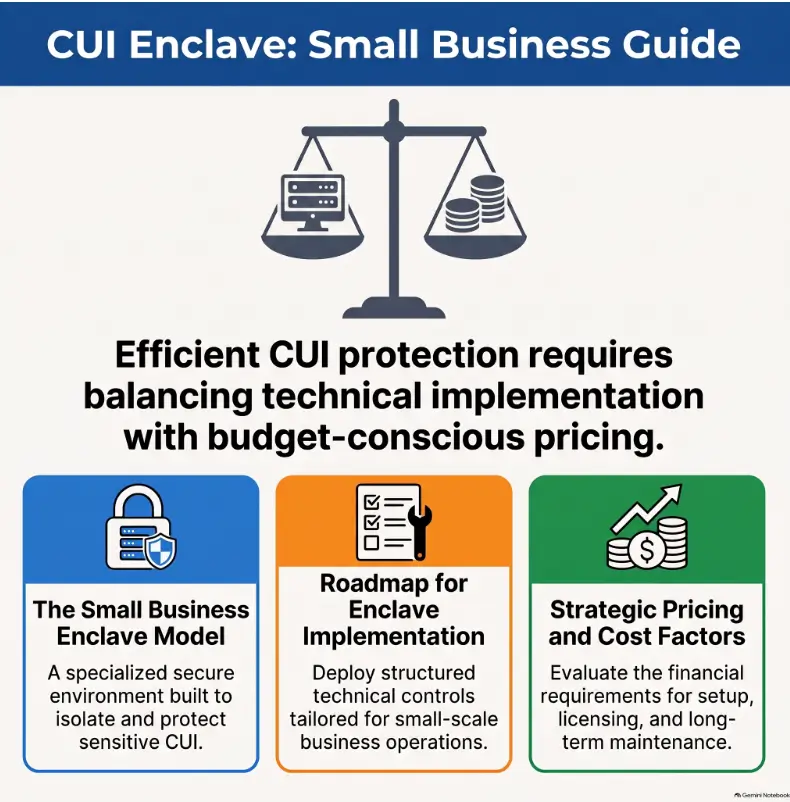
What Small Businesses Are Actually Paying For
A CUI enclave is not simply a more secure Microsoft subscription. It is a deliberately bounded environment intended to keep CUI and the systems protecting it inside a controlled security scope.
The price therefore reflects some combination of secure storage, email or collaboration, endpoint configuration, identity controls, logging, encryption, backups, administration, documentation, monitoring, support, and the work required to prove that those controls operate as described.
Public prices are useful only when the scope behind them is visible. The following figures were publicly posted when this article was reviewed in August 2026. They are vendor-stated price anchors, not industry averages.
| Enclave model | Public price anchor | What the price represents | Best fit |
|---|---|---|---|
| Encrypted email and file enclave | $450/month for 3 users | Government-community encrypted collaboration, documentation resources and compliance support | Small teams whose CUI is mainly email and files |
| Single-PC, roll-your-own enclave | $6,495/year | Hardening guidance, templates, compliance tooling and consultation; business supplies and manages hardware | Technically capable solo or micro contractors |
| Single-PC, self-managed enclave | $9,995/year plus refundable $1,000 deposit | Hardened PC, router, backup drive, documentation and initial setup; customer operates it | One primary CUI workstation without full managed IT |
| Single-PC, managed enclave | $19,995/year plus refundable $1,000 deposit | Hardware plus administration, monitoring, incident assistance and assessment preparation support | Micro-businesses that cannot operate security controls internally |
| Multi-user cloud or virtual desktop enclave | Custom quote | Government cloud, virtual desktops, licensing, applications, monitoring and administration depending on scope | Teams needing broader Office, engineering or application workflows |
The $450 monthly example comes from PreVeil’s current pricing for its three-user PreVeil Pass offering. At 12 months, that is an illustrative platform cost of $5,400 per year. The company states that the three-user package is paid annually in advance; additional users require pricing beyond the starting package.
The single-PC figures come from Totem Technologies’ published HRDN-IT pricing. They illustrate why apparently similar “CUI enclave” products can differ sharply: the least expensive tier expects the customer to supply and manage more of the environment, while the managed tier transfers substantially more operational work to the provider.
The Biggest Cost Driver Is Your CUI Boundary
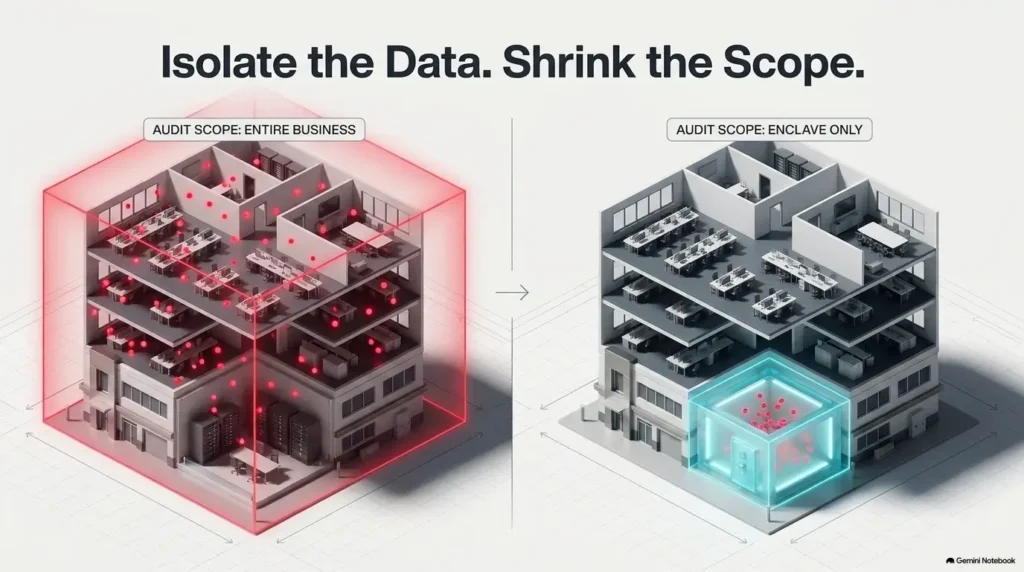
If ten employees work for your company but only two need CUI, pricing an enclave for all ten can be unnecessary. On the other hand, licensing only two users will not contain the scope if CUI regularly escapes into commercial email, personal downloads, ordinary file shares, unmanaged printers, CAD workstations, or other systems.
The useful question is therefore not “How many employees do we have?” It is “Where can CUI go during a normal workday?”
| Cost driver | Why it changes the quote | How to control cost safely |
|---|---|---|
| CUI users | More identities, licenses, endpoints and support | Limit access to people who genuinely need CUI |
| CUI applications | CAD, ERP, source code and specialty software may need to operate inside the boundary | Identify required applications before selecting the enclave model |
| Endpoints | Each workstation can create configuration, monitoring and evidence obligations | Use dedicated or virtualized CUI access where practical |
| Cloud services | External services handling covered defense information introduce contractual security requirements | Keep unnecessary cloud services outside the CUI workflow |
| Printing and removable media | Physical CUI expands procedures, equipment and evidence | Avoid printing or removable media when the contract workflow permits |
| Locations | Additional offices or work areas can expand physical and network scope | Centralize CUI handling where operationally realistic |
| Management level | Someone must maintain accounts, logs, patches, incidents and evidence | Retain work internally only when staff can reliably perform it |
This boundary is where small companies can save meaningful money without weakening the requirement. Shrinking the legitimate CUI footprint is different from pretending that systems are out of scope while CUI still passes through them.
Which Enclave Model Fits Your CUI Workflow?
The cheapest enclave is poor value if employees must constantly move CUI outside it to perform their jobs. Choose the architecture from the workflow first, then compare price.
Encrypted collaboration enclave
This model can make sense when a few employees primarily receive, send, store, and share controlled documents through email and file collaboration. It lets the rest of the organization continue using its ordinary commercial environment while the controlled workflow is separated.
It becomes less attractive when CUI must be opened in multiple specialty applications, copied into unsupported systems, processed on numerous endpoints, or integrated into production engineering workflows.
Single-workstation enclave
A hardened PC can be unusually efficient for a solo consultant, SBIR/STTR contractor, small machine shop, or other organization where one physical workstation can realistically contain the controlled work.
The tradeoff is operational friction. A one-PC enclave becomes a bottleneck when several employees need concurrent access or when collaboration, remote work, cloud applications, and large engineering files become routine.
Cloud or virtual desktop enclave
A cloud enclave or virtual desktop environment is better suited to several CUI users who need broader productivity applications, centralized administration, remote access, or specialized software. It can also keep controlled data away from ordinary employee endpoints when designed correctly.
This is where quotes become difficult to compare. One provider may quote only licenses and infrastructure. Another may include endpoint management, EDR, logging, backups, documentation, help desk support, continuous monitoring, and compliance administration.
Never compare those two proposals by monthly price alone.
Do You Actually Need GCC High?
Microsoft 365 GCC High is not a universal requirement for every business handling CUI. It is one architecture option. Your contractual requirements, data type, export-control obligations, applications, and CUI workflow determine whether it is appropriate.
For contractors subject to DFARS 252.204-7012, the important cloud distinction is broader. If an external cloud service provider stores, processes, or transmits covered defense information for contract performance, the clause requires the contractor to ensure that provider meets security requirements equivalent to the FedRAMP Moderate baseline and satisfies specified incident-response obligations. The controlling language is available in DFARS 252.204-7012.
That is why an ordinary low-cost commercial cloud subscription should not be assumed suitable merely because it offers encryption, MFA, or attractive security features.
If a provider recommends GCC High, ask what workload requires it. If the answer is simply “CMMC requires GCC High,” ask for a more precise explanation tied to your contract and architecture.
What the Enclave Price Usually Does Not Settle
An enclave can reduce technical scope. It does not purchase compliance as a finished product.
- C3PAO assessment fees: a platform subscription should not be assumed to include an independent certification assessment.
- Policies and procedures: your company still owns organizational practices that technology cannot perform for you.
- Physical security: office access, media handling and printed CUI may remain your responsibility.
- Personnel responsibilities: account approvals, training, incident decisions and other human controls do not disappear.
- Unsupported applications: CAD, ERP, manufacturing or engineering software may require extra architecture and licensing.
- Migration: locating old CUI and moving or removing it from existing systems can be a separate project.
- Internal labor: a self-managed enclave is inexpensive only if somebody has the time and competence to operate it.
Those costs explain why an enclave subscription should be treated as one line in the broader CMMC compliance cost, not as the complete budget.
If you are also budgeting EDR, identity, backup, logging and related controls, a separate security tool stack cost model can help prevent those expenses from disappearing between the enclave quote and the final operating budget.
The 2026 CMMC Pause Does Not Remove the CUI Protection Requirement
This distinction matters before spending money in 2026.
On July 13, 2026, the Department announced the immediate suspension of the planned CMMC Phase II requirements that had been scheduled for November 10, 2026. Phase I self-assessment requirements remain in place while the program undergoes review. The Department also stated that contractors remain obligated to protect covered defense information under DFARS 252.204-7012. The current status is explained in the official July 2026 CMMC announcement.
For a buyer, that means the pause is a reason to verify the assessment requirement in the current solicitation or contract. It is not a reason to let CUI flow through systems that fail the safeguarding obligations already incorporated into the contract.
Another source of confusion is NIST revision numbering. NIST published SP 800-171 Revision 3 in 2024 and later created a small-business primer for SP 800-171 Revision 3. During the current CMMC review, however, the Department has said it is enforcing NIST SP 800-171 Revision 2 through self-assessments and selected government-led assessments. Your contractual language remains the controlling place to verify what applies to your work.
A 15-Minute CUI Enclave Scope Check
Do this before talking to vendors. A short boundary worksheet can save several rounds of vague quotes.
- List the people who genuinely need CUI. Do not start with total employee count.
- List the CUI itself. Examples might include controlled drawings, technical specifications, source files or contract information identified as covered defense information.
- Write down every action performed on it. Receive, email, edit, download, print, upload, annotate, manufacture from, archive or share.
- Name every application used during those actions. Include email, office software, CAD, ERP, file transfer, ticketing and backup services.
- List every device and location involved. Include laptops, desktops, servers, mobile devices, printers and home offices.
- Identify outside recipients. Primes, subcontractors, consultants and other partners can change the collaboration requirements.
- Mark what could realistically be removed. Every unnecessary user, system or workflow removed from the CUI path may reduce cost and evidence burden.
You now have the beginning of a scope statement rather than a sentence that says, “We are a 12-person company and need CMMC.”
How to Compare CUI Enclave Quotes
Request the same answers from every provider. Otherwise one quote may look cheaper because half the necessary work is simply absent.
| Vendor question | Why it matters | Red flag |
|---|---|---|
| Exactly which systems and users are inside the proposed CUI boundary? | Shows what the quote is actually protecting | No boundary diagram or written scope |
| Which responsibilities do we retain? | Exposes internal labor and control gaps | “We handle compliance for you” |
| Can we review the shared responsibility matrix before purchase? | Separates vendor controls from customer controls | Responsibilities explained only verbally |
| Which endpoint, logging, backup and monitoring services are included? | Prevents surprise add-ons | Platform licensing presented as a complete managed service |
| How are our required applications handled? | Determines whether employees can actually work inside the enclave | Specialty applications deferred until after signing |
| What documentation and evidence will we receive? | Security controls must be demonstrable, not merely claimed | No sample deliverables or evidence description |
| Is assessment support included, and is the assessment itself separate? | Prevents confusion between readiness and independent assessment | Certification implied as part of buying the platform |
| What happens if we leave? | Reveals migration and lock-in risk | No clear data export or offboarding process |
The shared responsibility matrix is particularly valuable. A vendor may provide excellent technical controls while your organization remains responsible for personnel procedures, physical security, incident decisions, access approvals, training, policies and evidence that the vendor cannot create on your behalf.
When the Cheapest CUI Enclave Is Actually the Better Buy
Paying more is justified when it removes a real operational problem. It is not justified merely because the service contains more security vocabulary.
A narrow, inexpensive enclave can be appropriate when only one to three people handle CUI, their workflow is simple, the necessary applications are supported, and the organization has enough internal capability to perform its remaining responsibilities.
A more expensive managed environment becomes rational when the cheaper alternative would leave nobody reliably patching systems, reviewing logs, maintaining accounts, collecting evidence, responding to incidents or supporting employees. At that point, you are paying for operations rather than merely another license.
Conversely, a premium managed cloud enclave may be poor value for a one-person contractor who receives a small number of controlled documents and can legitimately contain all CUI on one hardened workstation.
The sensible target is not the cheapest enclave. It is the smallest workable boundary that your business can operate correctly every day.
Frequently Asked Questions
Can only two employees use the enclave while everyone else stays on normal Microsoft 365?
Potentially, yes. That can be an effective small-business architecture if CUI genuinely remains inside the controlled workflow. The boundary must account for systems that handle CUI and systems providing security protection to them, not merely the two licensed user accounts.
Is Microsoft GCC High mandatory for CMMC Level 2?
No universal rule says every Level 2 contractor must buy GCC High. The correct cloud environment depends on the contract, CUI workflow, cloud-service requirements, export controls and applications involved. Ask anyone claiming it is mandatory to identify the requirement that applies to your specific situation.
Does buying a CUI enclave make the business compliant?
No. An enclave can implement or support many technical requirements and make the assessment boundary easier to manage, but the organization retains responsibilities for policies, people, physical safeguards, governance and other controls. Compliance or certification also involves assessment of implementation, not product ownership.
Should a small business delay its enclave purchase because CMMC Phase II is suspended?
Do not base that decision on the Phase II pause alone. First read the current solicitation, contract and flow-down requirements. If your organization is already required to safeguard covered defense information, the underlying protection obligation remains even while future CMMC implementation is being reviewed.
What to Ask Before You Buy
Spend ten minutes turning your CUI workflow into a one-page vendor brief. Write down the number of CUI users, required applications, devices, work locations, cloud services, printing needs and outside collaborators.
Then send every prospective provider the same six questions:
- What exact CUI boundary are you proposing?
- What is included in setup and what becomes recurring?
- Which controls and operational tasks remain ours?
- Which applications or workflows are not supported?
- What evidence and documentation will we receive?
- What is the total first-year price and the expected renewal price, excluding any independent assessment?
If a vendor cannot answer those questions clearly, another product demonstration will not fix the problem. You do not yet have a comparable quote.
Last reviewed: 2026-10