Install Impacket through a chosen ownership model, then verify which launcher and environment you actually use. Keep package source, dependency ownership and a harmless acceptance check in the record.

Sources, review date and section shortcuts
Key claims reviewed: October 19, 2026. APT, pipx and project virtual environments have different ownership and update paths; none guarantees no future breakage.
Primary documentation · Related practical guide
Go straight to: Decision check · Main workflow · Further detail
Open the Python tool ownership record for this guide’s task-specific fields and next action.
Record the executable and environment you actually use
Kali recommends distribution packages where suitable and isolated Python application environments where appropriate. PEP 668 can also affect user installs outside a virtual environment. A successful install is not proof that the intended executable is first on PATH. Record package source, version and launcher, check its harmless help output and keep a recovery plan before upgrades. Source and scope.
The fastest way to waste a Kali afternoon is trying to “just install one thing” and realizing your OS has started saying no on purpose.
If you’re trying to install Impacket on Kali with PEP 668, that refusal isn’t a bug—it’s a guardrail that shows up right when you’re already in a hurry.
PEP 668 is a Python packaging standard that marks the system Python as an externally managed environment. When that marker is present, pip blocks global installs to stop you from overwriting OS-managed Python packages and quietly breaking other tools. The goal is fewer delayed explosions after upgrades.
The pain is modern and specific: you need impacket-* commands to exist, to be the right version, and to stay that way after your next apt upgrade. Keep guessing and you’ll lose time twice—once today, and again when something unrelated starts failing later. (If you’ve ever hit the “why are my kali packages kept back?” wall mid-update, this is the same ecosystem trying to keep your system coherent: Kali packages have been kept back (fast fixes).)
This post gives you a clean, repeatable lane:
apt for stability,
pipx for isolated CLI tools on your PATH, and
venv for project-pinned setups—plus the “don’t do this” traps (hello, --break-system-packages).
I’m writing this the way I wish someone had written it for me: after the “it worked… then it broke later” lesson.
Good. Now we pick a lane.
No drama. Just predictable tools. And a setup your future self won’t have to apologize for.
Kali’s externally managed Python policy can reject pip installations outside a virtual environment, including –user attempts. Choose distribution packages, an isolated application environment or a project venv according to ownership and update needs. These routes reduce particular conflicts; none guarantees that future updates cannot break a tool.
Choose your lane first: apt vs pipx vs venv
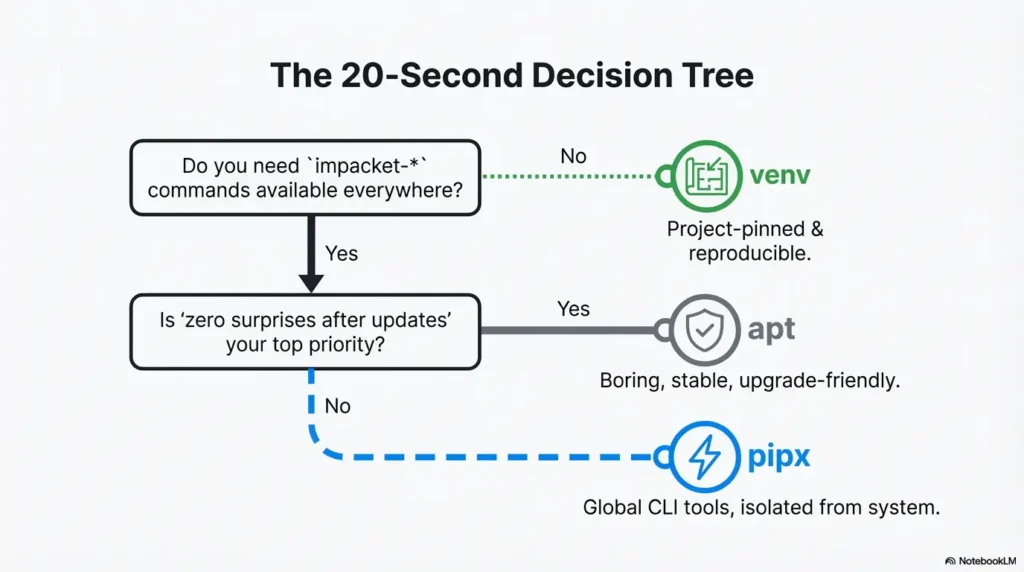
The 20-second decision tree (pick once, stop reinstalling)
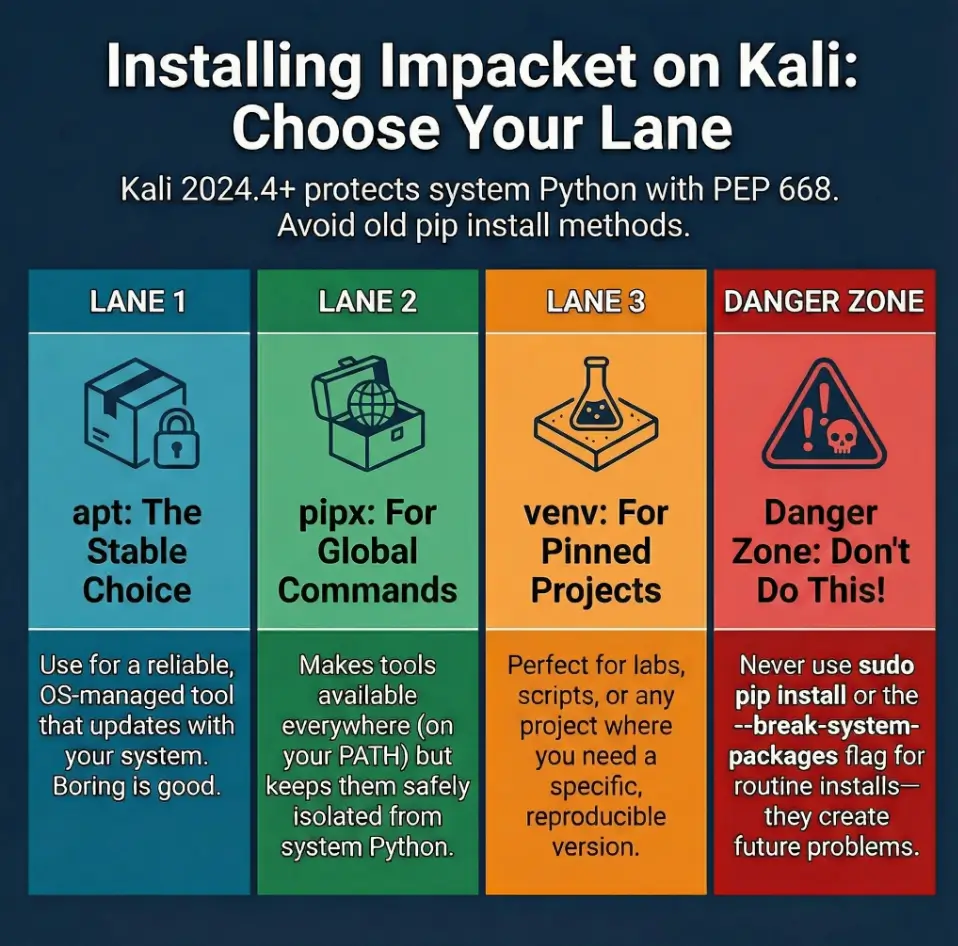
If you do one thing right today, do this: decide what “installed” means for you. Not “installed somewhere,” but installed in a way you can predict under pressure.
- Choose
aptif you want a stable, distro-managed Impacket that survives system updates with minimal drama. - Choose
pipxif you want theimpacket-*commands available for your user (from your PATH), but isolated from system Python. - Choose
venvif you need a specific Impacket version for a project, a course/lab, a script repo, or a pinned workflow.
apt= stable + boring (good)pipx= user-level CLI tools, isolatedvenv= project-pinned and reproducible
Apply in 60 seconds: Decide whether you need Impacket on your PATH everywhere or only inside one project folder.
Curiosity gap: Why the “right” method depends on how you run Impacket
Here’s the sneaky part: Impacket is both a library and a set of command-line examples. If you mainly run tools like secretsdump-style scripts from a terminal, you’ll care about PATH and command names. If you import Impacket in your own code, you’ll care about Python dependency pinning. Different “installed” targets, different best practices.
PEP 668, decoded: what changed in Kali 2024.4+
“Externally managed” means your OS owns system Python now
PEP 668 is a packaging standard that tells pip, “This Python environment is managed by the OS—don’t install things here.” On Kali, that means the system Python is treated as a shared dependency space for OS packages. If pip could freely overwrite those packages, your system tooling becomes a Jenga tower.
Kali’s own guidance has been blunt for a while: use APT for system packages, and use isolated environments for everything else. The message got louder in Kali 2024.4, because the tooling is now designed to stop you from doing the risky thing by accident.
Show me the nerdy details
PEP 668 works by adding a marker file that signals the environment is “externally managed.” pip sees that marker and refuses global installs to protect OS-managed Python packages. The modern packaging ecosystem prefers isolation: system packages via the OS package manager, app-like Python CLIs via pipx, and project dependencies via virtual environments.
Why Kali is stricter than your Ubuntu box (and why that’s good)
Kali is not just “Debian with a cool wallpaper.” It’s a distribution where a lot of tools depend on Python, and where upgrades happen often. That’s a recipe for dependency collisions if you treat system Python like a personal junk drawer.
An installation can affect dependencies shared with another tool. Keep the package-managed environment separate from an intentionally maintained isolated environment, and verify the launcher selected for each task. Reproducibility and update ownership matter more than forcing an installation through an unexplained protection error.
Open loop: What “breakage” actually looks like in pentest tooling
Breakage rarely looks like a clean error that points to the real cause. It looks like:
- A tool imports the wrong version of a shared module and fails in a weird place.
- A command exists, but behaves differently after an update because dependencies shifted.
- One tool works, but another breaks… and the only “change” was a pip install from last week.
The point: the install method isn’t about “making it work.” It’s about making it work predictably.
The fix wasn’t a heroic debugging session. The fix was admitting my install lane was wrong. I rebuilt the VM: apt for OS tools, pipx for CLIs, venv for the course repo. The week went smoothly. And the most annoying part? I could’ve saved myself about 90 minutes by choosing the lane first. (If your “clean VM” is running in VirtualBox, make sure performance isn’t quietly sabotaging you—especially after graphics tweaks: VirtualBox Kali 3D acceleration browser lag (when to disable it).)
Who this is for / not for
For: Kali as a daily driver VM, lab box, or client-ready toolkit
If you want a Kali machine that stays reliable across updates, you’re in the right place. This is especially true for a VM you snapshot, restore, and reuse. Consistency is the whole game. (If you’re deciding between hypervisors for a “stable lab box” workflow, this comparison helps set expectations early: VirtualBox vs VMware vs Proxmox for pentest labs.)
For: people who run impacket-* commands from PATH
If your workflow is “type the command, get output, move on,” pipx or apt tends to feel best. You want commands to be present and consistent without having to activate a venv every time.
Not for: folks compiling bleeding-edge commits daily (use venv + pinned deps)
If you’re regularly pulling the latest Impacket changes or testing a specific PR, you want a project folder with a venv and explicit pins. That’s not “extra work”—that’s how you prevent chaos. (This is also where a small, disciplined Python tooling repo can pay off over time: build a mini exploitation toolkit in Python.)
Not for: “just use sudo pip” energy (you’ll lose upgrades)
If your preferred method is “force it until it works,” Kali 2024.4+ will keep arguing with you. And even if you win today, you’ll pay later—usually right before something important.
- Yes/No: Do you need Impacket commands available without activating anything?
- Yes/No: Do you care more about “latest features” than “always works after updates”?
- Yes/No: Are you installing for a specific repo/course that should be reproducible later?
- Yes/No: Will you snapshot/clone this VM and want it to behave the same next month?
Neutral next action: If you answered “yes” to reproducibility, lean venv; if you answered “yes” to global commands, lean pipx; if you answered “yes” to stability, lean apt.
Option A — apt install: boring, stable, and upgrade-friendly
When apt is the correct answer (most of the time)
If your goal is “Impacket on Kali that behaves like every other OS tool,” apt is usually correct. It’s predictable, it participates in system updates, and it’s the least likely to surprise you when you’re busy.
What you get: distro-patched dependencies + predictable updates
APT installs are integrated with Kali’s packaging. That means dependencies are aligned with the OS, and updates roll in through the normal update process. You don’t have to remember what you installed where.
Tradeoffs: version lag and feature gaps (what to check before you commit)
The tradeoff is simple: OS packages can lag behind upstream. If you need a brand-new feature or a very specific behavior, apt may not be the right lane. That’s not a failure. That’s the entire reason pipx and venv exist.
Let’s be honest… stability wins on client days
When time is tight, the most expensive bug is the one you create yourself. If you don’t have a strong reason to avoid apt, don’t.
Show me the nerdy details
APT-managed Python packages are built and tested against the distro’s dependency graph. That reduces the chance of pulling in conflicting versions of shared libraries. It also means the package version you get is whatever Kali has packaged and validated for that release channel.
Option B — pipx install: isolated CLI tools without system Python damage
When pipx is best (you want Impacket commands globally, safely)
pipx is tailor-made for the “I want the command on my PATH” life. It installs Python CLI apps into isolated environments and exposes their entry points as commands you can run like any other tool.
This matters because Impacket’s tools are often used like apps: you’re not writing Python code, you’re running commands. pipx treats that as a first-class use case.
What pipx isolates (and what it doesn’t)
pipx isolates the package and its Python dependencies from system Python. That’s the big win. What it doesn’t do is magically fix PATH issues or user environment confusion. You still need a sane shell setup, and you still need to know which executable you’re calling. (If your shell environment is half the problem, cleaning up your terminal ergonomics can eliminate a ton of “installed but not found” grief: Zsh setup for pentesters (PATH sanity).)
Version control: pinning, upgrading, and rolling back without pain
The underrated feature is control. You can keep a known-good version, upgrade when you choose, and back out without rebuilding the whole machine. That’s the difference between “toolchain” and “pile of tools.”
Here’s what no one tells you… pipx solves 80% of “PEP 668 rage”
Most people aren’t trying to create Python libraries. They’re trying to install a CLI and get on with their lives. pipx is the compromise Kali wants you to choose: modern packaging discipline without forcing you into constant venv activation.
impacket-* commands globally but don’t want to touch system Python, pipx is the sweet spot.
- Isolated dependencies
- Commands on PATH
- Easy upgrades and rollbacks
Apply in 60 seconds: Commit to pipx for Python CLIs you run from the terminal.
Show me the nerdy details
pipx builds a virtual environment per installed app (or per package) and places shims/entry points into a user-accessible bin directory. This keeps app dependencies from colliding with OS-managed modules while still feeling like “install once, run anywhere.”
Option C — venv install: project-pinned Impacket for labs and tooling stacks
When venv is best (scripts, custom forks, training labs, reproducibility)
Use a venv when Impacket is part of a project, not just a tool. Examples:
- You have a repo with scripts that import Impacket modules.
- You’re following a course/lab that expects a specific version.
- You’re testing behavior differences between versions.
- You want reproducible installs for teammates or future-you.
A reproducibility option is to keep one isolated training environment per course. Record its interpreter and dependency versions, plus the maintained procedure for rebuilding it. A pinned environment still needs an update and recovery owner; it does not guarantee identical behavior on a different host.
The “one folder = one Python universe” mental model
A venv is a boundary. Inside the boundary, you control versions. Outside it, your OS controls versions. That separation is the whole point of PEP 668 and modern packaging.
Pin it or regret it: requirements, hashes, and keeping teammates sane
Even if you’re solo, version pinning is kindness to yourself. You don’t need to over-engineer it. Just capture the versions you used when things worked, and you’ll avoid the “it broke after I updated something… maybe?” guessing game.
Curiosity gap: How to run impacket-* from a venv without friction
The friction is real: you don’t want to “activate a venv” 20 times a day. Two practical patterns:
- Make a tiny wrapper script in your project that runs the venv’s Python/entry points explicitly.
- Use
python -minside the venv for scripts you control, so the import path stays clean.
Show me the nerdy details
A venv is essentially a directory tree with its own Python interpreter and site-packages path. When activated, your shell points python and pip to that interpreter. You can also avoid activation by calling path/to/venv/bin/python directly for deterministic behavior in scripts and automation.
The “don’t do this” zone: installs that create future you problems
This is where most “PEP 668 problems” are actually “I tried to outsmart my OS” problems. You can absolutely force things. You can also absolutely regret it.
Mistake #1: sudo pip install impacket into system Python
This is the classic. It “works” until it doesn’t. Then you’re debugging your whole machine, not just one tool. If you want system-wide tools, use apt or pipx.
Mistake #2: using --break-system-packages as a lifestyle
That flag exists for edge cases and controlled scenarios, not as a daily workflow. If you reach for it out of habit, you’re choosing short-term speed over long-term reliability.
Mistake #3: mixing apt + pip into the same interpreter (dependency roulette)
The fastest way to create spooky behavior is to mix package sources in one Python environment. You won’t notice immediately. You’ll notice when you’re tired and in a hurry. That’s the worst time to learn you’ve built a fragile stack.
- Avoid global pip installs on Kali
- Avoid mixing sources in one interpreter
- Pick a lane and keep it consistent
Apply in 60 seconds: If you already forced a global install, plan a cleanup: move to apt/pipx/venv and remove the global packages.
Common mistakes (and the fast fixes)
PATH confusion: “installed” but commands not found
This one is painfully common. You installed the package, but your shell can’t find the executable. Before you reinstall anything, check:
- Are you using the right user account?
- Is the directory where pipx puts binaries included in your PATH?
- Are you inside a venv when you think you are?
Quick reality check: I’ve “fixed” this by reinstalling, only to realize my terminal session never reloaded PATH. One new shell later, everything worked. Annoying, but common. (If your PATH keeps behaving like it has a mind of its own, it’s usually solvable with one clean shell setup pass: Zsh setup for pentesters.)
Multiple Impackets: which one am I running right now?
If you’ve tried multiple install methods, you might have multiple copies. The danger is not having multiple copies—it’s not knowing which one your terminal is using.
- If a command runs, ask: “Where did this executable come from?”
- If a Python import fails, ask: “Which interpreter is importing this?”
Kerberos extras: missing modules that feel like “Impacket is broken”
Sometimes Impacket is installed correctly, but a specific feature path fails because a dependency isn’t present in that environment. This happens more often in venv/pipx contexts where you’re intentionally isolated. The fix is usually “install the missing dependency in that same environment,” not “reinstall everything.” (And if what you’re seeing is a Kerberos clock-skew style failure, the fix is often about time sync, not Impacket itself: KRB_AP_ERR_SKEW fix.)
Open loop: Why your pipx install works… until it silently doesn’t (and how to prevent it)
pipx is stable, but humans aren’t. The silent failure pattern looks like this: you install via pipx, then later you install another copy via a different method, and PATH starts picking a different executable. You think pipx “broke,” but your machine is just doing what you told it to do.
Prevention habit: after installing, do a quick “which + version” check and write down what you expect to see. Future-you will thank you.
- Kali version (and whether you upgraded in-place)
- Python version you’re using for tools
- Install lane you chose (apt, pipx, or venv)
- Exact command that fails and the first meaningful error line
- Output of “where is this executable from?” (PATH/executable location)
Neutral next action: Collect these once, then diagnose—don’t reinstall blindly.
Verification that actually matters: prove it works before a client day
Installing is not the same as being ready. “Ready” means: you can run the commands you need, from the context you’ll actually use, without surprises.
Check 1: confirm which executable you’re calling (PATH + which)
Before you test functionality, confirm identity. The simplest mistake is testing one installation while thinking you’re testing another. If you only do one verification step, do this one.
Check 2: confirm version and import health (minimal, meaningful tests)
A healthy install is not just “command exists.” It’s “command runs and dependencies import cleanly.” Do a quick sanity run that touches the code path you care about.
Check 3: run a “known-good” command and capture output for your notes
Save one known-good output snippet (even just version output) in your notes. When things break later, you’ll have a reference point that’s more useful than memory. (If you’re building a reliable capture habit, a lightweight system helps: note-taking systems for pentesting.)
Show me the nerdy details
Verification is about reducing ambiguity. If a tool fails, you want to know whether the failure is due to PATH, interpreter selection, dependency mismatch, or runtime behavior. A short “identity + version + minimal run” sequence usually isolates the category quickly.
- Verify identity (which executable)
- Verify health (imports/run)
- Record a known-good baseline
Apply in 60 seconds: After install, do an identity check and write down the expected path/version.
Upgrade & rollback strategy (so you never reinstall in a panic)
This section is the difference between “I installed Impacket once” and “I own a maintainable toolchain.” The goal is simple: upgrades should be intentional, and rollbacks should be possible.
apt: upgrades via system updates (and when to hold packages)
With apt, your upgrades ride along with OS updates. That’s a feature. If you’re in the middle of a course or a sensitive workflow, consider delaying upgrades until you’re ready to validate again. For a VM, a snapshot before upgrades can be a sane safety net. (And if an update leaves your VM “mostly fine but weirdly broken,” this kind of post-update gotcha is common in practice: Kali VirtualBox no sound after update.)
pipx: upgrade/rollback rhythm (keep last-known-good)
pipx makes upgrades easy—sometimes too easy. Don’t upgrade blindly right before you need reliability. Upgrade when you have 10 minutes to verify. If you need to keep a known-good setup, treat it like a small change-management process: upgrade, test, then proceed.
venv: lockfiles and snapshots (repeatable environments)
venv is where you can be the most disciplined. Capture your dependency versions. If you have a training repo, keep a requirements file that reflects what worked. When you return later, you rebuild predictably instead of improvising.
Curiosity gap: The one habit that prevents “toolchain drift” in Kali
Write down the lane choice and one verification command. That’s it. A three-line note. It sounds too small to matter—until you come back to a VM months later and instantly know what’s installed, where, and why.
Best when you want stability and OS-managed updates.
- Boring = reliable
- Least maintenance
- May lag upstream
Best when you want user-level CLI tools without touching system Python.
- Isolated environments
- Commands on PATH
- Controlled upgrades
Best when you need project pinning and reproducibility.
- Per-project isolation
- Version pinning
- Great for labs/courses
Bottom line: Pick the lane that matches how you run Impacket, not the lane that feels fastest in the moment.
FAQ
Why does Kali 2024.4+ block pip install with PEP 668?
Because Kali treats system Python as OS-managed. PEP 668 signals that pip should not install packages into that environment, reducing the chance of breaking OS Python dependencies.
Is --break-system-packages safe to use on Kali?
It can be used in controlled edge cases, but it’s risky as a default habit. If you need a safer long-term approach, prefer pipx for CLI apps or venv for project installs.
Should I install Impacket with apt or pipx for day-to-day pentesting?
If you want stability and minimal maintenance, choose apt. If you want isolated CLI tools on your PATH without touching system Python, choose pipx. Both are valid; pick based on workflow.
How do I run impacket-* tools if I installed in a venv?
You can activate the venv before running commands, or call the venv’s Python/entry points directly using the full path. Many operators also use wrapper scripts to avoid repeated activation.
Why does impacket-smbclient (or another tool) not show up after install?
Kali wrappers such as impacket-smbclient and upstream commands such as smbclient.py have different names. Check pipx list and the installed script list before assuming a PATH error; then verify the executable path and environment.
How do I check which Impacket version I’m actually using?
Check the executable path and run a version/help output if available. If you use Python imports, confirm the interpreter and its site-packages path match the environment you intended.
Can I have multiple Impacket versions installed side-by-side safely?
Yes—this is one of the strengths of pipx and venv. Just be deliberate about which environment provides the command you’re running, and avoid mixing sources in one interpreter.
Does installing Impacket with apt break my Python packages for other tools?
Generally, apt is the safest for system integration because it’s managed by the OS packaging system. Breakage is more likely when global pip installs override OS-managed dependencies.
What’s the best method for a shared team VM or training lab image?
For a shared image, prefer predictability: apt for stable system tooling, pipx for Python CLIs that should be global, and venv inside project repos that need pinned dependencies.
How do I uninstall Impacket cleanly (apt vs pipx vs venv)?
Use the same lane you installed with: uninstall via apt if installed via apt, uninstall via pipx if installed via pipx, and remove the project venv directory if installed via venv. Avoid leaving multiple copies unless you intentionally manage them.
Next step (one concrete action)
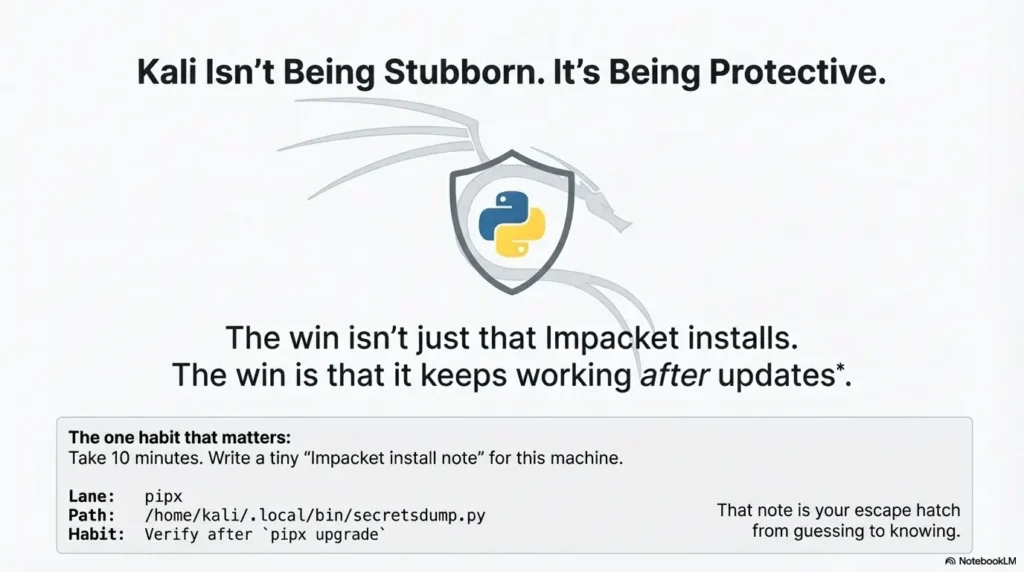
Take 10 minutes and write a tiny “Impacket install note” for this machine. Seriously—three lines:
- Lane: apt, pipx, or venv
- Expected executable path: where the command should come from
- Upgrade habit: how you’ll update and re-verify
That note is your future self’s escape hatch. When something acts weird, you won’t guess. You’ll check, confirm, and move on. (If you want a simple structure that keeps ops notes usable under pressure, borrow a page from pentest note systems: a practical note-taking system for pentesting.)
One more practical truth: Impacket is maintained by Fortra’s Core Security today, and it’s widely used in authorized testing workflows. Treat it like a power tool. Keep it organized, keep it predictable, and use it only where you have permission.
Review the installed environment before relying on it
Remember the hook—the feeling of “I just need one tool and Kali says no”? The punchline is that Kali isn’t being stubborn. It’s being protective. PEP 668 is the OS drawing a boundary so your system Python stays stable.
Choose APT when the packaged tool fits the task, pipx for a supported isolated CLI application or a project venv for controlled dependencies. Record the actual executable, package source and checks. Isolation and version pinning do not guarantee future operation.
Do this in the next 15 minutes: pick your lane, verify identity (which executable), and write the three-line install note. That’s how you turn “it works” into “it’s reliable.” (And if you’re packaging this into a repeatable VM you’ll reuse, pairing it with a stable lab setup plan keeps you from rebuilding from scratch: Kali lab infrastructure mastery.)
Original review: 2025-12
Command names depend on the install lane. Kali’s impacket-scripts package exposes wrappers such as impacket-smbclient; upstream pipx/venv installs normally expose examples such as smbclient.py. A missing impacket-* wrapper does not by itself mean installation failed. Use pipx list and command -v smbclient.py or command -v impacket-smbclient to check the lane you chose.
For a distro-managed install, use sudo apt install impacket-scripts. For a user-level isolated install, use pipx install impacket and pipx ensurepath, then open a new terminal. For a project, create python3 -m venv .venv and install through .venv/bin/python -m pip install impacket. PEP 668 can block pip install --user as well as system-wide installs. See the Kali packaging guide and Kali Impacket package reference.
Technical guidance updated: 2026-10-13. Clarified user-level pipx isolation, upstream versus Kali command names, and concrete install checks.
Python tool ownership record
Use these fields for your own task. Keep the actual conditions, evidence and unresolved questions beside the next decision.
Use the editable record below to retain the task context and unresolved questions.
Edit here, then select and copy the text to your own notes before leaving. This field has no submission or storage function; reloading resets it. Do not enter passwords, tokens or private client information. The 12,000-character limit applies to this working note.
Next action: Resolve PATH and environment identity before reinstalling the tool.
Related task: Use Kali msfconsole Ruby/Bundler Errors: Diagnose and Repair for that separate part of the workflow.
Worksheet change record — October 20, 2026
Added four task-specific fields, a next action and a related guide. This is a blank editorial working aid, not a completed test or validated assessment. Existing source-review dates retain their own scope; this addition is not a new verification of every statement.
Impacket launcher: installed and selected are different
Illustrative example — not a performed lab test.
- Observation
- A package operation succeeds, but the shell still invokes a launcher from an older isolated environment.
- Supported interpretation
- Package installation and command selection are separate facts.
- Still unresolved
- Which environment owns the invoked executable and its dependencies.
- Next authorized check
- Record the selected path and help/version output. Resolve the intended installation route and PATH selection before reinstalling. Keep the distribution package and separately maintained environment distinct; do not bypass managed-environment protection just to silence a mismatch.
Practice-aid update: October 20, 2026. Added the illustrative decision case and editable note. No new VM execution or full-article revalidation is claimed.