

Unquoted Service Path: From Scanner Hit to Defensible Proof
Stop chasing false positives. Real privilege escalation requires more than just a space in a path—it requires a writable boundary and an elevated context. This workflow is designed to move you past the “noisy screenshot dump” into a credible, minimal-impact verdict.
“Evidence-first, boundary-aware, and designed to avoid false positives. Let’s make it reproducible.”
Table of Contents
Safety / Disclaimer (read first)
This topic is dual-use. The same knowledge that helps you harden fleets can be misused to escalate privileges on systems you don’t own. So we’re keeping this authorization-only and non-actionable:
- Use this workflow only on systems you own or have explicit written permission to test (labs, CTFs, authorized engagements).
- This guide emphasizes verification, evidence, and remediation, and intentionally avoids step-by-step instructions that enable harm.
- In labs, take snapshots before changes. In real environments, treat service changes as change-managed work.
Personal note: the first time I saw this finding in a scanner output, I assumed it was “free admin.” It wasn’t. The machine taught me the lesson with a calm, humiliating silence: nothing happened because I never checked the write boundary. That’s why this guide exists.
When to seek help
If you’re touching production (workstation fleets, servers, domain controllers), stop and loop in your security/IT team. Service paths are brittle. One “quick fix” can break an app, fail a compliance check, or create downtime that costs far more than the finding.
Also: if you’re in a regulated environment, your proof strategy should be non-destructive by design. Show impact clearly, but don’t introduce new executables into sensitive directories without approval.
Who this is for / not for
For: lab learners, junior defenders, and auditors
- You want a repeatable “find → validate risk → prove → report” pattern.
- You want to separate “scanner found a thing” from “this is actually exploitable.”
- You’re building OSCP/PNPT-style notes that a grader (or a client) can follow—ideally backed by a consistent note system like an Obsidian OSCP enumeration template.
Not for: unauthorized testing or “try it on a random box”
- If you can’t articulate your scope, stop.
- If your goal is “quick privesc tricks,” you’re in the wrong room.
- Unquoted + spaces is necessary, not sufficient.
- Writability of candidate locations is the real gate.
- Proof should be minimal-impact and evidence-first.
Apply in 60 seconds: Add an “exploitable: yes/no + why” line to every service finding you write.
The one missing quote that changes everything
What “unquoted” really means in Windows parsing
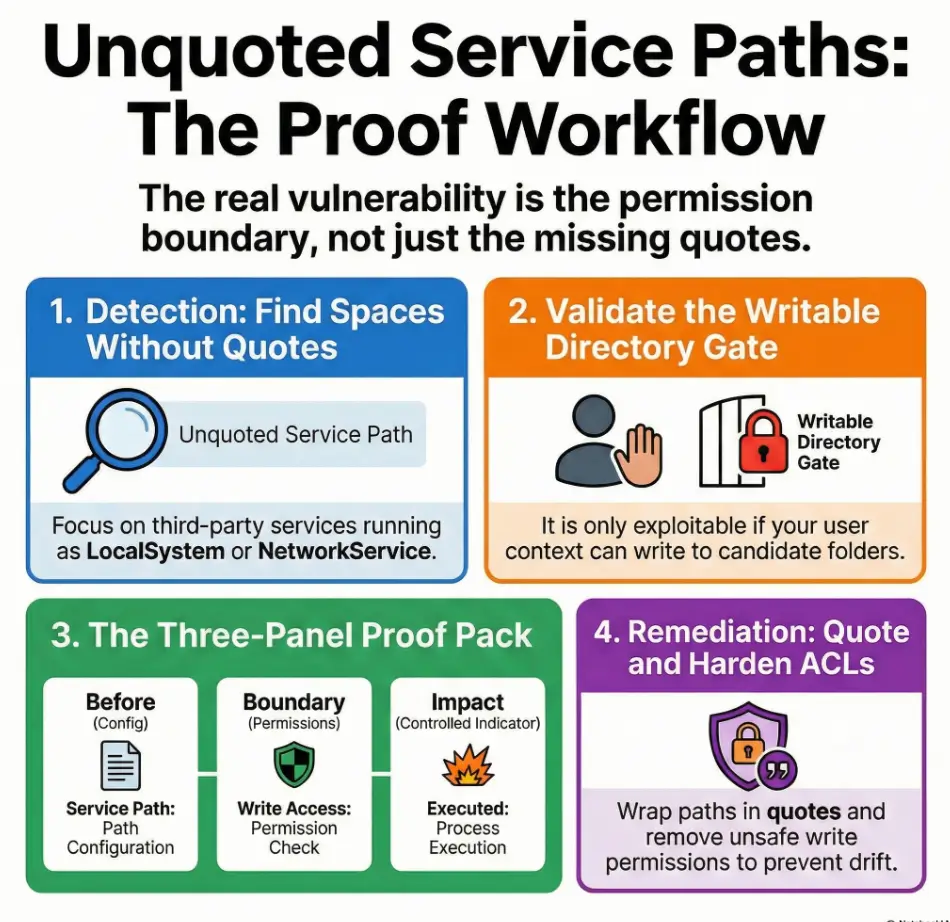
Windows services store an executable path (often with arguments). When that path contains spaces and isn’t wrapped in quotes, Windows may interpret it ambiguously—effectively splitting tokens at spaces. The classic illustration people use is a path like C:\Program Files\Vendor App\service.exe being interpreted as if earlier segments could be attempted first.
Important nuance: modern Windows isn’t “random.” It follows defined parsing behavior. And Microsoft’s own documentation for service creation notes that paths containing spaces must be quoted so they’re interpreted correctly. (That’s not pentest lore; it’s a straightforward correctness requirement.)
Show me the nerdy details
At a high level, this is about command-line parsing and how an unquoted executable path can be resolved in a way the installer didn’t intend. The “space” is the problem, not the folder. Quoting forces a single, unambiguous executable path, and arguments are then parsed after the closing quote.
The part most people forget: it’s not a vuln without write access
Here’s the grown-up version: unquoted path alone ≠ privilege escalation. The risk becomes practical only when an attacker (or, in a lab, a tester) can write an executable into a location that would be selected earlier—and the service runs with elevated privileges (e.g., LocalSystem) or is started by an elevated process.
Raymond Chen, writing on Microsoft’s “Old New Thing” blog in 2024, made a point that defenders should tattoo on their brains: a default-configured system typically isn’t exploitable because non-admin users can’t plant executables in protected locations. The exploit shows up when someone misconfigures permissions.
Quick personal anecdote: I once spent 25 minutes trying to “prove” this on a lab box, only to realize the vendor had installed under Program Files with sane ACLs. My screenshot pack looked impressive. My finding was wrong.
Detection: finding unquoted service paths without noise
Triage targets that actually matter
You can list dozens (sometimes hundreds) of services. But you don’t get points for volume—only for signal. Triage with these filters:
- Run-as account: prioritize services running as LocalSystem, LocalService, or NetworkService.
- Third-party vs Windows-native: third-party services are more likely to have messy install paths or custom folders.
- Start type and restart behavior: auto-start services or services that restart are higher “proof probability.”
Defender angle: vulnerability scanners like Qualys or Tenable Nessus may flag “untrusted service path” findings. Treat that as a starting point—not a verdict. Your job is to validate exploitability, not to paste scanner output into a report and hope no one reads it.
Evidence-first enumeration mindset (OSCP-style)
When you find a candidate service, capture these fields in your notes:
- Service name and display name
- Binary path (including arguments) and whether it’s quoted
- Run-as account
- Start type (auto/manual/disabled)
- Install directory ownership and permissions (you’ll validate next)
Keep it clean: one service per block, one screenshot per “before” state. If you’re doing this in a lab, I recommend naming screenshots like 01-service-config.png, 02-permissions.png, 03-proof.png. Not because it’s cute—because your future self will thank you at 1:12 a.m. (If you want a repeatable system, see this ShareX screenshot naming pattern.)
Let’s be honest…
If you can’t explain in one sentence why a specific service is exploitable, you’re not ready to report it. “It has spaces” is not a sentence. That’s a shrug with punctuation.
- Prioritize by run-as account and third-party install paths.
- Record the minimum fields a reviewer needs to reproduce.
- Don’t confuse “found” with “exploitable.”
Apply in 60 seconds: Add “Run-as + Start type + Quoted?” as three columns in your service notes.
Exploitability check: proving the preconditions (without guessing)
Map the “candidate drop” locations (conceptual)
Think of the unquoted path as a sentence missing quotation marks. Windows can misread where the “executable name” ends and where arguments begin. The risk is that an earlier token could be interpreted as the executable—but only if an executable exists there and the system is allowed to run it.
Your job is to map the candidate locations created by spaces in the path. Don’t improvise; use a deterministic checklist:
- Identify each directory segment up to each space boundary.
- For each segment, determine whether it’s a plausible executable location (folder exists? protected path?).
- Validate whether your current user context could write to that directory.
Personal anecdote: I once “mapped” the candidates in my head, missed one boundary, and spent 15 minutes validating the wrong folder. The box didn’t care that I was confident.
Permission reality check: “Can anything be written there?”
This is the hinge. You’re confirming the permission boundary for your current context (standard user, lab user, domain user, whatever you have). Separate these concepts:
- Writable folder: you can create new files (or new executables) in the directory.
- Writable file: you can modify/replace the service binary itself (different misconfig class).
- Writable parent path: sometimes the “candidate” is a parent folder you didn’t expect (custom vendor installs are notorious).
Show me the nerdy details
From a defender standpoint, this is about NTFS ACLs and effective access. A path might look “safe” because it’s under a familiar directory name, but inheritance, vendor installers, or overly broad group permissions (like Users or Authenticated Users) can change the story. Focus on effective write permissions for the user context that would attempt exploitation.
The service that looks vulnerable—but isn’t
False positives happen. Common reasons:
- The service runs as a low-privilege account and can’t meaningfully elevate.
- All candidate directories are non-writable to unprivileged users.
- The service rarely starts or is disabled; impact is limited (still a hygiene fix, but lower urgency).
Start type and restart behavior matter for proof strategy. A service that never restarts is like a locked door in a hallway no one uses—still not great, but not your fastest win in a timed exam. In a defensive audit, you still document it, but you calibrate severity honestly.
Exploitability Eligibility Checklist (Yes/No)
- Unquoted + spaces? If no → stop (not this issue).
- Runs as elevated account? (LocalSystem/LocalService/NetworkService or privileged domain account)
- At least one candidate directory writable to your current context? If no → document as “not exploitable in current context.”
- Service start behavior supports safe validation? (manual start in lab, controlled restart window in production)
- Proof plan is non-destructive? If no → redesign proof.
Neutral next step: If you answered “yes” to the first three, move to a proof plan that demonstrates impact without breaking the target.
Proof workflow: what counts as “credible” in a report
Proof objective: show control, not chaos
The point of proof is to demonstrate that the misconfiguration can change the execution chain under the service’s context—without destabilizing the host. In a lab exam, you want points. In a real environment, you want trust. Loud proof burns both.
I learned this the hard way during a blue-team validation sprint: I had a “proof” that caused an app to fail to start. The finding was real; my method was sloppy. The incident ticket was longer than the report.
Proof artifacts checklist (OSCP-ready)
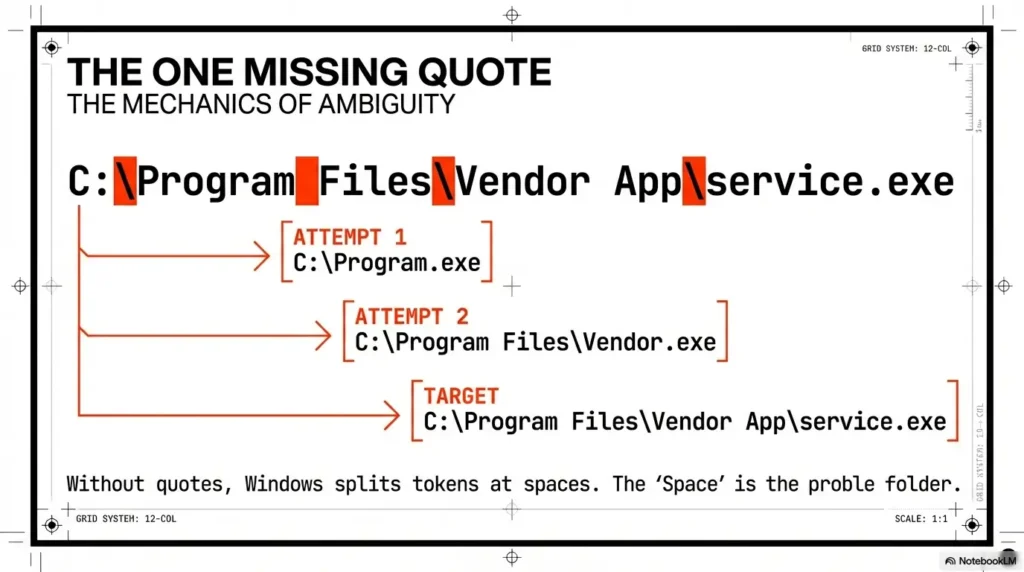
A strong proof pack typically includes:
- Before: service configuration (name, run-as, start type, binary path) and the unquoted condition.
- During: evidence of effective write permissions on candidate directories for your current context.
- After: evidence that execution behavior is affected in a controlled way (non-destructive confirmation, logs, or safe indicators).
For labs, “after” is often demonstrated by a controlled indicator that the service execution chain was influenced. For production, the safest “after” evidence is frequently configuration + permissions + risk narrative validated by change-controlled testing, rather than attempting to force behavior on a live system.
Here’s what no one tells you…
The strongest proof is usually two screenshots and one clean narrative, not ten action shots. A reviewer wants clarity: what you found, why it matters, and what would have to be true for exploitation. (If you want your “evidence pack” to score like a grown-up, borrow the structure from OSCP proof screenshot conventions and pair it with Kali lab logging practices so your artifacts survive review.)
- Before: unquoted path + service context.
- Boundary: confirmed write permissions.
- Impact: minimal indicator the chain can be affected.
Apply in 60 seconds: Write your proof narrative as three sentences—one per panel—before you take screenshots.
Mini Calculator: Quick Risk Score (for triage)
This is not a CVSS replacement. It’s a fast, honest triage score you can paste into notes.
Score: —
Neutral next step: Use the score to decide which service gets a deeper proof pack first.
Common mistakes (that waste hours or fail reports)
Mistake #1: Treating “unquoted” as automatically exploitable
This is the most common report-killer. The fix is a single line in your write-up:
Exploitability justification (one line): “Exploitable only if an unprivileged user can write to at least one candidate directory created by the unquoted path while the service runs with elevated privileges.”
I once reviewed an internal report that listed 18 “critical” unquoted paths. Seventeen were in protected directories. The technical team lost trust in the report, and the one real issue got delayed. That’s not a win.
Mistake #2: Ignoring the right permission boundary
People often check only the service binary file permissions (which is a different issue) and skip the candidate directories entirely—or vice versa. For this class of misconfig, directory write permission is usually the gate.
Mistake #3: Proof that breaks the target
“Loud” proofs trigger incident response. That means alarms, tickets, and time spent explaining yourself. In labs, it means wasted time. In production, it means burned relationships. Your proof should be surgical, boring, and undeniable. (If you tend to spiral, bookmark the OSCP rabbit-hole rule and treat it as a timer, not a vibe.)
- Write the exploitability condition explicitly.
- Validate the correct boundary (directory vs file).
- Keep proof non-destructive to preserve trust.
Apply in 60 seconds: Add a “false positive reason” line when exploitability is not confirmed.
Remediation that actually sticks (and survives audits)
Fix #1: Quote the service binary path (the obvious one)
Quoting is the correctness fix: it makes the executable path unambiguous. Microsoft’s service creation documentation is explicit that paths with spaces should be quoted to be interpreted correctly. In practice, defenders implement this via change-controlled service configuration updates (and careful validation that the service still starts).
Real-world caveat: quoting may be necessary but not sufficient if permissions remain dangerously broad on the install directories. You’re fixing the parsing ambiguity, but the underlying “writable where it shouldn’t be” problem may still exist elsewhere.
Fix #2: Remove unsafe write permissions from candidate directories
This is the part that “sticks.” If unprivileged users can write into sensitive service directories, the organization has a broader hardening issue. Least privilege for installation paths (especially custom vendor folders) is your durability control.
One defender memory: I watched a vendor update reset permissions to something overly permissive “to avoid support issues.” It did avoid support issues—for them. It created security issues for us. That’s why you want controls that detect drift, not just a one-time cleanup.
Fix #3: Validate after-change behavior
After change, validate:
- The service starts cleanly and dependencies remain intact.
- The “Path to executable” is properly quoted and normalized.
- Directory permissions match your baseline and don’t reintroduce broad write access.
“We quoted it” …so why is it still risky?
Residual risk scenarios often look like this:
- A vendor installer reintroduces unquoted paths on upgrade.
- Another service points to the same folder with weak ACLs.
- Non-service components (scheduled tasks, startup items) create similar execution ambiguity.
Show me the nerdy details
Durable remediation is a combination of correctness (quoting) and access control (ACL hygiene). Quoting prevents ambiguous parsing; ACL tightening prevents unprivileged write placement. Together, they reduce both exploitability and recurrence after updates.
Find services with spaces and no quotes. Capture service context.
Output: clean candidate list
Confirm effective write permissions on candidate directories.
Output: exploitable yes/no + why
Build a minimal-impact proof pack: before + boundary + controlled indicator.
Output: 2 screenshots + narrative
Quote paths and harden ACLs. Add auditing so updates don’t reintroduce risk.
Output: change-ready remediation
- Quoting removes ambiguity.
- ACL hardening removes the write path that makes it dangerous.
- Auditing prevents it from coming back after updates.
Apply in 60 seconds: Add a post-change check: “service starts + path quoted + ACL baseline intact.”
Reporting: turning a misconfig into a crisp, high-scoring finding
The “because → therefore → so what” write-up structure
This is how you turn a vague scanner hit into a clean finding:
- Because: The service binary path contains spaces and is not quoted.
- Therefore: Windows may resolve an earlier executable token in the path rather than the intended binary.
- So what: If a candidate directory is writable by a non-admin user, this can lead to code execution under the service account.
Notice the honesty: the “so what” is conditional. That conditional is where your professionalism lives.
Severity calibration (practical, not dramatic)
Calibrate severity using factors that matter:
- Privilege level: LocalSystem is higher impact than a restricted service account.
- Exploitability confirmed: write boundary validated (yes/no).
- Start behavior: auto-start services can be more reliably abused than dormant ones.
- Exposure surface: user population on the host, local access assumptions, and operational criticality.
Commercial entity reality check: tools like Qualys and Tenable Nessus will often flag the “unquoted path” pattern, and Sysinternals can help defenders inspect process/service behavior. But the report still needs your reasoning. Tools don’t get audited—people do. (If you want your deliverable to read like a client-ready artifact, borrow structure from a Kali pentest report template or the tighter professional OSCP report template and keep the same “exploitable: yes/no + why” discipline.)
Decision Card: Fix Now vs Fix in Next Maintenance Window
- Service runs as LocalSystem (or equivalent).
- Writable candidate directory is confirmed.
- Service is auto-start or business-critical.
- No writable candidate directory found for unprivileged users.
- Service is manual/rarely started.
- Change risk is high (vendor dependencies) and needs coordination.
Neutral next step: Tie priority to confirmed exploitability and operational impact—not to scanner severity alone.
Curiosity-gap: What defenders usually miss during hardening
Drift happens: installers, updates, and new services
This finding loves to come back. You fix it once, feel good for 12 minutes, and then a vendor update “helpfully” changes service configuration or permissions. Suddenly the same pattern reappears. Not because the universe hates you (although it sometimes feels personal), but because configuration drift is normal.
NIST has long emphasized configuration management as a discipline: maintain baselines, control changes, and monitor for deviation. That mindset is how you keep service hardening durable, especially in Windows environments with frequent updates and third-party installers.
Build a repeatable control
- Scheduled configuration auditing: regularly scan for unquoted paths and high-risk service contexts.
- Change management flags: treat new services or changed service paths as review events.
- Permission baselines: ensure install directories don’t drift into “everyone can write” territory.
Short personal story: I once watched a team “solve” unquoted paths by quoting everything… and left a vendor folder writable by standard users because “it makes troubleshooting easier.” Two weeks later, a different issue used that same folder as a foothold. The fix wasn’t wrong. It was incomplete.
- Quoting fixes one service today.
- Baselines and monitoring prevent ten services tomorrow.
- Permissions discipline is the long-term guardrail.
Apply in 60 seconds: Add “service path changes” to your change review checklist.
Short Story: The day “Program Files” wasn’t safe (120–180 words) …
It was a routine internal audit. Coffee, a quiet morning, the comforting hum of “everything is normal.” Then a scanner flagged an unquoted service path under a vendor directory that looked like it belonged in Program Files. I remember thinking, “This will be quick.” It wasn’t.
The service ran as LocalSystem. The path had spaces. Classic. But what snapped me awake wasn’t the unquoted string—it was the permissions. A well-meaning technician had granted broad write access to a subfolder weeks earlier to “make patching easier.” The folder wasn’t malicious; it was convenient. Convenience is how misconfigurations sneak in wearing a friendly face.
We didn’t do a loud proof. We documented the boundary, captured the service context, and wrote a remediation plan that wouldn’t break the app. When the fix went in, the best part wasn’t the closed ticket. It was the new baseline check that made sure it stayed closed.
Next step (one concrete action)
Create a one-page audit checklist you can reuse on every lab machine (and later, every engagement):
- List services with unquoted paths + spaces.
- Record run-as account and start type.
- Test effective write permissions on each candidate directory.
- Mark “exploitable: yes/no” with one sentence.
- Write one remediation line: quote path + harden permissions + prevent drift.
Quote-Prep List: What to Gather Before You Request Changes
- Service name, display name, and owner/team contact (if known).
- Current binary path (including arguments) and run-as account.
- Start type and dependency list (what breaks if it fails?).
- Effective permissions on install directories (before/after plan).
- Rollback plan (snapshot in lab; change rollback in production).
Neutral next step: Package this into one ticket so remediation doesn’t turn into a week-long email chain.
Long-tail keywords (US phrasing, 12–20)
- unquoted service path exploitation windows proof workflow
- how to detect unquoted service paths in windows services
- unquoted service path not exploitable without write permission
- windows service path spaces privilege escalation risk
- unquoted service path remediation quote and permissions
- oscp unquoted service path report template
- validate unquoted service path exploitability checklist
- unquoted service path local privilege escalation finding writeup
- windows services binary path quoting best practice
- audit windows services for unquoted paths program files
- unquoted service path false positives how to rule out
- windows hardening unquoted service paths recurring issue
- least privilege fix for writable program directories
- service misconfiguration detection evidence checklist
- security audit unquoted service path severity scoring
- defender guide unquoted service path permissions review
- windows local privesc misconfigurations service paths
- oscp-style service enumeration and proof artifacts
PAA questions (8–12)
- What is an unquoted service path vulnerability?
- Can an unquoted service path be exploited without admin rights?
- How do I know if a Windows service path is unquoted?
- Why does Windows sometimes run the wrong executable token?
- What permissions are required for unquoted service path exploitation?
- Is quoting the service path enough to fix the issue?
- How should I document an unquoted service path finding in a pentest report?
- Which Windows service accounts make this more severe?
- How do I prevent unquoted service paths from coming back after updates?
- What’s the difference between unquoted service path and weak service permissions?
Differentiation map
What competitors usually do
- Treat “unquoted path” as automatically exploitable.
- Dump generic tool lists without a proof narrative.
- Skip permission validation or hide it in a footnote nobody reads.
- Provide loud “got root” steps that don’t translate to safe reporting.
- End with “fix it” and call it a day.
How this workflow avoids it
- Centers the precondition test (write permissions) so findings stay accurate.
- Forces an OSCP-style proof pack (before/during/after artifacts).
- Uses severity calibration and “exploitable yes/no” as a reporting standard.
- Emphasizes non-destructive proof and production-safe remediation.
- Adds drift controls so the fix survives updates and vendor installs.

FAQ
1) What is an unquoted service path in Windows?
It’s a service executable path that contains spaces but is not wrapped in quotes. That ambiguity can cause Windows to interpret the executable portion incorrectly, which becomes a security risk if an attacker can place an executable in a candidate location that would be resolved first.
2) Does an unquoted service path always mean privilege escalation?
No. It’s often a false positive for escalation unless at least one candidate directory is writable by an unprivileged user and the service runs under a privileged context (or is started by a privileged process). Without that permission boundary, it’s usually “hygiene fix,” not “instant escalation.”
3) How do I confirm whether it’s exploitable without breaking anything?
Focus on evidence: capture the unquoted path, identify candidate directories created by space boundaries, and validate effective write permissions for your current user context. For production, prefer change-controlled validation rather than forcing runtime behavior on a live system.
4) Why do spaces in C:\Program Files\... matter for services?
Spaces create parsing ambiguity when the executable path is not quoted. Quoting tells Windows exactly where the executable path ends, preventing misinterpretation.
5) What permissions make unquoted paths dangerous?
Danger comes from unprivileged write access to candidate directories that could be selected as the executable location. Broad write access for groups like Users or Authenticated Users (in sensitive install paths) is a common root cause.
6) Which service accounts make this higher risk (LocalSystem vs others)?
LocalSystem is typically highest impact because it has extensive local privileges. LocalService and NetworkService can still be serious depending on the environment. A custom low-privilege account may reduce impact—though misconfigurations can still matter.
7) How do I prioritize which findings to fix first?
Prioritize confirmed exploitability (writable candidate directory), privilege level of the service account, and service start behavior (auto-start/frequent restart). A “High” scanner score without a validated write boundary should not jump the queue.
8) Is quoting the path enough, or do I need to change folder permissions too?
Quoting removes parsing ambiguity, but permissions hygiene makes the fix durable. If installation directories are writable by unprivileged users, other execution paths may remain risky—and updates may reintroduce similar problems.
9) How do I document proof in an OSCP-style report?
Use a three-panel structure: (1) before: service config + unquoted path + run-as, (2) boundary: permission evidence, (3) after: minimal indicator of impact. Keep it readable and non-destructive.
10) What’s the safest way to validate remediation worked?
Confirm the service path is properly quoted, the service still starts cleanly, and effective permissions on install directories match your intended baseline. Then add a recurring audit to catch drift after updates.
Conclusion
Remember the loose shoelace? Here’s the closure: the “missing quote” only becomes a fall when the floor is slick—meaning permissions and service context line up. That’s why the highest-scoring workflow isn’t “spot it, claim it.” It’s spot it → prove the boundary → document minimal-impact evidence → recommend quote + ACL hardening + drift control.
If you have 15 minutes, do this on one lab machine end-to-end: produce a one-page finding that includes the three panels (before/boundary/after), a risk score, and a remediation line that won’t break the service. That one clean finding will teach you more than ten noisy attempts. (And if you want a reusable “one page per target” note format for this exact kind of work, plug the same fields into an Obsidian OSCP host template so you never have to rebuild your structure under pressure.)
Last reviewed: 2026-01