Understanding the Structure of Vulnerable Web Apps: 7 Brutal Mistakes I Made in a 10-Minute Lab
I turned a “10-minute lab” into a two-hour cleanup because I mistook a tidy UI for the whole system.
That one lazy assumption is how smart, busy people get stuck looping through the same beginner mistakes.
If you’ve ever opened OWASP Juice Shop, DVWA, or a PortSwigger lab and felt oddly confident after one quick win, you know this pain. You find a small bug, but you don’t actually understand how the app works, where it trusts you, or which API endpoints matter.
Keep guessing, and you burn time while building the wrong instincts.
The Structure-First Map
Understanding the structure of vulnerable web apps isn’t about memorizing payloads. It’s a 10-minute, structure-first map of roles, routes, data flow, and trust boundaries that lets you predict the most likely bug families before you launch deeper testing.
A structure-first map is a compact snapshot of an app’s moving parts—who can do what, which requests actually drive features, how user-controlled data travels, and where trust changes. It turns random bug-hunting into intentional testing.
I’ve used this method to cut wasted lab time and stop celebrating “the wrong win.” Here’s the small shift that changes everything:
- ✓ What to look at first
- ✓ What to write down
- ✓ What to test next
Table of Contents
Why structure beats random bug-hunting
Most vulnerable web apps are designed to teach you patterns, not merely to hand you trophies. The fastest learners I’ve met don’t start with payloads—they start with a map. When you understand the structure, you can often predict where 3–5 classes of bugs will hide before you click your second page.
My early mistake was thinking “structure” was academic. It’s not. Structure is how you cut your testing time by 30–50 minutes per small practice app and avoid the confidence trap of “I found one SQLi, therefore I understand this whole thing.” This is the same mindset that separates penetration testing vs vulnerability scanning in real engagements: one is a structured hypothesis-driven process, not a checklist sprint.
- UI is not the full app
- Data flow predicts bug families
- Trust boundaries explain impact
Apply in 60 seconds: Write down three app roles: user, admin, system—before you test anything.
In platforms like OWASP Juice Shop, DVWA, or PortSwigger Web Security Academy labs, this approach is the difference between “I solved a challenge” and “I built a skill.” The second one pays off when you meet a real production app that doesn’t come with a tutorial voice whispering hints.

Mistake 1: I treated the UI like the app
This is a classic 10-minute-lab failure. I saw a tidy navigation bar and assumed I had seen the app. But the UI is the surface; the app is the routes, APIs, roles, and hidden states behind it.
In one lab session, I tested only what was clickable. I missed the JSON endpoints entirely and later learned the “real” vulnerabilities were sitting in API calls I never inspected. That was a painful 45-minute detour for a mistake that takes 90 seconds to avoid.
- Check the network tab for silent API traffic.
- Look for versioned paths like
/api/v1. - Notice features that appear only after role changes.
Show me the nerdy details
UI-driven testing often under-samples the attack surface. Many modern apps expose more logic in APIs than in rendered pages. Even in training apps, this pattern is intentionally exaggerated to teach you to follow the data, not the buttons.
Small personal note: I once celebrated finding a reflected XSS on a search box, then realized the app had a second search endpoint with different validation rules. I had “won” the wrong game.
Mistake 2: I skipped the data flow
I used to think data flow diagrams were for architects with too much coffee and no deadlines. Then I watched a single 5-minute sketch save me a messy hour in a lab. The right question isn’t “What vulnerability can I try?” It’s “Where does user-controlled data go next?”
In a typical vulnerable app, you can trace 3 main flows quickly:
- Authentication and session data
- User-generated content (profiles, comments, uploads)
- Search, filters, and admin tools
When you see these flows, you start predicting outcomes: injections, broken access controls, insecure deserialization, or SSRF-like patterns depending on how data crosses boundaries. If you want a sharper catalog of modern web attack thinking to pair with this mapping habit, keep Kali Linux web attack basics in your rotation.
- Trace where inputs land
- Note transformations and sanitizers
- Mark storage vs. immediate use
Apply in 60 seconds: Pick one input field and write its “next three stops.”
Mistake 3: I ignored trust boundaries
Here’s the uncomfortable truth: you can find the right bug and still misunderstand the app. That was me. I found an access control issue once—but I didn’t understand why it was possible. I had not identified the trust boundaries.
In a 10-minute lab, aim to label at least 4 boundaries:
- Unauthenticated vs. authenticated
- User vs. admin
- Client-side vs. server-side enforcement
- Internal services vs. public endpoints
Understanding these boundaries turns vague testing into targeted testing. You stop spraying payloads and start probing assumptions.
Mini-humor because it’s true: I once treated an “admin” page like a forbidden castle. It was actually a tent with the zipper open.
Mistake 4: I didn’t classify inputs
I used to treat all inputs like identical doors. But inputs have personality. Some are loud and obvious (search boxes). Others are quiet and deadly (hidden fields, headers, cookies, JSON bodies).
In 3 minutes, you can categorize inputs like this:
- Visible form fields: text, file, dropdown
- Transport-layer inputs: headers, query params, cookies
- Structured inputs: JSON, XML, GraphQL-like shapes
- State inputs: IDs, roles, feature flags
This classification is your exploit shortlist. If you see ID-based state inputs, you should immediately think about IDOR patterns and broken object-level authorization.
Mistake 5: I overtrusted automation
Tools are great. Tools also lie with a friendly smile. I once ran a scanner, saw a clean report, and moved on. Later, a single manual check revealed a broken access control path the tool couldn’t infer without a specific role context.
In learning labs, this is expected. They’re built to teach you why human reasoning still matters. In real apps, the same reality applies: automation helps you cover breadth; structure gives you depth. This is also why a tight foundation in web exploitation essentials pairs so well with the structure-first habit.
- Use Burp Suite or OWASP ZAP to capture and organize requests.
- But manually test at least 2 permission transitions.
- Check one “boring” endpoint for logic flaws.
- Great for discovery
- Weak at context
- Blind to intent-based logic
Apply in 60 seconds: Re-test one endpoint as two different roles.
Mistake 6: I missed state and session details
This mistake is subtle because everything “looks fine.” I logged in, I clicked around, I found a bug, and I left. But I hadn’t checked how session state was stored, refreshed, or invalidated.
Even in a short lab, check:
- Where the session token lives (cookie, local storage, header)
- Whether logging out actually invalidates it
- How role changes affect existing sessions
These checks take 4 minutes and can reveal outsized lessons about real-world auth flaws. They also build the right habits for production environments where “it worked in my browser” is not a security argument.
Mistake 7: I never wrote a 10-minute map
The most embarrassing part? I didn’t document my mental model. I relied on memory—a famously unreliable tool with no export button.
A “10-minute map” can be ugly. Mine often is. But even a rough map saves you from repeating mistakes and helps you compare apps across frameworks. If you want a repeatable way to capture this without turning your session into paperwork, a lightweight note-taking system for pentesting makes a bigger difference than most people expect.
Include just 6 items:
- Core roles
- Top 5 routes/endpoints
- Primary data stores (if observable)
- Two trust boundaries
- High-risk inputs
- One hypothesis about likely bug families
The 10-minute structure workflow
This is the routine I wish I’d used from day one. It’s short enough to do under pressure and strong enough to scale beyond training apps.
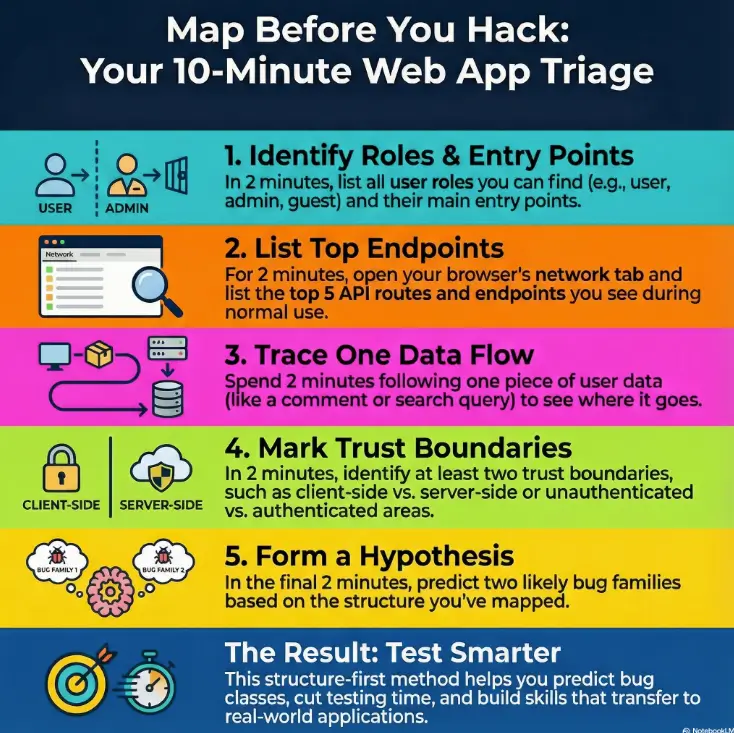
- Minute 1–2: Identify roles and entry points. Write them down.
- Minute 3–4: Open the network view and list the top endpoints you actually see.
- Minute 5–6: Trace one data flow from input to storage or output.
- Minute 7–8: Mark two trust boundaries and predict two bug families.
- Minute 9–10: Record your “10-minute map” in plain text.
If you do this, your next 20 minutes become sharper. You’ll waste fewer cycles on low-value guessing and you’ll spot the difference between a toy bug and a structure bug—the kind that reveals how the whole app thinks.
Short Story: 10 minutes that changed my lab habits (120–180 words)
I was working through a deliberately messy training app late at night, telling myself I only had ten minutes before sleep. I did what my old self always did: clicked the obvious forms, tossed a couple of payloads into a search bar, and found a small XSS. I almost closed the tab with that smug “good enough” feeling. Then I forced myself to try a new rule: map first, test second.
I listed roles, watched the API calls, and noticed an admin-only endpoint being called even when I wasn’t an admin. It wasn’t a bug I “cleverly exploited.” It was a structural leak. That tiny observation led me to a broken access control path that taught me more than the XSS ever could. The next day, the same habit helped me cut my lab time by roughly 30 minutes because I stopped hunting randomly and started testing intent.
Eligibility checklist: is this the right lab for you?
Not every vulnerable app fits your current goal. Use this quick yes/no filter before you sink an hour into the wrong practice target.
- Do you need beginner-friendly structure? Yes → start with DVWA or guided labs. No → go to an API-heavy target.
- Are you practicing access control? Yes → choose apps with multiple roles and admin panels.
- Do you want modern patterns? Yes → prioritize Juice Shop-style flows over older monolith-only labs.
- Are you limited to 20 minutes today? Yes → pick a single module and map it, not the whole app.
- Do you need portable notes? Yes → use a template you can reuse across apps.
Next step: Choose one lab and commit to a single 10-minute map before any exploitation attempts. Save this checklist and confirm the lab’s scope on its official page.
Mini 60-second estimator for lab time
This tiny estimator helps you pick a realistic session size when you’re short on time.
Next step: If you only have 15–20 minutes, lock in the map step and defer exploitation. Save this estimator and adjust your session plan before you start.
Decision card: which vulnerable web app to practice first, 2025
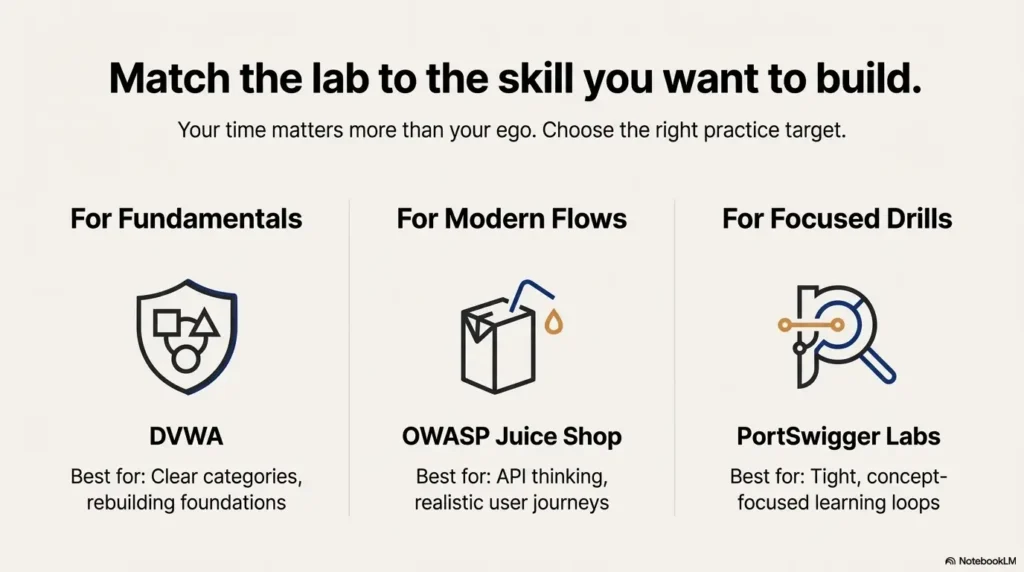
When you’re choosing between popular training targets, your time matters more than your ego.
- DVWA: great for fundamentals and clear categories
- OWASP Juice Shop: better for modern app flows and API thinking
- PortSwigger labs: best for tight, concept-focused drills
Apply in 60 seconds: Pick one skill and choose the lab that isolates it.
- When speed matters: PortSwigger-style single-concept labs often give the fastest learning loops.
- When structure matters: Juice Shop helps you practice mapping realistic user journeys.
- When you need confidence: DVWA’s categories can rebuild foundations quickly.
Next step: Write your goal in one sentence: “Today I’m practicing broken access control” and choose the lab that makes that goal unavoidable. Save this card and confirm the current module list on each platform’s official page.
The quiet patterns you start seeing
Once you stop treating labs like scavenger hunts, a calmer skill appears: pattern recognition. You’ll notice how the same structural moves repeat across languages and frameworks.
- Role logic duplicated in multiple places
- Client-side checks that feel “too convenient”
- Endpoints that accept more fields than the UI exposes
- Identifier-driven features that beg for authorization testing
The irony is that this mindset helps both beginners and experts. Beginners get a safe path. Experts get a fast filter that trims noise. If you’re stacking this skill for certification readiness, pairing it with a focused OSCP prep track can help you translate “map-first thinking” into exam-grade decision speed.
Show me the nerdy details
Many vulnerability classes are not random errors but systemic consequences of architectural patterns: shared authorization middleware, inconsistent object ownership checks, and legacy endpoints kept alive for backward compatibility. Mapping structure first helps you locate these patterns faster.
Korea and global practice notes
If you’re learning or testing from Korea, the same best practice holds: keep your work strictly within authorized labs. The local security community is strong, and there are plenty of legitimate learning paths in English and Korean. What matters most is not where you are—it’s that you maintain clear permission boundaries and keep your notes tidy enough to reuse across multiple targets.
Also, if your schedule is tight due to work or study, the 10-minute map approach is ideal because it fits into a commuter-sized block of time and still builds real testing instincts. For a structured cadence that keeps this habit alive without burnout, you might like a 2-hour-a-day OSCP routine style approach even if you’re not taking the exam soon.

A fast template you can copy into notes
This plain-text structure lets you capture the essentials without turning your learning session into a documentation marathon. It takes 2–3 minutes to fill.
- App name / module:
- Roles observed: user / admin / guest / system
- Top endpoints: (list 5)
- High-risk inputs: forms / headers / cookies / JSON
- Two trust boundaries:
- Hypotheses: likely bug families (pick 2)
- What I will test next session (15 minutes):
Infographic: the structure-first mental model
List 2–4 roles. Predict which actions differ per role.
Capture 5 key endpoints from real traffic, not menus.
Trace one input to output/storage in 3 hops.
Mark where trust changes: user→admin, client→server.
Predict 2 bug families. Test the easiest proof first.
Result: Cleaner triage, fewer false wins, better transfer to real apps.
Common operator questions that upgrade your map
Once you’ve built a basic structural habit, these questions sharpen your practice without bloating your time budget:
- What does the app trust that it shouldn’t?
- Which object IDs can I change without the UI?
- Which endpoint accepts more fields than it should?
- Where is authorization enforced—and where is it merely implied?
I’ve seen these four questions save learners from repeated “hunt and forget” cycles. They also help founders or small teams doing quick internal checks avoid the trap of shallow reassurance.
Safer real-world translation
Training apps are intentionally vulnerable. Real systems are ethically and legally different. The right way to translate these skills is to bring the structure-first approach into authorized environments only: internal test apps, bug bounty scopes that explicitly allow your methods, or sanctioned assessment ranges. If you’re building your own environment, a quick reference on safe hacking lab at home can help keep your practice clean and defensible.
Structure understanding helps you communicate better too. Saying “We likely have an object-level authorization gap across these three endpoints” is more actionable than “I found something weird.” It shortens remediation time and keeps the conversation professional.
FAQ
What is the fastest way to understand a vulnerable web app?
Start with a 10-minute structural map: roles, top endpoints seen in traffic, one data flow, and two trust boundaries. This makes your next tests deliberate instead of random. Apply in 60 seconds: Write down the top three roles you suspect before you log in.
Do I need Burp Suite to do this well?
It helps, but you can begin with browser dev tools. The key is capturing real requests and thinking about how the server reacts to changes in identity and object IDs. Apply in 60 seconds: Open the network tab and list five endpoints you see during normal use.
Which lab is best for broken access control practice?
Choose a platform with multiple clear roles and object ownership features. Apps like Juice Shop and curated concept labs often highlight these patterns well. Apply in 60 seconds: Identify one object you can “own,” then try viewing it under a second role in a safe lab setting.
How do I avoid wasting time on low-value bugs?
Prioritize structure signals: authorization checks, state transitions, and hidden inputs. A small bug is fine for learning, but don’t mistake it for full understanding. Apply in 60 seconds: After finding a bug, ask: “What structural assumption made this possible?”
Is this approach useful for API-heavy modern apps?
Yes—especially there. Modern apps often move core logic into APIs, making UI-only testing misleading. The structure-first method naturally pushes you toward traffic analysis and role-based comparisons. Apply in 60 seconds: Look for a versioned API path and note what it does that the UI doesn’t show.
What should I document to improve my skill fastest?
Keep a compact template: roles, endpoints, inputs, boundaries, hypotheses, and one next-step plan. This is enough to build long-term pattern memory without drowning in notes. Apply in 60 seconds: Copy the template from this article into your notes app.
Closing the loop: what I wish I’d known in that 10-minute lab
I keep thinking about that first rushed session because it was such a perfect lie. I found something small, felt smart, and left with a false sense of mastery. The real win wasn’t the bug I could name. It was the structure I could explain.
If you want a next step that fits inside 15 minutes, do this: pick one authorized vulnerable app module, run the 10-minute structure workflow, and then test exactly one hypothesis you wrote down. That simple loop builds the kind of confidence that survives outside training platforms. Over weeks, this also stacks nicely into a longer roadmap like an OSCP 90-day plan, even if your immediate goal is just cleaner web instincts.
- Map the app in 10 minutes
- Test one hypothesis
- Document for reuse
Apply in 60 seconds: Pick one endpoint and ask what it must verify but might not.
Last reviewed: 2025-12. This article is informed by widely used training ecosystems and public security guidance from organizations and platforms that emphasize legal, authorized learning environments.