Open the practical working record to connect this guide to your scope, evidence and next decision.
Choose by exercise scope rather than a universal ranking
DVWA is an intentionally vulnerable web application; Kioptrix releases are vulnerable VM exercises. Their setup, task coverage and dependencies differ. Use a contained, authorized environment and identify the specific release. Neither one alone establishes current enterprise readiness or a proven learning advantage for every beginner. Reference and scope.
Cybersecurity Lab Comparison
Kioptrix vs DVWA: Which Lab Teaches More Real Skills?
Compare a particular Kioptrix VM with DVWA for the task and environment you need.
That difference matters if you are choosing the best cybersecurity lab for a beginner, preparing for an entry-level practical exam, or trying to build a portfolio that proves more than command-copying stamina. One lab sharpens vulnerability literacy. The other tests whether that knowledge survives when the labels disappear.
This guide compares the skills each environment develops, where realism becomes misleading, how to keep intentionally vulnerable systems safely contained, and how to combine both labs into a practical learning sequence without wasting money on tools you are not ready to use.
Choose the right starting point
Match the lab to the skill gap you actually have.
Build transferable habits
Move from payload success to evidence, reasoning, and remediation.
Keep the lab contained
Practice inside an isolated environment with explicit authorization.
The useful answer is not “Kioptrix or DVWA.” It is knowing which one should come first for you. 🧭
Snapshot
Who this is for: beginner-to-intermediate learners comparing hands-on penetration-testing labs. What it solves: confusion about which lab develops practical skills rather than isolated tool familiarity. What you can do next: choose a starting lab, set up a safe practice environment, and complete a report-producing learning sequence.
Table of Contents
Before You Act
This article is for authorized learning environments only. It explains lab selection, safe setup, reasoning habits, documentation, and defensive analysis. It does not authorize testing against public systems, employer networks, school infrastructure, cloud accounts, or devices you do not own. Confirm scope in writing whenever a system is not entirely yours.
The Core Difference: DVWA Teaches Techniques, Kioptrix Tests Decisions
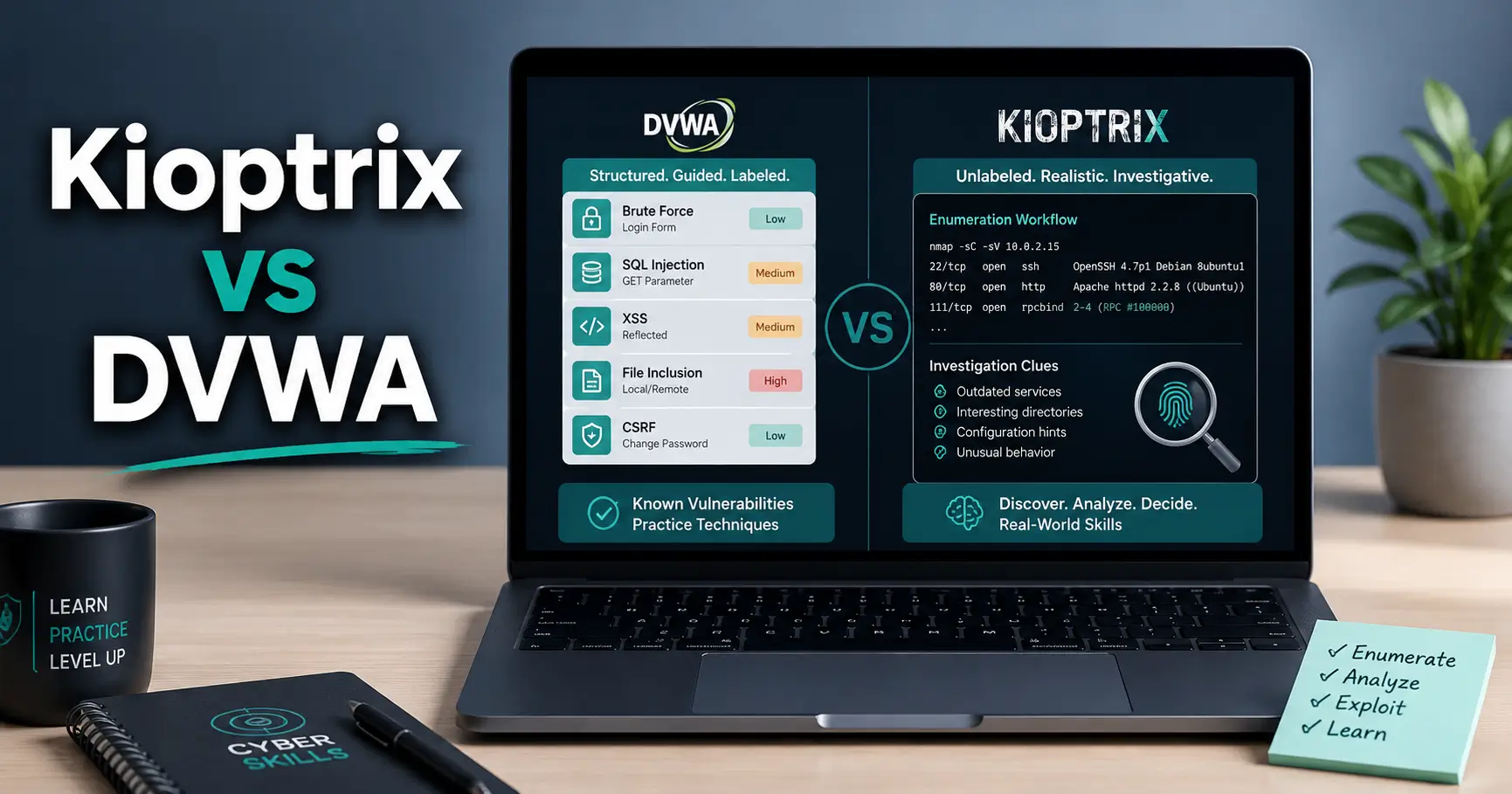
DVWA and Kioptrix are often placed in the same beginner-lab bucket, but they solve different learning problems. Treating them as interchangeable is a little like comparing a music lesson with a recital. Both involve the instrument. Only one asks you to decide what to play next.
DVWA isolates one web vulnerability at a time
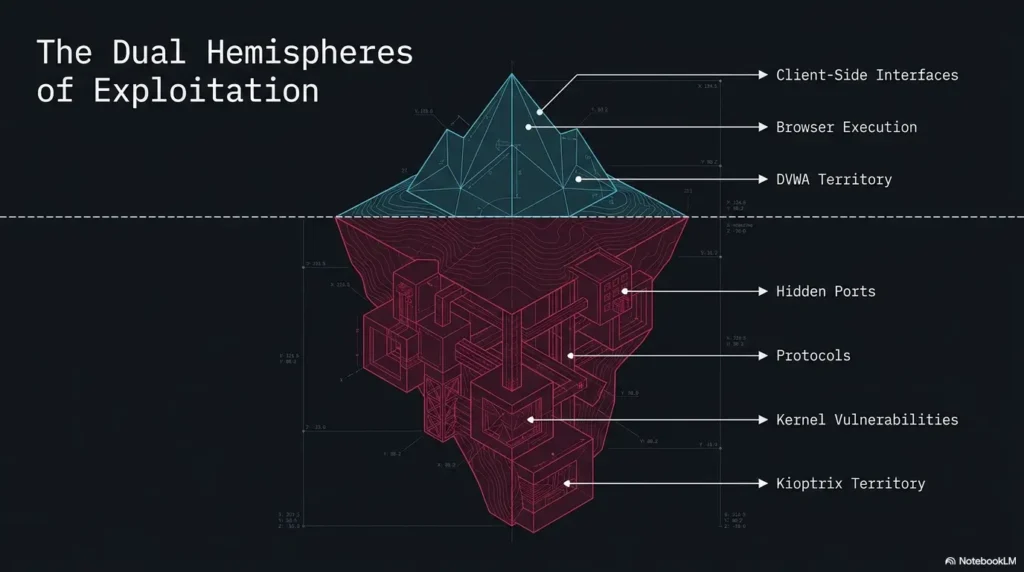
DVWA is a deliberately vulnerable web application built for controlled practice. Its modules separate vulnerability categories so you can study one mechanism without first locating it inside a noisy host.
That structure is especially useful when HTTP requests, cookies, parameters, server-side input handling, database behavior, and file-processing rules still feel like loose pieces on a workbench. You can change one variable, repeat the request, inspect the response, and see why a defense changes the result.
The adjustable security levels also make DVWA more than a payload playground. Used carefully, they let you compare vulnerable and hardened behavior. The goal is not simply to produce a successful response. It is to explain the trust mistake that made the response possible.
Kioptrix starts before you know where the weakness is
Kioptrix presents a vulnerable virtual machine rather than a labeled web lesson. You must identify the target, enumerate exposed services, interpret versions and configurations, test hypotheses, obtain initial access, and continue toward higher privileges.
The important difficulty is not always the exploit itself. It is deciding whether a web server, file-sharing service, database port, banner, directory, or configuration clue deserves more attention. Several findings may look promising. Some will be stale, misleading, or irrelevant.
That uncertainty is where Kioptrix earns its educational value. It trains the habit of asking, “What do I know, what am I assuming, and what evidence would separate the two?”
The comparison in one sentence
DVWA asks
“Can you understand and reproduce this vulnerability?”
Kioptrix asks
“Can you discover what matters and connect it into an attack path?”
For a learner who cannot yet explain why an injection or file-handling flaw works, DVWA is usually the stronger first choice. For someone who understands common vulnerability mechanics but becomes motionless in front of an unknown host, Kioptrix is likely to expose the more valuable gap.
Real-Skill Scorecard: What Each Lab Actually Exercises
“Real skills” is too foggy to be useful unless it is broken into observable behaviors. A lab can be excellent for web vulnerability comprehension and weak for host discovery. Another can develop persistence and prioritization while doing little to teach secure coding.
| Skill area | DVWA | Kioptrix | What good performance looks like |
|---|---|---|---|
| Target discovery | Low emphasis | High emphasis | Identify the correct host and confirm it without guessing |
| Service enumeration | Limited | High emphasis | Translate scan output into a prioritized investigation plan |
| Web vulnerability mechanics | High emphasis | Varies by machine | Explain the unsafe trust decision, not only the payload |
| Exploit selection | Guided by module | Open-ended | Validate versions, conditions, and evidence before use |
| Privilege escalation | Usually limited | Core objective | Enumerate local context and connect access to higher privilege |
| Reporting | Strong for isolated findings | Strong for attack chains | Document evidence, impact, remediation, and limitations |
| Repeatability | Excellent | Moderate | Reproduce results from clean notes without a walkthrough |
Reconnaissance and target discovery
DVWA normally begins after the target application is known. Kioptrix begins earlier. The virtual machine may receive an address dynamically, so the learner must identify it, distinguish it from other devices, and establish a baseline before testing anything.
This stage develops more than scanner familiarity. It teaches scope awareness, host identification, service mapping, and prioritization. A useful Kioptrix enumeration workflow should record what was observed, how it was confirmed, and what question each next action is meant to answer.
Web vulnerability comprehension
DVWA is the clearer teaching environment for injection, weak authentication, insecure file handling, command execution, request manipulation, and client-side trust problems. Its strength is controlled comparison.
You can observe how the same request behaves when validation, encoding, authorization checks, or other controls change. That makes it easier to answer the question employers and examiners eventually care about: “Why did this work, and what would stop it?”
Exploit selection and validation
Inside a named DVWA module, the vulnerability family is already disclosed. Kioptrix requires the learner to infer possibilities from service details, application behavior, and local evidence.
This creates space for false positives. A banner may be incomplete. A scanner may associate a version with an exploit that does not match the configuration. A web response may look vulnerable but fail under manual confirmation. Learning to reject weak leads is a real skill, not wasted time.
Key takeaway
A scan result is not a finding. It becomes useful only after you verify the condition, capture evidence, and explain why the result matters.
Reporting and reproducibility
DVWA supports focused write-ups: request, response, vulnerability condition, impact, remediation, and retest. Kioptrix supports broader attack-path reporting: discovery, enumeration, initial access, local findings, privilege escalation, and limitations.
A professional-looking report is not decoration added after the “fun part.” It reveals whether your reasoning was coherent. If another learner cannot reproduce your result from the evidence, the work is not yet complete. A structured vulnerability report writing guide can turn a lab session into a portfolio artifact rather than a forgotten terminal history.
The Missing Skill: What Happens When No Vulnerability Menu Appears?
Guided labs are useful because they reduce cognitive load. They are also dangerous when the guidance becomes invisible furniture. A learner may complete many modules and still feel stranded when presented with a target that does not announce its vulnerability category.
Ambiguity is part of the exercise
Real assessments rarely begin with a card labeled “SQL injection, medium difficulty.” They begin with a scope, a target, a time limit, and incomplete information. The tester must form hypotheses, choose economical checks, and abandon ideas that no longer fit the evidence.
Kioptrix recreates a small slice of that uncertainty. The environment is deliberately vulnerable, but the route is not presented as a numbered lesson. You must notice patterns and decide which clues deserve a closer look.
Enumeration becomes a reasoning process
Running a port scanner is data collection. Enumeration begins when you interpret the result.
- What service is actually responding?
- How confident are you in the detected version?
- Does the application behavior support the banner?
- Which service is exposed unnecessarily?
- What can be confirmed manually before attempting exploitation?
- What result would make you lower the priority of this path?
This is why an Nmap service-detection false-positive checklist is often more educational than another page of scan flags. It teaches you to challenge the output rather than kneel before it.
Here’s what no one tells you…
You can become comfortable with tools while remaining uncomfortable with investigation. That gap stays hidden in labs that always tell you which vulnerability to test.
Tool familiarity means you know where the controls are. Investigative confidence means you can choose a reasonable next step, explain why you chose it, and recover when it fails. Kioptrix is stronger at exposing the second problem.
Show me the nerdy details
The transfer problem can be described as a difference between recognition and generation. DVWA frequently asks you to recognize or reproduce a known vulnerability class. Kioptrix asks you to generate candidate explanations from incomplete evidence.
Recognition is faster and easier to measure. Generation requires a mental model of protocols, operating systems, applications, permissions, and likely misconfigurations. It also requires stopping rules, because endless scanning is not analysis.
A strong learning plan alternates both modes: isolated practice for mechanism accuracy, then open-ended practice for transfer.
Why the Easier Lab Can Sometimes Teach More
Difficulty is not the same as educational value. A confusing machine can produce heroic amounts of persistence while leaving the underlying concept blurry. DVWA’s simplicity can be an advantage when the learner needs clean feedback rather than additional noise.
Controlled repetition exposes the mechanism
Repeating a vulnerability at different security levels helps isolate what changed. Did the application reject unexpected input? Did it encode output? Did it enforce authorization on the server? Did it change file validation or command handling?
That repetition is deliberate practice, not “easy mode.” The learner can compare evidence before and after a control appears, which is much more valuable than memorizing a single successful string.
Source code turns exploitation into understanding
When source code is available, you can trace the route from request to unsafe operation. This connects browser behavior to server-side logic and makes remediation less abstract.
Read the vulnerable implementation, predict the behavior, test it, and then compare it with a more defensive version. This sequence turns the exploit into a small code-review lesson.
Immediate feedback shortens the learning loop
Beginners benefit when one variable changes at a time. An unfamiliar boot-to-root machine may combine networking, Linux, HTTP, databases, older software, virtualization, and privilege concepts in a single afternoon. That is a crowded room for a new learner.
DVWA lets you slow the music down. Once the mechanics are clear, Kioptrix can test whether you recognize the same ideas in less tidy surroundings.
Key takeaway
Choose the lab that makes the next concept visible. Productive difficulty stretches understanding. Unproductive difficulty merely hides the lesson.
Illustrative example
Consider two learners who both complete a file-upload exercise. The first copies a payload, sees the expected result, and marks the module complete. The second captures the request, identifies what the server checks, changes the filename and content separately, records the response differences, and explains which validation belongs on the server.
Both learners reached the same visible outcome. Only one built a model that can transfer to an unfamiliar application.
When they later face Kioptrix, the first learner searches for a matching walkthrough. The second looks for upload surfaces, server behavior, storage paths, execution context, and evidence that the application trusts user-controlled files. The practical advantage came from how the easier lab was used, not from the lab name.
What Changes After the First Shell?
In many web lessons, successful application-level exploitation feels like the finish line. In a machine-based lab, it is often only the transition from external assessment to local assessment.
Initial access is a checkpoint, not a victory screen
Once local access is obtained, the questions change. You are no longer asking only what the remote service exposes. You are asking what the current user can read, execute, modify, impersonate, or use to reach a more privileged context.
- Which user and groups define the current access?
- What operating-system and service context is visible?
- Which files contain credentials, connection details, or unsafe permissions?
- Which processes and scheduled tasks run with greater privilege?
- What can be inspected safely without damaging the lab?
- Which finding explains the privilege boundary failure?
A beginner-friendly privilege escalation guide should emphasize structured local enumeration and evidence, not a blind parade of scripts.
Kioptrix teaches attack-path continuity
Machine labs train the habit of carrying information forward. A credential found in one location may unlock another service. A configuration detail may explain why a process is running with excessive privilege. A low-value web finding may become important when combined with local access.
This continuity is closer to how professional findings accumulate. Serious risk often comes from several ordinary weaknesses aligned in an unfortunate row.
DVWA is narrower by design
DVWA does not need to force a complete machine compromise to be useful. Its job is to make web vulnerabilities observable, repeatable, and understandable.
The limitation appears only when learners assume application exploitation equals the full penetration-testing process. Discovery, scope management, local enumeration, privilege analysis, cleanup, reporting, and retesting must be added elsewhere.
Key takeaway
A shell proves access. A strong assessment explains the path, the privilege gained, the business or system impact, and the control that would break the chain.
Realism Has Cracks: Where Both Labs Can Mislead You
Calling Kioptrix “more realistic” is only partly correct. It offers a more realistic investigative workflow than a labeled vulnerability menu. It does not necessarily represent modern production architecture, defensive monitoring, identity controls, or operational consequences.
Old software is useful, but not automatically modern
Legacy services make certain vulnerabilities easier to observe. They can teach durable habits such as enumeration, version validation, manual confirmation, attack-path reasoning, and evidence capture.
They can also tempt learners to memorize old exploit recipes. The durable lesson is the method: identify, verify, understand conditions, test within scope, document, and recommend a control. The disposable lesson is a command copied without context.
Deliberately vulnerable targets behave differently
Training machines often contain a dense collection of weaknesses. Production systems may have segmentation, rate limits, centralized identity, endpoint controls, web application defenses, alerting, change management, legal constraints, customer data, and business-critical availability requirements.
A laboratory rewards curiosity. A professional assessment also rewards restraint. The right action may be to stop, document the evidence, and ask whether further exploitation is necessary.
Exploit success is not assessment quality
A successful exploit does not compensate for weak scope discipline, missing evidence, vague impact statements, or remediation that amounts to “update everything.”
Assessment quality includes reproducibility, risk explanation, minimal disruption, cleanup, and clear limits. It also includes knowing when the evidence is sufficient.
Review the OWASP Web Security Testing Guide
Do not confuse “realistic” with “modern”
An old machine can still teach prioritization and attack-chain continuity. It is a poor substitute for current API authorization, cloud identity, container security, Active Directory, mobile testing, or modern software supply-chain scenarios.
Use Kioptrix as a methodology trainer, not a museum map of every environment you will encounter.
Who Should Choose DVWA, Kioptrix, or Both?
The best lab is the one that exposes your current bottleneck without overwhelming the prerequisite knowledge underneath it. Your choice should be based on demonstrated skill, not on which name sounds more advanced.
Start with DVWA if you are still decoding the vocabulary
Choose DVWA first when you are learning how requests, parameters, sessions, database queries, file uploads, operating-system commands, and output encoding fit together.
- You need visible cause and effect.
- You cannot yet explain common web vulnerabilities without notes.
- You want repeatable exercises with one primary variable.
- You are studying secure coding or web testing fundamentals.
- You tend to copy payloads before understanding the request.
Choose Kioptrix if guided modules feel too comfortable
Choose Kioptrix when you can explain several common vulnerability classes but struggle to approach an unknown host. It is particularly useful for practicing target discovery, service enumeration, prioritization, attack-path continuity, local enumeration, and reporting.
- You can use basic Linux and networking tools without a command recipe.
- You understand the difference between a scan result and a verified finding.
- You need practice deciding what to investigate next.
- You want a complete machine-based portfolio report.
- You are ready to work without a vulnerability menu.
Use both if entry-level pentesting is the goal
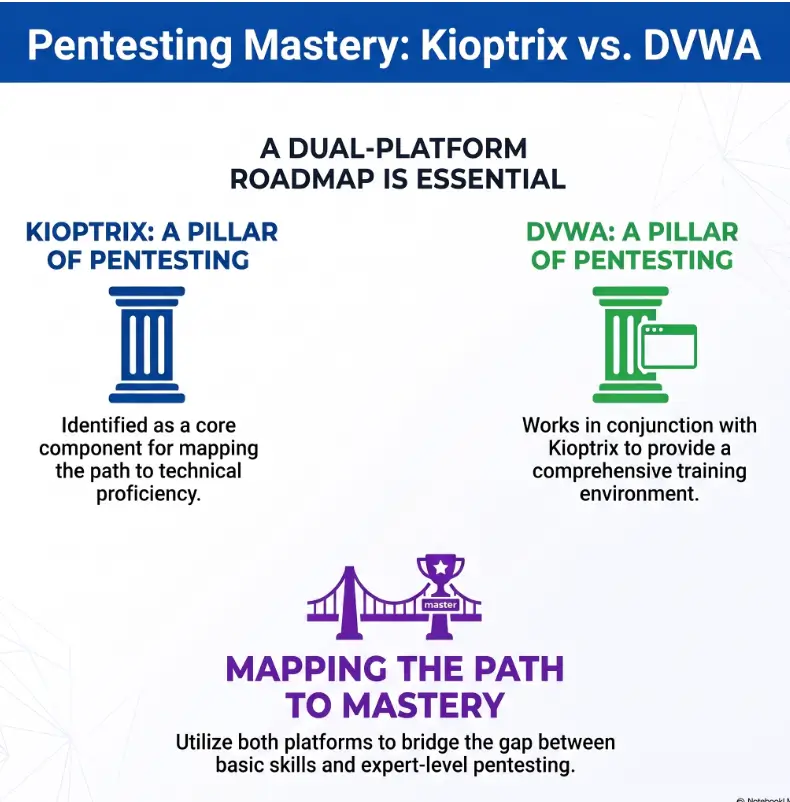
For most learners pursuing practical penetration-testing fundamentals, the strongest answer is sequence rather than competition. Use DVWA as the technique workshop. Use Kioptrix as the closed-book practical exam.
This sequence is also budget-friendly. Both can be used in a local virtualized environment, so a beginner usually gains more from improving documentation and reasoning than from buying a large tool stack.
| Learning setup | What it includes | Best for | When spending more may help |
|---|---|---|---|
| Good: free local lab | Existing computer, hypervisor, DVWA, Kioptrix, notes | Most beginners building core skills | Only when hardware limits prevent stable virtual machines |
| Better: structured practice plan | Local labs plus a guided curriculum, reporting template, and scheduled review | Learners who lose direction or skip fundamentals | When a course saves time through sequencing and feedback |
| Best: targeted feedback | Local labs plus periodic review from an instructor, mentor, or study group | Learners preparing portfolio work or practical assessments | When feedback addresses a known gap, not general anxiety |
Before paying for a course, lab subscription, coaching session, or commercial scanner, ask what specific problem it solves. “More tools” is not a learning objective. Feedback on weak reports, poor enumeration, or misunderstood web behavior can be worth paying for. A shiny dashboard that duplicates your free tools may not be.
Neither lab is enough for every career path
Neither environment provides complete preparation for cloud security, modern API authorization, Active Directory, container platforms, mobile testing, enterprise identity, secure software development, or defensive detection engineering.
They are foundations. Foundations matter, but nobody mistakes the foundation for the entire house.
Lab Safety First: Keep the Target Inside the Glass Box
Intentionally vulnerable systems should be treated as untrusted. Their educational value comes from weaknesses you would never knowingly expose on a normal server.
Never expose DVWA to the public internet
Run DVWA inside a local virtual machine, containerized learning environment, or similarly isolated setup that is not reachable from the public internet. Do not install it on a production web host, shared server, public cloud instance, or network used by people who did not agree to participate in the lab.
The official project documentation should be reviewed before installation, especially its warnings about deployment and default credentials.
Open the Official DVWA Repository
Treat downloaded virtual machines as untrusted systems
- Download images from the recognized project or distribution page.
- Compare available checksums when the publisher provides them.
- Prefer an Internal Network shared only by the attacker and target VMs for offline practice. A host-only network also exposes the host to the vulnerable guest; remove unnecessary host services and file sharing. NAT still permits outbound connections, so use it only for necessary installation or updates before returning the vulnerable target to an offline lab, with no port forwarding or bridged adapter.
- Do not attach folders containing personal, business, or client files.
- Disable unnecessary clipboard, drag-and-drop, and shared-folder features.
- Take a clean snapshot before starting.
- Shut down the vulnerable target when the session ends.
For setup choices, compare isolation features and resource needs before installing anything. This VirtualBox vs VMware vs Proxmox lab comparison can help you choose a sensible platform without buying more infrastructure than the exercise requires.
Practice only where authorization is explicit
Safe places include your own isolated machines, sanctioned training platforms, classroom environments, and systems covered by written permission with a defined scope.
Public scanning is not a shortcut to realism. It introduces legal, ethical, privacy, and operational risk while teaching poor scope discipline.
Stop and check the boundary
If you cannot point to the authorization, target list, allowed techniques, and testing window, do not proceed. Curiosity is not permission.
Common Mistakes That Turn Practice Into Button Clicking
A learner can spend many hours in a lab without improving much. The warning signs are familiar: copying commands before forming a question, running every scanner available, opening a walkthrough at the first silence, and treating root access as the only evidence of progress.
Mistake 1: Copying payloads before forming a hypothesis
Before testing, write three lines:
- Suspected weakness: what trust or control failure may exist?
- Expected evidence: what response would support that idea?
- Alternative explanation: what else could produce the same behavior?
This takes less than a minute and turns a copied action into an experiment.
Mistake 2: Running every scanner and reading none of the output
More output can create less understanding. Start with a small number of tools you can explain. Confirm important findings manually. Keep a record of why each command or request was used.
A ten-page report of unverified scanner alerts is weaker than three findings with clear evidence and accurate remediation.
Mistake 3: Opening a walkthrough after ten quiet minutes
Walkthroughs are useful diagnostic material, but they are poor steering wheels. Use a graduated hint policy:
- Review the scope, notes, and confirmed services.
- Repeat manual checks for the two highest-priority paths.
- Consult a narrow hint about the overlooked service or concept.
- Read a partial methodology hint.
- Use a complete walkthrough only after preserving your independent attempt.
When you do read a solution, compare decision points. Do not merely copy the successful route.
Mistake 4: Measuring progress by box count
“Machines completed” is easy to count and easy to inflate. Replace it with measures that reveal transfer:
| Weak progress measure | Stronger alternative |
|---|---|
| Number of boxes rooted | Percentage of enumeration completed without hints |
| Number of tools used | Number of findings manually verified |
| Length of command history | Quality of hypotheses and decision notes |
| Speed to exploit | Accuracy of evidence, impact, and remediation |
| Walkthroughs finished | Results reproduced later from personal notes |
Key takeaway
The goal is not to look busy inside the lab. The goal is to make better decisions with less guidance.
A Better Sequence: DVWA First, Kioptrix Second
The most efficient learning plan moves from clarity to ambiguity. First learn what a vulnerability looks like when isolated. Then test whether you can recognize related conditions when they are mixed with other services and incomplete clues.
The four-stage transfer loop
1. Understand
Study one DVWA vulnerability and explain the unsafe trust decision.
2. Reproduce
Capture and modify requests manually, then compare defensive changes.
3. Transfer
Approach Kioptrix without a vulnerability label or complete walkthrough.
4. Report
Document evidence, impact, remediation, limitations, and retest logic.
Phase 1: Build vulnerability literacy in DVWA
Select a small number of modules that cover different trust boundaries. Complete each without automated exploitation. Record the request, the vulnerable behavior, the server-side assumption, and the control that should change the outcome.
- State the vulnerability in plain English.
- Identify the user-controlled input.
- Explain where the application trusts it.
- Capture evidence before and after the test.
- Repeat at a higher security level.
- Describe why the defensive change matters.
Phase 2: Reproduce the finding through an intercepting proxy
Use a proxy to inspect requests and responses, but do not let the tool become a magic curtain. Modify one parameter at a time. Predict the result before sending the request. Compare what the browser displays with what the server actually returned.
This is the point where a free tool is usually enough. Paid editions can improve automation, collaboration, and workflow on larger assessments, but they do not replace HTTP understanding. Upgrade only when a feature solves a recurring, identifiable constraint.
Phase 3: Enter Kioptrix without a walkthrough
Set a time box for discovery and enumeration. Maintain three columns in your notes: confirmed fact, current hypothesis, and next verification step.
Use a clean folder structure for screenshots, command output, web captures, and report drafts. A practical Kioptrix lab checklist can reduce setup mistakes while leaving the investigative decisions to you.
| Note type | Example | Why it matters |
|---|---|---|
| Confirmed fact | A specific service responds on a verified port | Prevents assumptions from becoming “facts” later |
| Hypothesis | The service may expose a misconfiguration worth testing | Keeps reasoning visible and revisable |
| Verification step | Manually confirm the behavior and configuration condition | Turns curiosity into a bounded experiment |
| Decision | Continue, lower priority, or stop | Shows why the attack path changed |
Phase 4: Write a miniature penetration-test report
Your report should include an executive summary, scope, environment, methodology, findings, evidence, impact, remediation, limitations, and a concise attack-chain description.
Then revisit the lab and ask whether the proposed fix would actually break the path. A vague recommendation such as “patch the server” may be incomplete if weak credentials, excessive permissions, or another exposed service would still provide access.
Mini-report completion checklist
- Every finding has reproducible evidence.
- Impact is explained without exaggeration.
- Remediation addresses the root condition.
- The report separates facts from assumptions.
- Limitations and untested areas are stated.
- Lab artifacts and sensitive data are sanitized before publishing.
After completing the sequence once, reverse it. Start a fresh vulnerable machine before reviewing likely vulnerability categories. The result will show whether the DVWA concepts transferred without labels.
Explore the NIST NICE Cybersecurity Framework
FAQ: Kioptrix and DVWA Learning Decisions
Is Kioptrix harder than DVWA?
Kioptrix is usually harder in terms of ambiguity because the learner must discover and prioritize the path. DVWA may feel technically harder when the learner lacks web fundamentals. Difficulty depends on whether your weak point is exploit mechanics or open-ended investigation.
Should complete beginners start with Kioptrix?
Complete beginners should first understand basic networking, Linux command-line navigation, HTTP requests, virtual machines, and service enumeration. Kioptrix becomes productive when the learner can perform basic checks and explain the output. Before that point, the machine may feel opaque rather than challenging.
Does DVWA teach real penetration testing?
DVWA teaches real vulnerability concepts, request manipulation, tool interaction, validation, and remediation analysis. It does not cover the entire assessment lifecycle. Add target discovery, scope control, service enumeration, privilege analysis, reporting, and retesting to build broader penetration-testing skill.
Which lab is better for a cybersecurity portfolio?
DVWA is strong for focused vulnerability reports that show technical understanding. Kioptrix is stronger for a complete attack-path report. The best portfolio may include both: one precise web finding and one sanitized machine assessment with methodology, evidence, remediation, and lessons learned.
Can Kioptrix prepare someone for entry-level certifications?
It can support enumeration, basic exploitation, Linux practice, privilege concepts, note-taking, and persistence. It should not be treated as a complete match for any certification blueprint. Compare your practice plan with the current objectives published by the certification provider.
How long should learners spend on each lab?
Move forward based on competence rather than a fixed hour count. You are ready to leave a DVWA module when you can explain, reproduce, remediate, and retest it without a copied walkthrough. You are ready to move beyond a Kioptrix machine when you can reconstruct the attack path from your own notes and defend your prioritization decisions.
Is a walkthrough ever useful?
Yes. Use it after an independent attempt to diagnose blind spots, compare methodologies, and identify missed evidence. Preserve your original notes before reading it so you can distinguish what you discovered from what the author supplied.
What should replace these labs afterward?
Move toward modern web applications, API authorization labs, Windows and Active Directory environments, cloud identity scenarios, containers, source-code review, defensive logging, and remediation validation. Choose the next environment based on the role you want, not simply the next difficulty badge.
Your 15-Minute Next Step: Design the Learning Loop
Do not begin by downloading five machines or comparing twenty scanners. Spend fifteen minutes designing one complete learning loop.
- Write down one web vulnerability you can exploit but cannot yet explain clearly.
- Choose one DVWA module that isolates that concept.
- Create a four-part note template: hypothesis, request, evidence, remediation.
- Choose a date for one Kioptrix session after the DVWA exercise.
- Create folders for notes, evidence, screenshots, and the final report.
- Define your hint rule before you become stuck.
Use DVWA first when the mechanism is still blurry. Use Kioptrix first when the techniques are familiar but the unknown target makes you freeze. Use both in sequence when your goal is transferable penetration-testing skill rather than a quick stack of completed boxes.
The lab that teaches more real skills is the lab that forces you to practice the skill you are currently avoiding. Sometimes that is understanding the code. Sometimes it is choosing the next move in a room with no signposts.
Final decision rule
DVWA builds the vocabulary. Kioptrix tests the conversation. Your strongest path uses both, with evidence and reflection between them.
Last reviewed: 2026-10-13
Technical guidance updated: 2026-10-13. Clarified Internal Network, host-only, and NAT isolation boundaries, labeled the learner scenario as illustrative, corrected a reference label, and repaired section navigation.
Kioptrix and DVWA exercise selection
Use this when: you are a learner choosing between a named VM release and a web-application exercise. Copy these fields into your notes and replace each prompt with a dated response. Keep assumptions and unresolved questions visible.
| Field | What to record | Your evidence / owner / next check |
|---|---|---|
| Learning question | Name the particular behavior or reasoning task you want to practice. | To complete |
| Required setup | Record the release, dependencies, host architecture and isolated network. | To complete |
| Expected artifact | Specify notes, observations or a report that would show the work. | To complete |
| Observed difficulty | After a bounded session, record the actual prerequisite or blocker. | To complete |
Next action: Choose the exercise whose required setup and intended task fit your current question. Mark the relevant row confirmed, provisional or unresolved. Keep the supporting record, responsible person and next check beside it so another reader can continue the work without treating an assumption as a result.
This is a blank practice record, not a report of a test performed by Kioptrix. Add the actual versions, approved conditions and observations from your own session.
Worksheet change record — October 20, 2026
Added this kioptrix and dvwa exercise selection with four article-specific fields and an evidence-based next action. Existing source notes retain their own review dates. This addition is not a fresh verification of every statement or a newly executed test.