
Open the practical working record for this guide’s task-specific fields and next action.
Locate the first failing hop
Record installed versions, listener address, agent destination, interface, intended route and any overlapping subnet. A connected agent confirms a control channel, not reachability of every downstream service. Ligolo translates relevant packet behavior through its userland network stack; a TUN interface does not reproduce every raw-packet behavior of a local LAN. Verify a narrow permitted connection and name-resolution path before changing routes or adding hops. Reference and scope.
Ligolo-NG Setup Guide
Solving the NAT-induced “Velvet Curtain” effect.
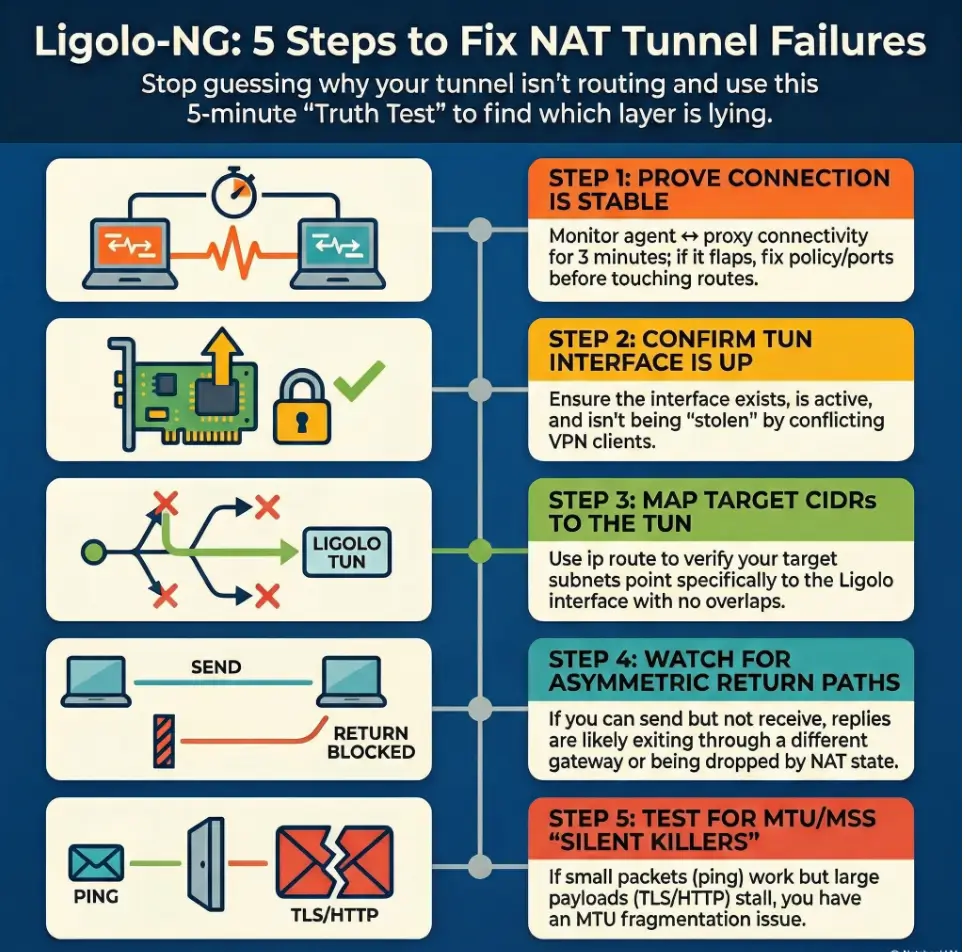
“Agent connected.” Tunnel started. Then every packet you send into the internal network evaporates like it hit a velvet curtain. The fastest way out is not another restart, not another route you half-remember. It’s a 5-minute truth test that tells you which layer is lying.
This guide is for the specific kind of pain NAT creates: a tunnel that exists but won’t carry traffic behind the boundary. When you keep guessing, you lose more than time, you risk blackholing your own internet, tripping detections, or burning credibility with the client contact holding the firewall logs.
Ligolo-ng uses a TUN interface on the operator side and a user-space network stack that translates traffic into connections made by the agent. It is not a raw-packet VPN: for TCP, the internal target normally sees the agent’s source address, and replies return to that connection. Supported traffic includes TCP, UDP, and ICMP echo; arbitrary raw packets and full traceroute behavior are not preserved. Start with transport stability, operator routes, agent-to-target reachability, and filtering.
The Protocol for Success:
- ✔️ Prove agent ↔ proxy stability first
- ✔️ Verify TUN state and route decisions
- ✔️ Test return traffic directionally
- ✔️ Only then touch MTU/MSS and timeouts
First confirm the agent can maintain its TCP/TLS connection to the proxy. Then check the operator’s TUN interface and exact target route, and test a known allowed TCP service from the agent. Targets normally reply to the agent’s own connection; they do not need a route back to the operator’s TUN subnet. Check target-side routing and firewalls separately, and investigate MTU only when evidence supports it.
Table of Contents
Who this is for / not for
Who this is for
- Authorized pentesters/red teamers using Ligolo-NG for legitimate internal access and pivoting (pair well with a documented penetration test SOW template)
- Defenders validating segmentation/NAT behavior during sanctioned tests using a disciplined security testing strategy
- Anyone stuck in “agent connects… but nothing routes” limbo
Who this is not for
- Anyone attempting access without explicit written authorization (also review penetration test limitation of liability language so scope stays clean)
- “Just curious” internet scanning or bypass attempts (don’t)
- Connectivity is the foundation, not a checkbox
- Routes only matter once packets actually move
- NAT problems often look like routing problems
Apply in 60 seconds: Keep a small timestamped log of connect/disconnect events before touching routes.
NAT reality check: what actually breaks tunnels first
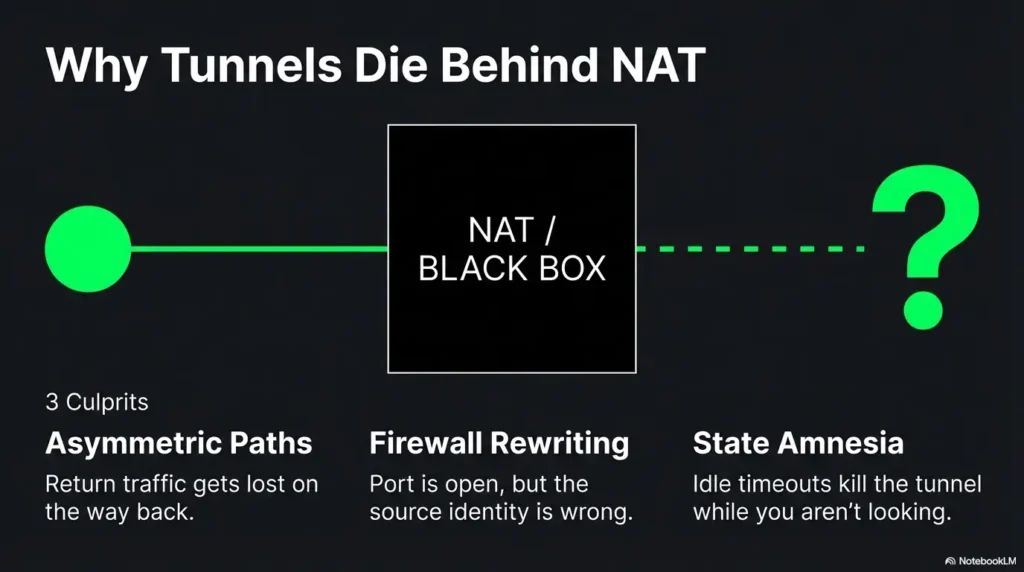
NAT isn’t evil. It’s just selective about what it remembers. It translates addresses, tracks “state,” and quietly discards anything that doesn’t fit the story it’s currently telling. Tunnels fail behind NAT because your packets take a path your diagram didn’t include, or because the NAT device forgets your session existed.
NAT pattern #1: “Outbound works, return path lies”
- Symptoms: agent connects, but internal subnets are unreachable
- Why: the agent cannot reach the target, or filtering blocks its target-side connection; targets normally reply to the agent
NAT pattern #2: “Port is open… from the wrong place”
- Symptoms: works on your lab, fails on client
- Why: firewall rules allow the port, but not from the NATed source you actually appear as (this is where a vendor security questionnaire mindset helps you ask the right “what do you see on your side?” questions)
NAT pattern #3: “Double NAT and the disappearing host”
- Symptoms: intermittent connectivity, random timeouts
- Why: multiple translation layers, short idle timers, state table churn
H3 micro (pattern interrupt): Let’s be honest…
You’re not “bad at networking.” NAT is a magic trick that forgets to tell you where it hid the rabbit.
Show me the nerdy details
NAT behavior varies by implementation. The IETF has published behavioral requirements for NATs (especially around how mappings and filtering behave for UDP). Real enterprise devices also apply policy layers that are not “NAT” in the pure sense, like stateful inspection rules, session normalization, and idle timers that reset based on specific traffic patterns.
Money Block: Eligibility checklist (binary yes/no + next step)
- Yes/No: Do you have written authorization and a defined scope? (If you’re formalizing it, start from a pen test SOW template.)
- Yes/No: Can the agent reach the proxy consistently (no flaps for 2–3 minutes)?
- Yes/No: Do you know the exact target CIDR(s) you’re trying to reach?
- Yes/No: Do you have a client contact for firewall/NAT log checks if needed? (If this is a recurring need, consider aligning expectations via an incident response retainer-style escalation path.)
Neutral next step: If any answer is “No,” fix that first. It shortens the whole engagement.
Baseline setup sanity: confirm the tunnel exists before you debug routes
Ligolo-NG is designed around a TUN interface that your system routes traffic into. If the tunnel isn’t actually stable, routes are just wishful thinking with extra steps. Ligolo-NG’s own documentation emphasizes starting the tunnel and then setting up routing in a deliberate order. That order is your friend when NAT is being temperamental.
Validate agent → proxy connectivity (first, always)
- Confirm the agent reaches the proxy IP/port consistently (not “once, triumphantly”)
- Watch for connect-then-drop patterns: timeouts vs resets hint at different controls
- Log timestamps: “connected at 10:14:03, dropped at 10:15:12” beats “it’s flaky” (keep your evidence clean with a simple Kali lab logging habit)
Confirm your TUN interface is up and owned by the right process
- Ensure the interface exists, is UP, and has the MTU you expect
- Watch for conflicts with VPN clients or other TUN/TAP tools (they love stealing routes)
- On macOS, Ligolo-NG docs note you may need to use a specific
utundevice name
Confirm your local host firewall isn’t quietly sabotaging you
- Local firewall rules can block forwarded traffic even if the tool “connected”
- Check both inbound and outbound rules relevant to the TUN interface
- Prefer targeted allow rules over “turn it off and pray”
- Stability test beats single success
- TUN up and conflict-free matters
- Host firewall can silently block forwarding
Apply in 60 seconds: Write down the TUN interface name and expected CIDR list before touching any routes.
Failure signature decoder: map the symptom to the fastest likely cause
This is where we stop improvising. When a tunnel fails in NAT environments, the symptom usually points to one of four buckets: route missing, route stolen, return path asymmetric, or stateful interference (firewall/NAT timers/inspection). The goal is to identify the bucket fast, not to “try a bunch of stuff.”
Symptom: “Agent connects, but no internal ping”
- Likely: missing route to the target subnet(s) via the tunnel interface
- Also: target ICMP blocked (don’t over-trust ping)
Symptom: “One subnet works, others don’t”
- Likely: partial route table, overlapping CIDRs, policy routing, or a second VPN stealing specific ranges (for multi-network labs, sanity-check your topology like VirtualBox NAT vs host-only vs bridged setups do)
Symptom: “DNS works, TCP dies”
- Likely: MTU/MSS issues, stateful firewall interference, or asymmetric routing
- Reality check: DNS answers can be cached or served locally; don’t assume “DNS works” means “path works” (and avoid accidental name-resolution surprises like proxy DNS leak behavior)
Symptom: “Works for 2 minutes then collapses”
- Likely: NAT idle timeout, keepalive missing, or state table pressure
Money Block: Decision card (When A vs B; time/cost trade-off)
When it’s routing
- Agent stable for 3+ minutes
- TUN is UP
- Some subnets work, others don’t
Time cost: ~10–20 minutes to audit routes and overlaps.
When it’s return path / state
- TCP stalls but small packets succeed
- Works briefly then drops
- Traceroute differs by direction
Time cost: ~15–30 minutes with evidence + client firewall/NAT logs.
Neutral next step: Pick the card that matches your symptoms and follow that path only.
Routes that don’t lie: building a clean path through a NAT boundary
Routes are the steering wheel. NAT is the passenger who keeps grabbing it. Your job is to keep steering intentional: target CIDRs into the Ligolo TUN, avoid overlaps, and validate the return path. The Linux ip route tooling is the canonical way to view and manipulate routes on most operator boxes, and it’s brutally honest about what the kernel will do.
Route checklist: the three lines that decide everything
- Route to target subnet(s) points to the Ligolo TUN
- No overlapping routes are stealing traffic (common with VPNs and lab ranges)
- Default route remains sane (don’t blackhole yourself)
Asymmetric routing trap: when traffic returns “the normal way”
For ordinary Ligolo-ng TCP access, the agent opens a target-side connection and the target replies to the agent, not directly to the operator’s TUN address. A target normally needs no new route to the operator subnet. Check the agent’s route and allowed TCP reachability to the target before changing network gateways.
- Detect it: check the agent’s route to the target and a permitted TCP service, then compare target-side logs. Operator traceroute through Ligolo-ng does not preserve a full raw-packet hop path.
- Interpret it: a timeout alone cannot distinguish target filtering, failed agent reachability, or transport loss. Ligolo-ng generates operator-side TCP behavior from the agent’s connect result.
- Fix patterns: verify operator-to-TUN routes and agent-to-target reachability separately. Change target-side routing only when topology and logs prove a problem, with authorization; a target normally needs no return route to the operator TUN subnet.
Show me the nerdy details
Many “it’s blocked” reports are actually “the reply went somewhere else.” TCP is unforgiving: you can see outbound SYNs, but without the return SYN-ACK, you’ll time out and start blaming the tunnel. Use route lookups (ip route get on Linux) and direction-aware tests to confirm which gateway the system selects for the destination and for the source.
Split tunneling (intentional) vs split brain (accidental)
- Intentional split tunneling: only specific internal CIDRs route to the tunnel
- Accidental split brain: your VPN routes one part, Ligolo routes another, and neither sees the full conversation
- Route only what you need
- Check overlaps before blaming NAT
- Validate return path directionally
Apply in 60 seconds: Do a route lookup for one target IP and confirm it points to your Ligolo TUN interface.
Want the official reference points?
The bind/listen gotcha: when you’re listening, but nobody can reach you
In NAT environments, “listening” is not the same as “reachable.” If you bind to the wrong interface, you might be listening on a private address that the agent can’t reach, or on localhost where only your own machine can hear you whispering. This is one of those failures that feels insulting because everything looks correct on your screen.
Binding to 127.0.0.1 vs 0.0.0.0 vs a specific interface
- 127.0.0.1 (localhost): only local processes can connect. Great for safety, terrible for remote agents.
- 0.0.0.0 (all interfaces): convenient, but be intentional. Ensure scope and firewall controls match your engagement rules.
- Specific interface/IP: best for precision. Use when the host is multi-homed (VPN + Wi-Fi + cloud NIC) and you need predictable behavior.
Port selection under NAT and egress filtering
Some networks allow only a small set of outbound ports. During authorized work, pick ports that align with the client’s policies and your rules of engagement. Your goal is stability and auditability, not cleverness. If you’re deciding between tunnel approaches, this is a good moment to revisit pivoting tool choice trade-offs in constrained networks.
- Document your chosen port and why it fits the engagement constraints.
- If egress is strict, coordinate with the client contact for a policy-compliant allow rule.
- When a port “works in the lab,” treat that as entertainment, not evidence.
H3 micro (pattern interrupt): Here’s what no one tells you…
In locked-down networks, the “best” port is the one that’s already allowed outbound, not the one that looks neat in your notes.
MTU & MSS: the silent tunnel killer in “almost working” setups
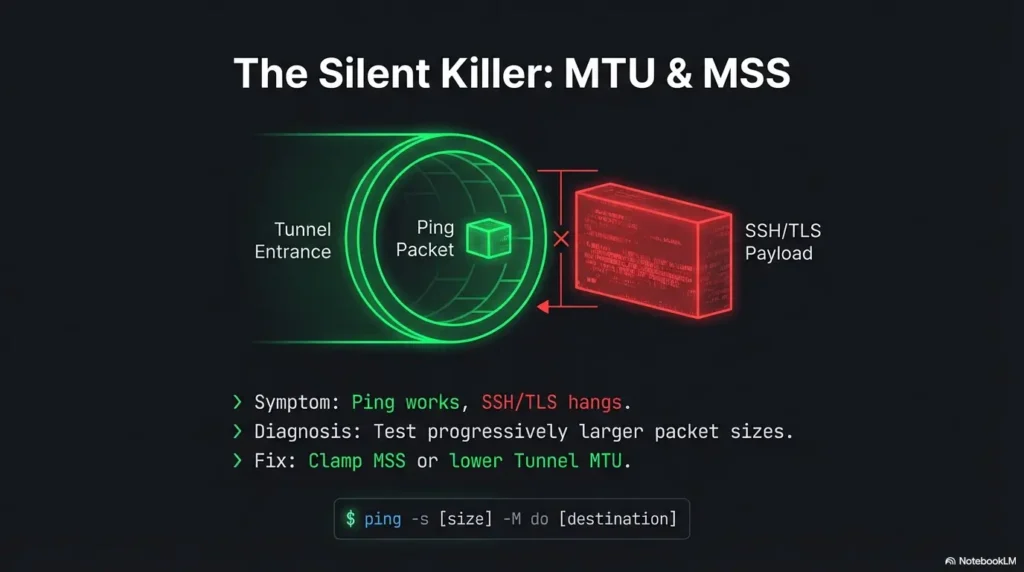
MTU issues are the tunnel equivalent of a hairline fracture: you can walk on it until you can’t. You’ll see small requests succeed, then larger payloads stall. TLS handshakes can fail in ways that feel supernatural: the kind of failure that makes strong coffee taste like doubt.
How MTU issues show up in real life
- Small requests succeed, larger payloads stall
- TLS handshakes fail “randomly”
- Some apps work while others hang (because packet sizes differ)
Quick MTU triage
- Test progressively larger packet sizes (don’t guess)
- Adjust tunnel MTU or apply MSS clamping where appropriate and allowed
- Re-test with the same target and the same protocol after each change
When it’s not MTU
- Middleboxes doing “helpful” inspection that changes traffic timing or segmentation
- Stateful firewalls enforcing odd session rules (especially around long-lived connections)
- Asymmetric routing masquerading as “random hangs”
Common mistakes (the ones that waste an entire afternoon)
Troubleshooting is mostly avoiding self-inflicted wounds. Ligolo-NG adds a powerful moving piece (a TUN-based path). NAT adds another. Here are the mistakes that reliably eat daylight.
Mistake #1: Debugging routes before proving connectivity
- Fix: verify agent ↔ proxy stability first (watch it for a few minutes)
Mistake #2: Adding a broad route that steals unrelated traffic
- Fix: route only the needed CIDRs; confirm with route lookups before and after
Mistake #3: Forgetting the return path exists
- Fix: validate reply routing from inside the target network where possible
Mistake #4: Treating ping as truth
- Fix: test multiple protocols (DNS, TCP, HTTP) and interpret selectively
- Stability → interface → routes → return path → MTU
- Keep changes small and reversible
- Use evidence, not vibes
Apply in 60 seconds: Write down “what changed” after each test so you can undo the last move.
Don’t do this: “quick fixes” that create bigger incidents
Don’t disable host firewalls as a shortcut
- You’ll introduce uncontrolled variables and risk policy violations
- Prefer a narrow allow rule tied to your engagement scope
Don’t route the entire internet through a fragile pivot
- You’ll create noisy traffic, trigger detections, and lose stability
- Also: your own browsing will become a troubleshooting distraction
Don’t stack multiple tunnels without a diagram
- Debugging without a path map is self-inflicted chaos
- Draw it. Even a messy napkin diagram beats memory
Minimal logging strategy: capture the evidence you’ll actually use
You don’t need a thousand lines of logs. You need the right three screenshots and one short timeline. This is especially true when you need a client-side check (firewall/NAT logs) and you want to sound competent, not accusatory. If you want a repeatable standard, borrow from how to read a penetration test report thinking: evidence first, interpretation second.
What to log on the attacker side
- Interface state: TUN exists, UP, MTU
- Route table snapshots before/after changes
- Connection timestamps: connect, drop, reconnect
- One representative test per protocol (ICMP, TCP) with timestamps
What to log on the pivot/agent side
- Connection attempts and drops
- Keepalive behavior (if configured) and whether drops correlate with idle time
- Local network context: default gateway and reachable subnets
What to request from the client (without sounding accusatory)
- Firewall logs for the relevant source/destination/port window
- NAT device session timeouts and policy notes (especially for long-lived sessions)
- Confirmation of egress policy for the port/protocol in scope
Money Block: Quote-prep list (what to gather before comparing)
- Target CIDR list (exact subnets, not “the internal network”)
- Known-good internal host + port (one service you’re allowed to test)
- Your visible source IP as seen by the client side (NATed identity)
- A 5-minute timestamp window for “it fails here”
- Whether ICMP is blocked in policy (so you don’t overread ping failures)
Neutral next step: Share this list with the client contact before asking for logs.
Next step: one concrete action (do this now)
Run a 5-minute “truth test” checklist
Run three tests: (1) Is agent-to-proxy transport stable? (2) Does the operator route select the TUN for the target? (3) Can the agent connect to the known allowed target service? Treat target-side routing and proxy transport as separate paths.
- Confirm agent ↔ proxy stability: watch for 2–3 minutes. No flaps.
- Confirm TUN is UP + routes to target CIDRs point to it: verify one target IP’s route decision.
- Run one TCP test to a known internal host/port from the operator and the agent: record timestamps and results; ask the client to verify the agent-source connection and firewall logs if it fails.
The tunnel never had time to build reliable state, and my “tests” were landing in the gaps. Once I proved the drop cadence, the fix became obvious: it wasn’t a routing puzzle. It was a session stability puzzle. The client confirmed a stateful device was expiring idle mappings aggressively. After that, the tunnel became boring, which is the highest compliment a tunnel can receive.
FAQ
Is Ligolo-NG better than SSH dynamic port forwarding for NATed networks?
Different tools fit different constraints. Ligolo-NG uses a TUN-based approach that can feel more “native routing” than a SOCKS-style workflow, which many operators find easier for broad subnet access. SSH dynamic forwarding can be simpler to explain and sometimes easier to pass through strict controls. In NATed networks, stability and return path matter more than the brand name of the tunnel.
Why does my agent connect but I can’t reach any internal subnet?
Likely causes include a missing operator route, an unstarted tunnel, unstable agent-to-proxy transport, or an agent unable to reach the target service. The target normally replies to the agent’s source address. Test a known allowed TCP service from the agent; a failed ping alone does not prove the routed service is unreachable.
What routes do I need to add for Ligolo-NG to reach a new CIDR?
Conceptually: a route for the new CIDR that points to your Ligolo TUN interface, and no overlapping route that steals that CIDR. The exact syntax depends on OS, but the principle is consistent: the kernel must choose the TUN as the next hop for those destination addresses.
How do I know if this is asymmetric routing vs a firewall block?
A timeout or reset alone is not enough to distinguish routing from filtering. Compare the operator’s route, agent-to-target connection, and target/firewall logs for the same time window. Ordinary Ligolo-ng access does not require targets to route replies to the operator; the agent handles target-side connections.
What ports usually work best through enterprise NAT/egress filtering?
There’s no universal answer because it’s policy-defined. In authorized work, choose a port/protocol combination that the client confirms is permitted and can be logged cleanly. If the environment is strict, coordinate a temporary allow rule rather than “port roulette.” Stability beats surprise.
Why does it work for a minute and then stop (NAT timeout)?
Many NAT and stateful devices expire idle sessions. If your tunnel traffic goes quiet (or looks idle to an intermediate device), mappings can drop and you’ll see sudden collapse after a short interval. Confirm this by correlating drop time with inactivity, then address it through engagement-approved keepalive behavior or policy adjustments.
Can MTU problems break a tunnel even when “connected”?
Yes. The transport connection can stay up while higher-layer traffic stalls due to fragmentation/PMTUD issues. If small payloads work and larger ones hang, treat MTU/MSS as a prime suspect and test progressively rather than guessing.
How do I troubleshoot when ICMP is blocked (ping fails)?
Use TCP-based tests to known allowed services (a host and port in scope), and validate routing decisions with route lookups rather than relying on ping. You can still test reachability; you’re just using a protocol the network actually permits.
Conclusion
Remember the hook: “agent connected” and nothing routes. The curiosity loop closes here: in NATed environments, the tunnel usually isn’t failing randomly. Something is consistently lying, and your job is to catch it in the act. If you follow the order (stability → TUN → routes → return path → MTU), you’ll stop throwing guesses at a problem that demands proof.
If you want two reliable reference points for the parts people argue about, the IETF’s NAT behavioral work is a solid grounding for how NATs can behave, and the Linux routing docs keep you honest about what your box will actually do.
Do this in the next 15 minutes: run the 5-minute truth test checklist, capture one clean timeline (connect/drop), one route snapshot, and one TCP test result. If it still fails, you now have the evidence to ask the client for a targeted firewall/NAT log check without turning the call into interpretive dance. When you’re packaging that evidence for stakeholders, keep it report-ready using penetration test report reading structure: what happened, what you proved, what you need from the client side.
Original review: 2026-02-20
Technical guidance updated: 2026-10-13. Corrected the agent-side connection and return-path model; clarified supported packets and MTU estimates.
Tunnel first-failing-hop map
Use these fields to turn this guide into a record for your own task. Keep the actual scope, evidence and unresolved questions together.
On a small screen, scroll the table sideways to read all columns.
| Field | What to record | Your evidence / next check |
|---|---|---|
| Control channel | Record agent and listener endpoints and connection evidence. | To complete |
| Route context | Preserve interface, intended routes and overlapping subnet concerns. | To complete |
| Application path | Record a permitted destination and the first observed failure. | To complete |
| DNS distinction | Keep lookup behavior separate from downstream reachability. | To complete |
Next action: Resolve the earliest unsupported hop before adding routes or another tunnel.
Related task: Use Chisel vs Ligolo-NG: Traffic and Deployment Criteria for that separate part of the workflow.
Worksheet change record — October 20, 2026
Added four task-specific fields, a next action and a related guide. This is a blank editorial working aid, not a completed test or validated assessment. Existing source-review dates retain their own scope; this addition is not a new verification of every statement.