

Stop Chasing Ghost Hits
The fastest way to waste a weekend is to celebrate a Nuclei run with “hundreds of findings”… then watch 90% of them dissolve the moment you click through. That’s not paranoia. That’s single-signal matching, redirect sink pages, and WAF/CDN “helpfulness” turning your scanner into a confetti cannon.
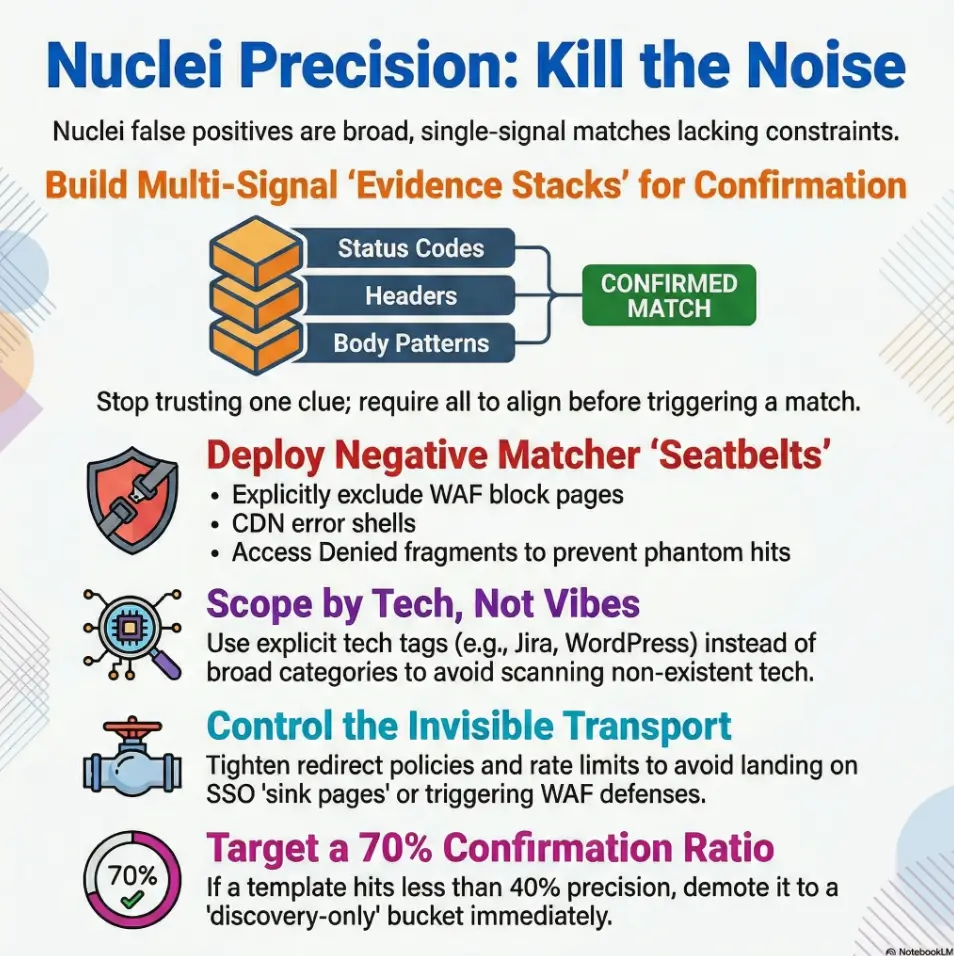
Nuclei template tuning is the practice of tightening how templates select targets and prove a match, using filters/tags, multi-signal matchers (status + headers + body), and negative matchers to exclude block pages, default shells, and other lookalikes. Done right, it raises truth density without blindly shrinking coverage.
Keep guessing and you lose time-to-triage, burn trust in your pipeline, and teach your team to ignore alerts.
This post gives you a repeatable system: scope smarter with tags and severity, build evidence stacks instead of vibes, add anti-evidence, and tame redirects, caching, and rate limits so “ghost hits” stop haunting your dashboards.
The Lesson: I learned the hard way in CI: volume feels good for five minutes; precision pays all week.
Nuclei false positives usually come from overly broad matchers, missing negative conditions, and noisy targets. Start by scoping with tags and severities, then tighten matchers (status + headers + body patterns), add negative matchers, and validate against known-good/known-bad fixtures. Calibrate rate limits, retries, and redirect handling to avoid “ghost hits.” Finally, version your tuned set and measure precision over time.
Table of Contents
Who this is for / not for
For you if…
- You run Nuclei in CI/CD, scheduled scans, or client programs and triage is drowning you
- You maintain a private template pack (or fork community templates)
- You need repeatable precision (not “it worked once on my laptop”)
Not for you if…
- You’re looking for “scan everything everywhere” defaults (that path leads to alert ash)
- You can’t validate findings against a second signal (logs, repro steps, manual check)
- You’re running unauthorized scans (don’t)
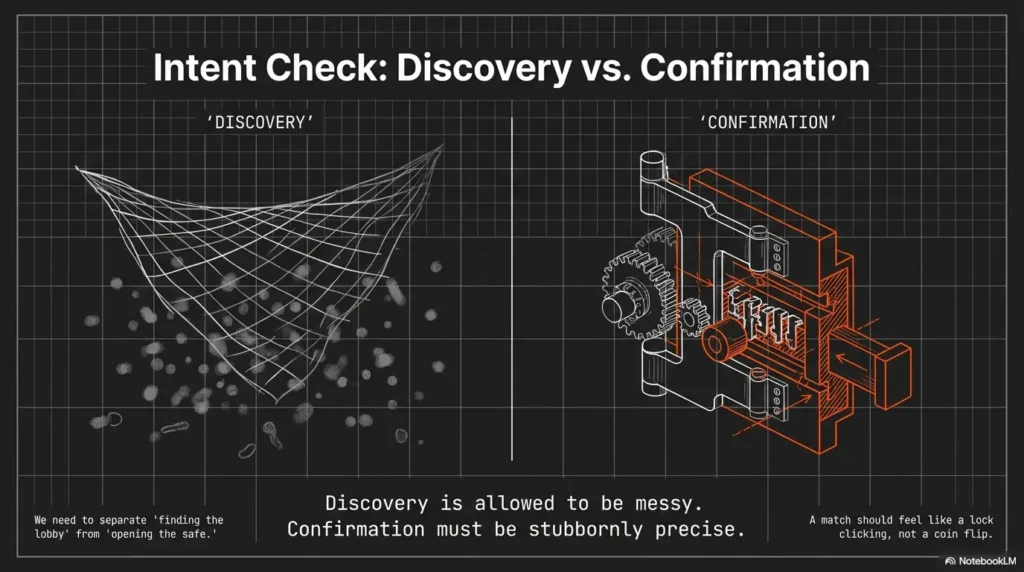
- Discovery is allowed to be messy
- Confirmation must be stubbornly precise
- Every noisy template needs a home (quarantine or refactor)
Apply in 60 seconds: Pick one template you distrust and label it “discovery-only” today.
Quick personal confession: the first time I ran Nuclei at scale in a pipeline, I celebrated the volume… then spent a weekend chasing “vulns” that were basically a CDN’s favorite error page wearing different hats. That weekend taught me an expensive lesson: high output isn’t the same as high signal.
Intent check: Why Nuclei “lies” even when the template looks correct
False positive archetypes (so you can name the monster)
- Banner coincidences: generic strings matched on unrelated pages
- Redirect mirages: 301/302 chains landing on a default page that matches
- WAF reflections: blocked responses echoing payload fragments
- CDN edge sameness: shared error pages across hosts
- Cache ghosts: stale content reappearing under load
Here’s the uncomfortable truth: Nuclei isn’t “lying” so much as it’s doing exactly what you told it to do. It’s a very literal assistant. If your template says “if body contains Welcome then match,” it will cheerfully agree with half the internet.
The quiet culprit: “single-signal matching”
Relying on only body text or only status codes is precision debt with interest. In real environments, a single clue is easy to fake by accident: SSO portals, shared UI components, reverse proxies, and WAFs all remix responses into something “close enough” to trigger lazy matchers. If you want a broader mental model for where scanning sits in a real program (and why confirmation has different rules), compare penetration testing vs vulnerability scanning and notice how “detection” and “validation” live in different worlds.
Operator rule: A vulnerability match should feel like a lock clicking, not a coin landing somewhere on the table.
Another lived moment: I once watched a “critical” finding disappear simply by changing the User-Agent. Same target. Same template. Different response shape. That’s not a vulnerability. That’s a transport artifact doing stand-up comedy.
Money Block: Eligibility checklist (are you ready to tune for precision?)
Answer Yes/No. If you hit 3+ “No,” fix that first or your tuning won’t stick.
- Yes/No: You can reproduce a match with a second signal (curl, browser, logs, or a manual step)
- Yes/No: You can run a tiny “fixture scan” (known-good + known-bad) on every template change
- Yes/No: You’re separating discovery from confirmation in routing and alerting
- Yes/No: You control template versions (git tag, release notes, or a pinned commit)
- Yes/No: You can measure confirm rate weekly (even a simple spreadsheet counts)
Next step: If you answered “No” to fixtures, create two fixtures today before editing more regex.
Target scoping first: Tags, severity, and template selection that actually behaves
Build a “precision-first” selection policy
- Prefer explicit tech tags (for example: apache, wordpress, jira) over broad categories
- Gate by severity plus confidence (an internal label is fine)
- Maintain allowlists for proven templates and quarantines for noisy ones
This is where most teams accidentally sabotage themselves: they treat template selection like a buffet. They pick “everything that looks tasty,” then wonder why the bill is triage fatigue. A clean selection policy becomes much easier when it’s aligned with an actual security testing strategy instead of “whatever templates were trending this week.”
Nuclei templates are YAML, and the community ecosystem moves fast. That’s great for coverage, but it means you should treat templates like dependencies: pin versions, review changes, and assume drift. ProjectDiscovery’s tooling makes automation easy, which is exactly why you need policy, not vibes.
Curiosity gap: Which 10 templates cause 80% of your noise?
Do a 1-week audit: rank templates by hit count, then compare to confirmed findings. You’ll usually find a tiny set of “serial false-positive offenders.” The fix is rarely heroic. It’s usually selection + routing.
- Use tags to avoid scanning tech you don’t have
- Quarantine repeat offenders immediately
- Promote templates based on confirmation ratio
Apply in 60 seconds: Create two folders: allowlist and quarantine. Move one noisy template now.
Anecdote from a client engagement: we reduced triage volume by roughly “a whole engineer-day per week” by doing nothing fancy. We simply stopped running generic templates against a fleet of marketing landing pages. It wasn’t security. It was self-inflicted noise.
Show me the nerdy details
Selection policy works best when it’s reproducible: a pinned template commit, an explicit tag list, and a “promotion” rule (for example, must hit ≥70% confirm rate over 20 samples before it can page). If you can’t enforce a percent, enforce a minimum sample size. Small numbers lie politely.
Matcher design: Stop trusting one clue, start building “evidence stacks”
Use multi-signal matchers (minimum 2, ideally 3)
- Status (for example: 200/401/403)
- Headers (server/app fingerprints, auth challenges)
- Body (unique markers, not generic words)
Think of a good Nuclei matcher like a courtroom case. One witness is interesting. Three independent witnesses is convincing. Status alone is a mood. Body alone is poetry. Headers often carry the receipts. (If you want a founder-friendly lens on why “receipts” matter, this pairs nicely with security metrics for founders, especially when you’re trying to defend precision work to non-security stakeholders.)
Prefer structure over vibes
- Anchor regex with context (boundaries, nearby tokens, predictable separators)
- Match stable identifiers (version strings, product paths, unique JSON keys)
- Require response “shape” when possible (Content-Type, JSON fields, HTML title patterns)
Pattern-interrupt micro (H3): Let’s be honest… your regex is too romantic
If it matches on a blank page, it will match on the internet. And the internet has a lot of blank pages wearing costumes.
Personal scar tissue: I once inherited a template that matched on the word “error.” That was it. Just “error.” It flagged a payment processor outage page, a React build warning, and a printer manual. It also flagged exactly zero vulnerabilities. Points for ambition, minus points for reality.
Practical pattern: build an evidence stack (conceptual)
- Status: Require the expected class (for example, 401 when probing auth)
- Header: Require a specific challenge header or product header token
- Body: Match a product-unique string near a stable UI element or JSON key
- Anti-evidence: Exclude WAF block phrases and generic “not found” shells
Neutral action: Add one extra independent signal to your noisiest matcher before you touch the regex.
Negative matching: The missing seatbelt that prevents “phantom vulnerabilities”
Add “anti-evidence” conditions
- Exclude default error pages (404, “not found”, generic app shells)
- Exclude WAF blocks (“access denied”, “incident id”, “request blocked”)
- Exclude login redirects where your payload never reached the endpoint
Negative matching is the part people skip because it feels pessimistic. But “pessimistic” is just “accurate” in a world full of CDNs, WAFs, and helpful proxies. If you’re debating what “helpful” security controls actually do at the edge, this idea clicks harder when you’ve already mapped WAF vs RASP vs CSP for startups.
Use matchers-condition intentionally
- Choose logic from the detection:
matchers-condition: andrequires all matcher blocks; its default isor. A matcher’s ownconditioncombines values within that matcher. Alternative valid exploit proofs may legitimately useor. - Discovery templates should be labeled and routed differently than vuln templates
One more lived moment: I’ve seen WAF block pages echo payload fragments back in the response body. The template “matched,” the tool reported success, and the finding looked real until you noticed the headers shouting “blocked.” That’s not a vuln. That’s a bouncer repeating your name at the door.
- Block pages and default shells are predictable
- Redirect sinks can be detected
- Anti-evidence turns “maybe” into “not this time”
Apply in 60 seconds: Add a specific negative matcher only after testing real block-page fixtures, and combine it with the required positive matchers. Generic “access denied” text may also appear in legitimate vulnerable responses.
Show me the nerdy details
Negative matching is strongest when it targets response families, not single strings. WAFs (Cloudflare, Akamai, Fastly in front of apps, and many enterprise appliances) tend to include stable tokens: incident identifiers, “Ray ID”-style IDs, generic “blocked” language, or standardized HTML shells. Build a small reusable negative-matcher snippet and apply it consistently.
Redirects, caching, and rate limits: The invisible settings that fabricate results
Redirect handling checklist
- Decide: follow redirects or not, per template type
- Detect “sink pages” (homepages, SSO portals) that create repeated matches
Redirects are where truth goes to get a costume change. If your scan follows redirects blindly, you may end up matching on the same SSO gateway across dozens of hosts and think you discovered a whole new universe. You didn’t. You discovered a hallway. And in SaaS environments, hallways often look like identity infrastructure, which is why it helps to understand SAML SSO for SaaS patterns when you’re diagnosing “why everything bounces to the same place.”
Tune transport reality
- Rate limit to avoid CDN/WAF behavior changes under burst
- Retries and timeouts: too aggressive equals partial responses that still match
- Normalize headers/User-Agent to reduce variance between runs
A small confession: I’ve had “ghost hits” appear only under load, then vanish when rechecked manually. The culprit wasn’t the application. It was the edge. Rate limiting and consistent request shaping turned the haunting into a predictable system.
Money Block: Decision card (follow redirects or not?)
Choose based on template purpose, not habit.
When to follow redirects
- Fingerprinting that expects canonical paths
- Well-known endpoints that legitimately redirect
- You also check for “sink pages” and anti-evidence
Time trade-off: More requests, more variability.
When not to follow redirects
- Vuln confirmation where the endpoint matters
- Targets that commonly bounce to SSO/home
- You’ve seen repeated matches across hosts
Time trade-off: Faster runs, fewer mirages.
Neutral action: Decide redirect policy for one template category today and document it.
Show me the nerdy details
Transport knobs change response shape. Under burst, CDNs may serve different cached variants; WAFs may switch from “monitor” to “challenge”; apps may return partial HTML shells. If your matchers don’t require stable headers or content-type, these variants become false positives. Treat rate limits, timeouts, and redirect policy as part of the template’s detection logic.
Curiosity gap: Why “works on one host” templates fail at scale
The scale trap
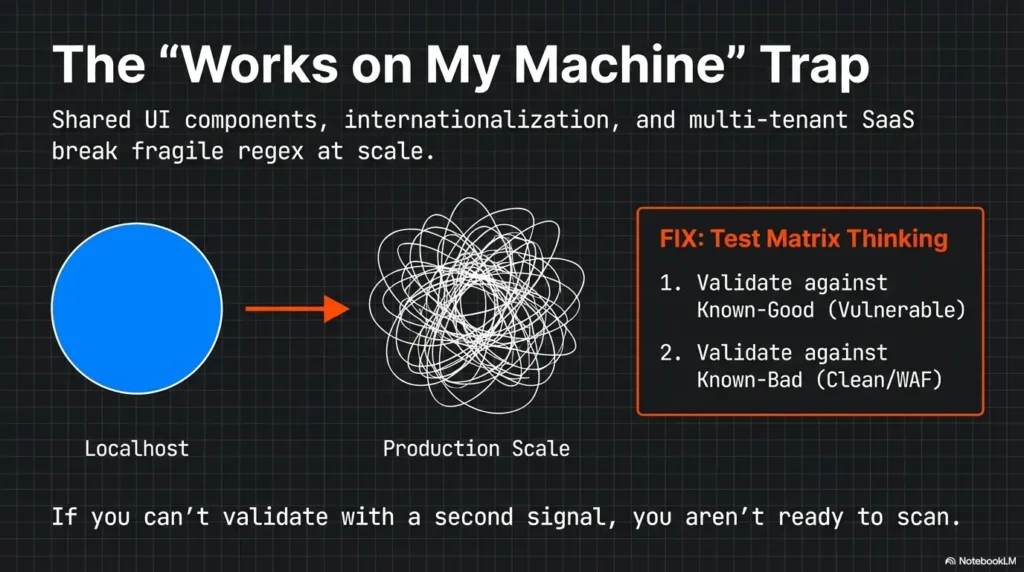
- Multi-tenant SaaS apps reuse UI fragments across customers
- CDNs share error content across origins
- Internationalization changes strings (your matcher breaks or over-matches)
When you test on one friendly host, everything looks crisp. At scale, you meet the real world: shared layouts, reused JavaScript bundles, and universal “something went wrong” pages. Your matcher wasn’t wrong. It was under-specified.
The fix: test matrix thinking
Validate on explicitly non-vulnerable and vulnerable fixtures, plus WAF-protected and redirected variants. Confirm both false positives and missed positives. Narrowing tech tags or adding exclusions may hide vulnerabilities when fingerprints are incomplete; retain a separate broader discovery pass and report coverage gaps.
Short Story: The Day the Homepage Became “Critical” …
We were scanning a client’s subdomains and celebrated a sudden spike in “high severity” matches. The dashboard looked like fireworks. I did what every tired engineer does: I believed the dashboard for exactly thirty seconds. Then I clicked through. Every “finding” was the same destination: a glossy SSO portal that politely welcomed me, regardless of what I requested. Redirects were funneling everything into one sink page, and our body matcher was keying off a generic string that happened to appear in that portal’s HTML shell.
The fix was embarrassingly simple: stop following redirects for confirmation templates, require a product-specific header token, and add a negative matcher for the SSO page title. The fireworks stopped. The real findings remained. The team slept again.
Common mistakes that inflate false positives (and how to stop them)
Mistake #1: Matching on generic UI text
Replace “Welcome”, “Dashboard”, “Sign in” with product-unique markers. If your matcher would match a dozen unrelated login screens, it’s not a matcher. It’s a horoscope.
Mistake #2: Ignoring content-type and response shape
- Require
application/jsonwhen expecting JSON - Require a specific HTML title pattern only when stable
Mistake #3: Treating discovery as exploitation confirmation
Split into two steps: detect → confirm. Detection can be broader; confirmation must be stubborn. If your pipeline pages on detection, you’re paying interest on a loan you didn’t mean to take. This is also where your internal stakeholders will ask, “How do we read this?” so it helps to have a shared baseline for how to read a penetration test report and what counts as “confirmed” versus “suspected.”
Mistake #4: No baseline fixtures
Without known-good/known-bad fixtures, you’re tuning blindfolded. And the internet is not a gentle obstacle course.
- Reduce generic text matching
- Require response shape (content-type + structure)
- Separate detect vs confirm with different routing
Apply in 60 seconds: Add a content-type requirement to one JSON-based template.
Personal note: the first fixture set I built felt tedious. Two weeks later, it felt like a superpower. Every template change stopped being a gamble and became a controlled experiment.
Tuning workflow: A repeatable loop that doesn’t depend on heroics
Step 1: Label your templates by purpose
discovery,fingerprint,weak-auth,misconfig,vuln-confirm
Step 2: Add a “confidence budget” to each template
- Low confidence → requires manual confirmation
- High confidence → allowed to page/alert
Step 3: Version and measure
- Track: hit rate, confirm rate, time-to-triage, top noisy templates
- Keep changelogs for matcher updates (future you will thank present you)
Pattern-interrupt micro (H3): Here’s what no one tells you…
The best tuning is mostly removing templates from the “auto-triage” path, not perfecting every regex.
Lived experience: I’ve seen teams spend hours polishing a noisy discovery template when the correct move was to route it into a low-priority bucket. The result: fewer pages, fewer interruptions, and more time to confirm the things that mattered. It’s the same energy as setting vulnerability remediation SLAs: you don’t “fix everything,” you build a system that makes the right things inevitable.
Money Block: Mini calculator (template precision in 20 seconds)
Enter total matches and confirmed true positives for the same cohort. The result is a confirmed fraction while outcomes remain unknown; call it measured precision only when all matches are adjudicated or a representative sample is clearly stated. This does not measure recall or missed vulnerabilities.
Neutral action: If precision is under 40%, demote the template before you debate regex aesthetics.
Curiosity gap: When false positives are actually “signal” you’re mis-scoping
If everything matches, your scope is the problem
- Are you scanning generic landing pages instead of app surfaces?
- Are you hitting the same SSO gateway across many hosts?
- Are you missing pre-filtering (tech fingerprint, port/service validation)?
Sometimes false positives are your system trying to whisper, “You’re not looking at the app. You’re looking at the lobby.” If your target list includes lots of marketing pages, CDN-hosted static sites, or single sign-on gateways, broad templates will “match” constantly because the responses are repetitive. This often intersects with “edge posture” choices (and why the same block page shows up everywhere), which is where security headers ROI thinking can help you separate “app truth” from “edge performance theater.”
Fix with “pre-conditions”
- Lightweight checks before expensive templates (ports, known paths, tech headers)
- Run fingerprint templates first, then only run tech-specific templates
Infographic: Precision-first flow (from scope to confirmation)
1) Pre-filter
Ports, known paths, basic tech hints
Output: smaller, cleaner target set
2) Fingerprint
Tech-specific templates only
Output: tag-driven routing
3) Confirm
Evidence stacks + negative matchers
Output: high-confidence findings
Accessibility note: This diagram shows a three-stage flow that reduces false positives by narrowing scope before confirmation.
Money Block: Quote-prep list (what to gather before comparing packs/policies)
- Your top 20 templates by hit count (last 7–14 days)
- Confirm outcomes for each (true/false/unknown)
- Redirect behavior notes (sink pages, SSO gateways)
- WAF/CDN indicators seen in headers or bodies
- Your current rate limit, retries, timeouts, redirect policy
Neutral action: Collect this once, then tune based on data instead of arguments.
FAQ
1) How do I reduce Nuclei false positives without missing real findings?
Start with scope (tags, tech fingerprints, allowlists), then enforce evidence stacks (status + headers + body) and add negative matchers for block pages, default shells, and redirect sinks. Finally, validate on fixtures (known-good/known-bad) and measure confirm rate weekly so you don’t “tune blind.”
2) What’s the best way to use tags and severity for safer CI scans?
In CI, prefer tech-specific tags and restrict to templates you’ve promoted via confirmation ratio. Use severity as a gating layer, but don’t let “high severity” auto-page unless the template is in your high-confidence set. CI is about regression and safety, not maximum coverage. If you’re building a program mindset across the org, pairing this with 1 hour a month security training can keep expectations sane: CI is a guardrail, not a prophecy.
3) Should I use and or or in matchers-condition for vulnerability templates?
Set matchers-condition: and when all positive and negative matcher blocks must pass. Multiple matcher blocks default to or; a negative matcher by itself can otherwise produce an unrelated match. A matcher’s condition controls its own values. Use or for genuine alternative proofs when appropriate, and validate vulnerable and non-vulnerable fixtures; the operator alone does not prove a vulnerability.
4) How do I handle redirects so homepages don’t trigger matches?
Decide redirect policy per template purpose. For confirmation templates, consider not following redirects, or follow with strict sink-page detection (title/header markers) plus negative matchers. Also require a product-specific header or path marker so a generic homepage can’t impersonate the target endpoint.
5) What’s a good confirmation workflow for noisy discovery templates?
Treat discovery results as leads. Pipe them into a “needs confirmation” queue, then run a second-step confirmation template or a small manual checklist (curl + header checks + repro path). Promote templates only when they hit a stable confirm rate over a meaningful sample size.
6) Why do WAF block pages cause false positives and how do I exclude them?
Many WAFs reflect parts of your request or payload in the response body, which can accidentally satisfy body matchers. Exclude common block-page language and require headers/content-types consistent with the target application. When possible, add an explicit “not blocked” signal as anti-evidence. For teams formalizing this into policy, it can help to tie the “what we disclose and how” thread back to a vulnerability disclosure policy so expectations stay aligned across engineering and security.
Conclusion
Remember the hook, that sinking feeling when your scan ends? Here’s the loop closure: the cure is not “scan less.” It’s prove more. Most false positives come from two places: sloppy selection and single-signal matching. When you scope with tags, enforce evidence stacks, add negative matchers, and treat transport settings as part of detection logic, Nuclei stops sounding like an alarm and starts sounding like a trustworthy instrument.
If you do one thing in the next 15 minutes, do this: take your top noisy template, add one extra evidence signal and one negative matcher, then test against one known-good and one known-bad target. Ship it as tuned-pack v1.0 and measure confirm rate for 7 days. Precision loves a calendar. If your confirmation step routinely depends on reaching internal services via pivots, it’s worth being deliberate about your tunnel tooling choices, for example comparing Chisel vs Ligolo-NG and keeping a stable runbook like a Ligolo-NG setup guide so “transport artifacts” don’t sneak in through your own infrastructure.
Original review: 2026-02
Technical guidance updated: 2026-10-13. Clarified matcher defaults and negative logic, coverage trade-offs, and the calculator’s confirmed-fraction metric.