
Beyond the Lobby: Fixing smbclient “List Without Access”
At 1:40 AM, nothing feels more insulting: smbclient lists shares but cannot list files. The lobby door opens, the hallway lights turn on, and then ls face-plants like an angry fax machine.
This “split-brain” behavior usually means you’re mixing two different realities. While share enumeration works, tree connect or directory operations fail due to protocol negotiation, permissions, or tiny quoting mistakes.
Stop guessing. You cannot brute-force clean evidence.
The Definition
“-L works, ls doesn’t” occurs when smbclient enumerates share names but fails during the tree connect or directory listing phase, often returning NT_STATUS_* errors (and if your night spirals into permission fog, you’ll want this specific breakdown of rpcclient NT_STATUS_ACCESS_DENIED close by).
- SMB Dialect Mismatch (SMB2/3 vs NT1)
- Signing Quirks
- ACL/Traverse Permissions
- Run two controlled tests back-to-back.
- Compare
-d 3debug lines. - Identify the SMB1 vs. ACL lane.
No superstition. Just stages. Two runs. One verdict. Then you move.
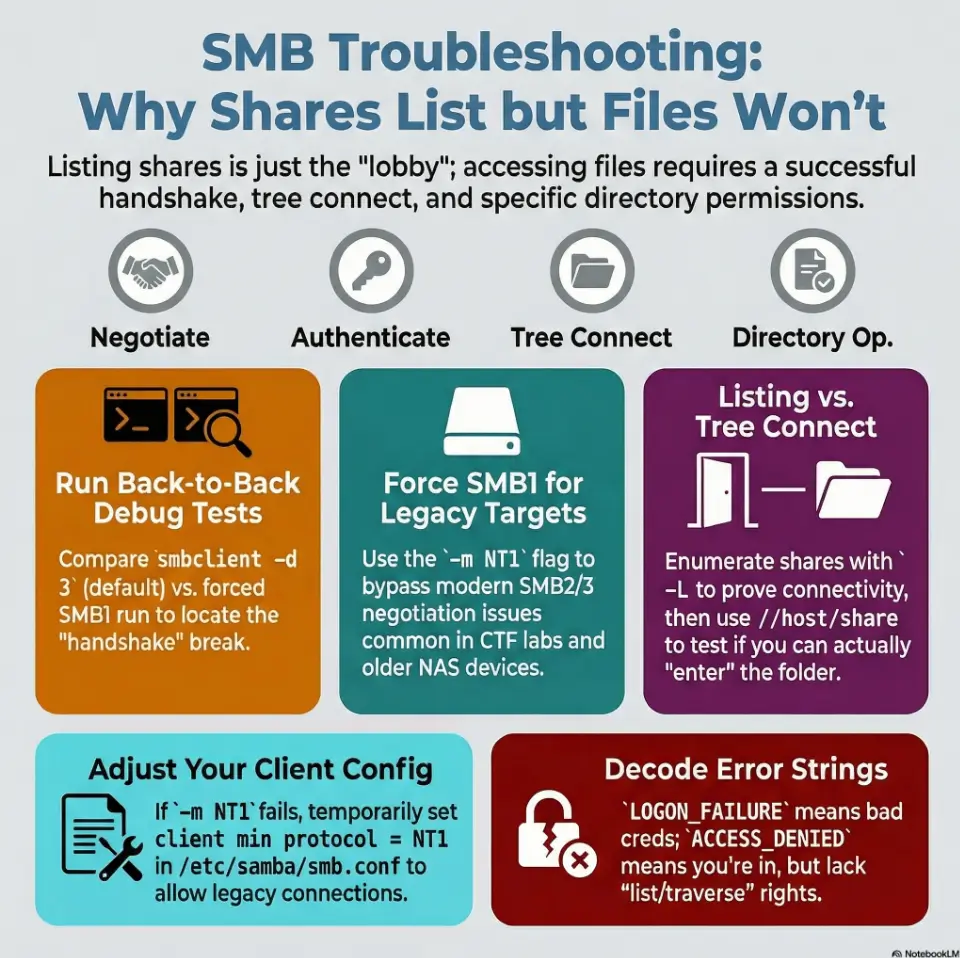
If smbclient -L shows shares but smbclient //host/share can’t list files, you likely have a protocol mismatch: share enumeration succeeds, but directory operations fail under SMB2/3. Test by forcing SMB1 per command (-m NT1) and, on newer distros, lowering Samba’s client min protocol temporarily (and sometimes client max protocol). Confirm with smbclient -d 3 negotiation lines, then revert.
Table of Contents
Who this is for / not for
For: Kali/Parrot/Ubuntu users doing Kioptrix-style labs (Samba targets, legacy NAS, old Windows)
If you’re staring at a retro target that feels like it still pays rent in floppy disks, this is for you. Think legacy Samba, old Windows boxes, crusty NAS devices, and intentionally vulnerable CTF machines where SMB negotiation is… “artisanal.”
For: Anyone seeing “shares listed, but ls fails” with NT_STATUS_* errors
You can enumerate shares, but directory listing throws errors or returns nothing. That split-brain behavior is the whole mystery we’re solving (and when the rabbit hole starts whispering “try 12 more flags,” it helps to have the OSCP rabbit hole rule as a sanity rail).
Not for: Modern AD environments where SMB1 is disabled for policy reasons (don’t “force NT1” on real corp networks)
In real corporate networks, SMB1 is often disabled on purpose. Don’t be the person who “fixes the lab” by weakening a production box. In a CTF, sure. On an engagement, treat SMB1 as a last-resort diagnostic and get explicit authorization.
-L works and ls fails. You’re seeing a mismatch between enumeration and directory operations. - CTF targets often negotiate oddly across dialects
- Modern clients often block NT1 by default
- Debug output tells you where the failure lives
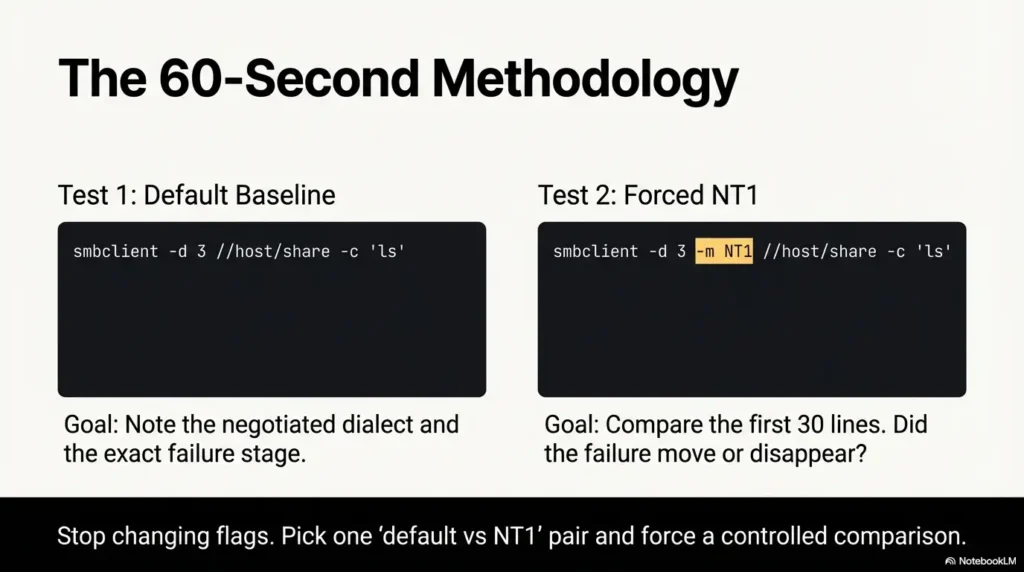
Apply in 60 seconds: Run the same command twice: once default, once with -m NT1, and compare the first 20 debug lines.
The symptom, decoded: “-L works, ls doesn’t”
Why share listing can succeed while file listing fails
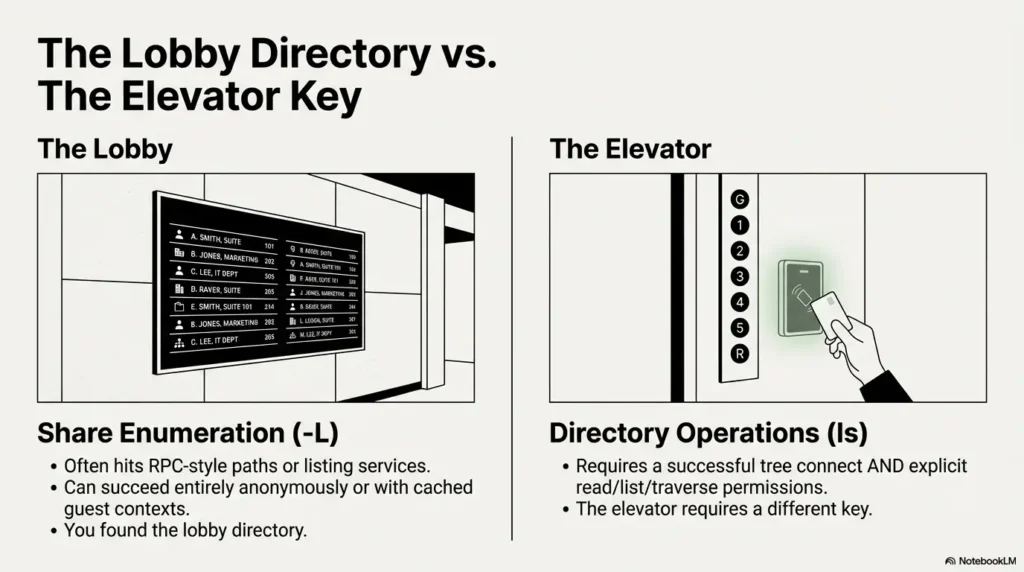
Here’s the sneaky truth: listing shares is not the same problem as listing files. Share enumeration often hits RPC-style paths (or different server-side code paths) that can succeed even when a later tree connect or directory operation fails. In human terms: you found the building’s lobby directory, but the elevator requires a different key (if you’re still mapping the terrain, a quick refresher on SMB null session behavior across port 139 vs 445 can explain why “it talks” but “it won’t walk”).
I learned this the hard way on a Kioptrix-like lab at 1:40 AM. I saw shares, felt victory creeping in, and then ls smacked me with an error that looked like it had been typed by an angry fax machine. That’s normal. Annoying, but normal.
The two handshakes hiding in plain sight (enumeration vs tree connect vs directory ops)
Think of your session as a short play with four acts:
- Negotiate: client and server agree on SMB dialect (SMB1 vs SMB2/3), signing, capabilities.
- Authenticate: guest/anonymous or username/password (sometimes “worked” only enough to talk).
- Tree connect: attach to a specific share (this is where “share exists” meets “you can enter”).
- Directory operation:
pwd,ls,cd, traversal rights, listing rights.
Quick triage: what exact error strings usually mean (NT_STATUS_ACCESS_DENIED, BAD_NETWORK_NAME, LOGON_FAILURE, INVALID_PARAMETER)
Don’t memorize these like spells. Use them like street signs:
NT_STATUS_LOGON_FAILURE: credentials wrong, or server rejects the auth method (if you’re cross-checking against smbmap output, see smbmap NT_STATUS_LOGON_FAILURE for the “same words, different tool personality” nuance).NT_STATUS_ACCESS_DENIED: auth might be real, but you lack rights for the requested operation (share, directory, list, traverse), and it’s worth contrasting smbmap ACCESS_DENIED behavior with what smbclient reports.NT_STATUS_BAD_NETWORK_NAME: share name mismatch or server doesn’t like that share path in that dialect.NT_STATUS_INVALID_PARAMETER(or similar weirdness): often negotiation/dialect quirks, sometimes Samba version behavior, sometimes the client and server disagree about a request structure (if you can’t even surface a clean banner, this is a cousin problem to smbclient can’t show Samba version situations).
Micro-check: “What did it actually say?” (copy the full line, don’t paraphrase)
This sounds preachy, but it saves your night: copy the full error line. One word changes everything. “Tree connect failed” is not “protocol negotiation failed.” They are different planets.
Show me the nerdy details
In SMB, different operations can traverse different code paths and permissions checks. Share enumeration can succeed via listing services/shares (historically via RAP/RPC-like paths or specific SMB calls), while directory listings require a successful tree connect plus permissions (read/list/traverse) and sometimes additional checks like signing or capabilities. Debug output shows whether failure is during negotiation, session setup, tree connect, or the actual directory query.
Protocol mismatch traps: SMB1 vs SMB2/3 under Kioptrix
When forcing SMB1 is the right test (legacy Samba, old configs, weak negotiation)
If your target is genuinely old (or intentionally old for training), forcing SMB1 is a diagnostic test that answers a simple question: “Is SMB2/3 the thing breaking directory operations?” In a surprising number of labs, the answer is yes.
Common lab situations where SMB1 is a reasonable test:
- Legacy Samba builds with quirky SMB2 support
- Old NAS appliances with partial SMB2 implementations
- Targets configured to behave like “the past” for teaching
When SMB2/3 breaks: signing, dialect negotiation, and older Samba quirks
SMB2/3 introduced changes that are excellent for security and performance, but older targets can choke on them. Also, newer clients may enforce defaults that the target never expected.
- Dialect mismatch: the server advertises something odd; client picks a dialect that later fails for directory calls.
- Signing expectations: one side expects signing; the other side can’t or won’t.
- Capabilities: sometimes a server’s advertised capabilities don’t match what it actually supports under load or specific calls.
The telltale clue: protocol negotiation failed vs tree connect failed
These two messages are the fork in your troubleshooting road:
- Negotiation failed: likely dialect/capabilities/signing mismatch. Forcing
-m NT1is a strong next test. - Tree connect failed: share name, share permissions, host restrictions, or auth context can be the culprit.
- Negotiation failures point to dialect/signing/capabilities
- Tree connect failures point to share path or share-level access
- Directory op failures point to list/traverse permissions or odd request handling
Apply in 60 seconds: Add -d 3 and look for the first “negotiated dialect” line and the first “tree connect” line.
Fix path A: Force SMB1 the clean way (without changing system-wide config)
Use -m NT1 to force SMB1 for this test session
This is the cleanest move because it’s per command. You’re not changing system defaults; you’re running a controlled experiment.
Minimal command chain (adjust user/pass/host):
# 1) List shares (default) smbclient -L //10.10.10.10 -N # 2) Connect and try directory ops (default) smbclient //10.10.10.10/SHARE -N -c 'pwd; ls' # 3) Repeat with forced SMB1 (NT1) smbclient -m NT1 //10.10.10.10/SHARE -N -c 'pwd; ls'
If step (2) fails but step (3) works, you’ve learned something valuable: SMB2/3 negotiation or behavior is the breaking point for that target.
Pair it with explicit user/domain syntax (even if “anonymous” seems implied)
Another classic lab trap: -L might succeed anonymously, but entering a specific share may require a different auth context. Try being explicit:
# Guest/anonymous explicitly (varies by target) smbclient -m NT1 //10.10.10.10/SHARE -U 'guest%' -c 'ls' # Domain syntax (if applicable) smbclient -m NT1 //10.10.10.10/SHARE -U 'WORKGROUP\user%pass' -c 'ls'
Validate with a minimal command chain (list shares → connect → pwd → ls)
Why those commands? Because they isolate stages:
-Lchecks “can I talk to you and enumerate?”- Connecting checks “can I tree connect?”
pwdchecks “can I perform basic share ops?”lschecks “do I have list/traverse and does dialect behave?”
Pattern interrupt: Let’s be honest… “I thought -L meant my creds were fine.” (It doesn’t.)
That’s the trap. -L can succeed with a guest context, cached behavior, or different server checks. It can be “fine enough to list names” without being “fine enough to walk the directories.”
One mid-article reference I actually trust when I’m double-checking flags: Read the official SMB client troubleshooting guidance
Fix path B: client min protocol (why your distro “protects you”)
Where client min protocol lives (and why it blocks NT1 by default)
On many modern Kali/Ubuntu-based systems, the Samba client stack won’t happily speak SMB1 unless you allow it. That’s not your distro being “annoying.” It’s your distro being a cautious friend who locks the door at night.
The setting is in your Samba configuration file, commonly:
/etc/samba/smb.conf
What you’re looking for is a line like:
client min protocol = SMB2
To allow NT1 (SMB1) for lab testing, you may temporarily set:
client min protocol = NT1 # sometimes helpful in labs: client max protocol = SMB3
Important: In many cases, you won’t need this if you’re already using -m NT1. But some environments still block NT1 below the tool layer, so you test it once, then revert.
Temporary vs persistent changes (test-first, then revert)
For CTF, the best workflow is “temporary permission to be insecure.” You want a change you can undo in under 60 seconds (and if you’re building good habits, consider pairing this with Kali Linux lab logging so you can prove exactly what changed, when).
- Temporary approach: make a backup, change one line, test, restore.
- Persistent approach: don’t, unless you’re building a dedicated lab VM and you accept the risk.
The safe rollback plan: snapshot the conf, change one line, re-test, restore
sudo cp -a /etc/samba/smb.conf /etc/samba/smb.conf.bak.$(date +%F-%H%M)
edit /etc/samba/smb.conf
add under [global]:
client min protocol = NT1
test smbclient again (prefer forcing -m NT1 anyway)

smbclient -m NT1 //10.10.10.10/SHARE -N -c 'ls'

rollback

sudo cp -a /etc/samba/smb.conf.bak.YYYY-MM-DD-HHMM /etc/samba/smb.conf
Micro-heading: Here’s what no one tells you… lowering min protocol can “fix” the lab and quietly weaken your box
This is why rollback matters. If you use a laptop for real work, treat your pentest VM like a sandbox, and keep SMB1 permission inside the sandbox.
- Back up
smb.confbefore touching it - Change one line at a time
- Restore immediately after you’ve confirmed the hypothesis
Apply in 60 seconds: Create a timestamped backup of /etc/samba/smb.conf before you run a single test.
Show me the nerdy details
Samba’s client behavior can be influenced by global config defaults that affect dialect choice and allowed minimums. In lab contexts, forcing NT1 at the tool level is ideal, but global constraints may still block legacy dialects in certain builds or linked libraries. The rollback pattern is the real skill: it keeps your environment deterministic and your future self grateful.
The permissions illusion: it’s not always protocol
Share is browseable but not listable (read vs list vs traverse)
Sometimes the protocol is fine, and you’re simply not allowed to list directories. SMB permissions can be oddly granular: you might be able to connect to a share but not enumerate its contents. That feels like being allowed into a library but told you can’t look at the shelves.
In practice, you’ll see one of these behaviors:
- Connect succeeds,
lsfails withACCESS_DENIED lsreturns nothing even though the share is real (less common, but it happens)- You can access a known file path but can’t list the directory (path guessing works, listing doesn’t)
Guest access, map to guest, and why “anonymous” behaves inconsistently
On many Samba targets, guest behavior depends on server settings. In labs, you’ll sometimes hit a “guest maps to a specific user” configuration. That can make -N appear “kind of authenticated,” while actual directory operations still fail due to rights.
Quick operator trick: test the same share with explicit guest syntax and with a blank user. Different results often reveal what the server is doing behind the curtain (and when RPC enumeration starts failing in the same “looks open but isn’t” way, it’s often the same story in different clothing, see rpcclient enumdomusers fails).
The “path quoting” gotcha (spaces, weird chars, and escaping)
This one is painfully human. You connect fine, you cd somewhere, and suddenly you can’t touch paths with spaces or weird characters. In smbclient, quoting matters. If you’re scripting -c commands, single quotes around the whole command string can save you from shell interpretation accidents.
smbclient //10.10.10.10/SHARE -N -c 'cd "Program Files"; ls'
When recurse lies: directory listing vs file open rights
Even if you can list, you might not be able to open files. Or the reverse: you can open a file if you know the name, but listing is blocked. Treat listing and opening as separate permissions tests.
Mini reality check from the field: I once spent 25 minutes blaming dialects when the share was simply “connect allowed, list denied.” The server wasn’t broken. My assumption was.
Show me the nerdy details
In access control terms, listing a directory can require permissions distinct from reading a specific file. SMB servers may enforce “traverse” and “list folder” rights separately. When you see a successful tree connect but failing directory query, permissions or server-side ACL interpretation can be the real root cause, not the negotiated dialect.
Common mistakes (the ones that eat your evening)
Mistake #1: Treating -L as proof your auth is correct
-L can succeed under guest, partial access, or a different check path. It’s “proof you can ask questions,” not proof you can walk the hallways.
Mistake #2: Forcing SMB1 globally and forgetting to revert
That’s how your lab tweak becomes a long-term footgun. The fix is boring: backup, change, test, restore.
Mistake #3: Testing one command and assuming the rest will follow
SMB is layered. Test like an operator: negotiate, auth, tree connect, directory ops. One step at a time.
Mistake #4: Ignoring debug output (-d 1/3) that literally names the failure
Debug output often says, in plain text, what dialect was negotiated and which call failed. It’s like ignoring a GPS voice because you prefer vibes.
Mistake #5: Forgetting host-based restrictions (allowed hosts, interface binds)
Some Samba configs restrict by source IP or interface binding. In CTFs, this is rarer, but it exists. If you can enumerate from one interface but not connect from another (VPN vs NAT), suspect restrictions.
- Yes/No: Does
smbclient -d 3show a negotiated dialect? - Yes/No: Does “tree connect” succeed before
lsfails? - Yes/No: Does forcing
-m NT1change the outcome? - Yes/No: Does explicit
-U 'user%pass'change the outcome?
Next step: If only -m NT1 flips failure to success, you’re in a protocol mismatch lane. If tree connect succeeds but ls fails consistently, you’re likely in a permissions lane.
Neutral action: save the outputs to your notes before changing anything else.
Don’t do this: “tactically wrong” troubleshooting moves
Don’t shotgun flags until something works (you’ll never learn the failure mode)
It’s tempting to stack options like a sandwich built in panic. The problem is you won’t know which change mattered. You’ll win the moment and lose the lesson.
Don’t downgrade system-wide Samba settings on a real engagement box
If you’re on a real assessment machine, don’t quietly enable SMB1 system-wide “because a lab blog said so.” Keep risky changes scoped and documented (and if you ever need to justify scoping decisions formally, this pairs well with penetration test limitation of liability language and clean engagement notes).
Don’t confuse “share exists” with “you can traverse directories”
A share name is a signpost, not a permission slip.
Don’t assume smbmap and smbclient behave identically (they don’t)
Tools differ in defaults, fallbacks, and how they interpret responses. If you’re also using Impacket tools, same story: great tools, different assumptions.
Evidence-first debugging: make the failure talk
Turn on smbclient debug just enough (-d 3) and read the negotiation lines
-d 3 is often the sweet spot: enough detail to see the dialect and failure stage, not so much that your terminal becomes a confetti cannon.
# Default smbclient -d 3 //10.10.10.10/SHARE -N -c 'pwd; ls' # Forced SMB1 smbclient -d 3 -m NT1 //10.10.10.10/SHARE -N -c 'pwd; ls'
Check what dialect you negotiated (SMB1/2/3) and what changed between commands
What you’re hunting for is a clean “before vs after” story:
- Dialect negotiated in default run
- Dialect negotiated in NT1 run
- Where the failure moves or disappears
Use a 3-step checklist: Negotiate → Authenticate → Tree connect → Directory op
Yes, that’s four steps. Security people can count. The point is sequence. If you skip sequence, you get superstition. If you follow sequence, you get a writeup you can defend.
Save artifacts for writeups (command, output, timestamp, target)
CTF learners underestimate how much time artifacts save. Write down:
- Exact command
- Exact output
- Target IP/hostname
- Timestamp
Inputs: (1) How many different SMB commands did you try so far? (2) How many times did you retype credentials? (3) Did you capture debug output (yes/no)?
- Rule of thumb output: If you tried > 6 commands and captured no debug output, you’re probably 10–20 minutes from clarity.
- If you did capture debug output: you can usually locate the failure stage in 2–4 minutes.
Neutral action: pick one “default vs NT1” pair and stop changing anything else until you’ve compared them.
Short Story: The night I learned SMB has two faces (120–180 words) …
Short Story: I was working a nostalgia-flavored lab where the target felt like it still listened to dial-up. smbclient -L gave me three shares and a small hit of confidence. I told myself, “Great, auth is fine.” Then I connected to the obvious share and ran ls. Instant denial. I tried new usernames, new flags, new prayers. Twenty minutes evaporated.
Finally I ran the same command twice: default negotiation, then -m NT1, both with -d 3. The logs read like a tiny confession. The default run negotiated a newer dialect, reached tree connect, and choked on directory operations. The NT1 run behaved like the target’s comfort zone and listed files immediately. Nothing magical happened. I just stopped guessing and forced a controlled comparison. That night, I didn’t just get files. I got a method.
Next step (one concrete action)
Run two back-to-back tests and compare: default negotiation vs forced SMB1
Do this exactly once, cleanly, and keep the outputs.
- Test normally: list shares and connect with
-d 3. - Repeat with forced NT1: same commands, add
-m NT1. - Compare: look for where the behavior diverges (negotiation, tree connect, directory op).
- Choose A (protocol lane): If
-m NT1makeslswork and default fails, treat this as a dialect mismatch and keep SMB1 use scoped to the lab command. - Choose B (permissions lane): If both default and NT1 fail at
lsafter a successful tree connect, suspect list/traverse permissions, guest mapping, or share ACLs.
Time trade-off: A usually resolves in 2–5 minutes. B can take 10–30 minutes depending on creds and share rules.
Neutral action: write one sentence: “Failure occurs at: negotiation / tree connect / directory op.”
FAQ
Why does smbclient -L list shares but connecting to a share fails?
Because share enumeration can succeed under a different access path or guest context, while connecting to a share requires a successful tree connect and share-level permissions. It can also be a dialect mismatch where SMB2/3 behaves differently than SMB1 on legacy targets.
What does -m NT1 do in smbclient, and is it the same as “SMB1”?
In smbclient, -m NT1 forces the NT1 dialect, which corresponds to SMB1 behavior. It’s commonly used as a diagnostic for legacy targets, especially in labs, to see whether SMB2/3 negotiation is the source of failure.
How do I change client min protocol safely on Kali/Ubuntu?
Back up /etc/samba/smb.conf, change only the client min protocol line under [global], re-test, then restore from backup immediately. Prefer per-command forcing (-m NT1) first, and only adjust global settings if you confirm the client is blocking NT1.
What’s the difference between NT_STATUS_ACCESS_DENIED and NT_STATUS_LOGON_FAILURE?
LOGON_FAILURE usually means credentials were rejected (wrong user/pass, wrong auth method, or policy). ACCESS_DENIED often means you did authenticate (or got a session) but lack rights for that specific action: entering a share, listing a directory, or traversing a path.
Why can I see a share name but ls returns nothing or errors out?
Common causes are (1) list/traverse permissions are missing, (2) you’re authenticated as guest and mapped to a restricted account, (3) dialect differences change behavior on legacy servers, or (4) quoting/escaping issues when using -c scripts.
Do smbmap results guarantee smbclient will work?
No. Tools differ in defaults and how they negotiate dialects and handle fallbacks. Treat each tool as its own client personality. If results conflict, trust the one that gives you the most transparent debug trail.
When should I suspect signing or SMB dialect negotiation issues?
If you see negotiation errors, protocol-related failures, or behavior that flips when you force a dialect (like -m NT1), suspect negotiation. If the negotiated dialect changes between runs or the failure stage shifts earlier, that’s a strong clue.
What’s the safest way to revert Samba client settings after a lab?
Restore your saved smb.conf backup immediately, or revert your VM snapshot if you’re working inside a dedicated lab VM. The safety habit is “test, confirm, revert,” not “set and forget.”
Conclusion
Let’s close the loop from the top: -L listing shares doesn’t mean you’ve won. It means you’ve reached the lobby. The real win is knowing which door fails: negotiation, authentication, tree connect, or directory ops. When you run default vs -m NT1 back-to-back with -d 3, SMB stops being spooky and starts being readable.
Run with
-d 3⬇️
Note negotiated dialect
Test
-N vs -U user%pass⬇️
Observe
LOGON_FAILURE vs success Connect to
//host/share⬇️
If fails: share name / share ACL / host rules
pwd; ls⬇️
If fails: list/traverse perms or dialect quirks
Accessibility note: This flowchart is presented as four labeled boxes describing sequential checks from negotiation to directory operations.
If you want one strong move you can do in 15 minutes: run the paired tests (default vs NT1), paste the first 30 lines of each debug output into your notes, and write one sentence: “Failure occurs at: ___.” That sentence is the difference between random flag-flailing and actual troubleshooting (and if you’re turning these artifacts into something you can reuse, pairing your evidence with a consistent workflow like OSCP proof screenshots and a clean ShareX screenshot naming pattern makes writeups dramatically faster).
Two late-article references worth keeping in your back pocket: Read the official SMB protocol versions guidance
Last reviewed: 2026-02-28.