

The Signal in the Noise: Precision Mirroring for Kioptrix
A 20-minute mirror can leave you with 1,400 files and exactly one useful clue, quietly buried under logos, thumbnails, and duplicate folders. That is the paradox of Kioptrix wget mirroring for recon: the more you collect too early, the less you often see.
For beginners and tired late-night labbers alike, the real problem is not missing pages. It is mistaking recursion depth for progress, then drowning in static assets, archive loops, and directory clutter before the actual signal has a chance to speak.
Keep guessing, and you do not just lose time. You lose clarity, momentum, and the clean evidence trail that makes recon worth doing. This guide helps you use wget mirroring the way it actually pays off in a Kioptrix-style lab: shallow first, scoped tightly, and expanded only when a real clue earns it.
You will learn how to spot useful filenames, linked legacy paths, and exposed leftovers without turning low-impact web recon into a storage problem. The method here is practical, restrained, and built around report-friendly decision-making rather than command-line bravado.
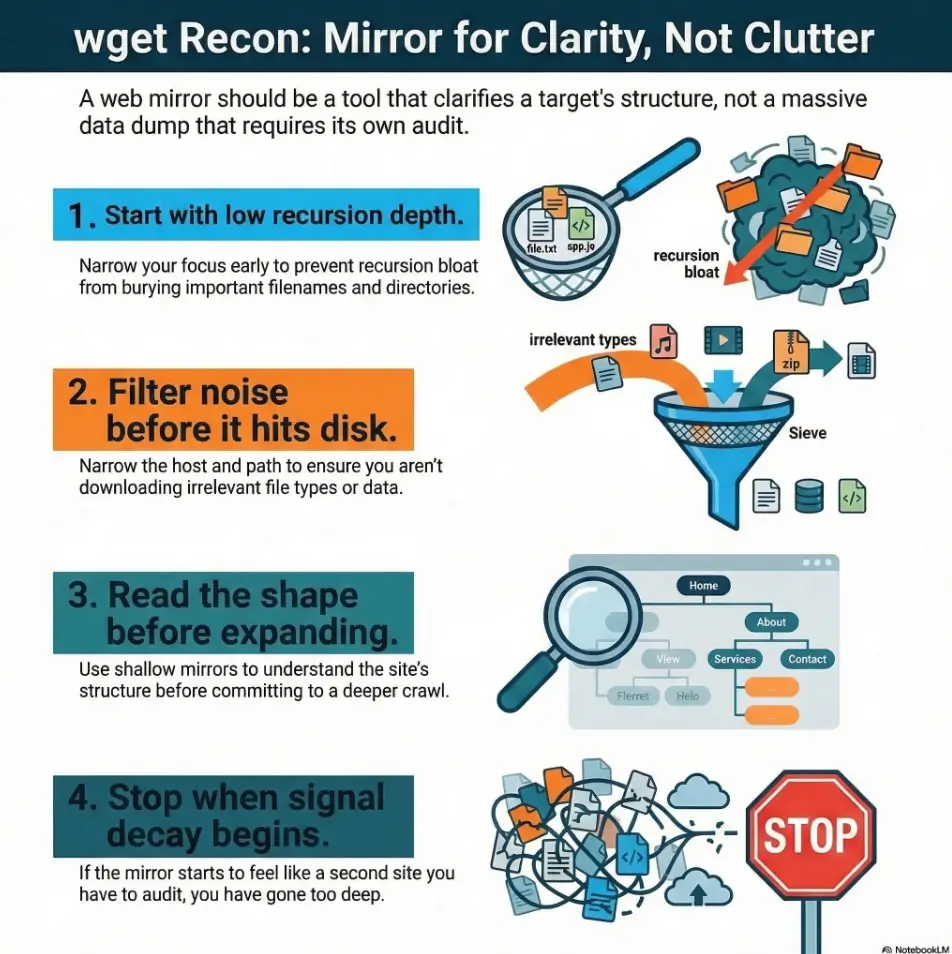
wget mirroring for recon in a lab like Kioptrix, start with a low recursion depth, narrow the host and path, and filter noisy file types before they ever hit disk. The biggest time sink is rarely “missing a page.” It is letting recursion bloat bury the handful of filenames, directories, and leftovers that actually matter.
Table of Contents
Crawl Smarter First: Why wget Depth Becomes a Time Sink Fast
The quiet trap: recursion feels efficient until it isn’t
There is a seduction to recursive mirroring. You type a few flags, press enter, and it feels like progress is happening while you sip coffee and pretend to be a disciplined operator. Then you open the mirrored directory and discover 1,400 files that taught you almost nothing. The crawl expanded, but your understanding did not.
That gap matters. In legacy labs, the signal is often tiny: a forgotten note, a strangely named folder, a backup artifact, an old admin path, a filename that reflects weak housekeeping. A giant mirror can bury those clues under layers of decorative assets and duplicate content. It turns recon into archaeology with a leaf blower.
What “depth” really controls in a mirror workflow
For HTTP, recursion depth follows link hops from the starting page, not the number of slash-separated directories. A deeply nested URL directly linked from the start may appear at depth 1, while several pages in the same directory may require multiple hops. Use depth together with explicit scope boundaries.
That distinction is where beginners often level up. Depth should be treated as a decision variable, not a default. A shallow crawl gives you shape. A targeted second pass gives you context. A deep crawl, used too early, gives you a trash heap wearing the costume of diligence.
Why Kioptrix-style targets punish lazy defaults
Legacy web apps and training boxes often have simple link structures, old naming habits, and occasional leftovers that matter more than polished navigation. That is exactly why shallow-first recon works so well. If you also rely on curl-only recon for quick raw HTML review, the contrast becomes even clearer: a bigger recursive pull is not the same thing as complete visibility.
Early web testing works best when it stays a mapping exercise first: identify entry points, review page content, and understand the application surface before you do anything heavier.
Let’s be honest… most wasted recon time starts with “just mirror everything”
I have done the “just let it run” move at 1:20 a.m. It feels wonderfully efficient until the next morning, when your directory tree looks like a hoarder garage and your notes say something elegant like “maybe check old stuff??” That is not methodology. That is surrender in command-line clothing.
- Depth is a scope budget, not a virtue
- Shallow passes reveal structure faster
- Noise grows quicker than insight
Apply in 60 seconds: Before your first crawl, write one sentence describing what you want the mirror to reveal: structure, filenames, or hidden-but-linked pages.
Depth Limits That Actually Save Time in Kioptrix Recon
Start shallow: when depth 1 is enough to expose the shape of the site
Depth 1 is the underrated adult in the room. It shows you the landing zone: the homepage, linked pages, obvious sections, and the naming style of the application. That alone can answer several early recon questions. Is the site tiny? Is it flat or nested? Are there old-school paths like /admin/, /backup/, or /test/? Are links hand-built and sparse, or does the site behave like a template machine?
For a small legacy app, this first pass is often enough to tell you whether deeper mirroring is even worth the disk churn. A short crawl that reveals five meaningful pages is better than a 20-minute crawl that returns 600 image assets and one CSS file with delusions of grandeur.
Move to depth 2: where useful directories usually begin to appear
Depth 2 is often the sweet spot for Kioptrix-style recon. By then, you can usually see secondary folders, linked resources that matter, and whether a path contains naming breadcrumbs that deserve attention. This is where you often spot artifacts that are not prominent from the homepage but are still linked in reachable content.
In practice, depth 2 is where many good mirrors stop being maps and start becoming collections. That is why I like to treat it as a checkpoint. If the directory tree gets more informative at depth 2, continue selectively. If it only gets larger, stop. Your future self, the one writing notes, will thank you in measured silence.
Depth 3 and beyond: when the crawl starts behaving like a vacuum cleaner
Depth 3 is not forbidden. It is conditional. It makes sense only when depth 1 or 2 has already exposed a specific area worth expanding, such as a promising subdirectory or a set of linked documents whose relationships are still unclear. Used without that trigger, depth 3 often starts pulling archives, date-based structures, duplicate variants, and static assets that add bulk without changing your understanding.
That is the part new learners often miss: more collection is not always more recon. Sometimes it is just more housekeeping with a side of regret.
The stopping rule: expand depth only after you find a reason
Here is the simplest stop rule I know: do not increase depth because the current crawl feels incomplete. Increase it only because a concrete finding created a question. A suspicious folder name. An old note page. A pattern of linked documents. A visible branch of the site that looks more useful than the root view.
If you cannot name the reason for more depth, you probably do not need more depth.
| Situation | Better choice | Why |
|---|---|---|
| Small legacy site, unknown structure | Depth 1 | Fast site shape, minimal junk |
| Promising second-level folders appear | Depth 2 | Enough context without full sprawl |
| One branch clearly matters | Targeted depth 3 | You are answering a specific question |
Neutral next step: Pick the smallest depth that still answers your current recon question.

First-Pass Triage: What You Want from a Mirror in the First 5 Minutes
Find indexable pages, directory structure, and naming patterns
The first five minutes after a mirror finishes should feel like triage, not like reading a novel. I usually scan the folder tree first, then filenames, then a few HTML pages. What I want is shape: top-level directories, naming style, repeated terms, stale conventions, and anything that suggests the application grew by accretion rather than design.
That last part matters. Legacy applications often tell on themselves through habits. A folder name that contains “old,” “temp,” “bak,” or “copy” is not proof of anything magical, but it is evidence of human process. And human process leaves crumbs.
Surface exposed backups, notes, config leftovers, and odd extensions
This is where a mirror earns its keep. Not by giving you everything, but by letting you spot outliers quickly. Unusual extensions, duplicated filenames, archived copies, and text files with developer-ish names can leap out when the mirror is small enough to scan with ordinary human eyes. That same habit pairs naturally with reviewing read-only shares for quiet leftovers and forgotten files when a lab exposes multiple passive collection surfaces.
I once spent ten minutes admiring a beautifully mirrored set of frontend assets before noticing that the only truly interesting file was a plain-text note in a boring folder. Recon has a dark sense of humor.
Spot linked admin paths without crawling the whole planet
A small mirror is enough to surface high-value linked areas: login paths, admin pages, status pages, manuals, or archives. The point is not to brute-force discovery. The point is to capture what the application already reveals through its own links and structure, then decide what deserves closer review.
Here’s what no one tells you… a small mirror is easier to analyze than a “complete” one
The beginner fantasy is completeness. The professional habit is interpretability. A tiny, legible mirror supports better notes, faster review, and more repeatable reporting. A bloated mirror creates friction everywhere: filenames become harder to scan, duplicates muddy judgment, and reruns feel expensive even when the target is tiny.
Show me the nerdy details
Fetching pages with Wget makes network requests and may appear in server logs. It is low-impact content collection, not passive observation. Keep the starting host/path and request budget explicit. Depth alone does not limit page count, assets, or parameter variants.
Who This Is For / Not For
This is for: lab learners, CTF-style beginners, and authorized internal testers
If you are learning web recon in a box like Kioptrix, or working inside a legacy internal environment where you have explicit permission to test, this workflow fits. It helps you build the habit of narrowing scope, collecting with bounded requests, and documenting why you expanded the crawl when you did.
This is for: people documenting recon decisions for repeatable reports
Good recon is not just what you found. It is also what you chose not to do. When you can explain why you stopped at a certain depth, why you excluded assets, and why you expanded only one branch, your notes become clearer and your reports become easier to defend. If you want that logic to survive beyond the terminal window, a structured template like this Kali pentest report template can help keep scope decisions legible.
Not for: uncontrolled internet-wide scraping or unauthorized targets
This workflow is explicitly bounded to owned systems, training labs, and environments where you have permission. Low-impact collection still requires authorization. Keeping the article anchored to authorized use is not just a legal nicety. It is part of professional discipline.
Not for: users who need active testing, auth flows, or JavaScript-heavy crawling
If the application requires authenticated flows, client-side rendering, or dynamic interaction to expose meaningful paths, wget is not the right hammer for every nail. That means a deeper recursive crawl does not solve a visibility problem that is architectural in nature.
- Yes: you have explicit permission to test this lab or internal target
- Yes: the site is mostly static or legacy-linked
- Yes: you want passive collection and readable notes
- No: you are trying to cover dynamic, authenticated, or JavaScript-dependent paths with mirroring alone
Neutral next step: If you answered “No” to the last line, switch your goal from “mirror everything” to “map what passive collection can actually see.”
Mirror Boundaries That Prevent Hours of Junk
File-type filters that cut out noise before it lands on disk
Nothing bloats a mirror faster than letting it store every decorative asset and bulky download by default. In early recon, you usually care more about HTML, plain text, scripts, config-like leftovers, and documents that may contain naming clues. You usually care much less about images, large media, and ornamental frontend ballast.
This does not mean those files are never useful. It means they should earn their way into the mirror. A first pass should privilege interpretability over completeness. The easiest junk to clean up is the junk you never downloaded.
Directory exclusions that stop infinite rabbit holes
Some path patterns are like hallway mirrors facing each other. Archives, sorted views, autogenerated folders, and repeated category pages can create the illusion of growth without adding insight. If you recognize a branch that is mostly duplication, exclude it on the second pass rather than hoping your patience will suddenly become saintly.
Host and path boundaries that keep the crawl narrow
One quiet hazard in mirroring is scope drift. You start on a neat little target and end up pulling unrelated paths, mirrored subareas, or shared assets that technically belong to the host but do not help your recon question. Narrowing by host and path keeps the crawl legible and keeps your notes honest. It also reduces the chance that your mirror becomes a junk drawer with command-line branding.
Why assets can lie: CSS, images, and downloads rarely justify deep recursion
Assets can feel important because they are numerous. But early recon rewards relevance, not volume. In most first-pass cases, CSS and images tell you less than folder names, text content, and odd documents. A few assets may be worth reviewing later. Let them wait. They are patient little rectangles.
- Filter bulky noise early
- Exclude branches that duplicate without teaching
- Keep host and path scope narrow
Apply in 60 seconds: Decide which two file categories you do not need on the first pass and exclude them before rerunning anything.
The “Looks Useful but Isn’t” Problem
Duplicate pages, sortable tables, and archive loops
Some mirrored content looks rich because there is a lot of it. That is a trap. Sortable tables, archives by date, repeated category pages, and multiple views of the same underlying content can explode file counts without adding a single new clue. The directory feels productive. Your brain feels busy. The signal-to-noise ratio quietly falls through the floor.
This is why I like to ask a rude but useful question: if this branch doubled in size, would it change my understanding of the site? If the honest answer is no, that branch is scenery.
Session-like URLs and endless parameter variations
Even in older environments, path variations and parameterized pages can create false novelty. To a crawler, they look distinct. To a reviewer, they often collapse into the same content wearing slightly different hats. Without controls, you can spend a good chunk of your session collecting variants that do not deepen your recon at all.
Auto-generated directories that bloat the mirror with no recon value
Generated exports, feeds, archives, image folders, or helper assets may be technically reachable and practically irrelevant. Reachable is not the same as relevant. That distinction is the quiet backbone of good scoping.
Open loop: if a crawl keeps growing, what is it actually teaching you?
This is the question to pin above your monitor. Growth alone is not evidence. A crawl that keeps expanding might be teaching you that the site has lots of duplicate structures. It might be teaching you that your scope is loose. It might be teaching you that you are avoiding analysis by collecting more things.
None of those lessons require another thousand files.
Common Mistakes That Turn Recon into Cleanup Work
Mistake #1: starting with deep recursion before you know the site shape
Starting deep is like trying to sketch a building by first drawing every doorknob. You create effort before orientation. In a small lab, that usually means spending more time sorting files than learning from them.
Mistake #2: mirroring all assets as if every image might matter
I understand the instinct. Nobody wants to miss the one suspicious file. But first-pass recon is not a museum acquisition program. Most early value comes from names, paths, documents, and linked pages. An image-heavy mirror feels complete because it is heavy, not because it is insightful.
Mistake #3: treating page count as proof of recon quality
More files can simply mean looser scope. A compact mirror with five meaningful anomalies beats a giant mirror with none. Quality lives in findings and decisions, not in folder weight.
Mistake #4: forgetting to separate collection from analysis
This is the big one. Collection is not analysis. A mirror only becomes recon when you triage it: directory names, odd extensions, visible notes, comments, archived copies, administrative paths, and repeated naming patterns. Without that second step, the mirror is just a souvenir.
Mistake #5: rerunning large mirrors without changing scope
Reruns are useful only when they answer a new question. If you are repeating the same broad mirror because the last one felt messy, you are not fixing the problem. You are photocopying it.
- Current depth and why you chose it
- Excluded file types or directories
- Which branch looked promising
- What question the next pass is supposed to answer
Neutral next step: Add these four lines to your lab notes before every second-pass mirror.
Don’t Do This: Depth Choices That Usually Backfire
Don’t go “full mirror” on the first pass
The first pass is for orientation. Plain --mirror sets unlimited recursion depth, and -l 0 also means unlimited. For a bounded start, use -r -l 1 and confirm the scope separately. Avoid treating a depth limit as a file-count or runtime limit.
Don’t confuse reachable with relevant
Just because a crawler can reach something does not mean you need it right now. This is the core discipline behind scoping. Reachability is technical. Relevance is analytical. Early recon needs more of the second one.
Don’t let one strange directory justify a site-wide crawl
One odd folder is a reason for a targeted expansion, not for site-wide appetite loss. Expand around the clue. Do not reward curiosity with chaos.
Curiosity gap: when should you break your own shallow-depth rule?
Break it when the shallow mirror raises a specific, bounded question. A directory whose child pages appear promising. A linked document cluster that hints at archived copies. A visible branch whose contents could materially change your understanding of the application. That is a valid trigger. “I feel like there must be more” is not.
A Better Workflow: Incremental Mirroring Instead of One Giant Pull
Pass 1: shallow map for structure
The first pass is a map. Keep it small. Narrow the scope. Collect enough to see structure, naming, obvious linked areas, and whether the site looks like a candidate for deeper passive review. Your notes after pass 1 should answer three questions: what the site looks like, what stands out, and what does not deserve more attention.
Pass 2: targeted expansion around promising folders
The second pass is not “more.” It is “more where it counts.” Expand only the branch or branches that earned attention in pass 1. This preserves context while keeping analysis human-sized. It also makes your report cleaner because you can explain the decision path instead of saying, with tragic vagueness, that you mirrored a bunch of stuff and vibes happened.
Pass 3: manual review of filenames, comments, and legacy artifacts
Now you shift from collection to inspection. Read filenames like clues. Review page comments. Look for backups, old docs, weird notes, duplicate copies, and naming conventions that reveal age or maintenance habits. Legacy boxes are often candid in quiet ways. They whisper through leftovers.
When to switch from wget to browser review or other passive analysis
Once the mirror has done its mapping job, manual review becomes more efficient than more recursion. If the application appears dynamic, requires interaction, or depends on client-side behavior, the mirror has reached its natural ceiling. Wget is still useful there, but not as a stand-in for everything else. That same judgment is part of a broader security testing strategy: use the lightest method that answers the current question clearly.
Short Story: I once ran a deeper mirror against a small lab target because the first pass felt too neat. That turned out to be my clue. The site was neat because it was small, not because I had missed something. The deeper crawl brought in a swamp of duplicate assets and helper files. I spent twenty minutes sorting them, then opened the original shallow mirror to compare.
The useful clue had been there all along: an oddly named document in a modest subdirectory that I had already collected in the first ten minutes. What changed was not the data. It was my willingness to trust a small, readable result. Recon has a way of teaching this lesson with mild embarrassment, which is sometimes the most durable teacher.
Show me the nerdy details
Incremental mirroring improves both reproducibility and comparative review. When passes are small and purpose-built, you can compare directory trees, spot what changed, and explain why a second crawl existed. That makes mirrors easier to audit and easier to discuss in a lab writeup.
The Signal Hunt: What a Good Kioptrix Mirror Usually Reveals
Legacy naming conventions that hint at weak housekeeping
Old systems often reveal themselves through naming. A branch called “oldsite,” “backup,” “test2,” or “copy” is not a vulnerability by itself. But it is strong evidence about maintenance culture. And maintenance culture is recon gold. It tells you whether the site feels curated, neglected, layered, or improvised.
Hidden-but-linked pages developers forgot to bury
This is one of the most satisfying outcomes of a shallow mirror: pages that are not obvious from the homepage but are still linked somewhere reachable. You are not brute-forcing them. You are simply observing what the application exposes when you collect its reachable structure carefully.
Backup artifacts, old docs, and version breadcrumbs
Version hints, archived notes, copied pages, and stray documents can turn a vague site into a story. Even if they do not create a direct next step, they reduce uncertainty. They tell you how old the app feels, what areas were touched, and whether the directory structure is likely to contain more quiet leftovers. That same pattern often rhymes with the way vulnerable web apps reveal their structure in small, human clues.
Open loop: the smallest file in the mirror may be the loudest clue
That is the strange grace of these labs. The file that matters most may be tiny, boring, and easy to miss in a huge crawl. Small mirrors improve your odds of noticing it. Not because they are more complete, but because they let your eyes and judgment actually work.
Depth 1, tight host/path scope, noisy assets filtered out.
Top folders, filenames, linked pages, odd extensions.
Use depth 2 or 3 only around promising branches.
If new depth adds duplicates, the crawl is done.
How to Decide the Crawl Was “Enough”
The three-question stop test
When I feel the itch to go one level deeper, I use three questions. First, did the last depth add a new category of insight, or just more of the same? Second, can I name the exact branch that deserves more expansion? Third, if I rerun with broader scope, what analysis question will that answer that I cannot answer now?
If at least two of those questions produce weak answers, I stop. “Enough” is not the enemy of thoroughness. It is a recon skill. It means your collection has crossed the line from useful to diminishing returns.
When new depth adds only duplicates, not insight
This is the clearest stopping signal. If every added level increases count but not understanding, the crawl has switched roles. It is no longer a map. It is clutter. At that point, manual review of what you already have will outperform more recursion almost every time.
How to document scope so you do not repeat the same crawl tomorrow
Write down the target area, depth, filters, exclusions, start reason, and stop reason. It sounds almost boring enough to be medicinal, and that is precisely why it works. Tomorrow’s you should be able to open the notes and understand why yesterday’s you stopped. Without that discipline, labs become Groundhog Day with shell history.
Pattern interrupt: enough is a recon skill too
The strongest learners I know are not the ones who collect the most. They are the ones who can say, calmly and with evidence, “This mirror answered the question.” That is not laziness. That is professional restraint.
Count three things from the last pass:
- New meaningful directories found
- New odd files or documents found
- Duplicate or clearly low-value files added
If the first two together are lower than the duplicate count, deeper recursion is probably paying you in clutter, not insight.
Neutral next step: Review your latest mirror and score those three numbers before expanding anything.

FAQ
Is wget mirroring still useful for recon in old lab boxes?
Yes, especially for static or legacy-linked sites where your early goal is to understand structure, naming, and reachable content quickly. It becomes less useful when the site depends heavily on authenticated flows or JavaScript-driven routing.
What recursion depth is usually enough for a small legacy web app?
For many small lab targets, depth 1 or 2 is enough to reveal the site shape and expose the branches worth manual review. Go deeper only when a specific finding creates a new question.
Can a deeper mirror miss the real clue by burying it in noise?
Absolutely. That is one of the main reasons shallow-first mirroring works. A small anomaly is easier to notice in a directory of 40 files than in one of 1,400.
Should I download images, PDFs, and binaries on the first pass?
Usually not all of them. Prioritize what helps triage: pages, text, and suspicious documents. Large assets and bulky downloads should earn inclusion based on a reason, not on reflex.
How do I avoid crawling useless duplicate paths?
Narrow host and path scope, exclude obviously repetitive directories, and stop using increased depth as a substitute for analysis. If a branch grows but teaches nothing new, trim it on the next pass.
Is wget better than browsing manually for early recon?
For quick structure mapping, often yes. For interpreting a small number of interesting pages, manual browsing can become faster once the mirror has done its job.
What should I look for first in a mirrored directory?
Top-level folders, odd filenames, backup patterns, notes, document leftovers, administrative paths, and naming conventions that reveal how the application has been maintained over time.
When should I stop increasing recursion depth?
Stop when new depth adds duplicates and bulk rather than new categories of insight. If you cannot state what extra depth is supposed to answer, you probably do not need it.
Can JavaScript-heavy pages make wget mirroring less useful?
Yes. Wget does not recursively retrieve URLs embedded in JavaScript, so more recursion does not fix a visibility problem caused by client-side rendering.
How do I keep a mirror report-friendly for later writeups?
Keep scope narrow, note your filters and exclusions, separate collection from analysis, and record why you stopped. A lean mirror with clear reasoning is much easier to explain than a giant undifferentiated pull.
Conclusion
The curiosity loop at the start of this article was simple: how do you stop wget mirroring from eating hours while still getting useful recon? The answer is not a magical flag. It is a posture. Start shallow. Read the shape. Expand only where a clue earns expansion. Stop when added depth gives you more files but not more understanding.
That is the quiet discipline behind strong lab recon. Not maximal collection, but deliberate collection. Not completeness theater, but useful visibility. In a Kioptrix-style environment, the mirror that helps most is often the one small enough to think with.
Within the next 15 minutes, run one tightly scoped, shallow mirror against your authorized lab target and review only three things: directory names, unusual filenames, and linked pages that look older than the homepage. Do not increase depth until one of those three creates a reason. That single habit will save you more time than any grand, glowing “full mirror” impulse ever will.
Original review: 2026-03.
Technical guidance updated: 2026-10-13. Clarified HTTP link-hop depth, unlimited mirror settings, and the limits of low-impact collection.