Beyond the Read-Only Label: Precision SMB Exploitation
In Kioptrix-style labs, a tool’s read-only SMB summary can describe only the path it tested. A child directory may have different object permissions, provided the share-wide policy permits writes.
“A root write test can miss writable child paths, but child ACLs cannot override a share-level write denial.”
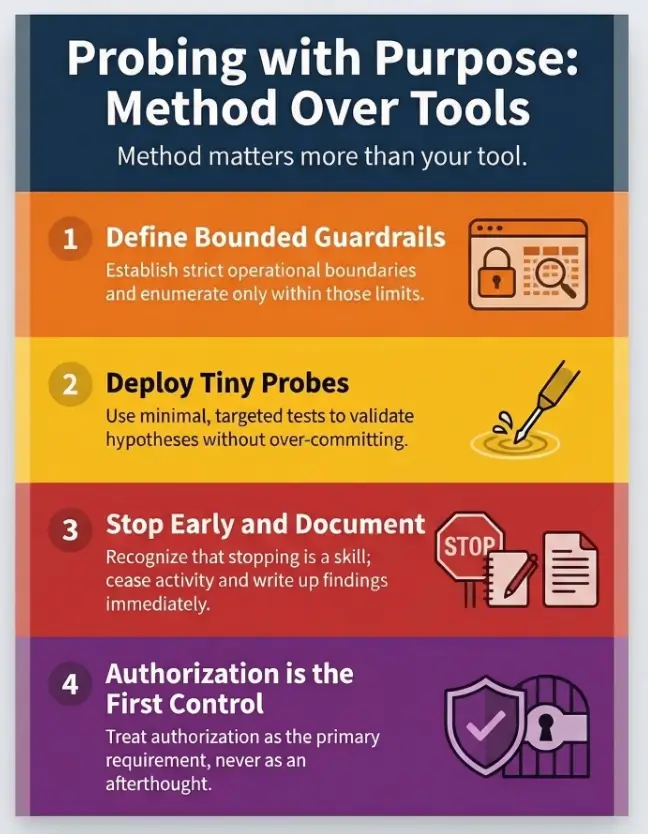
Stop the “brute-force wandering” and noisy testing that thins out your reports. Our method focuses on a low-noise, tactical approach to separating what looks read-only from what is truly unwritable.
- ✔ Assume: The label may be wrong.
- ✔ Narrow: Target the tree through bounded recursion.
- ✔ Validate: Use tiny, reversible probes for access.
- ✔ Prove: Document exactly one thing with clean evidence.
No drama. No static. Just defensible results.
- Child permissions can differ when share policy permits writes; a true share-wide write denial still applies.
- Bounded recursion finds those pockets without turning your session into a noise festival.
- A tiny create/rename/delete probe is enough proof without leaving scars.
Apply in 60 seconds: Decide your depth limit (e.g., 3) and your skip rules before you enumerate anything.
Table of Contents
Who this is for / not for
Who this is for
- US-based pentest students doing Kioptrix-style labs (authorized only)
- Blue teamers validating SMB misconfig paths for a hardening report
- Anyone who wants low-noise write-check logic that’s repeatable and documented
Who this is not for
- Anything without explicit authorization (no “production curiosity”)
- Credential spraying, lateral movement, or persistence workflows (out of scope)
- Anyone looking for “one magic command” instead of evidence-driven checking
Quick gut-check: if you can’t answer “Who owns this system?” and “Where is scope written down?” without sweating, stop. In real work, the fastest way to fail is to be vague about permission. That is also why a clear penetration test statement of work template matters so much before you ever touch enumeration.
- Scope keeps your testing lawful.
- Scope keeps your data usable in a report.
- Scope prevents “I only meant to…” moments.
Apply in 60 seconds: Write a single sentence in your notes: “Authorized lab target, date, and goal: find one writable subpath only.”
Scope first: what “read-only share” really means in SMB
Share permissions vs NTFS ACLs
SMB shares are a layered sandwich. The share permission is the “front door policy.” NTFS ACLs are the room-by-room locks inside. When you connect over the network, effective access is typically the most restrictive combination of the two. Microsoft’s own guidance on configuring share and NTFS permissions highlights that both layers matter, and you should expect the file system permissions to shape real access.
A tool may report the root as read-only after a failed root write test while a child permits creation. That differs from an actual share-level Read restriction: child NTFS rights cannot bypass it. On Linux-backed Samba, evaluate share policy plus POSIX permissions or ACLs rather than assuming NTFS. Check Samba’s share policy separately from object permissions.
Inheritance gotchas: where ACLs stop inheriting and weirdness begins
Here’s the plot twist that steals afternoons: ACL inheritance is not guaranteed to behave like your intuition. A folder can explicitly block inheritance or carry a custom ACL that doesn’t resemble its parent at all. In labs, that can be intentional misconfiguration. In production, it’s often the fossil record of an old migration, a rushed “temporary” exception, or a service account that was granted too much… and never un-granted.
The three outcomes you must label distinctly
- Listable: you can see the folder name (directory listing succeeds)
- Readable: you can open/download a file inside
- Writable: you can create or change content (even if delete is blocked)
I learned this the embarrassing way. Early in my lab days, I celebrated because I could list a directory called “upload.” Five minutes later, I was staring at “Access denied” like it had personally insulted my family. Listing is not writing. Listing is flirting. Writing is a committed relationship. If you’ve ever hit that exact wall, the pattern rhymes with smbclient listing without true access.
Show me the nerdy details
SMB “share permissions” are evaluated at the share boundary, while NTFS ACLs are evaluated on each object (folder/file). If inheritance is blocked or an ACE is explicitly set on a child object, the child can behave differently than its parent. Tools that summarize “writable: false” at the share root may not traverse and evaluate every child path, so they can miss pockets of effective Modify/Create permissions deeper in the tree.
Recursive path hunting: the low-noise algorithm that actually works
Let’s make this boring in the best way. Your goal is not “exploit everything.” Your goal is: find one defensible writable subpath and prove it with minimal impact. That’s it. One clean win beats a hundred chaotic maybes.
The recursion strategy
Use bounded recursion: a depth limit plus skip rules. Think of it like exploring a library with a flashlight. You don’t need to scan every book spine to find the one shelf that has a sticky note saying “DROP FILES HERE.”
- Breadth-first: you check many sibling folders early. Great when upload folders tend to live near the top.
- Depth-first: you follow one branch deeper. Great when shares are organized by department/project with nested ACL quirks.
In Kioptrix-style labs, breadth-first often finds “incoming/” or “public/” sooner. But if the share looks like “Departments/HR/…”, depth-first can be faster because ACL oddities often live in the “real work” leaf folders.
Skip rules: avoid the noise traps without missing gold
- Skip folders that are obviously huge (e.g., backups, ISO dumps, media archives)
- Skip “system-y” paths unless your lab goal requires them (e.g., printer driver shares)
- Skip deep recursion once you have one confirmed writable path
Personal note: I used to “just recurse everything” because it felt thorough. It also felt like watching paint dry, except the paint was my patience. Guardrails are kindness. The same principle shows up in safe CrackMapExec SMB reconnaissance flags: tight controls beat noisy enthusiasm.
Write-test primitives (minimal impact)
Your write test should be tiny, reversible, and obvious in a report. In authorized labs, the safest primitives usually look like:
- Create a tiny temp file (0–1 KB)
- Rename it (proves this rename operation, not the complete Modify permission set).
- Delete it (cleanup and proof)
If delete fails, you might be in a “write-but-not-delete” pocket. That’s still a meaningful finding. Document it cleanly and don’t escalate your behavior to “force cleanup.”
Handling confusing errors without spiraling
- Access denied: you’re blocked by permissions at that path
- Read-only attribute: can be a file attribute or an interpretation by a client tool (does not always equal ACL denial)
- Bad network name: path/share mismatch, alias confusion, or a mapping issue
When the error message is vague, your job is to be structured, not dramatic. Change one variable at a time. Write down what changed. Future-you will thank you with snacks. If the whole problem starts one step earlier at connection time, check your assumptions against common smbclient tree connect failures before blaming the folder itself.
Evidence output you want (report-friendly)
Make a “writable path table” as you go. Don’t wait until the end when your terminal scrollback becomes an archaeological dig.
| Path | Probe | Result | Notes |
|---|---|---|---|
| \\TARGET\SHARE\candidate\subfolder | create → rename → delete | PASS / PARTIAL / FAIL | error text, timestamp, user context |
- Bound recursion prevents “infinite tree” pain.
- Small probes prevent accidental damage.
- A table turns chaos into evidence.
Apply in 60 seconds: Create a single note template with columns: Path, Probe, Result, Notes.
💡 Read the official smbclient guidance
Tooling menu: pick one lane and stay consistent
Tools are opinions with flags. The mistake is bouncing between three tools without a consistent definition of “writable,” then blaming the target for being “weird.” Choose one primary lane, then use a second method only to resolve contradictions.
smbclient recursion workflow (Linux)
smbclient (from Samba) behaves like an FTP-style client for SMB shares. It can list directories and interact with files in a way that’s easy to log. In a lab, it’s a strong choice because it’s transparent: you see exactly what you tried and what the server replied.
Lab-safe posture: keep your actions to listing and tiny temp-file probes. Avoid bulk downloads. Avoid overwriting anything you didn’t create.
smbmap / CrackMapExec checks (lab-safe posture)
Tools like smbmap and CrackMapExec can summarize shares quickly, but summaries often reflect root-level assumptions. The tricky part is that “share writable: false” can still coexist with “subpath writable: true.” That’s not the tool lying, it’s the tool being a tool.
Rule of thumb: use these tools to discover candidate paths, then validate with a direct probe at the specific folder you care about. If you get blocked before that stage, compare with patterns from smbmap access denied troubleshooting and SMBMap NT_STATUS_LOGON_FAILURE fixes.
Windows-native options (PowerShell + mapped paths)
If your lab scenario includes a Windows foothold, native access can reduce friction. You can test create/rename/delete in a single folder without introducing extra binaries. This also tends to be easier to explain to defenders later because it resembles normal admin behavior.
One of my favorite “operator sanity” tricks: name your temp file like _write_probe_dont_panic.txt. It sounds silly, but it makes cleanup obvious and intent easy to explain.
Show me the nerdy details
Different tools may evaluate writability differently: some test creating a file, others test directory creation, and others infer access from metadata. SMB servers can also enforce permissions via share settings, NTFS ACLs, and sometimes additional controls (e.g., policies/auditing). When tools disagree, default to the simplest direct evidence: an actual create/rename/delete probe in the target folder, using minimal bytes and immediate cleanup.
Curiosity gap: why “one writable folder” is enough
There’s a particular kind of lab adrenaline that whispers: “If I found one writable folder, there must be five.” That voice is not your friend. The professional move is to stop at sufficient proof.
The leverage principle
One writable subpath can enable safe lab actions like:
- Uploading a harmless test artifact to validate misconfiguration
- Diffing configs or leaving a proof file that supports a finding
- Demonstrating how inconsistent ACLs create unintended write access
In real engagements, this is where you’d pivot into a scoped next step that’s explicitly authorized. In labs, it’s where you earn your “clean notes” badge. That reporting discipline also makes your findings easier to translate into a polished deliverable later, whether you use a Kali pentest report template or a more professional OSCP-style report format.
Here’s what no one tells you…
The first writable folder you find is often the worst one to use. It might be busy, sensitive, or full of legitimate files that you risk touching by accident. Choose the least disruptive path: empty, low-traffic, easy to justify.
- One confirmed writable pocket is enough to prove the issue.
- Choosing a quiet folder reduces accidental impact.
- Evidence beats exploration.
Apply in 60 seconds: Write down your stopping rule: “Stop after first PASS path with clean cleanup.”
Common mistakes that waste hours (and spike noise)
Mistake #1: treating listing success as write success
Listing is cheap and flattering. It makes you feel like you’re “in.” But “in” is not the same as “able to change.” If you treat listable as writable, you’ll chase phantom paths for an hour and then blame the lab image.
Mistake #2: recursion without guardrails
Unbounded recursion is how you end up enumerating a folder tree the size of a small continent. Worse, it can generate noisy access attempts that clutter logs and slow the server. Depth limit. Skip rules. Breathe.
Mistake #3: write tests that leave scars
Uploading binaries, overwriting existing files, or creating lots of artifacts is not “testing,” it’s vandalism with better vocabulary. If your proof requires cleanup drama, your method is wrong.
Let’s be honest…
“I’ll clean it up later” is a magical sentence that turns into “Why is my temp file still there?” The easiest cleanup is the one you do immediately, every time. The same habit applies to screenshots and notes too, which is why a sensible screenshot naming pattern saves so much post-lab pain.
Don’t do this: the “accidental exploitation” traps in read-only shares
This is the section where we keep your lab write-up from sounding like you swung a sledgehammer at a locked door.
The trap list (with safer substitutes)
- Don’t overwrite files: use a unique temp filename you created
- Don’t mass-test every folder: sample intelligently, then stop after proof
- Don’t assume a single tool’s summary: verify with a direct probe on the exact path
When your tool contradicts itself
If one tool says “no,” and another says “yes,” it usually means they tested different things (root vs subpath, file create vs directory create, or “inferred” vs “observed”). Reconcile it like an adult: repeat a tiny direct probe in the specific folder and record the exact server response.
Show me the nerdy details
Tool disagreement is often a methodology mismatch: some utilities only check share-level flags, some test a single create operation at the share root, and some rely on parsing listing metadata. SMB servers can return different errors depending on whether the client attempts to create a file, create a directory, rename an object, or delete it. That’s why a 4-step probe (create, list, rename, delete) yields clearer evidence than a single “writable?” boolean.
Curiosity gap: signals that a writable subpath is hiding nearby
Breadcrumbs in directory structure
Some folder names are basically neon signs. Not guarantees, but good candidates to check early:
- incoming/, upload/, drop/, public/
- temp/, staging/, transfer/
- Department/project folders where delegated write is common
ACL smell tests
- Permissions that appear non-inherited (child behaves differently than parent)
- Odd ownership on a folder compared to its neighbors
- Create or write allowed while delete is denied (operation-specific partial access)
Anecdote: I once ignored a folder called “staging_old” because it sounded irrelevant. It was the only place with write access. The folder name was basically the lab author whispering, “Look here.” I was the one being stubborn. Naming clues can be just as revealing elsewhere too, whether you are interpreting what nmblookup output really means or figuring out why nbtscan shows a hostname but no shares.
Validation: prove writability without causing damage
The minimal proof package
Your proof should fit on one screen:
- Create a tiny temp file
- List the directory and show it exists
- Rename the file (proves you can change state)
- Delete the file (cleanup and proof)
If you’re writing a lab report, capture the exact error messages. No theatrics, no guesses. Just “I attempted X in folder Y and got response Z.” That’s the kind of sentence that survives peer review and late-night self-doubt.
If delete is blocked
“Write-but-not-delete” happens. Document it as PARTIAL PASS, include the exact server response, and stop. In a real org, that pattern can still be risky (it allows file planting and clutter). In a lab, it’s a valid finding and a lesson in how nuanced permissions can be.
Mini calculator: how long will your bounded recursion take?
This is not a prophecy. It’s a sanity check so you don’t start a 40-minute walk when you only have 8 minutes.
Estimated time: …
Neutral next step: If the estimate feels too long, tighten depth or add a skip rule before you start.
Documentation: turn messy output into a clean finding
This is where you go from “I think I saw something” to “I can defend this finding in one paragraph.” And yes, this is also where your future self stops hating your past self.
The one-page “Writable Subpaths” section
Write it in two layers:
- Executive summary: plain-English statement of what you found and why it matters
- Technical appendix: exact folder path, probe method, and server response
Severity and remediation mapping (lab-to-real-world thinking)
In real environments, the remediation story often includes:
- Fixing overly broad NTFS ACLs and restoring sane inheritance where appropriate
- Aligning share permissions with intended access (and documenting the model)
- Enabling auditing where it’s appropriate for your org’s risk posture
Microsoft documents the mechanics of share vs NTFS permissions and also explains how file share auditing can be enabled, which is useful context when you’re writing remediation recommendations for defenders. If you want to frame that remediation in a more business-ready way, it helps to think in the language of vulnerability remediation SLAs and how stakeholders actually read a penetration test report.
Decision card: Breadth-first vs Depth-first recursion
| Pick this when… | You want… | Trade-off |
|---|---|---|
| Breadth-first | Fast discovery of obvious upload/drop folders near the top | More directory listings early |
| Depth-first | Finding “weird ACL pockets” deep in project/department trees | Risk of going deep into a dead branch |
Neutral next step: Choose one approach and write down why, before you touch the share.
Quote-prep list: what to gather before you compare or report
- Exact share and subpath (copy/paste, no typos)
- Account context (user/service/guest) and how you authenticated in the lab
- Probe method used (create / rename / delete) and outcomes
- Any tool disagreement notes (what each tool actually tested)
- Cleanup status (confirmed deleted, or delete denied with error)
Neutral next step: Put these five bullets into your lab template so you don’t reinvent documentation every time.
Infographic: the low-noise writable subpath workflow
Depth limit + skip rules + stopping rule.
List folders calmly. Record candidates.
Create → rename → delete (or document delete denied).
One confirmed path is enough proof.
💡 Read the official Microsoft share and NTFS permissions guidance
💡 Read the official Windows file share auditing guidance
FAQ
1) Can an SMB share be read-only but still have writable folders inside?
Only if “read-only” describes a limited tool test rather than the effective share-wide policy for that identity. A child ACL can permit writes where the root object does not, provided share policy allows them. It cannot override a share-level write denial.
2) What’s the difference between share permissions and NTFS permissions?
Share permissions are applied at the share boundary for network access. NTFS permissions are applied to folders and files on disk. In practice, your effective permission over SMB is constrained by both layers, and the most restrictive combination often wins.
3) What’s the safest way to test if a subfolder is writable in a lab?
A tiny, reversible probe: create a uniquely named temp file, rename it, then delete it immediately. If delete fails, document that outcome and stop. Avoid overwriting or uploading anything you didn’t create.
4) Why do smbmap or CME sometimes miss writable subpaths?
Many tools check share-level conditions or test a single path (often the share root) and then present a summary. If the writable permissions live deeper in the tree, a root-level test won’t see them. Direct probing at the exact folder is the clean tie-breaker.
5) How do I handle a folder that allows create but denies delete?
Treat it as “partial write.” Document the create success and delete denial with the exact error. Don’t attempt aggressive cleanup methods. In real environments, this is still a meaningful misconfiguration because it can allow clutter or file planting.
6) Is recursive enumeration “noisy” on Windows event logs?
It can be, depending on server auditing configuration. Listing and access attempts may generate logs if file share auditing is enabled. That’s one reason bounded recursion and stopping rules matter even in labs: good habits transfer.
7) What directory names commonly indicate upload-style write permissions?
Names like incoming, upload, drop, public, temp, staging, or transfer are common candidates. They are not guarantees, but they are efficient places to check early, especially in training labs.
8) How do I log evidence of write access for a pentest report?
Use a table with: path, probe type, result (pass/partial/fail), and notes including timestamps and exact error messages. One screenshot of the probe sequence plus the table is often stronger than pages of raw output.
9) Should I use breadth-first or depth-first recursion for SMB trees?
Breadth-first is often faster for finding obvious “drop” folders near the top. Depth-first can be better for nested department/project trees where ACL weirdness hides deep. Pick one and record why, then stick to your guardrails.
10) What’s the quickest way to stop once I’ve found a usable writable path?
Confirm the path with a single clean probe (create/rename/delete or document delete denied), record the evidence, and stop enumerating. The goal is sufficient proof, not maximum discovery.
Conclusion
The useful distinction is between a root-path test and a share-wide restriction. Child object permissions can differ, but an effective share-level Read denial cannot be bypassed by a more permissive child ACL. Record the identity, path, and operation so “writable” means exactly what you demonstrated.
My favorite outcome is when your notes read like a calm lab report instead of an emotional diary. One bounded recursion pass. One tiny probe. One clean table. Then you stop, because you already got the proof you came for. If you want that whole workflow to feel even more disciplined, it pairs nicely with a Kali lab logging routine and a reusable enumeration template.
Eligibility checklist (lab-safe)
- Yes/No: You have explicit authorization for this lab target.
- Yes/No: You defined depth limit + skip rules + stopping rule.
- Yes/No: Your probe is tiny, unique, and immediately cleaned up.
- Yes/No: You’re recording evidence in a table as you go.
Neutral next step: If any answer is “No,” fix that first before touching the share again.
Coverage tier map: how strong is your permission evidence?
- Tier 1: Listing only (weak evidence)
- Tier 2: Read confirmed (open/download a file)
- Tier 3: Create confirmed (tiny temp file)
- Tier 4: Rename confirmed (content modification remains a separate test)
- Tier 5: Full hygiene confirmed (delete succeeds or delete-denied documented)
Neutral next step: Aim for Tier 4 or Tier 5 on exactly one folder, then stop.
Your next 15-minute step: pick a depth limit (2–4), choose breadth-first or depth-first, enumerate only until you have 3–5 candidate folders, then run a single tiny create/rename/delete probe on the best candidate. Record the outcome in your table and end the session while it’s still clean.
Original review: 2026-03-07
Technical guidance updated: 2026-10-13. Corrected share-wide read restrictions versus root-path tests, Samba permissions, and rename evidence.