Cybersecurity study path
Kioptrix Level Before Security+:
Is It Helpful for Practical Motivation?
Security+ can feel strangely weightless at first. You read about ports, threats, controls, vulnerabilities, access rights, and incident response, but the ideas sometimes sit on the page like museum labels behind glass. Kioptrix Level 1 gives some learners a different kind of start: a legal, local lab where the vocabulary begins to make fingerprints.
But this is where beginners need a cool head. Kioptrix is not a replacement for Security+ exam prep. It is not a secret shortcut. It is not proof that you are ready for the test. Used well, it is a small controlled thunderstorm that can wake up your study room.
This guide shows when doing one Kioptrix Level before Security+ helps, when it distracts, how to keep the practice legal, and how to turn one lab session into better exam understanding instead of just a shiny “I rooted a VM” story.
For stuck beginners
See whether one lab can make dry Security+ topics feel real.
For cautious learners
Keep every activity inside a legal, isolated practice environment.
For exam planners
Return to the Security+ blueprint before the lab becomes a rabbit hole.
⚡ The promise: one legal lab, one clean reflection, and a smarter return to Security+ study.
Snapshot
This article is for Security+ beginners, career switchers, help desk workers, and curious IT generalists wondering whether Kioptrix Level 1 belongs before the exam grind. You will learn when the lab helps motivation, when it wastes time, how to keep it legal, and how to map each practical lesson back to Security+ topics.
Table of Contents
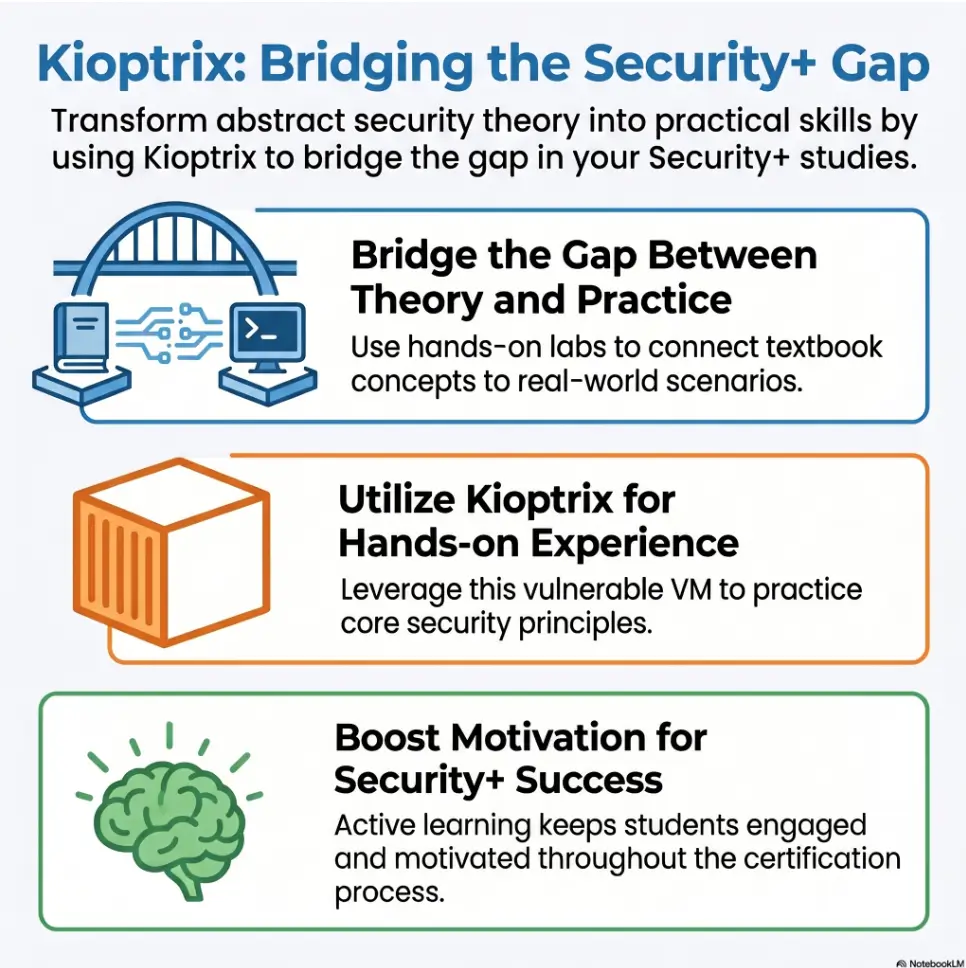
The Real Question Isn’t “Should I Hack First?”
The better question is quieter: what kind of learner are you when the material turns gray?
Some people learn security best from structured theory. They like chapters, domain checklists, practice exams, and clean definitions. Give them an exam objective, a cup of coffee, and a calendar, and they will build a tidy little bridge across the river.
Other learners need to touch the wires. They need to see a port scan result, a service banner, an outdated version number, a misconfiguration, a weird error, or a failed attempt before the vocabulary begins to breathe. For them, a small lab can turn study from fog into furniture.
The better question: what kind of learner are you?
If you are already moving steadily through Security+ and your practice scores are improving, Kioptrix may not be necessary before the exam. You may be better served by staying with the blueprint, reviewing missed questions, and practicing performance-based question logic.
If you keep reading the same paragraph about vulnerability management and feeling your attention slide off the page like rain on glass, one guided Kioptrix session may help. Not because it teaches the whole exam. It does not. It helps because it gives your brain a shelf to place the words on.
Why Security+ can feel abstract at the beginning
Security+ is broad by design. The SY0-701 exam includes multiple-choice questions and performance-based questions, and it expects judgment across security concepts, threats, architecture, operations, identity, risk, and governance. That breadth is useful in the real world, but it can feel like eating alphabet soup with a fork.
Beginners may see words such as enumeration, vulnerability, exploit, credential exposure, patching, segmentation, least privilege, and remediation. The words make sense individually. But they may not yet form a living sequence.
Kioptrix can supply one sequence. You observe. You document. You research. You test safely in a lab. You get confused. You slow down. You ask what a defender should have done differently. That sequence is where motivation often sneaks back into the room wearing muddy boots.
The tiny spark Kioptrix can provide
Think of Kioptrix Level 1 as a motivation lab, not a certification ladder. It can help you feel that security work is not only vocabulary. It is also observation, patience, note-taking, controlled testing, and careful reasoning.
The mistake is expecting one vulnerable VM to make you exam-ready. It will not teach the whole Security+ exam. It will not cover every domain. It will not replace practice questions. It will not magically make cryptography, compliance, identity, and governance sit up straight and behave.
But it can make one thing happen: it can make you care. And caring is not fluffy. For beginners, caring is fuel.
Key takeaway
- Kioptrix before Security+ can help motivation, not replace exam prep.
- One lab is enough to make abstract terms feel more concrete.
- The best result is better study focus, not bragging rights.
Apply in 60 seconds: Write this sentence: “I want Kioptrix to help me understand ______, not distract me from ______.”
Safety / Disclaimer: Keep the Lab Boringly Legal
Kioptrix should only be practiced inside a legal, isolated lab environment using systems you own or have explicit permission to test. This point is not decoration. It is the fence around the garden.
Do not scan, probe, test, attack, or “just check” public systems, school networks, employer assets, cloud servers, routers, neighbors’ devices, random IP addresses, or any target outside your authorization. Curiosity is excellent. Unpermitted testing is not a personality quirk. It is a risk.
A safe beginner lab is small, local, and boring. Boring is beautiful here. Boring keeps your learning clean, your notes defensible, and your future career story free from unnecessary smoke.
What a legal practice environment means
A legal practice environment means you are working with intentionally vulnerable machines, training platforms, or lab assets where testing is allowed. The target should be designed for practice, and the scope should be clear.
For a home lab, that usually means local virtualization, a verified isolated lab network setting, snapshots, and no accidental bridge into places you do not control. Your goal is not to prove you can make noise. Your goal is to learn a repeatable process without spilling coffee on the internet.
The beginner rule that saves trouble
Use this rule: if you would feel nervous explaining the target, the permission, and the scope to a future hiring manager, do not touch it.
That rule sounds strict until you need it. Cybersecurity is full of tools that do not know your intent. A scanner does not understand that you were “just learning.” A log file does not understand your career hopes. Keep the lab local, documented, and authorized.
Safe learning still counts
Some beginners worry that a legal lab is less “real.” That is the wrong measuring stick. A controlled lab is where you build mental muscle without harming anyone else’s systems.
Airline pilots use simulators. Surgeons practice before touching patients. Musicians rehearse scales before the concert hall lights come on. Cybersecurity learners can practice inside authorized labs and still build real understanding.
Kioptrix Level 1 Is a Lab, Not a Crystal Ball
Kioptrix Level 1 is useful because it makes you work through a basic security investigation sequence. It is not useful because it predicts your Security+ score. Those are different animals. One is a raccoon with a flashlight. The other is a very formal owl with a clipboard.
In a lab, you learn by asking, “What is here? What does it expose? What might be outdated? What does this result suggest? What should I document?” On the exam, you learn to answer, “What is the best control, priority, term, action, or response in this scenario?”
What Kioptrix actually trains
Kioptrix can train scanning discipline, service discovery, basic vulnerability research, note-taking, troubleshooting, and patience. It also teaches the emotional skill of not quitting when your first idea fails.
That emotional skill matters. Many beginners think cybersecurity is about knowing the magic command. In practice, much of the work is asking better questions after the first answer disappoints you.
A useful Kioptrix session might leave you with a note file full of unknown ports, strange service names, version numbers, failed assumptions, and defensive questions. That is progress. It may not look glamorous, but neither does a pantry full of rice and beans until dinner saves you.
What it does not train well for Security+
Kioptrix does not comprehensively train governance, risk management, identity and access management, cryptography, secure architecture, cloud security, legal concepts, vendor risk, business continuity, or exam strategy.
It also does not train you to read a Security+ question carefully. Exam questions often test the safest or best next step, not the most exciting move. That matters. The exam likes judgment. Labs often reward persistence. You need both, but not in the same proportions.
Here’s what no one tells you
A beginner may learn more from getting stuck than from getting root. The bruise is the lesson. The flag is just confetti.
When you get stuck, you are forced to inspect your assumptions. Did you scan too narrowly? Did you ignore a service? Did you misunderstand a result? Did you skip documentation? Did you chase the loudest clue instead of the strongest one?
Those questions are deeply useful for Security+ because they push you toward process. Security work is not only tool output. It is decision-making under uncertainty.
Readiness checklist: should you try Kioptrix before Security+?
- You can explain the difference between legal lab practice and unauthorized testing.
- You have at least a basic grasp of IP addresses, ports, services, and TCP versus UDP.
- You are willing to take notes instead of racing through a walkthrough.
- You have enough exam runway that one week will not damage your Security+ plan.
- You will return to the Security+ objectives after the lab.
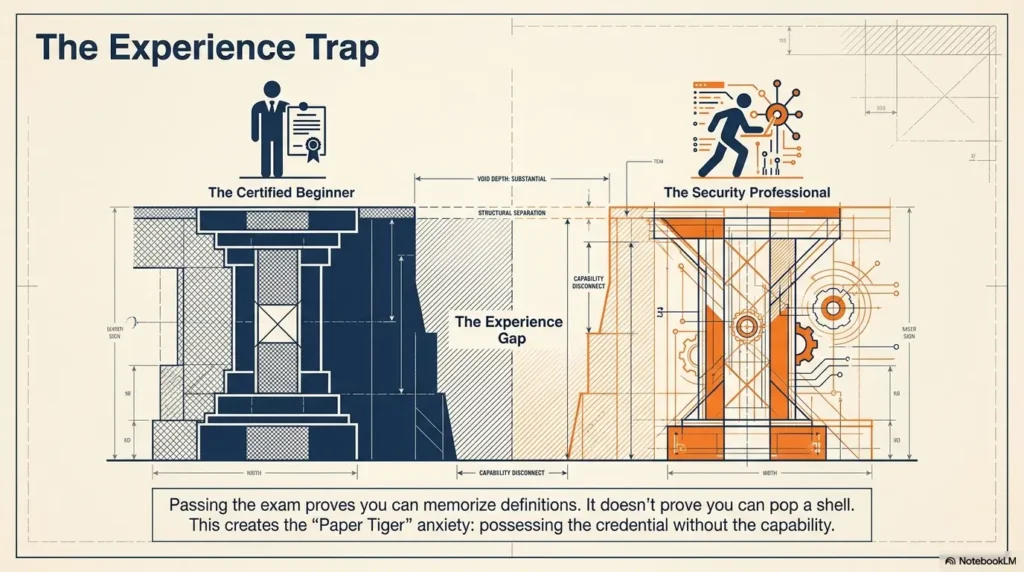
Security+ Rewards Breadth; Kioptrix Rewards Curiosity
Security+ is a broad certification. It asks whether you recognize concepts across many areas, not whether you can spend three nights chasing one vulnerable service in a practice VM.
Kioptrix is narrower and more tactile. It asks whether you can notice, research, test, adjust, and document inside a controlled lab. It does not care about your study calendar. It simply sits there, vulnerable and silent, like an old cabinet with one drawer stuck shut.
The exam wants pattern recognition
Security+ questions often reward pattern recognition. You may need to identify the most appropriate control, match a scenario to a risk concept, choose the best incident response action, or recognize a policy term.
That means exam prep must include practice questions, missed-question review, and repeated exposure to the official objectives. You need to learn how the exam frames problems. That is not the same as learning how a lab unfolds.
The lab wants persistence
A lab rewards persistence. It nudges you to gather information, compare clues, research unfamiliar output, test carefully, and keep notes when your first plan falls flat.
This is why Kioptrix can feel energizing. You are not just memorizing that open services increase attack surface. You are seeing a small example of why service exposure matters. The concept picks up a smell of warm electronics and late-night coffee.
Where the two finally shake hands
The overlap appears when you translate lab moments into defensive language. Open ports become attack surface. Old software becomes vulnerability management. Weak permissions become least privilege. Poor isolation becomes segmentation. Your notes become reporting and security operations.
This translation step is the secret ingredient. Without it, Kioptrix is just an interesting side quest. With it, the lab becomes a practical lens for Security+ topics.
Infographic: The One-Lab Motivation Loop
1. Legal Lab
Use only authorized local targets.
2. Observe
Find services, clues, and gaps.
3. Document
Write what happened and why.
4. Translate
Map findings to Security+ topics.
5. Return
Go back to objectives and quizzes.
Who This Path Fits, and Who Should Skip It
Kioptrix before Security+ is not a universal prescription. It is a study-path choice. For the right learner, it adds oxygen. For the wrong learner, it adds noise.
The trick is being honest about your deadline, your motivation, your basics, and your relationship with rabbit holes. Some learners enter a lab for one hour and come out with better focus. Others enter a lab and wake up three days later comparing five tools they cannot explain. The keyboard has trapdoors.
Good fit: the bored but capable beginner
This path fits someone who has read a few Security+ chapters but feels the material floating away like steam from coffee. You understand the basic words, but you do not yet feel their weight.
If that sounds familiar, one Kioptrix session may help you anchor concepts. You may come back to Security+ with new appreciation for patching, hardening, documentation, and defense-in-depth.
Good fit: the career switcher who needs proof
Career switchers often carry a private fear: “What if I only understand the words, not the work?” A small lab can answer part of that fear. It can show you that you can follow a process, survive confusion, and write useful notes.
That does not make you job-ready overnight. It does give you a more honest kind of confidence. Not swagger. Sequence.
If you are building a career story around practical learning, you may also find it useful to read about using Kioptrix as a career-switching practice tool after you finish this article.
Not ideal: the exam-in-30-days student
If your Security+ exam is in 30 days or less, be careful. You may not have time for a lab detour unless your study plan is already stable and your weak areas are under control.
At that point, your highest-value work is usually domain review, practice questions, performance-based question practice, missed-question analysis, and quick repair of weak concepts. Kioptrix may feel productive while quietly stealing exam time.
Not ideal: the “I only want exploits” learner
If you only want to copy a walkthrough and reach the ending, Kioptrix may build fake confidence. You might learn to repeat a sequence without understanding the evidence behind it.
That is not useful for Security+. It is also not useful for professional growth. Security work needs careful thinking, clear permission, defensive context, and good notes. The cool part is not the command. The cool part is knowing why it matters.
Key takeaway
- Try Kioptrix before Security+ if motivation is your bottleneck.
- Skip it if your exam date is close or your basics are shaky.
- Use the lab to build process, not performance theater.
Apply in 60 seconds: Circle your real bottleneck: boredom, confusion, deadline pressure, weak basics, or lack of confidence.
The Motivation Benefit: One Small Win Changes the Study Room
Motivation is not only a mood. Sometimes it is evidence. A beginner needs proof that the material connects to something real.
Kioptrix can offer that proof in a modest way. You see that services can reveal information. You see that old software matters. You see that documentation is not busywork. You see that a defender would care about the exact things Security+ keeps naming.
Theory becomes less paper-thin
Before a lab, “attack surface” may sound like a phrase from a meeting where everyone owns a navy blazer. After a lab, it becomes more physical. You saw exposed services. You wrote down what they were. You wondered why they were reachable.
That physical feeling matters because the brain remembers scenes. It remembers confusion, discovery, and correction. A Security+ chapter may stick better after the lab has left a few footprints in your memory.
Confidence grows from sequence, not swagger
The valuable sentence is not “I hacked a box.” The valuable sentence is “I followed a process and survived confusion.”
That kind of confidence is portable. It can help when you study logs, controls, vulnerability management, or incident response. You begin to trust that security problems are not solved by one giant leap. They are solved by small steps that keep their receipts.
Short Story: The Night the Ports Finally Made Sense
Maya had three Security+ chapters open, two cold coffees nearby, and one sentence underlined so hard the paper looked wounded: “Reduce unnecessary services.” She understood every word and somehow none of it.
That weekend, she set up one legal Kioptrix lab. She did not fly through it. She got stuck, misread results, and wrote “I don’t know what this means” seven times in her notes.
But one moment changed the room. A service appeared in her scan results, and suddenly “unnecessary exposure” was not a phrase. It was a door with a label.
She did not become an expert that night. She did something better. She returned to Security+ with a question she could actually use: “What would reduce this risk?” Her next chapter felt less like wallpaper and more like a map.
Let’s be honest…
Security+ study can become flashcard weather. Gray, repetitive, and somehow always threatening rain. Kioptrix adds thunder, but you still need the forecast.
Use the thunder to wake up. Then get back to the forecast: exam objectives, practice questions, missed concepts, and structured review.
The Main Mistake: Treating Kioptrix Like Exam Prep
The biggest mistake is not doing Kioptrix. The biggest mistake is letting Kioptrix impersonate a full Security+ plan.
A lab can feel intensely productive. Your screen changes. Your notes grow. You discover things. You get little bursts of progress. Compared with reading about governance or risk, the lab feels alive.
But exam readiness is not measured by how exciting your Saturday felt. It is measured by whether you can answer Security+ questions across the full scope.
Don’t replace objectives with walkthroughs
Walkthroughs can be helpful after a real attempt. They can show you a missed clue, a better note-taking method, or a concept you need to review. But they should not become your main study diet.
If you spend days watching Kioptrix walkthroughs while avoiding Security+ objectives, you are not studying more efficiently. You are redecorating the procrastination cave. Nice lighting, same cave.
Don’t confuse rooting a VM with exam readiness
Security+ asks many questions Kioptrix will not naturally teach. You still need to know control categories, risk treatment ideas, secure architecture choices, identity concepts, incident response order, cryptography basics, resilience planning, and policy language.
That does not make the lab useless. It simply gives the lab a correct job title. Kioptrix is a practical motivation tool and concept anchor. Security+ prep is the main road.
The “cool lab trap”
The cool lab trap is the feeling that you are advancing because your work looks technical. You have terminal windows. You have notes. You have tool output. You have the dramatic posture of someone in a movie who probably owns too many black hoodies.
But if your Security+ weak domains are not improving, the lab has become a detour. Productive-looking effort can still be poorly aimed. A compass beats a bonfire.
Key takeaway
- Kioptrix can make concepts vivid, but it cannot cover the full exam.
- Walkthroughs help only when they follow honest effort.
- Practice scores matter more than lab excitement when exam day is near.
Apply in 60 seconds: Put a hard stop on your lab session before you start. When time ends, write notes and return to Security+.
A Smart 7-Day Kioptrix-Before-Security+ Plan
A smart plan keeps Kioptrix small. The goal is not to become a lab goblin living under a bridge of Ethernet cables. The goal is to use one week to make Security+ concepts more concrete.
This plan assumes you are not close to exam day, you understand the legal boundary, and you can spend a short focused session each day. If you only have one weekend, compress the plan into setup, exploration, reflection, and Security+ mapping.
The seven-day flow
| Day | Focus | What to produce | Security+ connection |
|---|---|---|---|
| Day 1 | Set up the lab safely | A clean notes file and snapshot plan | Authorized testing, scope, safe operations |
| Day 2 | Learn scanning without rushing | Service list and first observations | Asset visibility, attack surface, ports |
| Day 3 | Research findings like an analyst | Short notes on versions and risks | Vulnerability management, CVEs, patching |
| Day 4 | Attempt the lab slowly | Attempt log with decisions and dead ends | Threats, vulnerabilities, operational process |
| Day 5 | Write a mini report | One-page findings summary | Reporting, remediation, business communication |
| Day 6 | Map lessons to Security+ | Topic map by exam area | Concept reinforcement |
| Day 7 | Return to exam prep | Practice quiz and missed-question list | Exam readiness, weak-domain repair |
Day 1: Set up the lab safely
Use local virtualization, verified isolated lab networking, and snapshots before you begin. Keep a plain notes file open from the start. The notes matter more than your memory, because memory is a charming liar after midnight.
Write your scope at the top of your file. Name the target. Name the environment. State that you are working only inside an authorized lab. This may feel formal, but it trains professional habits early.
If setup problems are your main obstacle, review a beginner-friendly resource such as Kioptrix network setup guidance before you blame yourself. Most early lab pain comes from adapters, virtualization settings, and tiny configuration gremlins chewing the wires.
Days 2 through 4: go slow on purpose
On scanning day, focus on discovery. What is reachable? What services appear? What looks familiar? What looks unfamiliar? What would a defender want to know?
On research day, avoid the copy-paste sprint. Look up what your findings mean in general terms. Write simple explanations. If you cannot explain a result in one plain-English sentence, you have found a study topic.
On attempt day, move carefully. Your goal is to understand the chain, not merely reach the ending. A rushed lab can teach your hands while leaving your brain at the bus stop.
Days 5 through 7: turn the lab back into exam fuel
Day 5 is report day. Summarize what was found, why it mattered, what risk it created, and what could reduce that risk. This is where the lab becomes more than a puzzle.
Day 6 is mapping day. Take every major lab lesson and connect it to a Security+ concept. Open ports become attack surface. Old software becomes vulnerability management. Access problems become permissions and least privilege. Notes become incident documentation.
Day 7 is return day. Take a short Security+ practice quiz. Do not obsess over the score. Ask whether the lab made concepts easier to recognize. That is the signal you came for.
Show me the nerdy details
A beginner lab can support Security+ learning through contextual encoding. That simply means your brain stores an idea better when it has a scene attached to it. “Patch management” as a phrase may be forgettable. “I found an old service version in a lab and had to ask what a defender should do” is more memorable.
The important move is abstraction. Do not memorize a single lab path as if it were universal. Extract the concept: exposure, weakness, risk, control, documentation, remediation. Security+ tends to reward that higher-level pattern recognition.
Good lab notes should include three layers: observation, interpretation, and defensive takeaway. Observation says what you saw. Interpretation says what it may mean. Defensive takeaway says how an organization could reduce the risk.
How to Map Kioptrix Lessons Back to Security+
The mapping step is where many beginners accidentally drop the treasure. They finish the lab, feel proud, close the VM, and never translate the experience into Security+ language.
Do not let that happen. Translation is the bridge. Without it, the lab is a memory. With it, the lab becomes study fuel.
Open ports become attack surface
When a lab shows reachable services, connect that moment to attack surface management. Ask what services are exposed, why they are exposed, whether they are necessary, and how visibility supports defense.
Security+ often cares less about “what tool did you use?” and more about “what does this exposure mean?” That is why your notes should include defensive language from the beginning.
Old software becomes vulnerability management
Version discovery is not just a lab step. It is a door into vulnerability management. When software is outdated, the defensive questions begin: Is there a known vulnerability? How severe is it? Is a patch available? Is a compensating control needed? Who owns remediation?
That thinking is much closer to Security+ than simply saying, “I found an old thing.” Old things are not automatically the whole story. Risk depends on exposure, exploitability, business impact, and available controls.
Privilege escalation becomes least privilege
In a lab, privilege escalation is often treated as a dramatic finish. For Security+ study, translate it into least privilege, permissions, account control, hardening, monitoring, and defense-in-depth.
The defensive question is simple: how could this path have been made harder, noisier, or impossible? That question turns a lab moment into exam-relevant thinking.
The final report becomes security operations
A mini report helps you practice the less glamorous side of cybersecurity: explaining what happened. This matters because real security work rarely ends with “done.” It ends with findings, risk, priorities, owners, fixes, and follow-up.
If you need a structure, a beginner-friendly Kioptrix lab report format can help you keep findings, evidence, and remediation ideas organized without turning notes into spaghetti.
| Kioptrix moment | Security+ concept | Defensive question |
|---|---|---|
| Finding reachable services | Attack surface | Does this service need to be exposed? |
| Identifying old software | Vulnerability management | Is there a patch, mitigation, or compensating control? |
| Seeing weak access boundaries | Least privilege | Are permissions limited to what is necessary? |
| Documenting a chain of events | Security operations | Can another person understand and act on this? |
| Getting stuck | Troubleshooting process | What assumption should be tested next? |
Key takeaway
- The lab matters most when you translate it into defensive concepts.
- Every finding should end with a “how would we reduce this risk?” question.
- Your mini report is part of the learning, not paperwork after the fun.
Apply in 60 seconds: Add a “Security+ connection” column to your lab notes before you begin.
The Better Study Stack: Lab + Blueprint + Reflection
The strongest beginner stack is not “lab or exam prep.” It is lab, blueprint, and reflection in the right order. Each one does a different job.
The lab gives texture. The Security+ objectives give scope. Reflection turns the texture into learning instead of noise. Remove any one of the three and the structure wobbles.
Use Security+ objectives as the spine
The official Security+ objectives should remain the study backbone. Kioptrix is one practical rib, not the skeleton.
This distinction protects your exam plan. It lets you enjoy the lab without pretending it covers everything. It also helps you explain your learning clearly if you later discuss it in an interview or resume project section.
Add practice questions after the lab
After the lab, take a short practice quiz tied to your current Security+ domain. Your goal is not instant perfection. Your goal is to see whether practical exposure improved recognition.
When you miss a question, do not merely read the correct answer and nod like a dashboard ornament. Write why your answer was tempting, why it was wrong, and what concept would help you choose better next time.
Add reflection before adding more boxes
Beginners often want to jump from one VM to the next. That can be useful later, but early on, reflection gives better returns than volume.
Before doing another box, ask: What did this teach me that Security+ actually tests? What did I misunderstand? What defensive control would reduce the risk? What topic should I review next?
Reflection template: turn one lab into exam fuel
- What did I discover?
- What confused me?
- What Security+ topic does this connect to?
- What defensive control would reduce the risk?
- What should I review before my next practice quiz?
If you like weekly review systems, a Kioptrix weekly review template can help you turn scattered lab notes into a cleaner learning loop.
When to Seek Help or Stop
Because this topic involves cybersecurity practice, knowing when to stop is part of being good at it. A mature learner does not press forward just because a tool is available. A mature learner respects scope, safety, and time.
Stopping is not failure. Sometimes it is the professional move. Sometimes it is the difference between a useful study session and a problem with receipts.
If the lab setup keeps breaking
If your lab setup keeps breaking, ask for help with virtualization, networking modes, host-only adapters, snapshots, and basic connectivity before assuming you are bad at security.
Many first-lab problems are not deep security problems. They are setup problems wearing a fake mustache. Treat them patiently. Document what you tried, what changed, and what error appeared.
If you feel tempted to test real targets
Stop immediately if you feel tempted to test real targets without permission. Move back to legal labs, formal training environments, or authorized platforms with clear rules.
This is not a gray area you need to “feel out.” You need permission and scope. Without both, do not proceed.
If Security+ scores are not improving
If your Security+ practice scores do not improve after the lab, do not add more labs as a reflex. Return to domain-based study and missed-question review.
Use a simple rule: the closer you are to exam day, the more your study time should follow the exam objectives. Labs can support understanding, but practice questions reveal readiness.
| Signal | What it may mean | Best next move |
|---|---|---|
| You cannot explain your lab scope | Authorization is unclear | Stop and define a legal lab only |
| You are copying every step | Understanding is thin | Pause and explain each action in notes |
| You ignore Security+ objectives for days | The lab became a detour | Return to exam blueprint and quizzes |
| Networking setup keeps failing | Virtualization basics need repair | Get setup help before continuing |
| You want to scan public systems | Boundary risk is rising | Stop and use authorized practice only |
Key takeaway
- Stop if permission, scope, or legality is unclear.
- Get help for lab setup before blaming your ability.
- If exam scores stall, go back to structured Security+ review.
Apply in 60 seconds: Write your stop rule before the lab: “I will stop if ______ happens.”

FAQ
Should I do Kioptrix before Security+?
Yes, if you use it as a short practical motivation exercise and you still keep Security+ objectives as your main plan. No, if it delays your exam prep, distracts you from weak domains, or turns into endless walkthrough watching.
Is Kioptrix too hard for a Security+ beginner?
It can be challenging, especially if networking basics are foggy. A guided first attempt can still be useful if you focus on learning the process, not finishing quickly.
Will Kioptrix help me pass Security+?
Indirectly. Kioptrix may improve motivation and concept recognition, especially around services, vulnerabilities, attack surface, and documentation. You still need exam-specific study across all Security+ domains.
Should I watch a walkthrough first?
Try a short independent attempt first. Then use a walkthrough when you are stuck, and take notes on why each step matters. Use walkthroughs as a map, not a taxi.
Is Kioptrix legal to practice?
Kioptrix is intended for authorized lab practice. Confirm permission, scope, platform rules, and applicable requirements before testing; owning or downloading a VM does not authorize testing unrelated systems.
What should I study after Kioptrix?
Return to Security+ objectives. Good follow-up areas include vulnerability management, network security, access control, incident response, security operations, and risk management.
Is TryHackMe or Hack The Box better than Kioptrix before Security+?
For many beginners, guided platforms may feel smoother because they provide clearer paths and explanations. Kioptrix is more old-school and less guided, which can be motivating or frustrating depending on your learning style.
How many Kioptrix levels should I do before Security+?
One level is enough before Security+ if your goal is motivation. More levels may help broader cybersecurity growth, but they are not necessary before the exam.
Next Step: Run One Lab, Then Write One Page
The cleanest answer is this: Kioptrix Level 1 before Security+ can be helpful if it gives you one practical spark and then sends you back to the exam blueprint with better eyes.
Do not turn it into a month-long detour. Do not let walkthroughs become your study plan. Do not confuse a lab finish with exam readiness. Use one legal lab to make abstract concepts feel real, then convert that experience into notes, defensive thinking, and Security+ review.
The 15-minute action
Open a blank note and create four headings: What I discovered, What confused me, What Security+ topic this connects to, and What defensive control would reduce the risk.
That is your bridge. Use it during your next legal lab session. If the lab makes one Security+ chapter feel less abstract, it did its job. Then close the VM, open the objectives, and keep walking.
Final practical reminder
The quiet win is not “I finished Kioptrix.” The quiet win is “Security+ now makes more sense, and I know exactly what to study next.”
Last reviewed: 2026-05
Technical guidance updated: 2026-10-13. Clarified required lab isolation and authorization; removed the time-sensitive exam claim and repaired duplicate H1 and table-of-contents links.