Open the practical working record for this guide’s task-specific fields and next action.
Show a task and its evidence
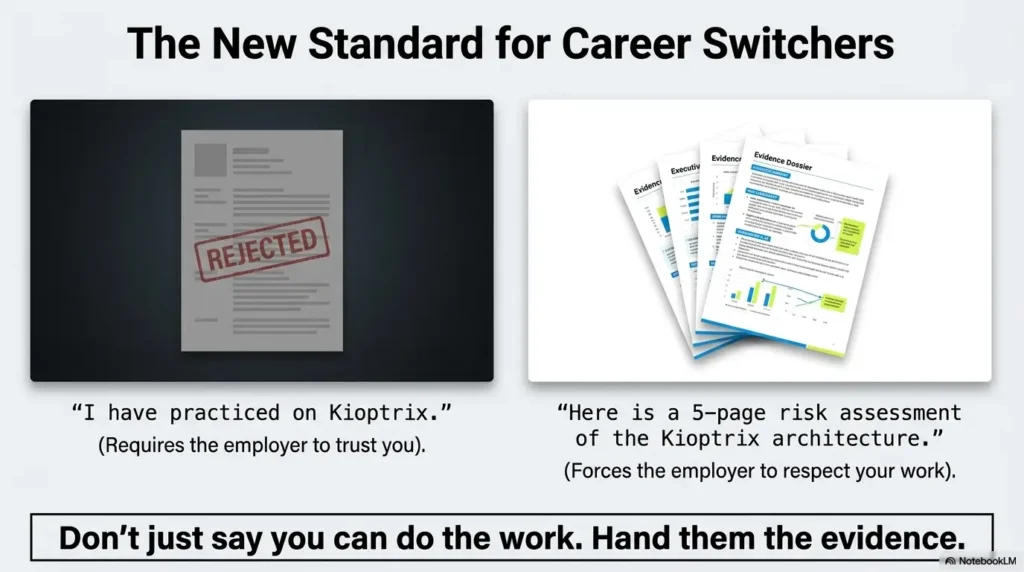
Select a relevant task from a job description, describe what you actually did in the lab and link a short example. Add prior transferable experience only where it is accurate. NICE can help describe work, but mapping a project to its language does not certify competence or establish job readiness. Reference and scope.
Kioptrix Level for Career Switchers: Turning Invisible Lab Hours Into Verifiable Proof
Connect a lab artifact to a specific practiced task while keeping prior experience and training separate.
The pain is specific. You are not trying to cosplay as an elite hacker. You are trying to prove progress without exaggerating. If you keep guessing, you lose weeks to scattered tabs, half-finished labs, and résumé bullets that sound like fog wearing boots.
This guide helps you turn one Kioptrix lab into clean portfolio evidence: scope, setup, lab notes, screenshots, remediation thinking, and a plain-English story of improvement. The trust signal is simple: security work rewards method, authorization, and documentation. Tools matter. Judgment travels farther.
The Career Proof Idea: One Lab, Four Signals
A Kioptrix Level lab can show more than technical curiosity. Done well, it shows controlled practice, ethical boundaries, patient enumeration, clear documentation, and remediation thinking. That combination is quietly powerful for career switchers because it answers the employer’s unspoken question: “Can this person learn safely and explain what they did?”
Authorized lab only
Repeatable notes
Screenshots with context
What changed after the lab
Table of Contents
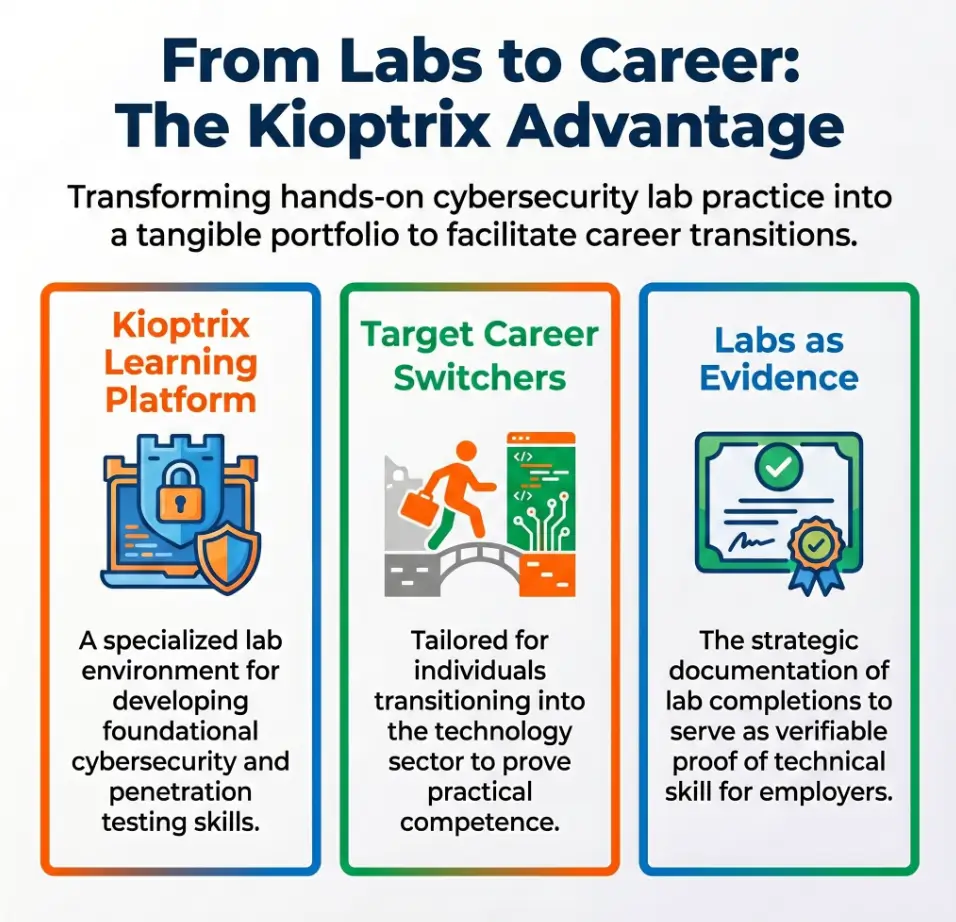
Safety / Disclaimer Block: Keep the Lab in the Lab
Kioptrix is for authorized, isolated practice. Keep the vulnerable virtual machine inside a controlled home lab or training environment. Do not scan, test, exploit, or probe systems you do not own or do not have explicit written permission to assess.
That line is not decorative legal lace. It is the foundation of professional security work. Career switchers sometimes think their first job is to prove technical courage. It is not. Their first job is to prove judgment.
Present the actual lab scope, your contribution, assistance used and a reviewed evidence example. Readers and employers differ in what they require. No measured hiring advantage or universal reviewer preference is established here; a home-lab artifact does not become client experience or a qualification by itself.
The career lesson hiding inside the safety rule
Security is full of sharp tools. Nmap, Metasploit, Burp Suite, exploit databases, shell access, packet capture, and password testing all have legitimate roles inside authorized work. Outside scope, the same actions can create legal, ethical, and employment trouble.
The smart beginner does not pretend the boundary is boring. The boundary is part of the portfolio. When you document your rules of engagement, network isolation, and lab-only scope, you show that you understand the difference between learning and trespassing.
- Use only systems you own or are explicitly authorized to test.
- Keep vulnerable VMs off the open internet.
- Document scope before running your first scan.
Apply in 60 seconds: Write one sentence at the top of your notes: “This lab is isolated, authorized, and used only for training.”
Start With Proof, Not Bravado
That is why a Kioptrix lab is useful. The lab gives you a small container for visible progress. Instead of trying to claim broad expertise, you can show one complete learning loop: setup, discovery, enumeration, research, cautious exploitation inside the lab, remediation notes, and reflection.
The portfolio problem career switchers quietly face
Many beginners collect tools faster than they collect proof. Their desktop becomes a tiny museum of cybersecurity ambition: Kali, VirtualBox, Obsidian, screenshots, half-named folders, and fourteen browser tabs with titles that begin confidently and end in confusion.
Proof changes the temperature. A simple writeup can show that you understand scope, can record findings, can translate scan output into plain English, and can connect technical observations to business risk. That is useful for junior security roles, help desk security work, vulnerability management support, and SOC-adjacent positions.
What Kioptrix can prove in one weekend
One beginner-friendly Kioptrix lab can demonstrate more than a final result. It can show that you know how to build a virtual lab, find a target on a private network, identify exposed services, research likely weaknesses, test carefully, and explain remediation ideas.
If you want a fuller foundation before this project, a structured Kioptrix beginner guide can help you understand the learning curve without turning the first weekend into a thunderstorm of jargon.
Here’s what no one tells you…
Your first lab writeup should not sound cinematic. It should sound awake. Clear steps, clean reasoning, modest language, and honest corrections are stronger than a theatrical victory lap.
A hiring manager does not need fog machine energy. They need signs that you can follow evidence, respect scope, and explain what you did when the answer was not obvious.
Decision Card: Bragging vs. Proof
| If you write… | It may signal… | Better move |
|---|---|---|
| “I rooted Kioptrix.” | Result without reasoning | Explain scope, process, findings, and fixes. |
| “I used many tools.” | Tool collecting | Show why each tool was chosen. |
| “I learned how enumeration guides decisions.” | Process maturity | Support it with notes and screenshots. |
Neutral action: Rewrite one résumé bullet so it describes a learning process, not only an outcome.
Who This Is For, And Who Should Skip It
Kioptrix can be a strong fit for career switchers who need visible traction. It is especially useful for help desk workers, IT generalists, military transitioners, college students, self-taught learners, compliance-adjacent professionals, and office workers who want to move toward security without inventing experience they do not have.
It is not for shortcut hunters chasing an “instant pentester” glow-up. One lab is a rung on the ladder. It is not the whole building, the elevator, and the rooftop party.
Best fit: career switchers who need visible traction
If you already troubleshoot printers, password resets, Windows profiles, ticket queues, or network hiccups, Kioptrix can help you connect your operational instincts to security thinking. Help desk workers often underestimate how much their existing habits matter: asking what changed, checking logs, isolating variables, and explaining problems to non-specialists.
If that sounds familiar, a focused guide on Kioptrix for help desk workers can help you frame your background as useful preparation rather than unrelated history.
Not for shortcut hunters chasing “instant pentester” energy
Kioptrix will not make you job-ready by itself. It will not replace networking basics, Linux comfort, ethics, certifications, interview preparation, or real workplace communication. It gives you a practice arena and a documentation opportunity.
That is still valuable. Small evidence stacks well. One honest lab report becomes two. Two become a pattern. A pattern becomes a story of steady progress.
Good signs you are ready
You are ready if you can use a terminal without panic, understand basic IP addressing, know what a port is, and are willing to take notes when confused. You do not need mastery. You need patience.
Also, you need a safe virtual lab setup. If your network settings look like a haunted closet, pause and fix that before scanning anything. The goblin-with-Wi-Fi era can wait.
Eligibility Checklist: Are You Ready for a Kioptrix Proof Project?
- Yes/No: I can create or import a VM in VirtualBox, VMware, or a similar tool.
- Yes/No: I understand that lab targets must be authorized and isolated.
- Yes/No: I can record commands, observations, and errors without deleting the messy parts.
- Yes/No: I know basic networking terms such as IP address, subnet, port, and service.
- Yes/No: I am willing to write remediation notes, not only celebrate access.
One-line next step: If you answered “No” twice or more, spend one session on lab setup and note-taking before attempting the full challenge.
Build the Lab Like an Adult, Not a Goblin With Wi-Fi
A safe lab is not glamorous. It is cables, settings, names, snapshots, and a little humility. It is also the difference between controlled training and accidental chaos.
Your attacker VM and Kioptrix target should live inside an isolated virtual network. Do not expose an intentionally vulnerable machine to the public internet. Do not bridge it into a network where other people’s devices could be affected. Treat isolation as part of the assignment.
Use an isolated virtual network
For many learners, host-only networking or another isolated lab configuration is the safer default. The exact configuration depends on your hypervisor, but the goal stays the same: your test machine can talk to the target, while the target is not casually visible to the wider world.
If network modes make your brain feel like a drawer full of mismatched keys, review a plain-English explanation of VirtualBox NAT, host-only, and bridged networking before you begin. This is not wasted time. It is risk reduction.
Capture your setup as evidence
At the start of your lab notes, record the host machine, hypervisor, VM names, network mode, target discovery method, date started, date completed, and rules of engagement. This turns setup from a vague memory into professional evidence.
A strong project does not begin with a scan. It begins with scope. That sentence alone separates careful learners from people who treat every network like a piñata.
Don’t skip this: your lab boundary is part of your résumé
For a deeper setup route, use a dedicated Kioptrix network setup checklist and save screenshots of the final configuration.
Show me the nerdy details
In a home lab, network isolation reduces unintended exposure. A host-only network usually creates a private segment between the host and guest VMs. NAT may allow outbound internet access while hiding the VM behind the host’s network translation. Bridged mode can place a VM directly on the same network as other devices, which is often inappropriate for intentionally vulnerable targets unless you fully understand the risk. For portfolio notes, record the network mode, IP range, target IP, attacker IP, and any snapshot names used before testing.
The First 30 Minutes: Show Your Thinking Before Your Tools
The first 30 minutes of your Kioptrix session are where the portfolio tone is set. Before you chase a shell, define your objective. Before you collect commands, create a log. Before you edit screenshots, save the messy middle.
This is how you prove steady progress. Not by pretending you never got stuck, but by showing that confusion did not stop the work.
Begin with a learning objective
Use a practical objective: “Complete Kioptrix Level 1 and produce a beginner-friendly writeup focused on enumeration, safe lab scope, evidence tracking, and remediation.” That sentence gives your session a spine.
Without an objective, labs become a foggy treasure hunt. With an objective, every note has a job.
Create a progress log before running commands
A timestamped log is one of the easiest ways to show discipline. Record what you tried, what happened, what confused you, and what you changed. You can keep it in a text file, markdown note, spreadsheet, or security notebook.
If you need a clean structure, a dedicated Kioptrix lab notes template can keep your session from becoming a pile of screenshots with mysterious names.
Save the messy middle
The best learning evidence often appears before success. A failed scan, a misunderstood service, a wrong assumption, and a corrected path can show maturity. Do not erase those moments. Label them.
One learner I knew had a habit of writing “What I thought” and “What changed my mind” after every roadblock. It was not glamorous, but it made their writeups unusually credible. You could see the gears turning, not just the confetti at the finish line.
- Write an objective before running tools.
- Record timestamps, observations, and decisions.
- Keep false starts when they teach something useful.
Apply in 60 seconds: Create three headings now: Objective, Observations, and What Changed My Mind.
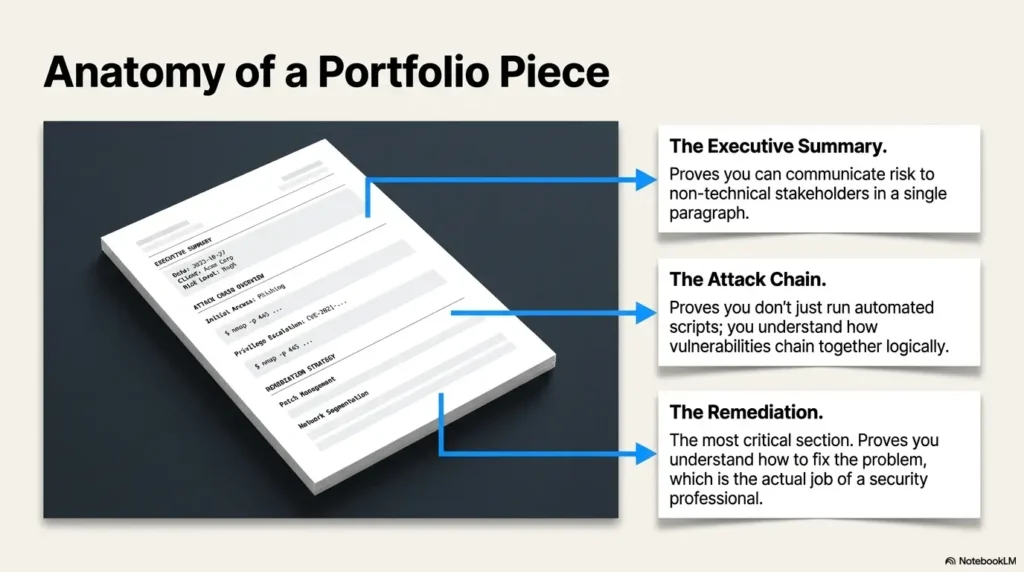
Enumeration Is the Career Skill Hiding in Plain Sight
Enumeration sounds dry until you realize it is the habit that separates guesswork from analysis. In beginner labs, enumeration means identifying the target, finding open ports, recognizing services, recording versions, and deciding what deserves investigation.
That is not just a lab skill. It maps to real security work. Vulnerability management, SOC triage, incident response, and help desk escalation all depend on careful observation before action.
Treat discovery like inventory, not treasure hunting
Your first job is not to “find the exploit.” Your first job is to understand what exists. What services are exposed? What versions are visible? Which ports appear expected, and which need a second look?
A clean Kioptrix enumeration routine can help you move from target discovery to service analysis without sprinting into the nearest rabbit hole.
Turn scan output into plain English
Raw scan output is not a portfolio explanation. Translate it. Instead of saying, “Ran scan and found ports,” write: “I identified exposed services, recorded service versions, and prioritized research based on likely risk and available information.”
That language helps non-specialists understand your value. It also shows that you are not treating tools as magic boxes.
Pattern interrupt: boring is beautiful here
In early cybersecurity learning, boring notes are the crown jewels. The person who records details beats the person who only remembers adrenaline.
Think of enumeration as inventory in a dim storage room. You do not begin by swinging a hammer. You turn on the lights, read labels, and notice which shelf is wobbling.
Kioptrix Career Proof Loop
Authorized lab only
Isolated VM network
Ports, services, versions
Notes and screenshots
Fixes and risk reduction
What improved
Use this loop for every lab session. It keeps the work safe, repeatable, and easy to explain.
Don’t Just “Get Root”: Explain the Road There
Root access may be the lab objective, but it is not the strongest résumé bullet. The stronger story is the road: how you moved from observation to decision, how you checked assumptions, and how you explained the risk afterward.
Think of root as the final scene. The portfolio value is in the plot, the map, and the quiet choice not to turn every paragraph into a tool parade.
Root access is the result, not the résumé bullet
Getting administrative access in a lab can feel thrilling. That is natural. But career materials need a calmer frame. A better project summary might say: “Completed an authorized vulnerable VM lab, documented exposed services, researched likely weaknesses, validated findings in scope, and wrote remediation recommendations.”
That sounds less dramatic and more employable. The hoodie can remain imaginary.
Write down why each step made sense
For every major step, capture six items: what you saw, what you inferred, what you checked, what you tried, what failed, and what changed. This structure forces reasoning into the open.
If your notes are scattered, use Kioptrix evidence tracking to connect screenshots, commands, and decisions into one traceable record.
Replace exploit worship with evidence
A beginner writeup can go wrong when it treats the exploit as the hero. The better hero is evidence. What weakness existed? Why did it matter? How could a system owner reduce the risk?
For example, remediation thinking might include patching, disabling unnecessary services, restricting access, improving logging, or changing configuration. You do not need to become a senior consultant overnight. You need to show that security work ends with risk reduction, not confetti.
Common Mistakes That Make Beginners Look Risky
Beginner mistakes are normal. Risky presentation is optional. The goal is not to hide the fact that you are learning. The goal is to avoid signals that make people question your judgment.
Most problems fall into four buckets: copy-paste walkthroughs, missing remediation, hidden confusion, and aggressive language.
Mistake 1: Publishing copy-paste walkthroughs
A copied command sequence without explanation does not prove skill. It proves that your clipboard had a busy afternoon. If you used a walkthrough after getting stuck, say so privately in your notes and publicly focus on what you learned.
Better: “I compared my assumptions against a reference after exhausting my initial path, then corrected my understanding of the service behavior.” That is honest and useful.
Mistake 2: Ignoring remediation
Every finding should end with fixes. If a service was outdated, discuss patching or retirement. If exposure was unnecessary, discuss restriction. If weak configuration contributed, discuss hardening.
Security work is not only about proving that something can break. It is about helping someone reduce the chance that it does.
Mistake 3: Hiding confusion
Confusion is not failure. Unexamined confusion is the problem. A good writeup can say, “At first, I misunderstood the service result. After checking documentation and testing again, I realized…”
That sentence shows learning. It also sounds like a person you could trust with a ticket queue on a Monday morning.
Mistake 4: Using aggressive language
Use calm language: identified, validated, documented, assessed, remediated, improved. The words are less sparkly. They also have shoes on.
- Explain commands instead of listing them blindly.
- End findings with remediation thinking.
- Use calm verbs that fit workplace security.
Apply in 60 seconds: Replace one dramatic phrase in your notes with “identified,” “validated,” or “documented.”
Turn One Kioptrix Level Into Four Portfolio Assets
The biggest mistake is treating one Kioptrix lab as one small accomplishment. With careful packaging, one lab can become four useful portfolio assets: a technical writeup, a recruiter summary, a remediation memo, and a screenshot timeline.
This is not padding. It is translation. Different readers need different proof.
Asset 1: A beginner-friendly technical writeup
Your technical writeup should include objective, scope, setup, enumeration, vulnerability research, exploitation summary, proof, remediation, and lessons learned. Keep the tone clean. A beginner should be able to follow your thinking without receiving an unsafe recipe for misuse.
A dedicated technical write-up structure can help you build a readable project page instead of a command dump.
Asset 2: A one-page recruiter summary
A recruiter summary should translate the lab into plain English. Example: “Practiced vulnerability assessment in an authorized VM lab and documented findings, evidence, and remediation recommendations.”
Do not mention every tool. Mention the job-relevant behaviors: scoped testing, documentation, research, communication, and risk thinking.
Asset 3: A remediation memo
A remediation memo is a short business-style note written as if a system owner asked, “What should we fix?” Include the issue, risk, likely impact, recommended fix, and a simple priority.
This asset is especially useful because it shows that you think beyond access. It hints that you can support vulnerability management, not just celebrate a shell prompt.
Asset 4: A progress screenshot timeline
Screenshots should be used sparingly and strategically. Capture setup, service discovery, key finding, successful lab proof, and final reflection. Add captions. A screenshot without context is just a rectangle with ambition.
For cleaner evidence, review Kioptrix screenshot organization before naming files like “final-final-real-final-root.png.” We have all been there. Let us evolve.
Coverage Tier Map: How Strong Is Your Portfolio Asset?
| Tier | What it includes | Career value |
|---|---|---|
| Tier 1 | Only final screenshot | Weak proof |
| Tier 2 | Commands and screenshots | Some technical activity |
| Tier 3 | Scope, notes, and findings | Clearer process |
| Tier 4 | Reasoning and remediation | Workplace relevance |
| Tier 5 | Reflection and improvement plan | Strong career-switcher signal |
Neutral action: Upgrade your current lab artifact by one tier before starting a new lab.
Make Progress Visible Without Oversharing Dangerous Detail
Public portfolio writing needs restraint. You want to show methodology, not provide a careless misuse guide. That balance is especially important for career switchers because your public work becomes part of your professional signal.
A mature security learner does not need to show every sharp object in the drawer. The strongest writeups teach judgment as much as technique.
Decide what belongs in public
Public material can include your objective, lab scope, sanitized screenshots, general methodology, high-level findings, remediation logic, and lessons learned. You can explain how enumeration informed your thinking without publishing every raw step in a way that invites misuse.
For a clean publishing habit, connect your writeup to a repeatable Kioptrix documentation process so each public post follows the same safe structure.
Decide what stays private
Keep overly detailed exploit commands, payload strings, sensitive-looking artifacts, and anything that could encourage unauthorized testing out of public career materials. You can retain private notes for your own learning, but public work should favor professional explanation.
This does not mean hiding your skill. It means showing that you understand audience, context, and risk.
Your public writeup should teach restraint
That is especially useful in entry-level roles where you may handle alerts, tickets, user reports, and system evidence. Clear judgment is not a bonus trait. It is the work.
- Publish scope, process, findings, and remediation.
- Keep raw exploit detail private when it adds risk without career value.
- Use sanitized screenshots with captions.
Apply in 60 seconds: Add a “Public vs. Private” heading to your draft before publishing.
The Career-Switcher Narrative: From “New” to “Reliable”
The best career-switcher story is not “I became amazing overnight.” It is “I built a repeatable learning process and can show how my judgment improved.” That is more believable, more useful, and much harder to fake.
Your goal is to move from “new” to “reliable.” Reliable people scope their work, record evidence, ask better questions, and close the loop with fixes.
Build a before-and-after paragraph
Use a simple before-and-after structure:
“Before this lab, I struggled to connect scan results to risk. After completing it, I could document exposed services, research likely vulnerabilities, validate findings inside an authorized lab, and recommend fixes in plain English.”
That paragraph does not overclaim. It shows growth. It also gives an interviewer something useful to ask about.
Connect Kioptrix to real entry-level roles
Kioptrix can support several entry-level narratives. For SOC analyst roles, emphasize alert thinking, evidence, and escalation notes. For vulnerability management assistant roles, emphasize service discovery, prioritization, and remediation. For help desk security liaison roles, emphasize careful troubleshooting and user-friendly explanation.
If interviews make your lab story feel slippery, practice turning the project into clear examples using Kioptrix interview stories.
Show the habit employers actually want
The quiet prize is not genius. It is repeatability: scope, test, document, reflect, improve. A person who can repeat a safe process is easier to train than a person who needs drama to feel productive.
This is why a modest Kioptrix writeup can matter. It shows not that you know everything, but that you can build knowledge responsibly.
Portfolio Prep List: What to Gather Before Publishing
- One sentence defining lab scope and authorization.
- VM setup notes, including network mode.
- Three to five screenshots with captions.
- A short enumeration summary in plain English.
- A remediation memo with practical fixes.
- A before-and-after reflection paragraph.
Neutral action: Gather these six items before choosing a publishing platform.
When to Seek Help Before Going Further
Cybersecurity learning rewards independence, but it should not reward reckless guessing. There are moments when the right move is to pause and get help from a mentor, instructor, experienced IT professional, or trusted community.
Asking for help is not a weakness. Asking too late can be expensive, embarrassing, or both.
Get help if your lab touches real networks
If your vulnerable VM appears visible outside your intended lab segment, stop. Do not continue testing until you understand the network exposure. Ask someone knowledgeable to review your configuration.
This is also a good time to revisit a Kioptrix home lab network layout so your target, attacker VM, and host machine are arranged safely.
Ask for guidance if legality feels blurry
If you are unsure whether a target is authorized, do not test it. Use only training systems or systems where you have written permission. The Computer Fraud and Abuse Act has historically been used in cases involving unauthorized computer access, and you do not want your learning project wandering anywhere near that campfire.
For learners in the United States, the safest practical rule is simple: no permission, no testing.
Find a mentor for interpretation, not shortcuts
A good mentor should help you understand why a path worked. They should not merely hand you the answer like a vending machine snack. Ask questions about reasoning, remediation, and safer documentation.
Try: “Can you help me understand why this service result mattered?” That invites teaching. “What command do I run next?” often invites dependency.
Next Step: Create a 7-Day Kioptrix Proof Plan
A seven-day plan keeps the project small enough to finish and serious enough to publish. The point is not to rush. The point is to create one finished artifact instead of ten half-born tabs staring at you like abandoned houseplants.
Use the plan below as a gentle operating rhythm. Adjust the time blocks to fit work, family, school, and energy. Consistency beats heroic all-nighters with cold coffee and haunted posture.
Day 1: Set up the lab and rules of engagement
Document the environment, network isolation, VM names, learning goal, and scope. Take a setup screenshot. Create a project folder before the tools begin multiplying like digital rabbits.
If your schedule is tight, use a Kioptrix after-work practice routine to protect progress without burning the evening to ash.
Day 2: Run discovery and write plain-English notes
Find the target inside the lab. Record attacker IP, target IP, visible services, and early questions. Translate every major finding into plain English.
Day 3: Research findings without rushing
Look up service versions, common misconfigurations, and likely risks. Separate confirmed facts from guesses. That distinction makes your notes cleaner and your confidence more honest.
Day 4: Attempt the main path carefully
Test inside scope. Record observations, errors, and changes in reasoning. If something fails, capture what you learned. Failure with notes is still progress.
Day 5: Write remediation notes
Explain how a system owner could reduce risk. Consider patching, service removal, access restriction, configuration hardening, and logging. Use business-friendly language.
Day 6: Draft the portfolio writeup
Build the article or project page. Include objective, scope, setup, enumeration, findings, remediation, screenshots, and lessons learned. Keep raw exploit detail restrained.
Day 7: Publish or save the polished proof
Post it on a blog, GitHub Pages, Notion portfolio, or save it as a PDF. One finished artifact beats a pile of abandoned drafts. Give it a clean title, date, and short summary.
- Separate setup, research, testing, remediation, and publishing.
- Make one small artifact per day.
- Finish before starting the next lab.
Apply in 60 seconds: Put Day 1 on your calendar and name the folder before you open a terminal.
FAQ
Is Kioptrix Level 1 good for cybersecurity beginners?
Yes, Kioptrix Level 1 is commonly used by beginners because it offers a controlled vulnerable VM for practicing basic vulnerability assessment habits. It is still important to use it only inside an authorized lab and to focus on documentation, not only the final result.
Can Kioptrix help me get a cybersecurity job?
Kioptrix can help as supporting evidence, especially if you turn the lab into a professional writeup. It will not replace experience, networking knowledge, certifications, or interview preparation. Its value is strongest when it shows safe process, clear notes, and remediation thinking.
Should I put Kioptrix on my résumé?
You can mention Kioptrix under projects if you frame it professionally. Use language such as “authorized vulnerable VM lab,” “service enumeration,” “evidence tracking,” and “remediation summary.” Avoid dramatic claims that make the work sound careless or inflated.
How detailed should my Kioptrix writeup be?
Make it detailed enough to show your reasoning, but not so raw that it becomes an unsafe instruction sheet. Include scope, setup, methodology, findings, screenshots with captions, remediation notes, and lessons learned. Keep risky command detail private when it does not add career value.
Is it okay to use walkthroughs?
Yes, but use them responsibly. Try the lab first, document where you got stuck, and use a walkthrough to understand the gap rather than to copy a path. In your writeup, focus on what changed in your understanding.
What should I do after Kioptrix Level 1?
Write a cleaner second report. You might move to another Kioptrix level, repeat the lab without notes, or compare your first and second writeups. A structured Kioptrix learning path can help you choose the next step without wandering.
How long should a beginner spend on one Kioptrix lab?
There is no universal time limit. A careful beginner might spend several evenings setting up, enumerating, researching, testing, and writing. That is fine. Your goal is not speed theatre. Your goal is visible, safe, repeatable progress.
Can I publish screenshots from my lab?
Yes, if they are sanitized and clearly tied to an authorized lab. Avoid exposing anything that looks like private credentials, personal network details, or risky exploit material. Captions help readers understand why each screenshot matters.
Conclusion
The invisible part of a career switch is often the hardest. You may be learning at night, practicing on weekends, and slowly building skill while your résumé still looks ordinary. Kioptrix does not solve that by turning you into an instant expert. It solves a smaller, better problem: it gives your progress a place to become visible.
When you keep the lab in the lab, document scope, enumerate patiently, explain the road to root, write remediation notes, and publish with restraint, you create proof that is calm enough to trust. That is the real career signal.
Your next step within 15 minutes: create a folder named “Kioptrix-Level-1-Proof,” add a notes file with three headings: Scope, Enumeration, and Remediation, then write your first rule of engagement before running any tool.
Steady proof beats borrowed bravado. Quietly, repeatedly, it becomes a bridge.
Last reviewed: 2026-05.
Tags: Kioptrix, cybersecurity career switch, ethical hacking lab, vulnerability assessment, security portfolio
Meta description: Use Kioptrix Level labs to prove steady cybersecurity progress with safe scope, notes, screenshots, and remediation.
Career-transition evidence map
Use this record for the specific task in this guide. Copy the fields into your notes and complete them with the actual conditions, evidence and assistance used in your own work.
| Field | What to record | Your evidence / next check |
|---|---|---|
| Relevant task | Select a specific task from the role you are exploring. | To complete |
| Prior experience | Record relevant work without changing its original context. | To complete |
| Lab contribution | Describe the separate activity you personally practiced. | To complete |
| Unproven requirement | Name a job requirement the lab does not establish. | To complete |
Next action: Choose the next practice task from an explicit evidence gap. Keep the original record so a later correction does not make an earlier assumption look like an established fact.
Related task: Continue with Kioptrix for Help Desk Staff: Explore Security Tasks when you need that separate part of the workflow.
Worksheet change record — October 20, 2026
Added four task-specific fields, a next action and a related guide. This is an editorial working aid, not a completed lab result or a validated skill assessment. Existing source-review dates retain their own scope; this addition is not a new fact-check of every statement.