
Small-team AWS security guide
AWS Security Hub vs GuardDuty for Small Teams:
Which One Should You Turn On First?
For a small AWS team, the hardest security decision is rarely “Which service has more features?” It is usually quieter and more annoying: “Which alert will someone actually read at 4:37 p.m. on a Tuesday, between a deploy, a customer bug, and a coffee that has gone emotionally cold?”
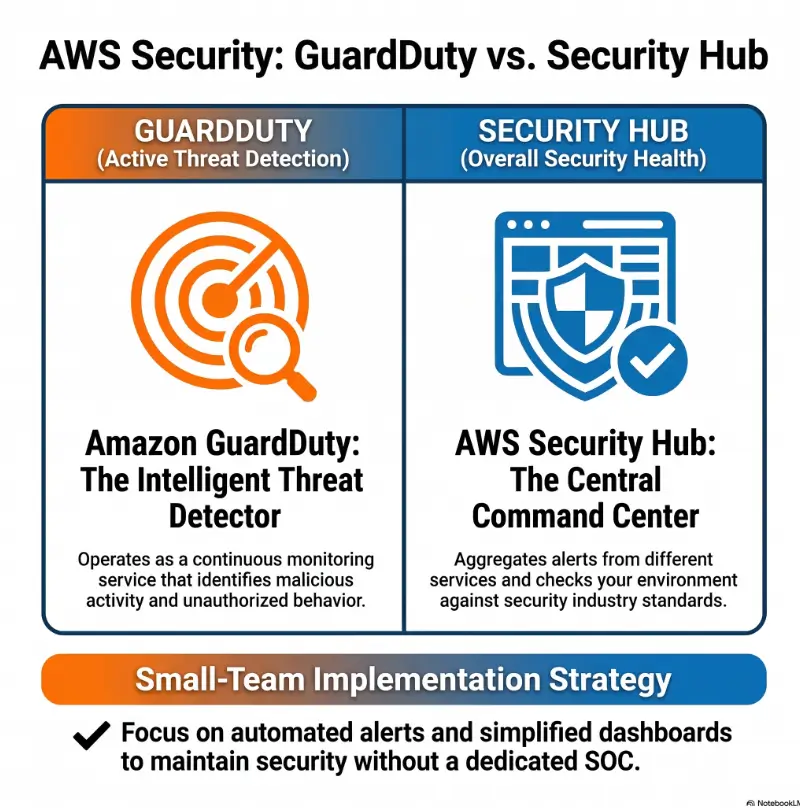
GuardDuty and Security Hub both sound important. They both produce findings. They both sit under the warm fluorescent umbrella of AWS security tooling. But they solve different problems. GuardDuty watches for suspicious activity. Security Hub helps organize security posture, standards, and findings across accounts and services.
The practical answer for most small teams: turn on GuardDuty first, build a response habit, then add Security Hub when you need posture checks, aggregation, and cross-account visibility. The trick is not buying more dashboard. The trick is building a security signal you can actually act on.
Start with the right signal
Learn why GuardDuty is often the safer week-one move for lean teams.
Avoid dashboard theater
See when Security Hub helps, and when it simply creates more work.
Build a 30-day rollout
Use a staged plan for owners, alerts, costs, tickets, and response paths.
Best first move: detection before decoration, response before reporting, and one accountable owner before another shiny console. 🛡️
Snapshot
This guide is for small engineering teams, startup founders, solo cloud builders, and budget-conscious security leads deciding between AWS GuardDuty and AWS Security Hub. You will learn which service to enable first, what each one actually does, how to avoid cost and alert creep, and how to run a practical 30-day rollout without turning your AWS account into a notification piñata.
Table of Contents
- Before You Act: Security Tools Need Owners, Not Just Switches
- GuardDuty First? The Small-Team Shortcut That Actually Works
- Security Hub Later? The Posture Layer Teams Usually Add Too Soon
- The Real Difference: Threat Detection vs Security Posture
- Who This Is For, and Who Should Pause First
- Cost Creep: The Part Small Teams Forget Until the Bill Arrives
- Alert Fatigue: Where Good Security Tools Become Noise Machines
- Practical Setup Order: A 30-Day Rollout for Small Teams
- Integration Strategy: When GuardDuty Should Feed Security Hub
- Decision Matrix: Pick the Service by Your Actual Problem
- Common Mistakes That Make AWS Security More Expensive Than Safer
- FAQ
- Next Step: Run a 15-Minute Security Signal Test
Before You Act: Security Tools Need Owners, Not Just Switches
This article is practical education, not a personalized security assessment. AWS environments vary by account structure, data sensitivity, compliance needs, region usage, traffic volume, and team maturity.
Before you enable anything across production, confirm your internal owner, escalation channel, budget tolerance, and response process. A security service without a response path is a smoke alarm in an empty cabin. Technically useful, emotionally dramatic, operationally lonely.
Before you turn on GuardDuty or Security Hub, write down four things:
- Who reviews findings during business hours?
- Where do urgent findings go: Slack, email, ticket, pager, or all of the above?
- What counts as urgent for your team?
- Who can rotate credentials, isolate workloads, or approve configuration changes?
For regulated workloads, customer data, financial systems, healthcare data, or contractual security obligations, compare this guidance with your internal policies and a qualified cloud security professional. The goal here is not to crown one AWS service king of the console. The goal is to help a small team make a sane first move.
GuardDuty First? The Small-Team Shortcut That Actually Works
For most small AWS teams, GuardDuty is the better first service to enable because it answers the question that hurts fastest: “Is something suspicious happening in my AWS account?”
That matters because small teams rarely lose sleep over abstract posture scores first. They lose sleep over compromised credentials, unusual API calls, strange network behavior, crypto-mining surprises, exposed workloads, and suspicious access to data.
What GuardDuty catches before humans notice
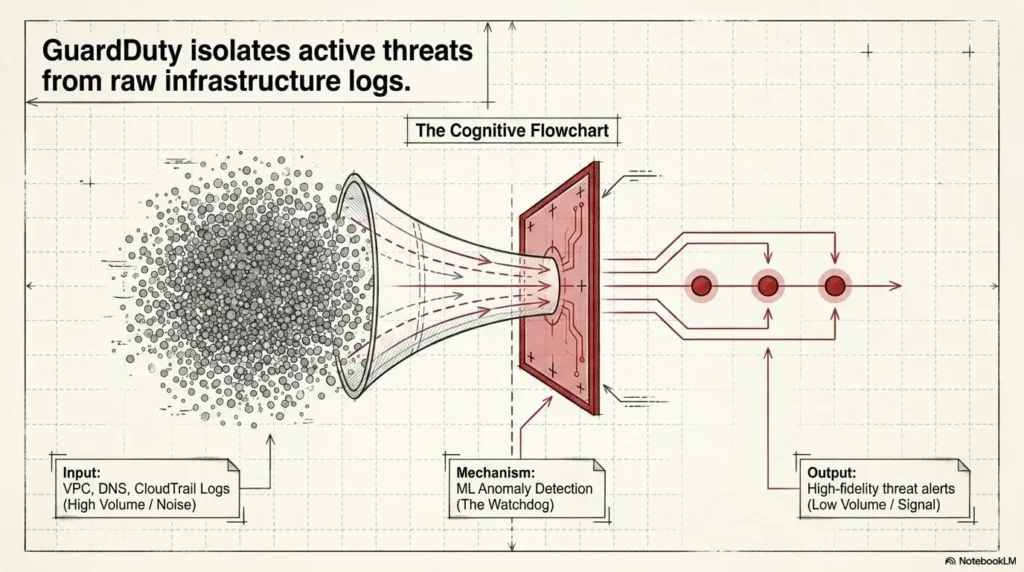
Amazon GuardDuty is a managed threat detection service. In plain English, it reviews AWS activity signals and looks for patterns that may indicate malicious behavior, account compromise, unusual access, malware-related activity, or suspicious communication.
For a small team, this is useful because nobody is manually reading cloud logs all day. Even if someone says they are, they are probably skimming the console with the haunted posture of a person checking smoke under a door.
GuardDuty is not magic. It does not replace incident response, access reviews, backups, patching, least privilege, or common sense. But it gives small teams a managed detection layer without needing to build a full security operations program on day one.
The quiet account problem: why low-traffic AWS environments still need detection
Small teams often think, “We barely have traffic. Why would anyone care about us?” Attackers do not need to care about you personally. They care about credentials, compute, exposed storage, public endpoints, and automation mistakes.
A quiet AWS account can still have a noisy failure. One leaked access key, one overly broad IAM user, one old EC2 instance, one forgotten region, or one public-facing service can become a very expensive learning moment.
GuardDuty is useful in these sleepy corners because it watches for behavior that humans may not see until the bill, the customer email, or the internal panic thread arrives.
When GuardDuty is enough for week one
GuardDuty alone may be enough for the first week if you have one AWS account, a small number of active regions, limited staff, no formal compliance program, and a basic ability to respond to findings.
In that case, your first goal is not perfection. It is visibility plus response. Enable GuardDuty, review findings, generate sample findings, decide who owns them, and write the first-page playbook.
Key takeaway: Start with detection, not decoration.
If your team cannot yet handle posture dashboards, start with GuardDuty. One credible detection signal with an owner beats twelve ignored panels glowing beautifully in the dark.
Security Hub Later? The Posture Layer Teams Usually Add Too Soon
Security Hub is valuable, but small teams often enable it too early and then wonder why their security program suddenly feels like a laundry basket full of angry Post-it notes.
Security Hub is strongest when you need a central place for findings, posture checks, security standards, account-level visibility, and prioritization. It becomes much more useful once you already have findings flowing from services such as GuardDuty, Inspector, IAM Access Analyzer, AWS Config-backed controls, or partner tools.
Security Hub is not just another alert tool
Security Hub is often described as a central security findings service and posture management layer. That description is accurate, but it can sound mushy to a busy founder.
A clearer translation: Security Hub helps answer, “Across my AWS accounts, which security findings, failed controls, and posture issues deserve attention first?”
That makes it different from GuardDuty. GuardDuty detects suspicious behavior. Security Hub organizes findings and evaluates security posture. Confusing those roles is how teams buy a dashboard when they actually need a doorbell.
Compliance checks, failed controls, and the slow leak of risk
Security Hub can help surface failed controls against security standards and best practices. These checks are useful because many cloud risks are not dramatic explosions. They are slow leaks: weak encryption settings, public access risk, missing logging, permissive security groups, forgotten resources, or policies that made sense three launches ago.
For teams moving toward SOC 2, ISO 27001, customer security questionnaires, vendor reviews, cyber insurance applications, or board-level reporting, Security Hub becomes more attractive. It gives you a way to organize posture work instead of arguing from memory.
Here’s what no one tells you: dashboards create work
A dashboard does not reduce work by existing. It reduces work when it helps you route, suppress, assign, prioritize, and close the right findings.
Small teams often enable Security Hub, turn on several standards, see a waterfall of failed controls, and then freeze. The findings may be valid. The problem is sequencing. If nobody owns remediation, Security Hub becomes a mirror you avoid because it keeps showing your tired face.
Key takeaway: Dashboards create work.
Turn on Security Hub when you have a place for findings to go, a way to suppress known noise, and owners who can fix posture issues without converting every sprint into a compliance bonfire.
The Real Difference: Threat Detection vs Security Posture
The cleanest way to compare AWS Security Hub vs GuardDuty is not by feature count. It is by question.
GuardDuty answers: “Is something suspicious happening?”
GuardDuty is about activity. It looks for suspicious behavior, unusual access patterns, possible credential misuse, malicious IP communication, and other signals that may indicate compromise or abuse.
If your anxiety is “What if someone gets into our account and we do not notice?” GuardDuty is the more direct answer.
Security Hub answers: “Are we configured badly across accounts?”
Security Hub is about posture and aggregation. It helps you see failed controls, standards checks, findings from other security services, and recurring patterns across accounts or regions.
If your anxiety is “We are growing, our AWS setup is messy, and we no longer know which risks matter most,” Security Hub is the stronger answer.
The overlap that confuses buyers
The confusion comes from the word “findings.” GuardDuty creates findings. Security Hub also shows findings. But a finding is not a strategy. It is a packet of concern wearing a nametag.
GuardDuty findings generally come from threat detection. Security Hub can ingest findings from GuardDuty and other services, while also generating posture-related findings from enabled standards and controls.
Show me the nerdy details
GuardDuty is a detection service. It uses AWS telemetry sources, threat intelligence, anomaly detection, and managed detection logic to produce security findings. Security Hub is a posture and findings management service. It can ingest findings from AWS security services and supported partners, organize them using a standard finding format, and help teams evaluate controls against security standards.
For small teams, the operational difference is simple: GuardDuty helps you notice suspicious events. Security Hub helps you manage many security signals once one console is no longer enough. Both can be useful. The sequencing matters more than the slogan.
Small-team AWS security flow
1
Detect
Enable GuardDuty to watch for suspicious activity.
2
Respond
Assign one owner, one channel, and one playbook.
3
Assess
Add Security Hub when posture checks matter.
4
Aggregate
Route findings into tickets, chat, or on-call.
Who This Is For, and Who Should Pause First
This decision looks different for a three-person SaaS startup than for a regulated fintech with separate security, compliance, and platform teams. Small teams need sequencing because every tool has a human cost.
Best fit for a 1 to 5 person engineering team
If your team has one production AWS account, a few workloads, and no dedicated security hire, GuardDuty first is usually the practical move. It gives you a managed detection layer without asking you to become a security operations center overnight.
Security Hub can come later when you need to review standards, track recurring posture failures, or present security progress to leadership, customers, or auditors.
Best fit for a startup with one AWS account and no security hire
A startup should avoid mistaking “more enabled services” for “more secure.” If nobody can respond, triage, suppress, and remediate, more findings simply add fog.
Use GuardDuty as your first alarm. Then create a small operating ritual: weekly review, owner assignment, sample finding test, and escalation channel. If you already keep a learning or evidence habit, connect this to your documentation workflow. A simple internal note can borrow the same thinking as a clean security evidence tracking habit: what happened, what we checked, what changed, and who approved it.
Not for teams expecting a full SIEM replacement
Neither GuardDuty nor Security Hub is a full replacement for a mature SIEM, detection engineering program, forensic workflow, or managed detection and response provider.
GuardDuty is managed threat detection. Security Hub is security posture and findings management. If your organization needs long-term log retention, custom correlation, case management, threat hunting, compliance reporting, and 24/7 response, you may need additional tooling or professional support.
Real-world example: the two-founder AWS account
Imagine two founders running a small B2B app. They have one production account, one staging account, a few Lambda functions, RDS, S3, CloudFront, and a lovingly neglected IAM user from the early prototype era.
If they enable Security Hub first and activate several standards, they may see dozens of failed controls. Some matter. Some are contextual. Some need AWS Config. Some require careful judgment. The founders now have a dashboard full of homework.
If they enable GuardDuty first, create an alert channel, test sample findings, and write a three-step response path, they gain immediate detection value. Then, when Security Hub comes later, it lands on prepared soil instead of concrete.
Cost Creep: The Part Small Teams Forget Until the Bill Arrives
Security tools often feel free at the moment of enablement because the click is tiny. The bill is not always tiny. Pricing can vary by region, data volume, account count, enabled protection plans, checks, ingested findings, and AWS pricing changes over time.
Small teams should treat cost review as part of setup, not a guilty ritual performed after finance asks why the AWS bill grew teeth.
GuardDuty pricing signals to watch during the free trial
GuardDuty commonly gives teams a trial window for many protection plans, which is useful because your own usage is the best estimate. During that period, review estimated monthly usage by data source, account, and region.
Pay attention to which protection plans are enabled. Foundational detection may be the first step, while additional protections for S3, EKS, runtime, RDS, Lambda, or malware scanning may change your usage profile.
Security Hub findings can multiply across accounts and regions
Security Hub costs can be affected by checks, findings, enabled standards, regions, accounts, and connected services. The small-team trap is assuming that a one-account estimate will behave the same after you enable multiple regions, add member accounts, or ingest findings from several services.
Security Hub can be worth the cost when it reduces confusion and helps prioritize action. It is less attractive when it becomes a paid scoreboard nobody uses.
One-account teams vs multi-account teams: different cost traps
| Team shape | Likely cost trap | Safer move |
|---|---|---|
| One account, one main region | Turning on more protection plans or standards than the team can review | Start narrow, review usage estimates weekly during the trial period |
| One account, many active regions | Forgetting region-by-region enablement and monitoring | List active regions before enabling services broadly |
| Multiple accounts | Findings and checks multiplying across environments | Use delegated administration carefully and track cost by account |
| Fast-growing startup | Adding tools without assigning owners | Create a monthly security service review with cost, noise, and action items |
Key takeaway: Cost is a signal, not just a bill.
If a service creates cost but not decisions, review your configuration. The best way to choose AWS security tools is to compare price against usable response, not console satisfaction.
Useful official cost check: review GuardDuty pricing and usage assumptions before expanding protection plans.
Review official GuardDuty pricingAlert Fatigue: Where Good Security Tools Become Noise Machines
Alert fatigue is not a personality flaw. It is a design failure plus a staffing mismatch. Small teams need fewer, sharper signals with clear ownership.
Why “more findings” can make you less secure
More findings can create the feeling of progress while reducing actual response. When everything is urgent, the team begins treating urgency as weather.
The fix is not to ignore findings. The fix is to define what gets immediate attention, what goes into a weekly review, what can be suppressed with a written reason, and what should become backlog work.
Severity is not the same as priority
A high-severity finding on a non-production sandbox may matter less than a medium-severity signal tied to production credentials. Priority depends on business context, asset importance, exploitability, exposure, and response ability.
Small teams should create a short priority rule. For example: production identity findings first, public exposure second, data access anomalies third, everything else reviewed weekly unless severity and context say otherwise.
Let’s be honest: someone has to own the inbox
A shared email inbox is not ownership. A Slack channel is not ownership. A ticket board is not ownership. Ownership is a named person or rotation with authority to decide, escalate, and close the loop.
Key takeaway: Severity is not priority.
A finding becomes useful only when your team can classify it, assign it, act on it, and document the decision. Otherwise, it becomes expensive wallpaper.
Practical Setup Order: A 30-Day Rollout for Small Teams
The best small-team setup is staged. You do not need a grand security opera in four acts. You need a sequence your team can survive while still shipping product.
Days 1 to 3: Enable GuardDuty and confirm coverage
Start by enabling GuardDuty in the account and regions that matter. Confirm which regions are active, generate sample findings, review the console, and check where findings can be routed.
Do not skip sample findings. They are the fire drill without the smoke. They teach your team what a finding looks like before everyone is already tense.
Days 4 to 10: Create a minimum response playbook
Your playbook can be short. It should explain who reviews findings, how to escalate, what evidence to capture, when to rotate credentials, when to isolate resources, and when to involve outside help.
This is also a good time to improve documentation hygiene. If your team is building security skills, a simple documentation routine can keep findings from becoming tribal memory trapped in one tired engineer’s head.
Days 11 to 20: Add Security Hub only where visibility breaks down
If GuardDuty findings remain manageable and your posture questions are simple, you may not need Security Hub yet. If you are juggling accounts, regions, compliance expectations, and findings from multiple services, Security Hub becomes more useful.
When you enable Security Hub, resist the urge to activate everything at once. Start with the standards and controls you are prepared to review. Make sure AWS Config prerequisites are understood where needed for posture checks.
Days 21 to 30: Route findings into tickets, Slack, or on-call
By the end of the month, findings should not live only in AWS consoles. Route them into a workflow your team already checks: ticketing system, chat channel, on-call path, or weekly review queue.
| Timeline | Main action | Success signal |
|---|---|---|
| Days 1 to 3 | Enable GuardDuty in relevant accounts and regions | Sample findings reviewed by the owner |
| Days 4 to 10 | Write a minimum response playbook | Team knows who acts and how |
| Days 11 to 20 | Add Security Hub if posture or aggregation is needed | Findings are grouped, not merely multiplied |
| Days 21 to 30 | Route findings into existing workflows | No critical security signal depends on console-checking luck |
Helpful official setup reference: use the AWS documentation to confirm GuardDuty behavior, integrations, and service scope before production rollout.
Open Amazon GuardDuty documentationIntegration Strategy: When GuardDuty Should Feed Security Hub
The strongest small-team setup is often not “Security Hub vs GuardDuty.” It is “GuardDuty first, then Security Hub when the finding stream needs a command center.”
The clean handoff: GuardDuty findings inside Security Hub
GuardDuty can send findings into Security Hub, giving teams one place to review detection findings alongside other security signals. This is useful when you already have more than one source of findings and want a clearer review flow.
The clean handoff works best when GuardDuty remains your detection layer and Security Hub becomes the aggregation and posture layer. Do not blur roles. Blurred roles become blurred ownership.
When five-minute visibility matters
Some findings need fast human attention. If a GuardDuty finding indicates possible credential compromise or suspicious activity touching production, it should not wait for a weekly dashboard review.
For urgent categories, route findings to an escalation path. Security Hub can help centralize, but your workflow should still distinguish immediate response from posture cleanup.
Why Security Hub becomes more useful after your second account
One account is often manageable by direct service consoles. Two accounts are manageable with discipline. Five accounts, several regions, and multiple environments begin to feel like a drawer full of cables you swear you organized last spring.
Once accounts multiply, Security Hub’s central view becomes more valuable. It helps you see whether risks are isolated incidents or patterns across your AWS organization.
Decision Matrix: Pick the Service by Your Actual Problem
The best AWS security tool for a small team depends on the fear you are trying to reduce. Be honest about that fear. It is not dramatic. It is efficient.
Choose GuardDuty if your fear is compromise
Choose GuardDuty first if you are worried about suspicious API activity, stolen credentials, compromised workloads, malware signals, unusual network behavior, or someone using your AWS account in ways you did not authorize.
Choose Security Hub if your fear is misconfiguration
Choose Security Hub if you are worried about weak posture across accounts, failed controls, inconsistent configurations, compliance-style evidence, or too many security findings spread across too many places.
Choose both if your fear is “we cannot see the whole picture”
Choose both when you need detection plus posture plus aggregation. This is common for teams with multiple AWS accounts, customer security reviews, regulated data, or a growing engineering team where informal security habits are starting to wobble.
| Your actual problem | Better first move | Why |
|---|---|---|
| “What if credentials are compromised?” | GuardDuty | It focuses on suspicious activity and threat detection. |
| “What if our AWS setup is badly configured?” | Security Hub | It helps review posture, standards, and failed controls. |
| “We have too many findings in too many places.” | Security Hub | It centralizes and helps organize findings. |
| “We have one production account and no security hire.” | GuardDuty | It provides a practical first detection layer. |
| “We are preparing for customer security reviews.” | Security Hub, after basic detection | Posture checks and evidence workflows become more important. |
| “We need detection and posture across multiple accounts.” | Both, staged carefully | GuardDuty detects; Security Hub aggregates and organizes. |
Helpful official comparison point: read how Security Hub organizes security posture and findings before enabling broad standards.
Open AWS Security Hub documentationCommon Mistakes That Make AWS Security More Expensive Than Safer
Most small-team mistakes are not foolish. They are understandable. Someone reads a security guide, sees many switches, and thinks the responsible move is to enable everything before lunch.
That instinct is noble. It can also produce a month of confusing findings, surprise costs, and half-finished remediation. Security should be a rhythm, not a confetti cannon.
| Common mistake | Why it hurts | Safer alternative |
|---|---|---|
| Turning everything on before naming owners | Findings pile up with no accountable response | Assign owner, escalation path, and review cadence first |
| Using Security Hub as your first incident detector | It is better as aggregation and posture management | Use GuardDuty first for suspicious activity detection |
| Treating a security score like an audit pass | Scores do not prove full compliance or security | Document decisions, exceptions, and remediation evidence |
| Ignoring AWS Config requirements | Some posture checks depend on configuration recording | Confirm prerequisites before enabling standards broadly |
| Archiving findings without a written reason | The same issue may return with no memory | Require a short closure note for suppressions and archives |
| Forgetting region-by-region visibility | Unused or forgotten regions can hide risk | Review active regions and close what you do not need |
Good / Better / Best setup for small AWS teams
| Setup level | What it includes | Best for | Watch out for |
|---|---|---|---|
| Good | GuardDuty enabled, sample findings reviewed, one owner named | One-account teams starting from zero | No ticket workflow yet |
| Better | GuardDuty plus response playbook, alert routing, weekly review | Startups with production workloads | Owner burnout if every alert goes to one person |
| Best | GuardDuty feeding Security Hub, standards selected, tickets routed, cost reviewed monthly | Growing teams with multiple accounts or compliance needs | Too many controls enabled too soon |
For teams building cloud security skills, this is a useful area to practice the same habits used in a structured security lab workflow: observe, document, decide, test, and review. The cloud may be real, but the thinking pattern is trainable.
Cost-control reference: check AWS Security Hub pricing before enabling broad standards across many regions or accounts.
Review official Security Hub pricing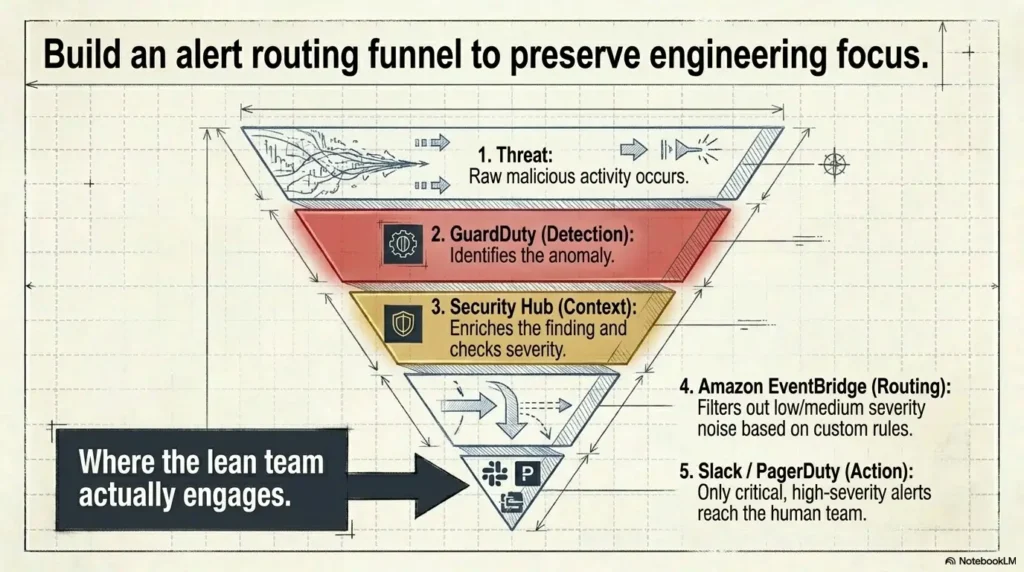
FAQ
Is GuardDuty better than Security Hub for small teams?
GuardDuty is usually better to enable first for small teams because it focuses on suspicious activity and possible compromise. Security Hub is better when you need posture checks, central findings management, standards, and cross-account visibility.
Do I need Security Hub if I already use GuardDuty?
Not always. If you have one account, few findings, and a simple review process, GuardDuty may be enough at first. Add Security Hub when findings become scattered, posture checks matter, or you need a central view across accounts and services.
Can Security Hub detect active attacks?
Security Hub can show findings from services that detect suspicious activity, including GuardDuty. But Security Hub itself is not the same as GuardDuty. Think of GuardDuty as detection and Security Hub as posture plus findings organization.
Can GuardDuty show compliance failures?
GuardDuty is not designed as a compliance posture tool. It focuses on threat detection. For standards, failed controls, and posture checks, Security Hub is usually the more relevant AWS service.
Should startups enable GuardDuty in every AWS account?
Many startups should consider broad GuardDuty coverage across meaningful accounts and active regions, especially production. Before enabling widely, review costs, regions, ownership, and alert routing so findings do not disappear into a console nobody checks.
Does Security Hub replace a SIEM?
No. Security Hub can centralize and organize security findings, but it does not replace a full SIEM, custom detection program, long-term log analysis strategy, or 24/7 managed response capability.
What should a small team do after GuardDuty creates a finding?
Confirm the affected account, region, resource, identity, severity, and context. Check whether production is involved. Capture evidence, assign an owner, rotate credentials or isolate resources when appropriate, and document the decision. If the risk is serious or unclear, involve qualified security help.
Which service should be enabled first in a new AWS account?
For most small teams, enable GuardDuty first, then add Security Hub once you have a response process and need posture scoring, finding aggregation, or cross-account prioritization.
Next Step: Run a 15-Minute Security Signal Test
The decision does not need to become a committee séance. Give yourself 15 minutes and test whether your team can turn a security signal into action.
15-minute AWS security signal test
- Pick one production AWS account and one active region.
- Enable or review GuardDuty coverage.
- Generate sample findings and confirm who sees them.
- Write one owner, one escalation channel, and one first response action.
- Decide whether Security Hub is needed now for posture checks, aggregation, or multi-account visibility.
If you cannot name the owner, channel, and first action, do not solve that by enabling more tools. Solve the ownership gap first. Then let GuardDuty become your first clean signal, and let Security Hub arrive when you are ready to organize the larger picture.
The calm order is simple: detect, respond, document, then aggregate. That sequence will not make your AWS account invincible, but it will make your team less blind, less noisy, and less likely to confuse a glowing dashboard with a working security habit.
Last reviewed: 2026-07