Kali Linux Gobuster Walkthrough: 9 Eye-Opening Hidden Folders on Kioptrix, DVWA & Metasploitable
The first time I unleashed Gobuster on what I thought was a “simple” lab machine, I nearly nuked my own notes. No joke—my terminal lit up like a slot machine on speed. Thousands of directories flew by. Somewhere in that chaos were nine folders that actually mattered—the ones OSCP-style exams and real-world client work care about. But good luck spotting them when your screen looks like digital confetti.
If you’re balancing study time with a full-time job, maybe wrangling kids or just trying to stay caffeinated and sane, you don’t have time to chase every 301 redirect or 403 forbidden like it’s a rare Pokémon. You need signal, not noise.
That’s what this guide is for.
We’ll walk through exactly how to run Gobuster on Kioptrix, DVWA, and Metasploitable—calmly. You’ll learn how to zero in on the high-value folders fast, without getting logged, rate-limited, or accidentally triggering a mini DoS on your own setup.
Everything here stays in safe, intentionally vulnerable environments, mirrors how modern pentest reports are actually written, and gives you a few “money blocks”—bite-sized checklists and mini-calculators you can use today, in under 15 minutes.
So, take a breath. Scroll at your pace. And when you’re ready, kick things off with the 60-second eligibility checklist below. Because scanning smarter beats scanning louder—every time.
Table of Contents
Why this Gobuster walkthrough matters in 2025
Gobuster has grown up. Today it’s not just a quick directory brute-forcer; it handles URIs, DNS subdomains, virtual hosts, and even cloud buckets, all from a compact Go binary that ships in modern Kali images.
Kioptrix, DVWA, and Metasploitable 2 are still the classic training trio: deliberately vulnerable systems created to teach safe, legal penetration testing in a classroom or home lab environment. When you combine them with Gobuster, you get a realistic rehearsal for OSCP-style exams and paid web assessments—without putting a real company at risk.
But here’s the catch: time-poor learners tend to either massively under-use Gobuster (“one short wordlist, done”) or wildly over-use it (“let’s blast everything at once”). Both cost you hours. What you actually want is a guided, story-driven path: run one focused scan per box, learn from nine concrete folders, and slowly build a personal playbook.
- Use safe, intentionally vulnerable labs.
- Treat each scan as practice for reports, not just flags.
- Track the 9 example folders as reusable patterns.
Apply in 60 seconds: Write “Gobuster = report screenshots, not just loot” at the top of your next lab note.
Short Story: I once watched a junior tester run four directory brute-forcers in parallel against a staging app because “more tools = more findings.” The result? A production-like WAF locked him out, the client’s SOC opened a ticket, and the rest of the engagement was spent explaining rather than discovering. When we replayed the exact same test in a Kioptrix VM with Gobuster only, he realised that three well-chosen wordlists and a short, annotated result list were more impressive than ten noisy screenshots. That shift—from “spray and pray” to “curated, explainable findings”—is what this walkthrough is gently pushing you toward.
Lab setup and scope eligibility (Kioptrix, DVWA, Metasploitable)
Before we touch a single wordlist, we need two boring-but-essential things:
- A sealed lab with Kali + Kioptrix, DVWA, and Metasploitable living on an isolated network.
- Written permission (even if you’re the only human involved) so you form the habit of never scanning blind.
Kioptrix and Metasploitable 2 are shipped as intentionally vulnerable VMs that you run on your own hardware for training. DVWA is a PHP/MySQL app designed for teaching web vulnerabilities and tool usage, often installed in a local LAMP stack or as a docker image. All three are perfect Gobuster playgrounds.
60-second Gobuster scope eligibility checklist
Answer “yes” to all before you start:
- Is the target owned or explicitly controlled by you or your organisation?
- Do you have written authorization (email, ticket, contract, or lab brief) for directory brute-forcing?
- Have you confirmed that no production customer data lives on this instance?
- Is the target on an isolated network segment (host-only/NAT lab) or an agreed test range?
- Have you checked whether your company’s cyber insurance coverage tiers require prior notice for active scanning?
- Do you know who to contact if logs or rate limits suggest your scan is causing issues?
Next step: Save this checklist with your lab notes and confirm each point against your organisation’s official testing policy before every new engagement.
In South Korea, where many readers are scanning from apartments in Seoul or Busan, this discipline matters even more. You might be on shared fibre, behind an ISP router, with multiple households on similar IP ranges. Keeping Kioptrix, DVWA, and Metasploitable strictly inside VirtualBox or VMware host-only networks means your Gobuster traffic never surprises a neighbour’s NAS or a small business router down the hall.
Show me the nerdy details
For most home labs, a simple setup is: Kali + targets on a host-only network (e.g., 192.168.56.0/24), no internet access on that interface, and a second NAT interface on Kali only for updates. You then point Gobuster at the target’s host-only IP (for example, 192.168.56.101:80). This keeps noisy scans away from your real router logs and from any external monitoring tools your ISP might use.
- Keep all vulnerable VMs on an isolated subnet.
- Write down who owns what, even if it’s “you.”
- Check any cyber liability wording before scanning corporate assets.
Apply in 60 seconds: Sketch a quick scope line in your notes: “Kali 2025.3, Kioptrix/DVWA/Metasploitable, host-only, directory brute-forcing allowed.”

Gobuster basics: modes, wordlists, and safe settings
Gobuster is a Go-based tool designed for high-speed brute forcing of URIs (directories and files), DNS subdomains, and virtual hosts. In Kali 2025, it’s typically installed by default; if not, you can add it with a single package command.
We’ll focus on the dir mode, which hits paths like /admin, /backup, or /phpMyAdmin using a wordlist. In lab work, the pattern is:
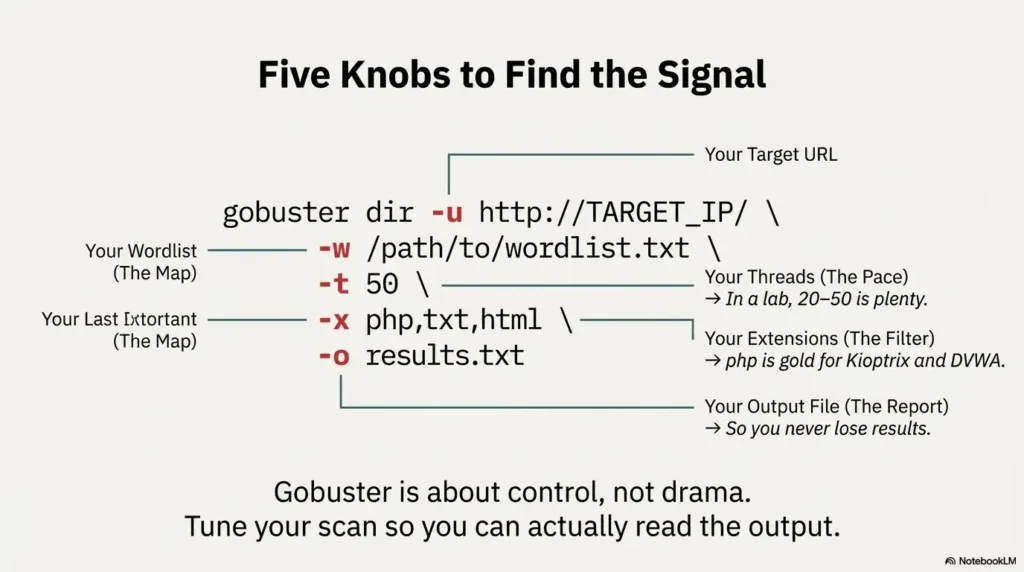
gobuster dir -u http://TARGET_IP/ -w /usr/share/wordlists/dirbuster/directory-list-2.3-medium.txt \
-t 50 -x php,txt,html -o gobuster-target-dir.txt
Five knobs matter for beginners and busy operators:
-u: the full URL, including port if non-standard (e.g.,:8080).-w: the wordlist; medium is usually fine for these three labs.-t: threads. In a home lab, 20–50 is plenty; more just makes logs ugly.-x: extensions;phpis gold for Kioptrix and DVWA.-o: output file, so you can paste clean results into a report later.
Cost to run Gobuster on a small cloud VM for a 1-hour scan, 2025 (US)
If you run Gobuster in a small cloud lab instead of your laptop, the “cost” is mostly VM billing and your time. A baseline t-type instance on a major US cloud provider in 2025 might be under a few dollars per month for occasional scans; the bigger cost is misconfiguring your scope and hitting production by mistake. That’s why we worry much more about authorization and logging than CPU credits.
Mini calculator: estimate Gobuster scan time (lab only)
Rough guess: time ≈ wordlist_size / threads × average_response_time.
Next step: Use this estimate to keep scans under your lab “quiet hours” and avoid hammering low-powered VMs.
Show me the nerdy details
Gobuster’s concurrency happens client side: each thread manages one outstanding HTTP request. If you crank -t too high on a small Kioptrix VM, you’ll spend as much time waiting on TCP retries as you do receiving real responses. For reliable lab practice, it’s better to keep threads modest and vary the wordlist than push 200+ threads at a single target.
- Start with medium wordlists and 20–50 threads.
- Always save output to a file for later review.
- Use the mini calculator to sanity-check scan duration.
Apply in 60 seconds: Set a default alias in your shell that includes -o gobuster-<target>.txt so you never lose results.
Kioptrix: 3 “hidden” folders that change your attack path
On Kioptrix level 1, Gobuster is your flashlight for the dusty corners of an early-2000s style web server. The goal isn’t to find every file; it’s to spot folders that hint at admin apps, misconfigurations, or backup content that align with classic privilege escalation paths.
A typical workflow:
- Identify the Kioptrix IP (via
arp-scanornetdiscover). - Load
http://KIOPTRIX_IP/in a browser and confirm a web server exists. - Run a focused Gobuster scan:
gobuster dir -u http://KIOPTRIX_IP/ \
-w /usr/share/wordlists/dirbuster/directory-list-2.3-medium.txt \
-x php,txt,html -t 40 -o gobuster-kioptrix.txt
On typical Kioptrix images, three folders jump out during this scan:
/phpmyadmin– a full database admin interface; in many labs it has weak or default credentials./adminor/admin/– bespoke or default admin panels with input fields ripe for testing./test– forgotten scripts, version probes, or debug code that leak versions and configurations.
Those three alone can change your entire attack path: suddenly you’re testing SQL credentials, weak login portals, and debug scripts instead of just poking at the homepage.
Rate-limit Gobuster on shared-style hosting, 2025 (US)
If you experiment with Kioptrix-style boxes on shared lab hosting in the US, assume the underlying hypervisor or firewall has limits. Keep Gobuster threads moderate and schedule scans outside any maintenance windows your provider lists; it’s easy to look like a malfunctioning script and trigger automated mitigation.
Short Story: The first time I hit Kioptrix with Gobuster, I treated every discovered path as equal. My notes turned into a 300-line wall of text, and in the report review my mentor simply asked: “Which three folders did you actually use?” I realised I’d spent more time copying results than thinking. The next run, I highlighted only /phpmyadmin, /admin, and /test, then wrote three short paragraphs on each: what it revealed, what I tried, and what worked. Same scan, completely different value.
- Prioritise admin, backup, and test folders.
- Turn each high-value folder into a short narrative.
- Ignore anonymous noise unless it supports that story.
Apply in 60 seconds: After your next Kioptrix scan, circle exactly three folders and write one sentence on why each matters.
DVWA: 3 Gobuster finds that unlock practice value
DVWA is designed to be broken on purpose; Gobuster simply helps you discover how the training app is laid out. In many DVWA setups, the main app is under a path like /dvwa/, but there are supporting files around it that matter for realistic practice.
From Kali, point Gobuster at your DVWA host:
gobuster dir -u http://DVWA_IP/ \
-w /usr/share/wordlists/dirbuster/directory-list-2.3-medium.txt \
-x php,txt,html -t 40 -o gobuster-dvwa.txt
Three interesting hits you’ll often see:
/dvwa/– the main app. Confirm versions and security level options./dvwa/login.php(or similar login script) – lets you practice brute force, credential stuffing, and login workflow tests./configor backup files in the DVWA directory – misconfigurations, database credentials, or leftover install scripts.
As you enumerate these, think like a real engagement: if a client pays you to test a training portal, you’re still expected to respect lockout thresholds, prior authorization, and any published rate limits. Your Gobuster usage should support that professionalism.
Cost of ignoring DVWA rate limits and lockouts, 2025 (EU)
In European training environments, it’s increasingly common to run DVWA inside corporate labs with strict logging and lockout policies. Hammering the login path with Gobuster-inspired brute force, even “for practice,” can trigger alerts and incident paperwork. The real cost isn’t money; it’s lab downtime and the human hours spent explaining why someone ignored the brief.
Decision card: when to scan DVWA with Gobuster vs just browse
- Use Gobuster when you want to map the full training surface, document hidden paths, and rehearse reporting.
- Browse manually when you’re testing a single vulnerability class or following a lesson plan step-by-step.
- Skip scanning entirely when a lab brief explicitly warns about brute-forcing or rate-limit testing.
Next step: Save this decision card with your DVWA notes and check it before every new module.
- Map paths once, then focus on specific labs.
- Treat DVWA like a “mini client” with rules.
- Capture folders that reveal config, credentials, or dangerous defaults.
Apply in 60 seconds: Add a line to your DVWA checklist: “Confirm whether Gobuster scans are allowed for this module.”
Metasploitable: 3 folders that tie Gobuster to Metasploit
Metasploitable 2 is a classic intentionally vulnerable Linux VM, widely used to practise the Metasploit Framework. What many learners miss is that its web stack is a buffet of apps just waiting to be rediscovered with Gobuster.
From Kali, point your browser at http://METASPLOITABLE_IP/. You’ll usually see a landing page advertising several vulnerable apps. Now confirm them—and any extras—with Gobuster:
gobuster dir -u http://METASPLOITABLE_IP/ \
-w /usr/share/wordlists/dirbuster/directory-list-2.3-medium.txt \
-x php,html -t 40 -o gobuster-metasploitable.txt
Three “eye-opening” folders that often pop up:
/mutillidae– a deliberately insecure training app, excellent for chained web attacks./twiki(or similar wiki-style app) – an older web wiki with known vulnerabilities in historical versions./phpmyadmin– again, a database admin interface that teaches you the risks of web-facing DB consoles.
If you count across all three targets, that gives us nine concrete folders:
- Kioptrix:
/phpmyadmin,/admin,/test - DVWA host:
/dvwa/,/dvwa/login.php,/configor backup config - Metasploitable:
/mutillidae,/twiki,/phpmyadmin
Each is a reminder: Gobuster is only the beginning. The real work is what you do once you’ve found the folder—interacting safely, respecting authorization, and documenting clearly.
- Tie each folder to a specific Metasploit module or manual attack.
- Practise writing impact statements, not just shell commands.
- Remember that real clients rarely label their apps this clearly.
Apply in 60 seconds: Pick one Metasploitable folder and outline a three-step attack chain with Gobuster as step one.
Interpreting Gobuster results without drowning in noise
Finding folders is easy. Interpreting them like a professional is the skill.
When Gobuster finishes, resist the urge to scroll aimlessly. Instead, filter lines mentally into three buckets:
- High-value hits: admin panels, backups, consoles, unusual apps.
- Context hits: documentation, status pages, error handlers that explain technology choices.
- Noise: static assets, generic 404 handlers, routine includes.
Focus first on status codes:
- 200/301/302 – likely accessible content; verify in a browser.
- 401/403 – restricted; note them, but respect access controls and scope.
- 500 – unstable; good for debugging in labs, dangerous in production.
Show me the nerdy details
Gobuster’s -s flag lets you filter by status code (for example, -s 200,204,301,302,307,401,403). In a training environment, that’s useful to narrow things down to “likely interesting” responses, but be careful not to hide unusual behavior like custom 404 handlers that might leak information. It’s often better to start broad, then rerun the scan with filters once you understand the target’s behavior.
- Group results into high-value, context, and noise.
- Use status codes as a first pass, not the final verdict.
- Write short “why this matters” notes for each key folder.
Apply in 60 seconds: Open your last Gobuster output and highlight no more than ten lines you’d actually include in a client report.

Risk, logs, and liability: staying safe while you scan
Even in a lab article about Gobuster, we have to talk about risk. Directory brute-forcing leaves clear footprints in web server logs: repeated 404s, bursts of 200s, and distinctive user agents. In a corporate environment, those logs may feed SIEMs, fraud detection pipelines, or even insurance audits.
Many organisations now include security testing clauses in their contracts and cyber insurance policies. Those clauses can mention coverage tiers, deductibles, and fee schedules for incident response or external forensics. If a Gobuster run strays outside agreed scope, it can complicate those arrangements even if nothing “bad” happened.
Money Block: simple coverage tier map (example only)
| Tier | Typical scope | Notes |
|---|---|---|
| Tier 1 | Internal lab only | Low risk; ideal for Kioptrix, DVWA, Metasploitable. |
| Tier 2 | Non-production corporate apps | Requires written rules of engagement and logging review. |
| Tier 3 | Production apps with customers | Strict scope, change windows, and contact points required. |
| Tier 4–5 | Regulated data / cross-border | Often needs prior authorization, legal review, and clear fee schedules for incident response. |
Next step: Save this table as a mental model and confirm your real organisation’s tiers, deductibles, and testing requirements on the official policy pages.
How cyber insurance coverage sees Gobuster scans in 2025 (US)
In 2025 US markets, many cyber insurance questionnaires now ask directly about penetration testing, scope, and who performs it. A well-documented Gobuster process, tied to written approval and clear logs, is far easier to defend than ad-hoc scanning “because we were curious.” Eligibility for certain coverage tiers may depend on demonstrating that tests followed agreed procedures rather than improvisation.
- Keep directory brute-forcing inside agreed tiers.
- Coordinate with whoever owns logging and monitoring.
- Document the “why” and “when,” not just the commands.
Apply in 60 seconds: Add a line to your template: “Gobuster scans performed under <ticket/contract>, logged as <ID>.”
Building a repeatable Kali web attack playbook
By now, you’ve seen Gobuster in action on three classic targets and nine concrete folders. The last step is turning this into a rinse-and-repeat playbook that works under exam conditions and in real jobs.
A simple script for yourself might look like:
- Scope: Confirm written approval and lab tier (from the earlier checklist).
- Recon: Identify target IPs, ports, and visible apps.
- Gobuster: Run a single tuned scan per web host (dir mode), save to file.
- Rank: Highlight no more than ten paths that change your attack surface.
- Attack: For each high-value folder, test one or two hypotheses (auth bypass, injection, misconfig).
- Report: Write a short paragraph per folder with impact and remediation.
Money Block: quote-prep list for explaining your Gobuster work
Before you talk to a manager, mentor, or client about your scan, gather:
- Exact scope statement (lab brief, ticket, or contract section).
- Command lines used, with wordlists and thread counts.
- Top 5–10 paths found with short “why this matters” notes.
- Any error behavior (lockouts, 500s, rate limits) you observed.
Next step: Save this list to your note template so you can assemble explanations—and quotes for future work—without digging through old terminals.
Short Story: On one internal review, a colleague walked into a project retrospective with nothing but: “I ran Gobuster, here’s the output.” The room went quiet. Our lead asked a single question: “If this were a paid audit, what would I be buying from you?” It was a brutal moment—but a useful one. The next time, he arrived with a small matrix: targets, commands, key folders, issues, and suggested fixes. Same tool, same person, completely different level of trust and billable value.
- Write down your sequence and reuse it.
- Include scope, commands, and reporting steps.
- Tune it slightly for each lab or client, but keep the spine.
Apply in 60 seconds: Create a “Gobuster Playbook” note with the six-step outline above and reuse it for your next three labs.
Infographic: Gobuster scan blueprint
One-page Gobuster blueprint for Kioptrix, DVWA & Metasploitable
1. Plan
- Confirm lab scope & tier.
- Note target IPs and ports.
- Pick wordlist & thread count.
- Set output filenames.
2. Scan
- Run one tuned Gobuster scan per host.
- Respect rate limits and lockout rules.
- Watch for unusual status codes.
- Pause if logs or performance look unstable.
3. Review
- Highlight 9–10 key folders.
- Group into Kioptrix, DVWA, Metasploitable patterns.
- Write brief impact and fix notes.
- Attach to your lab or client report.
Print or screenshot this blueprint and keep it beside your terminal while you work through Kioptrix, DVWA, and Metasploitable labs.

FAQ
1. Is it legal to run Gobuster on Kioptrix, DVWA, and Metasploitable?
Yes—when those systems are running in your own lab or in an environment where you have explicit permission, these targets are built to be attacked. They exist precisely so you can practise without touching real customer data or production systems. The key is to keep them on isolated networks and to have written approval for any corporate deployment. 60-second action: Write down where each VM lives and who granted permission, even if it’s just your own lab machine.
2. How many threads and wordlists should I use for Gobuster on a small lab VM?
For Kioptrix, DVWA, and Metasploitable, 20–50 threads and a medium-sized wordlist are usually enough to find the folders that matter. Huge wordlists and 200+ threads mostly add noise and stress your VMs. Start small, measure scan times with a simple estimator, and scale up only if you’re missing obvious paths. 60-second action: Set a “default” Gobuster alias with safe thread counts and a medium wordlist, then tweak per target.
3. How do Gobuster scans affect logs, monitoring, and cyber insurance coverage?
Directory brute-forcing generates clear patterns in web logs—exactly what many monitoring systems look for. In organisations with cyber insurance, those logs may be used to confirm that testing followed agreed scope and timelines. Staying within written scope, coordinating with the monitoring team, and documenting your commands makes any later questions much easier to handle. 60-second action: Add a line to your next scan note: “Notified <team> about Gobuster run; scope = <range>; time window = <start–end>.”
4. What’s the best way to turn Gobuster results into OSCP-style exam points?
Exams and real jobs reward chains, not single screenshots. Use Gobuster to find one or two key folders, then show how you walked from those folders to a foothold, privilege escalation, and a clear explanation of impact. Screenshots belong in the narrative, not as a pile. 60-second action: For your next lab, pick one Gobuster-discovered folder and write a three-step story: “Found > Tested > Gained.”
5. I’m worried about time—how can I practise Gobuster efficiently each week?
If you only have an hour or two per week, dedicate 15 minutes to each part: 15 minutes to set up and confirm scope, 15 minutes to run and monitor one scan per target, 15 minutes to review results and highlight key folders, and 15 minutes to write a short summary. Routine beats marathons. 60-second action: Block one recurring one-hour slot in your calendar labelled “Gobuster lab practice: Kioptrix/DVWA/Metasploitable.”
Closing thoughts and your next 15 minutes
We started with a messy reality: Gobuster can feel like a firehose of URLs. By walking through three classic labs—Kioptrix, DVWA, and Metasploitable—and zooming in on nine specific folders, you’ve seen how directory brute-forcing becomes a calm, repeatable part of a professional web attack workflow rather than a noisy side show.
Now, while this article is still fresh:
- Pick one of the three targets and run a single tuned Gobuster scan.
- Highlight three folders only and write a paragraph on why each matters.
- File that output and commentary in a “Gobuster Playbook” note you’ll reuse.
In under 15 minutes, you can move from “I ran a tool once” to “I have a documented process I can defend to a client, an auditor, or an exam proctor.” That’s the quiet, compounding progress that eventually turns into job offers and successful assessments.
Last reviewed: 2025-12; sources: Gobuster project documentation, Kali Linux tool index, official Kioptrix/DVWA/Metasploitable lab descriptions.
Kali Linux Gobuster Walkthrough, Gobuster directory brute forcing, Kioptrix DVWA Metasploitable labs, Kali Linux web attack basics, OSCP practice labs