Kali Linux Web Attack Basics: Nikto and Gobuster – 7 Shocking Lessons From My First Real Pentest

Kali Linux Web Attack Basics

Kali Linux Web Attack Basics: Nikto and Gobuster – 7 Shocking Lessons From My First Real Pentest

The short version? My first “real” web pentest using Kali turned into a full-blown stress test—for me. Between Nikto flooding logs like a fire hose and Gobuster hammering away like a caffeinated woodpecker, I nearly torched my nerves, my timeline, and my client’s trust. Don’t be like me. These tools can absolutely deliver gold… if you know how to wield them properly. Misused? They’ll flood your inbox with noise and your screenshots folder with regrets.

This guide lays out the essentials of web attacks in Kali Linux using Nikto and Gobuster—done the smart way. That means staying within scope, respecting your client’s infrastructure (and patience), and turning your scans into actual, billable results. You’ll get seven hard-earned lessons, a 60-second scope sanity check, a pocket-sized scan-time calculator, and some money-minded tips so this feels like a real professional engagement—not just weekend fun with root shells.

You can put the first lesson to work in under 10 minutes—whether you’re testing inside a legal home lab, running a box from a training platform, or working on a scoped client assessment you’ve already cleared in writing. Always in writing. Trust me on that.

60-Second Scope & Permission Check

Eligibility checklist (yes/no):

  • Do you have written permission for this exact domain/IP range?
  • Does the agreement mention web application testing, not just “vulnerability scan” in general?
  • Do you know the start/end dates and hours when scans are allowed?
  • Do you know who gets the report and how incidents are escalated?

If you answered “no” to any item, treat the test as not yet authorized.

Mini time estimator (rough):

Save this checklist and confirm your scope with the client, training provider, or program owner before you point any scanner at a live system.


Kali Linux Web Attack Basics

1. How this first pentest really felt (and why Nikto & Gobuster mattered)

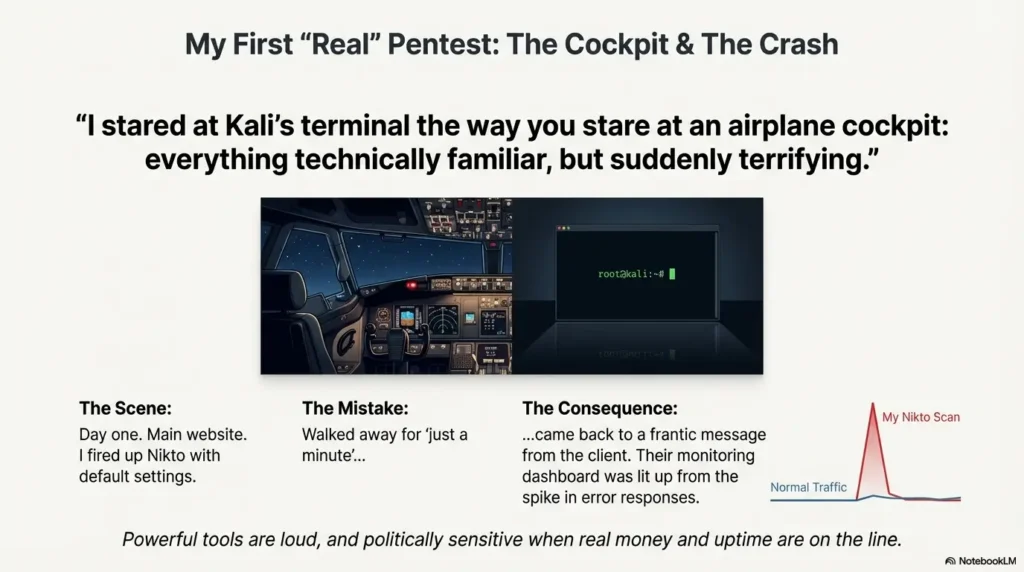
On my first real web pentest, I stared at Kali’s terminal the way you stare at an airplane cockpit: everything technically familiar, but suddenly terrifying because an actual organization was on the other side.

The scope was simple on paper: one main domain, a staging subdomain, and a tight three-day window. In practice, I had about six useful hours per day once meetings, notes, and sleep deprivation were factored in. That meant every tool had to earn its keep.

Enter Nikto and Gobuster. One promised quick checks for dangerous web server issues; the other promised secret directories and virtual hosts. While I worried about SQL injection and fancy exploits, these two workhorses quietly delivered the most practical leads in the entire engagement.

Short Story: On day one, I fired Nikto at the main site, walked away for “just a minute,” and came back to a frantic message from the client’s ops team. Their monitoring dashboard lit up from the sudden spike in error responses. I hadn’t done anything evil; I had simply run the scanner with default settings during their peak traffic. That night, somewhere between cold coffee and apology emails, I learned my first serious lesson: these tools are powerful, loud, and politically sensitive when real money and uptime are on the line.

Takeaway: Basic tools like Nikto and Gobuster can make or break your first web pentest if you respect scope and timing.
  • Plan when and where scans run, not just which flags you use.
  • Treat every console line as something a real person might question.
  • Use these tools to focus manual testing, not replace it.

Apply in 60 seconds: Write down the three domains or URLs you’ll scan first and the exact time window you’ll use.


Before Kali, before Nikto, before Gobuster, there is one unglamorous step: paperwork. On my first engagement, I skimmed the contract like a software license. Later I realized there were entire paragraphs about production vs staging, denial-of-service risk, and log retention that mattered far more than any command-line flag.

The practical translation: if something goes wrong, people will ask, “Was this covered by the agreement?” long before they ask, “What version of Kali were you running?”

Think in three layers:

  • Authorization: Who signed off on you attacking this thing?
  • Scope: Which systems, endpoints, and business units are in or out?
  • Impact: What level of performance risk, data exposure, or log noise is acceptable?

When money enters the picture, you also bump into professional liability and cyber coverage tiers. Even if you’re not running a full company yet, many clients will ask if you have insurance, what your deductible is, or how your fee schedule works when an incident review is required.

On my first pentest, I didn’t have dedicated cyber liability coverage, just a generic freelance policy. That meant I had to be conservative: no “let’s see what happens” experiments, no surprise stress tests, no clever tricks that could push a fragile system over the edge.

Decision card: Where should you run Nikto & Gobuster first?

Scenario Best place to test Time & risk notes
Learning the tools Deliberately vulnerable labs (DVWA, Juice Shop, training platforms) Lowest risk; ideal for experimenting with flags and wordlists.
Bug bounty or public program Targets listed in the official scope Check “allowed tools” and rate limits; respect their fee schedule and rules.
Client engagement with contract Staging or dedicated test environment first Coordinate with ops; confirm how findings affect their coverage tiers and premiums.

Save this decision card and confirm your testing path on the official program page or contract before scheduling scans.

Show me the nerdy details

Many organizations treat web attacks differently depending on data classification and uptime requirements. For example, a low-traffic marketing site might allow aggressive scans, while a payment portal only permits tightly controlled testing windows. Read the fine print: look for language about “critical systems,” “business hours,” and “availability guarantees.” If you see terms about penalties or service credits tied to downtime, your Nikto and Gobuster runs must be extremely cautious.

Takeaway: Your first real pentest starts in the contract, not in Kali.
  • Authorization, scope, and impact rules protect both you and the client.
  • Insurance and coverage questions become important as soon as money changes hands.
  • Conservative scan settings are smart when paperwork is unclear.

Apply in 60 seconds: Highlight every line in your agreement that mentions uptime, data sensitivity, or testing windows.

Sample 2025 web pentest day rates (ballpark only)

Region Typical junior day rate Notes
US / Canada USD $400–$900 Varies by city, sector, and whether cyber liability insurance is included.
Europe (EU/UK) EUR €350–€800 Rates rise for regulated environments and stricter compliance requirements.
Asia-Pacific USD $250–$600 equivalent Big spread: local market, currency, and experience matter more than country labels.

These are rough ranges, not quotes. Save this table and compare it with job boards, community surveys, and mentors before setting your own fee schedule.


3. Lesson 2: Kali setup that doesn’t break right before the deadline

My first pentest started with a classic mistake: I updated Kali during the engagement. One package pulled in another, something broke, and suddenly Gobuster refused to run with the wordlist path I’d used the previous day.

The fix is boring but powerful:

  • Create a snapshot or backup of your Kali VM before the project starts, ideally in whichever hypervisor you use (VirtualBox, VMware, or Proxmox).
  • Verify that nikto and gobuster both run and show help text.
  • Set up a single working directory per engagement, like ~/engagements/client-name/.
  • Keep notes and terminal commands in a simple text file or within a tmux session.

On that first engagement, I lost nearly 90 minutes untangling a broken install that could have been prevented by a two-minute snapshot the day before. When your window is only three days, losing 90 minutes to self-inflicted drama hurts.

Make Kali boring and predictable. The excitement should come from what you find in the client’s environment, not from wondering whether your tools will start today.

Takeaway: Stable tooling beats fancy tooling on a real engagement.
  • Snapshot before the project, not halfway through.
  • Standardize one folder layout for every assessment.
  • Record commands as you go so you can replay them later.

Apply in 60 seconds: Create a new directory called ~/engagements/test-lab and commit to using that pattern on future jobs.


4. Lesson 3: Nikto basics, noisy mistakes, and quiet wins

Nikto is like that blunt friend who tells you everything that might be wrong, all at once. My first run dumped a wall of warnings: outdated server banners, suspicious headers, debug scripts, and a backup file I never would have guessed.

The temptation is to copy-paste every line into your report. Resist that. Your goal is to turn Nikto from a firehose into a filter.

Start with something simple and explicit in your notes:

nikto -h https://app.example.com -output nikto-app.txt

If you haven’t already mapped the target, run a focused Nmap scan in Kali first so Nikto is aimed at the right hosts and ports.

Then ask three practical questions:

  1. Which findings imply real risk (data exposure, auth bypass, known exploit)?
  2. Which findings are noisy but still useful as context (old server banner, verbose error pages)?
  3. Which findings are essentially “FYI” and not worth cluttering the main report?

On my first pentest, a single item from Nikto—an exposed backup file—turned into the highest-impact finding of the whole engagement. It taught me that one well-chosen line from a scanner can matter more than fifty screenshots of low-risk headers.

Show me the nerdy details

By default, Nikto aggressively probes for a wide set of known issues. On sensitive environments, consider adjusting port, SSL, and timeout options so you don’t overwhelm brittle endpoints. Redirect output to a file, and tag the file name with date, time, and host. Later, when you cross-reference with Gobuster or manual testing, those filenames are your timeline.

Decision card: When to start with Nikto vs Gobuster

  • Start with Nikto when you’re unsure about the web server’s hygiene and want a fast checklist of obvious misconfigurations.
  • Start with Gobuster when the app looks custom and you suspect hidden directories, admin panels, or forgotten sub-apps.
  • Alternate them when you have plenty of time and a clear green light on scan intensity.

Save this decision helper in your notes and update it with examples from your own lab work and engagements.

Takeaway: Nikto is most valuable as a focused hint engine, not as a report generator.
  • Run it with clear scope and saved output.
  • Prioritize findings that change real attack paths.
  • Ignore low-value noise that doesn’t help anyone decide.

Apply in 60 seconds: In your lab, run Nikto once and mark three findings as “high context” vs three as “just noise.”


5. Lesson 4: Gobuster and the art of finding hidden doors

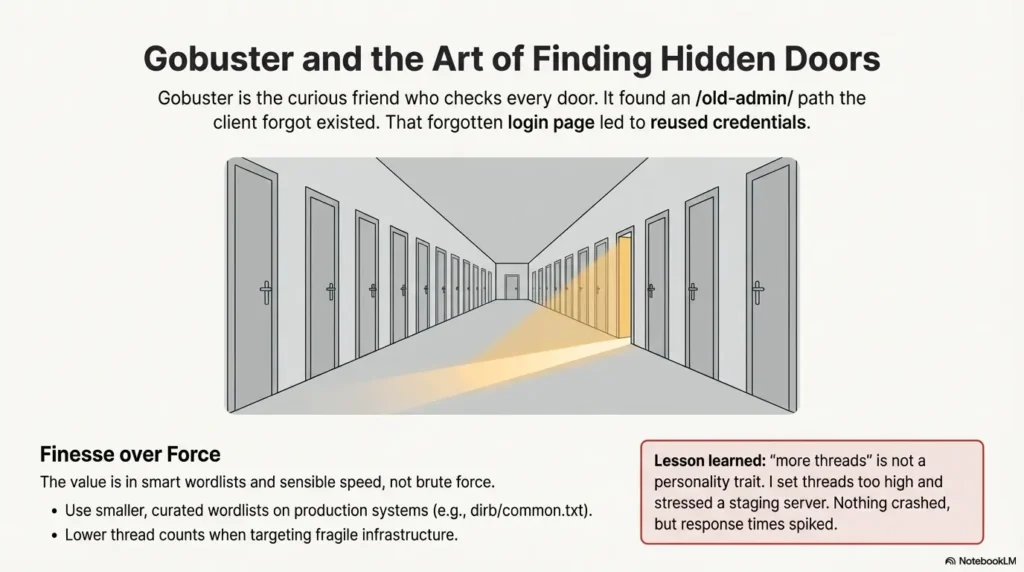
If Nikto is the blunt friend, Gobuster is the curious one who checks every door on the floor just to see what’s behind it. On my first pentest, Gobuster turned up an /old-admin/ path that the client had forgotten existed. It led to an outdated login page. That login page led to reused credentials. You can guess the rest.

The basic usage pattern in your notes might look like:

gobuster dir -u https://app.example.com -w /usr/share/wordlists/dirb/common.txt -o gobuster-app.txt

The risk is not that Gobuster is “too powerful,” but that it can be too fast when pointed at fragile infrastructure. Thread counts and timeouts matter. So does the wordlist you pick: using a 5-million-entry list against a production site two days before launch is a great way to annoy everyone.

On that first engagement, I set threads too high and briefly stressed a small staging server. Nothing crashed, but response times spiked. Lesson learned: “more threads” is not a personality trait.

In practice, I treat Gobuster as part of a small discovery toolkit that also includes Nmap and other enumeration scripts; on Kioptrix-style boxes, it sits right next to my go-to items from the essential Kali Linux tools list.

Takeaway: Gobuster’s value comes from smart wordlists and sensible speed, not from brute force everything.
  • Use smaller, curated wordlists on busy production systems.
  • Lower thread counts when bandwidth or CPU is limited.
  • Pay attention to 200/301/403 patterns, not just “cool” paths.

Apply in 60 seconds: Pick one small wordlist and label it “safe-for-prod” in your notes.

Kali Linux Web Attack Basics

6. Lesson 5: Reading the noise, prioritizing risk, and staying sane

The hardest part of my first web pentest was not running tools, but deciding what to care about. Nikto gave me tens of findings; Gobuster gave me hundreds of paths. None of that is useful until you sort it into a story.

A simple triage order that kept me sane:

  1. Anything suggesting direct data exposure (backups, exports, config files).
  2. Anything hinting at authentication or access control problems.
  3. Anything that reveals internal structure: debug endpoints, old versions, admin routes.
  4. Everything else… later.

This is where the difference between a real penetration test and a simple vulnerability scan becomes obvious: you’re not just listing issues, you’re building a prioritized attack narrative.

On my first engagement, I nearly buried the lead. I spent an hour writing about cookie flags while a forgotten admin console sat wide open under an unguessable path that Gobuster had quietly logged. Once I reprioritized, the report turned from a checklist recital into a clear argument for fixing the biggest risks first.

Eligibility checklist: Is this finding worth a full write-up?

  • Can someone else reproduce it in under 5 minutes with clear steps?
  • Does it affect confidentiality, integrity, or availability in a visible way?
  • Would a manager care if this screenshot showed up in tomorrow’s risk meeting?
  • Would fixing it measurably improve security or compliance?

If you answer “yes” to at least two questions, promote the finding into your main report. Save this checklist next to your notes and use it to filter noisy scanner output.

Takeaway: Your job is to turn lines of console output into three or four decisions for the business.
  • Group findings by impact, not by tool.
  • Lead with issues that change how they operate or handle data.
  • Let minor items support the big story instead of distracting from it.

Apply in 60 seconds: Pick any lab scan output and label three findings “business-relevant” vs three “noise.”


7. Lesson 6: Reporting your findings without embarrassing yourself

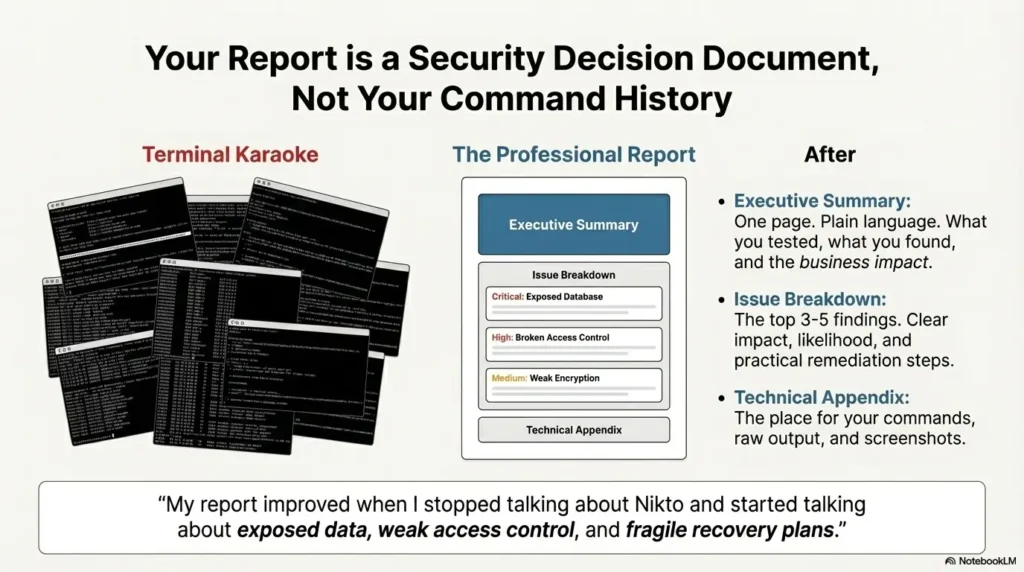
My first report draft read like terminal karaoke: command, output, screenshot; command, output, screenshot. Helpful for another pentester, maybe, but not for the director who had to decide what to fix this quarter.

A report that survives the risk committee usually has three layers:

  • Executive summary: one page of plain language: what you tested, what you found, and how it affects the business.
  • Issue breakdown: each major finding with impact, likelihood, and practical remediation steps.
  • Technical appendix: commands, parameters, and raw scanner output.

On my first pentest, I re-wrote the summary three times. The turning point was when I stopped talking about Nikto and Gobuster and started talking about exposed data, weak access control, and fragile recovery plans. The tools became supporting actors, not the main characters.

Takeaway: Your report is a security decision document, not a command history.
  • Let the executive summary stand alone.
  • Tie each major issue to concrete business impact.
  • Push raw tool output into appendices.

Apply in 60 seconds: Write a three-sentence summary of any lab test you’ve done, without naming a single tool.


Kali Linux Web Attack Basics

8. Lesson 7: Money, liability, and turning web attacks into a real career

Here’s the honest part: my first pentest fee was too low. By the time I finished scoping, scanning with Nikto and Gobuster, retesting, and writing the report, the effective hourly rate looked more like a hobby than a profession.

When you treat this as a service, you start to think in terms of rate cards, coverage tiers, and risk transfer instead of just “cool findings.” Clients may ask:

  • What’s your standard day rate and fee schedule?
  • Are you covered by professional or cyber liability insurance?
  • How do you handle incidents if a scan triggers a failure?

On my second engagement, I added a clear fee table and a simple clause about prior authorization and emergency contacts. That single page probably saved me hours of awkward emails.

Quote-prep list: what to gather before you send a proposal

  • Number of web apps, domains, and environments (prod, staging, dev).
  • Regulatory context (PCI DSS, healthcare, finance, or none).
  • Required documentation: report format, retest window, evidence level.
  • Whether the client expects you to carry cyber liability or malpractice-style coverage.
  • Preferred scheduling window and maintenance freezes.

Save this list as a template and confirm each item with the client before you discuss rates, premiums, or coverage tiers.

Takeaway: Treating this work like a business protects your time and your reputation.
  • Use a simple rate table instead of improvising prices.
  • Clarify insurance and liability expectations early.
  • Make scan intensity and retest options part of the contract, not an afterthought.

Apply in 60 seconds: Draft a one-line description of your “basic web assessment” and a rough day-count you’d expect.


9. Regional note: doing all this legally from your country

Laws about unauthorized access are strict almost everywhere, but the details differ by country. If you’re hacking from Seoul, Berlin, Toronto, or anywhere else, the rule of thumb is simple: do not rely on “everyone does it” as a legal defense.

In many countries, even scanning can be treated as an offense if you target systems without permission. Some regions have specific cybercrime acts; others fold it into broader computer misuse or network laws. Bug bounty programs and training platforms are exceptions because they publish scopes and rules that explicitly grant you limited rights.

On my first engagement with an overseas client, we had to align on time zones, data protection rules, and where data would be stored. That conversation mattered just as much as the Kali tools I used. One misplaced screenshot in the wrong jurisdiction can spark uncomfortable questions.

Whenever you cross borders virtually:

  • Check whether client data leaves the country when you store screenshots or logs.
  • Ask if they have internal rules for pentesting vendors and data retention.
  • Record who granted authorization and where they’re based.
Takeaway: Local law and jurisdiction shape what “authorized” really means for you.
  • Never run scans without explicit permission.
  • Know where your notes, logs, and screenshots live.
  • Document the person and country that granted authorization.

Apply in 60 seconds: Write down your country and ask, “Which law would apply if a scan goes wrong here?” then research it later today.


10. Web attack workflow infographic: from recon to report

To keep this from feeling like random commands, here’s a simple visual of how Nikto and Gobuster fit into a full Kali web attack workflow.

1. Scope & paperwork

Signed authorization, environments, time windows, contacts.

2. Recon & mapping

DNS, subdomains, tech stack, assets list.

3. Nikto sweep

Quick hygiene checks and low-hanging issues.

4. Gobuster discovery

Hidden paths, old consoles, forgotten apps.

5. Manual validation

Confirm real risk; avoid guessing from tool output alone.

6. Reporting & retest

Tell a clear story, then verify fixes.

Takeaway: Nikto and Gobuster are just two steps in a bigger rhythm of scope → recon → scan → validate → report.
  • Always anchor them inside a clear workflow.
  • Use their output to prioritize manual testing.
  • Close the loop with retesting where possible.

Apply in 60 seconds: Sketch this six-step flow on paper and add your favorite extra step where it fits.

📘 Check the official Gobuster documentation


FAQ

No. Running Nikto, Gobuster, or any other scanner against systems you do not own or control, without explicit authorization, can be illegal in many countries. Only test in labs, training platforms, bug bounty programs that list the target, or on systems where you have written permission. 60-second action: Locate your latest authorization email or contract and confirm which domains and IP ranges are in scope.

2. How long does a basic Kali web assessment with Nikto and Gobuster usually take?

For a small app with one or two subdomains and a simple tech stack, a focused assessment might take one to three days including scoping, scanning, manual validation, and reporting. The tools themselves may run in under an hour; interpreting the results takes longer. 60-second action: Use the mini time estimator above to rough-plan your next lab session or engagement window.

3. Do I need cyber liability insurance before offering pentest services?

You don’t need to be insured to learn in a lab or on a training platform, but once you accept money from clients, many will expect at least some form of professional or cyber liability coverage. Policies differ widely in coverage tiers, deductibles, and exclusions, so reading the details matters. 60-second action: Write down one question about coverage (for example, “What happens if my scan causes downtime?”) and ask a broker or mentor this week.

4. What should I do if Gobuster or Nikto appears to stress a target?

If response times spike or monitoring teams raise concerns, stop the scan, inform your contact, and document what you were running at the time. Do not quietly retry with different flags without telling anyone. Treat it like an incident learning moment rather than a failure. 60-second action: Add a short “incident response” paragraph to your personal testing playbook describing what you’ll do if a scan misbehaves.

5. Which wordlists should I use with Gobuster for my first real pentest?

Start with small, well-known lists that balance coverage and safety—common directory names, not massive all-language dumps. As you gain experience, you can build custom lists from the client’s tech stack, naming patterns, and previous findings. 60-second action: Pick one modest wordlist today, label it clearly as your “safe default,” and note where it lives on disk.


12. Conclusion: the real win from your first web pentest

By the end of my first real pentest, I had learned far more about people than about tools. Nikto and Gobuster absolutely helped uncover real issues—backup files, forgotten admin paths, leaky error messages—but the biggest lessons lived in scope calls, monitoring alerts, and post-engagement debriefs.

If you remember nothing else, remember this rhythm:

  • Slow down for authorization, scope, and expectations.
  • Stabilize your Kali setup before you start.
  • Use Nikto and Gobuster as focused discovery engines.
  • Translate console output into business decisions.
  • Protect yourself with sane rates, clear contracts, and appropriate coverage.

You can take a small but meaningful step in the next 15 minutes: spin up a safe lab target, run a single Nikto and Gobuster scan with notes, and write a three-paragraph “client-style” summary of what you found. That practice loop will prepare you more for your first real pentest or structured paths like the OSCP 90-day plan than another evening of scrolling tool screenshots on social media.

Last reviewed: 2025-12; sources: OWASP testing guidance, Kali Linux documentation, and the public Nikto & Gobuster project pages.


Kali Linux Web Attack Basics, Nikto tutorial, Gobuster directory brute force, web penetration testing for beginners, Kali Linux pentest workflow