

Signal Over Noise: A Disciplined Approach to Pentesting
Pentesting often looks louder than it really is. While it may seem like a blur of fast commands and oversized toolkits, the real work lies in clarity. Kioptrix Level strips away the theater, offering IT generalists a calm, focused environment to learn how security actually functions.
The challenge for beginners isn’t intelligence, it’s noise. By focusing on lab setup, isolated networking, and enumeration over flashy exploitation, this guide builds technical judgment that transfers to real-world defense.
This is where real progress begins.
Table of Contents
Fast Answer: Kioptrix Level for IT generalists who want a gentler entry into pentesting works best when you treat it as a thinking lab, not a hacker performance. This is a small, contained practice environment where you can learn how attackers notice systems, test assumptions, and document decisions without needing elite speed or a huge tool stack. The real goal is not drama. It is calmer technical judgment.
Start Here: Why Kioptrix Feels Less Scary Than “Real” Pentesting
A small lab changes the emotional weather before it changes your skills
One reason Kioptrix remains useful is almost embarrassingly simple: the environment is small enough that your mind does not immediately begin flapping like a loose server-room badge. Real production environments come with politics, complexity, unknown dependencies, and the deep moral weight of “please do not break payroll.” A practice lab removes that pressure. What remains is the part that matters for learning: seeing what is exposed, asking what it means, and deciding what to test next.
I have seen plenty of capable admins freeze the first time they open a security walkthrough, not because the material is impossible, but because the vibe suggests they should already know everything. Kioptrix lowers the temperature. It says: here is one machine, here is one small world, now pay attention. That is a far kinder invitation than the internet’s usual chest-thumping carnival.
This matters more than many people admit. Beginners do not only need information. They need a learning surface that does not punish hesitation. When the lab is contained, the brain spends less energy on panic and more on pattern recognition. That is not softness. That is better signal-to-noise.
- Less complexity means clearer observation
- Less pressure means better retention
- Containment makes mistakes survivable
Apply in 60 seconds: Reframe your first Kioptrix session as a lab in noticing, not a race to compromise the box.
Why IT generalists often learn faster in contained systems than in sprawling platforms
IT generalists are used to tracing issues across systems, but that skill can turn against you when the learning surface gets too wide. In a giant lab or sprawling platform, every branch looks equally important. In Kioptrix, the branches are fewer, and that lets familiar instincts become useful sooner. Ports, services, banners, permissions, misconfigurations, and version clues stop being trivia and start becoming a story.
Think of it like moving from a noisy airport terminal to a smaller train platform. You still need awareness, but the announcements are no longer fighting each other. That quiet is productive.
The hidden advantage: you already know more than you think
If you work help desk, desktop support, systems administration, or endpoint operations, you already think in terms of systems, failure points, configuration drift, and user behavior. Those habits are not baggage. They are compost. Messy, yes. Useful, also yes.
Many new learners underestimate how transferable ordinary IT work really is. If you have ever asked, “What changed?” “What is listening?” “What should not be exposed?” or “Why does this service behave differently from the baseline?” then you are already practicing the skeleton of security thinking. Kioptrix simply lets you do it on purpose, which is exactly why it resonates with help desk workers using Kioptrix to build security judgment.
First Question: Is Kioptrix a Good Fit for You or a Mismatch in Disguise?
Who this is for: curious IT generalists who like systems, troubleshooting, and evidence
Kioptrix is a good fit for learners who are patient enough to look twice. It rewards people who can tolerate partial information, keep notes, and resist the urge to turn every unknown into a dramatic leap. If you enjoy troubleshooting more than performance, you are already pointed in the right direction.
This is especially true for people moving sideways into security rather than parachuting in through hype. If your work already trained you to be methodical, skeptical, and annoyingly fond of logs, then Kioptrix is less a foreign language than a dialect shift.
Who this is not for: people chasing instant speed, flashy exploits, or résumé theater
If what you want is instant cinematic payoff, Kioptrix may feel almost too plain. That is not a flaw. It is a filter. Labs like this are not especially flattering to people who want to collect screenshots of tools without understanding why the tools were used. The machine does not care about your aesthetic. It only responds to evidence.
There is a particular beginner trap here: confusing visible activity with progress. Ten tools open at once can look impressive. It can also be the digital equivalent of opening every kitchen drawer and calling it cooking.
What “gentler entry” really means in a pentesting context
A gentler entry does not mean easy, fake, or harmlessly decorative. It means the path into the work is less jagged. The number of moving parts is smaller. The distance between observation and consequence is shorter. The feedback loop is tighter. You can make one change, run one scan, read one clue, and learn from one result.
Eligibility checklist
- Yes: You like troubleshooting and documenting what you find.
- Yes: You can commit 30 to 60 focused minutes, not a whole heroic weekend.
- Yes: You want to understand attacker logic, not just replay commands.
- No: You only want instant exploitation without enumeration.
- No: You get bored unless a lab looks glamorous on social media.
Next step: If you got at least three “yes” answers, Kioptrix is probably a solid starting lab.
Before You Begin: What This Lab Actually Teaches Beneath the Commands
Enumeration as disciplined observation, not random scanning
The best first lesson in Kioptrix is not exploitation. It is observation. Enumeration in Kioptrix teaches you to look before you lunge, and that habit scales everywhere. The first time a learner realizes that a careful scan can narrow the universe of reasonable next steps, something important clicks. The terminal stops being a slot machine and becomes a notebook with sharper teeth.
That sounds small. It is not. Mature operators are often distinguished less by what they can run than by what they know not to run yet.
Vulnerability hunting as pattern recognition, not guesswork
Beginners often imagine vulnerability work as a dramatic leap from nothing to breakthrough. In reality, it is usually more like old-fashioned fieldwork. You gather version clues, exposed services, web behaviors, authentication patterns, and configuration details. Then you narrow. Then you test. Then you narrow again. Kioptrix is excellent for learning this rhythm because the environment is compact enough that patterns stand out instead of dissolving into infrastructure fog.
I remember one early lab session where I felt stuck for nearly 20 minutes because nothing looked “obviously vulnerable.” That frustration turned out to be the lesson. I had been waiting for the machine to confess instead of building a case from what it was already telling me.
Reporting as proof of thinking, not paperwork after the fun part
Reporting sounds dull until you realize it is the artifact that proves you were thinking instead of flailing. In a small lab, a short write-up can capture your whole logic chain: what you saw, what you suspected, what you tested, what failed, and what changed your mind. That is not administrative garnish. It is the visible form of judgment.
For career changers and adjacent-role learners, this is gold. Interviews rarely reward a long chant of tool names. They remember whether you can explain why you took the next step, which is why turning Kioptrix notes into interview stories matters so much.
Show me the nerdy details
In practical terms, Kioptrix-style learning maps well to a simple loop: network/service enumeration, application inspection, hypothesis formation, verification, and documented outcomes. If your notes preserve the observation-to-action chain, you can later retell the lab as a decision story rather than a command dump.
Setup Without Drama: How to Make the Lab Feel Safe, Repeatable, and Boring in the Best Way
Why isolated networking matters more than cleverness on day one
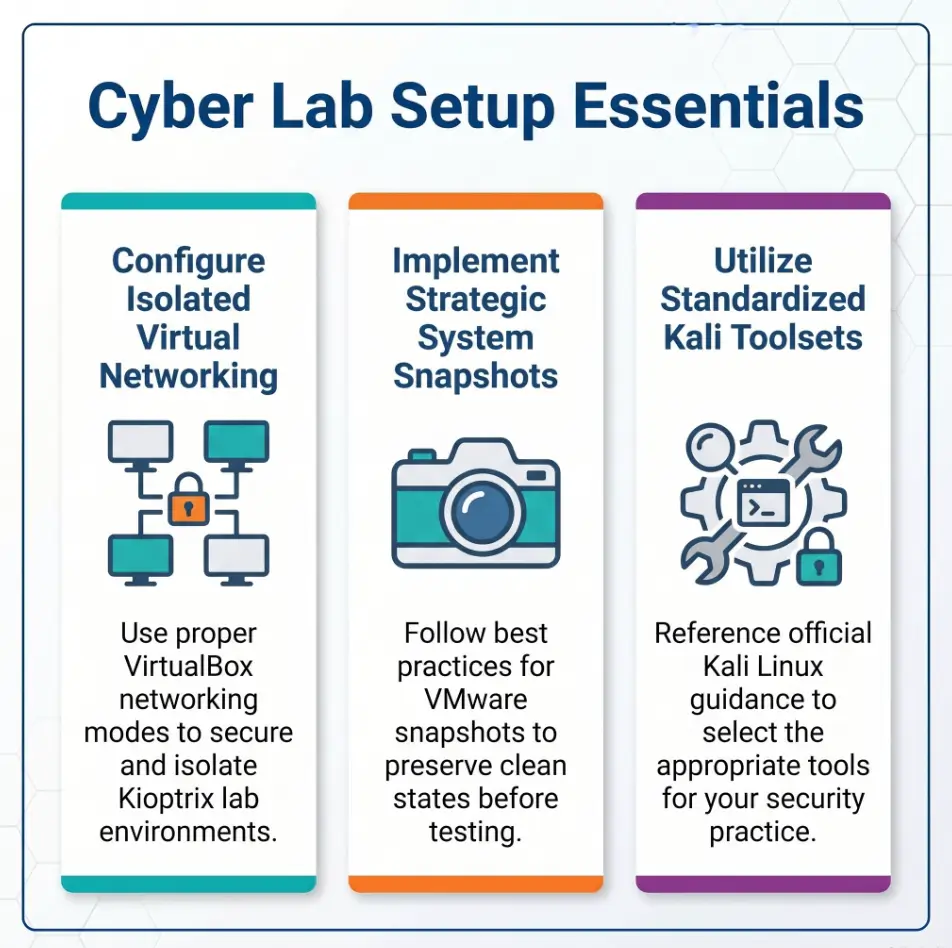
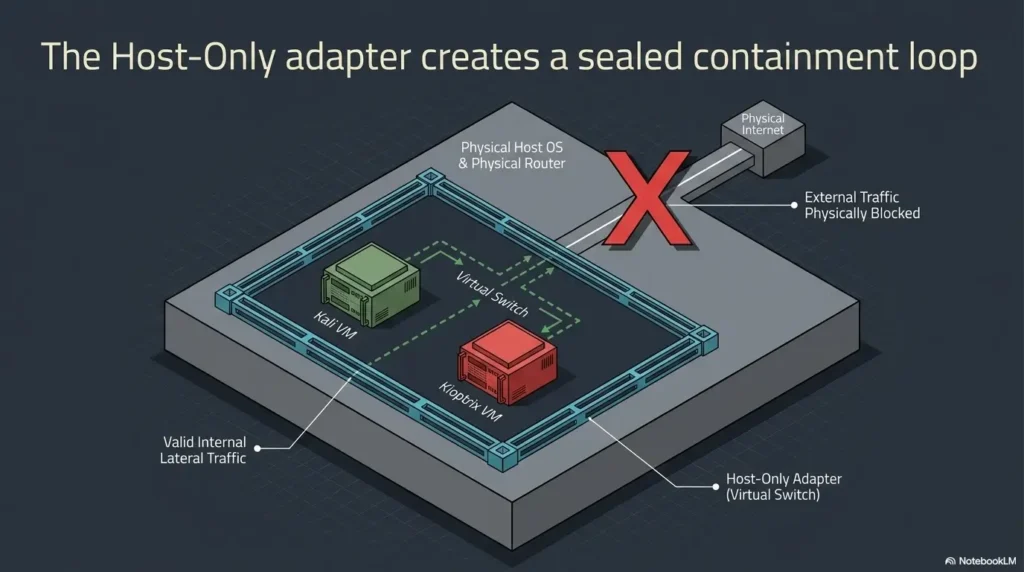
For beginners, networking should feel boring in the noblest possible way. Oracle’s VirtualBox documentation explains that host-only networking creates a network containing the host and a set of virtual machines without relying on the host’s physical network, It still permits guest-to-host access. Internal Network is the option for communication among selected lab VMs without host access; extra adapters or routing can change the isolation.
That clarity matters because beginner attention is finite. If you spend your first hour wondering whether your lab is accidentally chatting with the outside world, your learning energy drains into suspicion. A simple isolated layout gives your brain one less spinning plate. In a good lab, the network should feel like a clean table, not a magic trick. If you want a fuller breakdown, this piece on Kioptrix network setup pairs naturally with a more visual look at home lab network layout for Kioptrix.
Snapshot early, snapshot often: giving yourself permission to learn messily
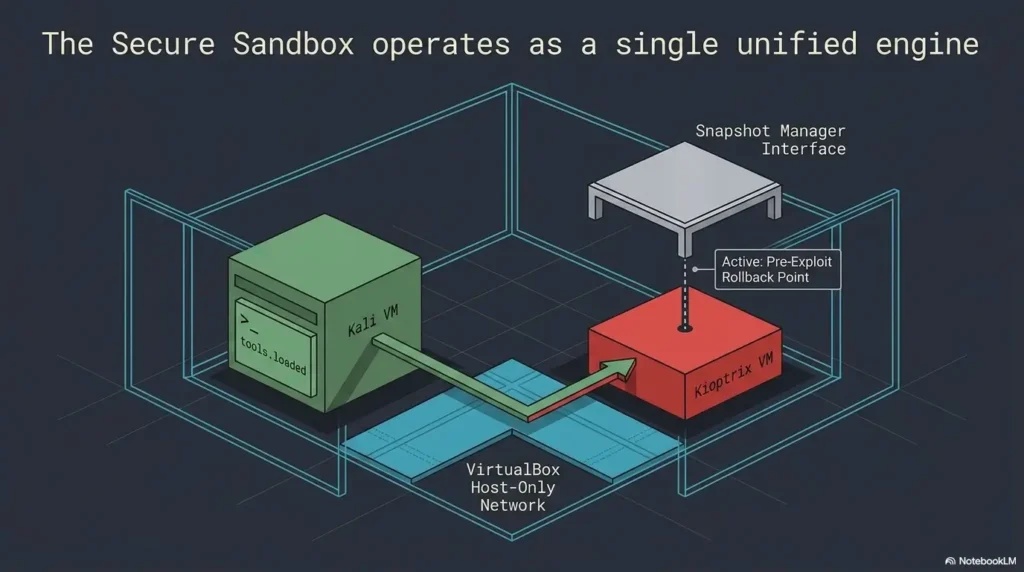
Snapshots are the closest thing a beginner gets to emotional insurance. They let you try, break, revert, and try again without turning each mistake into a funeral. VMware’s own guidance on snapshots is a useful reminder that snapshots are for point-in-time state, not permanent backup, and the linked Broadcom best-practice article applies specifically to vSphere/ESXi snapshots. Its short-retention advice is not a universal VMware Workstation or VirtualBox expiry rule. For a desktop lab, follow the product guidance, monitor disk growth, and keep a separate clean backup.
That advice has a lovely side effect for learners: it nudges you toward good lab hygiene. Take a clean snapshot before a major change. Use a small number of snapshots. Return to baseline on purpose. You are not building a museum of every brave mistake. You are building a repeatable practice loop, and a simple Kioptrix snapshot strategy helps keep that loop clean.
Decision card: VirtualBox vs VMware Workstation Pro for a legacy practice lab
| When to choose | Best fit | Trade-off |
|---|---|---|
| You want a simpler mental model for isolated networking | VirtualBox | May feel rougher around edges on some hosts |
| You care most about smooth snapshots and day-to-day flow | VMware Workstation Pro | Snapshot discipline matters more |
Neutral action: Pick the option that reduces setup doubt, not the one that sounds more advanced.
Let’s be honest… most beginners quit because setup friction steals the mood
This is the quiet villain. Not complexity. Not talent. Friction. An adapter that looks correct but is not. A VM that boots but does not talk. A snapshot taken too late. A host machine already wheezing under browser tabs, chat apps, and the digital equivalent of pocket lint.
I have watched motivation vanish over issues that had nothing to do with security thinking. It is why I am such a bore about clean setup. A lab should feel repeatable enough that your second session starts with confidence instead of archaeology.
Early Wins First: The Small Signals IT Generalists Tend to Notice Well
Services, ports, and banners as familiar territory for infrastructure-minded learners
This is where many IT generalists suddenly stop feeling like tourists. Open ports and service banners are not mystical artifacts. They are clues about what is present, what might be exposed, and what kinds of questions are worth asking next. That is already very close to ordinary infrastructure thinking, just viewed from the other side of the window.
When a machine shows you a service, it is introducing itself. Maybe a bit too casually. Your job is not to gasp. It is to listen.
Misconfigurations as cousins of the outages and tickets you already understand
A surprising amount of early security learning feels like troubleshooting with different consequences. Weak defaults, stale packages, odd permissions, exposed web paths, verbose error messages, and accidental trust relationships often look less like spycraft and more like the kind of avoidable mess that keeps ticket queues alive. That familiarity is an advantage.
I once helped untangle an internal support issue that boiled down to a service account with broader access than anyone remembered. No breach, thankfully. But the lesson stayed with me: misconfigurations are rarely glamorous. They are ordinary oversights wearing sharper shoes.
Why “What is exposed?” is a stronger first question than “How do I break in?”
The second question is seductive. It also leads people to skip the learning. “What is exposed?” is calmer and better. It keeps you grounded in facts. It slows down the part of the brain that wants certainty before it has earned it. In Kioptrix, that question often leads naturally to the next useful one: “What does this exposure suggest about the system’s age, role, or likely weakness?” If you want a practical next move after discovery, this guide on what to do after finding the Kioptrix IP fits that moment well.
Infographic: A gentler Kioptrix workflow
Use a simple lab network and a clean snapshot.
Identify ports, services, banners, and web clues.
Ask what is most plausible, not most exciting.
Run one careful verification step at a time.
Write what changed your mind and why.
Do Not Start Here: The Beginner Mistakes That Make Kioptrix Feel Harder Than It Is
Mistake: treating every tool like a magic key instead of a lens
Tools are lenses. They reveal things. They do not replace interpretation. One of the most common beginner errors is to treat a scanner, framework, or enumeration helper as if it is a kind of polite sorcery. You run it. It should tell you the answer. If it does not, panic or tool-hopping begins.
That mindset creates a strange helplessness. The learner becomes dependent on a result they do not fully understand. A better posture is this: what did the tool actually show, what does that imply, and what remains unproven?
Mistake: copying commands before understanding what question they answer
This is the classic copy-paste drift. A command worked in someone else’s walkthrough, so it gets replayed without a clear purpose. The terminal fills up. The learner feels busy. The actual question disappears. In the worst cases, the person can describe what they typed but not what they were testing.
To be fair, almost everyone does this at first. I certainly did. My notes from one early lab looked like a panicked grocery list written during turbulence. What helped was brutally simple: I started writing the question first and the command second. That habit is easier to keep when you understand why copy-paste commands fail in Kioptrix labs.
Mistake: moving too fast and losing the story of the machine
Machines tell stories in fragments. Versions, headers, forms, permissions, listening services, file paths, errors, defaults. If you rush, those fragments never braid into a usable thread. You end up with facts but not meaning.
- Run fewer commands with clearer purpose
- Write the question before the command
- Pause after each meaningful result
Apply in 60 seconds: Add one line to your notes after every command: “This was meant to answer…”
Slower Is Smarter: How to Explore a Target Without Turning Practice Into Noise
Build a rhythm: observe, hypothesize, test, note, repeat
A useful Kioptrix session has a rhythm to it. Observe. Form a small hypothesis. Test it. Note the outcome. Repeat. This matters because pentesting is full of seductive detours. A rhythm acts like guardrails. It keeps curiosity from becoming drift.
Notice the scale here. Small hypothesis. Not grand theory. You do not need to know the whole machine at once. You only need the next reasonable question.
Why one careful scan can teach more than five hurried ones
One careful scan forces you to read. Five hurried scans mostly create a fog bank. Kali’s current tools catalog shows just how many security tools are available, including staples like Nmap, Wireshark, Burp Suite, and Metasploit. That abundance is useful, but it can also seduce beginners into tool collecting before they have learned how to interpret ordinary signals.
This is why restraint is not a personality quirk. It is an operational skill. Running fewer things with better attention teaches you what the output means. That lasts. Tool-hopping mostly teaches you how to generate output faster. For many learners, a steady Kioptrix recon routine does more than one more scanner ever will.
Here’s what no one tells you… restraint is one of the first real pentesting skills
The beginner fantasy is that expertise looks like maximum activity. In practice, real maturity often looks like not overreacting. Not escalating too soon. Not assuming one clue means more than it does. Not firing off every automated helper just because the machine has not yielded yet. That is the heart of patience in Kioptrix Level, and it is more practical than it sounds.
Restraint protects the story. It preserves the chain between clue and decision. Once that chain snaps, learning gets expensive.
Mini calculator: How long should your session be?
Use this simple rule: 20 minutes setup + 20 minutes enumeration + 10 minutes notes.
If you only have 30 minutes, cut scope, not note-taking.
Neutral action: Choose a session length you can repeat twice this week.
Tool Panic, Meet Perspective: What You Actually Need on Day One
A short starter stack that supports learning without overwhelming judgment
Day one does not need a cathedral of tools. A practical starter stack is refreshingly modest: a VM platform, a Kali box or similar learning environment, a basic scanner, a browser, a note file, and enough patience to let output settle into meaning. That is plenty. More than enough, really.
In beginner labs, the bottleneck is almost never lack of tooling. It is usually interpretation. That is good news because interpretation is trainable.
Why more tools can create more fog for IT generalists
Generalists are often competent enough to install and launch a lot of things quickly. Ironically, that competence can backfire. You can create a dense cloud of options before you have earned the need for them. Then each new tool starts whispering its own priorities into the room.
A lab should not feel like a software flea market. It should feel like a quiet desk with a few sharp pencils.
The better question: what did this tool help you notice?
This is the question that turns tool use into learning. Not “What did it do?” but “What did it help me notice?” That wording matters because it keeps the human in charge. A good tool surfaces evidence. You still have to decide what the evidence means.
When learners begin answering that question fluently, the fear around tools drops. They stop performing with tools and start thinking through them. For example, when choosing between automation and restraint, a comparison like Metasploit vs manual work in Kioptrix can clarify what you are gaining and what you might be outsourcing too early.
Common Mistakes: Where IT Generalists Accidentally Bring the Wrong Habits Into the Lab
Expecting production neatness in a practice environment built for experimentation
IT workers often value stability, repeatability, and clean rollback paths. Those are good instincts. But labs require a slightly different emotional contract. You need enough order to stay oriented and enough looseness to try things. Some learners get strangely moral about doing the lab “correctly.” That anxiety makes experimentation feel sinful when it should feel supervised.
The trick is to preserve discipline without worshiping tidiness. Snapshot first. Note what you change. Then be willing to make a mess on purpose.
Overvaluing technical aggression and undervaluing patient documentation
Because security media often spotlights the breakthrough moment, many beginners come to believe the valuable part is the punchline. In reality, the notes are often where the judgment lives. Good notes capture your dead ends, your changed assumptions, and your narrowing logic. That is where maturity shows up.
One of my favorite interview stories from a learner was not about a dazzling exploit. It was about realizing a promising path was weak, stopping early, and explaining why. That kind of judgment lands quietly and sticks. A disciplined technical journal for Kioptrix practice helps preserve that kind of growth.
Confusing familiarity with operating systems for familiarity with attack paths
Knowing Windows or Linux as an operator helps, but it does not automatically teach you how those systems look from an adversarial perspective. The gap is not failure. It is simply angle. A system you know as a maintainer becomes slightly uncanny when you start asking what it exposes, where it trusts too much, and how defaults can betray it.
Quote-prep list: What to gather before comparing your own lab sessions
- How long setup took before you reached the first useful clue
- Which outputs actually changed your next decision
- Where you got stuck and what unstuck you
- Whether your notes preserved the full logic chain
Neutral action: Review these four points after each session for two weeks.
Career Translation: How Kioptrix Helps You Think Like a Better Defender Too
What offensive practice reveals about weak defaults and exposed services
One of Kioptrix’s best gifts is that it sharpens defensive intuition at the same time. Once you practice noticing exposed services, outdated software, brittle trust, and weak defaults from an attacker’s angle, you return to ordinary IT work with a more suspicious, healthier eye. Suddenly, a service exposed for convenience feels less invisible. A legacy web component feels less innocent.
That shift is not paranoia. It is literacy.
Why blue-team and admin experience can become an advantage, not baggage
People moving from admin or support roles sometimes carry a private fear that their background is too operational, too unglamorous, too “not security enough.” I think the opposite is often true. Good defenders and good offensive learners both need careful observation, respect for systems, and a habit of tying action to evidence.
The person who has cleaned up fragile systems often spots fragility faster. The person who has supported confused users often understands workflow better. The person who has been paged at 2:13 a.m. tends to appreciate boring reliability in a way that makes their lab work more disciplined. Pain is not always wisdom, but it can be tuition. That is part of what makes Kioptrix valuable for career changers rather than just full-time security specialists.
Turning lab notes into interview stories, not just terminal screenshots
If you want Kioptrix to help your career, do not only save terminal artifacts. Save decisions. A strong interview story usually has a simple spine: what you observed, what possibilities you considered, what you tested, what changed your mind, and what you learned. That structure reads as judgment, not cosplay.
Screenshot collections are thin evidence. Decision stories carry more weight because they show how you think under uncertainty.
Short Story: A desktop support professional I once coached had convinced himself he was “too basic” for security because he had never worked a formal security role. During a lab session, he noticed an exposed service, checked a few details, ruled out one noisy path, and documented why a quieter path seemed more plausible. Nothing about it was flashy.
But when he later retold the exercise in interview language, the story sang. He sounded calm, careful, and technically grounded. What changed was not his intelligence. It was the frame. He stopped narrating commands and started narrating judgment. That is when adjacent-role experience stopped looking like a detour and started looking like substance.
If You Feel Behind: The Emotional Dip Most Beginners Misread as Failure
Why confusion is often evidence of real learning, not a lack of talent
Beginners often assume that confusion means they are unsuited for the work. More often, confusion means the old mental model is being asked to stretch. That stretch feels awkward because it is real. The field is not only technical. It is interpretive. You are learning how to see systems from a different side, and that takes time.
I wish more people understood this early. Some of the smartest learners look slow at first because they are actually reading. Meanwhile, the quick ones may only be replaying a pattern they barely understand.
The difference between being lost and being early in the process
Being lost means you have no way to narrow. Being early means you have not narrowed yet. That difference matters. In a good Kioptrix session, you can usually regain orientation by returning to three things: what you know, what you only suspect, and what you need to verify next. That is enough to rebuild momentum.
There is a tenderness to this phase that the internet rarely honors. Early learning is clumsy. Notes are uneven. Output feels foreign. The machine seems to know something you do not. Of course it does. That is why you are here. If that first-session wobble feels familiar, Kioptrix first lab anxiety is more common than most beginners realize.
A gentler benchmark: can you explain your next move and why?
This is my favorite benchmark for beginners because it is both humble and sharp. Can you explain your next move and why? Not the whole path. Not the final answer. Just the next move. If yes, you are learning. If not, slow down until you can.
- Confusion can mean your model is expanding
- Progress is visible when your next step becomes clearer
- Benchmarks should reward reasoning, not speed theater
Apply in 60 seconds: Write one sentence beginning with “My next move is…” and force yourself to finish it with “because…”
FAQ
Is Kioptrix too old to be useful for modern learners?
No. It is old in the way a good workshop exercise can be old: not current in every detail, but still useful for practicing observation, narrowing, and reporting. The specific vulnerabilities are less important than the reasoning habits you build while working through them.
Do I need to know Linux well before trying Kioptrix?
You do not need expert Linux knowledge to begin. Basic comfort helps, but beginner labs are less about mastery of one operating system and more about careful enumeration, interpretation, and note-taking. You can learn the missing Linux pieces as you go.
Can help desk or sysadmin experience actually help in pentesting labs?
Yes. Those roles often build the exact habits beginners need most: patience, troubleshooting discipline, familiarity with services and configurations, and the ability to reason from partial evidence. The trick is to translate that experience into adversarial questions.
How long should one Kioptrix practice session be?
For many beginners, 30 to 60 minutes is ideal. Long enough to observe and test one thread. Short enough that fatigue does not turn curiosity into static. Consistency beats marathon sessions almost every time. If you want a more concrete pacing model, this guide to Kioptrix session length helps keep practice sustainable.
What tools should a beginner avoid overusing at first?
Avoid overusing anything that automates thought before you understand the question you are trying to answer. Big frameworks and shotgun-style helpers can be useful later, but early on they often bury the learning under output.
Is it better to focus on exploitation or enumeration first?
Enumeration first. Exploitation without sound enumeration tends to become guessing with extra steps. Enumeration gives exploitation a reason.
Can Kioptrix help with cybersecurity interviews?
Absolutely, especially if you preserve your notes and retell the lab as a decision story. Interviewers often care more about how you narrowed possibilities and justified your next move than about the number of tools you can name.
What should I write down during each session?
Write down what you observed, what you suspected, what you tested, what failed, what changed your mind, and what your next step will be. That is enough to turn one practice session into a reusable learning artifact. A clean Kioptrix recon log template can make that habit far easier to keep.
Next Step: One Calm Session Beats One Ambitious Weekend
Boot the lab, run one careful enumeration pass, and write a one-page note on what you observed
If this guide has a single drumbeat, it is this: smaller beats louder. A calm first session can do more for your future in security than one overbuilt weekend full of tools you barely understood. Boot the lab. Confirm the network. Take the snapshot. Run one careful pass. Capture what the machine told you. Stop while you still have curiosity left in the tank. If you are deciding how to stage that opening, your first Kioptrix lab session is a good companion to this section.
End the session before fatigue turns curiosity into noise
There is a point in many sessions where good attention starts to fray. The clues stop feeling connected. The commands get sloppier. The notes become thinner. That is not the moment to prove grit. That is the moment to end well. Good learners leave the table with a thread still in hand.
Broadcom’s snapshot guidance is a nice metaphor here too: short-lived, intentional states are healthier than bloated, neglected ones. Keep the practice loop clean.
Return with one question, not ten new tools
When you come back, return with one question. Not a new backpack full of utilities. Not a fever dream of advanced techniques. Just one question sharpened by your last session. That is how confidence grows without becoming costume.
Coverage tier map for your first month
| Tier | Focus | What changes |
|---|---|---|
| Tier 1 | Setup and isolation | You reduce uncertainty before learning begins |
| Tier 2 | Enumeration basics | You start seeing systems as evidence |
| Tier 3 | Hypothesis and verification | You stop guessing and start narrowing |
| Tier 4 | Retell and reflection | You convert practice into interview-ready judgment |
Neutral action: Identify the tier you are actually in before planning the next session.
The curiosity loop from the beginning closes here. Pentesting looked theatrical from far away because you were seeing the fireworks, not the furniture. Kioptrix is useful because it returns the furniture to the room. A machine. A few clues. One careful learner. That is enough. In the next 15 minutes, you can set up the lab, confirm isolated networking, take a clean snapshot, and write down one question you want your first enumeration pass to answer. That is not a glamorous beginning. It is a durable one.
Original review: 2026-04.
Technical guidance updated: 2026-10-13. Clarified host access in host-only networks and the vSphere/ESXi scope of the snapshot source.