
Mastering the Recon Routine: Kioptrix Level
A repeatable recon routine does not begin with cleverness. It begins when you stop letting one small lab sprawl into fifteen tabs, scattered scan output, and the uneasy feeling that you are moving a lot without actually moving forward.
That is the beginner trap. Not too few tools, but too little order. One port scan turns into version checks, script noise, web poking, SMB curiosity, and half-labeled notes until the session starts to feel less like recon and more like housekeeping in a storm.
Keep going that way, and the cost is not just time. It is missed clues, duplicated work, and shaky next steps built on guesses dressed up as evidence.
This guide shows you how to build a repeatable recon routine for Kioptrix Level so you can map services, verify findings, rank real leads, and leave each session with a clear next move instead of a folder full of “final-final-2” notes.
The method is simple. And that is the point. You do not need more noise. You need a cleaner sequence, a better log, and a way to tell the difference between what is open, what is interesting, and what is actually actionable.
Here’s how to make your recon calmer, sharper, and far more reusable.
- Run fewer tools in a clearer order
- Separate evidence from assumptions
- Write the next move before the session ends
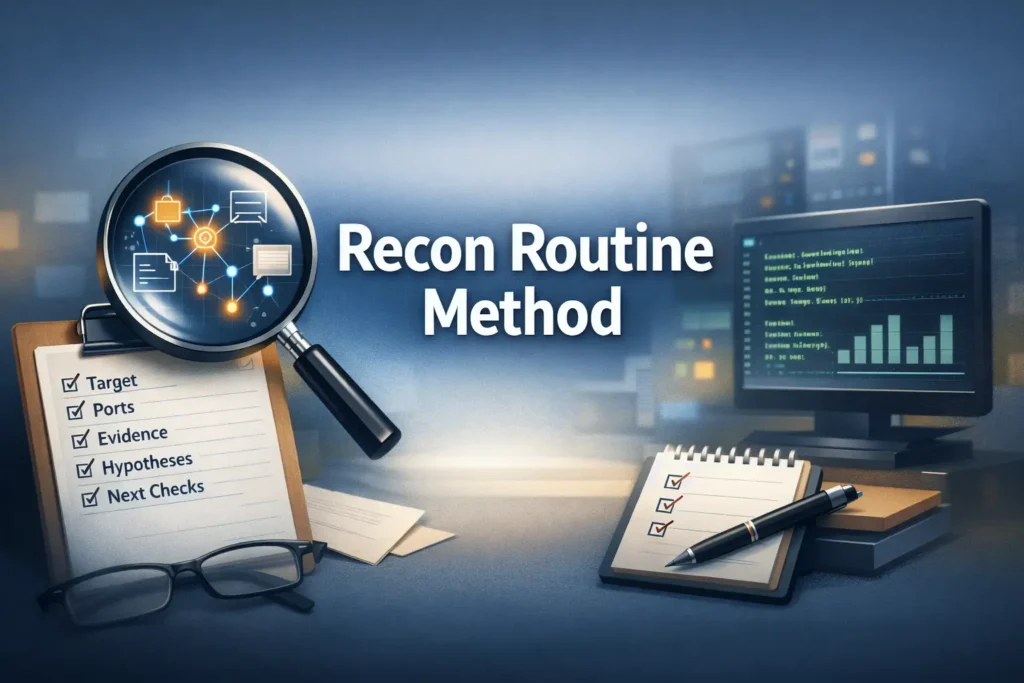
Apply in 60 seconds: Open a plain text file now and create five headings: target, ports, evidence, hypotheses, next checks.
Table of Contents
Start Here First: Why Beginners Need a Recon Routine Before More Tools
Why “just scan everything” breaks down fast in Kioptrix Level
Beginners often treat recon like a buffet with no plate size limit. A quick scan becomes a version scan, then a script scan, then a web screenshot tool, then a directory brute-force attempt, then a second port scan “just to be sure,” and before long the room is full of evidence confetti. The problem is not curiosity. Curiosity is useful. The problem is sequence without discipline.
In Kioptrix-style labs, the host often exposes several promising surfaces at once. That is part of the lesson. The machine is not whispering one clean answer into your ear. It is handing you a handful of clues and watching whether you can sort signal from glitter. When beginners “scan everything,” they usually create three kinds of waste: duplicated effort, weak notes, and premature conclusions. The result feels active, but it behaves like drift.
How repeatable recon lowers mistakes, not just effort
A routine is not about becoming robotic. It is about making your thinking reliable under mild pressure. I learned this the unglamorous way, after spending one session staring at a service list and realizing I could not remember which findings were verified and which were merely reported by a tool. Nothing bruises the ego quite like being outwitted by your own tabs.
Repeatable recon lowers mistakes because it gives each step a job. First discover. Then verify. Then prioritize. Then note what changes your next move. That structure turns scattered outputs into a simple chain of reasoning. It also protects beginners from the common temptation to treat every service as a doorway when some are really just wallpaper with a loud personality.
The real win: fewer missed clues, cleaner next moves
The biggest benefit is not speed on day one. It is fewer missed clues. A routine helps you revisit earlier findings after new context appears. A forgotten web title, an odd SMB response, or a version mismatch becomes visible because you have a place for it in the process. In practice, that means less backtracking and cleaner transitions from recon to enumeration.
That matters because recon is not just data collection. It is the part where you quietly build the story of the host. If the story is messy, the next move is messy too.
Who This Is For / Not For
This is for beginners using Kioptrix Level in a legal lab or classroom setting
This guide is for beginners working in authorized practice environments, whether that means a home lab, a classroom, or a training platform. It assumes you are learning, not racing. You want a process you can repeat without wondering each time whether you forgot a basic check.
This is for learners who forget what they already checked
If you have ever reopened the same port scan twice because you were not sure whether the first one included service detection, you are in the right room. If you have ever said, “I know I looked at the web service, but I do not remember what was unusual about it,” you are even more in the right room. Recon failure often looks technical from a distance, but up close it is usually organizational.
This is not for live targets, unauthorized testing, or speedrunning exploits
This is not a shortcut for real-world target testing, and it is not written for unauthorized activity. It is also not a speedrun guide. A routine is for learners who want their sessions to become calmer, clearer, and more transferable. There is a time for velocity. There is also a time for not turning your lab notes into a haunted attic.
- Yes: You are practicing inside a legal lab or training VM.
- Yes: You want a consistent beginner workflow.
- No: You need a live-target methodology.
- No: You want exploit shortcuts without evidence gathering.
Neutral next action: if you checked the first two boxes, build your log template before running another scan.
Build the Habit Loop: What a Repeatable Recon Routine Actually Looks Like
Start with one pass, not ten tabs
A beginner recon routine should feel almost boring at first. That is a compliment. You begin with one pass whose only purpose is to establish what is visibly there. No interpretation marathon. No speculative rabbit holes. Just one clean round of discovery. Think of it like walking into a dim concert hall before the orchestra starts. You are not judging the symphony yet. You are learning where the exits, seats, and stage are.
In practical terms, that means beginning with target confirmation and a basic service map. Your first pass should answer questions like: Is the target reachable? Which services are visible? Which outputs are trustworthy enough to note immediately? You do not need a brilliant theory yet. You need a map that is clean enough to support one.
Move from discovery to verification to prioritization
This three-step loop is where beginners become less reactive. Discovery tells you what might exist. Verification checks whether a finding holds up when observed more directly. Prioritization asks the adult question: which of these findings actually changes what I should do next?
That order matters. When you skip verification, you end up worshipping tool output as if it came down from a mountaintop. When you skip prioritization, you spend twenty minutes giving equal emotional weight to every port like a judge at a talent show with no elimination round. The routine works because it stops both habits before they bloom.
End every round with written next actions
Every recon pass should end with a tiny list of next checks. Not ten. Three is enough. The point is to preserve momentum across interruptions. A beginner who writes “Check web content manually, confirm SMB behavior, verify banner versions” will restart faster tomorrow than a beginner who leaves behind only a folder full of files with names like scan-final-final-2.txt.
Let’s be honest… most recon fails because notes fail first
That sentence can sting because it is true. In early practice, I used to think my problem was lack of intuition. It was not. My problem was that I was treating notes like a side dish. Once I started recording commands beside findings and marking guesses as guesses, the lab became less like fog and more like weather. Still unpredictable at times, but at least visible.
Show me the nerdy details
A repeatable routine reduces context switching. In learning-heavy labs, context switching is expensive because every switch increases the chance that you forget why a command was run, what it proved, and what it failed to prove. The fix is not more automation by default. The fix is ordered observation.
Scan Order Matters: The First 15 Minutes That Shape Everything After
Begin with host discovery only if the target is not already known
If the lab already gives you the target IP, do not perform extra discovery for drama. Beginners sometimes add steps because more steps feel more serious. They are not wrong to want rigor, but rigor is not decoration. If the host is known, begin with confirmation and service mapping. If it is not known, perform discovery cleanly and move on.
That distinction sounds small, but it saves energy. A repeatable routine is not “the maximum number of things I could do.” It is “the minimum number of things I should always do.” In a one-host beginner lab, this matters because every unnecessary layer creates more output than insight.
Run a basic port scan before adding version and script noise
Keep the first pass small, but record its coverage: target, protocol, port range, discovery behavior, and scan time. A default or top-port scan is not a complete TCP or UDP inventory. If no useful lead appears, extend coverage deliberately on the confirmed lab target rather than conclude that untested ports are closed.
I still remember one session where I buried a useful lead under a pile of extra script output that added volume but no decision value. The lesson was almost comic. I had ordered a marching band when a doorbell would have done.
Separate “open,” “interesting,” and “actionable” in your notes
For a TCP scan, open means the tested port accepted the probe; it does not identify the application or prove useful access. UDP states need separate interpretation, especially open|filtered. “Interesting” suggests relevance; “actionable” means the evidence supports a specific next check.
For example, a service can be open and interesting without being actionable yet. Another service can be open and immediately actionable because it suggests a clear manual follow-up. Once you sort findings this way, the service list starts behaving like a decision tree instead of a wall of text.
Why early restraint saves later hours
Early restraint feels slow for about ten minutes. After that, it starts saving hours. The first quarter-hour shapes the whole session because it determines whether your later checks are attached to evidence or emotion. A tidy opening pass gives you leverage. A noisy opening pass gives you chores.
- Confirm what is reachable
- Identify what is open
- Write only the next checks that evidence supports
Apply in 60 seconds: Add three columns to your notes right now: open, interesting, actionable.

Port List, Then Meaning: How to Turn Open Services Into a Decision Tree
Web ports suggest content, tech stack, and misconfiguration clues
When a web service appears, beginners sometimes either overreact or underreact. They either assume the web interface must be the main path, or they dismiss it because the page looks plain. Both moves are risky. Web services often provide the most human-readable clues: page titles, error behavior, server hints, directories, technologies, even small bits of language that explain how the box was built.
The key is not to treat the web port as sacred. Treat it as informative. Visit it manually. Observe what is shown versus what the scan predicted. Note odd behavior. Record what can be confirmed. A page that looks boring can still reveal naming patterns, version hints, or forgotten content. In beginner labs, boring often arrives wearing the real clue like a beige raincoat. If you want to stay disciplined while relying on only a few core tools, a curl-only recon workflow for Kioptrix pairs especially well with this habit.
SMB, RPC, and NetBIOS suggest enumeration before brute force thinking
When file-sharing and related services appear, that usually signals a path of observation before any path of force. The beginner mistake is to turn immediately toward aggressive ideas because the service feels important. The better move is to ask calmer questions first. What does the service actually reveal? What can be confirmed without stretching? What related services make this surface more or less promising?
This shift matters because it trains you to think in layers. Enumeration is not just about extracting data. It is about learning whether the host is consistent. If SMB-related behavior suggests one story and the web layer suggests another, that tension itself is a clue worth recording. That is also why understanding what nmblookup results actually mean or why nbtscan may show a hostname but no shares can sharpen your judgment instead of multiplying guesses.
SSH, FTP, and database ports need context before attention
These services often trigger beginner excitement because they sound close to access. But a service name is not a path. A database port may be exposed yet irrelevant to your immediate next move. An SSH service may be present but offer no useful clue until other evidence gives it context. An FTP service may be more informative than it first appears, or a complete dead end wearing neon.
The routine helps because it prevents emotional ranking based on familiarity. Do not give extra weight to a service simply because you recognize its name from tutorials. Give weight to services that connect most cleanly to the host’s broader story. When that story starts with a noisy first pass, it can help to compare your notes with a more focused breakdown of how to narrow the attack surface when Kioptrix shows open ports but no clear path.
Not every open service deserves equal time
This is one of the most adult lessons in beginner recon. Equal visibility is not equal importance. If you spend twenty minutes on a low-value lead because it feels respectable, you are not being methodical. You are being politely lost. A decision tree exists to rank follow-ups, not to flatter every open port with a ceremony.
That does not mean ignoring less obvious services forever. It means sequencing your attention so the most plausible, verifiable leads go first.
| If you see | Lean toward | Why |
|---|---|---|
| Clear web response with identifiable content | Manual web review | Human-visible clues can reshape all later checks |
| SMB-related services plus legacy feel | Enumeration and confirmation | Service relationships may reveal the real path |
| Single exposed service with thin context | Verification before depth | You need stronger evidence before spending time |
Neutral next action: choose one service to verify manually before running another broad scan.
Don’t Chase Shiny Noise: How to Rank Findings Without Fooling Yourself
High-visibility findings are not always high-value findings
A flashy banner, a long script output, or a familiar protocol can trick you into thinking it deserves top billing. Beginners do this because visibility feels persuasive. The host appears to be speaking loudly, so it must be saying something important. But the loudest clue is often just the easiest clue to notice.
Try ranking findings by three criteria instead: how trustworthy the evidence is, how directly it suggests a next check, and how well it fits the growing story of the host. That ranking method is quieter, but it is better. It also helps you avoid the classic mistake of spending forty minutes polishing one clue while ignoring three duller clues that point in the same direction.
Version banners can help, but only after verification
Version data is useful, but it should not be treated like a verdict. Banners can mislead. Tools can infer. Services can behave oddly. The routine protects you by forcing a pause between reported detail and decision-making. Before a version changes your plan, ask whether you have seen enough surrounding evidence to trust it.
This sounds restrained because it is. Restraint is part of the craft. In practice, it saves beginners from building elaborate castles on top of one uncertain string. If you want a reminder of how often tool output can drift from reality, compare your assumptions with examples like CrackMapExec reporting the wrong OS version or Nmap service detection false positives.
Mirror the target’s likely story, not your favorite tool’s story
One of the subtle beginner traps is becoming loyal to a tool’s worldview. If a tool emphasizes a certain surface, you may start seeing the host through that surface alone. A better habit is to mirror the host’s likely story. Which services seem to belong together? Which layer reveals the most human context? Which finding, if confirmed, would make two or three other findings suddenly make more sense?
That is what good prioritization feels like. Not frantic. Not mystical. Just a little more narrative and a lot less reactive.
Here’s what no one tells you… boring services often carry the real clue
I have lost time chasing glamorous edges while a plain service sat there with the answer folded neatly inside it like a letter in a coat pocket. Beginners are not foolish for doing this. The lab environment rewards curiosity. But curiosity needs a chaperone. Let that chaperone be evidence.
Short Story: Early on, I once spent nearly an hour circling a promising-looking service because the banner gave me that thrilling feeling of almost-there. I ran extra checks, copied outputs, opened notes, and felt wonderfully technical. Meanwhile, a quieter service had already offered the clue that could have reframed the whole session.
I had seen it, written it down badly, and then ignored it because it did not look dramatic enough. When I finally returned to it, the answer was almost embarrassing in its plainness. That was the day I stopped treating excitement as a ranking system. Recon got less cinematic after that, but far more useful.
Recommended Official Resources
- Nmap Reference Guide – The official Nmap reference for understanding port scanning, service detection, and how to interpret scan options in a structured way.
- OWASP Web Security Testing Guide – A highly credible framework for organizing manual web review, information gathering, and verification during reconnaissance.
- Kali Linux Documentation – Official Kali documentation that helps beginners validate tool usage, workflows, and lab setup details during practice sessions.
Note-Taking That Survives Confusion: A Simple Recon Log Beginners Can Reuse
Use fixed note buckets: target, ports, evidence, hypotheses, next check
If your notes change shape every session, your thinking changes shape with them. Fixed buckets solve this. They give you a reusable frame that can hold both clean findings and messy uncertainty. My preferred beginner structure is simple:
- Target: IP, hostname if known, basic context
- Ports: what is open and what appears to run there
- Evidence: direct observations, not interpretations
- Hypotheses: possible meanings, clearly labeled as guesses
- Next check: the next specific verification steps
That format survives interruptions beautifully. It also turns re-entry into a gentle process instead of a scavenger hunt through terminal history.
Record commands and outputs together, not separately
One of the easiest ways to sabotage yourself is to separate commands from the outputs that mattered. Hours later, you may remember that you saw something interesting without remembering what produced it. Pairing command and result in one place solves this. You do not need to record every line. Record the command, the meaningful output, and why it mattered.
This is a small habit with disproportionate payoff. It turns your notes into a map instead of a scrapbook. If you want a more formal companion to this habit, a template like an Obsidian enumeration note structure can help you keep each host from dissolving into terminal archaeology.
Mark confirmed facts differently from guesses
Use a visual system. Facts can be plain text. Hypotheses can start with “Maybe” or “Possibly.” Follow-up actions can start with “Check.” Keep it embarrassingly clear. That clarity helps you avoid a common beginner error: remembering a guess as though it were established truth.
In security labs, that drift matters. A wrong assumption that sounds neat can distort the rest of the session. A humble note that says “Possibly related to X, needs manual confirmation” may look less heroic, but it is vastly more useful.
Save screenshots only when they support a decision
Not every page or output deserves a screenshot. Save them when they preserve context that text alone would lose, or when they support a later write-up. Otherwise, screenshots become digital attic boxes filled with old lamps and no labels. Charming in theory, maddening in practice. A small naming convention, like the one in this screenshot naming pattern for pentest evidence, can keep your evidence shelf from turning into chaos with thumbnails.
Show me the nerdy details
A strong recon log is not just for memory. It improves later write-ups because it preserves the chain from observation to action. That chain is what makes a report feel credible instead of decorative.
- Keep commands beside findings
- Label guesses clearly
- End with the next three checks
Apply in 60 seconds: Create a reusable note template and save it as your lab session starter.
Common mistakes
Running aggressive scans before basic validation
Aggressive scanning can feel like confidence, but beginners often use it as a substitute for clarity. Before turning up intensity, make sure the target is confirmed, the open services are understood at a basic level, and the first manual observations are recorded.
Confusing scan output with proof
Tool output is a starting point. It is not proof by itself. Services can misreport. Banners can mislead. Interpretation without confirmation is one of the most expensive beginner habits because it feels smart right up until it wastes the afternoon.
Forgetting to revisit the web service after new clues appear
Web surfaces often deserve a second look once other evidence changes the frame. A detail that looked ordinary at the start may become meaningful later. Beginners often forget this because they mentally “finish” the web step too early.
Treating every old-lab finding like an exploit path
Not every clue exists to become a direct path. Some clues simply narrow the map. That is still useful. Respecting that difference keeps you from forcing narrative where the evidence has not earned it.
Writing notes that describe effort instead of evidence
“Spent 20 minutes checking SMB” is not a useful note. “Confirmed X behavior, no Y response, revisit only if web clue changes context” is useful. Effort logs soothe the conscience. Evidence logs move the work forward.
- Target IP and lab name
- First-pass service map
- One manual observation per major surface
- Three ranked next checks
Neutral next action: if any item is missing, fill that gap before expanding tool coverage.
Don’t Do This Next: Beginner Recon Errors That Waste the Whole Session
Don’t stack tools just to feel progress
There is a special kind of beginner comfort in watching windows multiply. It looks industrious. It sounds industrious. It is often just noise in a better suit. Tool stacking without decision logic creates the illusion of momentum while your actual understanding stands still with its coat half on.
Progress should be measured by the clarity of your next move, not by the number of outputs you can save in a folder.
Don’t assume the first exposed service is the entry point
The first visible path is simply the first visible path. It may matter. It may only be scenery. Beginners who anchor too early tend to reinterpret later evidence to support their first guess. That is a deeply human habit. It is also a splendid way to become elegantly wrong.
Don’t skip manual review because automation found “enough”
Automation is valuable, but manual review catches tone, structure, inconsistencies, and small clues that tools flatten. This is especially true for web content and mixed-service hosts. Manual review does not need to be dramatic. It just needs to exist. For example, when mirrored content gets messy, cleaner wget mirroring for recon can help manual review stay useful instead of turning into file clutter.
Don’t change your process midstream every time results look thin
If a result looks thin, beginners often abandon structure and improvise wildly. Resist that urge. Thin results are not a sign that process failed. They are often a sign that the host requires a second look or a cleaner ranking step. Changing the process too early makes it hard to tell whether the problem was the evidence or your response to it.
Follow the Breadcrumbs: How to Move From Enumeration to Real Leads
Use service-specific follow-up checks only after triage
Once you have ranked your findings, follow-up checks become much more useful. Service-specific work should answer a live question, not merely satisfy curiosity. That is the difference between purposeful enumeration and hobby wandering.
A good follow-up check either confirms a hypothesis, rules one out, or generates a more specific next question. If it does none of those, it may still be interesting, but it probably should not be first in line. That becomes especially important on SMB-heavy hosts, where safe sequencing matters more than enthusiasm, and guides like safe CrackMapExec SMB recon flags or how to check SMB signing cleanly can keep you from turning a narrow question into a noisy detour.
Compare what the scan says with what the target actually shows
This comparison is where the lab becomes less theoretical. The scan reports one story. The target’s behavior shows another. Sometimes they match neatly. Sometimes they do not. Those mismatches are valuable because they force you to ground your next move in observation instead of assumption.
I have found that beginners gain confidence fastest when they learn to love this comparison step. It turns recon from passive collection into active reasoning.
Revisit earlier findings when a later clue changes the picture
A repeatable routine should include revisits. Not endless looping, but intelligent returns. If a later clue changes how you interpret an earlier service, go back. That is not backtracking. That is good sense. Real progress in labs often looks less like a straight road and more like a lantern lighting older rooms one by one.
Open loops matter: unresolved details often point to the next door
When something does not fit, do not dismiss it too quickly. A service that behaves oddly, a title that hints at an internal function, a version that seems out of place, a response that suggests a relationship between surfaces: these open loops often point toward the next productive check. The key is to log them clearly so they can mature instead of evaporate.
- Verify before deepening
- Compare reported behavior with actual behavior
- Revisit clues when the story changes
Apply in 60 seconds: Write one sentence for each next check: “I am doing this because…”
Keep It Reusable: The Beginner Recon Checklist You Can Use Every Time
Phase 1: identify and confirm the target
Start with the simplest possible confirmation. Is the host the one you intend to inspect? Is it reachable in the way the lab setup suggests? Record the target clearly. Do not let your very first note be a mystery novel.
Phase 2: map ports and services
Create a clean service map. Do not mix discovery with heavy interpretation yet. Record open services and the first visible hints about them. Mark which findings are open, interesting, and actionable.
Phase 3: validate visible evidence manually
Visit the web service. Observe the response. Compare the scan’s story to the host’s story. Confirm only what you can actually observe. If the service suggests related surfaces, note them without inflating them.
Phase 4: rank likely footholds
Choose the few leads that deserve attention first. Rank them by evidence quality, follow-up clarity, and fit with the broader picture. This is the stage where beginners stop being dragged by every result.
Phase 5: write the next three checks before stopping
End the session by writing the next three checks. Not a wishlist. A short, ranked list. This gives your future self a handrail.
Count your open tabs, active tool outputs, and unlabelled notes.
Rule of thumb: if the total is above 10 and you do not have three ranked next checks, stop and reorganize before proceeding.
Neutral next action: reduce clutter until your next move fits in one short sentence.
When the Routine Feels Slow: Why Repeatability Beats Random Speed
Slow recon becomes fast recon once the order stops changing
Beginners often fear that a routine will make them slower. At first, it can. Then it quietly becomes the reason they speed up. Once the order stops changing, your brain spends less time deciding what recon is and more time noticing what the host is showing you. That difference is enormous.
Speed without stability is just hurry wearing running shoes. Stable order produces the kind of speed that survives stress and interruption.
Consistency is how beginners build pattern recognition
Pattern recognition sounds mysterious until you watch how it actually forms. It forms through repeated comparison. Same process, different hosts. Same buckets, different clues. Same ranking logic, different outcomes. Over time, you start recognizing which combinations deserve more attention and which ones mostly just create theater.
A reusable process makes writeups easier too
This is the quiet bonus nobody mentions enough. When your recon is structured, your writeup becomes easier. You already have the chain from observation to next action. You do not have to reconstruct your logic from fragments. That matters in training, reporting, and self-review. It also means your future self will trust your past self a little more, which is one of the small dignities of good technical practice. A practical companion here is a dedicated guide to Kali Linux lab logging, because stable recon gets even better when the evidence trail has a home.
Know the target. Remove doubt early.
List open services before drowning in detail.
Compare tool claims with actual behavior.
Choose the few leads that deserve time.
End with three next checks, not vague ambition.
FAQ
What is a repeatable recon routine in Kioptrix Level?
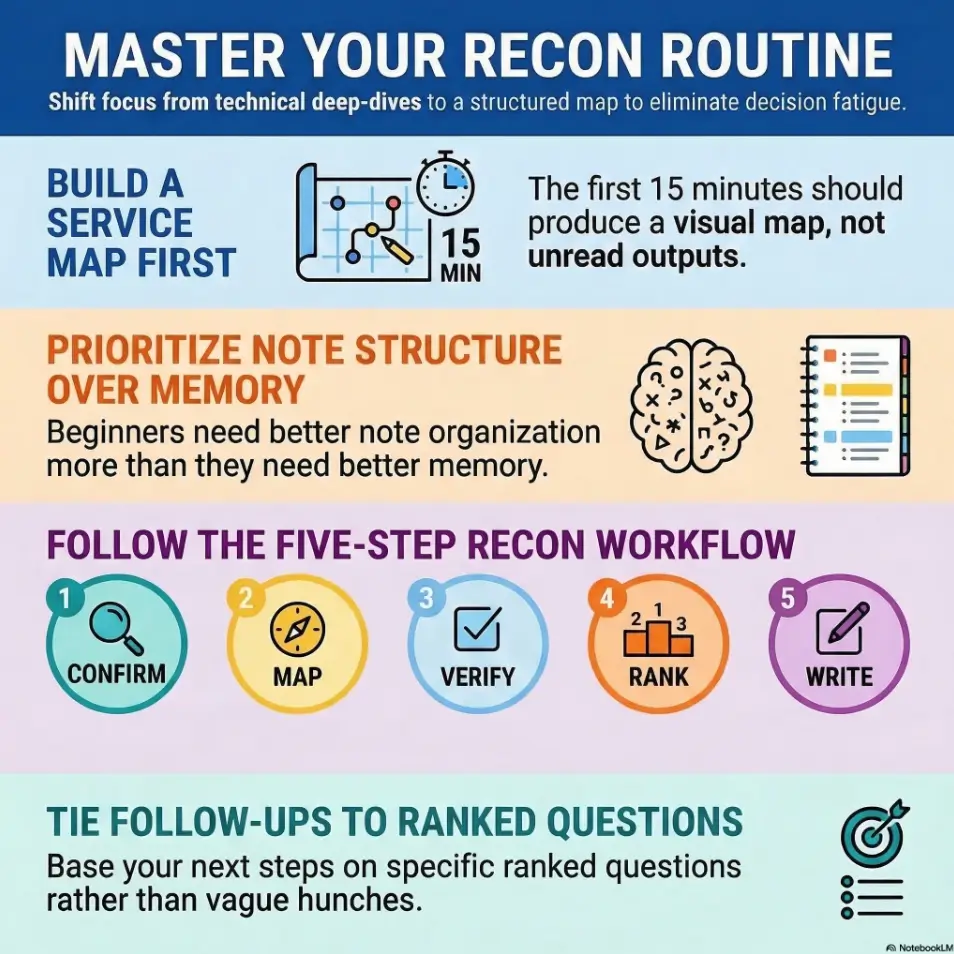
It is a consistent order for collecting and organizing evidence in a legal lab session. Instead of improvising every time, you move through the same basic stages: confirm the target, map services, verify what matters, rank leads, and write the next checks.
How long should beginner recon take before moving to enumeration?
There is no magic number, but beginners should move when the first-pass service map is clear and at least a few findings have been manually verified. If you still cannot explain why one lead matters more than another, you likely need a cleaner recon pass first.
Which recon steps should come first in a lab like Kioptrix Level?
Start with target confirmation if needed, then perform a basic service map, then manually review the most informative surfaces such as a web response or closely related services. Only after that should you move into more specific follow-up checks.
Should beginners use automated scripts right away?
They can be useful, but not as a first reflex. Beginners benefit most from understanding the host at a simple level before adding heavier layers of output. Scripts are helpful when they answer a ranked question, not when they are used to create motion.
How do I know which open port matters most?
Rank by evidence quality, follow-up clarity, and fit with the host’s broader story. A highly visible service is not automatically the highest-value service. The best lead is usually the one that produces a concrete next check with the least speculation.
What should I write down during recon?
Write the target, open services, confirmed evidence, your hypotheses clearly marked as guesses, and the next three checks. Put commands and meaningful outputs together. Notes should preserve reasoning, not just effort.
Why do I keep finding ports but no clear path?
This usually happens when findings are collected but not ranked. A service list by itself is not a plan. The missing step is often prioritization: deciding which clues are actionable and which are merely interesting.
Is web enumeration or SMB enumeration usually more important first?
It depends on the host, which is exactly why a routine helps. Start with the surface that offers the clearest, most verifiable clues. Often that means a quick manual web review and careful comparison with related service evidence before going deeper.
How do I avoid repeating the same failed checks?
End each session with a short list of next checks and record what a failed check actually ruled out. “Tried it” is too vague. “Checked X, no useful result, revisit only if Y changes” is much better.
Can one recon checklist work across multiple vulnerable labs?
Yes, at the process level. The specific services and clues will change, but the rhythm of confirm, map, verify, rank, and write next checks travels well across beginner labs.

Next step
Run one fresh Kioptrix Level recon session using a five-part log: target, ports, evidence, hypotheses, and next checks. Keep the first pass simple. Then stop and rank only three follow-ups. That tiny act alone often cuts backtracking more than any additional tool ever will.
If you want to make the exercise more honest, do it twice on different days using the exact same note template. Compare the two sessions afterward. What changed will teach you something. What stayed stable will teach you even more.
💡 Read the guide to how to read a penetration test report
| Tier | What you do | When to stop |
|---|---|---|
| 1 | Confirm target and map services | Once the first-pass picture is clean |
| 2 | Manual review of visible surfaces | Once at least two clues are verified |
| 3 | Rank likely leads | Once three next checks are written |
| 4 | Deeper enumeration | Only after the earlier tiers are stable |
Neutral next action: do not move up a tier until you can explain the current one in one or two sentences.
Conclusion
The hook at the start of this article was simple: beginners do not usually need more tools first. They need more order. That loop closes here. A repeatable recon routine is what turns scattered effort into usable evidence. It helps you notice more, forget less, and move forward with reasons rather than vibes. That may sound modest. In practice, it is a huge upgrade.
If you have 15 minutes today, do one thing: create your reusable five-part recon log and use it for a fresh Kioptrix Level pass. Confirm the target. Map services. Verify the obvious. Rank three leads. Write your next checks before you stop. That is how random motion begins to become method. And once method arrives, the lab gets quieter in the best possible way.
Original review: 2026-03.
Technical guidance updated: 2026-10-13. Clarified TCP and UDP scan states and the coverage limits of a first-pass port scan.