

The Methodology of the Mindful Pentester
Most beginners do not lose a Kioptrix weekend because the box is impossible. They lose it in the fog between one promising scan result, twelve open tabs, and the sudden belief that the next exploit will explain everything.
That is the quiet trap of a first vulnerable VM: it can make you feel busy long before you are thinking clearly. If you rush from enumeration to exploitation without a note trail, your weekend may produce commands, screenshots, and very little reusable skill.
This approach helps beginners build a practical cybersecurity workflow, not just chase a lucky shell. The cost of “guessing louder” is wasted time and missed growth.
Fast Answer: A beginner-friendly Kioptrix weekend plan works best when the goal is not “pwn the box fast,” but learn how to think: enumerate carefully, notice patterns, test one hypothesis at a time, and document what changed your direction. In one weekend, most beginners can complete meaningful reconnaissance, find at least one plausible path, and build a reusable hacking workflow without turning the lab into a guessing contest.
Table of Contents
Start Here: What “Weekend Progress” Actually Means on Kioptrix
Define the real win before you open the VM
The most important thing you can do before booting Kioptrix Level is redefine success. If your only definition of success is “root by Sunday,” you have built a brittle little throne. One wobble, and the whole weekend starts feeling like failure. A stronger definition is this: by the end of the weekend, you can explain the target surface, name your top hypotheses, show your note trail, and tell the story of how one clue changed your next move.
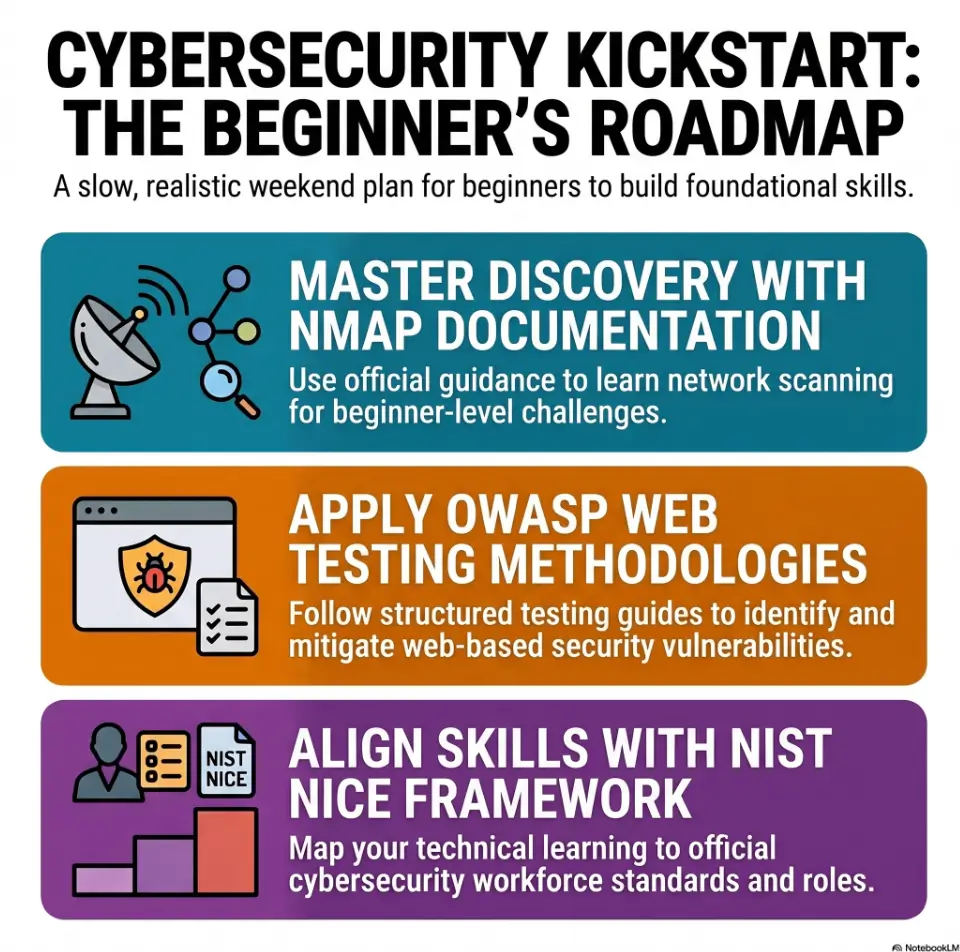
That is not consolation-prize thinking. That is real operator thinking. In actual security work, people are paid to reduce uncertainty, not to cosplay as action figures. NIST’s NICE framework describes cybersecurity work in terms of tasks, knowledge, and skills, which is a useful reminder that disciplined observation and communication are part of the craft, not decorative extras.
Separate “finish the box” from “learn the method”
These are related, but they are not identical twins. You can finish a box by copying someone else’s exact route and barely absorb the logic. You can also fail to finish and still learn something durable: how to scan with intention, how to rank services, how to stop chasing noise, how to tell when a dead end is actually dead. Beginners often confuse outcome with understanding because the shell is flashy and the reasoning is quiet.
I remember one of my earliest lab weekends feeling strangely productive and strangely empty at the same time. I had commands. I had output. I even had a couple of promising moments. But when I looked back through my notes, the trail read like a pocket full of receipts, not a chain of thought. That was the day I learned the lab was not testing my ability to paste commands. It was testing whether I could notice why they mattered.
Measure progress in clues found, not only shells gained
Try scoring your weekend with beginner-proof metrics:
- How many services did you identify and annotate?
- How many hypotheses did you rank and test?
- How many dead ends did you explain clearly?
- What one clue most changed your direction?
- Define success before you start
- Reward reasoning, not drama
- Track clues, not just wins
Apply in 60 seconds: Open a text file and write your success criteria in one sentence before you launch the VM.
Who This Is For, and Who It Is Not For
Best for beginners who want structure, not speed
This plan is for people who are willing to move slowly enough to understand what is happening. If you like the idea of a weekend lab but hate the feeling of drowning in jargon, you are in exactly the right neighborhood. Kioptrix is old enough to be approachable, but still rich enough to teach the big beginner lessons: enumeration first, assumptions second, exploitation third. For a gentler foundation, a Kioptrix for beginners overview can help you understand the shape of the work before the weekend starts.
Good fit for help desk, IT support, and career-pivot learners
If you already work around tickets, device issues, user confusion, or system oddities, you may have more transferable instinct than you think. Help desk work teaches triage, evidence gathering, note discipline, and the unglamorous art of not jumping to conclusions. Those are not side skills. Those are very close cousins of what makes lab work useful. The bridge from support to security is often less about becoming a wizard overnight and more about learning to investigate with sharper intention.
I have always liked this because it lowers the temperature. You do not need to arrive dressed as a pentester in your mind. You can arrive as a careful beginner with a notebook and a modest amount of suspicion. That is enough to start. If that describes your current role, a guide to Kioptrix for help desk workers can make the connection feel much less abstract.
Not ideal if you want instant wins without note-taking
If what you want most is the emotional sugar rush of “owned it in two hours,” this plan may feel almost rude. It asks you to pause, sort, review, and write. It asks you to be a little boring in the most useful ways. Labs punish impatience with a smile. They let you feel busy for long stretches while learning almost nothing.
Not for skipping Linux basics, networking basics, or patience
You do not need to be advanced, but some basics matter. You should be comfortable with simple terminal navigation, basic networking vocabulary, and the idea that services expose different kinds of opportunities. If concepts like IP addressing, ports, HTTP, SMB, or SSH feel completely alien, spend a little time on those first. Otherwise Kioptrix can turn into a haunted house where every door looks symbolic and none of them open.
Eligibility checklist
- Yes: You can use a terminal without panic
- Yes: You know what ports and services are
- Yes: You are willing to take notes
- No: You expect zero friction and zero confusion
Next step: If you said “no” to more than one line, spend 30 to 45 minutes on basic networking and Linux review before the weekend lab.
Weekend Map First: A Two-Day Plan That Does Not Burn You Out
Saturday morning: setup, scope, and first-pass enumeration
Your first block should feel almost plain. That is the point. Confirm the lab network. Confirm the target is reachable. Run first-pass scans. Create your note file. Label your screenshots folder if you use one. The temptation here is to sprint toward “interesting.” Resist it. The lab is usually most generous when you act like a patient surveyor, not a gold prospector swinging the pan wildly.
A realistic Saturday morning block is 90 to 120 minutes. Not five hours. Not a caffeinated siege. Long beginner sessions tend to mutate into command drift. Your eyes are still on the screen, but your mind has left the building and taken your judgment with it. If you struggle to choose sane blocks, this guide on Kioptrix session length pairs nicely with the weekend structure here.
Saturday afternoon: organize findings and test likely angles
Once you have ports, versions, banners, and any odd responses, stop and sort. Which services are exposed? Which of them feel old, misconfigured, or unusually chatty? Which findings are common and which feel slightly off-key? This is where the weekend becomes educational instead of theatrical. You are converting raw scan output into ranked possibilities.
Nmap’s own documentation describes it as a tool for network discovery and security auditing, which sounds obvious until you notice how many beginners use it like a slot machine instead. A scan is not a verdict. It is an introduction.
Sunday morning: revisit weak assumptions with fresher eyes
Sunday morning is where a lot of beginners accidentally become better analysts. Sleep has a funny talent for sanding down yesterday’s emotional attachment. A path that felt “definitely right” on Saturday night may look suspiciously loud and flimsy by breakfast. Good. That is growth, not betrayal.
Re-read your notes. Re-open old output. Ask what you treated as background noise. Sometimes the most important clue is the one your Saturday brain saw but did not rank correctly.
Sunday afternoon: complete the path, document the story, extract lessons
If you land a path, great. Finish it cleanly and write it clearly. If you do not land it, still finish the weekend by documenting the strongest evidence-supported hypotheses and what ruled each one in or out. A weekend with a coherent write-up and no shell is worth more than a weekend with a shell and no memory of how you got there.
Let’s be honest…
Most “weekend grind” advice quietly assumes you are part machine, part espresso, and part chaos goblin. Real beginners have jobs, dishes, text messages, stiff necks, and attention that wears grooves. A plan that ignores that is not ambitious. It is unserious. A calmer approach to Kioptrix practice sessions without burnout is not softer work. It is work that can survive real life.
Why “one box in a weekend” is already enough
One box is enough because the first box is not just a box. It is a mirror. It shows whether you enumerate before fantasizing, whether you document before forgetting, and whether you can tell the difference between curiosity and compulsion. Those habits scale. Random clicking does too, unfortunately.
Decision card: marathon weekend vs structured weekend
| Approach | Upside | Cost |
|---|---|---|
| Marathon grind | More hours on paper | More fatigue, more repeated mistakes |
| Structured blocks | Cleaner thinking, better notes | Requires stopping before you “feel done” |
Neutral action: Choose session blocks first, then let the lab fit inside them.
Show me the nerdy details
For a first weekend, the point of early enumeration is coverage, not exhaustion. Broad host discovery, service identification, and version clues create the map. Deeper probing only makes sense after you can explain why a service deserves the extra attention.
First Moves Matter: What to Do in the First 60 Minutes
Build the lab and confirm the target is reachable
The first 10 to 15 minutes should be almost insultingly basic. That is fine. Confirm VM networking. Confirm IPs. Confirm you can reach the target. A surprising amount of beginner frustration is not “security difficulty.” It is simple lab plumbing wearing a fake moustache. If the VM behaves oddly before enumeration even begins, review your Kioptrix network setup before you blame the box.
I once spent far too long squinting at scan weirdness that turned out to be a network setup mistake. That sort of lesson is humbling in the way cold sink water is humbling. Useful, unforgettable, and slightly annoying.
Run broad enumeration before choosing tools emotionally
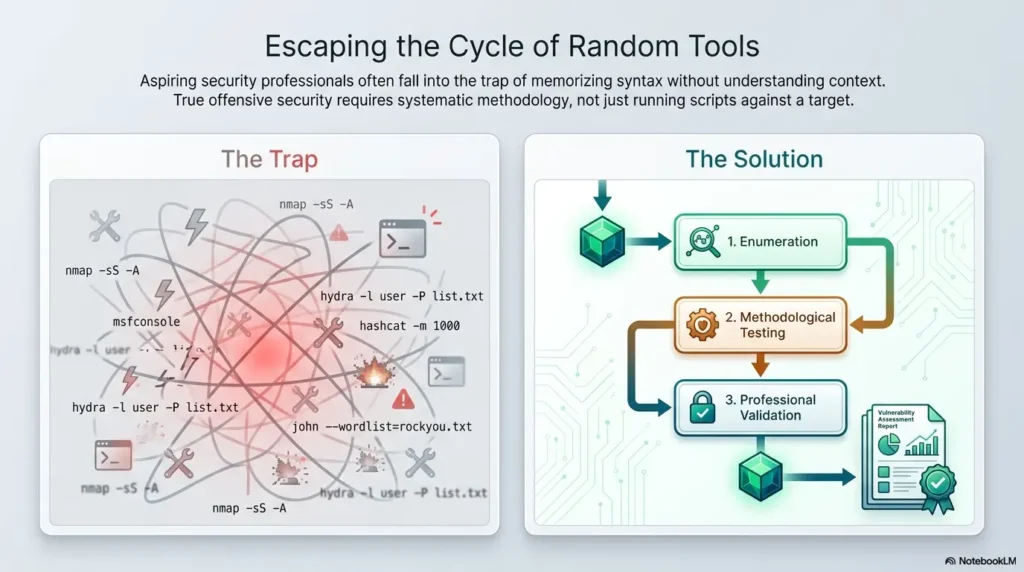
Do not pick a tool because it feels exciting. Pick it because it answers a question. Early on, your main questions are broad: what is exposed, what versions appear present, what speaks when spoken to, and what behaves oddly? The fastest way to waste an hour is to become romantically attached to one service before you have read the whole room.
Create a simple findings log you can actually maintain
Your notes do not need to be beautiful. They need to be alive. Use plain text. Split it into sections like target info, ports/services, hypotheses, commands run, results, and dead ends. If your system is too fancy, you will stop using it the moment the lab gets interesting. A fragile note system is like bringing a crystal vase into a garage. A practical Kioptrix note-taking tool should make your thinking easier to retrieve, not harder to maintain.
Capture ports, services, versions, and weird behavior early
The adjective here is weird. Not everything matters equally. Normal open services may still matter, but unusual banners, stale versions, strange redirects, anonymous access possibilities, and inconsistent responses deserve bright circles in your mind. OWASP’s testing guidance is useful here because it frames security testing as a methodical process of gathering, validating, and interpreting behavior rather than leaping to conclusions.
- Confirm connectivity first
- Enumerate broadly before narrowing
- Write down weirdness immediately
Apply in 60 seconds: Create note headings now: Target, Services, Hypotheses, Commands, Results, Dead Ends.
Don’t Chase the Exploit Too Early
Why beginners lose hours after one exciting clue
A single promising clue can behave like a carnival barker. It calls you closer, gets louder, and makes every other part of the room seem less important. Beginners often spend 2 or 3 hours pushing one possibility because it feels emotionally alive. The problem is not curiosity. The problem is monogamy. You commit too early to a path that has not earned the ring.
Read the attack surface before you marry a single path
Think of the exposed services as a small neighborhood, not one dramatic doorway. Some entrances are obvious but barren. Some look dull and contain the real story. Before choosing a main path, list the plausible routes supported by your observations, even if there are fewer than three. That tiny act introduces sobriety. It reminds your brain that possibility is plural.
Treat every service like a small door, not a promise
This framing matters more than it sounds. A service is not a promise of compromise. It is an invitation to investigate. Some doors open into broom closets. Some open into kitchens. Some open into walls because you were not actually standing at a door. Such is life.
Here’s what no one tells you…
The first plausible route is often just the loudest one. Loud is not the same as likely. In beginner labs, the loudest clue often earns too much trust because it gives emotional relief. Finally, something to do. But relief is not evidence.
One of the kindest habits you can build is learning to say, “Promising, but not proven.” That sentence will save you from so many ornamental disasters.
Clues Over Chaos: How to Read Kioptrix Without Guessing
Turn scan results into ranked hypotheses
Once you have your scan output, your job changes. You are no longer collecting. You are interpreting. That means turning findings into ranked hypotheses. Which service is most likely to yield leverage? Which has the strongest combination of age, exposure, misconfiguration potential, or known weakness pattern? Which one is merely present, and which one is trying to tell you a story? A focused Kioptrix methodology helps keep that interpretation from collapsing into vibes.
A simple ranking model helps. Use three labels:
- High interest: old version, weak config signs, interesting responses
- Medium interest: standard service with some clues but no obvious angle yet
- Low interest: little exposed information, nothing distinctive yet
Look for mismatch, age, misconfiguration, and forgotten defaults
Beginners often search only for “vulnerability.” That can make their vision too narrow. A better question is: what feels mismatched? Old software, weak defaults, odd permissions, exposed shares, behavior that does not match the expected service posture, pages that leak too much structure, banners that reveal more than they should. Security work often begins in the space between what a thing should be and what it oddly is.
Use web research carefully without outsourcing your brain
Yes, search the web. No, do not hand it your judgment like a valet tossing keys. Web research is best used to understand what a version means, what a service commonly exposes, or what testing patterns are normal. It is less useful when used as a replacement for reading your own evidence. If every clue immediately becomes “search exact error string plus exploit,” you are not really investigating anymore. You are shaking a vending machine.
Ask, “What does this service want me to notice?”
This is one of my favorite beginner questions because it changes the mood. Instead of demanding immediate answers, you become attentive. Does the service reveal version data? Does it redirect strangely? Does it allow anonymous behavior? Does a web page reveal structure, naming, or age? Curiosity becomes quieter and more precise. It stops being a flashlight waved wildly and starts being a desk lamp.
Mini calculator: hypothesis load
If you found 6 exposed items and 2 have version clues plus odd behavior, your first testing queue is not 6. It is 2 high-interest paths, then 2 medium-interest paths.
Neutral action: Rank all exposed services into High, Medium, and Low before testing the first likely route.
Common Mistakes Beginners Make on Kioptrix
Mistake one: repeating scans without changing the question
Running another scan can feel productive because the terminal is moving and your hope is still alive. But if the question did not change, another scan often becomes a ritual, not an investigation. Repetition is useful only when it is attached to a new angle: different depth, different script category, different host assumption, different service focus.
Mistake two: copying commands you do not understand
This mistake is common because it offers instant relief. You see a command online, paste it in, and feel briefly connected to expertise. But understanding grows when you know what the flags are trying to reveal and why they match your current question. Even partial understanding is better than command karaoke. The same lesson sits at the heart of why copy-paste commands fail during beginner lab work.
Mistake three: treating rabbit holes like progress
Some paths are seductive because they are rich in activity. Error messages, partial responses, odd files, maybe even a shimmer of exploit lore. But activity is not progress. Ask yourself every 15 to 20 minutes: has this line of work increased confidence in the path, or just increased my emotional investment?
Mistake four: not writing down failed attempts
Failed attempts are not embarrassing leftovers. They are boundary markers. They tell future-you what has already been tested and what evidence weakened the route. Without them, you will loop back like a shopping cart with a broken wheel.
Mistake five: confusing tool output with real analysis
This one bites even smart beginners. Tools are translators, not thinkers. They surface possibilities, fingerprints, hints, patterns. The analysis begins after the output appears. That is where your judgment enters the room.
Short Story: On one early lab weekend, I felt proud because my notes were full of output and my browser had that busy little look that makes a person feel competent. Then I tried to explain my best path in one paragraph. I could not. I had pages of evidence, but no argument. It felt like showing up to court with a suitcase full of receipts and no case.
So I started over. I highlighted only the clues that changed a decision, crossed out the decorative noise, and rewrote the path from scratch. I made less visible “progress” for about an hour, then suddenly more real progress than I had made all morning. The shell came later. The lesson arrived first: evidence matters, but organized evidence matters more.
- Do not re-run scans just to feel movement
- Write down failed attempts
- Treat tool output as raw material, not truth
Apply in 60 seconds: Add a “Why this failed” line under your next dead end instead of just pasting output.
Do Not Build the Case Backward
Why hindsight makes weak reasoning look stronger
Once you know the right path, the route often looks embarrassingly obvious. That is hindsight doing interior decoration. It moves the furniture, brightens the room, and convinces you the clues were always shouting. They were not. This matters because beginners can accidentally train themselves to narrate false certainty after the fact.
Document what you knew at the time, not after success
Keep your notes chronological. Write what you knew, what you suspected, what you tested, and what result changed the next step. That creates an honest chain. It prevents your write-up from becoming a myth where every choice was inevitable and every clue was luminous from the start.
Keep a clean chain from clue to action to result
This is the muscle that turns lab work into portfolio value. Employers, mentors, and your future self learn more from “I saw X, so I tested Y, which ruled out Z and made A more likely” than from a cinematic retelling of “then I hacked harder.” The clean chain is the point. A Kioptrix technical journal can help preserve that chain before memory starts polishing the rough edges.
Small notes now save fake confidence later
I have become almost sentimental about small notes. A one-line observation about a weird banner. A tiny remark that a path felt promising but thin. A sentence that says, “I am testing this only because of version age and exposure.” These are modest little lanterns. They keep your later write-up from turning into fan fiction about your own competence.
Show me the nerdy details
If your note trail cannot explain why a service moved from medium to high interest, your process is still too intuitive to reuse. A reusable workflow needs explicit triggers, even simple ones such as version disclosure, anonymous access, or unusual web behavior.
Pace Beats Adrenaline: How to Stay Useful for Two Days
Use short sessions and reset before frustration hardens
Frustration is not the enemy. Hardened frustration is. Once irritation crystallizes, your judgment narrows and your clicks get twitchy. Use 45- to 90-minute blocks with clear stopping points. Stand up. Get water. Look away from the terminal long enough for your brain to stop gripping the same wrong idea.
Stop when your actions become repetitive instead of strategic
There is a particular kind of lab fatigue where you are still active but no longer selective. Same searches, same assumptions, same half-understood commands, same websites, slightly different tabs. That is not persistence. That is intellectual treadmill walking.
Keep one parking-lot list for ideas you are not testing yet
This habit is absurdly helpful. Instead of opening 11 tabs for speculative paths, keep a parking-lot section in your notes. Drop the ideas there. That way your brain feels heard, but your current test does not get mugged by every new possibility passing by.
Let’s be honest…
Tired curiosity becomes random clicking faster than people admit. The lab starts to feel like a room full of keys, and you begin trying them because jingling feels like effort. This is where good weekends go to become blurry anecdotes.
Tired curiosity becomes random clicking faster than people admit
That line deserves to live on its own because it is one of the most important beginner truths in this whole article. When you feel the shift from “I am testing a hypothesis” to “I am hoping one of these things accidentally works,” stop. Your future self will thank you. Your notes will stop smelling faintly of panic. Building a repeatable Kioptrix practice routine is partly about recognizing that moment before it eats the evening.
Coverage tier map for a beginner weekend
| Tier | What it means |
|---|---|
| Tier 1 | Connectivity, IP, basic scan |
| Tier 2 | Service list with versions and odd behavior |
| Tier 3 | Ranked hypotheses with testing order |
| Tier 4 | One validated path or two strong near-paths |
| Tier 5 | Clear write-up with lessons and turning points |
Neutral action: Aim for Tier 3 by Saturday night and treat anything beyond that as bonus territory.
When You Get Stuck: A Calm Recovery Loop
Go back to enumeration with a narrower question
When stuck, do not restart your entire identity. Restart your question. “What am I missing?” is too broad. “What more can this specific service reveal?” is better. “What does this version or behavior suggest?” is better still. Narrow questions turn panic back into work. When the output feels noisy, a focused review of Kioptrix enumeration basics can bring the work back to the evidence.
Re-read old output for details you treated as background noise
Beginners often miss clues not because the clues are hidden, but because the clues were encountered before the beginner had enough context to value them. Re-reading is not regression. It is a second pass with a wiser set of eyes. Many lab breakthroughs arrive disguised as humble rereads.
Compare the obvious path with the neglected path
If one path has eaten 90 minutes and keeps producing vague maybe-signals, compare it with the quieter path you have been ignoring. Sometimes the neglected path has less emotional glow and more actual evidence. That is a marvelous trade.
Change one variable at a time, not five
When people get stuck, they often change tool, command, source, assumption, and direction all at once. Then if anything changes, they do not know why. Calm recovery depends on isolating variables. Keep the lab from turning into a snow globe.
Here’s what no one tells you…
Being stuck is often the moment real learning starts. The easy path flatters you. The stuck path interrogates your habits. It asks whether you can slow down, reframe, and think with less ego than before. That is not glamorous, but it is wildly transferable.
- Revisit output before adding chaos
- Compare one loud path with one quiet path
- Change a single variable at a time
Apply in 60 seconds: Write one narrower question about the service you are currently testing, then answer only that.
What to Write Down So the Weekend Still Counts
Log commands, outputs, dead ends, and turning points
Your notes should not be a transcript of every breath the terminal takes. They should capture the moments that mattered. The command you ran, the result that mattered, the interpretation you made, the dead end you confirmed, the clue that changed your direction. That is the backbone.
Save screenshots only when they prove a decision
Beginners often oversave screenshots because screenshots feel official. But ten vague screenshots are less useful than two that prove a turning point. Treat screenshots like exhibits, not wallpaper.
Write one paragraph on why the final path became convincing
This is the paragraph that converts weekend activity into professional memory. Why did the final path become more convincing than the others? Which clues supported it? What weakened the alternatives? That paragraph matters more than the glamour shot at the end.
Turn the box into a portfolio story, not a private memory
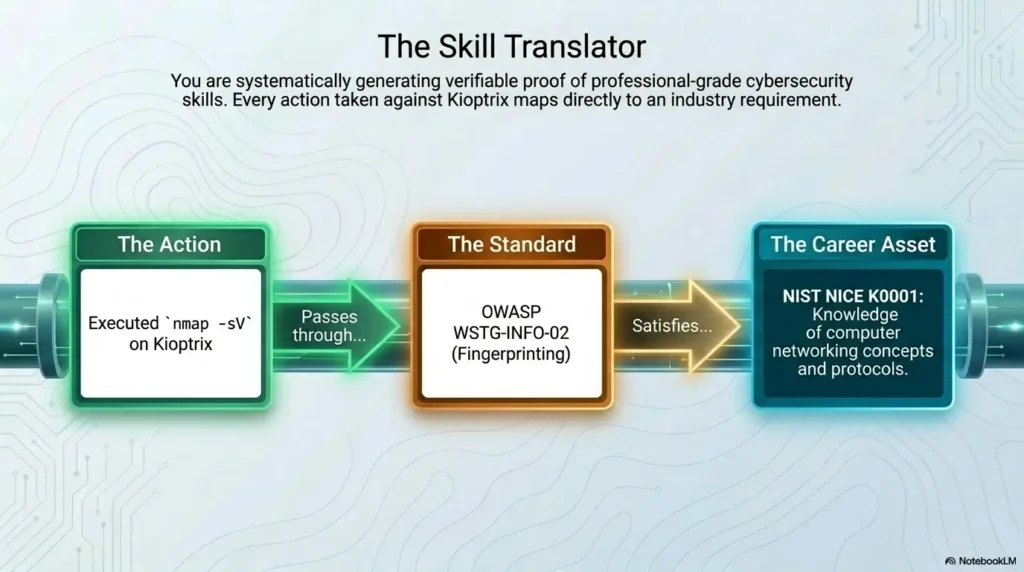
If you hope to move toward cybersecurity roles, this matters. The story of the box is not “I rooted it.” The story is “I approached an unknown system, enumerated carefully, ranked hypotheses, tested deliberately, documented dead ends, and explained my final path.” NIST’s NICE materials remain useful here because they frame cybersecurity capability as a combination of tasks, knowledge, and skill, not just outcomes. For shaping that into something readable, Kioptrix report writing tips can help the weekend become a useful artifact instead of a private memory.
Portfolio prep list
- The target and lab setup in one sentence
- Your initial enumeration summary
- Your evidence-supported hypotheses
- The dead end that taught you the most
- The clue that changed the whole direction
Neutral action: Turn these five items into a one-page write-up before the weekend ends.
Next Step: Your First Concrete Move Tonight
Set up Kioptrix, create a plain-text notes file, and spend 45 minutes only on enumeration
If you want the cleanest possible start, do this tonight. Set up the VM. Confirm the network. Open a plain-text notes file. Spend 45 minutes on enumeration only. Not exploitation. Not exploit-db treasure hunting. Not ten tabs of “maybe this version is vulnerable.” Just observation. That single boundary changes the personality of the entire weekend. If this is your first attempt, a Kioptrix first lab setup guide can keep the first hour from being swallowed by avoidable confusion.
Rank evidence-supported paths before exploitation
Rank the plausible paths your evidence supports; three is only a planning example. Do not invent extra routes to reach a quota. One well-supported hypothesis can justify the next scoped test once you have reviewed the exposed surface.
End the session by writing what confused you most and why
This is underrated. End your first session with one short paragraph on what confused you most. Was it service enumeration? Version interpretation? Weird web behavior? Unclear output? That paragraph becomes a compass for the next block. It also keeps the weekend emotionally honest.
Infographic: The Calm Beginner Weekend Flow
1. Setup
Confirm VM, IP, connectivity, notes file.
2. Enumerate
Scan broadly. Record services, versions, odd behavior.
3. Rank
Rank evidence-supported paths before testing.
4. Test
Change one variable at a time. Track dead ends.
5. Write
Explain why the winning path became convincing.
The best first move is not dramatic. It is modest and beautifully unfair to chaos. Forty-five minutes. Enumeration only. A plain text note file. Evidence-supported paths. That is how a beginner weekend stops feeling like a casino and starts feeling like training.
FAQ
Can a total beginner do Kioptrix in one weekend?
Yes, if “do” means learn meaningfully rather than necessarily finish every last step alone. A total beginner can absolutely complete setup, run useful enumeration, identify plausible paths, and build a repeatable note-taking workflow in one weekend. Finishing the box is possible, but it should not be the only definition of success.
How many hours should I spend on Kioptrix over a weekend?
For most beginners, 4 to 8 focused hours across two days is more useful than one giant exhaustion session. Two or three blocks on Saturday and one or two on Sunday is usually enough to make real progress without turning your brain into warm soup.
Do I need Kali Linux to start Kioptrix?
No single distro is mandatory, but you do need a practical environment with the tools and terminal comfort to enumerate and test safely. Kali is common because it is convenient, not because the lab checks your outfit at the door.
What should I do if my scans are not showing much?
First, confirm your lab networking and target reachability. Then ask whether your scan question is too narrow. Re-run only when you are changing something meaningful: depth, scope, scripts, or service focus. Many “empty scan” problems are either lab setup issues or overly shallow first passes.
Is it normal to get stuck for hours on Kioptrix?
Yes. Deeply normal. The important question is whether you are stuck productively or theatrically. Productive stuck means you are narrowing questions, re-reading output, and testing cleaner hypotheses. Theatrical stuck means you are generating heat and browser tabs.
Should I use walkthroughs if I am a beginner?
Use them carefully and late. Try to exhaust your own reasoning first. If you do consult one, use it as a comparison tool, not a replacement brain. Stop at the smallest hint that gets you moving again, then return to your own process. A full Kioptrix Level guide is most useful after you have already built your own trail of evidence.
What should I write in my notes while doing Kioptrix?
Write the target info, commands run, outputs that mattered, hypotheses, failed attempts, and turning points. Most importantly, write why a clue changed your next step. That is the part people skip and later wish they had.
Is finishing the box more important than understanding the path?
No. Understanding the path is more transferable. A shell without understanding is a souvenir. A clear explanation of the path is a skill.
Can Kioptrix help me move from help desk into cybersecurity?
Yes, especially if you use it to demonstrate investigation habits: evidence gathering, ranking possibilities, documenting dead ends, and explaining technical reasoning in plain language. That story can travel much farther than “I followed a walkthrough and got root.” Learners making that transition may also benefit from a broader look at Kioptrix for IT generalists.
What should I do after I finish my first Kioptrix box?
Write a clean summary, note the biggest turning point, list what confused you, and identify one skill gap to study next. Then do another beginner-friendly box with the same note structure. Repetition with method is where the real transformation begins.
Before you leave this page, notice what we quietly closed from the opening hook. The weekend does not need to become a stage for speed. It can become a workshop for judgment. That is the better bargain. A slower, cleaner first Kioptrix weekend gives you something sturdier than a lucky finish: it gives you a way of working.
If you have 15 minutes tonight, do the smallest useful version. Set up the lab. Open the notes file. Enumerate only. Write the evidence-supported plausible paths. End with one sentence about what confused you most. That tiny beginning is not small in the way it looks small. It is small the way a key is small.
Original review: 2026-04.
Technical guidance updated: 2026-10-13. Clarified that three attack paths are a planning example, not a prerequisite that requires inventing unsupported hypotheses.