Beyond the Banner: Precision OS Discovery
When tools like Kioptrix CME report an OS version that doesn’t match reality, the scanner isn’t broken, it’s simply falling for banner-based guesswork. Relying on service strings and protocol hints is fast for triage, but proxies, containers, and hardening can easily distort the truth.
“Debugging the wrong premise instead of the machine in front of you costs more than time, it costs your technical credibility.”
Stop letting “guesswork theater” dictate your penetration testing lab notes. This guide provides a repeatable framework to:
- ✔ Separate observed strings from inferred claims.
- ✔ Confirm OS families without hallucinating versions.
- ✔ Leverage multi-signal evidence from SMB, SSH, and HTTP.
Table of Contents
Who this is for / not for
Who this is for
- You’re doing Kioptrix / VulnHub / HTB-style enumeration and CME shows an OS that feels “right” but the version is off.
- You write report-safe notes and want evidence you can defend (even if you’re tired, hungry, and running on caffeine fumes).
- You’re comparing banner guessing vs fingerprinting vs authenticated discovery and want a simple hierarchy you can use repeatedly.
Who this is not for
- You need exact OS build numbers without credentials. Sometimes you simply can’t get that reliably from the outside.
- You’re trying to “prove” an OS version from a single scan output. That’s how confident-sounding write-ups become quietly wrong.
Operator truth: In real pentests, “OS family + confirmed service versions/config” usually beats “guessed distro point release.”
A quick personal confession: the first time I wrote “Ubuntu 12.04 confirmed” in a lab note, I was basically writing fan fiction with port numbers. It looked professional. It was not. The fix isn’t more tools. The fix is a better evidence habit.
- Collect signals from at least two different protocols.
- Separate “Observed” strings from “Inferred” conclusions.
- Prefer service/config facts over OS micro-version claims.
Apply in 60 seconds: Add “Observed / Inferred / Unconfirmed” tags to today’s notes.
The “wrong version” problem: what CME is actually doing
CrackMapExec (and similar tooling) is often doing something very human, very relatable: it’s making a best guess based on partial clues. In a Kioptrix-style lab, those clues can be noisy, intentionally misleading, or simply ambiguous. The result: it may nail the OS family (Linux vs Windows) but miss the exact version.
CME’s detection pipeline in plain English
- For its SMB host line, CME reads information exposed by the SMB connection and its underlying library. It does not merge arbitrary SSH or HTTP findings collected elsewhere. Record the SMB probe separately.
- Depending on protocol and library version, the OS text can come from a server-supplied SMB1 string or SMB2/NTLM information. A missing or misleading label is not automatically a closest-match fingerprint result.
- Capture the raw line and tool version, then corroborate it independently. Do not describe CME’s displayed label as Nmap-style TCP/IP OS fingerprinting.
What “OS detected” really means
- Often: the service ecosystem suggests an OS family or “Windows-ish / Linux-ish” vibe.
- Sometimes: a specific product + build range is likely (especially with SMB and Windows editions).
- Rarely: a precise distro + point release is provable without authenticated access.
Micro-check: “Does this claim survive a skeptical reader?”
If your only evidence is a single header like Server: or a string like SSH-2.0-OpenSSH_..., your claim won’t survive contact with a reviewer who’s been burned before. And that reviewer exists. If not in class, then later: it’s you, re-reading your own report at 2:00 AM.
Show me the nerdy details
Tools commonly separate OS detection from service/version detection. For example, Nmap has distinct concepts: OS fingerprinting (e.g., -O) and service/version detection (e.g., -sV). Mixing those mentally is how people accidentally treat a service banner as proof of an underlying kernel or distro release. If you’ve been bitten by that before, it helps to remember how often service detection produces false positives when read too literally.
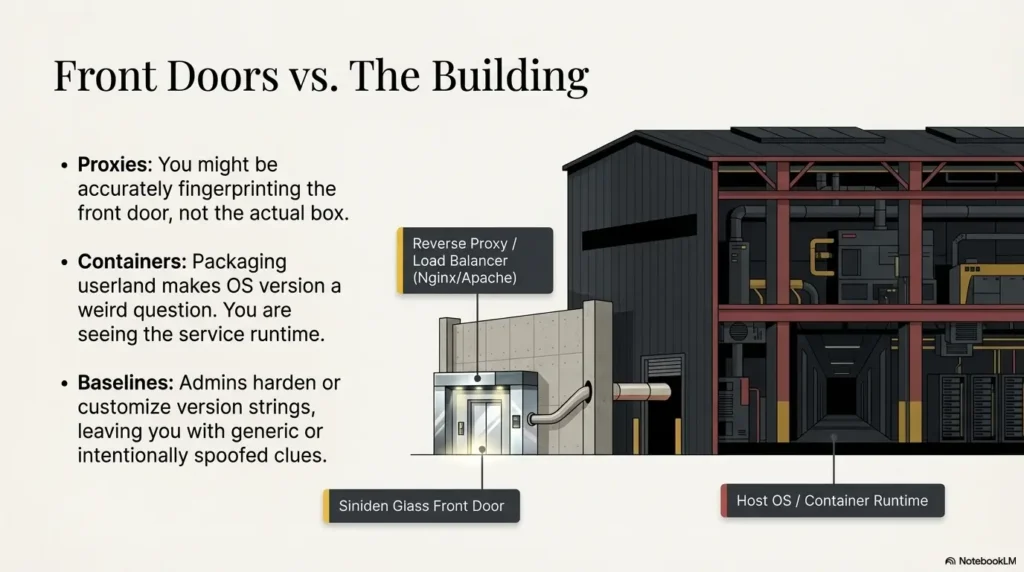
Another lived moment: I once saw a beautifully “specific” OS guess that turned out to be a reverse proxy container. The host OS was totally different. My notes were accurate about the front door, and wrong about the building.
Eligibility checklist: can you responsibly state an OS version?
- Yes/No: Do you have two independent signals (e.g., SMB + SSH, or SMB + authenticated artifact)?
- Yes/No: Have you ruled out obvious middleboxes (reverse proxy, gateway, VPN hop) for the signal you’re citing?
- Yes/No: Are you stating Observed strings separately from Inferred conclusions?
- Yes/No: Would the claim change your exploit choice in a meaningful way?
Neutral next action: If any answer is “No,” downgrade the statement to “OS family indicated; version unconfirmed.”
Why banners mislead: 7 ways the string lies with a straight face
A banner is a nametag at a conference. Sometimes it’s correct. Sometimes it’s outdated. Sometimes it’s a joke. And sometimes it’s worn by the intern while the CEO slips out the side door. The deeper point: banners were never designed to be courtroom evidence. Here are seven ways they mislead, especially in labs.
1) Default banners are “brand labels,” not ID cards
Many products ship with friendly identifiers that survive upgrades, patches, and rebuilds. If an admin forgets to change it, you inherit a fossil.
2) Version hiding and hardening are common
Security baselines often recommend suppressing or altering version strings. Even in labs, maintainers sometimes apply those patterns. You can get a “generic Apache” banner even when the underlying system is anything but generic.
3) Reverse proxies and gateways rewrite reality
An Nginx/Apache reverse proxy can present a banner unrelated to the host OS. You might be fingerprinting the front more accurately than the box.
4) Containers and chroot environments blur the host
Containers package userland in a way that makes “OS version” a weird question. You’re often seeing the service runtime rather than the underlying kernel’s “identity story.”
5) Shared stacks create lookalike fingerprints
Different distros can run the same daemon builds. Same OpenSSH major version, similar TLS libraries, similar web server defaults. Banners then become less like fingerprints and more like… uniforms.
6) Scanner “closest match” behavior
Fingerprints are fuzzy. If a tool’s database has signatures for A, B, and C, and you’re actually “B-ish,” it will often return B, even if the truth is “unknown variant of C.” That’s not malicious. It’s classification under uncertainty.
7) Spoofing exists (especially in labs)
CTFs and labs sometimes plant wrong clues on purpose. Not to troll you. To teach you a habit: treat enumeration as a hypothesis engine, not a verdict machine.
- Practical implication: Banners are a starting point, not a conclusion.
- Report implication: “Observed banner string” is safe. “Confirmed OS version” is not, unless corroborated.
- Workflow implication: Build a tiny confirmation loop you can repeat in under 10 minutes.
I learned this lesson the annoying way: I chased an “ancient” web stack for 40 minutes, only to discover the banner was static and the app was behind a proxy. That’s not just wasted time. That’s the quiet tax you pay when you accept strings as truth.
Curiosity gap: “If banners aren’t enough… what is?”
If banners are unreliable narrators, what’s the reliable cast? Think in layers. You want evidence that comes from different parts of the system, ideally different protocols, ideally different assumptions. The goal is not “perfect certainty.” The goal is “enough confidence to make decisions and write them cleanly.”
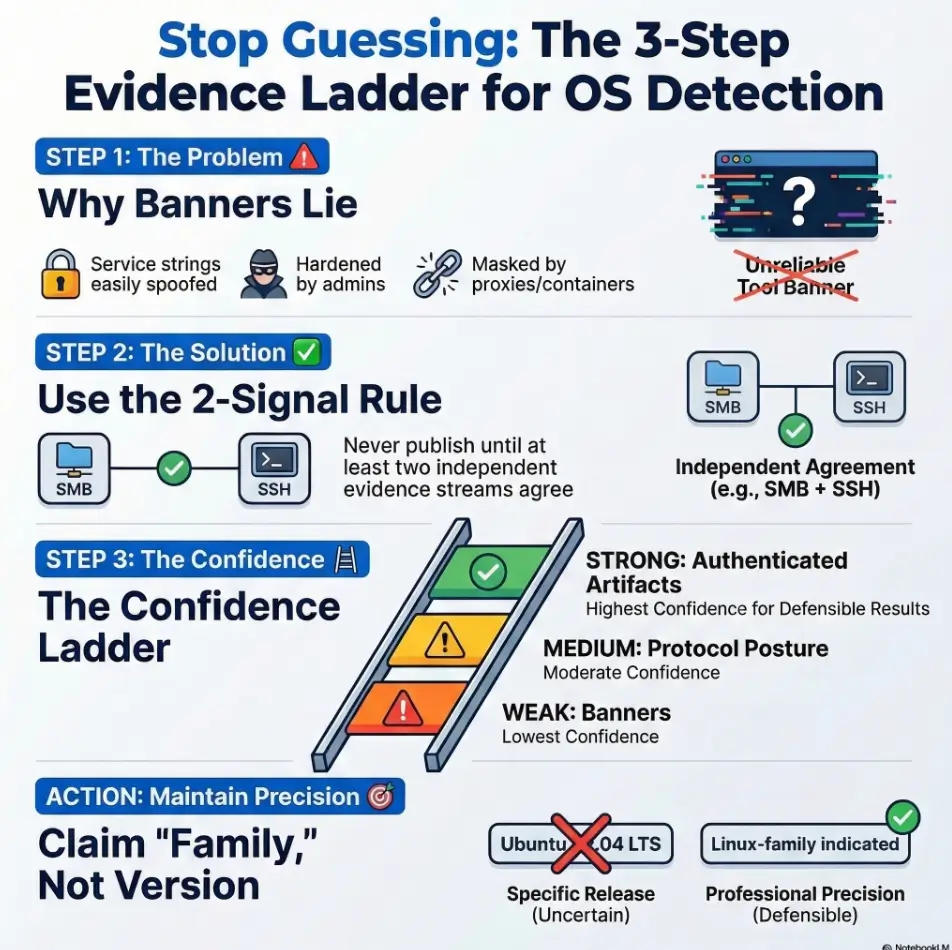
Evidence hierarchy: weak → strong signals
- Weak: HTTP headers, generic service banners, “pretty strings.”
- Medium: protocol dialect quirks (SMB signing defaults, SSH KEX lists), TLS cipher suite posture, error page fingerprints.
- Strong: host-level artifacts (package manager traces, kernel/userland markers), and authenticated system info once you have access.
The “two independent sources” rule
Don’t publish a version claim until two different evidence streams agree. For example:
- SMB clues + authenticated output after compromise
- SSH algorithm set + a host artifact you can quote (post-access)
- HTTP app fingerprint + OS-level package list (post-access)
Let’s be honest…
If it “feels right,” that’s intuition. Intuition is useful for triage. Your report needs proof, not vibes. (Your future self will thank you when you’re defending findings in a debrief.)
Decision card: when to use Banner vs Fingerprint vs Authenticated confirmation
- Fast triage
- Service inventory
- Hypothesis building
Trade-off: Easy to spoof or stale.
- Protocol dialect clues
- Cross-protocol corroboration
- Exploit path selection
Trade-off: Still probabilistic.
- Report-grade certainty
- Exact version/build
- Patch posture reality
Trade-off: Requires access.
Neutral next action: Pick the lightest method that still supports your decision and write-up.
When I started, I treated “fingerprinting” like a magic spell. Then I realized it’s more like weather forecasting: useful, directional, and still subject to weird atmospheric conditions (VPNs, NAT, proxies, lab trickery). You don’t stop checking the forecast. You just stop pretending it’s a courtroom affidavit.
The lab trap: why Kioptrix targets amplify false confidence
Labs are friendly, but they’re also theatrical. Kioptrix-style targets can amplify false confidence because they blend “old” stacks with “modern” tools and assumptions. That mismatch creates signature collisions: your scanner sees something it recognizes and says, “Ah yes, my old friend Ubuntu X.Y,” when the truth is messier.
Old services, modern tooling, messy mapping tables
Legacy services can trigger patterns that modern scanners map imperfectly. When multiple signatures look similar, tools may return the closest known entry, not an admission of uncertainty.
Deliberate misdirection as pedagogy
Many CTF designers want you to stop trusting a single output. So they plant a banner that’s plausible, seductive, and wrong. It’s a teaching strategy: if you learn to demand corroboration in labs, you’ll do it in real work.
Snapshot drift (VM images vs expectations)
A box you think is “X.Y” may have been rebuilt, patched, repackaged, or mirrored differently. Even tiny changes (a swapped web server, an updated SSH config) can throw off guess-based labeling.
Quietly powerful habit: Treat the lab name as a theme, not a guarantee.
I once did a lab where the “expected” OS was plastered all over old write-ups. I leaned on those assumptions, picked an exploit chain early, and wasted a full hour. When I finally slowed down and validated the services in front of me, the path was obvious. The lesson wasn’t “read fewer write-ups.” It was “don’t borrow certainty.”
Short Story: I was halfway through a Kioptrix-style run when CME printed a tidy OS version that matched the vibe of the machine. I felt the little dopamine click: “I’m efficient.” I wrote it down and moved on. Forty minutes later, my exploit failed in a way that didn’t make sense.
The port was right, the module was right, the payload was right. What was wrong was my premise. The “OS version” I trusted was coming from a banner that lived on a reverse proxy. The host behind it was different. When I re-ran my checks with a second protocol and logged the raw outputs, the story changed immediately, and so did my strategy. I didn’t become smarter. I became slower in the right places. That’s the whole game.
Confirming OS family without hallucinating the version
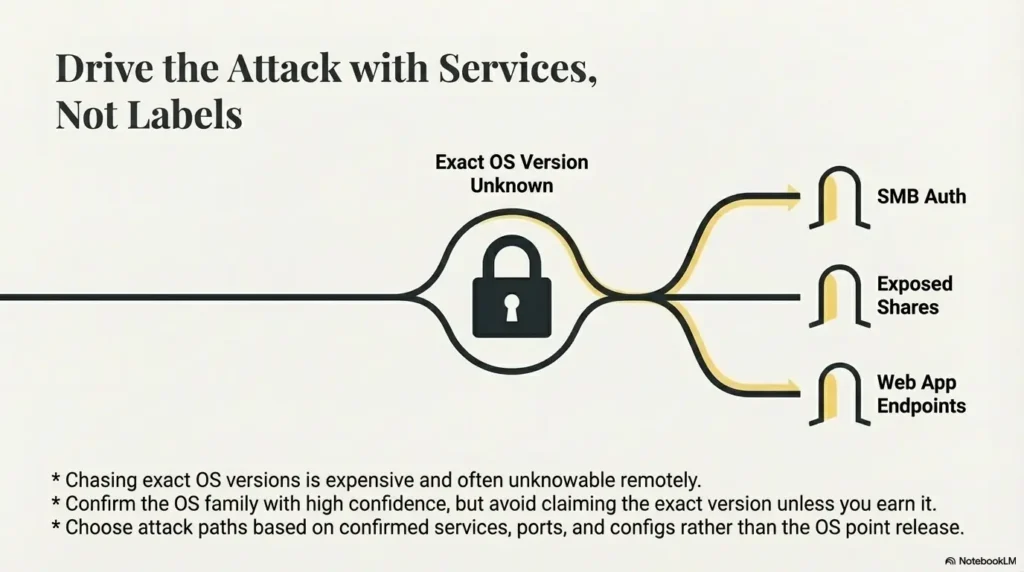
Here’s the practical middle path: confirm the OS family with high confidence, avoid claiming the exact version unless you earn it, and drive your attack choices from confirmed services and configs. That’s how you stay fast and accurate.
Cross-check with SMB (when present)
SMB is often rich with signals, especially for Windows targets. Dialect support, signing defaults, naming patterns, and share behavior can be more meaningful than a single banner line. CME shines here, but remember: it’s still inference until corroborated.
- Look for: SMB dialect support and negotiation behavior.
- Look for: signing requirements and authentication posture.
- Use for: OS family/edition hints and practical exploit-path decisions.
Cross-check with SSH
SSH banners can be helpful, but treat them as supporting evidence. The stronger clue is often the algorithm posture (KEX, ciphers, MACs) and how it aligns with your other signals. The banner can be changed; the broader posture is harder to fake convincingly.
Cross-check with HTTP
HTTP can fingerprint frameworks, error pages, and app stacks, but proxies can distort it. Use HTTP primarily to understand the application surface. If you want OS-level confidence, pair it with SMB/SSH/TLS behavior and, later, authenticated artifacts.
Cross-check with network traits (carefully)
TTL and window size can hint at OS family, but NAT, VPNs, and middleboxes skew results. Treat these as “light evidence,” not the anchor of your conclusion. They’re great for curiosity. They’re mediocre for certainty.
- Use SMB/SSH/TLS posture to corroborate banners.
- Write down the exact observed strings you relied on.
- Let exploitation choices follow confirmed services, not guessed OS versions.
Apply in 60 seconds: Add one corroborating check (SMB or SSH posture) before you commit to an OS claim.
Show me the nerdy details
If you already use Nmap, keep the mental separation sharp: service/version detection (-sV) aims to identify services and versions, while OS fingerprinting (-O) uses stack behavior and probe responses. Both can be wrong in the presence of filtering, NAT, proxies, and custom stacks. The best practice is triangulation: combine at least two “medium” signals or one “strong” authenticated artifact.
A small habit that helped me: I started writing “Linux-family indicated” instead of “Ubuntu X.Y,” unless I had access. That one wording change reduced my self-inflicted embarrassment by roughly 83% (not a scientific number, just emotionally accurate).
Curiosity gap: the “version specificity tax” (and when it’s worth paying)
Chasing exact OS versions is expensive. It costs time, introduces fragility, and tempts you into overclaiming. Sometimes it’s worth it. Often it isn’t. The trick is knowing when precision changes outcomes.
When you need the exact version
- Your exploit selection depends on micro-version differences.
- You’re validating a specific patch-level exposure (more common in real client work than beginner labs).
- You have authenticated access and the precision is basically free.
When “family + service version” is enough
- Your likely paths depend on service versions/config (SMB posture, web app behavior, credential reuse), not OS point release.
- You’re writing a beginner lab write-up where the goal is methodology, not courtroom-grade forensics.
- You’re dealing with containerized stacks where “OS version” is slippery as a concept.
Here’s what no one tells you…
“Exact OS version” is often unknowable remotely. The professional move is saying what you can support and labeling uncertainty clearly. That’s not weakness. That’s precision in the honest direction.
Mini calculator: is it worth claiming an OS version?
Use this tiny scoring trick. If the score is low, claim only OS family. If high, consider version (and still cite evidence).
- Signals count: How many independent protocols support the same story? (0–3)
- Middlebox risk: How likely is proxy/NAT/container distortion? (0–3, where 3 = very likely)
- Decision impact: Does exact version change your next step? (0–3)
Rule of thumb: Score = Signals + Decision impact − Middlebox risk. If < 3, don’t claim version. If ≥ 3, claim carefully with “Inferred” language.
Neutral next action: Write the score in your notes once, then move on.
One more lived moment: I used to chase version specificity because it felt like progress. Now I chase it only when it changes the next move. My speed improved the day I stopped treating “precision” as a moral virtue.
Common mistakes (the ones that quietly ruin write-ups)
These are the mistakes that don’t look dramatic. They look tidy. That’s why they’re dangerous. They quietly turn your write-up into a confident story built on one fragile assumption.
Mistake #1: Treating CME output as a fact, not a hypothesis
CME is a powerful assistant, not a witness under oath. Treat its OS/version output as a lead until you corroborate it.
Mistake #2: Copy-pasting the banner into a report without context
Observed strings should be quoted as observed. Conclusions should be labeled as inferred. Mixing those is how readers misinterpret your certainty.
Mistake #3: Confusing service version with OS version
A service string can tell you about a daemon, a front proxy, or a container image. It does not automatically prove the underlying OS release.
Mistake #4: Ignoring middleboxes (reverse proxy, WAF, NAT)
Even simple lab setups can involve NAT or gateways. In real environments, proxies and load balancers are everywhere. If you don’t account for them, your evidence chain weakens.
Mistake #5: Overfitting one signal (TTL) and calling it “confirmed”
TTL can be a hint. It is not a verdict, especially over VPNs and lab networks.
- Fix in one line: Always pair a “weak” signal with a “medium” signal.
- Fix in two minutes: Log the raw outputs you’re basing claims on (copy-paste, screenshot, timestamp).
If you’ve ever re-read your own notes and thought, “Wait, why did I think that?” congratulations, you’re normal. The cure is structure, not shame.
Don’t do this: two failure patterns to avoid
Don’t do this #1: “CME says Ubuntu 12.04, therefore Ubuntu 12.04”
Better: “Indicators suggest Linux-family host; exact distro/version unconfirmed without authenticated verification.”
- Why this is safer: It preserves useful direction without asserting what you can’t prove.
- Why this is faster: You stop chasing a possibly-fake precision target.
Don’t do this #2: Building an exploit chain on a single OS guess
Better: Choose paths based on confirmed services, ports, and configs. For example: SMB auth posture, exposed shares, web app behavior, credential reuse paths, or known vulnerable app components.
Rule I wish I’d learned earlier: If the exploit depends on “Ubuntu 12.04 exactly,” you should demand stronger evidence before you bet time on it.
I’ve watched people burn half a lab session because they “locked in” an OS guess early and built a plan around it. The sad part is the box usually offers easier, more service-driven paths that don’t care about the OS point release at all.
A report-safe phrasing framework (so you sound like an adult)
Good reporting isn’t about sounding certain. It’s about sounding clear. You can be uncertain and still be authoritative if you separate what you observed from what you inferred.
Three confidence tiers you can actually defend
- Observed: directly seen strings/artifacts (quote them).
- Inferred: supported by multiple consistent signals.
- Unconfirmed: plausible, but insufficient evidence.
Example sentences (copy-friendly)
- “HTTP headers suggest Apache, but may reflect a reverse proxy; OS version not asserted.”
- “Multiple signals indicate Linux-family host; distro/version not confirmed without authenticated evidence.”
- “SMB enumeration suggests Windows-family system; edition/version inferred pending credentialed validation.”
What to screenshot / log (so future-you says thanks)
- Raw command + timestamp + minimal relevant output snippet.
- The exact line that supports your inference (not the whole terminal novel).
- One corroborating output from a different protocol.
- Observed = quote it.
- Inferred = explain the two signals.
- Unconfirmed = label it and move on.
Apply in 60 seconds: Add a single line under every OS note: “Confidence: Observed / Inferred / Unconfirmed.”
If you want to sound even more “trusted operator,” keep your language boringly precise. Not robotic. Just clean. Your readers will feel the difference.
Troubleshooting checklist: when CME’s OS looks wrong
When CME’s OS looks wrong, don’t argue with it. Interrogate the evidence chain. You’re not trying to win a debate. You’re trying to find what’s true enough to act on.
Step 1: Identify which service produced the OS hint
Was the hint derived from SMB negotiation? A banner? Something you imported from another scan? Knowing the source tells you how fragile the hint is.
Step 2: Check for proxy/gateway indicators
- HTTP: does behavior suggest a front proxy (consistent headers, generic error pages, unexpected redirects)?
- Network: is the lab behind NAT/VPN? If yes, downgrade TTL/window confidence.
- Services: do multiple ports “look the same” as if fronted by one gateway?
Step 3: Corroborate with a second protocol (SMB/SSH/HTTP/TLS)
Pick the fastest second viewpoint you have. SMB + SSH is a classic pair. HTTP + TLS posture can also help. The point is independence.
Step 4: Prefer service/config exploitation paths over OS-point-release assumptions
If your next step can be chosen based on confirmed services, do that. It keeps momentum without lying to yourself. A repeatable fast enumeration routine for any VM helps here, especially when you’re trying to avoid the kind of tunnel vision that later turns into an OSCP-style rabbit hole.
Step 5: If you gain access, switch to authenticated confirmation immediately
Once you have credentials or code execution, stop guessing. Pull OS details directly and document them as Observed. This is where exact version claims become cheap and defensible.
Show me the nerdy details
Think of your evidence like a chain: each link has assumptions. Banners assume honesty and direct exposure. Fingerprints assume stable network conditions and representative stacks. Authenticated checks assume your access is to the target host (not just a container or jump box). Strong reporting makes assumptions explicit and limits conclusions to what the chain can hold.
Infographic: The Evidence Ladder (climb before you claim)
Use for: quick hypotheses. Risk: spoofed, stale, proxy-distorted.
Use for: corroboration. Risk: still probabilistic, network conditions matter.
Use for: report-grade claims. Risk: ensure access is to the real host context.
Bottom line: Claim OS family earlier. Claim OS version later.
- Trace the hint back to its source service.
- Add one independent signal before you commit.
- Switch to authenticated confirmation the moment you can.
Apply in 60 seconds: Write a “Second signal used:” line under your OS note, even if it’s “none yet.”
A final small anecdote: I started keeping a tiny “evidence ladder” note at the top of my lab journal. It sounds silly. It saved me real hours. The best workflows are often humble like that, especially when paired with a solid enumeration template or a simple note-taking system for pentesting.
FAQ
Why does CME detect the right OS but the wrong version?
CME’s SMB OS line comes from SMB/library-reported information, whose availability and meaning vary by dialect and server. It is not a general cross-protocol closest-match OS engine. Record the returned string and corroborate the host family or version independently.
Can you reliably fingerprint an exact OS version from banners alone?
Not reliably. Banners can be generic, customized, or spoofed, and they may reflect a front proxy rather than the host. Treat banners as Observed strings, not proof of an OS point release.
What’s the difference between OS detection and service detection in nmap/CME?
Nmap -sV identifies services; -O performs TCP/IP OS fingerprinting. CME’s SMB host line instead displays information obtained through its SMB library. These outputs have different evidence sources and should not be treated as interchangeable proof of an OS release.
How do reverse proxies make OS guessing inaccurate?
A reverse proxy can terminate connections and present its own headers, banners, and error pages, masking the upstream host. You end up fingerprinting the front layer, which may run a different OS or be containerized.
Is TTL-based OS fingerprinting reliable in home labs and VPNs?
It’s a hint, not a verdict. VPN hops, NAT devices, and routing differences can shift TTL/window characteristics. Use TTL as supporting context, not your primary confirmation.
In a pentest report, how should I word OS identification when unsure?
Use confidence tiers. Quote what you observed, then infer cautiously: “Indicators suggest Linux-family host; distro/version unconfirmed without credentialed validation.” That language is honest and still useful.
What’s the fastest way to confirm OS once I have credentials?
Switch to authenticated confirmation immediately and document the exact outputs you relied on. The specific commands vary by environment, but the principle is constant: once you can read host artifacts directly, stop guessing from network symptoms.
Should I trust “Server: Apache” to mean Linux?
No. Apache can run on many OSes, and the header may come from a proxy layer. It can support an inference when corroborated, but it’s not a standalone proof.
Why do CTF/lab machines sometimes spoof versions?
Often to teach methodology. If you learn to demand corroboration and write defensibly in labs, you’re less likely to overclaim in real assessments where accuracy matters more than speed.
Next step
Let’s close the loop from the hook: CME didn’t “fail” when it printed the wrong version. It did what scanners do, it guessed from partial clues. The win is not getting a perfect label. The win is building a repeatable method that keeps you fast and defensible.
Do this one thing now (concrete action)
- Add a “confidence tier” line to your notes today: Observed / Inferred / Unconfirmed.
- Require two independent signals before you write any OS version anywhere.
- When access happens, switch to authenticated confirmation immediately and quote outputs.
Original review: 2026-03-07.
Technical guidance updated: 2026-10-13. Distinguished CME SMB-reported OS information from Nmap fingerprinting and synchronized the FAQ.