


Ligolo-NG Setup Guide
Solving the NAT-induced “Velvet Curtain” effect.
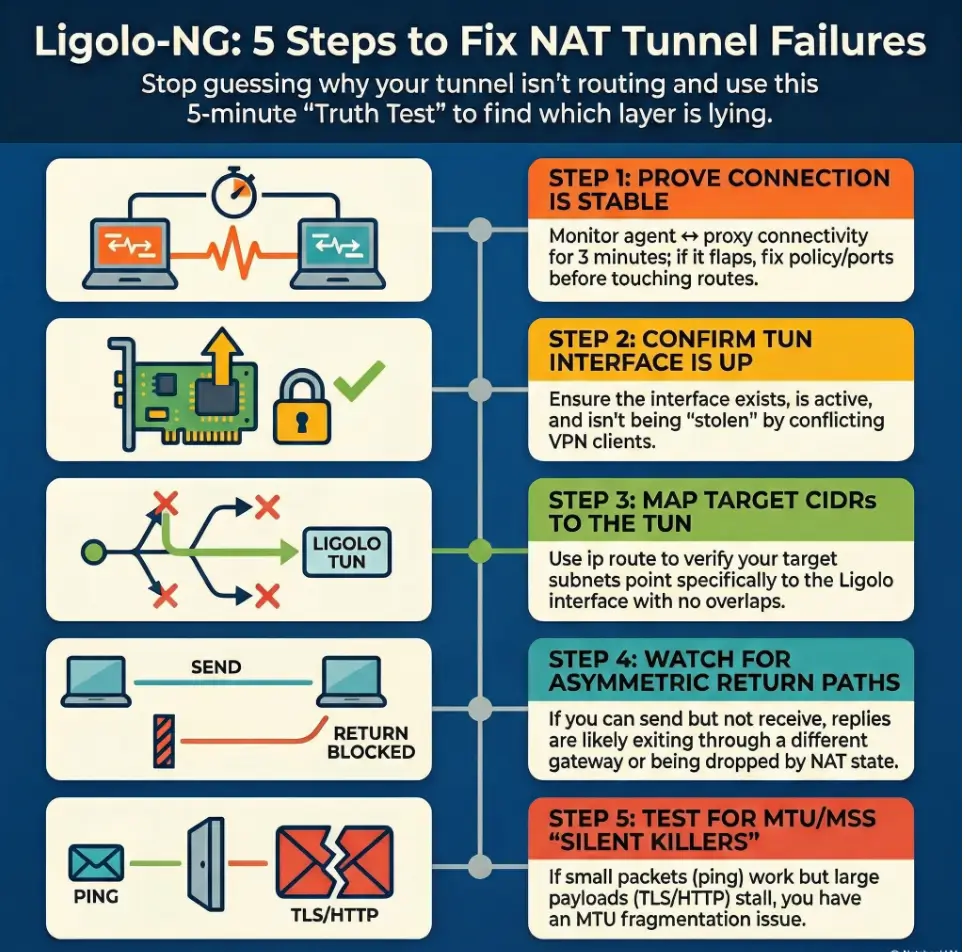
“Agent connected.” Tunnel started. Then every packet you send into the internal network evaporates like it hit a velvet curtain. The fastest way out is not another restart, not another route you half-remember. It’s a 5-minute truth test that tells you which layer is lying.
This guide is for the specific kind of pain NAT creates: a tunnel that exists but won’t carry traffic behind the boundary. When you keep guessing, you lose more than time, you risk blackholing your own internet, tripping detections, or burning credibility with the client contact holding the firewall logs.
Ligolo-NG is a TUN-based tunneling/pivoting tool that routes selected CIDRs through a virtual interface, making internal access feel like “normal networking.” In NAT environments, the usual culprits are bind/listen mistakes, stolen or missing routes, asymmetric return paths, and MTU/MSS problems.
The Protocol for Success:
- ✔️ Prove agent ↔ proxy stability first
- ✔️ Verify TUN state and route decisions
- ✔️ Test return traffic directionally
- ✔️ Only then touch MTU/MSS and timeouts
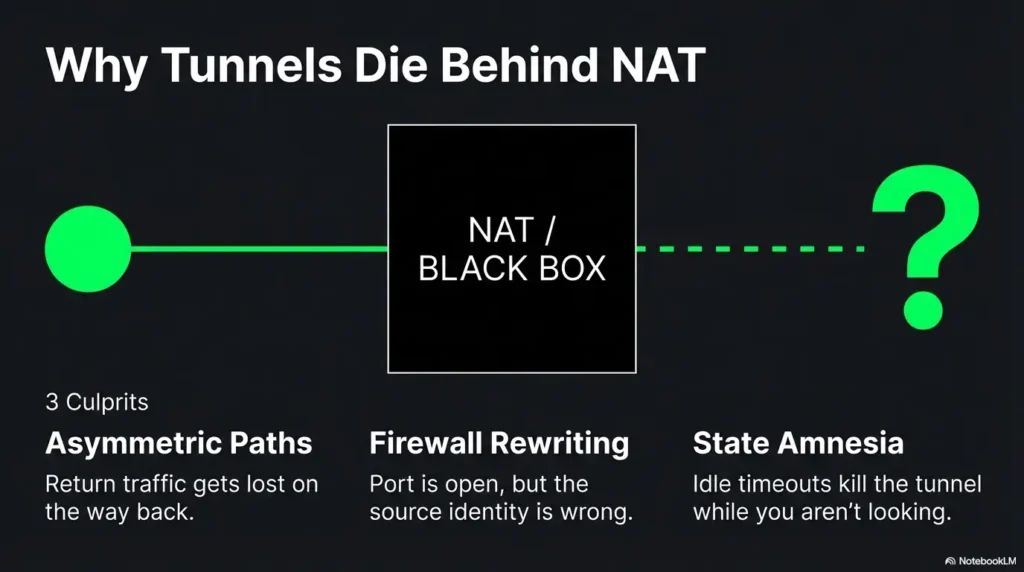
Tunnel failures in NAT environments usually come from three culprits: the wrong bind/listen interface, routing that never makes it back (asymmetric paths), or firewall/NAT rewriting that breaks reachability. Start by verifying agent-to-proxy connectivity, then confirm your TUN interface is up and routes point to it. Next, test return traffic (ping/traceroute) from both sides. Finally, adjust allowed ports, bind addresses, and routes to match the NAT boundary.
Table of Contents
Who this is for / not for
Who this is for
- Authorized pentesters/red teamers using Ligolo-NG for legitimate internal access and pivoting (pair well with a documented penetration test SOW template)
- Defenders validating segmentation/NAT behavior during sanctioned tests using a disciplined security testing strategy
- Anyone stuck in “agent connects… but nothing routes” limbo
Who this is not for
- Anyone attempting access without explicit written authorization (also review penetration test limitation of liability language so scope stays clean)
- “Just curious” internet scanning or bypass attempts (don’t)
A quick operator confession: the first time I hit this failure mode, I spent 45 minutes “fixing routes” that weren’t broken. The real issue was simpler: my connectivity was flapping and I was diagnosing ghosts. This guide is structured to prevent that exact spiral.
- Connectivity is the foundation, not a checkbox
- Routes only matter once packets actually move
- NAT problems often look like routing problems
Apply in 60 seconds: Keep a small timestamped log of connect/disconnect events before touching routes.
NAT reality check: what actually breaks tunnels first
NAT isn’t evil. It’s just selective about what it remembers. It translates addresses, tracks “state,” and quietly discards anything that doesn’t fit the story it’s currently telling. Tunnels fail behind NAT because your packets take a path your diagram didn’t include, or because the NAT device forgets your session existed.
NAT pattern #1: “Outbound works, return path lies”
- Symptoms: agent connects, but internal subnets are unreachable
- Why: return traffic follows a different route than your tunnel expects (asymmetric routing)
NAT pattern #2: “Port is open… from the wrong place”
- Symptoms: works on your lab, fails on client
- Why: firewall rules allow the port, but not from the NATed source you actually appear as (this is where a vendor security questionnaire mindset helps you ask the right “what do you see on your side?” questions)
NAT pattern #3: “Double NAT and the disappearing host”
- Symptoms: intermittent connectivity, random timeouts
- Why: multiple translation layers, short idle timers, state table churn
H3 micro (pattern interrupt): Let’s be honest…
You’re not “bad at networking.” NAT is a magic trick that forgets to tell you where it hid the rabbit.
Show me the nerdy details
NAT behavior varies by implementation. The IETF has published behavioral requirements for NATs (especially around how mappings and filtering behave for UDP). Real enterprise devices also apply policy layers that are not “NAT” in the pure sense, like stateful inspection rules, session normalization, and idle timers that reset based on specific traffic patterns.
Money Block: Eligibility checklist (binary yes/no + next step)
- Yes/No: Do you have written authorization and a defined scope? (If you’re formalizing it, start from a pen test SOW template.)
- Yes/No: Can the agent reach the proxy consistently (no flaps for 2–3 minutes)?
- Yes/No: Do you know the exact target CIDR(s) you’re trying to reach?
- Yes/No: Do you have a client contact for firewall/NAT log checks if needed? (If this is a recurring need, consider aligning expectations via an incident response retainer-style escalation path.)
Neutral next step: If any answer is “No,” fix that first. It shortens the whole engagement.
Baseline setup sanity: confirm the tunnel exists before you debug routes
Ligolo-NG is designed around a TUN interface that your system routes traffic into. If the tunnel isn’t actually stable, routes are just wishful thinking with extra steps. Ligolo-NG’s own documentation emphasizes starting the tunnel and then setting up routing in a deliberate order. That order is your friend when NAT is being temperamental.
Validate agent → proxy connectivity (first, always)
- Confirm the agent reaches the proxy IP/port consistently (not “once, triumphantly”)
- Watch for connect-then-drop patterns: timeouts vs resets hint at different controls
- Log timestamps: “connected at 10:14:03, dropped at 10:15:12” beats “it’s flaky” (keep your evidence clean with a simple Kali lab logging habit)
A small memory from a client network: I once saw an agent “connect” every time, but drop at roughly the same interval. It turned out to be an idle/session policy on the path. The tunnel wasn’t broken. The network just had a short attention span.
Confirm your TUN interface is up and owned by the right process
- Ensure the interface exists, is UP, and has the MTU you expect
- Watch for conflicts with VPN clients or other TUN/TAP tools (they love stealing routes)
- On macOS, Ligolo-NG docs note you may need to use a specific
utundevice name
Confirm your local host firewall isn’t quietly sabotaging you
- Local firewall rules can block forwarded traffic even if the tool “connected”
- Check both inbound and outbound rules relevant to the TUN interface
- Prefer targeted allow rules over “turn it off and pray”
- Stability test beats single success
- TUN up and conflict-free matters
- Host firewall can silently block forwarding
Apply in 60 seconds: Write down the TUN interface name and expected CIDR list before touching any routes.
Failure signature decoder: map the symptom to the fastest likely cause
This is where we stop improvising. When a tunnel fails in NAT environments, the symptom usually points to one of four buckets: route missing, route stolen, return path asymmetric, or stateful interference (firewall/NAT timers/inspection). The goal is to identify the bucket fast, not to “try a bunch of stuff.”
Symptom: “Agent connects, but no internal ping”
- Likely: missing route to the target subnet(s) via the tunnel interface
- Also: target ICMP blocked (don’t over-trust ping)
Symptom: “One subnet works, others don’t”
- Likely: partial route table, overlapping CIDRs, policy routing, or a second VPN stealing specific ranges (for multi-network labs, sanity-check your topology like VirtualBox NAT vs host-only vs bridged setups do)
Symptom: “DNS works, TCP dies”
- Likely: MTU/MSS issues, stateful firewall interference, or asymmetric routing
- Reality check: DNS answers can be cached or served locally; don’t assume “DNS works” means “path works” (and avoid accidental name-resolution surprises like proxy DNS leak behavior)
Symptom: “Works for 2 minutes then collapses”
- Likely: NAT idle timeout, keepalive missing, or state table pressure
A quick field note: I’ve seen “works for 2 minutes” caused by a screen-lock policy that killed a process, not the network. So yes, also check the boring OS stuff. It’s rude how often that wins.
Money Block: Decision card (When A vs B; time/cost trade-off)
When it’s routing
- Agent stable for 3+ minutes
- TUN is UP
- Some subnets work, others don’t
Time cost: ~10–20 minutes to audit routes and overlaps.
When it’s return path / state
- TCP stalls but small packets succeed
- Works briefly then drops
- Traceroute differs by direction
Time cost: ~15–30 minutes with evidence + client firewall/NAT logs.
Neutral next step: Pick the card that matches your symptoms and follow that path only.
Routes that don’t lie: building a clean path through a NAT boundary
Routes are the steering wheel. NAT is the passenger who keeps grabbing it. Your job is to keep steering intentional: target CIDRs into the Ligolo TUN, avoid overlaps, and validate the return path. The Linux ip route tooling is the canonical way to view and manipulate routes on most operator boxes, and it’s brutally honest about what the kernel will do.
Route checklist: the three lines that decide everything
- Route to target subnet(s) points to the Ligolo TUN
- No overlapping routes are stealing traffic (common with VPNs and lab ranges)
- Default route remains sane (don’t blackhole yourself)
Personal scar tissue: I once added a “helpful” broad route in a hurry and watched my own DNS go sideways. My notes said “progress,” my browser said “absolutely not.” Keep routes precise and reversible.
Asymmetric routing trap: when traffic returns “the normal way”
Asymmetric routing is the classic “I can send it, but the reply never returns to the tunnel.” This is especially common when the target network has multiple gateways, policy-based routing, or internal firewalls that treat tunneled traffic differently.
- Detect it: run traceroute (or equivalent) from multiple vantage points, including from inside the network if you have a foothold host that can test outward.
- Interpret it: if the forward path goes through the tunnel but the return path exits via a different gateway, you’ll see stalls, one-way connections, or “SYN sent, no SYN-ACK.”
- Fix patterns: adjust routes on the right side of the NAT boundary, ensure replies are routed back into the tunnel, and confirm no “better” default route steals replies.
Show me the nerdy details
Many “it’s blocked” reports are actually “the reply went somewhere else.” TCP is unforgiving: you can see outbound SYNs, but without the return SYN-ACK, you’ll time out and start blaming the tunnel. Use route lookups (ip route get on Linux) and direction-aware tests to confirm which gateway the system selects for the destination and for the source.
Split tunneling (intentional) vs split brain (accidental)
- Intentional split tunneling: only specific internal CIDRs route to the tunnel
- Accidental split brain: your VPN routes one part, Ligolo routes another, and neither sees the full conversation
- Route only what you need
- Check overlaps before blaming NAT
- Validate return path directionally
Apply in 60 seconds: Do a route lookup for one target IP and confirm it points to your Ligolo TUN interface.
Want the official reference points?
The bind/listen gotcha: when you’re listening, but nobody can reach you
In NAT environments, “listening” is not the same as “reachable.” If you bind to the wrong interface, you might be listening on a private address that the agent can’t reach, or on localhost where only your own machine can hear you whispering. This is one of those failures that feels insulting because everything looks correct on your screen.
Binding to 127.0.0.1 vs 0.0.0.0 vs a specific interface
- 127.0.0.1 (localhost): only local processes can connect. Great for safety, terrible for remote agents.
- 0.0.0.0 (all interfaces): convenient, but be intentional. Ensure scope and firewall controls match your engagement rules.
- Specific interface/IP: best for precision. Use when the host is multi-homed (VPN + Wi-Fi + cloud NIC) and you need predictable behavior.
Operator anecdote: I once bound to a VPN interface out of habit and then wondered why the agent “couldn’t see” the proxy. It could see it fine. I just put the door on the wrong side of the building.
Port selection under NAT and egress filtering
Some networks allow only a small set of outbound ports. During authorized work, pick ports that align with the client’s policies and your rules of engagement. Your goal is stability and auditability, not cleverness. If you’re deciding between tunnel approaches, this is a good moment to revisit pivoting tool choice trade-offs in constrained networks.
- Document your chosen port and why it fits the engagement constraints.
- If egress is strict, coordinate with the client contact for a policy-compliant allow rule.
- When a port “works in the lab,” treat that as entertainment, not evidence.
H3 micro (pattern interrupt): Here’s what no one tells you…
In locked-down networks, the “best” port is the one that’s already allowed outbound, not the one that looks neat in your notes.
MTU & MSS: the silent tunnel killer in “almost working” setups
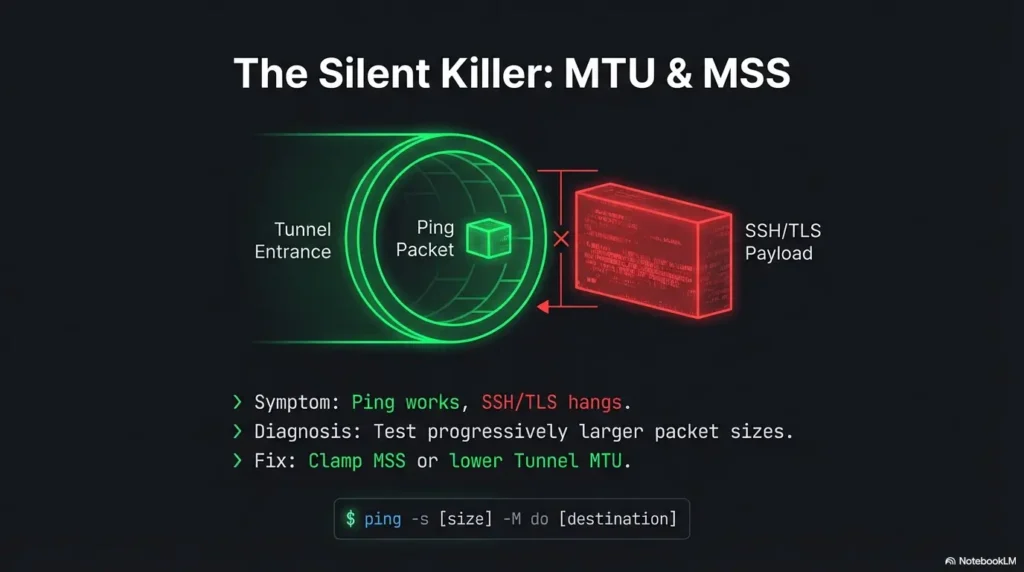
MTU issues are the tunnel equivalent of a hairline fracture: you can walk on it until you can’t. You’ll see small requests succeed, then larger payloads stall. TLS handshakes can fail in ways that feel supernatural: the kind of failure that makes strong coffee taste like doubt.
How MTU issues show up in real life
- Small requests succeed, larger payloads stall
- TLS handshakes fail “randomly”
- Some apps work while others hang (because packet sizes differ)
Quick MTU triage
- Test progressively larger packet sizes (don’t guess)
- Adjust tunnel MTU or apply MSS clamping where appropriate and allowed
- Re-test with the same target and the same protocol after each change
Money Block: Mini calculator (inputs ≤3)
Goal: Estimate a safe TCP payload size when you suspect MTU pain.
Inputs: (1) Path MTU guess (e.g., 1500, 1420, 1380) (2) IP header (20) (3) TCP header (20)
Estimated max TCP payload: (click Calculate)
Neutral next step: Use this as a starting point, then validate with real packet tests on your path.
When it’s not MTU
- Middleboxes doing “helpful” inspection that changes traffic timing or segmentation
- Stateful firewalls enforcing odd session rules (especially around long-lived connections)
- Asymmetric routing masquerading as “random hangs”
A quick story: I once blamed MTU for half an hour because “small works, big fails.” Turns out the app was switching from UDP-based discovery to TCP for the actual transfer, and TCP replies were taking a different gateway. Same symptom, different villain.
Common mistakes (the ones that waste an entire afternoon)
Troubleshooting is mostly avoiding self-inflicted wounds. Ligolo-NG adds a powerful moving piece (a TUN-based path). NAT adds another. Here are the mistakes that reliably eat daylight.
Mistake #1: Debugging routes before proving connectivity
- Fix: verify agent ↔ proxy stability first (watch it for a few minutes)
Mistake #2: Adding a broad route that steals unrelated traffic
- Fix: route only the needed CIDRs; confirm with route lookups before and after
Mistake #3: Forgetting the return path exists
- Fix: validate reply routing from inside the target network where possible
Mistake #4: Treating ping as truth
- Fix: test multiple protocols (DNS, TCP, HTTP) and interpret selectively
- Stability → interface → routes → return path → MTU
- Keep changes small and reversible
- Use evidence, not vibes
Apply in 60 seconds: Write down “what changed” after each test so you can undo the last move.
Don’t do this: “quick fixes” that create bigger incidents
These are the shortcuts that “work” just long enough to create noise, break policy, or sabotage the engagement. I’ve seen all three. My least favorite is when the tunnel “starts working” right as everyone loses trust in the testing process.
Don’t disable host firewalls as a shortcut
- You’ll introduce uncontrolled variables and risk policy violations
- Prefer a narrow allow rule tied to your engagement scope
Don’t route the entire internet through a fragile pivot
- You’ll create noisy traffic, trigger detections, and lose stability
- Also: your own browsing will become a troubleshooting distraction
Don’t stack multiple tunnels without a diagram
- Debugging without a path map is self-inflicted chaos
- Draw it. Even a messy napkin diagram beats memory
Operator confession #2: I once stacked a VPN plus a tunnel plus a second pivot and told myself I’d “remember the path.” I did not remember the path. The path remembered me, though, and punished me for it.
Minimal logging strategy: capture the evidence you’ll actually use
You don’t need a thousand lines of logs. You need the right three screenshots and one short timeline. This is especially true when you need a client-side check (firewall/NAT logs) and you want to sound competent, not accusatory. If you want a repeatable standard, borrow from how to read a penetration test report thinking: evidence first, interpretation second.
What to log on the attacker side
- Interface state: TUN exists, UP, MTU
- Route table snapshots before/after changes
- Connection timestamps: connect, drop, reconnect
- One representative test per protocol (ICMP, TCP) with timestamps
What to log on the pivot/agent side
- Connection attempts and drops
- Keepalive behavior (if configured) and whether drops correlate with idle time
- Local network context: default gateway and reachable subnets
What to request from the client (without sounding accusatory)
- Firewall logs for the relevant source/destination/port window
- NAT device session timeouts and policy notes (especially for long-lived sessions)
- Confirmation of egress policy for the port/protocol in scope
Money Block: Quote-prep list (what to gather before comparing)
- Target CIDR list (exact subnets, not “the internal network”)
- Known-good internal host + port (one service you’re allowed to test)
- Your visible source IP as seen by the client side (NATed identity)
- A 5-minute timestamp window for “it fails here”
- Whether ICMP is blocked in policy (so you don’t overread ping failures)
Neutral next step: Share this list with the client contact before asking for logs.
Next step: one concrete action (do this now)
Run a 5-minute “truth test” checklist
This is the part that saves you from “I tried everything.” You’re going to run three tests that answer three questions: (1) Is the connection stable? (2) Are routes pointing where you think they are? (3) Does return traffic come back through the tunnel?
- Confirm agent ↔ proxy stability: watch for 2–3 minutes. No flaps.
- Confirm TUN is UP + routes to target CIDRs point to it: verify one target IP’s route decision.
- Run one TCP test to a known internal host/port and trace the return path: if you can’t trace from inside, capture enough evidence to ask the client to verify the return path and firewall logs.
Short Story: The last time I hit “agent connected, nothing routes,” I did what every tired operator does: I blamed the tool. I swapped ports. I restarted everything. I even muttered apologies to the routing table. Then I forced myself to run a boring timeline. The agent was reconnecting every couple minutes. Not crashing, reconnecting.
The tunnel never had time to build reliable state, and my “tests” were landing in the gaps. Once I proved the drop cadence, the fix became obvious: it wasn’t a routing puzzle. It was a session stability puzzle. The client confirmed a stateful device was expiring idle mappings aggressively. After that, the tunnel became boring, which is the highest compliment a tunnel can receive.
FAQ
Is Ligolo-NG better than SSH dynamic port forwarding for NATed networks?
Different tools fit different constraints. Ligolo-NG uses a TUN-based approach that can feel more “native routing” than a SOCKS-style workflow, which many operators find easier for broad subnet access. SSH dynamic forwarding can be simpler to explain and sometimes easier to pass through strict controls. In NATed networks, stability and return path matter more than the brand name of the tunnel.
Why does my agent connect but I can’t reach any internal subnet?
The two fastest causes are (1) missing or incorrect routes to the target CIDR via the Ligolo TUN, or (2) return traffic exiting a different gateway (asymmetric routing). Prove the tunnel is stable first, then verify a single target IP’s route decision and test return-path behavior with direction-aware testing.
What routes do I need to add for Ligolo-NG to reach a new CIDR?
Conceptually: a route for the new CIDR that points to your Ligolo TUN interface, and no overlapping route that steals that CIDR. The exact syntax depends on OS, but the principle is consistent: the kernel must choose the TUN as the next hop for those destination addresses.
How do I know if this is asymmetric routing vs a firewall block?
Asymmetry often shows “one-way” behavior: outbound packets leave, replies never return. Firewalls often show consistent resets or consistent drops for a given tuple (source/dest/port). The most reliable way to separate them is to capture a small evidence set (timestamps + one TCP attempt) and compare forward vs return path from available vantage points, then request client firewall/NAT logs for that window.
What ports usually work best through enterprise NAT/egress filtering?
There’s no universal answer because it’s policy-defined. In authorized work, choose a port/protocol combination that the client confirms is permitted and can be logged cleanly. If the environment is strict, coordinate a temporary allow rule rather than “port roulette.” Stability beats surprise.
Why does it work for a minute and then stop (NAT timeout)?
Many NAT and stateful devices expire idle sessions. If your tunnel traffic goes quiet (or looks idle to an intermediate device), mappings can drop and you’ll see sudden collapse after a short interval. Confirm this by correlating drop time with inactivity, then address it through engagement-approved keepalive behavior or policy adjustments.
Can MTU problems break a tunnel even when “connected”?
Yes. The transport connection can stay up while higher-layer traffic stalls due to fragmentation/PMTUD issues. If small payloads work and larger ones hang, treat MTU/MSS as a prime suspect and test progressively rather than guessing.
How do I troubleshoot when ICMP is blocked (ping fails)?
Use TCP-based tests to known allowed services (a host and port in scope), and validate routing decisions with route lookups rather than relying on ping. You can still test reachability; you’re just using a protocol the network actually permits.
Conclusion
Remember the hook: “agent connected” and nothing routes. The curiosity loop closes here: in NATed environments, the tunnel usually isn’t failing randomly. Something is consistently lying, and your job is to catch it in the act. If you follow the order (stability → TUN → routes → return path → MTU), you’ll stop throwing guesses at a problem that demands proof.
If you want two reliable reference points for the parts people argue about, the IETF’s NAT behavioral work is a solid grounding for how NATs can behave, and the Linux routing docs keep you honest about what your box will actually do.
Do this in the next 15 minutes: run the 5-minute truth test checklist, capture one clean timeline (connect/drop), one route snapshot, and one TCP test result. If it still fails, you now have the evidence to ask the client for a targeted firewall/NAT log check without turning the call into interpretive dance. When you’re packaging that evidence for stakeholders, keep it report-ready using penetration test report reading structure: what happened, what you proved, what you need from the client side.
Last reviewed: 2026-02-20