
Open the practical working record for this guide’s task-specific fields and next action.
Read the probe result before changing scan scope
Record target scope, privilege level, route and selected discovery probes. Silence may reflect filtering, loss or an absent host, so do not label all nonresponders down. Skipping discovery can increase work on unreachable addresses, and local Ethernet neighbor discovery may still occur. A port result needs its own state/reason interpretation. Use a narrowly permitted comparison rather than treating -Pn as a universal speed or connectivity fix. Source and scope.
Taming the “Host Seems Down” Ghost: A Guide to Reliable OSCP Enumeration
There’s a special kind of OSCP lab misery where you know the box exists—yet Nmap stares back with “0 hosts up.” You don’t just lose minutes. You lose momentum, then judgment, then the whole rhythm of enumeration.
The Truth: Most “ping failed” moments aren’t a dead host—they’re a host discovery mismatch across a VPN where ICMP (and sometimes other probes) gets filtered.
Core Definitions
- -sn: Runs host discovery only (no port scanning). It depends on discovery probes like ARP on local networks and ICMP/TCP/UDP-style checks depending on context.
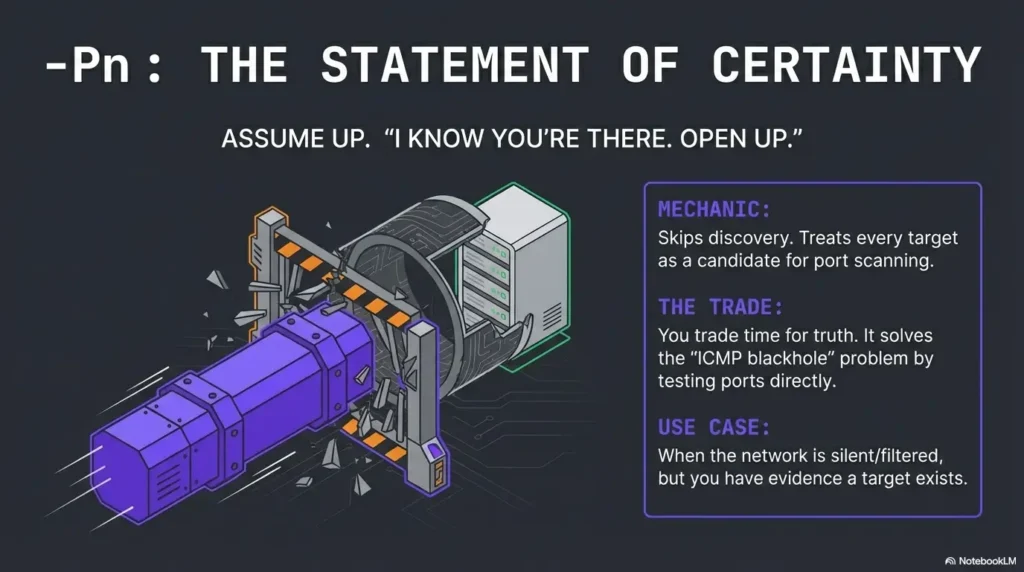
- -Pn: Skips IP host discovery and assumes targets are up. This moves straight to port scanning—it is more reliable when probes are blocked, but often slower and noisier.
If you keep guessing, you’ll keep burning time on false negatives and expanding scan scope out of stress. This post gives you a repeatable, two-command baseline to choose speed vs. certainty—without turning enumeration into a timeout marathon. (If you want a broader “default rhythm” for first contact, pair this with a fast enumeration routine for any VM so you’re not reinventing your flow every subnet.)
Good. Now let’s make your scans trustworthy.
-sn suppresses port scanning and normally performs host discovery. -Pn skips IP host discovery and attempts the requested scan against every target. Local Ethernet ARP/IPv6 Neighbor Discovery may still occur. Combining -Pn -sn skips discovery and port scanning; “up” from the assume-up mode is not proof of reachability.
Table of Contents
Safety / Disclaimer (authorized-only)
Use these techniques only on systems you own or are explicitly authorized to test (labs, CTFs, written permission). Host discovery and scanning are dual-use. Keep your scope tight, your rates sane, and your notes clean—especially if you’re building exam-style habits where you’ll need to explain what you did and why you did it.
- Good: lab ranges provided by your platform, targets you control, written scopes
- Not good: public IPs, “curiosity” scanning, production networks without permission
Operator truth: “I was just checking if it’s up” still counts as scanning. Treat discovery like a real action with real consequences.

Who this is for / not for
For: lab operators who keep seeing “0 hosts up”
- OSCP/PNPT-style VPN labs where ICMP is filtered or inconsistent
- NAT/segmented networks where ARP discovery doesn’t apply
- Time-boxed enumeration where “false down” wastes hours (if you tend to spiral, hardwire a stop condition with an OSCP rabbit hole rule)
Not for: anything outside written scope
- Any production or public targets without permission
- Internet-wide scanning (that’s not “learning,” that’s risk)
The real reason “ping fails” in labs
ICMP isn’t the only “ping” Nmap uses
When most people say “ping,” they mean ICMP echo. But Nmap’s idea of “Is this host up?” can involve multiple probe types, and it changes based on where you are in the network and what privileges you have.
In plain terms, Nmap host discovery may use:
- ARP discovery on local Ethernet (fast and decisive when you’re truly L2-adjacent)
- ICMP probes (echo and other ICMP types depending on settings)
- TCP/UDP-style probes when you enable them (or when defaults apply in certain contexts)
Nmap’s own documentation describes host discovery as a flexible system of probes—not a single “ping.” That’s why “ping fails” often means your chosen probes are filtered, not that the host is down.
Curiosity gap: the “up” that never shows
Here’s the brain-bender: a host can be reachable on a TCP port and still appear “down” to discovery. Why? Because many lab networks (and plenty of real ones) will happily drop ICMP while allowing selected TCP traffic. Discovery says “no reply,” but a service might still answer if you actually try it.
- Discovery probes can be filtered while services remain reachable.
- ARP only helps when you’re truly on the same L2 segment.
- In labs, “false down” is common by design.
Apply in 60 seconds: When discovery says “down,” treat it as “no discovery reply,” then validate with a follow-up scan method you can justify.
-sn, defined: discovery-only (and what it still sends)
What -sn actually does
-sn is host discovery only. No port scan. No “find me open ports.” It’s basically Nmap saying: “Who looks alive according to my discovery probes?”
That makes -sn great for triage when you want a quick list of likely-live hosts—as long as discovery is trustworthy in your environment.
What changes when you add targets across subnets
On a local Ethernet segment, ARP discovery can feel like cheating in a good way: fast, low drama, and usually correct. But across a VPN or routed subnets, ARP doesn’t cross the boundary. Suddenly your discovery depends on other probes, which may be filtered or rate-limited.
That’s why a “ping sweep” mindset breaks in labs. You’re not sweeping a LAN. You’re talking across a controlled tunnel where the rules are not yours.
Show me the nerdy details
At a high level: ARP is a link-layer protocol used to map IPs to MAC addresses on a local network segment. Routers don’t forward ARP broadcasts across subnets, so ARP-based “who is alive?” logic won’t work over routed links or most VPN setups. In those cases, discovery depends on probes that can traverse the route (ICMP, TCP, UDP)—and those are exactly the things labs frequently filter to shape learning objectives.
Here’s what no one tells you…
The fastest scans are the ones that avoid the wrong kind of “proof.” If your discovery probes are blocked, -sn can become a time sink because it’s waiting for replies that will never come. That doesn’t make -sn “bad.” It makes it mismatched to the environment.
-Pn, defined: “assume up” (the trade you’re making)
What -Pn flips in your workflow
-Pn skips IP host discovery and attempts the requested scan against every supplied target. Local Ethernet ARP or IPv6 Neighbor Discovery may still occur. Check actual probe responses rather than treating its assumed “up” status as independent evidence.
That means:
- No waiting on discovery replies
- Every target is considered a candidate for port scanning
- You trade “is it up?” logic for “does it respond to port probes?” logic
Hidden cost: time and noise multipliers
-Pn is often the right move in ICMP-hostile labs—but it’s not free.
- More targets scanned → more time
- More timeouts → more frustration
- More scanning surface → more noise (and in real environments, more logs)
In labs, the “noise” part is mostly about speed and mental bandwidth. In real environments, it’s about operational impact. Same tool, different stakes.
Curiosity gap: why -Pn can feel “magically accurate”
It’s not magic—it’s refusing to ask permission to scan. If the environment blocks the question (“are you up?”), -Pn skips the question and tests for responses where it matters: ports.
-Pn is reliability-first—but you pay with time at scale.
- Great for “ICMP-blackhole” networks.
- Bad for huge ranges when you have no other signal.
- Best when you already have a reason to believe targets exist.
Apply in 60 seconds: Use -Pn on a smaller, evidence-backed target set before expanding your scope.
- When A (-sn): You’re L2-adjacent (ARP likely works) or discovery is known to be reliable.
- When B (-Pn): You’re across VPN/subnets, ICMP is filtered, or “false down” keeps happening.
- Time trade-off: -sn is fast when it works; -Pn is consistent when discovery lies.
Neutral next step: Pick one approach and run it on 3–5 known targets to calibrate your lab before scanning the whole range.
Official docs note: If you want the authoritative deep dive, read the official Nmap host discovery documentation and the Nmap manual (kept as text here so this post remains internal-link clean).
Decision rule: speed vs certainty (a lab-first flowchart in words)
Start with the least expensive signal
Think like an operator, not like a flag collector. Your job is to spend the least time getting the most reliable signal.
- If you’re on the same LAN segment: discovery-first thinking can be cheap and accurate (ARP can shine).
- If you’re on a VPN/subnet: discovery may be unreliable by default, so don’t cling to it out of habit.
Then switch when the evidence says so
If you have any reason to believe a host is up—routing works, you’ve seen hints, another tool indicates reachability, the lab notes imply presence—then -Pn can prevent the “false down” rabbit hole.
Let’s be honest… Most lab time is lost not to hard boxes. It’s lost to believing your tooling too literally. (And if you need a quick “stop wasting time” guardrail, wire in a timebox like OSCP Hydra timeboxing—same principle, different tool: spend minutes, not emotions.)
I picked a single IP from the range, ran an assume-up scan approach, and suddenly got a quiet response on a port I wasn’t expecting. The subnet wasn’t dead. My discovery question was. The lesson wasn’t “always use -Pn.” The lesson was “stop demanding one kind of evidence when the environment refuses to provide it.” After that, I wrote a two-command baseline and never had to relive that hour again.
Common mistakes: the two that tank OSCP time
Mistake #1: treating “Host seems down” as a fact
It’s a conclusion based on discovery probes. In labs, discovery probes are frequently filtered. So “seems down” is more like: “didn’t reply the way I asked.”
If you internalize that phrasing, your behavior changes. You stop spiraling. You start validating.
Mistake #2: using -Pn on a massive range too early
This is the other trap: you learn -Pn works, so you use it everywhere, immediately, on everything. Suddenly a quick triage becomes a slow grind. Your scan output becomes harder to prioritize, and your brain starts skipping lines because it’s tired.
- Discovery is useful when it’s reliable.
-Pnis useful when you have evidence and need certainty.- Scope control beats flag collecting.
Apply in 60 seconds: Start with 3–5 targets, confirm your “up” signals, then expand in measured chunks.
Don’t do this: “fixing” discovery by cranking aggression blindly
Why “just go faster” backfires
When results look wrong, the impulse is to crank speed and aggression. But faster can mean:
- more dropped probes (you didn’t get more truth, you got more silence)
- more retries and timeouts (your scan expands instead of shrinking)
- more noisy output (harder to compare runs)
In labs, you want repeatability more than you want adrenaline. (If you’re collecting “mystery behaviors,” consider keeping a small running list of edge cases like Nmap -sV false positives so you don’t over-trust a single output line.)
Better: control scope first, then refine
- Start narrow, prove reachability, then expand.
- Keep outputs comparable (use consistent flags per phase). (A quick “don’t forget the obvious” refresher: easy-to-miss Nmap flags.)
- Change one variable at a time so you know what mattered.
Output interpretation: what to trust when results conflict
When -sn says down but services exist
Treat discovery as probabilistic. If a service answers, that’s a stronger signal than “no discovery reply.” Your job is to reconcile evidence, not pick a favorite tool.
- Discovery evidence: “It replied to my discovery probes.”
- Service evidence: “It replied to a port probe.”
In many lab situations, service evidence wins.
When -Pn finds nothing
“Nothing found” can mean:
- the host is truly unreachable
- the host is reachable but filtered heavily
- you’re on the wrong segment / wrong target range
- timeouts and parameters masked open ports
Interpret it as: “No response under these parameters,” not “nothing exists.” That framing keeps you curious instead of defeated.
Curiosity gap: the “empty scan” that still teaches you
An empty result can still be useful: it tells you something about routing, ACLs, host-based firewalls, or the lab’s intended constraints. It’s not a trophy, but it’s signal.
Show me the nerdy details
Conflicting results often come down to which packets were allowed to traverse the path. A host might drop ICMP but accept TCP to selected ports; it might accept packets but rate-limit replies; or it might sit behind filtering that behaves differently depending on timing and volume. When you see conflicts, your “debug target” is the network behavior, not the scanner’s ego.
-Pn right now?
- Yes/No: Are you scanning across VPN/subnets (not the same L2 segment)?
- Yes/No: Have you already seen any hint the target range exists (notes, routes, prior evidence)?
- Yes/No: Are you time-boxed and losing time to “false down” messages?
Neutral next step: If you answered “Yes” to 2+ items, run an assume-up follow-through on a small subset before scaling.
- Nmap Reference Guide: Host Discovery (Ping Scanning)
- Nmap Reference Guide: Host Discovery Controls (-sn, -Pn)
- Nmap Reference Guide: Option Summary (Host Discovery)
Lab-proof note-taking: make scans comparable (and report-ready)
Capture: command + timing + network context
When you’re troubleshooting discovery, your notes are not “extra.” They’re the difference between progress and repeating yourself.
- Record target scope (single IP, small list, /24)
- Record flags (so you can compare runs)
- Record time (timeouts can make the same command behave differently)
- Record context (L2-adjacent vs VPN/subnet)
Keep a two-pass structure
- Pass 1: discovery/triage (fast signal)
- Pass 2: deeper enumeration on confirmed candidates (certainty)
Micro habit that saves time: reuse the same baseline commands so you’re not reinventing your own workflow mid-stress. (If you want this “boring power” as a reusable template, plug it into an Obsidian OSCP enumeration template so your runs stay comparable.)
VPN/subnet → ARP won’t help.
-Pn if discovery is filtered or inconsistent.
Then expand in chunks you can reason about.
Next step: one concrete action (10 minutes)
Build your “two-command baseline”
Here’s the goal: a repeatable pair—one for discovery/triage, one for assume-up follow-through—that you can run without thinking when the lab gets weird.
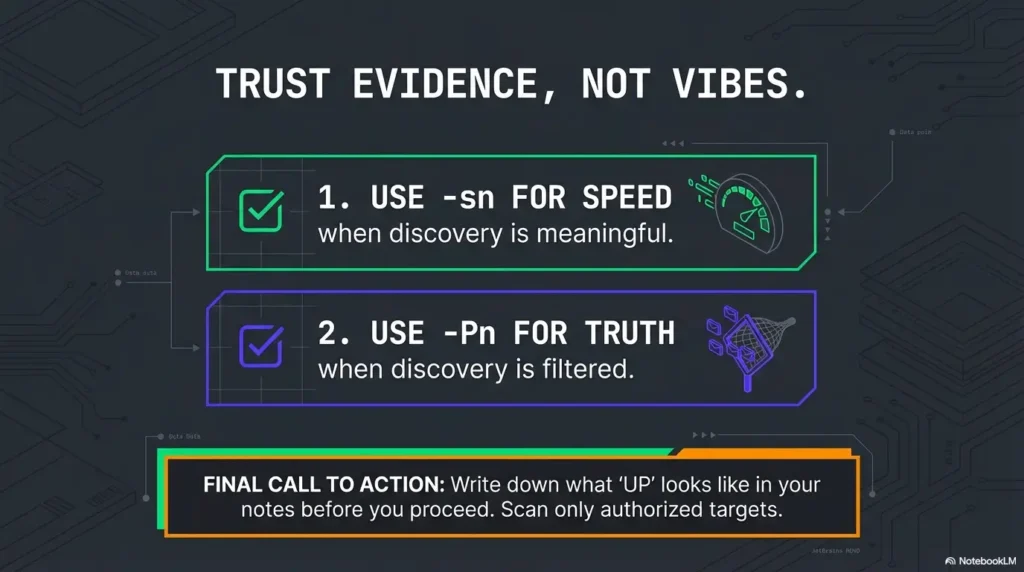
- Baseline A (triage mindset): Use a discovery-only pass when it’s likely to be meaningful.
- Baseline B (certainty mindset): Use assume-up follow-through when discovery is lying to you.
How to do it in 10 minutes:
- Pick a small, known target set (3–5 IPs or a tiny slice of the range).
- Run your discovery-first approach and note what “up” looks like in this environment.
- Run your assume-up approach on the same set and note what changes.
- Only then expand scope—because now you’re calibrated.
Show me the nerdy details
Calibration is about controlling variables. If you change scope, timing, and flags all at once, you can’t tell whether the network changed, the scanner changed, or your assumptions changed. A baseline pair reduces that ambiguity so every future scan teaches you something instead of just producing output.
Neutral next step: Save your baseline pair in a note and reuse it for every new subnet—same flags, same rhythm, same sanity. (If you’re serious about exam-ready evidence, fold the habit into Kali lab logging so you can reconstruct your decisions later.)
FAQ
1) What’s the difference between -Pn and -sn in Nmap?
-sn suppresses port scanning and normally performs host discovery. -Pn skips IP host discovery and attempts the requested scan against all targets. Local Ethernet ARP/IPv6 ND may still occur; -Pn -sn suppresses port scanning too.
2) Why does Nmap say “Host seems down” when the machine is reachable?
Because that message reflects discovery probe results, not absolute reachability. Discovery probes (ICMP/ARP/TCP/UDP-style) may be filtered while services still respond.
3) Is -Pn always slower than discovery-based scanning?
Often, yes—especially on large ranges—because every target is scanned regardless of whether it responds to discovery. But it can be “faster overall” when discovery is unreliable and you’d otherwise waste time on false negatives.
4) When should I use -sn in OSCP labs?
Use it when discovery is likely reliable (for example, when you’re truly L2-adjacent and ARP can provide quick truth) or when you need fast triage and you’ve validated that probes get replies in that environment.
5) When should I switch to -Pn during enumeration?
Switch when discovery keeps lying (repeated false “down”), or when you have external evidence that targets exist and you need certainty more than speed.
6) Does -sn still send probes like ICMP or ARP?
Yes. -sn is still a discovery phase—it simply avoids port scanning. What it sends depends on network context and options, and on local Ethernet it commonly relies on ARP for discovery.
7) Why does ARP discovery work on some networks but not over VPN?
ARP is link-layer and doesn’t route across subnets. VPN/routed environments typically won’t forward ARP broadcasts, so ARP-based discovery won’t identify hosts across those boundaries.
8) Can firewalls block ICMP but allow TCP ports (and confuse discovery)?
Absolutely. It’s common to drop ICMP while allowing specific TCP services. That’s exactly why a host can appear “down” to discovery yet still respond on a port.
Conclusion
Let’s close the loop from the top: the host that “never shows up” is often not a ghost. It’s a target living in an environment that refuses to answer your discovery question. The fix isn’t superstition or random aggressiveness—it’s choosing the right truth-check for the network you’re actually on.
If you remember one thing, make it this: -sn is fast when discovery is meaningful, and -Pn is reliable when discovery is filtered. Your job is to calibrate quickly, keep scope under control, and trust evidence over vibes.
Your 15-minute next step: pick 3–5 targets, run your two-command baseline, and write down what “up” looks like in that lab. After that, every scan you run will be a decision—not a guess. (And when you start collecting proof artifacts, make them painless with an OSCP proof screenshot workflow—clean evidence is speed.)
Original review: 2026-01-24
Calibrate with two small lab-only commands: For one explicitly authorized target, compare nmap -sn 192.0.2.10 with nmap -Pn -p 80,443 192.0.2.10, replacing the documentation address with your permitted target. This is a two-port check, not full enumeration. Do not infer that a host is live solely because -Pn reports it as up. See the official Nmap host-discovery reference.
Technical guidance updated: 2026-10-13. Clarified local ARP/ND behavior, -Pn -sn, assume-up evidence, and a bounded two-command comparison.
Discovery versus scan comparison
Use these fields to turn this guide into a record for your own task. Keep the actual scope, evidence and unresolved questions together.
On a small screen, scroll the table sideways to read all columns.
| Field | What to record | Your evidence / next check |
|---|---|---|
| Target boundary | Record the permitted addresses, route and privilege context. | To complete |
| Probe choice | Preserve the selected discovery or scan options. | To complete |
| Observed reason | Keep response, silence and port-state reasons together. | To complete |
| Coverage cost | Record untested hosts and the work added by the comparison. | To complete |
Next action: Treat discovery silence as an observation to explain rather than proof that every host is down.
Related task: Use Kioptrix Recon Routine: Scope, Evidence and Decisions for that separate part of the workflow.
Worksheet change record — October 20, 2026
Added four task-specific fields, a next action and a related guide. This is a blank editorial working aid, not a completed test or validated assessment. Existing source-review dates retain their own scope; this addition is not a new verification of every statement.