
Open the practical working record for this guide’s task-specific fields and next action.
Set an attempt budget before a clock budget
Agree on accounts, destinations, permitted credential sources, total and per-account attempts, rate, concurrency and an immediate stop contact. Lockouts and service impact can occur before a timebox expires. Validate the request and response classification using synthetic or specifically approved credentials before any bounded exercise. A tool success message needs independent permitted confirmation. The proposed study timer is not an OffSec requirement or authorization to try credentials. Source and scope.
The OSCP Hydra Timebox: Master Your Momentum
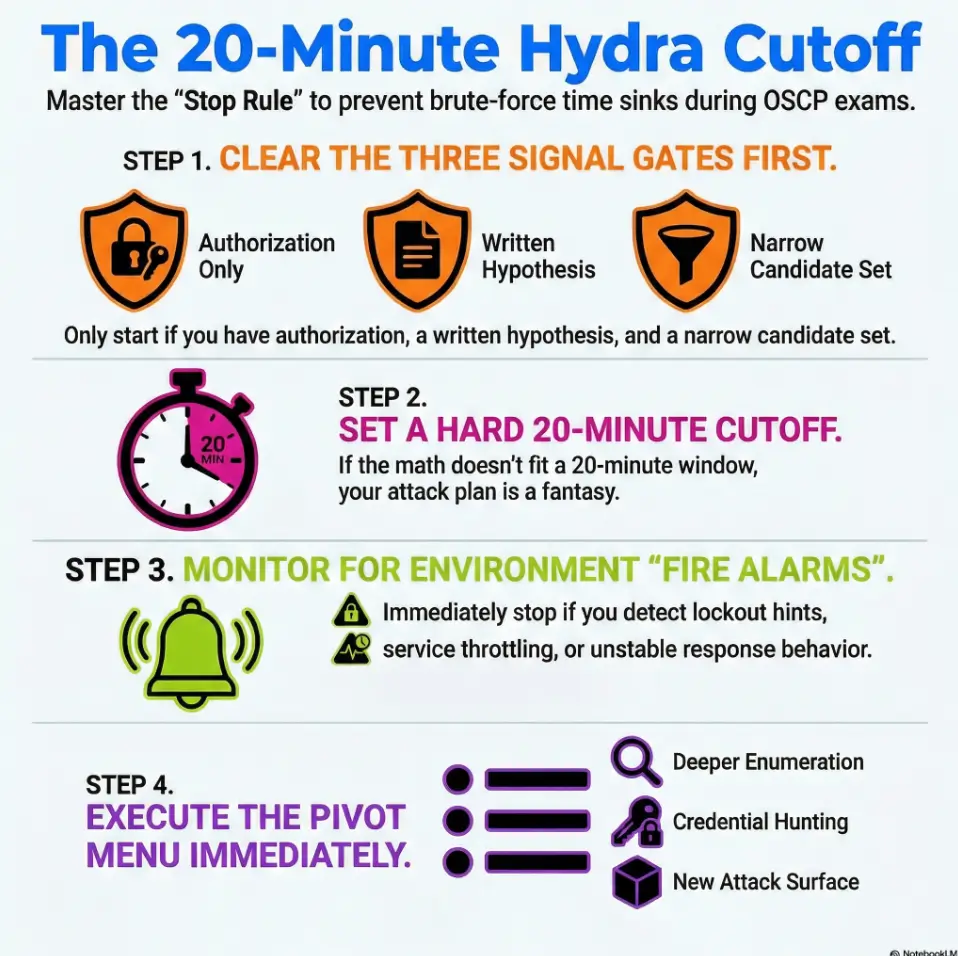
The OSCP Hydra timebox is a personal stop rule: cap a credential-testing branch at 20 minutes, but stop sooner at the approved attempt budget or any lockout, throttling, or instability signal. Check authorization, lockout policy, and input quality before starting; lack of warnings does not prove testing is safe.
This is an author’s time-management heuristic, not an OffSec rule or a guarantee that a particular test is permitted. Apply it only after checking scope, the current exam rules, and the account-lockout policy. Twenty minutes is a maximum planning window, not permission to use every minute.
Save your clock. Protect your proof trail. Keep your morale intact.
- Run only when you have a reason this login is “the path.”
- Watch for lockout/throttle signals like your score depends on it (because it does).
- When the timer dings, pivot immediately—no bargaining.
Apply in 60 seconds: Start a timer now and write one sentence: “I’m testing creds here because ____.”
Table of Contents
Timebox first: why 20 minutes changes everything
The “clock tax” you don’t feel until hour 6
Repeated setup and ambiguous responses consume time without establishing whether authentication succeeded. Record attempts and classification uncertainty, and stop at the approved attempt or impact boundary even when the study timer has time left.
What the timebox protects: focus, evidence, and morale
A hard cutoff protects three things you can’t buy back:
- Focus: you stay an investigator, not a slot-machine operator.
- Evidence: you can explain what you tried and why you stopped.
- Morale: you avoid the “I’m behind” panic that makes you sloppy.
- If you can’t name the signal you’re watching, you’re not testing—you’re hoping.
- Hope is expensive in timed environments.
- Timeboxing converts hope into a decision.
Apply in 60 seconds: Write the one signal that would make you continue (e.g., “verified lockout policy + approved attempt budget + consistent responses + narrow list”).
Open loop: Why the best brute-force often looks like “not brute-force”
Here’s the twist: the highest-yield “Hydra moments” usually happen after you’ve done boring reading. A config leak. A username pattern. A note in a share. A reused password you already earned somewhere else. The timebox forces you to seek that kind of leverage instead of rolling dice.
- Inputs: time (minutes), thread limit (your chosen concurrency), candidate count.
- Output: “Can I realistically test this set in 20 minutes?”
- Reality check: if the math doesn’t fit, your plan is fantasy.
Apply in 60 seconds: Pick one small candidate set you can finish inside 20 minutes—then stop when the timer ends.
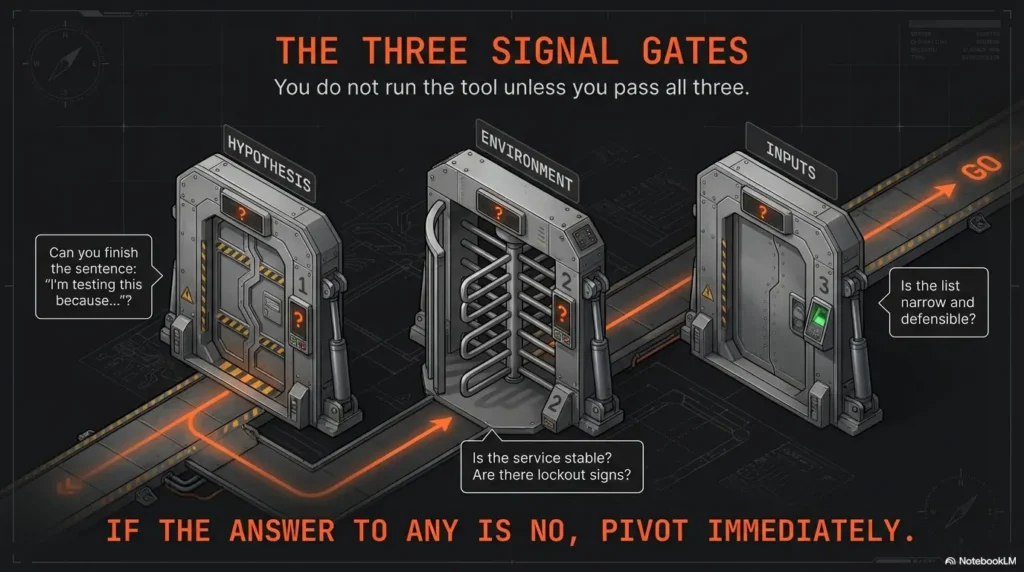
Signal gates: the only reasons brute-force earns time
The goal isn’t “never brute-force.” The goal is “only brute-force when the environment is telling you it’s plausible.” These gates are your bouncers. If you don’t get in, you don’t get in—no arguing with the velvet rope.
Gate A — You have a hypothesis, not a hunch (why this service?)
Your hypothesis should fit in one sentence: “This login is likely the path because ____.” Examples that are good without being reckless:
- The service is clearly a management surface (and the box is otherwise quiet).
- You found usernames in exposed content and the naming scheme is consistent.
- You have evidence of credential reuse from another foothold or artifact.
Examples that are bad: “Because it has a login prompt.” (So does my email. Please don’t.)
Gate B — The environment allows attempts (rate limits, lockout hints, response stability)
You are looking for stability and permission signals. If the service behaves like it will punish noise, that’s not “a challenge.” That’s a cost you can’t afford.
- Lockout hints: explicit warnings, cooldown banners, or escalating delays.
- Throttling behavior: response time creeps upward, errors change, or you get intermittent failures.
- Fragility: the service crashes, resets, or becomes inconsistent under minimal load.
Gate C — Your input set is defensible (small, relevant, explainable)
Defensible means you can justify it later without sweating: “These usernames came from X artifact.” “These passwords are tied to the org/product/context.” “This is a short, relevant set.” If your list is gigantic, you don’t have a plan—you have a landfill.
Open loop: The one clue in banners/logins most people ignore
Many login surfaces leak a tiny piece of psychology: whether the system cares about user enumeration. If it behaves differently for “user exists” vs “user doesn’t,” your first job is learning the pattern—not hammering passwords. We’ll close this loop when we build the decision tree.
- Yes/No: Do I have explicit authorization for password testing in this environment?
- Yes/No: Can I state a one-sentence hypothesis?
- Yes/No: Do I have a narrow, relevant candidate set?
Apply in 60 seconds: If any answer is “No,” pivot to enumeration and come back only when it becomes “Yes.”
The 20-minute cutoff decision tree (text flow you can follow under stress)
This is the part you want printed. Not because you’re forgetful—because stress makes everyone forgetful. (Including the version of you who swore you’d be “calm and methodical.”)
Start: “Do I have authorization + a written hypothesis?” → if no, stop
Write it. Literally. If you can’t write it, you don’t have it. If you don’t have it, you stop. This is the guardrail that keeps “testing” from turning into “spraying everything because I’m nervous.”
Step 1: “Is the service interactive and stable?” → if no, pivot
Stable means responses don’t wobble, the login mechanism behaves predictably, and you can observe feedback signals without guessing. If the surface is flaky, you can’t interpret outcomes—and un-interpretable work is wasted work.
Step 2: “Any lockout / throttling indicators?” → if yes, stop (don’t burn the box)
In a real engagement, lockouts can create incident noise, block legitimate users, and damage trust. In a lab or exam environment, they can still poison the service and cost you the rest of the path. When you see lockout or throttling signals, treat it like a fire alarm: you don’t debate it; you leave.
Step 3: “Do I have a narrow candidate set?” → if no, narrow (or abandon)
Narrow means small enough to finish inside the timebox while still being explainable. If you can’t finish it, you’re not timeboxing—you’re scheduling regret.
Step 4: “Did I get any meaningful feedback within the window?” → if no, stop
“Meaningful feedback” can be:
- Consistent invalid vs valid-user behavior (useful intelligence)
- Confirming that a small set is definitely wrong (closure)
- A successful authentication (obvious win)
If you get none of these, stop. Your best next move is to earn better inputs, not extend bad ones.
Outcome: Continue (narrower), Pause (collect more intel), or Abandon (pivot)
Continue only if signals are clean and your set is getting smaller. Pause if you need one missing piece (like confirming username format). Abandon when it’s clearly low-probability.
Show me the nerdy details
“Feedback” is really about observability. If you can’t reliably distinguish outcomes (e.g., uniform errors, inconsistent response times, shifting session behavior), you can’t measure progress. A good timebox assumes you can see a signal; if the system hides signals, the most rational move is to gather more context (versions, endpoints, auth mechanism quirks) rather than increase volume. This is why stable enumeration often beats noisy guessing.
Two minutes later, that share yielded a config file with a default username format and a single hard-coded credential for a service account. No brute-force victory lap. Just quiet leverage. The next hour wasn’t frantic; it was surgical. The story isn’t “brute-force is bad.” The story is: stopping on time created the conditions for the real win.
Narrowing strategies that don’t turn into a rabbit hole
Narrowing is where brute-force stops being brute-force. Done well, it becomes “credential testing with context.” Done poorly, it becomes “I’m collecting lists to feel busy.”
Reduce scope by role: “admin” fantasies vs realistic users
Be suspicious of your own imagination. “admin/admin” is a meme, not a methodology. In most environments—lab or real—service accounts, support accounts, and system-specific usernames are more plausible than your heroic “Administrator” dream.
Reduce scope by context: company name, host naming, service purpose
Context is the cheapest filter:
- Hostnames often imply roles (app, db, vpn, dev).
- Service purpose implies account types (backup user, monitoring user).
- Artifacts imply naming schemes (first.last, initial+surname, etc.).
Reduce scope by evidence: creds reuse clues, exposed files, shares, configs
This is where you win time back. Look for:
- Configs with environment variables or connection strings.
- Shell history, notes, or scripts with parameters.
- Shares (SMB/NFS), web directories, backups, and “old” files.
Pattern interrupt (micro): Let’s be honest—your list is probably too big
If you feel the urge to “just add one more wordlist,” that’s your nervous system trying to buy certainty. Don’t pay for certainty with time. Pay with better evidence.
Open loop: The “two sources” rule that keeps guesses from becoming noise
Here’s the rule: don’t add an item to your candidate set unless it’s supported by two independent hints (e.g., username pattern + leaked name list; service context + org naming). We’ll use this rule again in the pivot menu. If you want an “adult supervision” reference for ethical, scoped testing, NIST’s guidance is a useful baseline: NIST SP 800-115 (Technical Guide to Information Security Testing and Assessment).
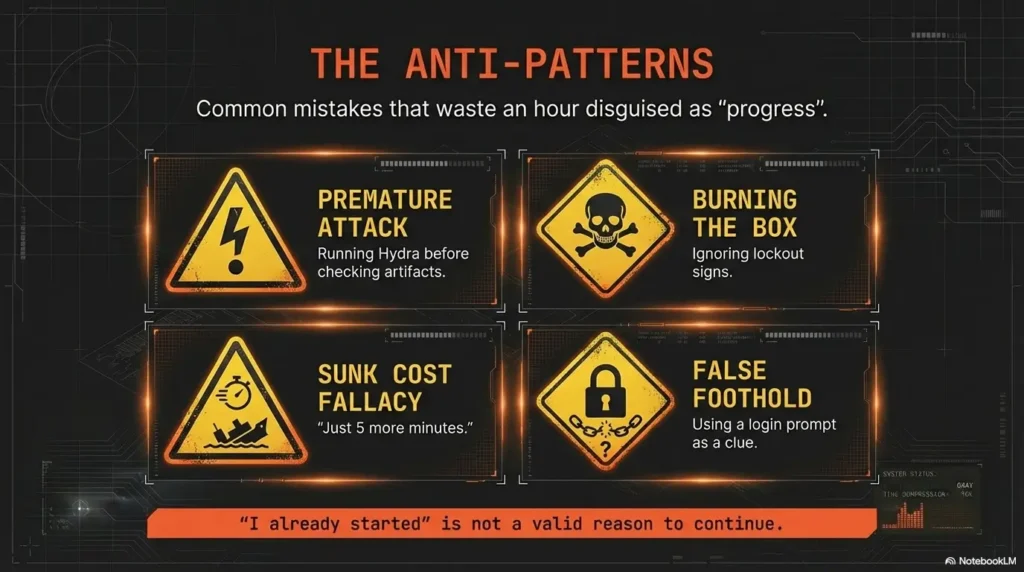
Common mistakes that waste an hour disguised as “progress”
Mistake 1 — Running brute-force before credential discovery work
In OSCP-style environments, credential reuse and misplacements are common learning outcomes. That means credential hunting often beats credential guessing. If you haven’t checked obvious artifact sources (configs, shares, bash/zsh history leaks, backups), brute-force is usually premature.
Mistake 2 — Treating “no result yet” as a reason to “just let it run”
This is the sunk-cost trap wearing a hoodie. “I already started” is not a reason. “I’m seeing clean signals and the set is narrowing” is a reason.
Mistake 3 — Ignoring lockout/throttle signs and poisoning the environment
Even in training labs, lockout behaviors can change the state of the service and your ability to test. In real engagements, it can create operational harm. Your timebox is a safety device, not only a productivity hack.
Mistake 4 — No proof trail (you can’t justify what you did later)
OffSec-style exams emphasize documentation and replicability. If you can’t explain your decision-making, you create two problems: (1) you can’t learn from it, and (2) you can’t defend it. If you want a repeatable “evidence-first” workflow, pair this with a proof screenshot checklist and a consistent ShareX screenshot naming pattern.
- Choose Hydra only when the test is permitted, the per-account attempt budget and lockout policy are known, responses are stable, and the candidate set is narrow.
- Choose Hunt when you lack context, the set is large, or the service looks fragile.
- Time trade-off: 20 minutes max vs 20 minutes of deeper enumeration that compounds.
Apply in 60 seconds: Pick one: “Hydra for 20” or “Hunt for 20.” Set the timer and commit.
Don’t do this: the exam-day Hydra pitfalls that trigger spirals
Don’t brute-force everything that has a login prompt
A login prompt is not a clue. It’s just a door. Your job is to find why this door matters. If you can’t explain that, you’re collecting doors, not footholds. When you’re unsure, ground yourself with an OSCP initial access checklist so “Hydra” stays a deliberate branch—not the default reflex.
Don’t brute-force when you can’t explain why these users/passwords
“Because it’s common” is not enough. “Because I found a pattern and a source” is enough. If you can’t explain it, you can’t defend it.
Don’t brute-force while skipping faster wins (misconfigs, shares, version bugs)
This one hurts because it’s subtle. Brute-force feels like an “active” move, so it steals your attention from quieter wins: a directory listing, a forgotten backup, a permissive share, a service version with known misconfig behaviors, or simply catching false positives in nmap service detection before you waste cycles.
Pattern interrupt (micro): Here’s what no one tells you—stopping is a skill
Stopping is not quitting. Stopping is choosing a higher-yield line of attack. It’s strategy, not weakness.
- 2025 (OSCP+): 23 hours 45 minutes exam time; documentation comes after.
- 2025 (OSEP): 47 hours 45 minutes exam time.
- Note: Proctored environments also add setup and “human overhead.” If you’re building your exam environment SOP, keep a VM lockdown checklist handy so the basics never steal focus mid-run.
Apply in 60 seconds: Write your personal “panic threshold” (e.g., “No brute-force beyond 20 minutes unless I have Gate A/B/C.”).
Pivot menu: what to do the moment the timer dings
When the timer ends, you need a menu. Otherwise you’ll “just extend five minutes” because you don’t know what else to do. Here are four pivots that produce signal fast. (If you tend to spiral, pair this section with an explicit rabbit-hole stop rule so the pivot stays clean.)
Pivot A — Enumeration refresh: “What did I not read carefully?”
Re-read the confirmed service, supported authentication mechanism, account scope and the most recent permitted baseline. A missing prerequisite should change the plan rather than trigger another credential list.
Pivot B — Credential hunt: files, shares, notes, configs, history, artifacts
The fastest “credential attack” is often finding credentials someone left behind. Look for:
- Config files and environment variables
- Backups and old archives
- History files and scripts
- Share listings and web directories
When shares are involved, basic tooling quirks can waste time—so keep practical fixes close (e.g., when smbclient can’t show the Samba version) and make sure your session notes capture what worked.
Pivot C — Path thinking: “If I had a low-priv shell, what would I do next?”
This sounds backwards, but it works. If your intended next step requires local file access, maybe your first step should be finding a path to that access—through misconfigs, service exposure, or a different port—not through guessing passwords.
Pivot D — Attack surface swap: new port, new service, new host segment
If you’re stuck, change the surface. OSCP-style networks reward breadth plus depth. A different service might offer a misconfig foothold that later makes the login trivial. When you do land a shell, don’t let “bad interactivity” slow you down—keep a TTY upgrade checklist ready so the next hour stays surgical.
Proof-first logging: how to make your decision defensible
Documentation isn’t just for the report. It’s for your brain. A clean proof trail prevents the “What did I even try?” fog that wastes more time than any tool ever will. If you’re running a disciplined workflow, combine Kali lab logging with a consistent ShareX naming scheme so every decision is searchable later.
Record your hypothesis, timebox start/stop, and what signal you watched
- Hypothesis: one sentence.
- Start/Stop: timestamps (or at least “20-minute window”).
- Signal watched: lockout indicators, response stability, user enumeration behavior.
Capture “stop evidence”: lockout hints, throttling behavior, no-feedback outcome
“Stop evidence” is the screenshot or note that proves you made a rational call. It might be a lockout warning, a clear delay escalation, or a summary like “no differential feedback across valid/invalid users.” (If you want a concrete standard for what to capture, use a dedicated OSCP proof screenshot guide so you never “wish you had that screenshot” later.)
Write the pivot reason in one sentence (future-you will thank you)
This is the sentence that keeps you sane: “I stopped because ____ and pivoted to ____.” It’s small, but it prevents you from circling back later out of uncertainty.
- One-line hypothesis + why this service mattered
- Timebox start/stop and what you observed
- Stop evidence (lockout/throttle/no-signal)
Apply in 60 seconds: Add a template snippet to your notes titled “Credential Testing (Timeboxed)” and reuse it every time.
Who this is for / not for
For: time-poor OSCP candidates who need a repeatable rule under pressure
If you tend to over-invest once something is running, this framework will feel like relief. It’s designed for candidates who want to protect time for the stuff that actually scores: solid enumeration, credible paths, and clean proof.
Not for: anyone targeting real systems without explicit authorization
Password testing without permission can cause harm and violate laws and policies. This article is about authorized testing in labs, controlled environments, or properly scoped engagements.
Not for: anyone using brute-force as a substitute for enumeration
If brute-force is your first move, you’re skipping the part that makes it efficient: context. Earn context first; then test responsibly.
Next step: one concrete action
Build a one-page “20-minute Hydra Timebox” card. It’s your script for stressful moments—the same way a pilot uses a checklist when the cockpit gets loud. If you already run Obsidian for your workflow, it’s easiest to anchor this card to your host template so it shows up exactly when you’re staring at a new service.
- Write your 3 signal gates (Hypothesis / Environment / Defensible inputs).
- Paste the decision tree text flow from Section 3.
- Add your pivot menu (A–D) on the bottom.
- Keep it where you keep your exam checklist or lab SOP.
If you want it to stick, do a 15-minute rehearsal: set a timer, simulate a “login prompt,” and practice the stop-and-pivot without negotiating with yourself. You’re not training Hydra. You’re training your judgment. For official exam constraints and expectations, cross-check the OSCP Exam Guide.
FAQ
Is brute-forcing with Hydra allowed in OSCP-style labs?
In many training labs, credential testing is part of the learning experience—but rules vary by platform and scenario. The safe baseline is: only test passwords where you have explicit authorization and where the environment’s rules permit it. In proctored exams, you’re also responsible for ensuring the tools and features you use don’t violate restrictions.
What’s a reasonable time limit for password attacks during an exam?
Twenty minutes is this article’s planning heuristic, not an exam mandate. Stop sooner if the approved per-account attempt budget is reached or any lockout, throttling, or instability appears. A follow-up window requires a new evidence-based decision and must stay inside that budget.
How do I know if a service is throttling or locking accounts?
Watch for escalating delays, changing error messages, new warnings, intermittent failures, or any clear indication of account lockout policy. If you see those signals, stopping is the correct move—especially in timeboxed environments.
Should I brute-force SSH or RDP in OSCP practice?
Treat it as conditional. If you have a narrow set and stable signals, a brief timebox can be reasonable. If you don’t, credential hunting (configs, shares, history, backups) often produces higher-yield results with less risk and more reportable evidence.
What’s the best alternative when Hydra isn’t working?
Pivot to evidence-building: enumerate the service deeper, hunt for credentials in artifacts, look for misconfigurations or exposed files, and test for credential reuse only when you’ve earned plausible inputs. “More guessing” is rarely the best alternative.
How do I narrow a username list ethically in a lab environment?
Use contextual sources: leaked documents within the lab, naming patterns, service account conventions, and any explicitly provided datasets. Avoid harvesting personal data outside scope. The “two sources” rule helps: only include candidates supported by two independent hints.
What should I log as proof if I stop brute-forcing early?
Log the hypothesis, the timebox window, the signal you watched, and the stop evidence (lockout/throttle/no-signal). Then log the pivot in one sentence. This turns “I stopped” into a defensible decision, not a vague feeling.
Conclusion
Remember the open loop: the best brute-force often looks like “not brute-force.” It looks like reading carefully, earning context, and then testing a small idea with a timer running. OffSec-style exams are timed, proctored, and documentation-heavy—so your workflow must be both effective and defensible. The 20-minute Hydra timebox is a way to keep your hands steady when your brain wants to panic-shop for certainty.
Your next move should take 15 minutes: create the one-page card, rehearse one stop-and-pivot, and commit to the rule. The goal is not to be fearless. It’s to be repeatable. For Hydra itself (syntax, modules, options), the canonical reference is the project repo: thc-hydra on GitHub.
Original review: 2026-01.
Validate before interpreting success: For HTTP forms, compare a permitted known-good login with a known-bad response and check the module’s success/failure condition. Generic errors, redirects, CSRF tokens, rate limits, and MFA can produce misleading results. Confirm any reported match through the authorized login flow. A wall-clock estimate does not measure failed attempts per account.
Technical guidance updated: 2026-10-13. Clarified the personal 20-minute heuristic, pre-test lockout/attempt budgets, and validation of reported authentication success.
Authentication exercise stop card
Use these fields to turn this guide into a record for your own task. Keep the actual scope, evidence and unresolved questions together.
On a small screen, scroll the table sideways to read all columns.
| Field | What to record | Your evidence / next check |
|---|---|---|
| Approved scope | Record accounts, destinations and permitted credential sources without secrets. | To complete |
| Attempt budget | Define total, per-account, rate and concurrency limits. | To complete |
| Classification check | Use a synthetic baseline to verify response interpretation. | To complete |
| Immediate stop | Record lockout, throttling, instability and escalation conditions. | To complete |
Next action: Set the attempt ceiling before applying a personal study timer.
Related task: Use CME SMB Recon: Scope, Attempts and Version Checks for that separate part of the workflow.
Worksheet change record — October 20, 2026
Added four task-specific fields, a next action and a related guide. This is a blank editorial working aid, not a completed test or validated assessment. Existing source-review dates retain their own scope; this addition is not a new verification of every statement.