Sources, review date and section shortcuts
Key claims reviewed: October 19, 2026. The 20/90/180-minute blocks and target-switching thresholds are editorial examples, not official requirements or proven score improvements. Rest and evidence collection must fit inside the actual assessment window.

Exam deadlines · Break procedure
Go straight to: Who this is for / not for (read this before you copy the schedule · Setup before Hour 0: your “zero-friction” exam kit
Open the Exam schedule assumption check for this guide’s task-specific fields and next action.
The Operator’s Playbook: Beyond the Hour 19 Wall
At hour 19, the exam doesn’t beat you with a “hard box.” It beats you with a folder named
final-final2,
one missing screenshot, and the quiet lie that you’ll “remember it later.”
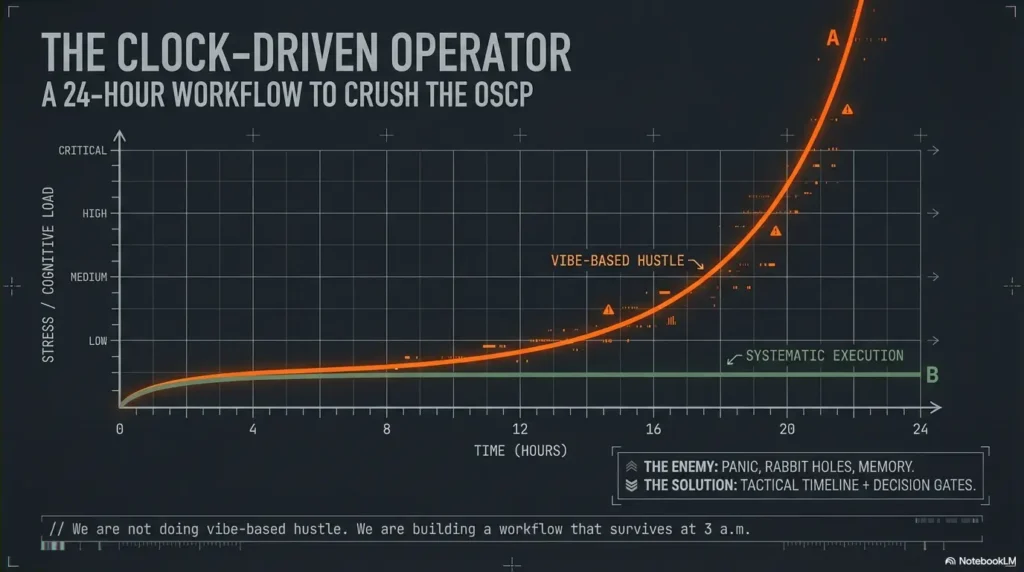
This is what OSCP pressure actually looks like: you have signals everywhere—ports, banners, half-working creds—but your time disappears into sentimental rabbit holes and tool noise that never turns into points. Keep guessing and you don’t just lose minutes. You lose reproducibility, and that’s how “almost root” becomes zero.
An OSCP time management plan is a clock-driven workflow that turns recon into decisions, exploits into repeatable steps, and progress into report-ready proof—using timeboxes, pivot rules, and an attack + admin rhythm that survives fatigue.
The Core Principles
- • No vibes.
- • No loyalty to one target.
- • No “I’ll document later.”
The Action Plan
- • Start with first-blood triage.
- • Run 20/90/180-minute blocks.
- • Track a credential ledger like currency.
- • Bank screenshots and proof as you go.
Built like an operator’s playbook: hard gates, clean artifacts, and a report flow that won’t implode at 3 a.m.—because the only progress that counts is the progress you can prove.
A strong OSCP time plan is less about hustle and more about decision gates. Start with quick wins (service recon → obvious exploits), lock proof early, then run timed deep dives with hard pivot rules (switch targets when signals go cold). Use two tracks: attack (exploit) and admin (notes, screenshots, report artifacts). The schedule below is hour-by-hour with pivot triggers and salvage moves.
Timing correction: The current exam lasts 23 hours 45 minutes, followed by 24 hours to upload documentation. This schedule is a personal planning aid; all target access, proof capture, and control-panel flag submissions must finish before 23:45. Build in breaks and sleep, and finish the final report in the separate submission window. See the official exam guide.
Who this is for / not for (read this before you copy the schedule)
For
- Test-takers who want a clock-driven workflow, not vibes
- People who stall on “one box” and need exit criteria (start with the OSCP rabbit-hole rule)
- Anyone who wants a clean attack + admin rhythm (proof doesn’t happen “later”)
Not for
- First-time lab learners who haven’t practiced a full 24-hour sim yet
- Anyone relying on memorized exploits without understanding proof + stability
- People who refuse to pivot (you’ll lose to your own loyalty)
- Yes/No: Have you completed at least one 12–24 hour mock under a timer?
- Yes/No: Can you reproduce a foothold twice without improvising?
- Yes/No: Do you have a notes + screenshots habit that survives stress?
Apply in 60 seconds: If any answer is “no,” run a 6-hour mini-sim first and practice “proof as you go.”
Setup before Hour 0: your “zero-friction” exam kit
Notes system that survives panic (folder + template + timestamp habit)
- One folder per target + one “00-index” page (ports, creds, URLs, status) using an Obsidian OSCP host template.
- Timestamp every pivot (e.g., “07:40 switched to Target B due to no new signal”).
- Keep a credential ledger in one place (host → user → pass/hash → where found → last verified).
Screenshot rule: capture proof as you go, not “later”
“Later” is a fantasy. Take a screenshot at every milestone: initial access, privilege escalation, flag capture, and any command output that proves the step. Name files predictably: target_step_YYYYMMDD_HHMM.png. If you want it dead-simple, steal the ShareX screenshot naming pattern and stop thinking about it forever.
Command hygiene: paste-safe snippets + one place for credentials
- Store “known-good” recon and enum commands in a paste-safe note (no smart quotes, no weird dashes).
- When you find creds, immediately paste them into the ledger and validate once (re-entry matters).
- Keep terminal output readable: tee logs for key scans so you can cite exact outputs later (see Kali Linux lab logging if your logs are chaos).
Micro-H3 (pattern interrupt): Let’s be honest… your biggest enemy is tab chaos
Your two-track rule (non-negotiable)
- Attack track: recon → exploit → stabilize → privesc
- Admin track: notes → screenshots → reproducibility steps → report blocks
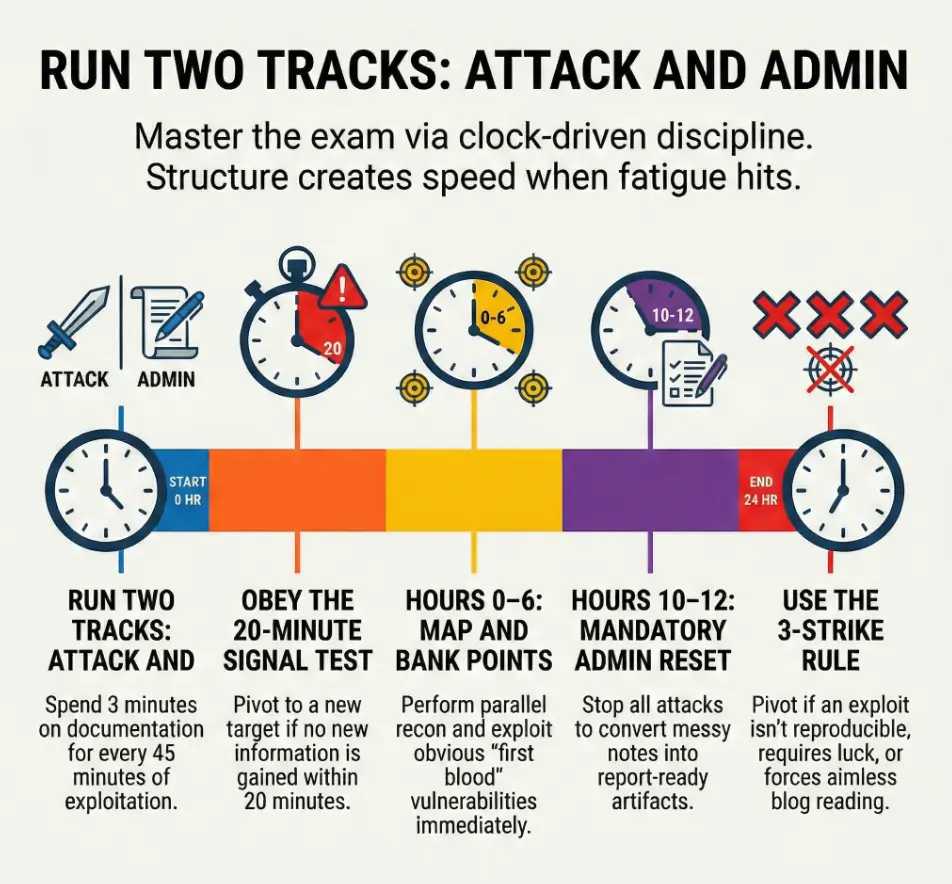
Rule of thumb: every 30–45 minutes, spend 3 minutes on admin. It’s the cheapest insurance you can buy.
Hours 0–2: Open fast—map the battlefield without falling in love
The first two hours are where people either win the exam… or volunteer to suffer. Your mission: build a clean map, then choose “first blood” targets based on signal—not ego. (Yes, your brain will try to romance the hardest box. No, you don’t get points for romance.)
| Time | Objective | Output you must produce |
|---|---|---|
| 0:00–0:20 | Read the exam sheet like a contract (targets, constraints, scoring) | A 6-line “rules + scoring” note + a blank report skeleton |
| 0:20–1:20 | Parallel recon: nmap strategy + quick service fingerprints | Ports table per target + 2–3 “possible paths” bullets |
| 1:20–2:00 | Shortlist “first blood” targets (highest signal, lowest uncertainty) | Ranked list: Target A/B/C with one-line rationale |
Curiosity gap: The first 10 minutes decide your next 10 hours—why?
Show me the nerdy details
Use recon outputs to reduce uncertainty, not to collect trivia. Your fastest loop is: identify reachable surfaces (ports/services) → test one concrete hypothesis per service → record outcomes. If a scan result doesn’t change the next test you’ll run, it’s likely not worth expanding yet. This is how you avoid “tool noise” turning into a personality. If version detection is lying to you, read the fixes for Nmap -sV false positives.
Hours 2–6: Quick wins sprint (scoreboard first, ego last)
This block is your points foundation. You’re hunting for obvious footholds: default creds, known vulns with confirmed versions, misconfigurations, weak file permissions, exposed admin panels. You’re not trying to prove you’re clever. You’re trying to bank certainty.
2:00–3:30 — exploit the obvious (default creds, known vulns, misconfigs)
- Pick the target with the cleanest signal and start an end-to-end attempt (ground it with an OSCP initial access checklist so you don’t improvise under stress).
- Confirm versions before you commit to an exploit path.
- When you hit a login page, test low-friction ideas first (but avoid blind guessing spirals—timebox brute attempts with OSCP Hydra timeboxing).
3:30–4:30 — privilege escalation “low-hanging” checks (enum + config scans)
Once you have a foothold, do the fast privesc sweep: permissions, running services, scheduled tasks/cron jobs, config files, history, and credentials in predictable locations. Tools can help, but you still need to validate manually because “almost root” is a mirage. If you see a clean path, don’t overthink it—especially for classic wins like sudo NOPASSWD privilege escalation or an unquoted service path vulnerability.
4:30–6:00 — lock proof + stabilize shells (repeatable access, clean artifacts)
- Capture proof at initial access and privesc milestones (use the OSCP proof screenshot standard so your evidence is actually scorable)
- Write reproducibility steps while you can still feel the path
- Stabilize access before you chase “one more thing”
Apply in 60 seconds: Add a “Re-entry tested? (Y/N)” line to each target’s notes and fill it immediately.
Micro-H3 (pattern interrupt): Here’s what no one tells you… “almost root” is worth zero
Your nervous system will beg you to keep pushing because you’re “close.” Close is emotionally expensive. Your plan needs to be emotionally cheap: proof, repeatability, and clear pivots.
Pivot Rules v1: the 20-minute signal test (when to switch targets)
The 20-minute signal test is your “anti-rabbit-hole seatbelt.” You’re allowed to explore—just not indefinitely. Every 20 minutes, ask: Did uncertainty go down? If not, pivot. This is not quitting; it’s resource allocation (and yes, the pivoting tool choice matters when you’re trying to move fast without breaking your own setup).
Pivot if…
- No new info in 20 minutes (no new ports, files, creds, paths)
- Your exploit path depends on “guessing” a version you can’t confirm
- Tool output is noisy and you can’t reduce uncertainty fast
Stay if…
- You found creds (even partial), tokens, or reusable secrets
- You found writable paths, exposed scripts, or predictable enum leads
- You discovered an internal app surface you can test methodically
Decision Card: When to keep pushing vs switch
Keep pushing (20–90 minutes)
- You have a testable hypothesis (not a hunch)
- You can name the next 2 tests and what “success” looks like
- Evidence suggests a path is real (logs, errors, permissions, creds)
Switch now (pivot)
- You’re repeating the same test with different “hope”
- You can’t explain why the next idea is better than the last
- You’re “reading the internet” instead of interrogating the system
Neutral action: Write a one-line pivot reason before switching so you can return efficiently.
Hours 6–10: Deep dive block #1 (one hard box, but on a leash)
6:00–6:20 — re-recon the chosen target with “what matters” filters
- Re-check only the services that map to plausible exploit paths.
- Pull key pages, endpoints, banners, and error messages into notes.
- Reduce the target to two hypotheses max (use an Obsidian OSCP enumeration template if your notes sprawl).
6:20–8:30 — focused exploitation loop (hypothesis → test → evidence)
For this example block, state one hypothesis, run a bounded test, record what changed and decide whether another test is justified. Adjust the duration to your practice results and the actual clock.
8:30–10:00 — privesc with checklists + manual validation
Use your privesc checklist, but validate each lead manually. Tools are assistants; you are the judge. This is where clean documentation helps: a privesc chain you can reproduce is a chain you can report.
Curiosity gap: Why “more enumeration” can be the wrong move at Hour 7
Because enumeration without decision gates becomes emotional avoidance. At hour 7, your brain wants certainty. Endless enum feels like certainty, but it’s just motion. The correct move is targeted tests that either open a path or close it.
Hours 10–12: Admin reset—convert progress into points
This is the part your future self will beg you for. You stop, you audit, you clean. Not because you’re “done,” but because memory is a liar at hour 22. Convert progress into report-ready artifacts while it’s still fresh.
- Evidence audit: Do you have required proof (flags, screenshots, commands) for each win?
- Notes cleanup: Turn messy logs into report blocks (what you did, why it worked, proof).
- Environment check: Confirm stability and re-entry steps you can legally explain (start from an OSCP VM lockdown checklist so your environment doesn’t sabotage you mid-exam).
Hours 12–16: Deep dive block #2 + “creds-first” sweep
This block is where many exams flip. Not because you suddenly become a wizard, but because you start treating credentials like currency. A single reused credential can unlock a new surface, shorten recon, or turn a “hard box” into a 30-minute path.
12:00–13:30 — credential hunting sweep across all targets (reuse wins)
- Re-check notes for any creds you didn’t validate.
- Try creds where they make sense (same org/app stack, shared services).
- When creds work, bank proof and document the access method.
13:30–16:00 — second hard target: repeat the same hypothesis loop
Curiosity gap: The “one credential” that flips the whole exam—where it hides
It often hides in plain places you’re too rushed to treat seriously: config files, service scripts, history, backup directories, or “temporary” notes left by a developer. The trick is not magic; it’s discipline—when you see a hint, you write it down and validate it once (especially the classics like bash/zsh history leaks).
- Use one credential ledger for the whole exam
- Validate each credential at least once
- Write “where found” so you can justify it in the report
Apply in 60 seconds: Add a “Last verified (HH:MM)” column to your credential ledger right now.
Pivot Rules v2: the 3-strike system (stop donating hours)
The 20-minute test protects you from drift. The 3-strike system protects you from obsession. It’s designed for the emotional moments—when you’re tired, “so close,” and convinced the answer is one more blog post away.
- Strike 1: You can’t reproduce an exploit twice → document what worked once, then move on.
- Strike 2: Privesc requires a miracle (roulette behaviors, blind brute force, pure luck) → pause and switch targets.
- Strike 3: You’re reading blogs, not systems → pivot immediately.
Mini calculator: “points per uncertainty” in 30 seconds
Use this as a triage lens when you’re deciding where the next 90 minutes should go.
Input (estimate)
- Time bet: 90 minutes
- Signal strength: low / medium / high
- Reusability: does success create creds or access you can reuse? (yes/no)
Output (decision)
- High signal + reusable: take the bet now
- Medium signal: take the bet only with a clear hypothesis loop
- Low signal: pivot unless you’re missing just one confirmable step
Neutral action: Rank three targets “High/Med/Low signal” and pick one 90-minute bet.
Hours 16–20: Last scoring push (triage like an incident responder)
Now you stop acting like a treasure hunter and start acting like an incident responder. You triage. You choose the next action based on impact and likelihood, not attachment. This is where discipline turns into points.
Triage board: targets ranked by points per uncertainty
- List each target with status: no signal / foothold / privesc stuck / proven chain.
- Pick one “best 90-minute bet” and run it end-to-end.
- If you’re stuck, do a creds sweep before you start a new rabbit hole.
“One more box” trap avoidance: score math + time reality check
Review the actual objectives, evidence already captured and time remaining before opening another path. A guessed score is not an official result.
Don’t do this: Starting a brand-new rabbit hole at Hour 19
Before starting a new path late in the assessment, confirm that time remains to verify required evidence and submit control-panel values. The hour mentioned here is an example checkpoint, not a rule.
Hours 20–23:45: Report mode that doesn’t implode at 3 a.m.
The exam session ends at 23:45, not hour 24. Use the final block for evidence checks and report drafting while access remains available. Capture required screenshots and submit flags in the control panel before the exam ends. You then have a separate 24-hour documentation-upload window. Reserve sleep, breaks, and a submission buffer in your own schedule; the timeboxes below are personal planning heuristics.
| Time | Objective | Non-negotiable checks |
|---|---|---|
| 20:00–21:30 | Assemble sections per target (steps, screenshots, commands) | Each step has a screenshot or output proof |
| 21:30–23:00 | Verify reproducibility (fresh shell → flag → screenshot) | Re-entry works; commands are complete; filenames match |
| 23:00–23:45 | Polish for clarity: headings, filenames, missing proof check | No missing steps; no “magic”; readable by a stranger |
One more confession: the worst feeling is believing you’ll remember a command later. You won’t. Your brain will feel like a shaken snow globe. Treat screenshots and notes like oxygen: not glamorous, but mandatory.
Don’t do this: Assuming you’ll remember commands without screenshots
Before starting a new path late in the assessment, confirm that time remains to verify required evidence and submit control-panel values. The hour mentioned here is an example checkpoint, not a rule.
If you can’t reproduce it from the report, it’s not real progress. The report is your “ground truth,” not your memory.
Common mistakes (and the exact fix for each)
- Mistake: “I’ll document later” → Fix: screenshot + note after each milestone
- Mistake: tunneling on one exploit → Fix: 20-minute signal test + pivot gate
- Mistake: running huge scans nonstop → Fix: targeted recon tied to hypotheses
- Mistake: copy/paste exploitation without validation → Fix: prove version + verify path
- Mistake: messy creds handling → Fix: single credential ledger + timestamps
A practical trick: when you catch yourself saying “just one more thing,” you’re usually not doing the next best step—you’re soothing anxiety. Replace that phrase with: “What would reduce uncertainty in 10 minutes?”
Tools & workflow guardrails (what’s allowed, what’s smart)
Keep it legal and within exam rules. Don’t rely on folklore. When in doubt, defer to Offensive Security’s guidance for what’s permitted. Tools like Nmap, Burp Suite, and your OSCP-typical enumeration helpers can be powerful—if you use them to shrink uncertainty, not to create noise.
Keep it legal: stay within exam rules; don’t attempt prohibited actions
Ethics isn’t a “nice-to-have” here—it’s part of being a professional. The exam environment has boundaries by design. Your job is to win within them, the same way you would on a real engagement.
Stability > speed: repeatable foothold beats fragile one-offs
Repeatability is what turns a shell into points. A fragile foothold that collapses when you touch it is like writing on water. If you’re choosing between “flashy” and “stable,” choose stable.
Timeboxes you can trust: 20/90/180-minute blocks and why they work
- 20 minutes: signal test (are you learning anything new?)
- 90 minutes: a full end-to-end bet (hypothesis → attempt → evidence → decision)
- 180 minutes: one deep dive block max before an admin reset
Operator mindset: You don’t “try harder” by staying longer. You try harder by choosing better tests, faster pivots, and cleaner proof.
Next step (one concrete action)
Run one full 23h 45m mock plus a separate report window this week using this schedule, then revise your pivot rules based on where you bled time. Write the top 3 pivot triggers you ignored. Then re-run a 6-hour slice to prove you can obey the gates when it gets uncomfortable.
Quote-prep list: what to gather before you compare approaches
- Your last mock timeline: where did you lose 60+ minutes?
- Your top 10 “repeatable” commands (recon, enum, privesc checks)
- Your report skeleton: sections per target + screenshot naming convention
- Your pivot reasons library: “no new signal,” “non-repro exploit,” “noise spiral”
Neutral action: Put these into one folder so you can start future mocks in under 3 minutes.
FAQ
How many hours should I spend on recon in the OSCP exam?
Use a fast pass early (roughly the first hour) to map services and rank targets, then do targeted recon only when it supports a hypothesis. Recon is “too much” when it doesn’t change your next action.
What’s a good OSCP pivot rule when I’m stuck on a box?
A 20-minute review or three-strike rule is an editorial planning example, not an OffSec rule or a proven optimal interval. At a checkpoint, review new evidence, the next test and remaining time before deciding whether to continue.
Should I write the report during the exam or after I finish exploiting?
Do “admin as you go,” then do a structured report block at hours 10–12 and 20–23:45. Waiting until the end increases the chance of missing proof and losing reproducibility when fatigue hits.
What if I have a shell but can’t escalate privileges—do I move on?
Yes, after a timebox. Run a fast privesc checklist, validate the best leads, then pivot if the remaining path looks like luck or roulette. Bank the foothold with clean proof so returning later is cheap.
How do I avoid wasting time on “tool noise” during OSCP?
Tie each tool run to a hypothesis. If you can’t say what output would change your next step, don’t run it. “More output” is not “more progress.” For web endpoints, tune your discovery instead of “spraying”—see ffuf wordlist tuning.
What’s the best way to manage screenshots for OSCP reporting?
Screenshot every milestone immediately, use consistent filenames, and store them per target. Assume you will not remember commands at hour 23. Your screenshots are your memory.
How do I decide which target to attempt first in OSCP?
Use the actual target objectives and available evidence to choose a first task. No target order in this article is proven to improve scores or decision quality.
Is it worth continuing a hard box if I’ve already spent 4 hours?
Only if you can name the next two tests and why they reduce uncertainty. If you’re repeating ideas or hoping for luck, pivot. Sunk cost is not a strategy.
Conclusion
Remember the curiosity loop from the top—why the first 10 minutes decide your next 10 hours? Because they set your default behavior. This schedule makes your default action + proof + pivots. When you’re tired, you won’t rise to your motivation. You’ll fall to your process.
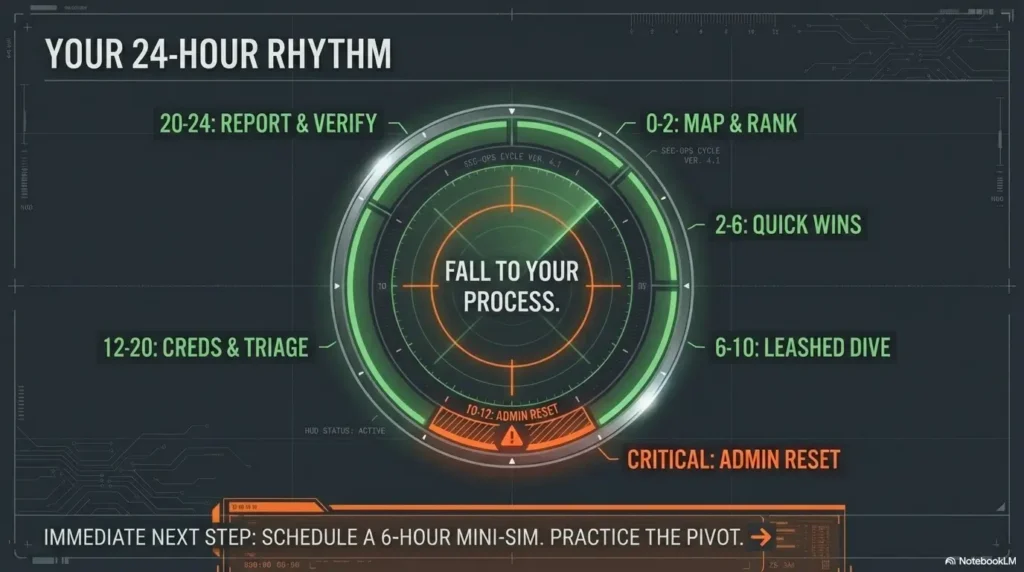
Infographic: the 23h 45m exam rhythm (attack + admin)
0–2
Map + rank targets
Output: ports table + first blood list
2–6
Quick wins + stabilize
Output: proof + re-entry steps
6–10
Deep dive (leashed)
Output: hypothesis log + decisions
10–12
Admin reset
Output: report-ready blocks
12–20
Creds sweep + triage
Output: best 90-min bets
20–23:45
Report + verify
Output: reproducible steps
Your next step can be done in 15 minutes: create your folder template, start a credential ledger, and write your pivot reasons list (three lines). Then schedule a 6-hour mini-sim and practice obeying the gates—especially the pivots you hate.
Original review: 2026-01-25.
Technical guidance updated: 2026-10-13. Corrected the 23h 45m exam cutoff, separate documentation window, and pre-cutoff proof/control-panel requirements.
Exam schedule assumption check
Use these fields to turn this guide into a record for your own task. Keep the actual scope, evidence and unresolved questions together.
On a small screen, scroll the table sideways to read all columns.
| Field | What to record | Your evidence / next check |
|---|---|---|
| Official constraints | Record the current provider guide and applicable deadlines. | To complete |
| Personal blocks | Keep study timers and switching rules labeled as your own plan. | To complete |
| Evidence buffer | Reserve time for the actual required documentation and checks. | To complete |
| Practice review | Compare a permitted mock session with the planned blocks. | To complete |
Next action: Recheck official rules before adapting the illustrative timetable to an exam booking.
Related task: Use Hydra Lab Timeboxing: Attempt Budgets, Lockouts and Stop Conditions for that separate part of the workflow.
Worksheet change record — October 20, 2026
Added four task-specific fields, a next action and a related guide. This is a blank editorial working aid, not a completed test or validated assessment. Existing source-review dates retain their own scope; this addition is not a new verification of every statement.