OSCP FFUF Wordlist Tuning: “Raft vs common.txt” (and when each wins)

ffuf wordlist tuning

Stop Gambling with Your Clock: Mastering FFUF Signal Density

Forty minutes. One hundred thousand words. Zero new paths—just the same polite redirect wearing different costumes. That’s the moment ffuf stops feeling like a tool and starts feeling like a slot machine.

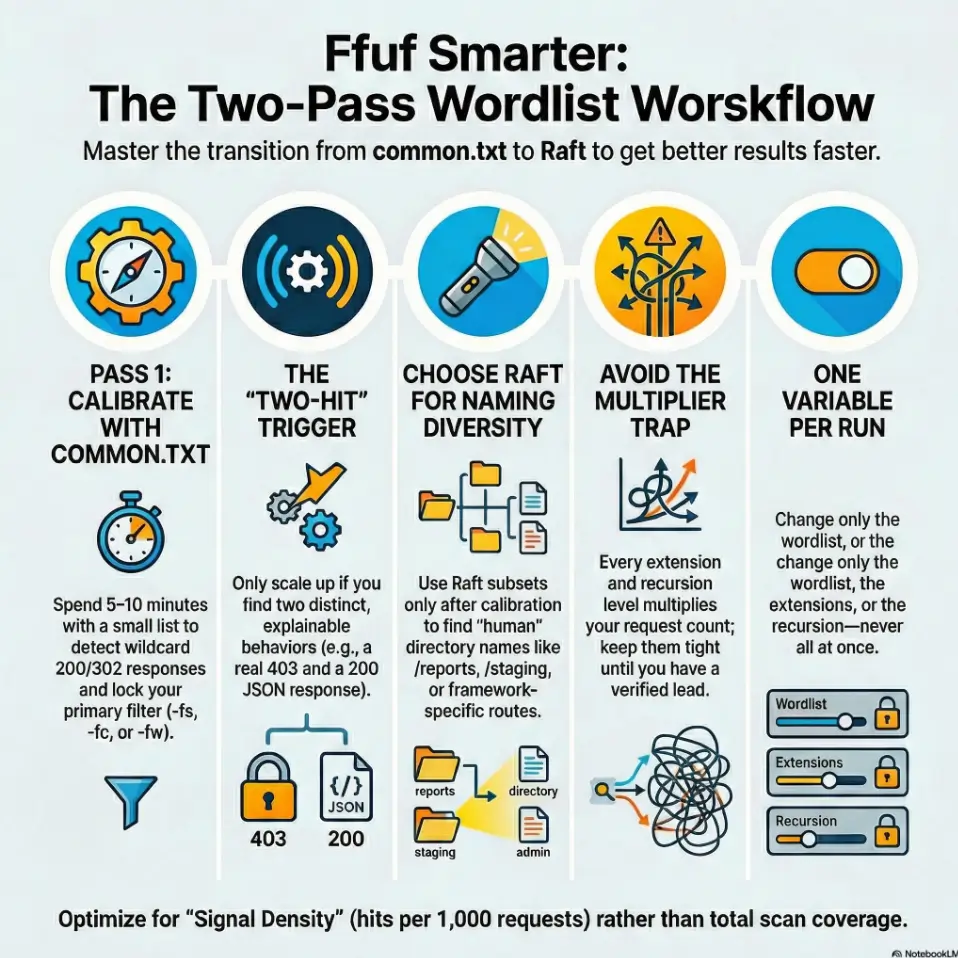
“OSCP FFUF wordlist tuning is the unglamorous skill that keeps your clock from bleeding out. I’m not chasing ‘coverage.’ I’m chasing signal density—hits per 1,000 requests—with a switch trigger you can defend in a screenshot.”

The Workflow

Pass 1: common.txt to lock truth.

Pass 2: Raft only when depth is proven.

The Strategy

One variable per run.

Filters first. Then scale.

The Goal

Find the real foothold elsewhere: SMB, reused creds, or hidden vhosts. (If you’re juggling multiple paths, this is exactly where a repeatable initial-access checklist keeps your workflow honest.)

Fast Answer (snippet-ready):

In OSCP-style web enum, common.txt wins first when you need fast, low-noise confirmation of obvious paths and you’re still calibrating filters (wildcard 404s, size, status). Raft wins next when you’ve proven the app has depth (real 200/302 patterns, tech clues, parameterized routes) and you need breadth—more unique directories, words, and naming styles. Start small, lock filters, then scale to Raft deliberately.


1) Start-with-the-clock: why wordlist choice is an exam skill

The hidden cost: 30 minutes of noise is “one foothold” lost

In a lab, “I’ll let it run” feels harmless. In an exam-style timebox, it’s a trade: every 30 minutes of low-signal fuzzing is often one missed foothold somewhere else—an SMB misconfig, a credential reuse, a forgotten vhost, a sneaky backup file. (And when that timebox mindset has to extend beyond web, the same discipline shows up in timeboxing Hydra the OSCP-safe way.) I learned this the annoying way: I once let a massive list run while I ate, came back proud… and realized I had 400 “hits” that were all the same wildcard response. The tool did work. I did not.

Signal density: the metric that matters (hits per 1,000 requests)

Forget “hits.” Track hits per 1,000 requests. That’s signal density. If your density is bad, scaling the list just scales disappointment. Your target isn’t “complete coverage.” Your target is repeatable yields: a small number of pages that change what you do next. (If you’ve ever been burned by “it looked real” output elsewhere, this is the same muscle you build when you learn why service detection false positives happen in Nmap.)

Takeaway: In OSCP-style web enum, wordlists are a budgeting tool—optimize for signal density, not bravado.
  • Track hits per 1,000 requests (not raw hits).
  • Start small until your filters are trustworthy.
  • Scale only when you can explain what “real” looks like.

Apply in 60 seconds: Write “hits/1k” next to your ffuf output and decide if the next run should be bigger or smarter.

OSCP, Web Enumeration, FFUF, Wordlists, Pentest Workflow

Open loop: the one test that predicts whether Raft will pay off

Here’s the test we’ll close later: Can you get two different “real” behaviors in under 10 minutes? (Example: one true 200 with content, one meaningful 302 to a login, one 403 that smells like an admin area.) If yes, Raft often pays. If not, Raft is usually a request bonfire. This is also where a simple “don’t get hypnotized by motion” rule helps—if you’ve ever needed one, bookmark the OSCP rabbit-hole rule and reread it when your terminal starts feeling like comfort food.

Mini calculator: “How long will this run actually take?”

Estimate time with three numbers: requests × avg response time (or pace) + overhead. In practice, use pace.

  • Requests: wordlist size × (extensions count, if file fuzzing) × (recursion factor, if enabled)
  • Pace: sustained requests/second you can hold without timeouts
  • Time: requests ÷ pace

Example: 2,000 words ÷ 40 rps ≈ 50 seconds. 100,000 words ÷ 40 rps ≈ 41 minutes. That’s the whole moral.

Neutral next action: Before you run Raft-large, do the math once and decide if the time matches the lead quality.

2) Raft vs common.txt: the real difference (it’s not just size)

common.txt = “obvious paths” + fast confirmation loops

common.txt (the classic dirb wordlist) is built for the boring, human part of the internet: /admin, /backup, /uploads, /test, /old. It’s not fancy. That’s why it’s powerful early. When your filters aren’t dialed, a smaller list gives you a cleaner truth: “Is this host giving me real differences, or is it lying with wildcard responses?” If you want a parallel “baseline first” example for tools, the same logic shows up in a Gobuster-first directory fuzzing walkthrough: small, explainable runs that teach you the target’s personality.

Raft = curated English words + naming variety (breadth over comfort)

Raft lists (from SecLists) are curated English words and directory naming styles, often with much broader vocabulary. The win isn’t “more.” The win is different naming: hyphenated words, verbs, less obvious nouns, the kind of internal folder names developers make at 1:00 a.m. (“tools,” “staging,” “reports,” “migration,” “assets-old”).

When “bigger” is worse: response bloat, rate limits, and false positives

Bigger lists can punish you in three ways:

  • Response bloat: you drown in 200s that aren’t real pages, just templated errors.
  • Rate limits/timeouts: your pace drops, and suddenly “quick scan” becomes “coffee break scan.”
  • False positives: redirects and wildcard behaviors look like success until you click them.

I’ve had runs where I was convinced I “found tons,” only to discover every “hit” was the same 302 to /. That’s not enumeration. That’s being politely escorted away by the server.

Practical mental model: Confirm → Expand → Specialize

Confirm the host is honest (filters + baseline). Expand breadth only after you have proof of depth. Then Specialize (framework lists, API lists, extensions, recursion) when you have a direction. This is how operators stay fast. And when “direction” becomes “notes + repeatability,” having a consistent capture system—like an Obsidian OSCP enumeration template—is what keeps your discoveries from evaporating.

3) Pick-the-first-10-minutes: a decision rule that never feels wrong

If you have zero filters yet: start with common.txt

If you haven’t validated wildcard behavior (or you suspect it), start with a small list. You’re not trying to “find everything.” You’re trying to learn how the server lies. In the first 10 minutes, clarity beats coverage. (This “exam reality check” matters even before you scan—if you want a clean baseline in locked-down environments, keep an OSCP VM lockdown checklist nearby so your setup doesn’t sabotage your evidence.)

If you already have stable filters: jump to a Raft slice

If you’ve already confirmed stable patterns—like a consistent 404, a meaningful 403, or titles that differ—you can start with a Raft subset. Not the largest list. A slice. Treat Raft like a ladder: step up only when the rung holds.

If the app is framework-heavy (Rails/Django/Laravel): Raft earlier

Framework-y apps often have deeper information architecture and routes that aren’t in “common” lists. If you see a framework fingerprint (headers, cookies, asset paths, default error pages), Raft tends to find more “human” route words sooner. Once you hit auth flows and redirects, this becomes much easier to reason about if your browsing is consistent—especially if you’ve already set up Burp with an external browser in Kali and can confirm behavior quickly.

If the app is static-ish (basic CMS/landing pages): common longer

Static sites and simple CMS installs usually have a smaller set of meaningful directories. You can waste a lot of requests looking for routes that don’t exist. In those cases, common.txt + smart extension probing is often the better spend.

Open loop: the “two-hit trigger” that tells you to scale up immediately

Here’s the trigger: if your first small run yields two distinct, explainable hits (not two copies of the same behavior), scale up. Example: a real /admin (403) plus a real /api (200 with JSON). That’s depth. That’s when Raft starts paying rent.

Quick Decision Flow (no drama, just outcomes)
Step 1: Baseline
Do 20–30 requests with a small list.
Goal: spot wildcard 200/302 and stable sizes.
Step 2: Two-hit trigger
Did you get two different meaningful behaviors?
(Real 200 content + real 403, or 302→login + API JSON)
If YES
Scale: Raft subset → Raft medium → specialize lists.
Keep filters constant. Change one variable per run.
If NO
Stay small: common.txt + refine filters + test vhosts/robots/sitemap.
Don’t “scale” uncertainty. Fix the baseline first.

4) Filter-first setup: make your results trustworthy before you scale

Wildcard detection: the “everything is 200” trap (and how to spot it)

Wildcard behavior is when the server returns a “successful-looking” response for nonsense paths. Your scanner becomes a liar detector. Quick test: request a few random strings (like /this_should_not_exist_123) and compare behavior to your “hits.” If the status, size, or title matches… you’ve got a wildcard situation.

It’s not rare. I’ve seen misconfigured frameworks and proxies respond with 200s for everything, with a friendly template. Your job is to stop trusting status codes alone.

Choose one primary filter: -fs vs -fw vs -fc (and when each lies)

The ffuf project documents multiple filters; the trick is choosing the one that stays stable on your target.

  • -fc (filter status code): clean, but can lie if wildcard uses 200 or 302.
  • -fs (filter response size): great when error templates are consistent; risky if content is dynamic.
  • -fw (filter word count): sometimes more stable than bytes; can wobble with timestamps or random tokens.
  • -fr (filter regex): powerful, but only after you understand the response body pattern.

My operator habit: I pick one primary filter, then keep everything else constant until I’ve earned confidence. And when you need to preserve that confidence in evidence, it helps to standardize how you capture it—this is exactly why I keep a ShareX screenshot naming pattern ready before I start.

Calibrate with 20 requests, not 2,000

Calibrate quickly: 20–30 requests can tell you whether your filter is stable. If you need 2,000 requests to figure out your filter, you’re paying tuition the expensive way. (Ask me how I know.) If you’re also logging your session (commands + timestamps), pairing this with Kali lab logging that’s report-friendly makes the story easier to reconstruct later.

Let’s be honest… you’re not tuning a tool, you’re tuning your patience.

Most wasted fuzzing time isn’t “lack of wordlists.” It’s emotional. You want movement. A scrolling terminal feels like progress. But in a report—or an exam—repeatable truth beats motion every time. (If your deliverable is OSCP-style, keeping the “what counts as proof” standard clear—see OSCP proof screenshot discipline—cuts a lot of late-night regret.)

Show me the nerdy details

Filtering by size (-fs) often works because many apps render a consistent error template. But modern stacks can inject dynamic tokens (CSRF, timestamps, A/B test IDs), which makes size/word filters drift. If you see “near misses” where sizes are off by a few bytes/words, try filtering on a stable phrase via -fr, or switch from bytes to word count. Also, don’t confuse redirect volume with success—verify the destination content and whether the redirect is identical across random paths.

OSCP, Web Enumeration, FFUF, Wordlists, Pentest Workflow

5) Run-small-on-purpose: the “Raft sampler” approach

Use a Raft subset first: small/medium directories before large words

Raft is a family, not a single monolith. The best pattern is to start with a smaller directories list before you go near massive “words” lists. This keeps your first Raft run honest: you’re testing whether the app’s naming style matches the list’s vocabulary.

I like to treat it like tasting a soup: one spoon tells you if you should eat the bowl—or stop pretending and make something else. And if your “something else” involves pivoting to a different attack surface, having a quick reference on OSCP pivoting tool choice saves you from improvising under pressure.

Add scope only when you see patterns: redirects, consistent sizes, real titles

Patterns that justify scaling:

  • Redirects that land somewhere meaningful (login, SSO, admin portal)
  • Consistent sizes/titles that differ from random paths
  • 403s in the right places (admin, internal tools, backups)

Keep a tight thread: one variable per run (wordlist or extensions or recursion)

If you change everything at once, you learn nothing. I’ve watched people tweak list + extensions + recursion + threads and then declare victory or defeat based on vibes. Don’t. Run like a scientist with a deadline: one variable per run. (If you want that discipline to survive multi-host juggling, a dedicated Obsidian OSCP host template helps you keep one “truth thread” per target.)

Coverage tier map: how to scale without melting your clock

Think in tiers. You don’t “go big.” You earn the next tier.

Tier 1
common.txt baseline + filter calibration
Tier 2
Raft small directories (or small words) + same filters
Tier 3
Raft medium + extension probing (separate run)
Tier 4
Framework/API lists (Rails/Django/Laravel) + parameter fuzzing
Tier 5
Raft-large only with proven depth + strict timebox

Neutral next action: Label your current run Tier 1–5 in your notes before you press enter.

6) When common.txt wins (yes, even on complex apps)

Early footholds: /admin, /backup, /old, /test, /dev, /api

Even on complex apps, the first foothold often lives in a painfully obvious directory. That’s not an insult to developers; it’s just reality. The world is built by tired humans. (I say this as a tired human.) And once you get that foothold, it’s worth switching into a structured “what next?” loop—this is where an OSCP initial access checklist keeps you from skipping the boring step that would’ve saved you later.

Timeboxed confirmation: “prove it exists” before “map everything”

common.txt is perfect when your goal is: prove there’s something here. Once you can prove it—real response, real behavior—then you earn deeper mapping. Until then, you’re just painting fog.

Low-noise value: better for screenshots + reporting discipline

Small lists make cleaner evidence. If you’re building an OSCP-style report, you want screenshots that tell a story: baseline → discovery → access attempt → next move. common.txt gives you a tighter narrative. It also reduces the temptation to attach a “results.txt” that’s basically confetti. (If you want your evidence to be “exam-proof” instead of “hopeful,” align your workflow with OSCP proof screenshot standards and keep naming consistent with a timestamp-first ShareX naming pattern.)

Open loop: why your best find often comes from the smallest list

Because the best find is usually a doorway, not a map. A single admin panel, a forgotten backup, a debug endpoint—that’s a pivot. And pivots come from clarity, not breadth.

7) When Raft wins (and what “winning” looks like)

Naming diversity: hyphens, nouns, verbs, British vs American variants

Raft tends to win when the app’s directories are named like human language: /reports, /exports, /billing, /onboarding, /monitoring. It also captures naming variations that smaller lists don’t prioritize. If the app feels like it has internal tooling, Raft speaks that dialect better.

Deeper IA: staging paths, internal tooling, “human” folder names

“Winning” looks like this: you get fewer hits than you expected, but each hit is weirder—and more specific. A /staging folder, a /tools endpoint, a /migrations directory. The stuff that makes you sit up straight.

Framework conventions: routes that aren’t in common lists

Framework apps often generate routes and patterns that aren’t “universal.” Raft’s breadth gives you a higher chance of matching that house style. When you see JSON responses, session cookies, and recognizable framework assets, Raft earlier can be smart.

Here’s what no one tells you… Raft is only powerful after you’ve earned good filters.

Without filters, Raft is a megaphone pointed at noise. With filters, Raft is a microscope. Same list. Different outcomes. And if “filters + evidence” is part of your exam workflow, this is where your environment hygiene matters more than people admit—keeping a VM lockdown checklist close prevents small setup mistakes from turning into big reporting pain.

Short Story: “The day Raft finally felt like cheating” (120–180 words) …

I once hit a web box where everything looked normal: a homepage, a login link, nothing spicy in robots.txt. I did what Past Me always did—ran a huge list immediately, watched 302s fly by, and told myself I was “being thorough.” Forty minutes later, I had a folder full of “hits” that all redirected to the same landing page. I was basically stress-testing the server’s patience.

This time, I stopped. I ran common.txt for 7 minutes, took the two weirdest responses, and tuned one filter. Then I ran a small Raft directories list. The difference was embarrassing: one hit landed on /reports with a real index, and inside was an export endpoint that led to credentials. Same tool. Same host. Different order. The “cheat” wasn’t Raft—it was discipline.

8) Extensions-and-modes: stop brute-forcing the wrong shape of URL

Directory fuzzing vs file fuzzing (don’t mix blindly)

Directory fuzzing asks: “What folders exist?” File fuzzing asks: “What files exist?” Mixing both in one run can multiply noise and hide the trail. If you’re exploring structure, do directories first. If you’re hunting exposed artifacts, do file fuzzing as a separate run.

Smart extension sets for OSCP-style apps: .php, .txt, .bak, .zip, .old

Extensions are a multiplier. Keep them tight. For typical OSCP-style targets, a small set like .php, .txt, .bak, .zip, .old can be enough to catch the classics without exploding your request count. When the path suggests uploads, treat it like a high-yield branch and switch to a more specialized workflow—this is exactly when an OSCP file upload bypass checklist earns its keep.

Match mode to target: -e vs separate runs vs segmented lists

If you’re unsure, prefer separate runs. It’s easier to reason about results when you know exactly what changed. Save the “everything at once” approach for when you already have a confirmed path and you’re squeezing extra value.

Recursion rules: when it’s a multiplier and when it’s a trap

Recursion can be magic—if you already found a meaningful directory. But recursion on a noisy baseline is a trap. It multiplies the wrong thing. Earn recursion with a verified hit that suggests depth.

Decision card: When A vs B (and the time trade-off)

Pick common.txt when…
  • You haven’t validated wildcard behavior.
  • You need fast, screenshot-clean proof.
  • The site feels shallow or static.

Typical time spend: 5–10 minutes.

Pick Raft when…
  • You already have stable filters.
  • You saw two distinct meaningful behaviors.
  • The app smells like framework + depth.

Typical time spend: 10–15 minutes (subset), longer only with proof.

Neutral next action: Choose A or B before you run, and write your reason in one sentence.

9) Common mistakes: the “don’t do this” list that saves hours

Mistake #1: Running Raft-large before you’ve validated wildcard behavior

If the host is wildcarding, Raft-large doesn’t “find more.” It produces a bigger pile of identical lies. Validate first. Always.

Mistake #2: Using multiple filters at once and not knowing what caused the “hits”

Stacking filters feels safe. It’s also a great way to hide the truth from yourself. Use one primary filter, then adjust deliberately.

Mistake #3: Treating redirects as success without checking destination behavior

A 302 can be a real lead (login, admin, SSO). Or it can be the same generic redirect for everything. Verify where it lands and whether it differs from random paths.

Mistake #4: Keeping the same thread count/rate on every host (rate-limit pain)

Different hosts tolerate different pace. If you see timeouts, dropped connections, or inconsistent results, slow down. A slower, stable run beats a fast run that lies.

Mistake #5: Fuzzing everywhere instead of following one confirmed lead

The highest-yield enum is often depth-first once you have a lead. Hit /admin? Follow it. Hit /api? Inspect it. Don’t keep carpet-bombing the homepage because it feels productive.

10) Mistakes that look smart (but tank your signal)

“I’ll just add more extensions” (how this multiplies noise)

Every extension multiplies your requests. If you add 8 extensions to a 50,000-word list, you didn’t get “a little more thorough.” You multiplied your run by 9. Unless you have a strong reason (like a known stack), keep extension sets tight.

“I’ll recurse immediately” (how this hides the real entry point)

Recursion early can bury the meaningful entry point under a mountain of second-order noise. Earn recursion by confirming a directory that truly exists and behaves differently.

“I’ll ignore 403s” (why 403 is sometimes your best clue)

A 403 can be a sign you found something real—an admin panel, internal tooling, or a protected directory. In OSCP-style environments, 403s can be doors with a lock, not walls with nothing behind them.

Takeaway: Most “advanced” enum mistakes are just multipliers applied too early.
  • Extensions multiply requests.
  • Recursion multiplies uncertainty if baseline is noisy.
  • 403 can be signal, not failure.

Apply in 60 seconds: Pick one multiplier (extensions or recursion) and postpone it until you have a verified hit.

11) Who this is for / not for

For: OSCP-style labs, authorized pentests, web enum under time pressure

This workflow is for candidates and testers doing authorized enumeration—OSCP labs, practice ranges, or pentests with explicit permission—where time is limited and evidence needs to be clean. If your targets include AD environments, the same “no BloodHound, still move fast” mindset applies—see AD enumeration without BloodHound for that parallel discipline.

Not for: unauthorized scanning, public targets without explicit permission

Don’t use this to scan systems you don’t have permission to test. “It’s just directories” is still scanning. Keep it ethical, keep it legal, keep it boring in the best way.

If you’re brand-new: what to learn first (HTTP basics + response triage)

If you’re new, learn response triage: status codes, redirects, content lengths, and what “normal” looks like. Tools like ffuf, gobuster, feroxbuster, and Burp Suite can only help if you can interpret output.

If you’re advanced: where the extra edge actually comes from (calibration discipline)

The extra edge isn’t a secret list. It’s discipline: faster baselines, cleaner filters, and better switching triggers. The best operators are boringly consistent.

12) Next step

Here’s the two-pass workflow to run on your next target—tight, repeatable, and friendly to your future report.

  1. Pass 1: common.txt (10 minutes max) — Calibrate filters, confirm the host is honest, grab quick wins.
  2. Pass 2: Raft subset (10–15 minutes max) — Only if you’ve confirmed real hit patterns (stable 200/302/403 behavior you can explain).

Document the filter you used and the reason. Your next run becomes faster because you’re not re-learning the target’s personality from scratch. (Yes, servers have personalities. Some are liars. Some are dramatic. Some are both.) And when you turn this into a deliverable, having a consistent structure—like a Kali pentest report template—makes the story painless to write.

💡 Read OWASP guidance on brute force / wordlist attacks

OSCP, Web Enumeration, FFUF, Wordlists, Pentest Workflow

FAQ

1) Is common.txt enough for OSCP web enumeration?

Often, yes—for the first pass. common.txt is excellent for confirming obvious paths quickly and helping you calibrate filters. If the app shows depth (two-hit trigger), add a Raft subset for broader naming coverage.

2) Which Raft list should I start with for directory fuzzing?

Start with a smaller Raft directories list (or a small/medium slice) before you touch any “large words” list. Your first Raft run is a test: does the app’s naming style match the list’s vocabulary?

3) How do I handle wildcard 200/302 responses in ffuf?

Send a few requests to random, nonsense paths and compare them to your “hits.” If they look the same, you’re seeing wildcard behavior. Use one stable primary filter (often size, words, or regex) and re-run a small list to confirm your filter works before scaling.

4) Should I fuzz files and directories in the same run?

Usually no. Separate runs keep your results explainable: directories for structure first, then file fuzzing with a tight extension set when you have a reason. Mixing everything multiplies requests and muddies signal density.

5) What’s a good threads/rate starting point to avoid missing results?

Pick a pace that stays stable—no timeouts, no dropped connections. Start moderate, then adjust. Different hosts tolerate different rates. A slower, consistent run is better than a fast run that returns unreliable output.

6) Why am I getting a ton of 403s and what should I do next?

Don’t dismiss 403s. They can indicate real protected areas (admin panels, internal tooling). Verify if the 403 behavior is consistent and different from random paths, then investigate access controls, auth flows, and related endpoints nearby.

7) When should I use recursion in ffuf during OSCP-style testing?

Use recursion after you’ve confirmed a meaningful directory that truly exists and behaves differently. Recursing early multiplies noise and can bury the real entry point you needed to notice.

8) What filters are safer: -fs, -fc, -fw, or -fr?

“Safer” depends on the app. Status filtering can fail under wildcard 200/302. Size/word filtering works well when error templates are consistent, but can drift with dynamic content. Regex filtering is powerful once you understand the response pattern. The safest approach is: choose one primary filter, validate it with random paths, then scale.

9) How do I choose wordlists for API endpoints vs normal web paths?

APIs often use different naming (versioning like /v1, nouns like /users, verbs like /login). Start with the same baseline discipline (small run + filters), then move to lists that match API vocabulary once you’ve confirmed JSON behavior.

10) Should I run Raft-large at all during an exam-style timebox?

Only with proof. If you’ve already found depth, stabilized filters, and you have a reason to believe additional routes matter, a strict timeboxed Raft-large run can be worth it. Otherwise, it’s usually a distraction from higher-yield pivots.

Conclusion

Let’s close the open loop from the beginning: the test that predicts whether Raft will pay off is whether you can get two distinct, explainable behaviors in under 10 minutes. If you can, Raft becomes a smart next move—because you’re scaling truth, not uncertainty. If you can’t, the win isn’t “try harder.” The win is fix the baseline: validate wildcard behavior, pick one primary filter, and keep runs small until the host starts telling you different stories.

If you do one thing in the next 15 minutes: run the two-pass workflow on a single target, write down your filter choice, and calculate the time cost before you scale. Your future self—tired, report-writing, and slightly annoyed—will thank you.

Last reviewed: 2026-01-22.