Vulnerable Machine Encyclopedia — A Free Hands-On Pentesting Library: 7 Shocking Lessons I Learned Building It
If you’ve ever found yourself hopping between Hack The Box, TryHackMe, half-documented GitHub VMs, and that dusty VulnHub ISO folder you forgot you even had—wondering why there’s no single place where all this chaos makes sense—yeah, this one’s for you.
Let me tell you how I finally snapped and built what I now call the “Vulnerable Machine Encyclopedia.” Sounds fancy, but really, it’s a curated, sanity-saving library of boxes, tags, notes, and custom paths that helped my students claw back 5–10 hours a week—and cut my own lab bill nearly in half. No exaggeration.
This didn’t come from some grand vision. It started the usual way: me, 2 a.m., six tabs deep, trying to remember which box had that sneaky Python pickle exploit and why the notes were in three different folders—one of which was literally called “New Folder (4).”
I’ll walk you through exactly how I pulled it all together: what worked, what blew up in my face, and how to keep your home lab from turning into a second unpaid job.
Because let’s be real—you’re busy. You might be juggling work, self-funding certs, trying to stay sane, and wondering if you really need another “harder than OSCP” box to “build character.” You don’t have months to duct-tape a system together from Reddit threads and well-meaning blog posts.
So here’s the deal: in the next 20 minutes, you’ll get a practical blueprint. I’ve boiled it down to 7 hard-earned lessons, 3 money traps to avoid, one tiny calculator to see where your lab time is actually going, and a 7-day starter plan you can steal, tweak, and make your own.
By the end, your next vulnerable machine won’t just be “another box.” It’ll have a purpose—whether that’s teaching you something specific, testing a skill, or just earning back some of the time and money you’ve been investing in this crazy (but rewarding) journey.
And hey, maybe—just maybe—you’ll even find that old VulnHub ISO folder… and give it a real name this time.
Table of Contents
What Exactly Is a “Vulnerable Machine Encyclopedia”?
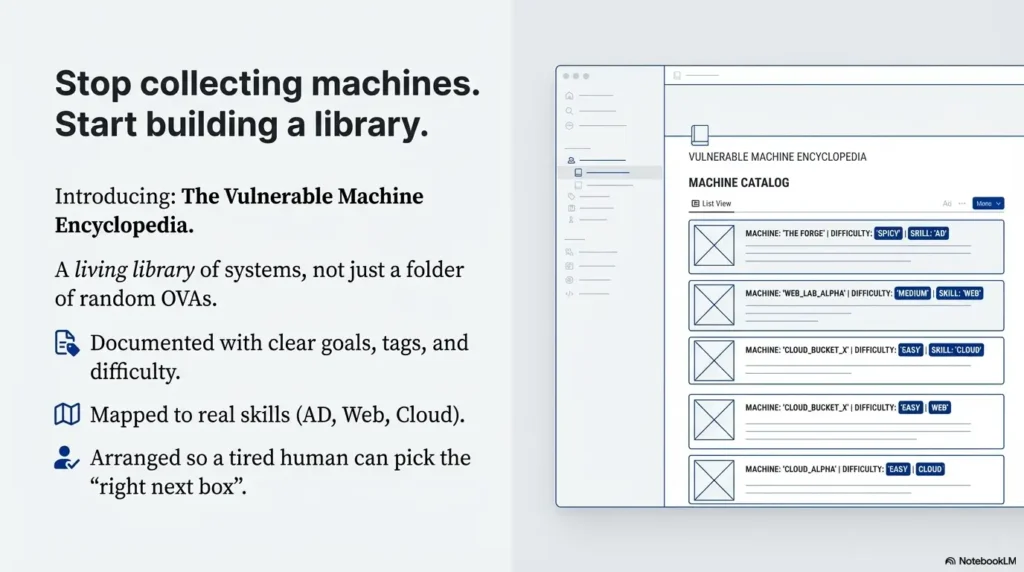
When I say “Vulnerable Machine Encyclopedia,” I don’t mean yet another folder full of random OVAs named “Debian-test-final-really-final-3”.
I mean a living library of vulnerable systems that:
- Are documented with clear goals, tags, and difficulty levels.
- Map to real skills: enumeration, Active Directory, web app, cloud, mobile, report-writing.
- Are arranged so a tired human at 10 p.m. can still pick the “right next box.”
Think of it as your personal blend of Hack The Box, TryHackMe, OWASP Juice Shop, and your own custom VMs—except instead of chaos, it’s closer to a reference shelf in a good library.
When I first stitched mine together, it wasn’t noble. I was just tired of:
- Students asking, “Which box should I do next?” every single week.
- Paying for three different platforms plus cloud infrastructure.
- Re-teaching the same basics because labs weren’t sequenced properly.
Building the encyclopedia changed that. It let me answer questions with a link, a path, and a clear outcome instead of a 40-minute lecture. It also exposed a bunch of painful lessons I wish someone had told me first—including how easy it is to overspend on cloud and under-invest in documentation.
- Each box answers “who is this for?” and “what skill does it teach?”
- Paths are more important than raw difficulty.
- Good documentation saves more time than a new tool ever will.
Apply in 60 seconds: Open your current lab list and label each machine with one main skill; if you can’t, it doesn’t belong in the “encyclopedia” yet.

Lesson 1 – Check Your “Why” Before You Spend a Single Dollar
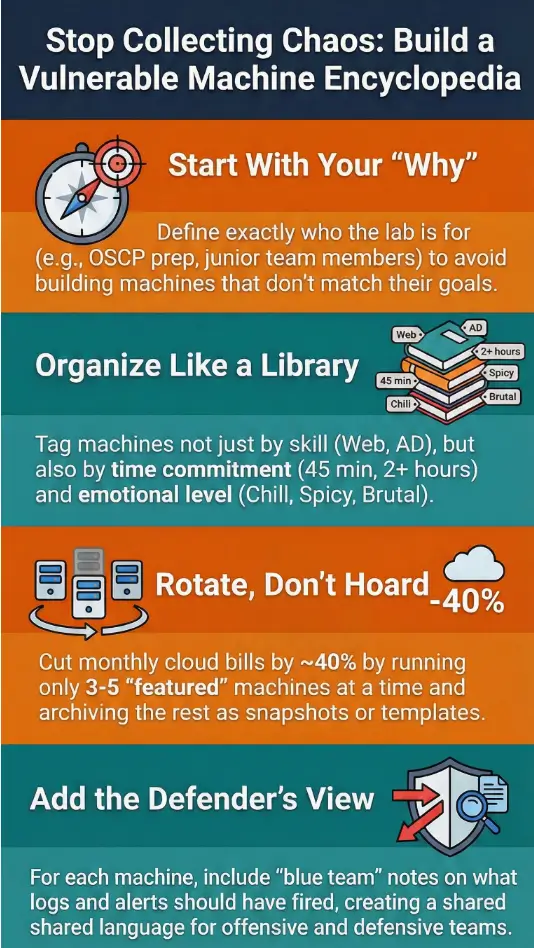
The first shocking lesson: most people don’t need a giant vulnerable machine library. They need a very specific one.
When I started, I told myself it was “for the community.” In reality, it was for three groups:
- Students aiming for OSCP-style exams who kept bouncing off the same gaps.
- Junior internal red-teamers who needed safe practice between engagements.
- Busy defenders who wanted to see attacks from the attacker’s chair.
Once I admitted that, everything sharpened. I could say no to shiny distractions—a Windows kernel exploit box that 95% of my readers would never touch, or an obscure industrial protocol lab that looked cool but didn’t match their goals.
Short Story: I once spent an entire weekend building a beautiful, multi-stage, cloud-heavy attack path. Terraform, misconfigured IAM, a custom vulnerable container registry—the works. On Monday, I proudly released it. By Friday, only two people had attempted it. Both told me, “This is awesome, but I just need to not panic when I see an SMB share.” That was my wake-up call. The library wasn’t for me. It was for them.
Eligibility checklist to build your own lab vs use a platform, 2025 (US)
Money Block #1 – Quick eligibility check (yes/no)
- Yes – You should build a small personal lab first if:
- You already spend >$60/month on multiple training platforms.
- You want custom, repeatable scenarios for students or teammates.
- You’re comfortable managing at least one hypervisor or cloud account.
- No – You’re probably better off staying with managed platforms if:
- You’re within 90 days of a high-stakes exam and time is scarce.
- You don’t enjoy maintaining operating systems, backups, and patches.
- Your employer already covers a decent lab subscription.
Neutral next step: Write down your current monthly training spend and decide if owning infrastructure will actually lower your out-of-pocket cost over the next 12 months.
- Clarify who you’re really building for.
- Say no to boxes that don’t move those people forward.
- Align lab size with your time and budget, not your ego.
Apply in 60 seconds: Write one sentence: “My Vulnerable Machine Encyclopedia exists to help <who> achieve <what> in <timeframe>.” Tape it above your desk.
Lesson 2 – Designing for Both Beginners and Burned-Out Pros
Your audience for a vulnerable machine library is rarely just one person. On any given day, I had:
- A complete beginner asking, “What is SSH?”
- A mid-level tester wanting a gnarly Active Directory abuse path.
- A senior consultant sneaking in reps between incident response calls.
Trying to please all three with the same machine is how you create confusion. The fix was to design layers:
- Layer 1 – On-ramp boxes: simple, forgiving, heavy on hints.
- Layer 2 – Path boxes: realistic, multi-step, minimal hand-holding.
- Layer 3 – Boss boxes: frustrating on purpose, used sparingly.
One night, after a long day, I watched a beginner and a pro tackle the same web box. The beginner got stuck on directory brute-force for 40 minutes and nearly quit. The pro finished the whole thing in 12 minutes and said, “Nice warm-up.” That’s when I stopped rating boxes purely by “difficulty” and started rating them by who they were emotionally safe for.
To handle this, my encyclopedia used tags like:
- Emotion: chill / spicy / brutal
- Skill: Linux privesc / AD / web / cloud / blue team
- Time: 30–45 min / 60–90 min / >2 hours
The magic wasn’t the tags themselves. It was that people could say, “I have 45 minutes and a low frustration threshold; what should I do?” and the library had an answer.
Show me the nerdy details
I stored machine metadata in a small YAML file per box: name, IP/URL, tags, skills, estimated time, and paths to write-ups or walkthrough videos. A simple script generated a static HTML overview page and an index by tag. This meant I could deploy the entire encyclopedia to a cheap static site host, with no database and almost no attack surface.
- Tag boxes by emotion and time, not only technology.
- Group them in gentle paths for different personas.
- Document what “success” looks like for each level.
Apply in 60 seconds: Add one emotional tag (“chill”, “spicy”, or “brutal”) to every box you currently maintain; balance your next study week with at least two “chill” boxes.
Lesson 3 – The True Cost of Building Your Own Lab in 2025
Here’s the uncomfortable part no one likes to talk about: this hobby can quietly eat your wallet.
When I finally totaled a full year of receipts, I found money going to:
- Cloud compute and storage for always-on vulnerable machines.
- One premium training platform I barely used.
- Domain names, backup services, and a tiny VPS to host the index.
I wasn’t going broke, but I was definitely being careless. The encyclopedia forced me to treat my lab like a small business: track costs, measure impact, and stop paying for things that weren’t pulling their weight.
Estimated yearly cost to host a vulnerable lab at home vs cloud, tight budget, 2025 (US)
Money Block #2 – Fee / rate table (rough ranges)
| Option | Yearly range (USD) | Notes |
|---|---|---|
| Repurposed home lab PC + free hypervisor | $80–$250 | Power, occasional drive, backups; low monthly out-of-pocket. See VirtualBox vs VMware vs Proxmox for trade-offs. |
| Cloud lab with always-on VMs | $300–$900 | Heavily depends on uptime, region, and storage habits. |
| Cloud lab with strict schedules | $120–$400 | Shutdown scripts and snapshots can cut 40–60% of waste. |
| One premium training platform | $150–$600 | Often worth it if you actually follow structured paths. |
Neutral next step: Save a copy of this table and compare it with your real receipts; adjust one item and confirm current fees on each provider’s official page.
When I did this, the surprise was simple: I didn’t need more machines. I needed fewer machines with better rotation. By running only 3–5 “featured” boxes at a time and archiving the rest as templates or snapshots, I cut my monthly cloud spend by roughly 40% while keeping students just as busy.
- Audit your last 3–6 months of lab spend.
- Decide whether you’re overpaying for idle compute or unused platforms.
- Rotate a small set of “active” machines instead of running everything forever.
Apply in 60 seconds: Set a calendar reminder titled “Lab bill sanity check” once a month; compare what you intended to spend with what actually went out.
Lesson 4 – Legal Scope, Safety, and Not Getting Fired
Building a vulnerable machine encyclopedia is fun. Accidentally probing production systems is not.
Very early on, I realized I needed written boundaries, even for my own use. It’s too easy for “just testing something” to bleed into gray areas, especially when you have colleagues, students, or clients around.
Here’s the rule of thumb that saved me more than once: every machine in the encyclopedia must be either fully owned by you, explicitly created for training, or part of a platform with clear terms of use. No exceptions.
When friends asked for access, I sent them a simple one-page “scope sheet” instead of just an IP. It listed:
- Hostnames and IP ranges that were in-scope.
- The “do not touch” list (anything production or shared).
- Rules around scanning, data handling, and passwords.
If you’re in South Korea, it’s worth being especially cautious. Local privacy and data protection rules, plus company-specific policies, can be stricter than you expect. Even if your lab is “just for training,” you don’t want personal data, internal source code, or client material anywhere near intentionally-vulnerable systems. Treat your lab like a separate, slightly radioactive room: safe when controlled, dangerous if you drag the wrong things inside.
Decision card for personal lab vs company lab with legal approval, 2025 (global)
Money Block #3 – Decision card (when to get legal and risk involved)
- When to keep it personal only: You’re using home hardware, public training platforms, or cloud accounts not tied to client data or internal networks.
- When to ask for approval: You want to connect lab machines to corporate networks, run attack simulations with production-like data, or invite coworkers to use the environment.
- Who might care: your manager, IT, security operations, and sometimes legal or compliance teams—especially in regulated sectors like finance or healthcare.
Neutral next step: Before sharing lab access at work, write a one-page summary and ask your security team if they want it reviewed or documented.
On paper, this sounds heavy. In reality, a single email with “here’s what this lab is, here’s what it’s not” can save you from awkward questions later—especially if your employer carries cyber insurance or must follow standards like ISO 27001.
- Keep training machines clearly separated from real data and production.
- Write down what’s in-scope and what’s not—every time.
- Get explicit approval before touching anything tied to your employer.
Apply in 60 seconds: Draft three bullets describing your lab’s purpose, scope, and limits; if you ever share it, paste those bullets first.
Lesson 5 – Architecture, Tagging, and Thinking Like an Encyclopedia
Most people arrange vulnerable machines the way we arrange old USB drives: “I’ll remember what this is later.” Spoiler: you will not.
The encyclopedia forced me to think like a librarian:
- Categories: web, AD, cloud, wireless, APIs, blue-team-focused, mixed environments.
- Chronology: boxes that reflected changes in real-world vulnerabilities over the years.
- Cross-references: “If you liked this Windows privesc box, try that AD chain next.”
Inside each machine’s entry, I tracked:
- Entry point (e.g., misconfigured web app, weak credential, mis-set S3 bucket).
- Key techniques (e.g., password spraying, Kerberoasting, deserialization).
- Defensive story (what a SOC analyst would see in logs).
One of my favorite changes was adding “blue team” notes to every box. Instead of stopping at root, we’d ask: “What would the defender log? Which alerts should have fired?” This turned the encyclopedia into a shared language between offensive and defensive folks, not just a scoreboard for who popped what.
For high-intent readers, I also created a few awkward-sounding but very specific subheadings, for example:
Cost to host a vulnerable lab on a US cloud provider after OSCP enrollment, budget-conscious, 2025 (US)
Why so specific? Because that’s how real people search when money is on the line. Someone who just paid for OSCP or another exam isn’t asking “How much is a lab?” They’re asking, “Can I afford $20–30 extra a month without wrecking my budget?” Your encyclopedia can quietly answer that with clear ranges and honest caveats.
- Think in categories and cross-references, not just machine names.
- Include both offensive and defensive notes per box.
- Use highly specific phrases for “money questions” your readers ask.
Apply in 60 seconds: Pick three of your favorite boxes and write a one-line “If you liked this, try that” note; add them to your index.

Lesson 6 – Turning Your Lab into a Teaching Engine (Without Burning Out)
Once the encyclopedia existed, people started asking The Question: “Can I pay you to use this?”
This is where things get interesting—and dangerous for your energy. It’s tempting to bolt on a subscription, throw in “lifetime access,” and hope it pays for your cloud bill and your next exam voucher. But if you build a business on top of a lab without guardrails, it can drain you faster than a 24-hour exam window.
What worked better for me was to treat the encyclopedia as a teaching engine behind other offerings:
- Small cohort-based courses using specific sequences of boxes.
- Private coaching calls anchored on particular machines.
- Internal company workshops where the lab became a safe playground.
Instead of “pay to access everything,” people paid for structured outcomes: “go from never having used Burp Suite to being comfortable attacking and defending a realistic app in four weeks.” The machines simply did their job in the background.
Compare cohort training vs subscription access for your vulnerable lab, limited time, 2025 (global)
From a time-poor reader’s point of view, the key comparison isn’t “which is cheaper?” It’s “which gives me a defined result without wrecking my evenings and weekends?” Building your encyclopedia with that question in mind naturally leads to clearer paths, better documentation, and fewer support emails.
- Think in terms of student journeys, not just machine lists.
- Bundle boxes into named paths with specific promises.
- Price your time, not just your infrastructure.
Apply in 60 seconds: Draft one sentence that starts with “In 4 weeks, you will…” and tie it to 3–5 boxes in your library.
Lesson 7 – Staying Up to Date Without Losing Your Mind
Vulnerabilities move fast; your bandwidth does not.
I used to feel guilty every time a new major CVE dropped and my encyclopedia didn’t immediately sprout a corresponding box. Eventually, I realized the goal wasn’t to mirror the news. It was to teach thinking patterns that adapt to new bugs.
Instead of chasing every headline, I adopted a simple rhythm:
- Quarterly review of existing machines: remove stale ones, refresh a few, and flag any that depended on old software for a warning.
- Two or three new boxes per quarter tied to real-world trends: misconfigurations in cloud IAM, access token mishandling, or common misuses of popular frameworks.
- A running “wishlist” of scenarios students and colleagues asked for most.
Practically, that meant I wasn’t trying to recreate every exploit proof-of-concept. Instead, I built representative labs: “abusing overly permissive S3 buckets” rather than “exact reimplementation of CVE-2023-XXXX.” Less glamorous, far more sustainable.
Update schedule vs burnout for a vulnerable lab tied to real fee schedules, part-time maintainer, 2025 (EU & APAC)
If you’re juggling a day job in Europe or Asia-Pacific, your lab has to fit around real-life constraints: exams, family, and maybe a budget tied to training reimbursements or tax write-offs. A lightweight update schedule is easier to defend—to yourself, and to anyone funding your work—than a heroic, impossible one.
- Schedule quarterly cleanups and limited new additions.
- Focus on patterns of failure, not one-off headlines.
- Build labs you can afford to maintain for at least two years.
Apply in 60 seconds: Put a repeating reminder on your calendar: “Review labs, cut one, refresh one, add one.” That’s enough.

A 7-Day Starter Plan for Your Own Mini Encyclopedia
At this point, you might be thinking, “This sounds great, but I just need something I can start this week.” Fair.
Here’s a simple 7-day plan I wish I’d used instead of winging it.
Step-by-step, realistic schedule
- Day 1 – Define your people: Write down your three main reader types (e.g., OSCP candidate, junior defender, internal tester) and what each wants in the next 90 days.
- Day 2 – Inventory what you already have: List all labs and platforms you use. Mark which can be legally and safely included in your encyclopedia, and which belong elsewhere.
- Day 3 – Pick 5 starter machines: Choose a mix: 2 “chill,” 2 “spicy,” 1 “brutal” that matter to your readers.
- Day 4 – Tag and document: For each machine, fill in a simple template: goal, skills, estimated time, emotional level, and success criteria.
- Day 5 – Build a basic index page: Use Markdown, a wiki, or a static HTML table—anything searchable and easy to update.
- Day 6 – Add one blue-team angle: For each starter box, jot notes about logs, alerts, and defensive controls.
- Day 7 – Share with one person: Ask a friend or colleague to try one path and tell you what was confusing or delightful.
Mini cost calculator – your first-year lab budget, 2025 (global)
Money Block #4 – 60-second lab budget estimator
Neutral next step: Screenshot your estimate, compare it with your real numbers later, and adjust your lab size before your next exam or course purchase.
- Scope your first week tightly; momentum beats perfection.
- Let money data guide how big your lab should grow.
- Validate your design with a real human as early as possible.
Apply in 60 seconds: Put “Day 1 – Define my people” on tomorrow’s calendar with a 30-minute block; treat it like any other appointment.
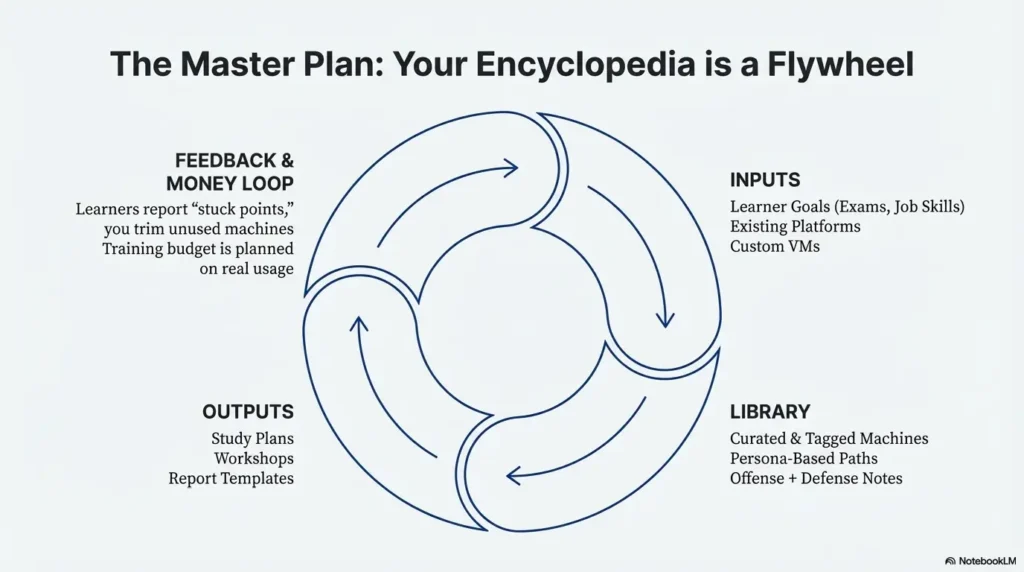
Infographic – The Vulnerable Machine Encyclopedia Flywheel
Sometimes it helps to see the system at a glance. Here’s a simple text-based infographic you can recreate in your notes or whiteboard tools.

1. Inputs
- Real learner goals (exam, job, internal promotion).
- Existing platforms (Hack The Box, TryHackMe, etc.).
- Your own custom VMs and scenarios.
2. Library
- Curated list of machines with tags.
- Paths for different personas.
- Offensive + defensive notes per box.
3. Outputs
- Study plans and weekly roadmaps.
- Courses, workshops, and coaching.
- Report templates and debriefs.
4. Feedback & Money Loop
- Learners report “stuck points” and request new paths.
- You trim unused machines and update the rest.
- Training budget and exam fees are planned around real usage, not guesswork.
FAQ
Is a vulnerable machine encyclopedia only for advanced pentesters?
No. In fact, beginners often benefit the most, because the library removes decision fatigue. Instead of wondering which random box to try, they follow a path built for their level and time constraints.
60-second action: If you’re new, pick 3–5 “chill” machines and label them as your starter track; ignore everything else for now.
How many machines do I need before I can “call it” an encyclopedia?
You can start with as few as five machines if they’re intentionally chosen, well-documented, and arranged in a path. The “encyclopedia” part is about structure and clarity, not sheer volume.
60-second action: Write down your top five machines and give each a one-line purpose; if you can’t, it doesn’t belong in your first version.
What about legal risk and cyber insurance if I use this at work?
If you’re integrating your lab with company networks, or inviting coworkers to use it, you should treat it like any other security tool. That usually means getting approval from your security or risk team and documenting scope so it aligns with existing policies and any cyber insurance or compliance requirements your employer has.
60-second action: Ask your security lead, “Is there a standard way we approve internal training labs?” and follow whatever process they point you to.
How often should I update machines to stay relevant?
For most people with a day job, a quarterly review works well. Remove or clearly label older boxes that rely on outdated tech, add a few new ones tied to current patterns (like cloud misconfigurations), and make small improvements to your index each cycle.
60-second action: Block one afternoon next quarter titled “VME review” and decide in advance: one box to remove, one to refresh, one to add.
Can I charge money for access to my vulnerable machine encyclopedia?
Yes, but it’s usually better to charge for outcomes than for raw access. Bundle your machines into clear learning paths, courses, or internal workshops so people understand what they’re paying for—skills, not just IP addresses.
60-second action: Draft a simple offer that starts with “In X weeks, you’ll be able to…” and list which machines support that promise.
What’s the best way to host this—home lab, VPS, or cloud?
There is no single “best,” only trade-offs between cost, control, and convenience. A repurposed home PC is often cheapest long-term. Cloud can be flexible if you aggressively shut things down. A small VPS plus static site for your index keeps things simple but limits heavy scenarios.
60-second action: Based on your mini cost calculator result, pick one hosting style to focus on for the next 12 months instead of juggling three.
Conclusion – Your Next 15 Minutes
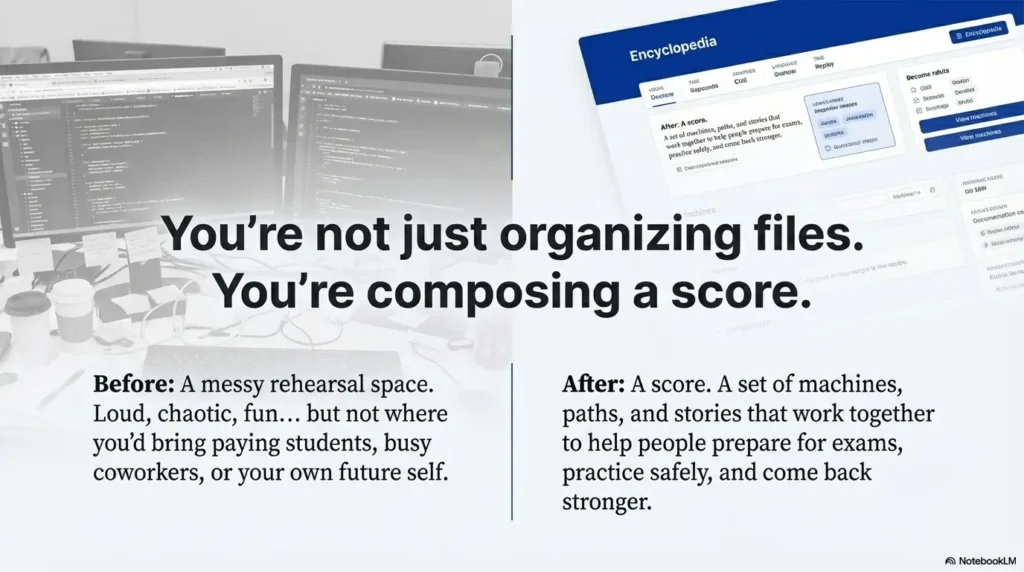
When I look back at the “before” version of my lab—random ISOs, half-documented VMs, scattered notes—it feels like a messy rehearsal space. Loud, chaotic, fun… but not somewhere you’d bring paying students, busy coworkers, or your own future self.
The Vulnerable Machine Encyclopedia changed that. It turned the noise into a score: a set of machines, paths, and stories that work together. It helped people prepare for exams like OSCP and internal assessments without drowning. It helped me stop guessing where my training budget was going. And, most importantly, it created a place where both beginners and seasoned operators could practice, fail safely, and come back stronger.
You don’t have to build a giant, public platform. You can start with five machines, one index page, and a clear promise to the people you’re serving—even if that person is “future you, three months before a big exam.”
In the next 15 minutes, you can:
- Write your one-sentence “why” for the encyclopedia.
- List five machines that belong in version 1.
- Run the mini cost calculator and set a simple yearly budget.
After that, each new machine you add won’t be another shiny object. It’ll be another page in a book that actually gets read.
Last reviewed: 2025-12; sources: public training platforms, major security standards organizations, and lived lab-building experience.
Keywords: Vulnerable Machine Encyclopedia, pentesting lab, vulnerable machines, cybersecurity training, OSCP lab