


One Hour. One Owner. One Shipped Habit.
A five-person team can cut real security risk with just 12 hours a year if each hour produces one visible behavior change, not another dusty “policy PDF.” The secret isn’t motivation, it’s removing the tiny failure points where overloaded people make fast, helpful clicks in the wrong tab. If you want a simple way to keep your program honest, pair each month with a lightweight security metrics scorecard founders can read in 60 seconds.
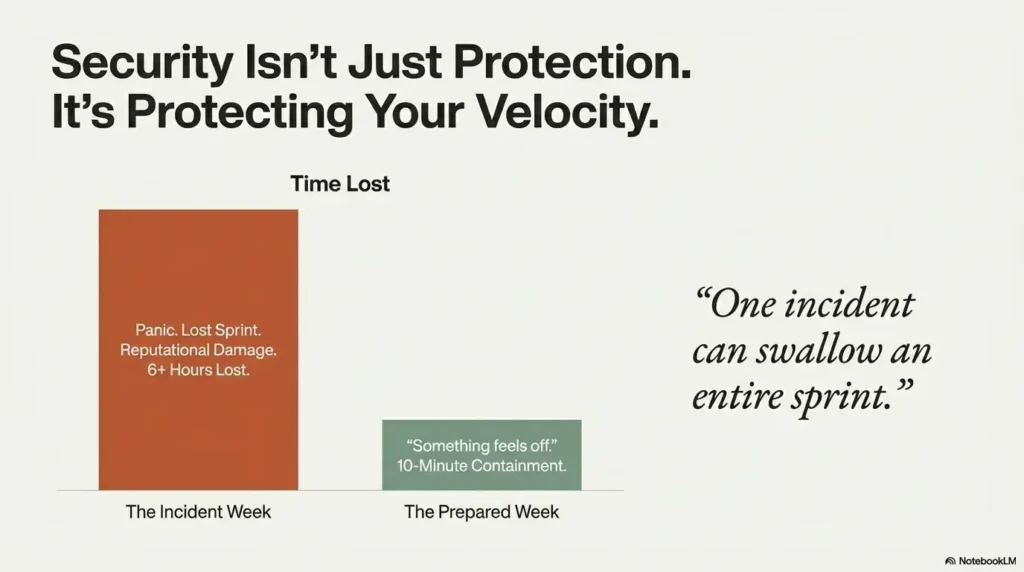
If you’re juggling support, sales, deploys, and payroll, security usually shows up as an interruption or an annual video everyone forgets by Tuesday. Meanwhile, one weak recovery setup or one “urgent invoice” can swallow an entire sprint.
The 1-Hour-Per-Month Curriculum
- ✓ Phishing Triage
- ✓ Password & MFA Resilience
- ✓ Device Hygiene
- ✓ File-Sharing Controls
- ✓ Vendor Access
- ✓ Incident Reporting Drills
Stop guessing. Reduce repeat mistakes by shipping safer defaults monthly and verifying adoption in seven days.
No theater. No blame. Just calmer weeks.
Start here: Why the monthly rhythm works.
Table of Contents
Start Here: Why 1 Hour a Month Actually Works for Tiny Teams
The small-team reality: context switching, not lack of intelligence
Most five-person teams are not careless. They are overloaded. One person is handling sales calls, support tickets, and payroll approvals in the same morning. Another is jumping between bug triage and customer onboarding. Mistakes happen at the seam between tasks, especially when urgency wears the costume of importance.
In one startup I advised, a founder clicked a fake invoice link right after approving a real contractor payment. Same browser tab fatigue, same time pressure, same language pattern. Nobody needed more intelligence. They needed fewer ambiguous moments and safer defaults, plus a clearer plan for what happens when something slips through. That’s why even lean teams benefit from having an incident response retainer plan scoped before the first bad day arrives.
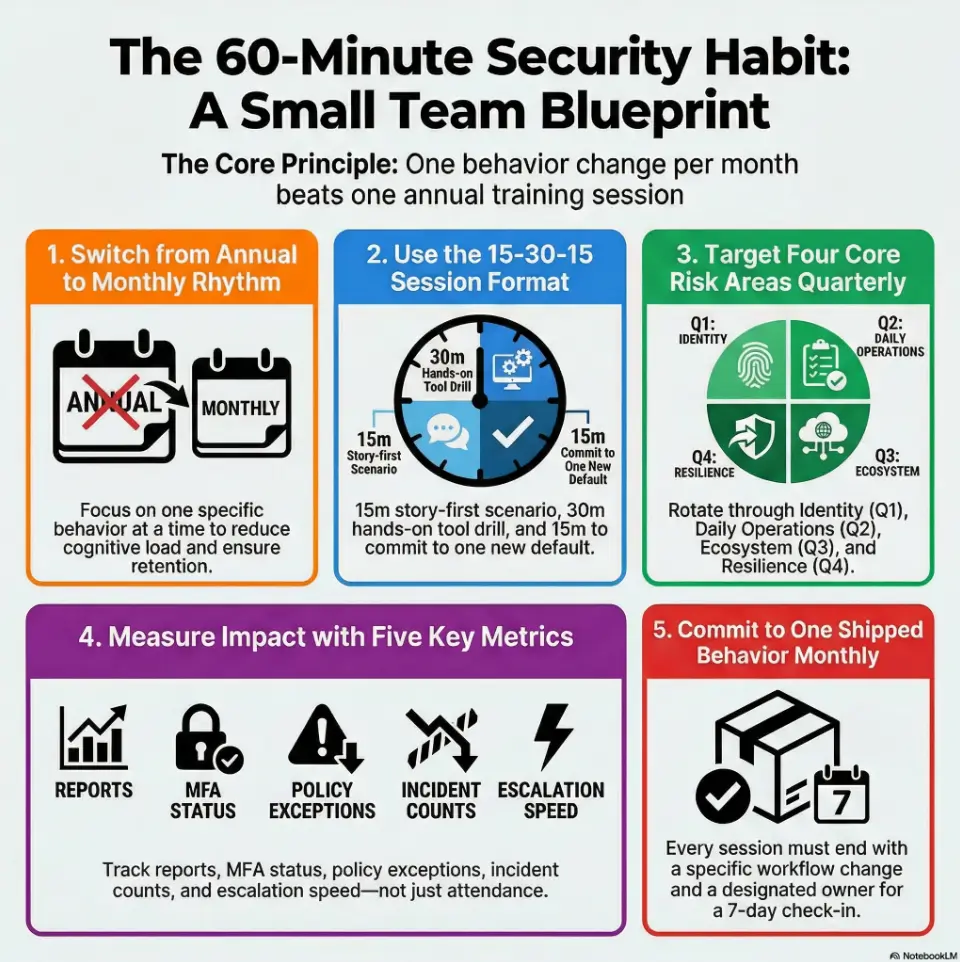
One behavior per month beats one annual info-dump
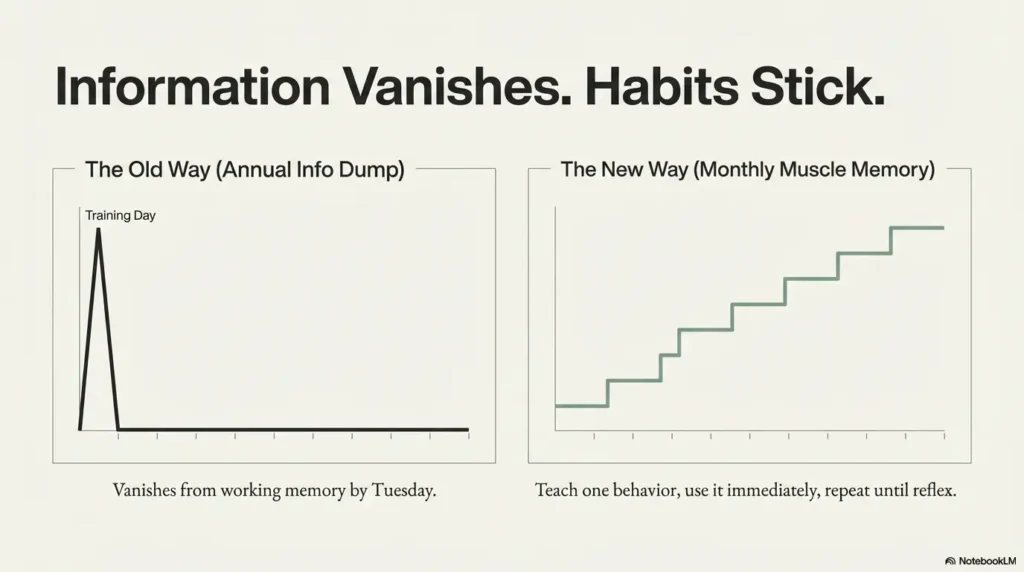
Annual training often creates a temporary spike in awareness and then vanishes from working memory. A monthly cadence works because it is close to daily reality. You teach one behavior, use it immediately, review it next month, and repeat until it becomes muscle memory.
- Month cadence: low friction, high retention
- One behavior focus: low cognitive load
- Tool-native drills: immediate transfer into work
What “incident reduction” means for a 5-person company (practical definition)
For tiny teams, incident reduction is not a glossy dashboard. It is fewer bad clicks, fewer access mistakes, faster reporting, and shorter containment when something goes wrong. Think in operational terms:
- Fewer avoidable security interruptions per month
- Faster time from “something feels off” to escalation
- Lower repeat error rate for the same failure mode
If you can reduce repeat mistakes by even one event per quarter, the saved time and stress are meaningful. In teams this small, one incident can eat an entire sprint.
- Train monthly, not annually
- Ship one behavior change each session
- Measure actions, not attendance
Apply in 60 seconds: Put a recurring 60-minute security block on the calendar for the next 3 months.
Before You Train: Define the 3 Incidents You Most Want to Prevent
Pick your “top three” from real pain: phishing, credential reuse, data sharing slips
Start with your own history. If your team has had suspicious invoices, pick phishing. If people reuse passwords, pick credential hygiene. If files float through random chat threads, pick sharing controls. You do not need a full threat model to get momentum. You need a shortlist of pain with names and examples. (If you want a lightweight way to get unstuck, use an MVP threat modeling approach for startups that focuses on “what can actually hurt us this quarter.”)
A practical “top three” for many five-person teams:
- Phishing and social-engineering messages in email/chat
- Weak credential behavior (reuse, weak MFA recovery)
- Unsafe file sharing and overbroad permissions
Use a 10-minute incident backtrace: where human behavior broke first
Take one recent event and backtrace it quickly:
- What was the trigger?
- What decision point appeared?
- Which default or cue failed?
- What behavior would have prevented it?
This is where training content comes from. Not from generic slides. From your own fault lines. The first time teams do this, there is often a moment of awkward silence, then relief. “Right, this is actually fixable.”
Set a baseline in plain English, not enterprise jargon
Before month one, write a one-page baseline:
- Current suspicious-message reporting rate
- MFA enrollment completion
- Average time to escalate potential incidents
- Known policy exceptions (who, why, until when)
Keep it readable in under 2 minutes. If your baseline sounds like a legal brief, nobody will use it. A handy pattern is to define just a few security metrics for founders and review them like you review uptime or churn, briefly, consistently, without drama.
Money Block: Eligibility Checklist (yes/no)
- Do all five team members use named accounts? Yes/No
- Is MFA enabled for email and primary collaboration tools? Yes/No
- Does everyone know one incident reporting path? Yes/No
- Is offboarding same-day for access revocation? Yes/No
Neutral action: If two or more answers are “No,” begin with Month 1 foundations before advanced drills.
Who This Is For / Not For
This is for: early-stage SaaS, agencies, e-commerce ops, lean remote teams
If your team is under ten people and you need security practices that respect velocity, this framework fits. It is built for teams where the “security lead” also runs operations, and where every hour must justify itself.
I especially like this model for hybrid teams with multiple contractors. The monthly rhythm helps align full-timers and part-time contributors around one shared default each month, especially around access rules and how shared secrets are handled in real life. If that’s been fuzzy, use a startup secrets management baseline so “where do we store credentials” stops being an oral tradition.
Not for: highly regulated orgs that need formal compliance programs
If you operate in heavily regulated environments, you may need formal controls, legal review, documented policy attestations, and auditor-ready evidence beyond this guide. This curriculum can still be your human-behavior layer, but it is not a substitute for formal compliance requirements.
If your team handles PHI/financial records, what to add before rollout
Add three safeguards early:
- Data handling boundaries by role and system
- Documented incident response contacts and escalation windows
- Periodic access reviews with owner sign-off
In practical terms, add structure where the cost of a mistake is highest. Teams handling sensitive records should also align with published guidance from recognized standards bodies and sector regulators, and ensure you can respond fast if something breaks. For many tiny teams, that starts with deciding whether your security “help” is DIY, a template plus advisor, or a scoped incident response retainer that you can activate without negotiating under pressure.
Show me the nerdy details
For sensitive-data environments, align behavior training with control families: identity and access management, logging/monitoring, incident response, and vendor risk. Keep training records lightweight but traceable to specific controls and observed behavior changes.
Curriculum Blueprint: A 12-Month Security Training Plan (1 Hour Each)
Month 1–3: password hygiene, MFA resilience, phishing triage
Quarter one is about identity and detection basics. Focus on what prevents the largest number of avoidable incidents.
- Month 1: password manager setup, shared-login elimination, emergency access process
- Month 2: MFA methods, recovery-code handling, device trust hygiene
- Month 3: phishing triage drill using realistic messages from your own workflow
By month three, every team member should know exactly how to escalate suspicious messages in under two minutes. If you’re a SaaS team, this is also the right moment to align on API authentication and authorization fundamentals, because “one stolen token” often turns into “one very long week.”
Month 4–6: device security, secure file sharing, social engineering defense
Quarter two moves into operational hygiene:
- Month 4: update cadence, endpoint basics, lock-screen and lost-device protocol
- Month 5: file-sharing controls, permission expiration, approved channels
- Month 6: social engineering scenarios in chat and voice channels
One agency team I worked with found that “friendly urgency” in chat was their biggest weakness. After one drill, they adopted a simple rule: any payment change request requires a second-channel verification. Their stress level dropped overnight. The other quiet win here is reducing “oops” exposure caused by common cloud misconfigurations that happen when people move fast and permission boundaries lag behind.
Month 7–9: vendor/app permissions, data classification, incident reporting muscle
Quarter three tightens your ecosystem:
- Month 7: app/vendor access review, revoke stale integrations
- Month 8: data labels for internal vs restricted information
- Month 9: incident reporting sprint with timer-based drills
This is where teams usually discover “permission drift” and “unknown app sprawl.” Not glamorous, very valuable. If you regularly hand vendors access or answer customer security reviews, pair Month 7 with a vendor security questionnaire playbook so your “yes/no” answers match reality.
Month 10–12: tabletop mini-drills, policy refresh, lessons-learned loop
Quarter four consolidates learning:
- Month 10: mini tabletop: invoice fraud or account takeover scenario
- Month 11: policy refresh in plain language
- Month 12: year-end review, what changed, what failed, what ships next year
Make month twelve candid. Teams grow when they can discuss near-misses without blame, then turn the lesson into a fix with an owner. If you want to keep the “fix” part practical, align it with a vulnerability remediation SLA mindset: what gets fixed first, by when, and who signs off.
- Q1 prevents avoidable account compromise
- Q2 hardens daily workflow habits
- Q3-4 reduce blast radius and speed recovery
Apply in 60 seconds: Copy these 12 topics into your team calendar and assign a rotating session owner.
Session Design That Sticks: 15-30-15 Format
15 min: story-first “what went wrong” scenario
Start with a story from your world, not a stock-photo breach tale. A fake supplier request. A suspicious OAuth prompt. A rushed message from a “known” teammate. Stories create emotional relevance and sharpen attention fast.
One founder told me this opening changed everything: “This exact message hit us last Thursday at 4:43 p.m.” Instantly real. Instantly sticky.
30 min: hands-on drill in your actual tools (email, chat, docs, password manager)
The middle block is where habits form. Keep it tactile:
- Report a suspicious message in your real mail client
- Review one shared folder’s permissions and expiration settings
- Practice account recovery without bypassing policy
Training that never touches production-adjacent tools is theater. Teams remember what they click, not what they watch. If you’re unsure where to place hands-on time beyond “awareness,” a simple starting point is rotating one month into an ultra-practical security testing strategy conversation: what you test, when, and what you’ll do with the findings.
15 min: commit to one new team default and owner
End every session with one shipped default. Examples:
- “All invoice change requests require verbal callback”
- “All new integrations expire unless explicitly renewed”
- “All incidents use one escalation phrase in one channel”
Assign one owner and a 7-day checkpoint. No owner means no change.
Let’s be honest… nobody remembers slides they never used
Use fewer slides. More exercises. Faster decisions. If you need a north star, aim for this: every person should leave with one behavior they can execute before lunch tomorrow.
Don’t Do This: 7 Training Habits That Increase Risk
Mistake 1: annual-only training with zero monthly reinforcement
Memory decays. Work pressure rises. Annual-only training leaves a long runway for drift.
Mistake 2: generic phishing examples that don’t match your workflow
If your team sees vendor payment emails all day, generic “bank scam” examples miss the mark. Use your real threat surface.
Mistake 3: no manager participation, so behavior never changes
Behavior follows power. If leaders skip drills, everyone reads security as optional.
Mistake 4: treating “completion” as success instead of incident signals
Completion is administrative. Reduction in repeat errors is operational.
Mistake 5: punishing mistakes so people hide near-misses
Fear delays reporting. Delayed reporting increases impact. Psychological safety is not soft. It is containment strategy.
Mistake 6: “security owner” with no authority to enforce defaults
Ownership without decision rights creates frustration and shadow exceptions.
Mistake 7: tools before habits, dashboards before decisions
Tooling amplifies behavior. It does not replace it. Start with defaults, then automate where it helps. If your team is debating “which protective layer first,” a quick framing is WAF vs RASP vs CSP for startups, then choose the least disruptive control that reduces your most common failure mode.
Money Block: Decision Card (When A vs B)
When to start with policy: repeated confusion about who can do what.
When to start with drills: people know policy but still fail under time pressure.
Time/cost trade-off: policy-first is quicker to publish; drill-first is quicker to change behavior.
Neutral action: pick the path that addresses your highest repeat error this month.
Curiosity Gap: Why Smart Teams Still Click Bad Links
Cognitive overload, urgency bias, and trust hijacking in real inboxes
Most harmful clicks are not reckless clicks. They are overload clicks. A message arrives at the exact moment someone is juggling five tasks, and urgency hijacks verification. The brain chooses speed over scrutiny.
I once clicked a fake “document shared with you” notice because it matched an active project name. That tiny embarrassment became a useful policy change later. We introduced a two-step verification habit for all unexpected share prompts. (For teams who keep collecting “tiny fixes,” it helps to track which ones actually reduce risk; a short security headers ROI perspective can be a good reminder that small defaults can produce outsized gains.)
The “known sender” trap in Slack, email, and shared docs
Attackers mimic tone, timing, and familiar names. The message feels like routine collaboration. That is why “known sender” is a weak trust signal on its own.
- Verify unusual requests in a second channel
- Pause on urgency + secrecy combinations
- Treat permission changes like financial approvals
Here’s what no one tells you… most failures start as normal, helpful behavior
People click because they are trying to help, move fast, and unblock others. Good intentions are often the starting point. Training should respect this reality and design safer defaults around it, not shame it out of existence.
Short Story: The Tuesday Invoice That Almost Landed
It was a Tuesday afternoon, the kind where every notification feels like a small fire. Our ops lead received a message from a supplier asking to “update bank details before EOD.” The formatting looked right. The signature looked right. Even the phrasing sounded like the real account manager.She started the payment workflow, then paused because our latest monthly session had introduced a new rule: any payment-detail change gets a same-day callback to a verified number. She made the call. The real supplier said they sent nothing. We stopped the transfer in under ten minutes. No drama on social media. No heroic all-nighter. Just one quiet habit, practiced once a month, doing exactly what it was built to do.
Tool Stack on a Budget: The Minimum Viable Security Setup
Password manager + MFA app + endpoint updates + secure backup
You do not need a sprawling stack to start. For many teams under ten people, the baseline stack includes:
- Password manager with shared vault controls
- MFA app with backup-code discipline
- Automatic endpoint update policy
- Reliable backup process with restore testing
Keep complexity low. Reliability beats novelty.
Access control defaults: least privilege without blocking velocity
Least privilege sounds slow until you design it well. Give default access by role, time-limit elevated permissions, and review exceptions monthly. This balances speed with control.
One team reduced access confusion by introducing a simple rule: “Ask for elevation with expiration.” Requests became cleaner, approvals faster, and cleanup automatic. If your systems rely on enterprise identity, consider mapping this to SAML SSO for SaaS decisions so “who gets access” is governed consistently across tools.
“If it’s not logged, it didn’t happen”: lightweight audit habits for small teams
Logging does not need to be enterprise-grade on day one. But you need enough record-keeping to reconstruct what happened during an incident. Focus on:
- Admin action logs
- Permission change history
- Incident report timeline notes
Think of logs as memory for high-pressure days.
- Keep tooling minimal and maintainable
- Default to least privilege with expiration
- Log critical actions from day one
Apply in 60 seconds: List your four baseline controls and assign one owner to each.
Money Block: Mini Calculator (Training ROI)
Input 1: hourly blended team cost (example: $80/hr).
Input 2: incident hours lost per event (example: 6).
Input 3: incidents avoided per quarter (example: 1).
Output: $80 × 6 × 1 = $480 saved per quarter before reputational and customer impact costs.
Neutral action: run your own numbers with conservative estimates and review quarterly.
Common Mistakes and the Fix in One Line
Mistake: shared admin logins → Fix: named accounts + emergency break-glass process
Shared admin credentials erase accountability. Use named admin accounts and a controlled emergency access path.
Mistake: ad hoc file sharing → Fix: approved channels + permission expiration
Ad hoc sharing creates silent sprawl. Limit collaboration to approved channels and expire access by default.
Mistake: unclear reporting path → Fix: one-button incident escalation rule
If reporting requires detective work, reporting will be delayed. Define one route and rehearse it monthly. When the escalation path is defined, it helps to keep the response steps consistent with your broader security testing strategy and tooling, so “reporting” actually triggers action.
Mistake: skipped offboarding → Fix: same-day access revocation checklist
Offboarding delays are common and risky. Make same-day revocation a non-negotiable operating rule.
Mistake: training with no follow-up → Fix: monthly “one behavior shipped” review
Training without follow-through is motivational content, not risk reduction. Ship one behavior and verify it in seven days.
Show me the nerdy details
Track behavior adoption with binary checks at day 7 and day 30. Example: “Invoice callback verification performed for all bank-change requests.” Binary tracking avoids interpretation drift and makes reviews fast.
Open Loop: Are You Measuring the Right Things or Just Attendance?
Leading indicators: suspicious-email reports, MFA enrollment, policy exceptions
Leading indicators tell you if behavior is improving before incidents occur. Good examples:
- Suspicious message report count per month
- MFA completion and recovery hygiene status
- Number and age of policy exceptions
In a five-person team, these metrics can be tracked in a single page.
Lagging indicators: incident count, containment time, repeat-error rate
Lagging indicators confirm outcomes:
- Incidents per quarter
- Time to containment
- Repeat errors by category
The goal is not zero incidents forever. The goal is fewer repeats and faster recovery.
A 5-metric scorecard your team can read in 60 seconds
Use this monthly card:
- Suspicious reports submitted
- MFA coverage status
- Open high-risk exceptions
- Incidents this month
- Median escalation time
Infographic: Coverage Tier Map for 5-Person Team Security Training
Use this map to decide your next upgrade, one tier at a time.
Money Block: Fee/Rate Table (Typical market ranges)
| Option | 2026 Typical Range | Notes |
|---|---|---|
| DIY internal monthly training | Low direct spend | Best when owner has authority and calendar discipline |
| Template + advisor review | Low to medium | Useful for first 90 days and playbook setup |
| Managed security awareness program | Medium to high | Consider if regulated or rapidly scaling |
Neutral action: choose the lightest option that still gives you monthly execution and measurable outcomes.
FAQ
How often should a 5-person team run security training?
Monthly is the sweet spot for tiny teams. It is frequent enough to reinforce behavior and light enough to sustain. One hour per month with one shipped default usually outperforms annual-only training.
What should be included in a 1-hour monthly security session?
Use a 15-30-15 structure: 15 minutes scenario review, 30 minutes hands-on drill in real tools, 15 minutes for one new default, owner assignment, and a 7-day checkpoint.
Can small businesses reduce phishing risk without expensive software?
Yes. Better reporting habits, second-channel verification for risky requests, and consistent monthly drills can materially reduce phishing-related mistakes even before advanced tooling.
Who should own security training if we have no security team?
Assign a rotating owner, but give one permanent accountable sponsor with authority to enforce defaults. Ownership without authority leads to policy drift.
How do we measure whether training is working?
Track five metrics: suspicious reports, MFA coverage, open high-risk exceptions, incident count, and escalation time. Improvement in these metrics indicates behavior change and operational resilience.
Should remote teams train differently from in-office teams?
Remote teams should emphasize chat-based social engineering, asynchronous escalation paths, and device hygiene. The structure stays the same, but scenarios should reflect remote workflows.
What is the minimum policy set for teams under 10 people?
Start with access control, password/MFA, acceptable sharing channels, incident escalation, and offboarding revocation. Keep each policy short, plain, and actionable. If you’re also budgeting for compliance milestones, a SOC 2 budget calculator can help you decide what’s “later” versus what must exist early.
Is annual compliance training enough for incident prevention?
Usually no. Annual training may satisfy administrative needs but often fails to drive continuous behavior change. Monthly reinforcement is where incident reduction happens.
Next Step: Run Your First 60-Minute Session This Week
Pick one incident type, one owner, one behavior change, one metric
Start painfully simple. Choose one incident category you actually face. Assign one owner with authority. Decide one behavior to ship. Select one metric to verify movement. Complexity can come later. Consistency must come first.
Use a 7-day follow-up checkpoint to confirm behavior actually changed
Without a follow-up checkpoint, intention masquerades as progress. In seven days, confirm the behavior happened in real workflow. If not, remove friction and retry. Teams improve through iteration, not declaration.
Turn month one into a repeatable template for month two
This closes the loop from the hook: you do not need heroic effort, only a repeatable system. The first session feels awkward for almost everyone. The second session feels familiar. By month three, your team speaks a shared security language and responds faster under pressure.
Give yourself a 15-minute launch window today:
- Book the recurring monthly hour
- Choose your Month 1 topic
- Write a one-sentence escalation rule
- Assign owner + 7-day check-in
That is enough to start reducing avoidable incidents this quarter.
Last reviewed: 2026-02.